belt LINCOLN NAVIGATOR 2022 Owners Manual
[x] Cancel search | Manufacturer: LINCOLN, Model Year: 2022, Model line: NAVIGATOR, Model: LINCOLN NAVIGATOR 2022Pages: 646, PDF Size: 7.29 MB
Page 5 of 646
Contacting Us
Contacting Us
..................................................17
Introduction
About This Publication ..................................
19
Using This Publication ..................................
20
Symbols Glossary
Symbols Used on Your Vehicle ...................
21
Data Privacy
Data Privacy ....................................................
24
Service Data ....................................................
25
Event Data .......................................................
26
Settings Data ..................................................
26
Connected Vehicle Data ..............................
27
Mobile Device Data .......................................
27
Emergency Call System Data .....................
28
Visual Search
Steering Wheel ..............................................
29
Instrument Panel .............................................
31
Vehicle Interior ...............................................
33Front Exterior
..................................................
35
Rear Exterior ....................................................
37
Child Safety
Child Safety Precautions .............................
39
Child Restraint Anchor Points .....................
40
Child Restraints ...............................................
41
Installing Child Restraints ............................
44
Booster Seats .................................................
48
Child Safety Locks ..........................................
51
Seatbelts
Seatbelt Precautions ....................................
52
Fastening and Unfastening the Seatbelts ........................................................................\
.
53
Sensitive Locking Mode ...............................
54
Automatic Locking Mode .............................
54
Adjusting the Seatbelts During Pregnancy ........................................................................\
55
Adjusting the Seatbelt Height ....................
56
Seatbelt Reminder .........................................
56
Checking the Seatbelts ...............................
58
Seatbelt Extensions ......................................
58Personal Safety System
™
What Is the Personal Safety System .........
60
How Does the Personal Safety System Work .............................................................
60
Personal Safety System Components ........................................................................\
60
Airbags
How Do the Front Airbags Work ................
61
How Do the Side Airbags Work ..................
61
How Does the Safety Canopy™ Work .......
62
Airbag Precautions ........................................
63
Properly Adjusting the Driver and Front Passenger Seats ........................................
64
Children and Airbags ....................................
65
Front Passenger Sensing System .............
65
Crash Sensors and Airbag Indicator ........
68
Disposing of Airbags ....................................
69
911 Assist
What Is 911 Assist ...........................................
70
How Does 911 Assist Work ..........................
70
Emergency Call Requirements ...................
70
1
2022 Navigator (TB9) Canada/United States of America, enUSA, Edition date: 202109, First-Printing Table of Contents
Page 17 of 646
Towing Your Vehicle – Troubleshooting
......................................................................400
Fuses
Fuse Precautions .........................................
401
Under Hood Fuse Box ................................
401
Body Control Module Fuse Box ..............
408
Identifying Fuse Types ................................
413
Fuses – Troubleshooting ...........................
413
Maintenance
Maintenance Precautions ..........................
414
Opening and Closing the Hood ...............
414
Under Hood Overview ................................
415
Engine Oil .......................................................
417
Checking the Coolant .................................
418
Engine Air Filter ...........................................
422
Changing the Fuel Filter ............................
423
Changing the 12V Battery .........................
423
Adjusting the Headlamps .........................
426
Exterior Bulbs ...............................................
428
Interior Bulbs ................................................
428
Drive Belt Routing .......................................
428Vehicle Care
Cleaning Products
......................................
429
Cleaning the Exterior .................................
430
Cleaning the Interior ...................................
432
Repairing Minor Paint Damage ................
434
Waxing Your Vehicle ...................................
434
Storing Your Vehicle
Preparing Your Vehicle for Storage ........
435
Removing Your Vehicle From Storage ......................................................................
436
Wheel and Tire Information
Locating the Tire label ...............................
437
Department of Transportation Uniform Tire Quality Grades .........................................
437
Information on the Tire Sidewall .............
438
Glossary of Tire Terminology ...................
443
Tire Replacement Requirements .............
444
Using Snow Chains .....................................
446
Tire Care
Checking the Tire Pressures ....................
449Inflating the Tires
.........................................
449
Inspecting the Tire for Wear .....................
449
Inspecting the Tire for Damage ..............
450
Inspecting the Wheel Valve Stems ..........
451
Tire Rotation ..................................................
451
Tire Pressure Monitoring System
What Is the Tire Pressure Monitoring System .......................................................
453
Tire Pressure Monitoring System Overview ......................................................................
453
Tire Pressure Monitoring System Precautions ...............................................
454
Tire Pressure Monitoring System Limitations ................................................
455
Viewing the Tire Pressures ......................
455
Resetting Tire Pressure Monitoring System ......................................................................
455
Tire Pressure Monitoring System – Troubleshooting ......................................
458
Changing a Road Wheel
Changing a Flat Tire ....................................
461
13
2022 Navigator (TB9) Canada/United States of America, enUSA, Edition date: 202109, First-Printing Table of Contents
Page 25 of 646
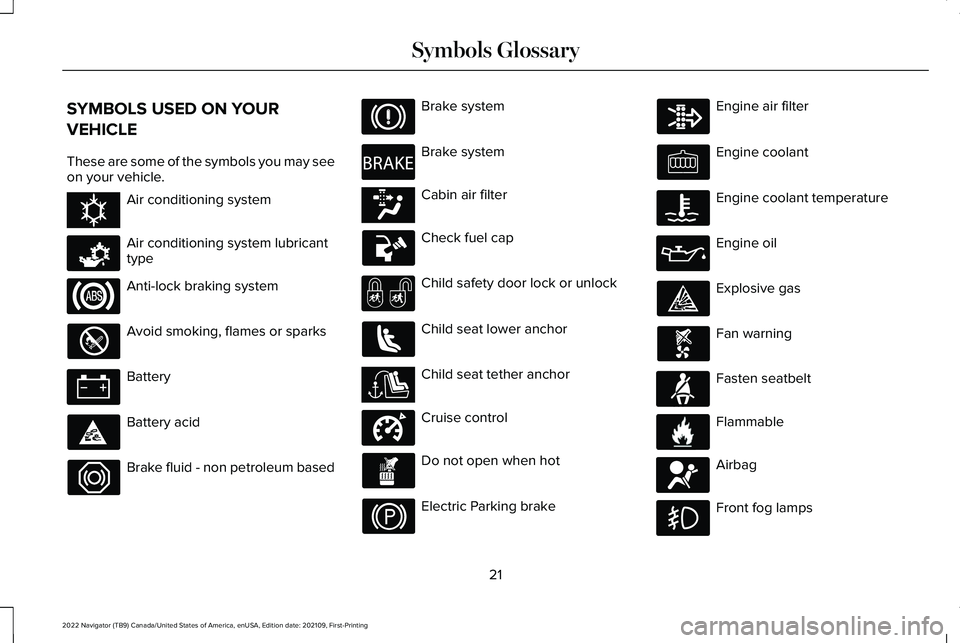
SYMBOLS USED ON YOUR
VEHICLE
These are some of the symbols you may see
on your vehicle.
Air conditioning system
Air conditioning system lubricant
type
Anti-lock braking system
Avoid smoking, flames or sparks
Battery
Battery acid
Brake fluid - non petroleum based Brake system
Brake system
Cabin air filter
Check fuel cap
Child safety door lock or unlock
Child seat lower anchor
Child seat tether anchor
Cruise control
Do not open when hot
Electric Parking brake Engine air filter
Engine coolant
Engine coolant temperature
Engine oil
Explosive gas
Fan warning
Fasten seatbelt
Flammable
Airbag
Front fog lamps
21
2022 Navigator (TB9) Canada/United States of America, enUSA, Edition date: 202109, First-Printing Symbols GlossaryE162384 E231157 E270480 E139223 E141128 E332905 E71880 E231160 E67017
Page 28 of 646
WARNING: Do not connect wireless
plug-in devices to the data link connector.
Unauthorized third parties could gain
access to vehicle data and impair the
performance of safety related systems.
Only allow repair facilities that follow our
service and repair instructions to connect
their equipment to the data link connector.
We respect your privacy and are committed
to protecting it. The information contained
in this manual was correct at the time of
publication but as technology rapidly
changes, we recommend that you visit the
local Lincoln website for the latest
information.
Your vehicle has electronic control units that
have data recording functionality and the
ability to permanently or temporarily store
data. This data could include information on
the condition and status of your vehicle,
vehicle maintenance requirements, events
and malfunctions. The types of data that can
be recorded are described in this section.
Some of the data recorded is stored in event
logs or error logs. Note:
Error logs are reset following a service
or repair.
Note: We may provide information in
response to requests from law enforcement,
other government authorities and third
parties acting with lawful authority or through
a legal process. Such information could be
used by them in legal proceedings.
Data recorded includes, for example:
• Operating states of system components,
for example fuel level, tire pressure and
battery charge level.
• Vehicle and component status, for
example wheel speed, deceleration,
lateral acceleration and seatbelt status.
• Events or errors in essential systems, for
example headlamps and brakes.
• System responses to driving situations,
for example airbag deployment and
stability control.
• Environmental conditions, for example
temperature. Some of this data, when used in combination
with other information, for example an
accident report, damage to a vehicle or
eyewitness statements, could be associated
with a specific person.
Services That We Provide
If you use our services, we collect and use
data, for example account information,
vehicle location and driving characteristics,
that could identify you. We transmit this data
through a dedicated, protected connection.
We only collect and use data to enable your
use of our services to which you have
subscribed, with your consent or where
permitted by law. For additional information,
see the terms and conditions of the services
to which you have subscribed.
For additional information about our privacy
policy, refer to the local Lincoln website.
24
2022 Navigator (TB9) Canada/United States of America, enUSA, Edition date: 202109, First-Printing Data Privacy
Page 30 of 646
EVENT DATA
This vehicle is equipped with an event data
recorder. The main purpose of an event data
recorder is to record, in certain crash or near
crash-like situations, such as an airbag
deployment or hitting a road obstacle; this
data will assist in understanding how a
vehicle
’s systems performed. The event data
recorder is designed to record data related
to vehicle dynamics and safety systems for
a short period of time, typically 30 seconds
or less.
The event data recorder in this vehicle is
designed to record such data as:
• How various systems in your vehicle
were operating.
• Whether or not the driver and passenger
seatbelts were buckled/fastened.
• How far (if at all) the driver was
depressing the accelerator and/or the
brake pedal.
• How fast the vehicle was traveling.
• Where the driver was positioning the
steering wheel. This data can help provide a better
understanding of the circumstances in which
crashes and injuries occur.
Note:
Event data recorder data is recorded
by your vehicle only if a non-trivial crash
situation occurs; no data is recorded by the
event data recorder under normal driving
conditions and no personal data or
information (for example name, gender, age,
and crash location) is recorded. However,
parties, such as law enforcement, could
combine the event data recorder data with
the type of personally identifying data
routinely acquired during a crash
investigation.
To read data recorded by an event data
recorder, special equipment is required, and
access to the vehicle or the event data
recorder is needed. In addition to the vehicle
manufacturer, other parties, such as law
enforcement, that have such special
equipment, can read the information if they
have access to the vehicle or the event data
recorder. BlueCruise Data (If Equipped)
If BlueCruise is active in certain crash or near
crash-like situations, such as an airbag
deployment or hitting a road obstacle, the
system may record driver attentiveness,
based on the direction of eyes and duration,
and photographs of the driver seat area.
Note: No data is recorded under normal
driving conditions.
SETTINGS DATA
Your vehicle has electronic control units that
have the ability to store data based on your
personalized settings. The data is stored
locally in the vehicle or on devices that you
connect to it, for example, a USB drive or
digital music player. You can delete some of
this data and also choose whether to share
it through the services to which you
subscribe.
See Center Display Precautions
(page 501).
26
2022 Navigator (TB9) Canada/United States of America, enUSA, Edition date: 202109, First-Printing Data Privacy
Page 44 of 646
manufacturer. A safety seat that is
improperly installed or utilized, is
inappropriate for your child's height, age,
or weight or does not properly fit the child
may increase the risk of serious injury or
death.
WARNING: Do not allow a passenger
to hold a child on their lap when your
vehicle is moving. Failure to follow this
instruction could result in personal injury
or death in the event of a sudden stop or
crash. WARNING: Do not use pillows, books
or towels to boost your child's height.
Failure to follow this instruction could result
in personal injury or death. WARNING: Properly secure child
restraints or booster seats when they are
not in use. They could become projectiles
in a sudden stop or crash. Failure to follow
this instruction could result in personal
injury or death. WARNING:
Do not put the shoulder
section of the seatbelt or allow the child to
put the shoulder section of the seatbelt
under their arm or behind their back.
Failure to follow this instruction could
reduce the effectiveness of the seatbelt
and increase the risk of injury or death in
a crash. WARNING:
Do not leave children or
pets unattended in your vehicle. Failure to
follow this instruction could result in
personal injury or death.
When installing a child restraint with
seatbelts:
• Place the vehicle seat in the upright
position before you install the child
restraint.
• Use the correct seatbelt buckle for that
seating position.
• Insert the belt tongue into the buckle.
Make sure the tongue is securely
fastened in the buckle. •
Keep the buckle release button pointing
up and away from the child restraint, with
the tongue between the child restraint
and the release button, to prevent
accidental unbuckling.
• Put the seatbelt in the automatic locking
mode.
CHILD RESTRAINT ANCHOR POINTS
WHAT ARE THE CHILD RESTRAINT
ANCHOR POINTS
Anchor points allow you to quickly and safely
install a child restraint.
LOCATING THE CHILD RESTRAINT
LOWER ANCHOR POINTS
Second Row Bench Seat
40
2022 Navigator (TB9) Canada/United States of America, enUSA, Edition date: 202109, First-Printing Child Safety
Page 46 of 646
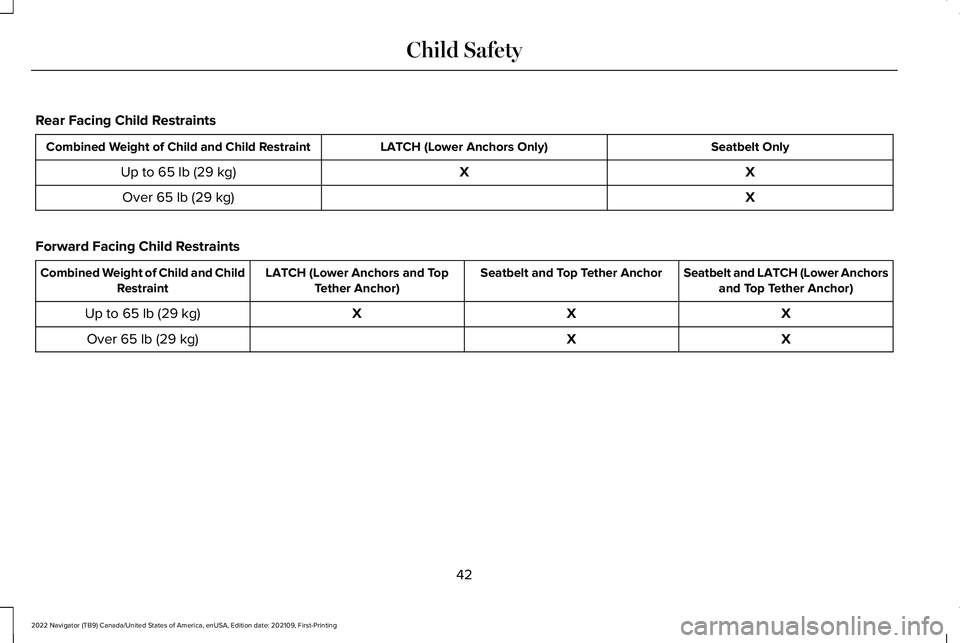
Rear Facing Child Restraints
Seatbelt Only
LATCH (Lower Anchors Only)
Combined Weight of Child and Child Restraint
X
X
Up to 65 lb (29 kg)
X
Over
65 lb (29 kg)
Forward Facing Child Restraints Seatbelt and LATCH (Lower Anchors
and Top Tether Anchor)
Seatbelt and Top Tether Anchor
LATCH (Lower Anchors and Top
Tether Anchor)
Combined Weight of Child and Child
Restraint
X
X
X
Up to
65 lb (29 kg)
X
X
Over
65 lb (29 kg)
42
2022 Navigator (TB9) Canada/United States of America, enUSA, Edition date: 202109, First-Printing Child Safety
Page 47 of 646
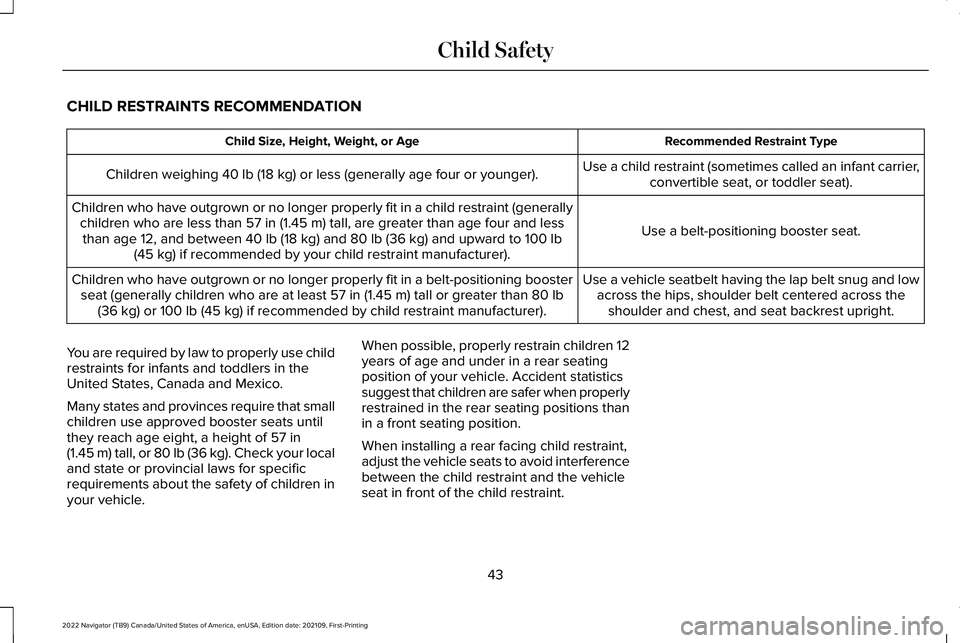
CHILD RESTRAINTS RECOMMENDATION
Recommended Restraint Type
Child Size, Height, Weight, or Age
Use a child restraint (sometimes called an infant carrier,convertible seat, or toddler seat).
Children weighing 40 lb (18 kg) or less (generally age four or younger).
Use a belt-positioning booster seat.
Children who have outgrown or no longer properly fit in a child restrain\
t (generally
children who are less than
57 in (1.45 m) tall, are greater than age four and less
than age 12, and between 40 lb (18 kg) and 80 lb (36 kg) and upward to 100 lb
(45 kg) if recommended by your child restraint manufacturer).
Use a vehicle seatbelt having the lap belt snug and lowacross the hips, shoulder belt centered across theshoulder and chest, and seat backrest upright.
Children who have outgrown or no longer properly fit in a belt-positioni\
ng booster
seat (generally children who are at least
57 in (1.45 m) tall or greater than 80 lb
(36 kg) or 100 lb (45 kg) if recommended by child restraint manufacturer).
You are required by law to properly use child
restraints for infants and toddlers in the
United States, Canada and Mexico.
Many states and provinces require that small
children use approved booster seats until
they reach age eight, a height of
57 in
(1.45 m) tall, or 80 lb (36 kg). Check your local
and state or provincial laws for specific
requirements about the safety of children in
your vehicle. When possible, properly restrain children 12
years of age and under in a rear seating
position of your vehicle. Accident statistics
suggest that children are safer when properly
restrained in the rear seating positions than
in a front seating position.
When installing a rear facing child restraint,
adjust the vehicle seats to avoid interference
between the child restraint and the vehicle
seat in front of the child restraint.
43
2022 Navigator (TB9) Canada/United States of America, enUSA, Edition date: 202109, First-Printing Child Safety
Page 48 of 646
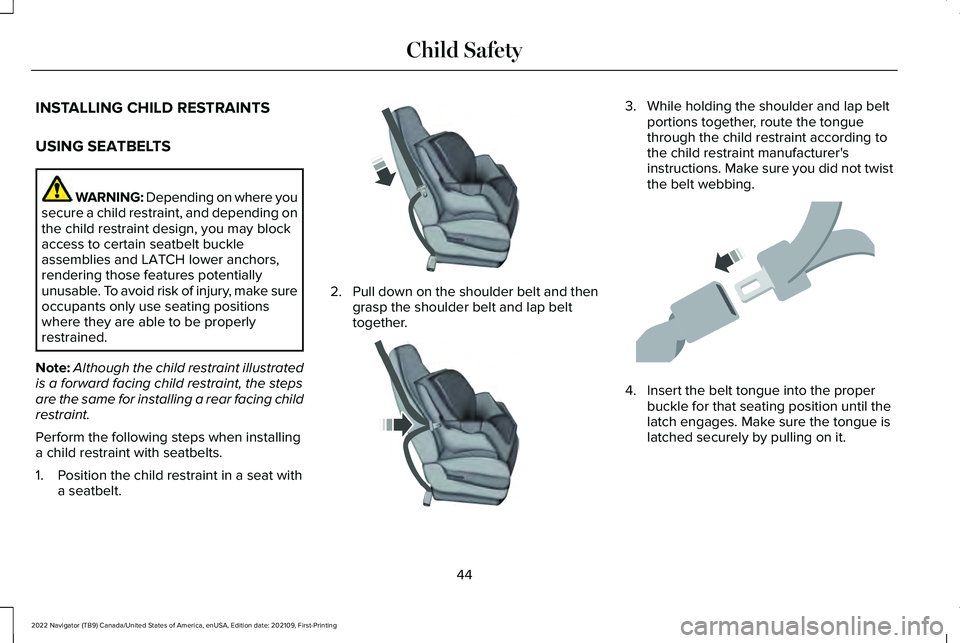
INSTALLING CHILD RESTRAINTS
USING SEATBELTS
WARNING: Depending on where you
secure a child restraint, and depending on
the child restraint design, you may block
access to certain seatbelt buckle
assemblies and LATCH lower anchors,
rendering those features potentially
unusable. To avoid risk of injury, make sure
occupants only use seating positions
where they are able to be properly
restrained.
Note: Although the child restraint illustrated
is a forward facing child restraint, the steps
are the same for installing a rear facing child
restraint.
Perform the following steps when installing
a child restraint with seatbelts.
1. Position the child restraint in a seat with a seatbelt. 2.
Pull down on the shoulder belt and then
grasp the shoulder belt and lap belt
together. 3. While holding the shoulder and lap belt
portions together, route the tongue
through the child restraint according to
the child restraint manufacturer's
instructions. Make sure you did not twist
the belt webbing. 4. Insert the belt tongue into the proper
buckle for that seating position until the
latch engages. Make sure the tongue is
latched securely by pulling on it.
44
2022 Navigator (TB9) Canada/United States of America, enUSA, Edition date: 202109, First-Printing Child SafetyE142529 E142530 E142531
Page 49 of 646
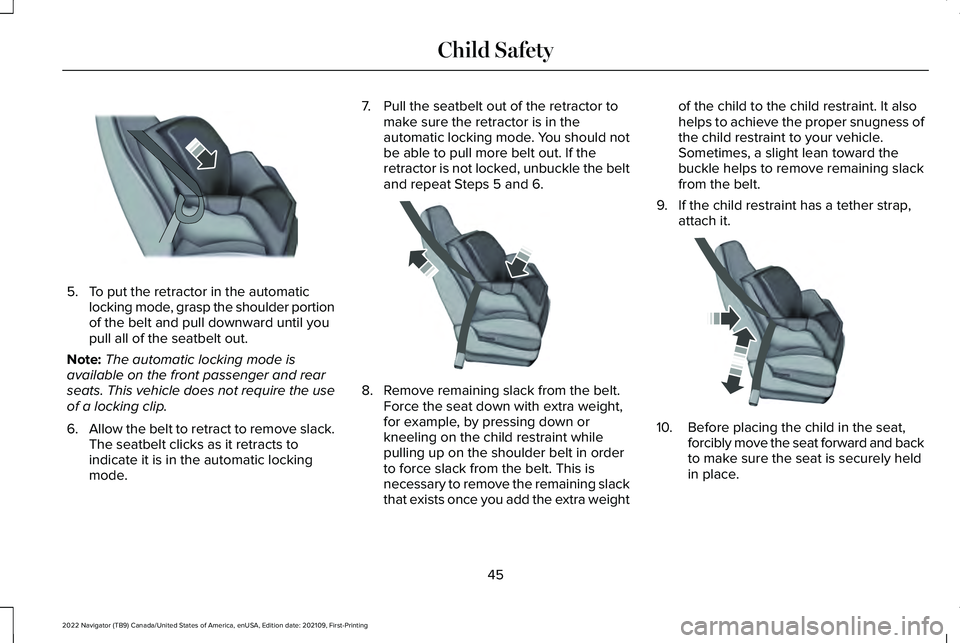
5. To put the retractor in the automatic
locking mode, grasp the shoulder portion
of the belt and pull downward until you
pull all of the seatbelt out.
Note: The automatic locking mode is
available on the front passenger and rear
seats. This vehicle does not require the use
of a locking clip.
6. Allow the belt to retract to remove slack.
The seatbelt clicks as it retracts to
indicate it is in the automatic locking
mode. 7. Pull the seatbelt out of the retractor to
make sure the retractor is in the
automatic locking mode. You should not
be able to pull more belt out. If the
retractor is not locked, unbuckle the belt
and repeat Steps 5 and 6. 8. Remove remaining slack from the belt.
Force the seat down with extra weight,
for example, by pressing down or
kneeling on the child restraint while
pulling up on the shoulder belt in order
to force slack from the belt. This is
necessary to remove the remaining slack
that exists once you add the extra weight of the child to the child restraint. It also
helps to achieve the proper snugness of
the child restraint to your vehicle.
Sometimes, a slight lean toward the
buckle helps to remove remaining slack
from the belt.
9. If the child restraint has a tether strap, attach it. 10. Before placing the child in the seat,
forcibly move the seat forward and back
to make sure the seat is securely held
in place.
45
2022 Navigator (TB9) Canada/United States of America, enUSA, Edition date: 202109, First-Printing Child SafetyE142875 E142533 E142534