belt LINCOLN NAVIGATOR 2022 Owner's Guide
[x] Cancel search | Manufacturer: LINCOLN, Model Year: 2022, Model line: NAVIGATOR, Model: LINCOLN NAVIGATOR 2022Pages: 646, PDF Size: 7.29 MB
Page 74 of 646
WHAT IS 911 ASSIST
911 Assist is a SYNC system feature that can
call for help.
For more information, visit
www
. owner . ford. com .
HOW DOES 911 ASSIST WORK
If a crash deploys an airbag, excluding knee
airbags and rear inflatable seatbelts, or
activates the fuel pump shut-off, your vehicle
may be able to contact emergency services
by dialing 911 through a paired and
connected Bluetooth®-enabled phone.
Not all crashes will deploy an airbag or
activate the fuel pump shut-off. If a
connected cell phone sustains damage or
loses its connection to SYNC during a crash,
SYNC will search for and try to connect to a
previously paired cell phone. SYNC will then
attempt to call the emergency services. Before making the call:
•
SYNC provides about 10 seconds to
cancel the call. If you fail to cancel the
call, SYNC attempts to dial 911.
• SYNC says the following, or a similar
message: "SYNC will attempt to call 911,
to cancel the call, press Cancel on your
screen or press and hold the phone
button on your steering wheel."
If you do not cancel the call and SYNC makes
a successful call a pre-recorded message
plays for the 911 operator. The occupants in
your vehicle are able to talk with the
operator. Be prepared to provide your name,
phone number and location immediately
because not all 911 systems are capable of
receiving this information electronically.
During an emergency call the system
transmits vehicle data to the emergency
service. EMERGENCY CALL
REQUIREMENTS WARNING: Do not wait for 911 Assist
to make an emergency call if you can do
it yourself. Dial emergency services
immediately to avoid delayed response
time which could increase the risk of
serious injury or death after a crash. If you
do not hear 911 Assist within five seconds
of the crash, the system or phone may be
damaged or non-functional. WARNING: Always place your phone
in a secure location in your vehicle so it
does not become a projectile or get
damaged in a crash. Failure to do so may
cause serious injury to someone or
damage the phone which could prevent
911 Assist from working properly. WARNING:
Unless the 911 Assist
setting is set on before a crash, the system
will not dial for help which could delay
response time, potentially increasing the
risk of serious injury or death after a crash.
70
2022 Navigator (TB9) Canada/United States of America, enUSA, Edition date: 202109, First-Printing 911 Assist
Page 86 of 646
WHAT IS MYKEY
MyKey allows you to program keys with
restricted driving modes to promote good
driving habits.
MYKEY SETTINGS
NON-CONFIGURABLE MYKEY
SETTINGS
Seatbelt Reminder or Belt-Minder™
MyKey mutes the audio system until the front
seat passengers buckle the front seat belts.
Note:
If your vehicle includes an AM/FM
radio or a very basic audio system, then the
radio may not mute.
Satellite Radio (If Equipped)
Some Satellite radio channels have restricted
access to adult radio content. Early Low Fuel
The low fuel level warning lamp turns on
earlier.
Driving and Parking Aids
You cannot configure settings for parking
aids, blind spot information system, and cross
traffic alert. These systems turn on when the
vehicle turns on, and you cannot switch them
off with a MyKey.
You cannot configure settings for
pre-collision assist and lane keeping. These
systems turn on when the vehicle turns on,
but you can switch them off with a MyKey.
A new destination in the navigation system
can only be set using voice commands when
using a MyKey, and with your vehicle moving.
Note:
MyKey drivers may be able to switch
the lane departure warning feature off, but
this feature turns back on automatically with
every new key cycle. CONFIGURABLE MYKEY SETTINGS
You can configure the following settings after
creating a MyKey.
See Creating a MyKey
(page 83).
Speed Limit WARNING:
Do not set MyKey
maximum speed limit to a limit that will
prevent the driver from maintaining a safe
speed considering posted speed limits and
prevailing road conditions. The driver is
always responsible to drive in accordance
with local laws and prevailing conditions.
Failure to do so could result in accident or
injury.
You can set a speed limit for your vehicle.
Warning messages appear in the information
display and a tone sounds if your vehicle
reaches the set speed. You cannot override
the set speed when using a MyKey.
82
2022 Navigator (TB9) Canada/United States of America, enUSA, Edition date: 202109, First-Printing MyKey™
Page 102 of 646
LIFTGATE PRECAUTIONS
WARNING: It is extremely dangerous
to ride in a cargo area, inside or outside of
a vehicle. In a crash, people riding in these
areas are more likely to be seriously
injured or killed. Do not allow people to
ride in any area of your vehicle that is not
equipped with seats and seatbelts. Make
sure everyone in your vehicle is in a seat
and properly using a seatbelt. Failure to
follow this warning could result in serious
personal injury or death. WARNING: Make sure that you fully
close the liftgate to prevent exhaust fumes
from entering your vehicle. If you are
unable to fully close the liftgate, open the
air vents or the windows to allow fresh air
to enter your vehicle. Failure to follow this
instruction could result in personal injury
or death. WARNING:
Keep keys out of reach
of children. Do not allow children to
operate or play near an open or moving
power liftgate. You should supervise the
operation of the power liftgate at all times.
OPENING THE LIFTGATE
OPENING THE LIFTGATE FROM INSIDE
YOUR VEHICLE With the transmission in park (P),
press the button on the instrument
panel.
Note: Be careful when opening or closing
the liftgate in a garage or other enclosed
area to avoid damaging the liftgate.
Note: Do not hang anything, for example a
bike rack, from the glass or liftgate. This
could damage the liftgate and its
components.
Note: Do not leave the liftgate open while
driving. This could damage the liftgate and
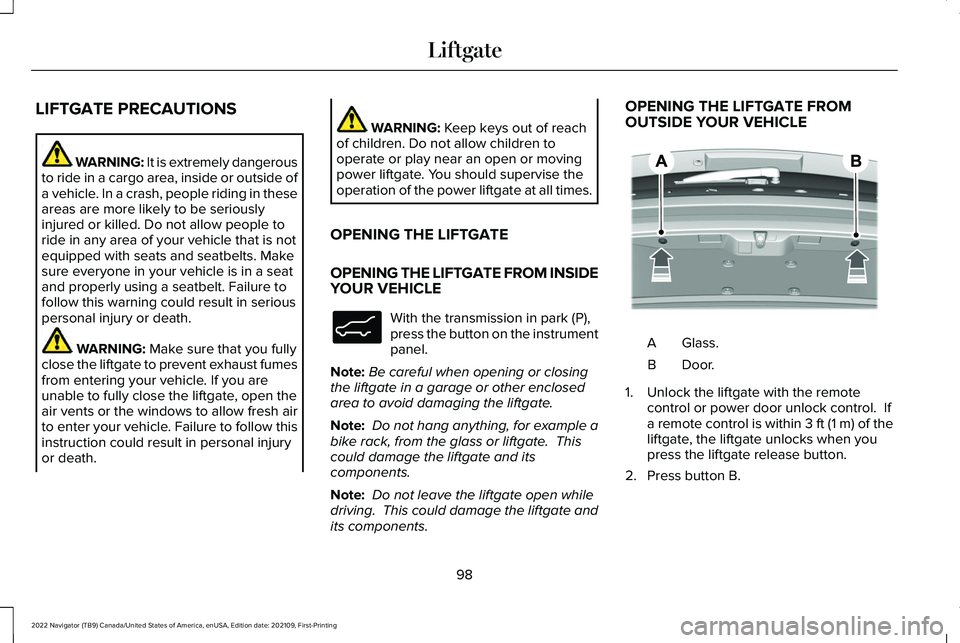
its components. OPENING THE LIFTGATE FROM
OUTSIDE YOUR VEHICLE
Glass.
A
Door.B
1. Unlock the liftgate with the remote control or power door unlock control. If
a remote control is within 3 ft (1 m) of the
liftgate, the liftgate unlocks when you
press the liftgate release button.
2. Press button B.
98
2022 Navigator (TB9) Canada/United States of America, enUSA, Edition date: 202109, First-Printing LiftgateE138633 E349965
Page 148 of 646
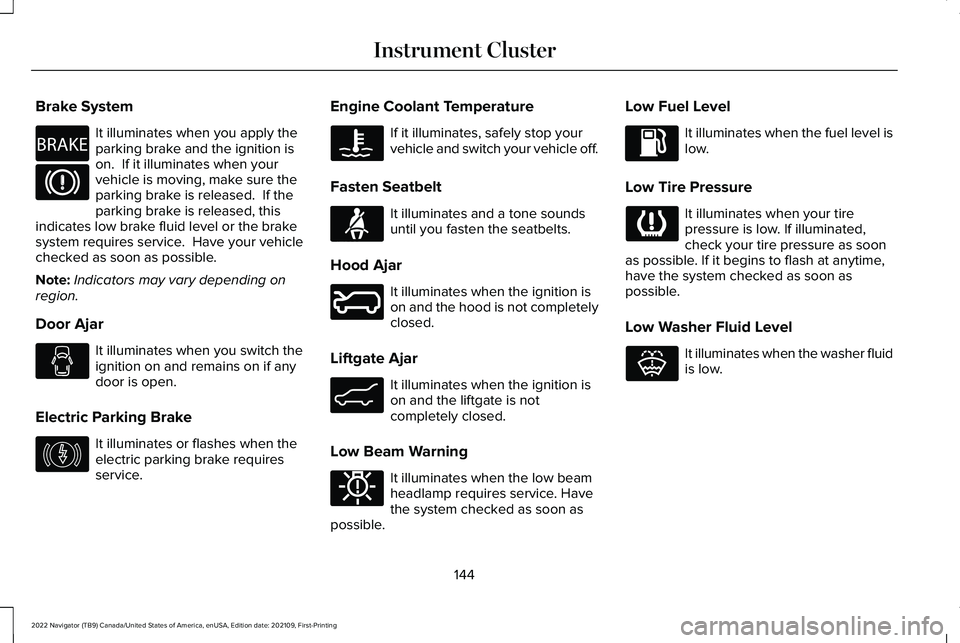
Brake System
It illuminates when you apply the
parking brake and the ignition is
on. If it illuminates when your
vehicle is moving, make sure the
parking brake is released. If the
parking brake is released, this
indicates low brake fluid level or the brake
system requires service. Have your vehicle
checked as soon as possible.
Note: Indicators may vary depending on
region.
Door Ajar It illuminates when you switch the
ignition on and remains on if any
door is open.
Electric Parking Brake It illuminates or flashes when the
electric parking brake requires
service. Engine Coolant Temperature If it illuminates, safely stop your
vehicle and switch your vehicle off.
Fasten Seatbelt It illuminates and a tone sounds
until you fasten the seatbelts.
Hood Ajar It illuminates when the ignition is
on and the hood is not completely
closed.
Liftgate Ajar It illuminates when the ignition is
on and the liftgate is not
completely closed.
Low Beam Warning It illuminates when the low beam
headlamp requires service. Have
the system checked as soon as
possible. Low Fuel Level It illuminates when the fuel level is
low.
Low Tire Pressure It illuminates when your tire
pressure is low. If illuminated,
check your tire pressure as soon
as possible. If it begins to flash at anytime,
have the system checked as soon as
possible.
Low Washer Fluid Level It illuminates when the washer fluid
is low.
144
2022 Navigator (TB9) Canada/United States of America, enUSA, Edition date: 202109, First-Printing Instrument ClusterE270480 E146190 E71880 E246598 E162453 E181350 E132353
Page 170 of 646
FRONT SEAT PRECAUTIONS
WARNING: Sitting improperly, out of
position or with the seatback reclined too
far can take weight off the seat cushion
and affect the decision of the passenger
sensing system, resulting in serious injury
or death in the event of a crash. Always sit
upright against your seat back, with your
feet on the floor. WARNING: Do not recline the seat
backrest too far as this can cause the
occupant to slide under the seatbelt,
resulting in personal injury in the event of
a crash. WARNING:
Do not place objects
higher than the top of the seat backrest.
Failure to follow this instruction could result
in personal injury or death in the event of
a sudden stop or crash. WARNING:
Do not adjust the driver
seat or seat backrest when your vehicle is
moving. This may result in sudden seat
movement, causing the loss of control of
your vehicle.
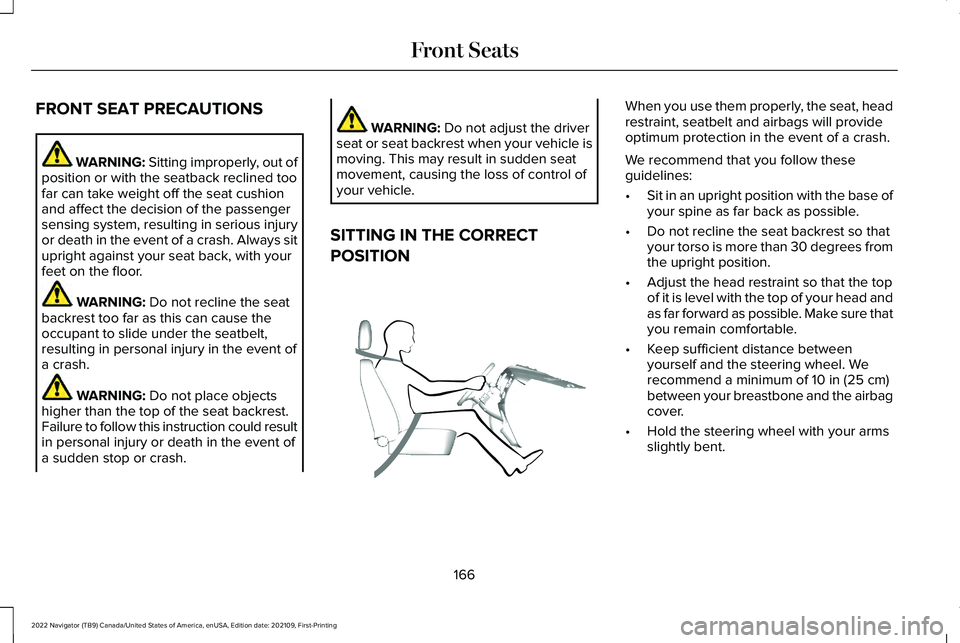
SITTING IN THE CORRECT
POSITION When you use them properly, the seat, head
restraint, seatbelt and airbags will provide
optimum protection in the event of a crash.
We recommend that you follow these
guidelines:
•
Sit in an upright position with the base of
your spine as far back as possible.
• Do not recline the seat backrest so that
your torso is more than 30 degrees from
the upright position.
• Adjust the head restraint so that the top
of it is level with the top of your head and
as far forward as possible. Make sure that
you remain comfortable.
• Keep sufficient distance between
yourself and the steering wheel. We
recommend a minimum of
10 in (25 cm)
between your breastbone and the airbag
cover.
• Hold the steering wheel with your arms
slightly bent.
166
2022 Navigator (TB9) Canada/United States of America, enUSA, Edition date: 202109, First-Printing Front SeatsE68595
Page 171 of 646
•
Bend your legs slightly so that you can
press the pedals fully.
• Position the shoulder strap of the seatbelt
over the center of your shoulder and
position the lap strap tightly across your
hips.
Make sure that your driving position is
comfortable and that you can maintain full
control of your vehicle.
POWER SEATS
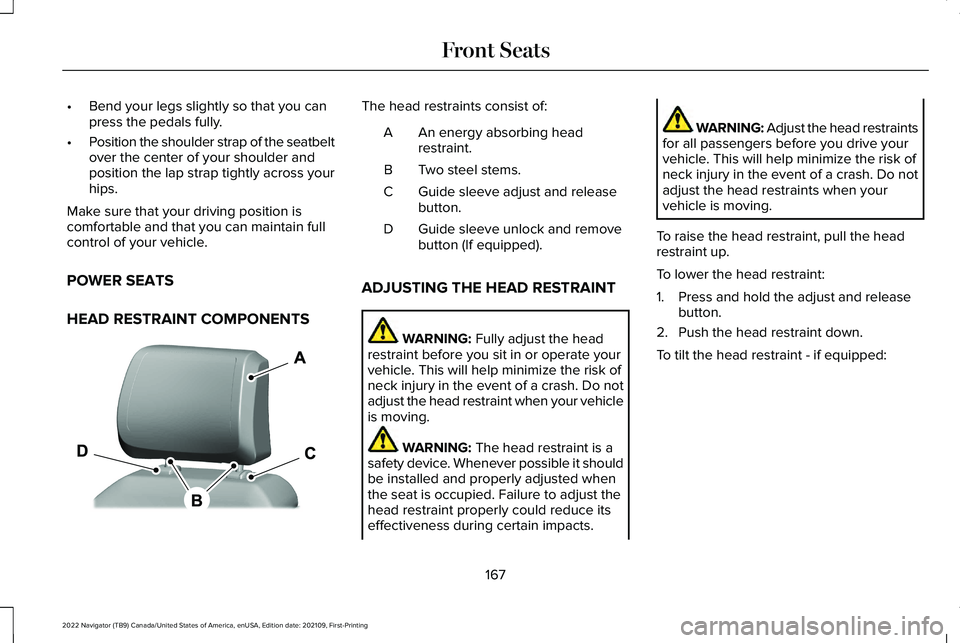
HEAD RESTRAINT COMPONENTS The head restraints consist of:
An energy absorbing head
restraint.
A
Two steel stems.
B
Guide sleeve adjust and release
button.
C
Guide sleeve unlock and remove
button (If equipped).
D
ADJUSTING THE HEAD RESTRAINT WARNING: Fully adjust the head
restraint before you sit in or operate your
vehicle. This will help minimize the risk of
neck injury in the event of a crash. Do not
adjust the head restraint when your vehicle
is moving. WARNING:
The head restraint is a
safety device. Whenever possible it should
be installed and properly adjusted when
the seat is occupied. Failure to adjust the
head restraint properly could reduce its
effectiveness during certain impacts. WARNING: Adjust the head restraints
for all passengers before you drive your
vehicle. This will help minimize the risk of
neck injury in the event of a crash. Do not
adjust the head restraints when your
vehicle is moving.
To raise the head restraint, pull the head
restraint up.
To lower the head restraint:
1. Press and hold the adjust and release button.
2. Push the head restraint down.
To tilt the head restraint - if equipped:
167
2022 Navigator (TB9) Canada/United States of America, enUSA, Edition date: 202109, First-Printing Front SeatsE327921
Page 180 of 646
ADJUSTING THE SEAT BACKREST
WARNING: Reclining the seatback
can cause an occupant to slide under the
seat's seatbelt, resulting in severe personal
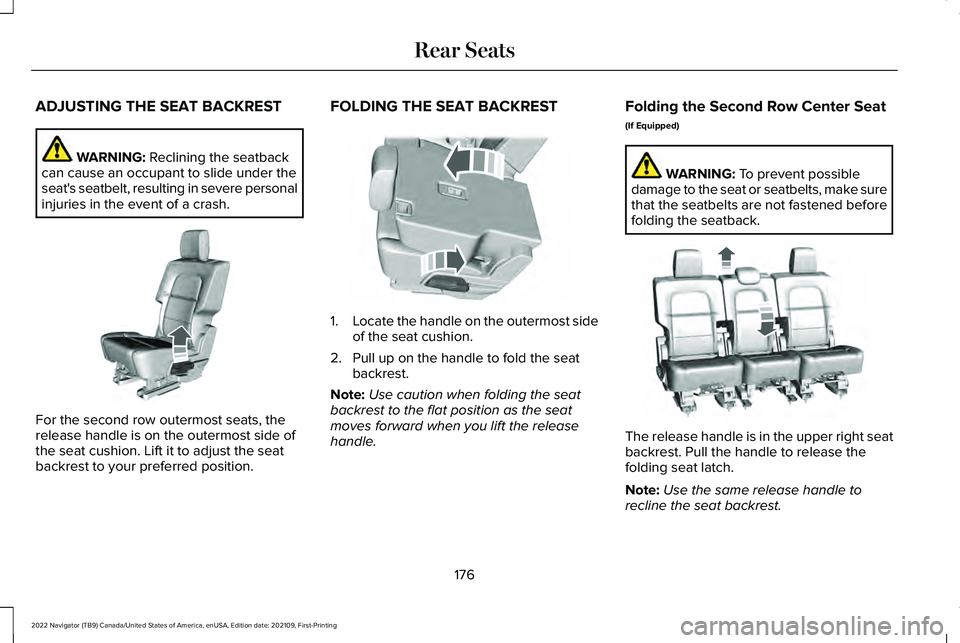
injuries in the event of a crash. For the second row outermost seats, the
release handle is on the outermost side of
the seat cushion. Lift it to adjust the seat
backrest to your preferred position. FOLDING THE SEAT BACKREST
1.
Locate the handle on the outermost side
of the seat cushion.
2. Pull up on the handle to fold the seat backrest.
Note: Use caution when folding the seat
backrest to the flat position as the seat
moves forward when you lift the release
handle. Folding the Second Row Center Seat
(If Equipped) WARNING:
To prevent possible
damage to the seat or seatbelts, make sure
that the seatbelts are not fastened before
folding the seatback. The release handle is in the upper right seat
backrest. Pull the handle to release the
folding seat latch.
Note:
Use the same release handle to
recline the seat backrest.
176
2022 Navigator (TB9) Canada/United States of America, enUSA, Edition date: 202109, First-Printing Rear SeatsE247681 E246710 E247331
Page 184 of 646
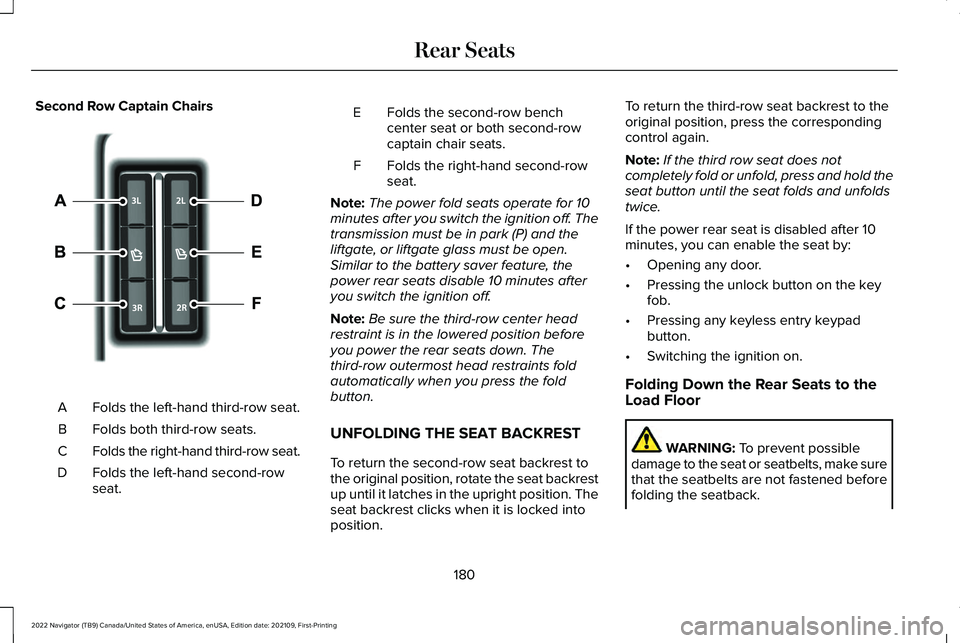
Second Row Captain Chairs
Folds the left-hand third-row seat.
A
Folds both third-row seats.
B
Folds the right-hand third-row seat.
C
Folds the left-hand second-row
seat.
D Folds the second-row bench
center seat or both second-row
captain chair seats.
E
Folds the right-hand second-row
seat.
F
Note: The power fold seats operate for 10
minutes after you switch the ignition off. The
transmission must be in park (P) and the
liftgate, or liftgate glass must be open.
Similar to the battery saver feature, the
power rear seats disable 10 minutes after
you switch the ignition off.
Note: Be sure the third-row center head
restraint is in the lowered position before
you power the rear seats down. The
third-row outermost head restraints fold
automatically when you press the fold
button.
UNFOLDING THE SEAT BACKREST
To return the second-row seat backrest to
the original position, rotate the seat backrest
up until it latches in the upright position. The
seat backrest clicks when it is locked into
position. To return the third-row seat backrest to the
original position, press the corresponding
control again.
Note:
If the third row seat does not
completely fold or unfold, press and hold the
seat button until the seat folds and unfolds
twice.
If the power rear seat is disabled after 10
minutes, you can enable the seat by:
• Opening any door.
• Pressing the unlock button on the key
fob.
• Pressing any keyless entry keypad
button.
• Switching the ignition on.
Folding Down the Rear Seats to the
Load Floor WARNING: To prevent possible
damage to the seat or seatbelts, make sure
that the seatbelts are not fastened before
folding the seatback.
180
2022 Navigator (TB9) Canada/United States of America, enUSA, Edition date: 202109, First-Printing Rear Seats E246705
Page 226 of 646
HOW DOES AUTOMATIC RETURN TO
PARK (P) WORK
Your vehicle shifts into park (P) when your
vehicle is stationary and any of the following
occur:
•
You switch the vehicle off.
• You open the driver door with your
seatbelt unlatched.
• You unlatch the driver seatbelt when the
driver door is open.
Note: Do not use automatic return to park
(P) when your vehicle is moving, except in
an emergency. See Starting and Stopping
the Engine (page 200).
AUTOMATIC RETURN TO PARK (P)
LIMITATIONS
Automatic return to park may not work if the
door ajar switch is malfunctioning.
See an authorized dealer if any of the
following occur: •
Door ajar indicator does not illuminate
with the driver door open.
• Door ajar indicator illuminates with the
driver door closed.
• Transmission not in park message
appears with the driver door closed, after
you shift out of park (P).
AUTOMATIC TRANSMISSION
AUDIBLE WARNINGS
Transmission Not In Park (P) Audible
Warning
Sounds if you open the driver door before
shifting into park (P).
Park Selection Audible Warning
Sounds when you shift into park (P).
222
2022 Navigator (TB9) Canada/United States of America, enUSA, Edition date: 202109, First-Printing Automatic Transmission
Page 248 of 646
HOW DOES AUTO HOLD WORK
Auto Hold applies the brakes to hold your
vehicle after you stop it and release the
brake pedal. This can help when waiting on
a hill or in traffic.
SWITCHING AUTO HOLD ON AND
OFF
WARNING: The system does not
replace the parking brake. When you leave
your vehicle, always apply the parking
brake. WARNING: You must remain in your
vehicle when the system turns on. At all
times, you are responsible for controlling
your vehicle, supervising the system and
intervening, if required. Failure to take care
may result in the loss of control of your
vehicle, serious personal injury or death. WARNING:
The system will turn off
if a malfunction is apparent. Failure to take
care may result in the loss of control of
your vehicle, serious personal injury or
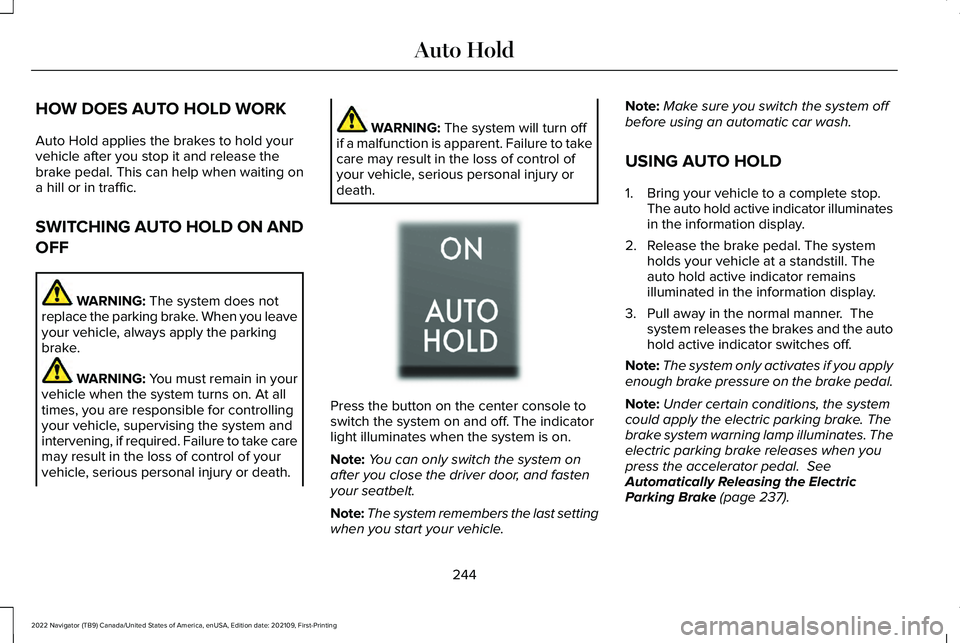
death. Press the button on the center console to
switch the system on and off. The indicator
light illuminates when the system is on.
Note:
You can only switch the system on
after you close the driver door, and fasten
your seatbelt.
Note: The system remembers the last setting
when you start your vehicle. Note:
Make sure you switch the system off
before using an automatic car wash.
USING AUTO HOLD
1. Bring your vehicle to a complete stop. The auto hold active indicator illuminates
in the information display.
2. Release the brake pedal. The system holds your vehicle at a standstill. The
auto hold active indicator remains
illuminated in the information display.
3. Pull away in the normal manner. The system releases the brakes and the auto
hold active indicator switches off.
Note: The system only activates if you apply
enough brake pressure on the brake pedal.
Note: Under certain conditions, the system
could apply the electric parking brake. The
brake system warning lamp illuminates. The
electric parking brake releases when you
press the accelerator pedal.
See
Automatically Releasing the Electric
Parking Brake
(page 237).
244
2022 Navigator (TB9) Canada/United States of America, enUSA, Edition date: 202109, First-Printing Auto HoldE256165