cooling LINCOLN NAVIGATOR 2022 Owners Manual
[x] Cancel search | Manufacturer: LINCOLN, Model Year: 2022, Model line: NAVIGATOR, Model: LINCOLN NAVIGATOR 2022Pages: 646, PDF Size: 7.29 MB
Page 9 of 646
Enabling Remote Start
................................155
Remotely Starting and Stopping the Vehicle ........................................................
155
Extending the Remote Start Duration .......................................................................
156
Remote Start Remote Control Indicators .......................................................................
156
Remote Start Settings .................................
156
Climate Control
Identifying the Climate Control Unit ........
158
Switching Climate Control On and Off .......................................................................
158
Switching Recirculated Air On and Off .......................................................................
158
Switching Air Conditioning On and Off .......................................................................
158
Switching Defrost On and Off ...................
158
Switching Maximum Defrost On and Off .......................................................................
158
Switching Maximum Cooling On and Off .......................................................................
159
Switching the Heated Rear Window On and Off ........................................................
159
Setting the Blower Motor Speed .............
159Setting the Temperature
............................
159
Directing the Flow of Air ............................
159
Auto Mode .....................................................
160
Climate Control Hints ...................................
161
Rear Passenger Climate Control
Identifying the Rear Passenger Climate Control Unit ...............................................
163
Switching the Rear Passenger Climate Controls On and Off ................................
163
Setting the Blower Motor Speed .............
163
Setting the Temperature ............................
164
Directing the Flow of Air ............................
164
Rear Auto Mode ...........................................
164
Rear Passenger Climate Control Indicators .......................................................................
164
Interior Air Quality
What Is the Cabin Air Filter ........................
165
Replacing the Cabin Air Filter ...................
165
Front Seats
Front Seat Precautions ...............................
166Sitting in the Correct Position
...................
166
Power Seats ...................................................
167
Massage Seats ...............................................
171
Heated Seats .................................................
172
Ventilated Seats ............................................
173
Rear Seats
Manual Seats .................................................
174
Power Seats ...................................................
178
Massage Seats ...............................................
181
Heated Seats ..................................................
181
Ventilated Seats ...........................................
182
Rear Occupant Alert System
What is the Rear Occupant Alert System .......................................................................
183
How Does the Rear Occupant Alert System Work ............................................................
183
Rear Occupant Alert System Precautions .......................................................................
183
Rear Occupant Alert System Limitations .......................................................................
183
Switching Rear Occupant Alert System On and Off ........................................................
184
5
2022 Navigator (TB9) Canada/United States of America, enUSA, Edition date: 202109, First-Printing Table of Contents
Page 18 of 646
Wheel Nuts
...................................................468
Capacities and Specifications
Engine Specifications ................................
469
Motorcraft Parts ...........................................
470
Engine Oil Capacity and Specification .......................................................................
471
Cooling System Capacity and Specification ......................................................................
473
Fuel Tank Capacity ......................................
474
Air Conditioning System Capacity and Specification .............................................
475
Washer Fluid Specification .......................
476
Brake Fluid Specification ...........................
476
Transfer Case Fluid Capacity and Specification .............................................
478
Front Axle Fluid Capacity and Specification ......................................................................
479
Rear Axle Fluid Capacity and Specification ......................................................................
480
Vehicle Identification
Vehicle Identification Number ..................
481Connected Vehicle
What Is a Connected Vehicle
...................
482
Connected Vehicle Requirements ..........
482
Connected Vehicle Limitations ................
482
Connecting the Vehicle to a Mobile Network .....................................................
482
Connecting the Vehicle to a Wi-Fi Network ......................................................................
482
Connected Vehicle – Troubleshooting ......................................................................
483
Vehicle Wi-Fi Hotspot
Creating a Vehicle Wi-Fi Hotspot ............
486
Changing the Vehicle Wi-Fi Hotspot Name or Password .............................................
486
Audio System
Audio System Precautions ........................
488
Identifying the Audio Unit .........................
488
Switching the Audio Unit On and Off .....
488
Selecting the Audio Source .....................
488
Playing or Pausing the Audio Source .....
488
Adjusting the Volume .................................
489
Switching Shuffle Mode On and Off ......
489Switching Repeat Mode On and Off
......
489
Setting a Memory Preset ..........................
489
Muting the Audio .........................................
489
Adjusting the Sound Settings ..................
489
Setting the Clock and Date ......................
490
AM/FM Radio ................................................
490
Switching the Display On and Off ............
491
Digital Radio ..................................................
491
Satellite Radio ..............................................
493
Audio System – Troubleshooting ...........
496
Rear Passenger Audio Controls
Identifying the Rear Passenger Audio Controls .....................................................
500
Switching the Rear Passenger Audio Controls On and Off ..............................
500
Selecting the Audio Source .....................
500
Playing and Pausing the Audio Source ......................................................................
500
Adjusting the Volume ................................
500
Switching Shuffle Mode On and Off ......
500
Switching Repeat Mode On and Off ......
500
Changing the Radio Station .....................
500
14
2022 Navigator (TB9) Canada/United States of America, enUSA, Edition date: 202109, First-Printing Table of Contents
Page 162 of 646
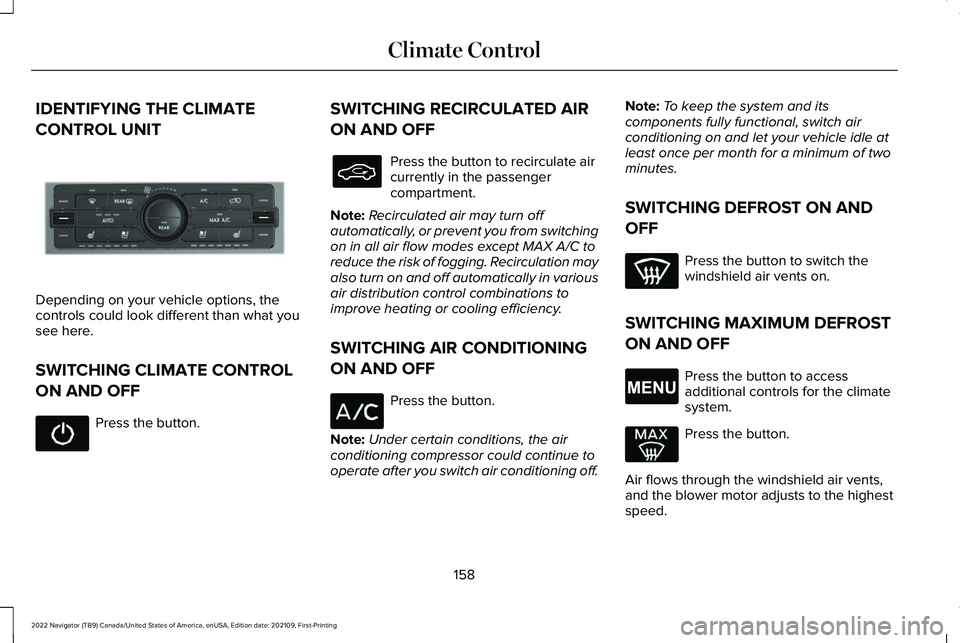
IDENTIFYING THE CLIMATE
CONTROL UNIT
Depending on your vehicle options, the
controls could look different than what you
see here.
SWITCHING CLIMATE CONTROL
ON AND OFF
Press the button. SWITCHING RECIRCULATED AIR
ON AND OFF Press the button to recirculate air
currently in the passenger
compartment.
Note: Recirculated air may turn off
automatically, or prevent you from switching
on in all air flow modes except MAX A/C to
reduce the risk of fogging. Recirculation may
also turn on and off automatically in various
air distribution control combinations to
improve heating or cooling efficiency.
SWITCHING AIR CONDITIONING
ON AND OFF Press the button.
Note: Under certain conditions, the air
conditioning compressor could continue to
operate after you switch air conditioning off. Note:
To keep the system and its
components fully functional, switch air
conditioning on and let your vehicle idle at
least once per month for a minimum of two
minutes.
SWITCHING DEFROST ON AND
OFF Press the button to switch the
windshield air vents on.
SWITCHING MAXIMUM DEFROST
ON AND OFF Press the button to access
additional controls for the climate
system.
Press the button.
Air flows through the windshield air vents,
and the blower motor adjusts to the highest
speed.
158
2022 Navigator (TB9) Canada/United States of America, enUSA, Edition date: 202109, First-Printing Climate ControlE293088 E265038
Page 163 of 646
You can also use this setting to defog and
clear the windshield of a thin covering of ice.
Note:
To prevent window fogging, you
cannot select recirculated air when
maximum defrost is on.
Note: The heated rear window also turns on
when you select maximum defrost.
SWITCHING MAXIMUM COOLING
ON AND OFF Press the button.
Note: When you switch maximum cooling
off, air conditioning remains on.
SWITCHING THE HEATED REAR
WINDOW ON AND OFF Press the button to clear the rear
window of thin ice and fog. The
heated rear window turns off after
a short period of time. Note:
This button also activates the heated
mirrors.
Note: Do not use harsh chemicals, razor
blades or other sharp objects to clean or
remove decals from the inside of the heated
rear window as this could cause damage to
the heated rear window grid lines not
covered by the vehicle Warranty.
SETTING THE BLOWER MOTOR
SPEED Turn the control to adjust the
volume of air circulated in the
vehicle.
SETTING THE TEMPERATURE Press the toggle button on the left-hand side
of the climate control upward or downward
to set the left-hand temperature.
Note:
This control also adjusts the right-hand
side temperature when you switch off dual
zone mode.
Press the toggle button on the right-hand
side of the climate control upward or
downward to set the right-hand temperature.
DIRECTING THE FLOW OF AIR Press the button to access
additional controls for the climate
system.
159
2022 Navigator (TB9) Canada/United States of America, enUSA, Edition date: 202109, First-Printing Climate Control E266187 E266186 E265038
Page 165 of 646
SWITCHING DUAL MODE ON AND OFF
Press the button.
CLIMATE CONTROL HINTS
General Hints
• Prolonged use of recirculated air may
cause the windows to fog up.
• You may feel a small amount of air from
the footwell air vents regardless of the
air distribution setting.
• To reduce humidity build-up inside your
vehicle, do not drive with the system
switched off or with recirculated air
always switched on.
• Do not place objects under the front
seats as this may interfere with the
airflow to the rear seats. •
Remove any snow, ice or leaves from the
air intake area at the base of the
windshield.
• To improve the time to reach a
comfortable temperature in hot weather,
drive with the windows open until you
feel cold air through the air vents.
Automatic Climate Control
• Adjusting the settings when your vehicle
interior is extremely hot or cold is not
necessary. Automatic mode is best
recommended to maintain set
temperature.
• The system adjusts to heat or cool the
interior to the temperature you select as
quickly as possible.
• For the system to function efficiently, the
instrument panel and side air vents
should be fully open. •
If you press AUTO during cold outside
temperatures, the system directs air flow
to the windshield and side window air
vents.In addition, the blower motor may
run at a slower speed until the engine
warms up.
• If you press
AUTO during hot
temperatures and the inside of the
vehicle is hot, the system uses
recirculated air to maximize interior
cooling. Blower motor speed may also
reduce until the air cools.
Quickly Heating the Interior
1. Press
AUTO.
2. Adjust the temperature function to the setting you prefer.
Recommended Settings for Heating
1. Press
AUTO.
2. Adjust the temperature function to the setting you prefer. Use
72°F (22°C) as a
starting point, then adjust the setting as
necessary.
161
2022 Navigator (TB9) Canada/United States of America, enUSA, Edition date: 202109, First-Printing Climate ControlE265280
Page 166 of 646
Quickly Cooling the Interior
1. Press MAX A/C.
2. Drive with the windows open for a short period of time.
Recommended Settings for Cooling
1. Press
AUTO.
2. Adjust the temperature function to the setting you prefer. Use
72°F (22°C) as a
starting point, then adjust the setting as
necessary.
Defogging the Side Windows in Cold
Weather
1. Press and release defrost or maximum defrost.
2. Adjust the temperature control to the setting you prefer. Use
72°F (22°C) as a
starting point, then adjust the setting as
necessary.
162
2022 Navigator (TB9) Canada/United States of America, enUSA, Edition date: 202109, First-Printing Climate Control
Page 177 of 646
VENTILATED SEATS
VENTILATED SEAT PRECAUTIONS
Do not:
•
Spill liquid on the front seats. This may
cause the air vent holes to become
blocked and not work properly.
• Place cargo or objects under the seats.
They may block the air intake causing
the air vents to not work properly.
SWITCHING THE VENTILATED SEATS
ON AND OFF
The vehicle must be running to use this
feature. Press this symbol on the climate controls or
the touchscreen to cycle through the various
ventilation settings and off. More indicator
lights indicate higher fan speeds.
Note:
When you switch the climate control
fan speed and the ventilated seats to their
maximum settings, the ventilated seats
provide increased cooling.
If the engine falls below 350 RPM while the
ventilated seats are on, the feature turns
itself off unless the vehicle is in
Auto-Start-Stop mode. You may need to
reactivate the ventilated seats.
Note: The ventilated seats may remain on
after you remote start your vehicle, based
on your remote start settings. The ventilated
seats may also turn on when you start your
vehicle if they were on when you switched
your vehicle off.
173
2022 Navigator (TB9) Canada/United States of America, enUSA, Edition date: 202109, First-Printing Front SeatsE224689
Page 186 of 646
The rear seat heat controls are on the rear
of the center console.
Press the heated seat symbol to cycle
through the various heat settings and off.
More indicator lights indicate warmer
settings.
Note:
The heated seats may remain on after
you remote start your vehicle, based on your
remote start settings. The heated seats may
also turn on when you start your vehicle if
they were on when you switched your
vehicle off. Automatic Climate Controlled Seats (If
Equipped)
When you switch the auto setting on, the
climate controlled seats switch between the
heated seats and ventilated seats to match
your climate control setting.
VENTILATED SEATS
VENTILATED SEAT PRECAUTIONS
Do not:
• Spill liquid on the seats. This may cause
the air vent holes to become blocked and
not work properly.
• Place cargo or objects under the seats.
They may block the air intake causing
the air vents to not work properly.
SWITCHING THE VENTILATED SEATS
ON AND OFF
The vehicle must be running to use this
feature. Press this symbol on the climate controls or
the rear touchscreen to cycle through the
various ventilation settings and off. More
indicator lights indicate higher fan speeds.
Note:
When you switch the climate control
fan speed and the ventilated seats to their
maximum settings, the ventilated seats
provide increased cooling.
If the engine falls below 350 RPM while the
ventilated seats are on, the feature switches
itself off unless the vehicle is in
Auto-Start-Stop mode. You may need to
reactivate the ventilated seats.
Note: The ventilated seats may remain on
after you remote start your vehicle, based
on your remote start settings. The ventilated
seats may also switch on when you start
your vehicle if they were on when you
switched your vehicle off.
182
2022 Navigator (TB9) Canada/United States of America, enUSA, Edition date: 202109, First-Printing Rear SeatsE146322 E224689
Page 231 of 646
pedal when changes in vehicle speed are
required. Avoid abrupt steering, acceleration
and braking. This could result in an increased
risk of vehicle roll over, loss of vehicle control
and personal injury. Use all available road
surface to bring your vehicle to a safe
direction of travel.
In the event of an emergency stop, avoid
skidding the tires and do not attempt any
sharp steering wheel movements.
If your vehicle goes from one type of surface
to another (i.e. from concrete to gravel) there
can be a change in the way your vehicle
responds to a maneuver, i.e. steering,
acceleration or braking.
DRIVING IN SAND
When driving over sand, try to keep all four
wheels on the most solid area of the trail.
Avoid reducing the tire pressures but shift
to a lower gear and drive steadily through
the terrain. Apply the accelerator slowly and
avoid excessive wheel slip.
When driving at slow speeds in deep sand
under high outside temperatures, use a low
gear when possible. Low gear operation can
maximize the engine and transmission
cooling capability.
Avoid driving at excessive speed. This
causes vehicle momentum to work against
you and your vehicle could become stuck to
the point that assistance may be required
from another vehicle. Remember, you may
be able to back out the way you came if you
proceed with caution.
DRIVING THROUGH MUD AND WATER
WARNING: Do not spin the wheels
at over 34 mph (55 km/h). The tires may
fail and injure a passenger or bystander. Mud
Be cautious of sudden changes in vehicle
speed or direction when you are driving in
mud. Even four-wheel drive vehicles can lose
traction in slick mud. If your vehicle does
slide, steer in the direction of the slide until
you regain control of your vehicle. After
driving through mud, clean off residue stuck
to rotating driveshafts and tires. Excess mud
stuck on tires and rotating driveshafts can
cause an imbalance that could damage drive
components.
Water
If you must drive through high water, drive
slowly. Traction or brake capability may be
limited. When driving through water,
determine the depth and avoid water higher
than the bottom of the hubs. If the ignition
system gets wet, your vehicle may stall. Once
through water, test the brakes. Wet brakes
do not stop your vehicle as effectively as dry
brakes. Drying improves by applying light
pressure to the brake pedal while moving
slowly.
227
2022 Navigator (TB9) Canada/United States of America, enUSA, Edition date: 202109, First-Printing Four-Wheel Drive
(If Equipped)
Page 255 of 646
WHAT IS HILL DESCENT CONTROL
Hill descent control allows the driver to set
and maintain vehicle speed while
descending steep slopes in various surface
conditions.
HOW DOES HILL DESCENT
CONTROL WORK
Hill descent control can maintain vehicle
speeds on downhill slopes between
2–20 mph (3–32 km/h). Above 20 mph
(32 km/h), the system remains on but the
descent speed cannot be set or maintained.
Note: The system does not function below
2 mph (3 km/h)
.
The system requires a cool down interval
after a period of sustained use. Hill descent
control provides a warning in the message
center and a tone sounds when the system
is about to disengage for cooling. At this
time, manually apply the brakes as needed
to maintain descent speed. Note:
The amount of time that the system
can remain active before cooling varies with
conditions.
HILL DESCENT CONTROL
PRECAUTIONS WARNING:
The system does not
control speed in low traction conditions or
extremely steep slopes. The system is
designed to be an aid and does not relieve
you of your responsibility to drive with due
care and attention. Failure to follow this
instruction could result in personal injury. WARNING:
Hill descent control
cannot control descent in all surface
conditions and circumstances, such as ice
or extremely steep grades. Hill descent
control is a driver assist system and cannot
substitute for good judgment by the driver.
Failure to do so may result in loss of
vehicle control, crash or serious injury. WARNING:
The system does not
replace the parking brake. When you leave
your vehicle, always apply the parking
brake and shift the transmission into park
(P) for automatic transmission or first gear
for manual transmission.
SWITCHING HILL DESCENT
CONTROL ON AND OFF Press the button on the instrument
panel. A light illuminates and a
tone sounds when the system is
active.
SETTING THE HILL DESCENT
SPEED
To increase or decrease the descent speed,
press the accelerator or brake pedal, or use
the SET + and SET - buttons on the steering
wheel. Once you reach the preferred speed
remove your feet from the pedals.
251
2022 Navigator (TB9) Canada/United States of America, enUSA, Edition date: 202109, First-Printing Hill Descent Control
(If Equipped)E163171