air condition LINCOLN NAVIGATOR 2022 Owners Manual
[x] Cancel search | Manufacturer: LINCOLN, Model Year: 2022, Model line: NAVIGATOR, Model: LINCOLN NAVIGATOR 2022Pages: 646, PDF Size: 7.29 MB
Page 9 of 646
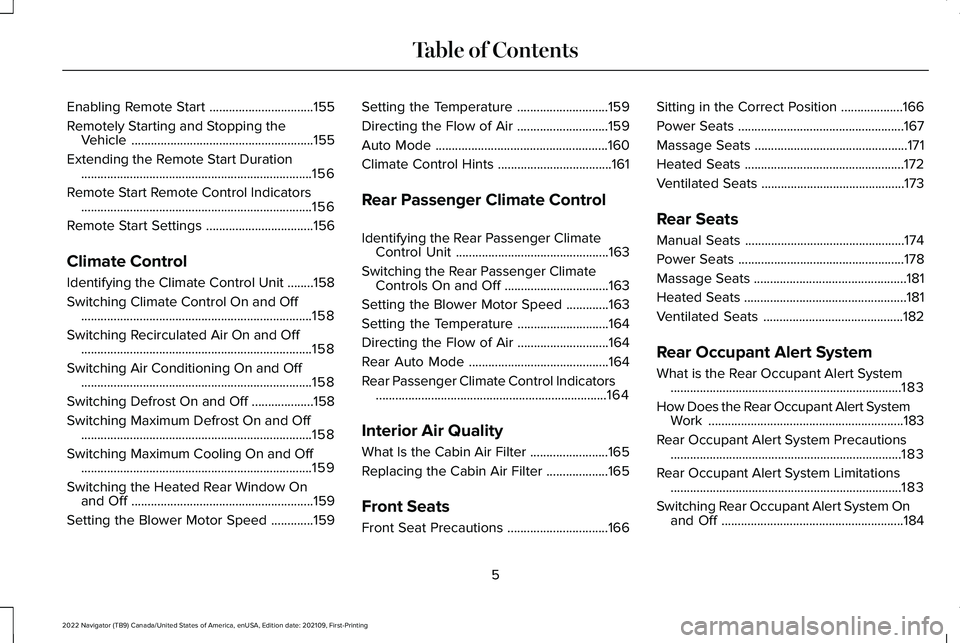
Enabling Remote Start
................................155
Remotely Starting and Stopping the Vehicle ........................................................
155
Extending the Remote Start Duration .......................................................................
156
Remote Start Remote Control Indicators .......................................................................
156
Remote Start Settings .................................
156
Climate Control
Identifying the Climate Control Unit ........
158
Switching Climate Control On and Off .......................................................................
158
Switching Recirculated Air On and Off .......................................................................
158
Switching Air Conditioning On and Off .......................................................................
158
Switching Defrost On and Off ...................
158
Switching Maximum Defrost On and Off .......................................................................
158
Switching Maximum Cooling On and Off .......................................................................
159
Switching the Heated Rear Window On and Off ........................................................
159
Setting the Blower Motor Speed .............
159Setting the Temperature
............................
159
Directing the Flow of Air ............................
159
Auto Mode .....................................................
160
Climate Control Hints ...................................
161
Rear Passenger Climate Control
Identifying the Rear Passenger Climate Control Unit ...............................................
163
Switching the Rear Passenger Climate Controls On and Off ................................
163
Setting the Blower Motor Speed .............
163
Setting the Temperature ............................
164
Directing the Flow of Air ............................
164
Rear Auto Mode ...........................................
164
Rear Passenger Climate Control Indicators .......................................................................
164
Interior Air Quality
What Is the Cabin Air Filter ........................
165
Replacing the Cabin Air Filter ...................
165
Front Seats
Front Seat Precautions ...............................
166Sitting in the Correct Position
...................
166
Power Seats ...................................................
167
Massage Seats ...............................................
171
Heated Seats .................................................
172
Ventilated Seats ............................................
173
Rear Seats
Manual Seats .................................................
174
Power Seats ...................................................
178
Massage Seats ...............................................
181
Heated Seats ..................................................
181
Ventilated Seats ...........................................
182
Rear Occupant Alert System
What is the Rear Occupant Alert System .......................................................................
183
How Does the Rear Occupant Alert System Work ............................................................
183
Rear Occupant Alert System Precautions .......................................................................
183
Rear Occupant Alert System Limitations .......................................................................
183
Switching Rear Occupant Alert System On and Off ........................................................
184
5
2022 Navigator (TB9) Canada/United States of America, enUSA, Edition date: 202109, First-Printing Table of Contents
Page 18 of 646
Wheel Nuts
...................................................468
Capacities and Specifications
Engine Specifications ................................
469
Motorcraft Parts ...........................................
470
Engine Oil Capacity and Specification .......................................................................
471
Cooling System Capacity and Specification ......................................................................
473
Fuel Tank Capacity ......................................
474
Air Conditioning System Capacity and Specification .............................................
475
Washer Fluid Specification .......................
476
Brake Fluid Specification ...........................
476
Transfer Case Fluid Capacity and Specification .............................................
478
Front Axle Fluid Capacity and Specification ......................................................................
479
Rear Axle Fluid Capacity and Specification ......................................................................
480
Vehicle Identification
Vehicle Identification Number ..................
481Connected Vehicle
What Is a Connected Vehicle
...................
482
Connected Vehicle Requirements ..........
482
Connected Vehicle Limitations ................
482
Connecting the Vehicle to a Mobile Network .....................................................
482
Connecting the Vehicle to a Wi-Fi Network ......................................................................
482
Connected Vehicle – Troubleshooting ......................................................................
483
Vehicle Wi-Fi Hotspot
Creating a Vehicle Wi-Fi Hotspot ............
486
Changing the Vehicle Wi-Fi Hotspot Name or Password .............................................
486
Audio System
Audio System Precautions ........................
488
Identifying the Audio Unit .........................
488
Switching the Audio Unit On and Off .....
488
Selecting the Audio Source .....................
488
Playing or Pausing the Audio Source .....
488
Adjusting the Volume .................................
489
Switching Shuffle Mode On and Off ......
489Switching Repeat Mode On and Off
......
489
Setting a Memory Preset ..........................
489
Muting the Audio .........................................
489
Adjusting the Sound Settings ..................
489
Setting the Clock and Date ......................
490
AM/FM Radio ................................................
490
Switching the Display On and Off ............
491
Digital Radio ..................................................
491
Satellite Radio ..............................................
493
Audio System – Troubleshooting ...........
496
Rear Passenger Audio Controls
Identifying the Rear Passenger Audio Controls .....................................................
500
Switching the Rear Passenger Audio Controls On and Off ..............................
500
Selecting the Audio Source .....................
500
Playing and Pausing the Audio Source ......................................................................
500
Adjusting the Volume ................................
500
Switching Shuffle Mode On and Off ......
500
Switching Repeat Mode On and Off ......
500
Changing the Radio Station .....................
500
14
2022 Navigator (TB9) Canada/United States of America, enUSA, Edition date: 202109, First-Printing Table of Contents
Page 25 of 646
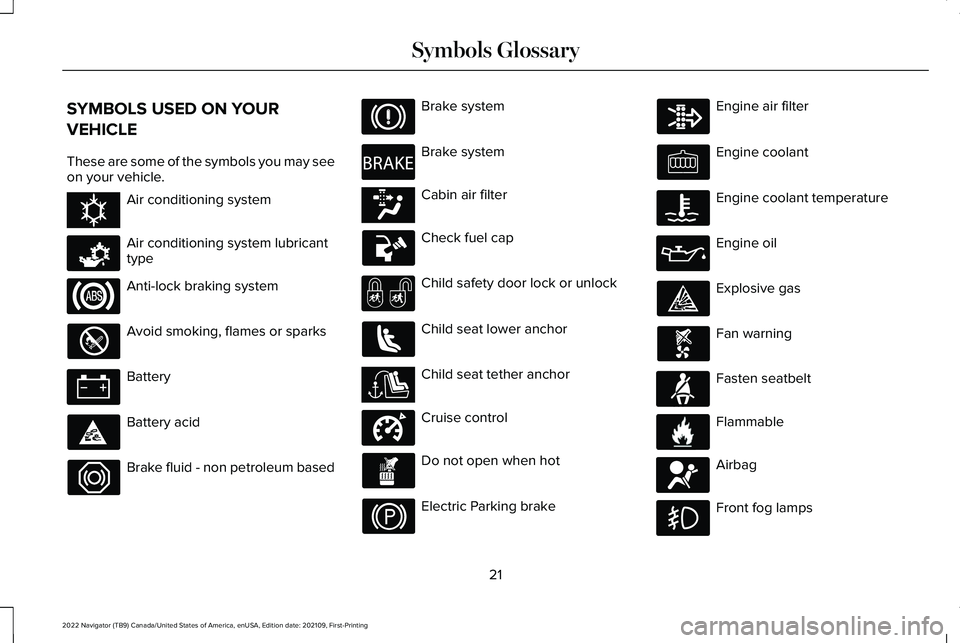
SYMBOLS USED ON YOUR
VEHICLE
These are some of the symbols you may see
on your vehicle.
Air conditioning system
Air conditioning system lubricant
type
Anti-lock braking system
Avoid smoking, flames or sparks
Battery
Battery acid
Brake fluid - non petroleum based Brake system
Brake system
Cabin air filter
Check fuel cap
Child safety door lock or unlock
Child seat lower anchor
Child seat tether anchor
Cruise control
Do not open when hot
Electric Parking brake Engine air filter
Engine coolant
Engine coolant temperature
Engine oil
Explosive gas
Fan warning
Fasten seatbelt
Flammable
Airbag
Front fog lamps
21
2022 Navigator (TB9) Canada/United States of America, enUSA, Edition date: 202109, First-Printing Symbols GlossaryE162384 E231157 E270480 E139223 E141128 E332905 E71880 E231160 E67017
Page 28 of 646
WARNING: Do not connect wireless
plug-in devices to the data link connector.
Unauthorized third parties could gain
access to vehicle data and impair the
performance of safety related systems.
Only allow repair facilities that follow our
service and repair instructions to connect
their equipment to the data link connector.
We respect your privacy and are committed
to protecting it. The information contained
in this manual was correct at the time of
publication but as technology rapidly
changes, we recommend that you visit the
local Lincoln website for the latest
information.
Your vehicle has electronic control units that
have data recording functionality and the
ability to permanently or temporarily store
data. This data could include information on
the condition and status of your vehicle,
vehicle maintenance requirements, events
and malfunctions. The types of data that can
be recorded are described in this section.
Some of the data recorded is stored in event
logs or error logs. Note:
Error logs are reset following a service
or repair.
Note: We may provide information in
response to requests from law enforcement,
other government authorities and third
parties acting with lawful authority or through
a legal process. Such information could be
used by them in legal proceedings.
Data recorded includes, for example:
• Operating states of system components,
for example fuel level, tire pressure and
battery charge level.
• Vehicle and component status, for
example wheel speed, deceleration,
lateral acceleration and seatbelt status.
• Events or errors in essential systems, for
example headlamps and brakes.
• System responses to driving situations,
for example airbag deployment and
stability control.
• Environmental conditions, for example
temperature. Some of this data, when used in combination
with other information, for example an
accident report, damage to a vehicle or
eyewitness statements, could be associated
with a specific person.
Services That We Provide
If you use our services, we collect and use
data, for example account information,
vehicle location and driving characteristics,
that could identify you. We transmit this data
through a dedicated, protected connection.
We only collect and use data to enable your
use of our services to which you have
subscribed, with your consent or where
permitted by law. For additional information,
see the terms and conditions of the services
to which you have subscribed.
For additional information about our privacy
policy, refer to the local Lincoln website.
24
2022 Navigator (TB9) Canada/United States of America, enUSA, Edition date: 202109, First-Printing Data Privacy
Page 29 of 646
Services That Third Parties Provide
We recommend that you review the terms
and conditions and data privacy information
for any services equipped with your vehicle
or to which you subscribe. We take no
responsibility for services that third parties
provide.
Where equipped, SiriusXM with 360L may
use the modem. To disable, turn off the
SiriusXM 360L or Vehicle Connectivity
setting. See Enabling and Disabling the
Modem (page 482).
SERVICE DATA
Service data recorders in your vehicle are
capable of collecting and storing diagnostic
information about your vehicle. This
potentially includes information about the
performance or status of various systems
and modules in the vehicle, such as engine,
throttle, steering or brake systems. In order
to properly diagnose and service your
vehicle, Ford Motor Company (Ford of
Canada in Canada), and service and repair
facilities may access or share among them vehicle diagnostic information received
through a direct connection to your vehicle
when diagnosing or servicing your vehicle.
Additionally, Ford Motor Company (Ford of
Canada, in Canada) may, where permitted
by law, use vehicle diagnostic information
for vehicle improvement or with other
information we may have about you, for
example, your contact information, to offer
you products or services that may interest
you. Data may be provided to our service
providers such as part suppliers that may
help diagnose malfunctions, and who are
similarly obligated to protect data. We retain
this data only as long as necessary to
perform these functions or to comply with
law. We may provide information where
required in response to official requests to
law enforcement or other government
authorities or third parties acting with lawful
authority or court order, and such information
may be used in legal proceedings. For U.S.
only (if equipped), if you choose to use
connected apps and services, you consent
that certain diagnostic information may also
be accessed electronically by Ford Motor
Company and Ford authorized service
facilities, and that the diagnostic informationmay be used to provide services to you,
personalizing your experience, troubleshoot,
and to improve products and services and
offer you products and services that may
interest you, where permitted by law. For
Canada only, for more information, please
review the Ford of Canada privacy policy at
www.ford.ca, including our U.S. data storage
and use of service providers in other
jurisdictions who may be subject to legal
requirements in Canada, the United States
and other countries applicable to them, for
example, lawful requirements to disclose
personal information to governmental
authorities in those countries.
25
2022 Navigator (TB9) Canada/United States of America, enUSA, Edition date: 202109, First-Printing Data Privacy
Page 30 of 646
EVENT DATA
This vehicle is equipped with an event data
recorder. The main purpose of an event data
recorder is to record, in certain crash or near
crash-like situations, such as an airbag
deployment or hitting a road obstacle; this
data will assist in understanding how a
vehicle
’s systems performed. The event data
recorder is designed to record data related
to vehicle dynamics and safety systems for
a short period of time, typically 30 seconds
or less.
The event data recorder in this vehicle is
designed to record such data as:
• How various systems in your vehicle
were operating.
• Whether or not the driver and passenger
seatbelts were buckled/fastened.
• How far (if at all) the driver was
depressing the accelerator and/or the
brake pedal.
• How fast the vehicle was traveling.
• Where the driver was positioning the
steering wheel. This data can help provide a better
understanding of the circumstances in which
crashes and injuries occur.
Note:
Event data recorder data is recorded
by your vehicle only if a non-trivial crash
situation occurs; no data is recorded by the
event data recorder under normal driving
conditions and no personal data or
information (for example name, gender, age,
and crash location) is recorded. However,
parties, such as law enforcement, could
combine the event data recorder data with
the type of personally identifying data
routinely acquired during a crash
investigation.
To read data recorded by an event data
recorder, special equipment is required, and
access to the vehicle or the event data
recorder is needed. In addition to the vehicle
manufacturer, other parties, such as law
enforcement, that have such special
equipment, can read the information if they
have access to the vehicle or the event data
recorder. BlueCruise Data (If Equipped)
If BlueCruise is active in certain crash or near
crash-like situations, such as an airbag
deployment or hitting a road obstacle, the
system may record driver attentiveness,
based on the direction of eyes and duration,
and photographs of the driver seat area.
Note: No data is recorded under normal
driving conditions.
SETTINGS DATA
Your vehicle has electronic control units that
have the ability to store data based on your
personalized settings. The data is stored
locally in the vehicle or on devices that you
connect to it, for example, a USB drive or
digital music player. You can delete some of
this data and also choose whether to share
it through the services to which you
subscribe.
See Center Display Precautions
(page 501).
26
2022 Navigator (TB9) Canada/United States of America, enUSA, Edition date: 202109, First-Printing Data Privacy
Page 64 of 646
WHAT IS THE PERSONAL SAFETY
SYSTEM
An advanced safety system that protects
occupants in frontal crashes.
HOW DOES THE PERSONAL
SAFETY SYSTEM WORK
This system provides an improved level of
frontal crash protection to front seat
occupants and is designed to reduce the risk
of airbag-related injuries. The system
analyzes occupant conditions and crash
severity before activating the appropriate
safety devices. During a crash, the restraints
control module may deploy the seatbelt
pretensioners, and one or both stages of the
dual-stage airbags based on crash severity
and occupant conditions.
PERSONAL SAFETY SYSTEM
COMPONENTS
•
Driver and passenger dual-stage airbag
supplemental restraints.
• Front seat outermost seatbelts with
pretensioners, energy management
retractors and seatbelt usage sensors.
• Driver seat position sensor.
• Front passenger sensing system.
• Passenger airbag off and on indicators.
• Front crash severity sensors.
• Restraints control module with impact
and safing sensors.
• Restraint system warning light and tone.
• The electrical wiring for the airbags, crash
sensors, seatbelt pretensioners, front
seatbelt usage sensors, driver seat
position sensor, front passenger sensing
system and indicator lights.
60
2022 Navigator (TB9) Canada/United States of America, enUSA, Edition date: 202109, First-Printing Personal Safety System
™
Page 69 of 646
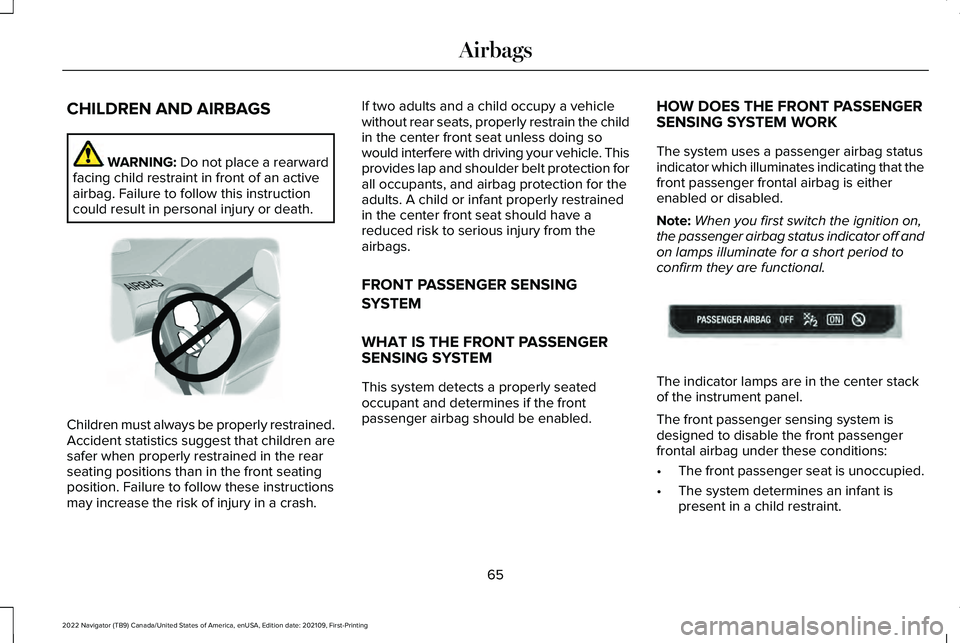
CHILDREN AND AIRBAGS
WARNING: Do not place a rearward
facing child restraint in front of an active
airbag. Failure to follow this instruction
could result in personal injury or death. Children must always be properly restrained.
Accident statistics suggest that children are
safer when properly restrained in the rear
seating positions than in the front seating
position. Failure to follow these instructions
may increase the risk of injury in a crash. If two adults and a child occupy a vehicle
without rear seats, properly restrain the child
in the center front seat unless doing so
would interfere with driving your vehicle. This
provides lap and shoulder belt protection for
all occupants, and airbag protection for the
adults. A child or infant properly restrained
in the center front seat should have a
reduced risk to serious injury from the
airbags.
FRONT PASSENGER SENSING
SYSTEM
WHAT IS THE FRONT PASSENGER
SENSING SYSTEM
This system detects a properly seated
occupant and determines if the front
passenger airbag should be enabled.
HOW DOES THE FRONT PASSENGER
SENSING SYSTEM WORK
The system uses a passenger airbag status
indicator which illuminates indicating that the
front passenger frontal airbag is either
enabled or disabled.
Note:
When you first switch the ignition on,
the passenger airbag status indicator off and
on lamps illuminate for a short period to
confirm they are functional. The indicator lamps are in the center stack
of the instrument panel.
The front passenger sensing system is
designed to disable the front passenger
frontal airbag under these conditions:
•
The front passenger seat is unoccupied.
• The system determines an infant is
present in a child restraint.
65
2022 Navigator (TB9) Canada/United States of America, enUSA, Edition date: 202109, First-Printing AirbagsE142846 E181984
Page 71 of 646
•
Other passengers pushing or pulling on
the seat.
• Rear passenger feet and knees resting
or pushing on the seat.
The listed conditions could cause the weight
of a properly seated occupant to be
incorrectly interpreted by the front passenger
sensing system. The person in the front
passenger seat could appear heavier or
lighter due to the conditions listed. Make sure the front passenger
sensing system is operating
properly. See Crash Sensors and
Airbag Indicator (page 68).
If the airbag readiness light is on, do the
following:
• Pull your vehicle over.
• Switch your vehicle off. •
Check for any objects lodged underneath
the front passenger seat or cargo
interfering with the seat.
• Remove the obstruction if found.
• Restart your vehicle.
• Wait at least two minutes and verify that
the airbag readiness light in the
instrument cluster is no longer
illuminated.
• If the airbag readiness light in the
instrument cluster remains illuminated,
there may be a problem due to the front
passenger sensing system.
Do not attempt to repair or service the
system. Take your vehicle in for service
immediately.
If it is necessary to modify an advanced front
airbag system to accommodate a person
with disabilities, contact your Customer
Relationship Center.
See Contacting Us
(page 17). FRONT PASSENGER SENSING
SYSTEM PRECAUTIONS WARNING: Sitting improperly, out of
position or with the seatback reclined too
far can take weight off the seat cushion
and affect the decision of the passenger
sensing system, resulting in serious injury
or death in the event of a crash. Always sit
upright against your seat back, with your
feet on the floor. WARNING:
Any alteration or
modification to the front passenger seat
may affect the performance of the front
passenger sensing system. This could
seriously increase the risk of injury or
death.
67
2022 Navigator (TB9) Canada/United States of America, enUSA, Edition date: 202109, First-Printing AirbagsE67017
Page 73 of 646
The readiness light will not
illuminate immediately after you
switch the ignition on.
• The readiness light either flashes or stays
on.
• You hear a series of five tones. The tone
pattern repeats periodically until the
problem, the light or both are repaired.
If any of these things happen, even
intermittently, have the supplemental
restraint system serviced immediately.
Unless serviced, the system may not function
properly in the event of a crash. The fact that the seatbelt pretensioners or
front airbags did not activate for both front
seat occupants in a crash does not mean
that something is wrong with the system.
Rather, it means the restraints control module
determined the accident conditions (crash
severity, seatbelt usage) were not
appropriate to activate these safety devices.
•
The front airbags activate only in frontal
and near-frontal crashes. Front airbags
may activate in rollovers, side impacts or
rear impacts if the crash causes sufficient
frontal deceleration.
• The seatbelt pretensioners activate in
frontal, near-frontal and side crashes, and
in rollovers. •
The side airbags inflate in certain side
impact crashes or rollover events. Side
airbags may activate in other types of
crashes if the vehicle experiences
sufficient sideways motion or
deformation.
• The Safety Canopy inflates in certain side
impact crashes or rollover events. The
Safety Canopy may activate in other
types of crashes if the vehicle
experiences sufficient sideways motion
or deformation, or a certain likelihood of
rollover.
DISPOSING OF AIRBAGS
Contact your authorized dealer as soon as
possible. Airbags must be disposed of by
qualified personnel.
69
2022 Navigator (TB9) Canada/United States of America, enUSA, Edition date: 202109, First-Printing AirbagsE67017