fuel pressure LINCOLN NAVIGATOR 2022 Owners Manual
[x] Cancel search | Manufacturer: LINCOLN, Model Year: 2022, Model line: NAVIGATOR, Model: LINCOLN NAVIGATOR 2022Pages: 646, PDF Size: 7.29 MB
Page 8 of 646
Interior Lamp Function
.................................131
Adjusting the Instrument Panel Lighting Brightness ..................................................
132
Ambient Lighting ..........................................
132
Interior Lighting – Troubleshooting .........
132
Windows
Opening and Closing the Windows ........
133
Global Opening and Closing .....................
133
Window Bounce-Back .................................
134
Locking the Rear Window Controls .........
135
Interior Mirror
Interior Mirror Precautions .........................
136
Auto-Dimming Interior Mirror ....................
136
Exterior Mirrors
Adjusting the Exterior Mirrors ...................
137
Folding the Exterior Mirrors .......................
137
Auto-Dimming Exterior Mirror ...................
138
Moonroof
Opening and Closing the Sun Shade ......
139Opening and Closing the Moonroof
.......
139
Venting the Moonroof .................................
140
Moonroof Bounce-Back .............................
140
Instrument Cluster
Instrument Cluster Overview .....................
141
Tachometer ....................................................
142
Speedometer ................................................
142
Fuel Gauge ....................................................
142
Engine Coolant Temperature Gauge ......
143
Engine Oil Pressure Gauge .......................
143
Transmission Fluid Temperature Gauge .......................................................................
143
What Are the Instrument Cluster Warning Lamps ..........................................................
143
Instrument Cluster Warning Lamps .........
143
What Are the Instrument Cluster Indicators .......................................................................
145
Instrument Cluster Indicators ....................
145
Instrument Cluster Display
Using the Instrument Cluster Display Controls ......................................................
147Instrument Cluster Display Main Menu
.......................................................................
147
Trip Computer ...............................................
148
Customizing the Instrument Cluster Display .......................................................................
149
Personalized Settings
Changing the Language ............................
150
Changing the Measurement Unit ............
150
Changing the Temperature Unit ..............
150
Changing the Tire Pressure Unit .............
150
Head Up Display
What Is the Head Up Display .....................
151
Switching the Head Up Display On and Off ........................................................................\
151
Head Up Display Settings ...........................
151
Head Up Display Indicators .......................
153
Head Up Display – Troubleshooting .......
154
Remote Start
What Is Remote Start ...................................
155
Remote Start Precautions ..........................
155
Remote Start Limitations ............................
155
4
2022 Navigator (TB9) Canada/United States of America, enUSA, Edition date: 202109, First-Printing Table of Contents
Page 17 of 646
Towing Your Vehicle – Troubleshooting
......................................................................400
Fuses
Fuse Precautions .........................................
401
Under Hood Fuse Box ................................
401
Body Control Module Fuse Box ..............
408
Identifying Fuse Types ................................
413
Fuses – Troubleshooting ...........................
413
Maintenance
Maintenance Precautions ..........................
414
Opening and Closing the Hood ...............
414
Under Hood Overview ................................
415
Engine Oil .......................................................
417
Checking the Coolant .................................
418
Engine Air Filter ...........................................
422
Changing the Fuel Filter ............................
423
Changing the 12V Battery .........................
423
Adjusting the Headlamps .........................
426
Exterior Bulbs ...............................................
428
Interior Bulbs ................................................
428
Drive Belt Routing .......................................
428Vehicle Care
Cleaning Products
......................................
429
Cleaning the Exterior .................................
430
Cleaning the Interior ...................................
432
Repairing Minor Paint Damage ................
434
Waxing Your Vehicle ...................................
434
Storing Your Vehicle
Preparing Your Vehicle for Storage ........
435
Removing Your Vehicle From Storage ......................................................................
436
Wheel and Tire Information
Locating the Tire label ...............................
437
Department of Transportation Uniform Tire Quality Grades .........................................
437
Information on the Tire Sidewall .............
438
Glossary of Tire Terminology ...................
443
Tire Replacement Requirements .............
444
Using Snow Chains .....................................
446
Tire Care
Checking the Tire Pressures ....................
449Inflating the Tires
.........................................
449
Inspecting the Tire for Wear .....................
449
Inspecting the Tire for Damage ..............
450
Inspecting the Wheel Valve Stems ..........
451
Tire Rotation ..................................................
451
Tire Pressure Monitoring System
What Is the Tire Pressure Monitoring System .......................................................
453
Tire Pressure Monitoring System Overview ......................................................................
453
Tire Pressure Monitoring System Precautions ...............................................
454
Tire Pressure Monitoring System Limitations ................................................
455
Viewing the Tire Pressures ......................
455
Resetting Tire Pressure Monitoring System ......................................................................
455
Tire Pressure Monitoring System – Troubleshooting ......................................
458
Changing a Road Wheel
Changing a Flat Tire ....................................
461
13
2022 Navigator (TB9) Canada/United States of America, enUSA, Edition date: 202109, First-Printing Table of Contents
Page 26 of 646
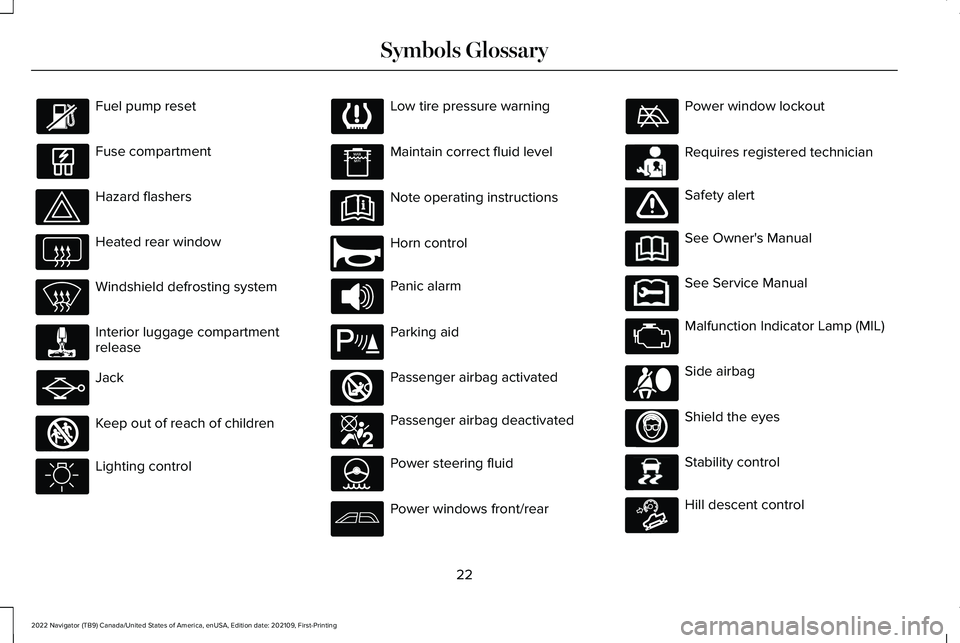
Fuel pump reset
Fuse compartment
Hazard flashers
Heated rear window
Windshield defrosting system
Interior luggage compartment
release
Jack
Keep out of reach of children
Lighting control Low tire pressure warning
Maintain correct fluid level
Note operating instructions
Horn control
Panic alarm
Parking aid
Passenger airbag activated
Passenger airbag deactivated
Power steering fluid
Power windows front/rear Power window lockout
Requires registered technician
Safety alert
See Owner's Manual
See Service Manual
Malfunction Indicator Lamp (MIL)
Side airbag
Shield the eyes
Stability control
Hill descent control
22
2022 Navigator (TB9) Canada/United States of America, enUSA, Edition date: 202109, First-Printing Symbols Glossary E161353 E270945 E139213 E270849 E270850 E231159 E65963 E231158 E167012 E138639 E163171
Page 28 of 646
WARNING: Do not connect wireless
plug-in devices to the data link connector.
Unauthorized third parties could gain
access to vehicle data and impair the
performance of safety related systems.
Only allow repair facilities that follow our
service and repair instructions to connect
their equipment to the data link connector.
We respect your privacy and are committed
to protecting it. The information contained
in this manual was correct at the time of
publication but as technology rapidly
changes, we recommend that you visit the
local Lincoln website for the latest
information.
Your vehicle has electronic control units that
have data recording functionality and the
ability to permanently or temporarily store
data. This data could include information on
the condition and status of your vehicle,
vehicle maintenance requirements, events
and malfunctions. The types of data that can
be recorded are described in this section.
Some of the data recorded is stored in event
logs or error logs. Note:
Error logs are reset following a service
or repair.
Note: We may provide information in
response to requests from law enforcement,
other government authorities and third
parties acting with lawful authority or through
a legal process. Such information could be
used by them in legal proceedings.
Data recorded includes, for example:
• Operating states of system components,
for example fuel level, tire pressure and
battery charge level.
• Vehicle and component status, for
example wheel speed, deceleration,
lateral acceleration and seatbelt status.
• Events or errors in essential systems, for
example headlamps and brakes.
• System responses to driving situations,
for example airbag deployment and
stability control.
• Environmental conditions, for example
temperature. Some of this data, when used in combination
with other information, for example an
accident report, damage to a vehicle or
eyewitness statements, could be associated
with a specific person.
Services That We Provide
If you use our services, we collect and use
data, for example account information,
vehicle location and driving characteristics,
that could identify you. We transmit this data
through a dedicated, protected connection.
We only collect and use data to enable your
use of our services to which you have
subscribed, with your consent or where
permitted by law. For additional information,
see the terms and conditions of the services
to which you have subscribed.
For additional information about our privacy
policy, refer to the local Lincoln website.
24
2022 Navigator (TB9) Canada/United States of America, enUSA, Edition date: 202109, First-Printing Data Privacy
Page 147 of 646
WHAT IS DISTANCE TO EMPTY
Indicates the approximate distance your
vehicle can travel on the fuel remaining in
the tank. Changes in driving pattern can
cause the value to not only decrease but also
increase or stay constant for periods of time.
ENGINE COOLANT TEMPERATURE
GAUGE
Indicates the engine coolant temperature.
ENGINE OIL PRESSURE GAUGE
Indicates the engine oil pressure.
Note:
This is a configurable gauge.
TRANSMISSION FLUID
TEMPERATURE GAUGE
Indicates the transmission fluid temperature. Special operating conditions can cause
higher than normal operating temperatures.
See Special Operating Conditions
Scheduled Maintenance (page 536).
Note: This is a configurable gauge.
WHAT ARE THE INSTRUMENT
CLUSTER WARNING LAMPS
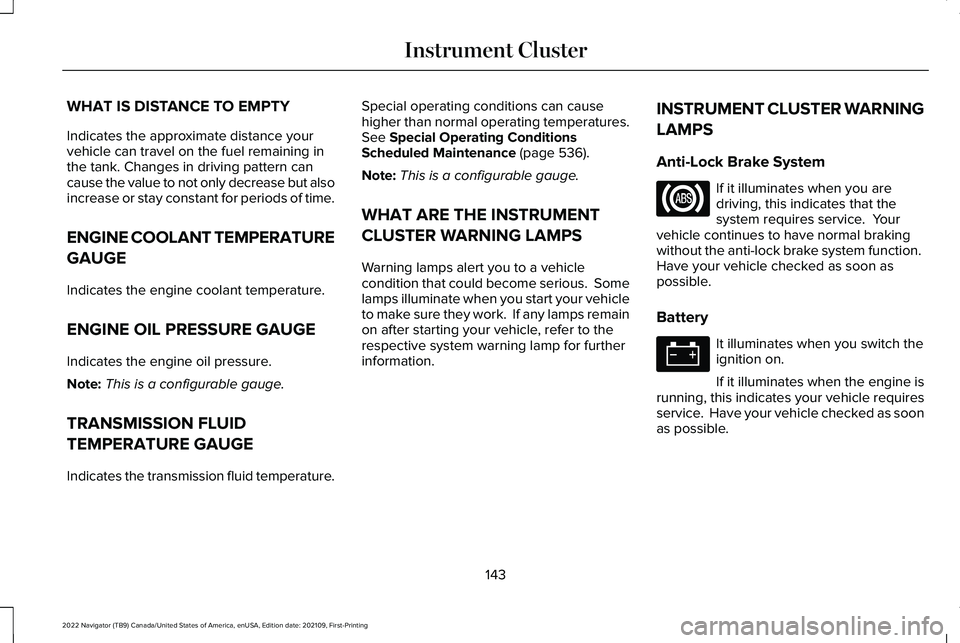
Warning lamps alert you to a vehicle
condition that could become serious. Some
lamps illuminate when you start your vehicle
to make sure they work. If any lamps remain
on after starting your vehicle, refer to the
respective system warning lamp for further
information. INSTRUMENT CLUSTER WARNING
LAMPS
Anti-Lock Brake System If it illuminates when you are
driving, this indicates that the
system requires service. Your
vehicle continues to have normal braking
without the anti-lock brake system function.
Have your vehicle checked as soon as
possible.
Battery It illuminates when you switch the
ignition on.
If it illuminates when the engine is
running, this indicates your vehicle requires
service. Have your vehicle checked as soon
as possible.
143
2022 Navigator (TB9) Canada/United States of America, enUSA, Edition date: 202109, First-Printing Instrument Cluster
Page 148 of 646
Brake System
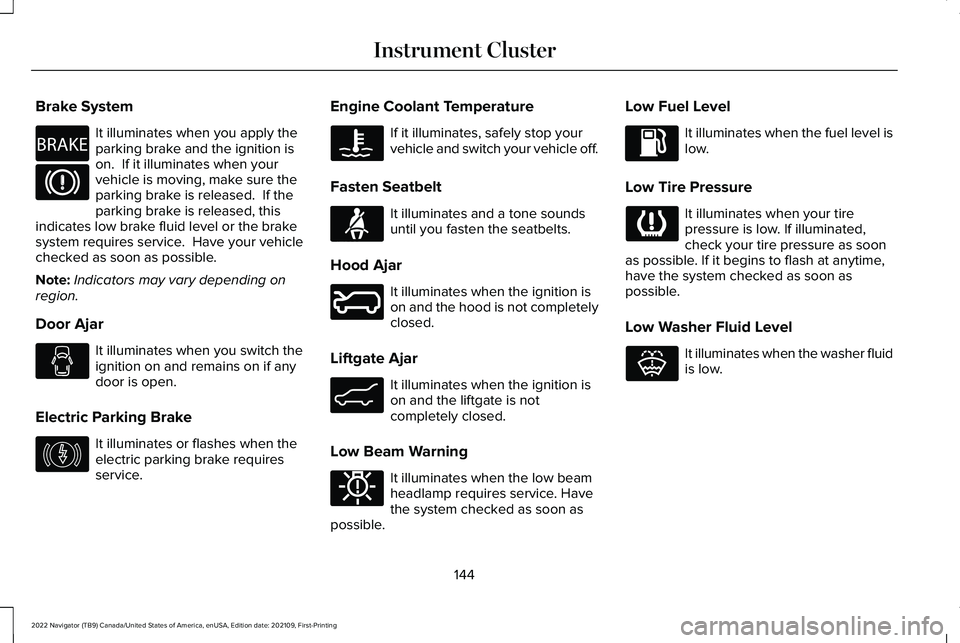
It illuminates when you apply the
parking brake and the ignition is
on. If it illuminates when your
vehicle is moving, make sure the
parking brake is released. If the
parking brake is released, this
indicates low brake fluid level or the brake
system requires service. Have your vehicle
checked as soon as possible.
Note: Indicators may vary depending on
region.
Door Ajar It illuminates when you switch the
ignition on and remains on if any
door is open.
Electric Parking Brake It illuminates or flashes when the
electric parking brake requires
service. Engine Coolant Temperature If it illuminates, safely stop your
vehicle and switch your vehicle off.
Fasten Seatbelt It illuminates and a tone sounds
until you fasten the seatbelts.
Hood Ajar It illuminates when the ignition is
on and the hood is not completely
closed.
Liftgate Ajar It illuminates when the ignition is
on and the liftgate is not
completely closed.
Low Beam Warning It illuminates when the low beam
headlamp requires service. Have
the system checked as soon as
possible. Low Fuel Level It illuminates when the fuel level is
low.
Low Tire Pressure It illuminates when your tire
pressure is low. If illuminated,
check your tire pressure as soon
as possible. If it begins to flash at anytime,
have the system checked as soon as
possible.
Low Washer Fluid Level It illuminates when the washer fluid
is low.
144
2022 Navigator (TB9) Canada/United States of America, enUSA, Edition date: 202109, First-Printing Instrument ClusterE270480 E146190 E71880 E246598 E162453 E181350 E132353
Page 214 of 646
FUEL AND REFUELING
PRECAUTIONS
WARNING: Do not overfill the fuel
tank. The pressure in an overfilled tank
may cause leakage and lead to fuel spray
and fire. WARNING:
The fuel system may be
under pressure. If you hear a hissing sound
near the fuel filler inlet, do not refuel until
the sound stops. Otherwise, fuel may spray
out, which could cause serious personal
injury. WARNING:
Fuels can cause serious
injury or death if misused or mishandled. WARNING:
Fuel may contain
benzene, which is a cancer-causing agent. WARNING:
When refueling always
shut the engine off and never allow sparks
or open flames near the fuel tank filler
valve. Never smoke or use a cell phone
while refueling. Fuel vapor is extremely
hazardous under certain conditions. Avoid
inhaling excess fumes. WARNING:
Read and follow all the
instructions on the pump island.
Follow these guidelines when refueling:
• Extinguish all smoking materials and any
open flames before refueling your
vehicle.
• Switch the engine off before refueling.
• Automotive fuels can be harmful or fatal
if swallowed. Fuel is highly toxic and if
swallowed can cause death or permanent
injury. If fuel is swallowed immediately
call a physician, even if no symptoms are
immediately apparent. The toxic effects
of fuel may not be apparent for hours. •
Avoid inhaling fuel vapors. Inhaling fuel
vapor can lead to eye and respiratory
tract irritation. In severe cases, excessive
or prolonged breathing of fuel vapor can
cause serious illness and permanent
injury.
• Avoid getting fuel in your eyes. If you
splash fuel in your eyes, immediately
remove contact lenses, if worn, flush with
water for 15 minutes and seek medical
attention. Failure to seek proper medical
attention could lead to permanent injury.
• Fuels can be harmful if absorbed through
the skin. If you splash fuel on your skin,
clothing or both, promptly remove
contaminated clothing and thoroughly
wash your skin with soap and water.
Repeated or prolonged skin contact
causes skin irritation.
• Be particularly careful if you are taking
Antabuse or other forms of Disulfiram for
the treatment of alcoholism. Breathing
fuel vapors could cause an adverse
reaction, serious personal injury or
sickness. Immediately call a physician if
you experience any adverse reactions.
210
2022 Navigator (TB9) Canada/United States of America, enUSA, Edition date: 202109, First-Printing Fuel and Refueling
Page 217 of 646
6. Clean the fuel filler funnel and place it
back in your vehicle or correctly dispose
of it.
Note: If your vehicle runs out of fuel add a
minimum of 1.3 gal (5 L) of fuel to restart the
engine.
Note: You may need to switch the ignition
from off to on several times after refueling
to allow the fuel system to pump the fuel
from the tank to the engine. When restarting,
cranking time takes a few seconds longer
than normal.
Note: Extra funnels can be purchased from
an authorized dealer if you choose to
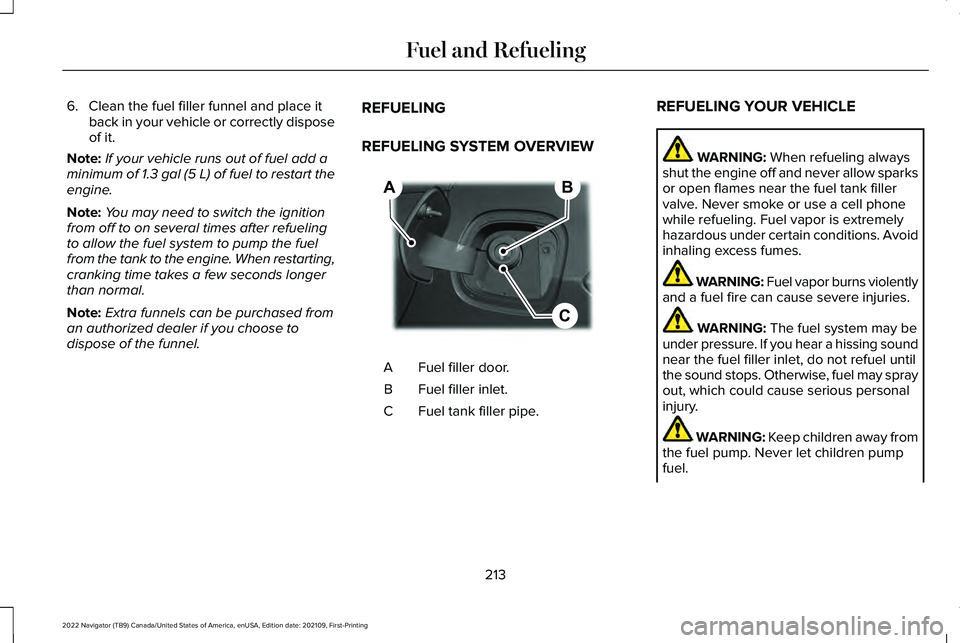
dispose of the funnel. REFUELING
REFUELING SYSTEM OVERVIEW Fuel filler door.
A
Fuel filler inlet.
B
Fuel tank filler pipe.
C REFUELING YOUR VEHICLE WARNING: When refueling always
shut the engine off and never allow sparks
or open flames near the fuel tank filler
valve. Never smoke or use a cell phone
while refueling. Fuel vapor is extremely
hazardous under certain conditions. Avoid
inhaling excess fumes. WARNING: Fuel vapor burns violently
and a fuel fire can cause severe injuries. WARNING:
The fuel system may be
under pressure. If you hear a hissing sound
near the fuel filler inlet, do not refuel until
the sound stops. Otherwise, fuel may spray
out, which could cause serious personal
injury. WARNING: Keep children away from
the fuel pump. Never let children pump
fuel.
213
2022 Navigator (TB9) Canada/United States of America, enUSA, Edition date: 202109, First-Printing Fuel and RefuelingB
C
A E267248
Page 218 of 646
WARNING: Do not pry open the fuel
tank filler valve. This could damage the fuel
system. Failure to follow this instruction
could result in fire, personal injury or death. WARNING: Stay outside your vehicle
and do not leave the fuel pump unattended
when refueling your vehicle. WARNING:
Do not remove the fuel
pump nozzle from its fully inserted position
when refueling. WARNING:
Stop refueling when the
fuel pump nozzle automatically shuts off
for the first time. Failure to follow this will
fill the expansion space in the fuel tank and
could lead to fuel overflowing. WARNING:
Do not overfill the fuel
tank. The pressure in an overfilled tank
may cause leakage and lead to fuel spray
and fire. WARNING: Wait at least five seconds
before removing the fuel pump nozzle to
allow any residual fuel to drain into the fuel
tank.
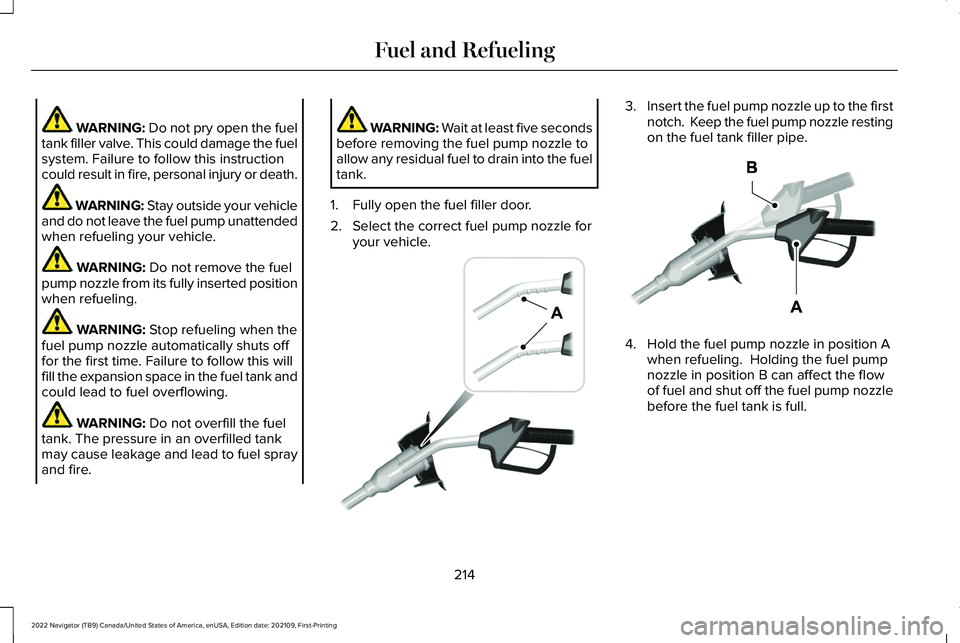
1. Fully open the fuel filler door.
2. Select the correct fuel pump nozzle for your vehicle. 3.
Insert the fuel pump nozzle up to the first
notch. Keep the fuel pump nozzle resting
on the fuel tank filler pipe. 4. Hold the fuel pump nozzle in position A
when refueling. Holding the fuel pump
nozzle in position B can affect the flow
of fuel and shut off the fuel pump nozzle
before the fuel tank is full.
214
2022 Navigator (TB9) Canada/United States of America, enUSA, Edition date: 202109, First-Printing Fuel and RefuelingE139202 E327438
Page 389 of 646
BREAKING-IN
Your vehicle requires a break-in period. For
the first 1,000 mi (1,600 km), avoid driving at
high speeds, heavy braking, aggressive
shifting or using your vehicle to tow. During
this time, your vehicle may exhibit some
unusual driving characteristics.
DRIVING ECONOMICALLY
The following helps to improve fuel
consumption:
•
Drive smoothly, accelerate gently and
anticipate the road ahead to avoid heavy
braking.
• Regularly check your tire pressures and
make sure that they are inflated to the
correct pressure.
• Follow the recommended maintenance
schedule and carry out the
recommended checks.
• Plan your journey and check the traffic
before you set off. It is more efficient to
combine errands into a single trip
whenever possible. •
Avoid idling the engine in cold weather
or for extended periods. Start the engine
only when you are ready to set off.
• Do not carry unnecessary weight in your
vehicle as extra weight wastes fuel.
• Do not add unnecessary accessories to
the exterior of your vehicle, for example
running boards. If you use a roof rack,
remember to fold it down or remove it
when not in use.
• Do not shift into neutral when you are
braking or when your vehicle is slowing
down.
• Shut all windows when driving at high
speeds.
• Switch off all electric systems when not
in use, for example air conditioning. Make
sure that you unplug any accessories
from the auxiliary power points when not
in use. DRIVING IN SPECIAL CONDITIONS
EMERGENCY MANEUVERS
In an unavoidable emergency where you
must make a sudden sharp maneuver, turn
the steering wheel only as rapidly and as far
as required to avoid the emergency. Apply
smooth pressure to the accelerator pedal or
brake pedal as needed. Avoid abrupt
steering, acceleration and braking changes.
Abrupt changes could increase the risk of
vehicle roll over, loss of vehicle control and
personal injury. If possible, use any available
road surfaces to bring your vehicle under
control.
385
2022 Navigator (TB9) Canada/United States of America, enUSA, Edition date: 202109, First-Printing Driving Hints