lights LINCOLN NAVIGATOR 2022 Owners Manual
[x] Cancel search | Manufacturer: LINCOLN, Model Year: 2022, Model line: NAVIGATOR, Model: LINCOLN NAVIGATOR 2022Pages: 646, PDF Size: 7.29 MB
Page 64 of 646
WHAT IS THE PERSONAL SAFETY
SYSTEM
An advanced safety system that protects
occupants in frontal crashes.
HOW DOES THE PERSONAL
SAFETY SYSTEM WORK
This system provides an improved level of
frontal crash protection to front seat
occupants and is designed to reduce the risk
of airbag-related injuries. The system
analyzes occupant conditions and crash
severity before activating the appropriate
safety devices. During a crash, the restraints
control module may deploy the seatbelt
pretensioners, and one or both stages of the
dual-stage airbags based on crash severity
and occupant conditions.
PERSONAL SAFETY SYSTEM
COMPONENTS
•
Driver and passenger dual-stage airbag
supplemental restraints.
• Front seat outermost seatbelts with
pretensioners, energy management
retractors and seatbelt usage sensors.
• Driver seat position sensor.
• Front passenger sensing system.
• Passenger airbag off and on indicators.
• Front crash severity sensors.
• Restraints control module with impact
and safing sensors.
• Restraint system warning light and tone.
• The electrical wiring for the airbags, crash
sensors, seatbelt pretensioners, front
seatbelt usage sensors, driver seat
position sensor, front passenger sensing
system and indicator lights.
60
2022 Navigator (TB9) Canada/United States of America, enUSA, Edition date: 202109, First-Printing Personal Safety System
™
Page 126 of 646
EXTERIOR LAMPS
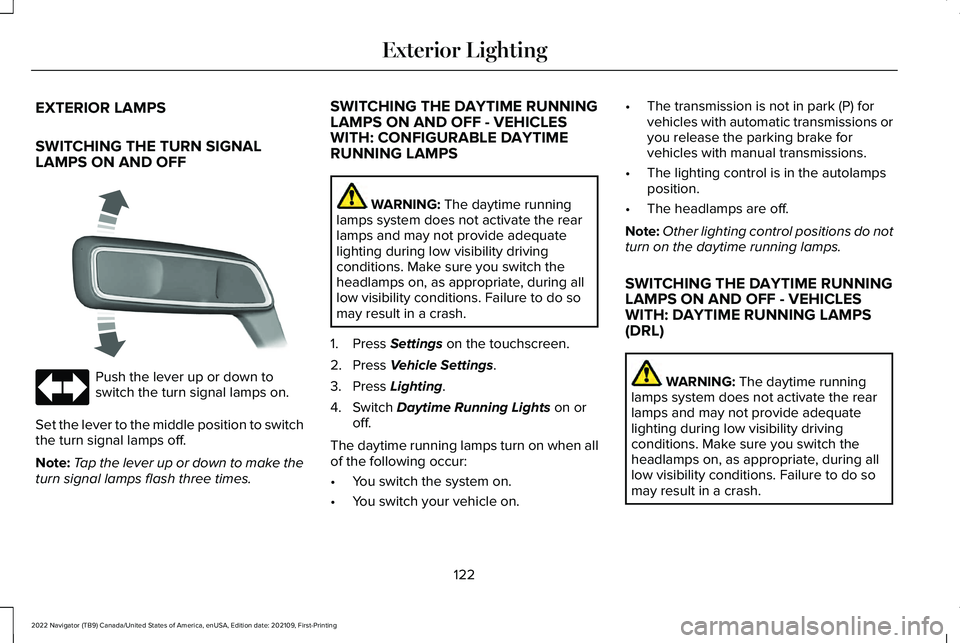
SWITCHING THE TURN SIGNAL
LAMPS ON AND OFF
Push the lever up or down to
switch the turn signal lamps on.
Set the lever to the middle position to switch
the turn signal lamps off.
Note: Tap the lever up or down to make the
turn signal lamps flash three times. SWITCHING THE DAYTIME RUNNING
LAMPS ON AND OFF - VEHICLES
WITH: CONFIGURABLE DAYTIME
RUNNING LAMPS WARNING: The daytime running
lamps system does not activate the rear
lamps and may not provide adequate
lighting during low visibility driving
conditions. Make sure you switch the
headlamps on, as appropriate, during all
low visibility conditions. Failure to do so
may result in a crash.
1. Press
Settings on the touchscreen.
2. Press
Vehicle Settings.
3. Press
Lighting.
4. Switch
Daytime Running Lights on or
off.
The daytime running lamps turn on when all
of the following occur:
• You switch the system on.
• You switch your vehicle on. •
The transmission is not in park (P) for
vehicles with automatic transmissions or
you release the parking brake for
vehicles with manual transmissions.
• The lighting control is in the autolamps
position.
• The headlamps are off.
Note: Other lighting control positions do not
turn on the daytime running lamps.
SWITCHING THE DAYTIME RUNNING
LAMPS ON AND OFF - VEHICLES
WITH: DAYTIME RUNNING LAMPS
(DRL) WARNING:
The daytime running
lamps system does not activate the rear
lamps and may not provide adequate
lighting during low visibility driving
conditions. Make sure you switch the
headlamps on, as appropriate, during all
low visibility conditions. Failure to do so
may result in a crash.
122
2022 Navigator (TB9) Canada/United States of America, enUSA, Edition date: 202109, First-Printing Exterior Lighting E273180
Page 128 of 646
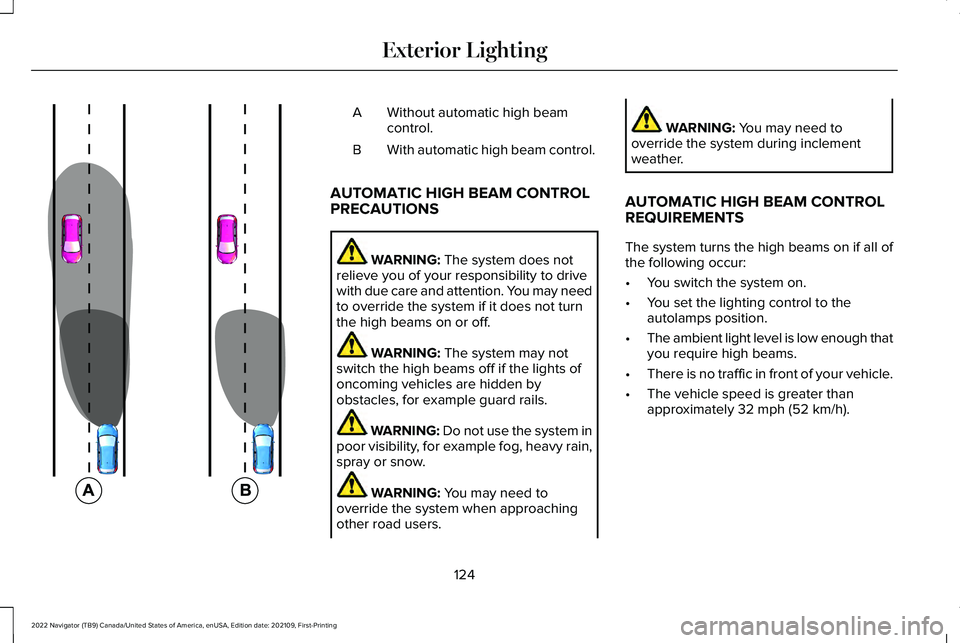
Without automatic high beam
control.
A
With automatic high beam control.
B
AUTOMATIC HIGH BEAM CONTROL
PRECAUTIONS WARNING: The system does not
relieve you of your responsibility to drive
with due care and attention. You may need
to override the system if it does not turn
the high beams on or off. WARNING:
The system may not
switch the high beams off if the lights of
oncoming vehicles are hidden by
obstacles, for example guard rails. WARNING:
Do not use the system in
poor visibility, for example fog, heavy rain,
spray or snow. WARNING:
You may need to
override the system when approaching
other road users. WARNING:
You may need to
override the system during inclement
weather.
AUTOMATIC HIGH BEAM CONTROL
REQUIREMENTS
The system turns the high beams on if all of
the following occur:
• You switch the system on.
• You set the lighting control to the
autolamps position.
• The ambient light level is low enough that
you require high beams.
• There is no traffic in front of your vehicle.
• The vehicle speed is greater than
approximately
32 mph (52 km/h).
124
2022 Navigator (TB9) Canada/United States of America, enUSA, Edition date: 202109, First-Printing Exterior Lighting E327596
Page 131 of 646
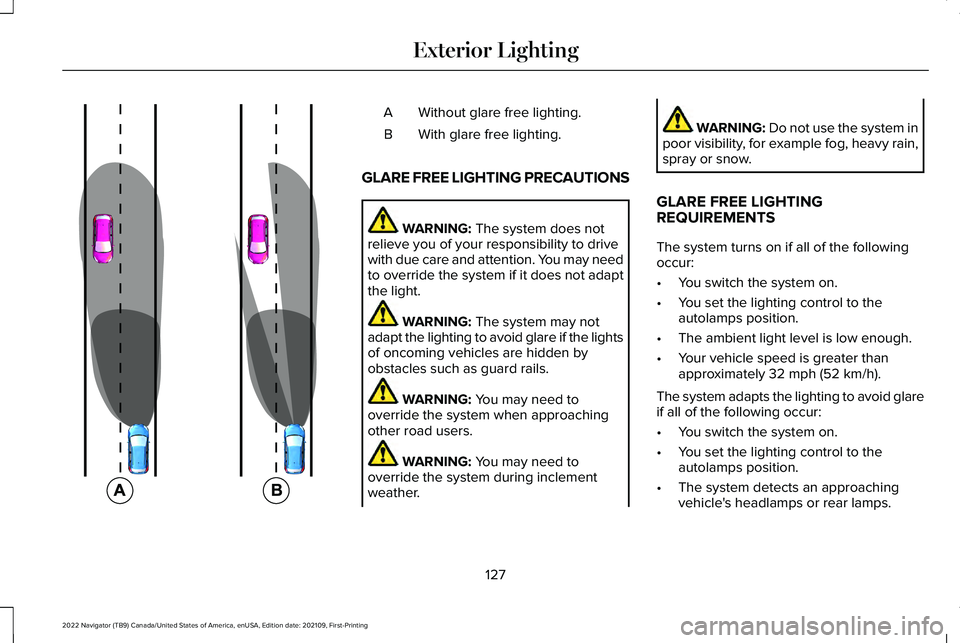
Without glare free lighting.
A
With glare free lighting.
B
GLARE FREE LIGHTING PRECAUTIONS WARNING: The system does not
relieve you of your responsibility to drive
with due care and attention. You may need
to override the system if it does not adapt
the light. WARNING:
The system may not
adapt the lighting to avoid glare if the lights
of oncoming vehicles are hidden by
obstacles such as guard rails. WARNING:
You may need to
override the system when approaching
other road users. WARNING:
You may need to
override the system during inclement
weather. WARNING:
Do not use the system in
poor visibility, for example fog, heavy rain,
spray or snow.
GLARE FREE LIGHTING
REQUIREMENTS
The system turns on if all of the following
occur:
• You switch the system on.
• You set the lighting control to the
autolamps position.
• The ambient light level is low enough.
• Your vehicle speed is greater than
approximately
32 mph (52 km/h).
The system adapts the lighting to avoid glare
if all of the following occur:
• You switch the system on.
• You set the lighting control to the
autolamps position.
• The system detects an approaching
vehicle's headlamps or rear lamps.
127
2022 Navigator (TB9) Canada/United States of America, enUSA, Edition date: 202109, First-Printing Exterior Lighting E220921
Page 164 of 646
Directing Air to the Windshield Air
Vents
Press the button to activate the
selection screen.
Press the button on the
touchscreen.
Directing Air to the Instrument Panel
Air Vents Press the button to activate the
selection screen.
Press the button on the
touchscreen.
Directing Air to the Footwell Air Vents Press the button to activate the
selection screen.
Press the button on the
touchscreen.
AUTO MODE
SWITCHING AUTO MODE ON AND
OFF Press the button to switch auto
mode on. Repeatedly press the
button to adjust auto mode.
Note:
When you switch auto mode on, lights
on the blower motor control do not illuminate
to indicate the blower motor speed.
Adjust the blower motor control or air
distribution control to switch auto mode off.
AUTO MODE INDICATORS
The indicators are on the Auto Mode button. Description
Auto Mode Indicator Status
The blower motor speed is reduced. Use this setting to minimize the amou\
nt of noise from the
blower motor. This setting increases the time taken to cool the interior.
One indicator illuminated.
The blower motor speed is moderate.
Two indicators illuminated.
The blower motor speed is increased. Use this setting to reduce the time\
taken to cool the interior.
This setting increases the amount of noise from the blower motor.
Three indicators illuminated.
160
2022 Navigator (TB9) Canada/United States of America, enUSA, Edition date: 202109, First-Printing Climate ControlE265283 E265283 E244097 E265283
Page 176 of 646
HEATED SEATS
HEATED SEAT PRECAUTIONS
WARNING: Use caution when using
the heated seat if you are unable to feel
pain to your skin because of advanced
age, chronic illness, diabetes, spinal cord
injury, medication, alcohol use, exhaustion
or other physical conditions. The heated
seat could cause burns even at low
temperatures, especially if used for long
periods of time. Failure to follow this
instruction could result in personal injury. WARNING:
Do not poke sharp
objects into the seat cushion or seat
backrest. This could damage the heated
seat element and cause it to overheat.
Failure to follow this instruction could result
in personal injury. WARNING:
Do not place anything on
the seat that blocks the heat, for example
a seat cover or a cushion. This could cause
the seat to overheat. Failure to follow this
instruction could result in personal injury.
Do not:
• Place heavy objects on the seat.
• Operate the heated seat if water or any
other liquid spills on the seat. Allow the
seat to dry.
SWITCHING THE HEATED SEATS ON
AND OFF
The vehicle must be running to use this
feature. Press the heated seat symbol to cycle
through the various heat settings and off.
More indicator lights indicate warmer
settings.
Note:
The heated seats may remain on after
you remote start your vehicle, based on your
remote start settings. The heated seats may
also turn on when you start your vehicle if
they were on when you switched your
vehicle off.
Automatic Climate Controlled Seats
(If
Equipped)
When you switch the auto setting on, the
climate controlled seats switch between the
heated seats and ventilated seats to match
your climate control setting.
172
2022 Navigator (TB9) Canada/United States of America, enUSA, Edition date: 202109, First-Printing Front SeatsE146322
Page 177 of 646
VENTILATED SEATS
VENTILATED SEAT PRECAUTIONS
Do not:
•
Spill liquid on the front seats. This may
cause the air vent holes to become
blocked and not work properly.
• Place cargo or objects under the seats.
They may block the air intake causing
the air vents to not work properly.
SWITCHING THE VENTILATED SEATS
ON AND OFF
The vehicle must be running to use this
feature. Press this symbol on the climate controls or
the touchscreen to cycle through the various
ventilation settings and off. More indicator
lights indicate higher fan speeds.
Note:
When you switch the climate control
fan speed and the ventilated seats to their
maximum settings, the ventilated seats
provide increased cooling.
If the engine falls below 350 RPM while the
ventilated seats are on, the feature turns
itself off unless the vehicle is in
Auto-Start-Stop mode. You may need to
reactivate the ventilated seats.
Note: The ventilated seats may remain on
after you remote start your vehicle, based
on your remote start settings. The ventilated
seats may also turn on when you start your
vehicle if they were on when you switched
your vehicle off.
173
2022 Navigator (TB9) Canada/United States of America, enUSA, Edition date: 202109, First-Printing Front SeatsE224689
Page 186 of 646
The rear seat heat controls are on the rear
of the center console.
Press the heated seat symbol to cycle
through the various heat settings and off.
More indicator lights indicate warmer
settings.
Note:
The heated seats may remain on after
you remote start your vehicle, based on your
remote start settings. The heated seats may
also turn on when you start your vehicle if
they were on when you switched your
vehicle off. Automatic Climate Controlled Seats (If
Equipped)
When you switch the auto setting on, the
climate controlled seats switch between the
heated seats and ventilated seats to match
your climate control setting.
VENTILATED SEATS
VENTILATED SEAT PRECAUTIONS
Do not:
• Spill liquid on the seats. This may cause
the air vent holes to become blocked and
not work properly.
• Place cargo or objects under the seats.
They may block the air intake causing
the air vents to not work properly.
SWITCHING THE VENTILATED SEATS
ON AND OFF
The vehicle must be running to use this
feature. Press this symbol on the climate controls or
the rear touchscreen to cycle through the
various ventilation settings and off. More
indicator lights indicate higher fan speeds.
Note:
When you switch the climate control
fan speed and the ventilated seats to their
maximum settings, the ventilated seats
provide increased cooling.
If the engine falls below 350 RPM while the
ventilated seats are on, the feature switches
itself off unless the vehicle is in
Auto-Start-Stop mode. You may need to
reactivate the ventilated seats.
Note: The ventilated seats may remain on
after you remote start your vehicle, based
on your remote start settings. The ventilated
seats may also switch on when you start
your vehicle if they were on when you
switched your vehicle off.
182
2022 Navigator (TB9) Canada/United States of America, enUSA, Edition date: 202109, First-Printing Rear SeatsE146322 E224689
Page 211 of 646
WHAT IS AUTO-START-STOP
The system is designed to help reduce fuel
consumption and CO
2 emissions by stopping
the engine when it is idling, for example at
traffic lights.
AUTO-START-STOP PRECAUTIONS WARNING: Apply the parking brake,
shift into park (P), switch the ignition off
and remove the key before you leave your
vehicle. Failure to follow this instruction
could result in personal injury or death. WARNING: Apply the parking brake,
shift into park (P), switch the ignition off
and remove the key before you open the
hood or have any service or repair work
completed. If you do not switch the ignition
off, the engine could restart at any time.
Failure to follow this instruction could result
in personal injury or death. SWITCHING AUTO-START-STOP
ON AND OFF
The system turns on when you switch the
ignition on. Press the button to switch the
system off.
Note: OFF illuminates in the switch.
Note: Deactivating the system using the
button lasts only one key cycle.
Press the button again to switch the system
back on.
Note: The system turns off if it detects a
malfunction. If the system malfunctions,
have your vehicle checked as soon as
possible.
STOPPING THE ENGINE
Stop your vehicle, keep your foot on the
brake pedal and the transmission in drive
(D). RESTARTING THE ENGINE
Release the brake pedal or press the
accelerator pedal.
A message appears in the information
display if the system requires you to take
action.
AUTO-START-STOP INDICATORS
WARNING:
The system may require
the engine to automatically restart when
the auto-start-stop indicator illuminates
green or flashes amber. Failure to follow
this instruction could result in personal
injury. The Auto-Start-Stop indicator
illuminates green when the engine
stops. It flashes amber and a
message appears when you need to take
action.
207
2022 Navigator (TB9) Canada/United States of America, enUSA, Edition date: 202109, First-Printing Auto-Start-Stop
Page 276 of 646
Note:
Keep the front of your vehicle free of
dirt, metal badges or objects. Vehicle front
protectors, aftermarket lights, additional
paint or plastic coatings could also degrade
sensor performance.
A message displays if something obstructs
the camera or the sensor. When something
blocks the sensor, the system cannot detect
a vehicle ahead and does not function. See
Adaptive Cruise Control – Information
Messages (page 283).
The radar sensor has a limited field of view.
It may not detect vehicles at all or detect a
vehicle later than expected in some
situations. The lead vehicle image does not
illuminate if the system does not detect a
vehicle in front of you.
272
2022 Navigator (TB9) Canada/United States of America, enUSA, Edition date: 202109, First-Printing Adaptive Cruise Control