power steering LINCOLN NAVIGATOR 2022 Owners Manual
[x] Cancel search | Manufacturer: LINCOLN, Model Year: 2022, Model line: NAVIGATOR, Model: LINCOLN NAVIGATOR 2022Pages: 646, PDF Size: 7.29 MB
Page 7 of 646
Liftgate
Liftgate Precautions
......................................98
Opening the Liftgate .....................................
98
Setting the Liftgate Opening Height .......
100
Closing the Liftgate .....................................
100
Stopping the Liftgate Movement .............
103
Liftgate Obstacle Detection ......................
103
Opening and Closing the Liftgate Window .......................................................................
103
Liftgate – Troubleshooting ........................
104
Security
Passive Anti-Theft System .........................
106
Anti-Theft Alarm System ............................
106
Anti-Theft Alarm System Settings ............
107
Security – Troubleshooting .......................
108
Power Running Boards
Power Running Board Precautions ..........
110
Power Running Board Settings .................
110
Deploying and Stowing the Power Running Boards .........................................................
110Power Running Boards – Troubleshooting
........................................................................\
.
111
Steering Wheel
Adjusting the Steering Wheel ....................
112
Resetting the Stopping Position ................
112
Horn ..................................................................
112
Switching the Heated Steering Wheel On and Off .........................................................
112
Adjustable Pedals
Adjusting the Pedals ....................................
113
Wipers and Washers
Wipers ..............................................................
114
Autowipers ......................................................
114
Switching the Rear Window Wiper On and Off .................................................................
115
Reverse Wipe .................................................
115
Checking the Wiper Blades ........................
116
Replacing the Front Wiper Blades ............
116
Replacing the Rear Wiper Blades .............
117
Washers ...........................................................
117Wipers and Washers – Troubleshooting
........................................................................\
119
Exterior Lighting
Exterior Lighting Control ............................
120
Headlamps ....................................................
120
Headlamps – Troubleshooting ..................
121
Autolamps .......................................................
121
Exterior Lamps ..............................................
122
Automatic High Beam Control ..................
123
Automatic High Beam Control – Troubleshooting .......................................
126
Glare Free Lighting ......................................
126
Glare Free Lighting – Troubleshooting .......................................................................
129
Adaptive Front Lighting ..............................
129
Interior Lighting
Switching All of the Interior Lamps On and Off .................................................................
131
Switching the Front Interior Lamps On and Off .................................................................
131
Switching the Rear Interior Lamps On and Off .................................................................
131
3
2022 Navigator (TB9) Canada/United States of America, enUSA, Edition date: 202109, First-Printing Table of Contents
Page 12 of 646
Applying the Electric Parking Brake
......236
Applying the Electric Parking Brake in an Emergency ...............................................
236
Manually Releasing the Electric Parking Brake ..........................................................
236
Automatically Releasing the Electric Parking Brake ...........................................
237
Electric Parking Brake Audible Warning ......................................................................
237
Releasing the Electric Parking Brake if the Vehicle Battery Has Run Out of Charge
......................................................................
237
Electric Parking Brake – Troubleshooting ......................................................................
237
Reverse Braking Assist
What Is Reverse Braking Assist ...............
239
How Does Reverse Braking Assist Work ......................................................................
239
Reverse Braking Assist Precautions ......
239
Switching Reverse Braking Assist On and Off ...............................................................
240
Overriding Reverse Braking Assist ........
240
Reverse Braking Assist Indicators ..........
240Reverse Braking Assist – Troubleshooting
.......................................................................
241
Hill Start Assist
What Is Hill Start Assist ..............................
243
How Does Hill Start Assist Work .............
243
Hill Start Assist Precautions ......................
243
Hill Start Assist – Troubleshooting .........
243
Auto Hold
How Does Auto Hold Work ......................
244
Switching Auto Hold On and Off .............
244
Using Auto Hold ..........................................
244
Auto Hold Indicators ..................................
245
Traction Control
What Is Traction Control ............................
246
How Does Traction Control Work ...........
246
Switching Traction Control On and Off ......................................................................
246
Traction Control Indicator .........................
246
Traction Control – Troubleshooting ........
247Stability Control
How Does Stability Control Work
...........
248
Switching Stability Control On and Off ......................................................................
249
Stability Control Indicator .........................
250
Hill Descent Control
What Is Hill Descent Control .....................
251
How Does Hill Descent Control Work .......................................................................
251
Hill Descent Control Precautions .............
251
Switching Hill Descent Control On and Off .......................................................................
251
Setting the Hill Descent Speed ................
251
Hill Descent Control Indicator .................
252
Hill Descent Control – Troubleshooting ......................................................................
252
Steering
Electric Power Steering .............................
253
Steering – Troubleshooting ......................
254
Parking Aids
Parking Aid Precautions ............................
255
8
2022 Navigator (TB9) Canada/United States of America, enUSA, Edition date: 202109, First-Printing Table of Contents
Page 26 of 646
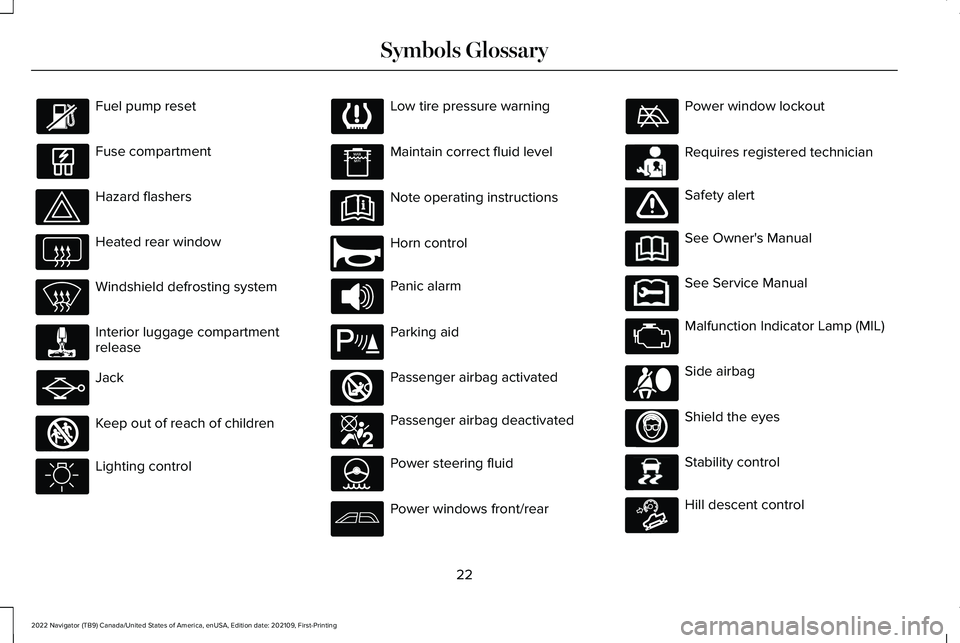
Fuel pump reset
Fuse compartment
Hazard flashers
Heated rear window
Windshield defrosting system
Interior luggage compartment
release
Jack
Keep out of reach of children
Lighting control Low tire pressure warning
Maintain correct fluid level
Note operating instructions
Horn control
Panic alarm
Parking aid
Passenger airbag activated
Passenger airbag deactivated
Power steering fluid
Power windows front/rear Power window lockout
Requires registered technician
Safety alert
See Owner's Manual
See Service Manual
Malfunction Indicator Lamp (MIL)
Side airbag
Shield the eyes
Stability control
Hill descent control
22
2022 Navigator (TB9) Canada/United States of America, enUSA, Edition date: 202109, First-Printing Symbols Glossary E161353 E270945 E139213 E270849 E270850 E231159 E65963 E231158 E167012 E138639 E163171
Page 138 of 646
USING GLOBAL OPENING
1. Press and release the unlock button on
the remote control.
2. Within one second, press and hold the unlock button on the remote control.
3. Release the button when the windows start to open.
Press the lock or the unlock button on the
remote control to stop global opening.
Note: Global opening will only respond to a
press and hold of the unlock button for a
short period of time after the unlock button
is pressed on the remote control.
SWITCHING GLOBAL OPENING ON
AND OFF
1. Press the menu button on the steering wheel to enter the information display
main menu.
2. Select Settings.
3. Select
Vehicle.
4. Select
Windows.
5. Switch
Remote Open on or off. USING GLOBAL CLOSING WARNING:
When closing the power
windows, verify they are free of obstruction
and make sure that children and pets are
not in the proximity of the window
openings.
1. Press and hold the lock button on the remote control.
2. Release the button when the windows start to close.
Press the lock or the unlock button on the
remote control to stop global closing.
Note: Bounce-back is on during global
closing. See What Is Window Bounce-Back
(page
134).
SWITCHING GLOBAL CLOSING ON
AND OFF
1. Press the menu button on the steering wheel to enter the information display
main menu.
2. Select
Settings. 3. Select
Vehicle.
4. Select
Windows.
5. Switch
Remote Close on or off.
WINDOW BOUNCE-BACK
WHAT IS WINDOW BOUNCE-BACK
The window stops and reverses if it detects
an obstruction when closing.
OVERRIDING WINDOW BOUNCE-
BACK WARNING:
If you override
bounce-back, the window does not reverse
if it detects an obstacle. Take care when
closing the windows to avoid personal
injury or damage to your vehicle.
1. Close the window until it reaches the point of resistance and let it reverse.
134
2022 Navigator (TB9) Canada/United States of America, enUSA, Edition date: 202109, First-Printing Windows
Page 183 of 646
Press the button on the head restraint or the
button on the instrument panel to the left of
the steering wheel to fold the third row
outermost head restraints. Pull the head
restraint up to place it in the upright position.
Note:
These head restraints fold when you
press the fold flat button.
ADJUSTING THE SEAT BACKREST WARNING: Do not recline a rear seat
on which a child restraint is installed.
Failure to follow this instruction could
reduce the effectiveness of the child
restraint.
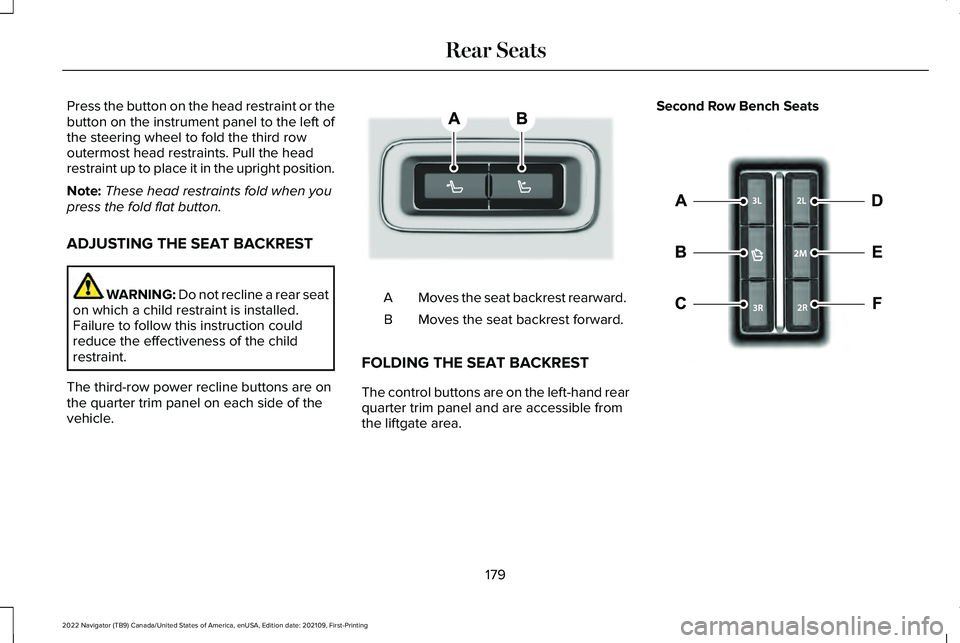
The third-row power recline buttons are on
the quarter trim panel on each side of the
vehicle. Moves the seat backrest rearward.
A
Moves the seat backrest forward.
B
FOLDING THE SEAT BACKREST
The control buttons are on the left-hand rear
quarter trim panel and are accessible from
the liftgate area. Second Row Bench Seats
179
2022 Navigator (TB9) Canada/United States of America, enUSA, Edition date: 202109, First-Printing Rear SeatsE246706 E257920
Page 189 of 646
WHAT IS THE MEMORY FUNCTION
The driver seat memory function recalls the
position of these features:
•
Driver seat.
• Power mirrors.
• Power steering column.
• Power adjustable foot pedals.
The passenger seat memory function recalls
the position of the passenger seat.
MEMORY FUNCTION
PRECAUTIONS WARNING: Before activating the
memory seat, make sure that the area
immediately surrounding the seat is clear
of obstructions and that all occupants are
clear of moving parts. WARNING:
Do not use the memory
function when your vehicle is moving. LOCATING THE MEMORY
FUNCTION BUTTONS
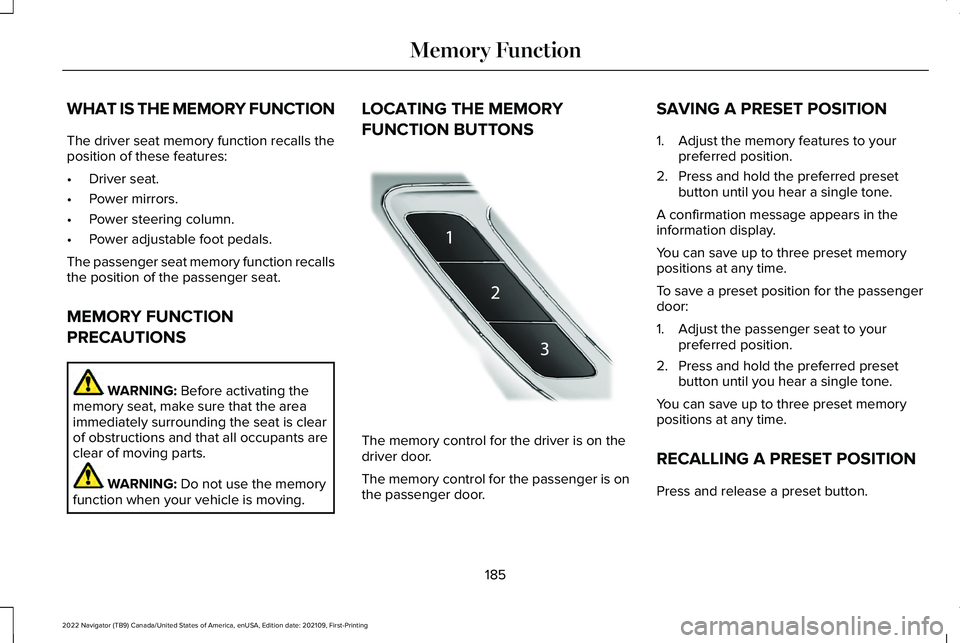
The memory control for the driver is on the
driver door.
The memory control for the passenger is on
the passenger door.SAVING A PRESET POSITION
1. Adjust the memory features to your
preferred position.
2. Press and hold the preferred preset button until you hear a single tone.
A confirmation message appears in the
information display.
You can save up to three preset memory
positions at any time.
To save a preset position for the passenger
door:
1. Adjust the passenger seat to your preferred position.
2. Press and hold the preferred preset button until you hear a single tone.
You can save up to three preset memory
positions at any time.
RECALLING A PRESET POSITION
Press and release a preset button.
185
2022 Navigator (TB9) Canada/United States of America, enUSA, Edition date: 202109, First-Printing Memory FunctionE222235
Page 208 of 646
HOW DOES AUTOMATIC ENGINE
STOP WORK
Automatic engine stop turns the engine off.
The ignition also turns off in order to save
battery power. Before the engine shuts
down, a message appears in the information
display showing a timer counting down. If
you do not intervene within 30 seconds, the
engine shuts down. Another message
appears in the information display to inform
you that the engine has shut down in order
to save fuel. Start your vehicle as you
normally do.
SWITCHING AUTOMATIC ENGINE
STOP ON AND OFF
1. Press the menu button on the steering
wheel to enter the information display
main menu.
2. Select Settings.
3. Switch
Auto Engine Off on or off.
Note: You cannot permanently switch off
the automatic shutdown. If you switch it off,
it turns on each time you switch the ignition
on. OVERRIDING AUTOMATIC ENGINE
STOP
You can stop the engine shutdown, or reset
the timer, at any point before the 30-second
countdown has expired by doing any of the
following:
•
Pressing the brake pedal or accelerator
pedal.
• Pressing the OK or RESET button during
the countdown.
Note: You cannot permanently switch off
the automatic engine shutdown feature.
When you switch it off temporarily, it turns
on at the next ignition cycle.
ACCESSING THE PASSIVE KEY
BACKUP POSITION
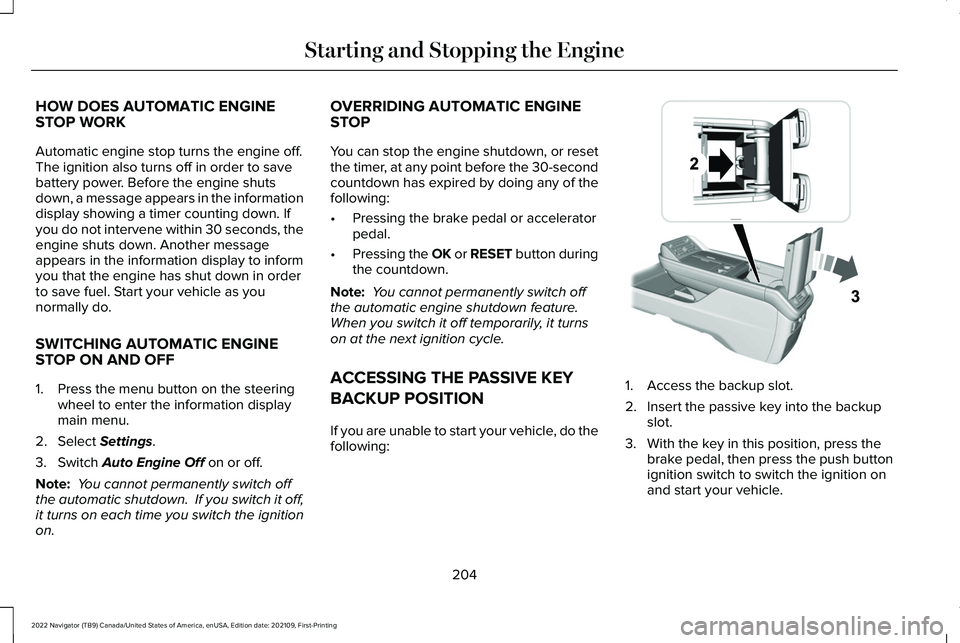
If you are unable to start your vehicle, do the
following: 1. Access the backup slot.
2. Insert the passive key into the backup
slot.
3. With the key in this position, press the brake pedal, then press the push button
ignition switch to switch the ignition on
and start your vehicle.
204
2022 Navigator (TB9) Canada/United States of America, enUSA, Edition date: 202109, First-Printing Starting and Stopping the EngineE247437
Page 227 of 646
HOW DOES FOUR-WHEEL DRIVE
WORK
Using the 1-Speed Automatic Four-
Wheel Drive System
The 1-speed automatic four-wheel drive
system utilizes an electronically controlled
on-demand 1-speed transfer case. This
system monitors various vehicle sensory
inputs to provide an increased level of
performance. This system offers the driver
two-wheel drive high, four-wheel drive auto
and four-wheel drive high as available modes
of operation via the selectable drive mode
switch. When four-wheel drive auto is
selected, the system continuously varies
power to the front wheels for optimum
performance for all on-road conditions. When
four-wheel drive high is selected, the system
provides power to the front and rear wheels
for use in off-road or slippery conditions such
as deep snow, sand or mud. There is further
information on driving in unique driving
conditions. See Driving Hints (page 384).
Using the 2-Speed Automatic Four-
Wheel Drive System
(If Equipped)
The 2-speed automatic four-wheel drive
system utilizes an electronically controlled
on-demand 2-speed transfer case. This
system monitors various vehicle sensory
inputs to provide an increased level of
performance. This system offers the driver
two-wheel drive high, four-wheel drive auto,
four-wheel drive high, and four-wheel drive
low as available modes of operation. When
four-wheel drive auto is selected, the system
continuously varies power to the front wheels
for optimum performance for all on-road
conditions. When either four-wheel drive high
or four-wheel drive low are selected with the
appropriate drive modes , the four-wheel
drive system provides electronically locked
power to the front and rear wheels for use
in off-road or slippery conditions such as
deep snow, sand or mud. Selecting slow
climb also provides additional gearing for
increased torque multiplication for conditions
like deep sand, snow, steep slopes, or pulling heavy objects.
See Slow Climb (page 296).
Additionally, the system is capable of
recreational flat towing by putting the
transfer case into neutral (N).
See
Recreationally Towing Your Vehicle (page
397).
There is further information on driving in
unique driving conditions. See Driving Hints
(page
384).
FOUR-WHEEL DRIVE
PRECAUTIONS WARNING:
Vehicles with a higher
center of gravity (utility and four-wheel
drive vehicles) handle differently than
vehicles with a lower center of gravity
(passenger cars). Avoid sharp turns,
excessive speed and abrupt steering in
these vehicles. Failure to drive cautiously
increases the risk of losing control of your
vehicle, vehicle rollover, personal injury
and death.
223
2022 Navigator (TB9) Canada/United States of America, enUSA, Edition date: 202109, First-Printing Four-Wheel Drive
(If Equipped)
Page 230 of 646
FOUR-WHEEL DRIVE AUTO
4A turns on when you select EXCITE,
NORMAL 4x4 AUTO or SLIPPERY.
Four-wheel drive auto provides electronically
controlled four-wheel drive power to both
the front and rear wheels, as required, for
increased traction in varying on-road
conditions. The four-wheel drive auto tuning
varies based on selected Drive Mode. See
Selecting a Drive Mode (page 294).
Note: Four-wheel drive auto can turn on or
off automatically based on Drive Mode
selection. See Selecting a Drive Mode (page
294
).
FOUR-WHEEL DRIVE HIGH
4H turns on when you select DEEP
CONDITIONS. Four-wheel drive high
provides electronically locked four-wheel
drive power to both the front and rear wheels
for use in off-road or winter conditions such
as deep snow, sand or mud. This mode is
not for use on dry pavement. Note:
Four-wheel drive high can turn on or
off automatically based on Drive Mode
selection. See Selecting a Drive Mode (page
294
).
FOUR-WHEEL DRIVE LOW
4L turns on when you select SLOW CLIMB.
Four-wheel drive low provides electronically
or mechanically locked four-wheel drive
power to both the front and rear wheels for
use on low traction surfaces, but does so
with additional gearing for increased torque
multiplication. This mode is only for off-road
conditions such as deep sand, steep slopes,
or pulling heavy objects.
Note: Four-wheel drive low can turn on or
off automatically based on drive mode
selection. See Selecting a Drive Mode (page
294
).
FOUR-WHEEL DRIVE INDICATORS
Two-wheel Drive High Momentarily illuminates when
two-wheel drive high is selected.Four-wheel Drive Auto Continuously illuminates when
four-wheel drive auto is selected.
Four-wheel Drive High Continuously illuminates when
four-wheel drive high is selected.
Four-wheel Drive Low
(If Equipped) Continuously illuminates when
four-wheel drive low is selected.
FOUR-WHEEL DRIVE DRIVING HINTS
EMERGENCY MANEUVERS
In an unavoidable emergency situation
where a sudden sharp turn must be made,
remember to avoid over-driving your vehicle
(i.e. turn the steering wheel only as rapidly
and as far as required to avoid the
emergency). Excessive steering can result
in loss of vehicle control. Apply smooth
pressure to the accelerator pedal or brake
226
2022 Navigator (TB9) Canada/United States of America, enUSA, Edition date: 202109, First-Printing Four-Wheel Drive
(If Equipped)E181778 E181781 E181779 E181780
Page 232 of 646
Note:
Driving through deep water may
damage the transmission. If the front or rear
axle is submerged in water, the axle
lubricant and power transfer unit lubricant
should be checked and changed if
necessary.
DRIVING ON HILLY OR SLOPING
TERRAIN
Although natural obstacles may make it
necessary to travel diagonally up or down a
hill or steep incline, you should try to drive
straight up or straight down.
Note: Avoid turning on steep slopes or hills.
A danger lies in losing traction, slipping
sideways and possible vehicle roll over.
Whenever driving on a hill, determine
beforehand the route you can use. Do not
drive over the crest of a hill without seeing
what conditions are on the other side. Do
not drive in reverse over a hill without the
aid of an observer. When climbing a steep slope or hill, start in
a lower gear rather than downshifting to a
lower gear from a higher gear once the
ascent has started. This reduces strain on
the engine and the possibility of stalling.
If your vehicle stalls, do not try to turnaround
because this could cause vehicle roll over.
It is better to reverse back to a safe location.
Apply just enough power to the wheels to
climb the hill. Too much power can cause
the tires to slip, spin or lose traction, resulting
in loss of vehicle control.
Descend a hill in the same gear you would
use to climb up the hill to avoid excessive
brake application and brake overheating. Do
not descend in neutral. Disengage overdrive
or move the transmission selector lever to a
lower gear. When descending a steep hill,
avoid sudden hard braking as you could lose
control. The front wheels have to be turning
in order to steer your vehicle.
Note:
If your vehicle has anti-lock brakes,
apply the brakes steadily. Do not pump the
brakes. DRIVING ON SNOW AND ICE
Four-wheel drive vehicles have advantages
over two-wheel drive vehicles in snow and
ice but can skid like any other vehicle.
Should you start to slide while driving on
snowy or icy roads, turn the steering wheel
in the direction of the slide until you regain
control.
Avoid sudden applications of power and
quick changes of direction on snow and ice.
Apply the accelerator slowly and steadily
when starting from a full stop. Avoid sudden
braking. Although a four-wheel drive vehicle
can accelerate better than a two-wheel drive
vehicle in snow and ice, it cannot stop any
faster as braking occurs at all four wheels.
Do not become overconfident as to road
conditions.
Make sure you allow sufficient distance
between you and other vehicles for stopping.
Drive slower than usual and consider using
one of the lower gears. In emergency
stopping situations, apply the brake steadily.
Do not pump the brake pedal. See Anti-Lock
Braking System Limitations (page 233).
228
2022 Navigator (TB9) Canada/United States of America, enUSA, Edition date: 202109, First-Printing Four-Wheel Drive
(If Equipped)