tow LINCOLN NAVIGATOR 2023 Owners Manual
[x] Cancel search | Manufacturer: LINCOLN, Model Year: 2023, Model line: NAVIGATOR, Model: LINCOLN NAVIGATOR 2023Pages: 660, PDF Size: 14.04 MB
Page 469 of 660
Stowing the Flat or Spare Tire
1.Lay the tire on the ground, near the rearof the vehicle, with the valve stem sidefacing up.
2.Slide the wheel partially under thevehicle and install the retainer throughthe wheel center. You may have toremove the wheel center cap prior topushing the retainer through the centerof the wheel. To remove the center cap,press it off with the jack tool from theinner side of the wheel. Pull on the cableto align the components at the end of thecable.
3.Using the swivel wrench, insert it throughthe access hole behind the third row seatand engage the winch.
4.Turn the swivel wrench clockwise untilthe tire is raised to its stowed positionunderneath the vehicle. The wrenchbecomes harder to turn and the sparetire winch ratchets or slips when the tireis raised to maximum tightness. A clickingsound can be heard from the winchindicating that the tire is properly stowed.
5.Carefully place all tools back into the toolkit bag.
6.Reinstall the tool kit bag on the jack andtighten the straps.
7.Reinstall the jack properly on the bracketand secure with the wing nut.
8.Close the access hole with the rubberplug.
9.If the vehicle has an access panel,reinstall.
10.Unblock the wheel.
WHEEL NUTS
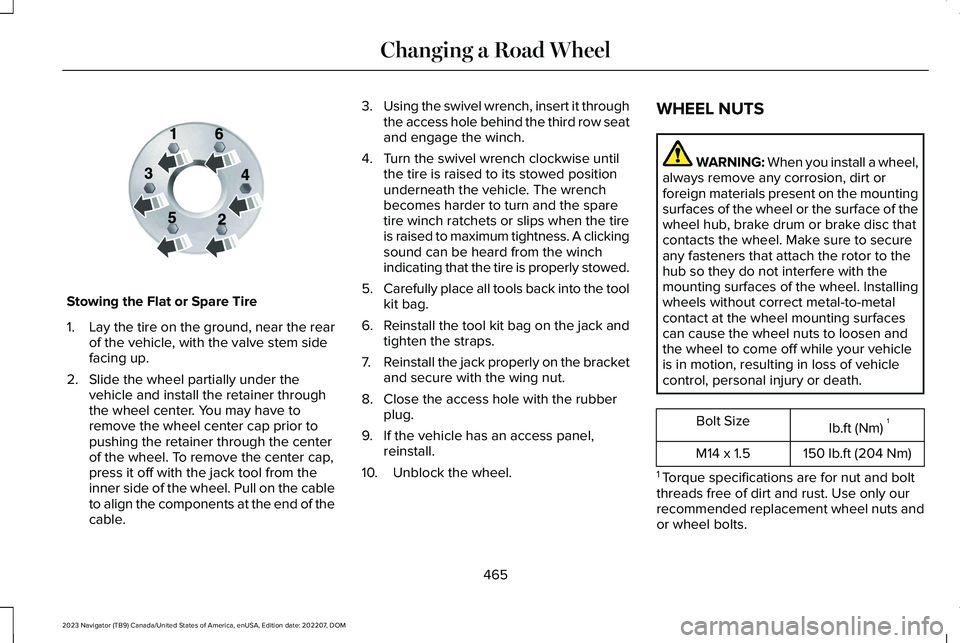
WARNING: When you install a wheel,always remove any corrosion, dirt orforeign materials present on the mountingsurfaces of the wheel or the surface of thewheel hub, brake drum or brake disc thatcontacts the wheel. Make sure to secureany fasteners that attach the rotor to thehub so they do not interfere with themounting surfaces of the wheel. Installingwheels without correct metal-to-metalcontact at the wheel mounting surfacescan cause the wheel nuts to loosen andthe wheel to come off while your vehicleis in motion, resulting in loss of vehiclecontrol, personal injury or death.
lb.ft (Nm)1Bolt Size
150 lb.ft (204 Nm)M14 x 1.5
1 Torque specifications are for nut and boltthreads free of dirt and rust. Use only ourrecommended replacement wheel nuts andor wheel bolts.
465
2023 Navigator (TB9) Canada/United States of America, enUSA, Edition date: 202207, DOMChanging a Road WheelE166719
Page 492 of 660
Tone Settings
1.Press Settings on the touchscreen.
2.Press Sound Settings.
3.Press Tone Settings.
4.Press the arrows or slider bar to adjustthe settings.
Speed Compensated Volume
1.Press Settings on the touchscreen.
2.Press Sound Settings.
3.Press Speed Compensated Volume.
4.Press a setting.
Occupancy Mode (If Equipped)
1.Press Settings on the touchscreen.
2.Press Sound Settings.
3.Press Occupancy Mode.
4.Press a setting.
Sound Mode (If Equipped)
1.Press Settings on the touchscreen.
2.Press Sound Settings.
3.Press Sound Mode.
4.Press a setting.
SETTING THE CLOCK AND DATE
1.Press Settings on the touchscreen.
2.Press Clock Settings.
3.Set the time.
Note:The AM and PM options are notavailable if 24-hour mode is on.
Switching Automatic Time Updates Onand Off
1.Press Settings on the touchscreen.
2.Press Clock Settings.
3.Switch Auto Time Update on or off.
AM/FM RADIO
AM/FM RADIO LIMITATIONS
The further you travel from an AM or FMstation, the weaker the signal and the weakerthe reception.
Hills, mountains, tall buildings, bridges,tunnels, freeway overpasses, parkinggarages, dense tree foliage andthunderstorms can interfere with thereception.
When you pass a ground-based broadcastrepeating tower, a stronger signal mayovertake a weaker one and result in theaudio system muting.
488
2023 Navigator (TB9) Canada/United States of America, enUSA, Edition date: 202207, DOMAudio System
Page 495 of 660
Gray indicates the system is acquiring adigital station.
Orange indicates digital audio is playing.
Multicast Indicator
The multicast indicator appears if the currentstation is broadcasting multiple digitalbroadcasts. The highlighted numbersindicate additional digital channels available.
Note:For stations that have more than oneHD multicast, the HD indicator and radio textappears as a button. Press the button tocycle through all of the HD stations on thatspecific frequency.
SATELLITE RADIO (IF EQUIPPED)
WHAT IS SATELLITE RADIO
Your factory-installed SiriusXM radio systemincludes a limited subscription term, whichbegins on the date of sale or lease of yourvehicle. See an authorized dealer foravailability.
For additional information about extendedsubscription terms, visit www.SiriusXM.comin the United States, www.SiriusXM.ca inCanada, or call SiriusXM at 1-888-539-7474.
Note:SiriusXM reserves the unrestrictedright to change, rearrange, add or deleteprogramming including canceling, movingor adding particular channels, and its prices,at any time, with or without notice to you.Neither SiriusXM and its affiliates nor FordMotor Company and its affiliates will beliable to you or any third party for any suchmodification, suspension or termination.
SATELLITE RADIO LIMITATIONS
For optimal reception performance, keep theantenna clear of snow and ice build-up andkeep luggage and other material as far awayfrom the antenna as possible. Placingluggage over the antenna may reduceperformance. Factory-installed andaftermarket vehicle structures including, butnot limited to, roof racks and soft top roofsin a partially open position could reducereception performance.
Hills, mountains, tall buildings, bridges,tunnels, freeway overpasses, parkinggarages, dense tree foliage andthunderstorms can interfere with yourreception.
When you pass a ground-basedbroadcast-repeating tower, a stronger signalmay overtake a weaker one and could resultin the audio system muting. Your displaycould show an error message to indicate theinterference.
LOCATING THE SATELLITE RADIOIDENTIFICATION NUMBER
1.Select SiriusXM as the audio source.
2.Tune to channel 0.
SELECTING A CHANNEL
Manually Selecting a Channel
Press the button to find theprevious or next available radiochannel.
491
2023 Navigator (TB9) Canada/United States of America, enUSA, Edition date: 202207, DOMAudio SystemE328569 E328570
Page 504 of 660
INFORMATION ON DEMAND
SCREEN
The information on demand screen displayscards on the side of the display and allowsyou to see information from differentfeatures.
Press the button to view the nextcard.
Press the button to view theprevious card.
Press the button to view availablecards.
You can swipe toward the main screen tomove the content into the main screen.
Note:This can only be done with someinformation on demand screens.
REBOOTING THE CENTER DISPLAY
You can reboot the center display using thecontrols on the steering wheel.
1.Simultaneously press and hold the seekforward and audio system power buttonfor 10 seconds.
500
2023 Navigator (TB9) Canada/United States of America, enUSA, Edition date: 202207, DOMCenter Display OverviewE353212 E353211 E353209
Page 521 of 660
CONNECTED NAVIGATION (IF
EQUIPPED)
Your vehicle may be equipped withconnected navigation. Depending on yourversion, you are given a 90 day or 3 yeartrial. After the trial period, you need to signup to continue the experience. For additionalinformation, visit lincoln.com/connectedservices.
Note:If you do not sign up or renew yoursubscription, you can still use navigationthrough a connected device.
ACCESSING NAVIGATION
Press the button to accessNavigation.
Note:As the driver, be aware of all localtraffic regulations and road attributes, andoperate your vehicle in a safe and legalmanner.
NAVIGATION MAP UPDATES
To update your map data over Wi-Fi, yourvehicle must be connected to a Wi-Fi accesspoint. For USB updates and other details,contact dealers at 1-866-462-8837 in theUnited States and Canada, or 800-557-5539in Mexico.
Note:If you find map data errors, you mayreport them by going towww.here.com/mapcreator.
ADJUSTING THE MAP
ZOOMING THE MAP IN AND OUT
You can use pinch gestures to zoom in andout. Place two fingers on the screen andmove them apart to zoom in. Place twofingers on the screen and bring themtogether to zoom out.
CHANGING THE FORMAT OF THEMAP
Press the Menu button.
1.Press the Map Orientation tile.
2.Select a map orientation.
LIVE TRAFFIC
WHAT IS LIVE TRAFFIC
You can observe real-time road congestionwhen live traffic is on.
SWITCHING LIVE TRAFFIC ON ANDOFF
Press the Menu button.
1.Press the Traffic on Map tile.
2.Press Traffic on or Traffic Off.
517
2023 Navigator (TB9) Canada/United States of America, enUSA, Edition date: 202207, DOMNavigation E328845 E328845
Page 530 of 660
WHAT IS LINCOLN PROTECT
Protect yourself from the rising cost ofvehicle repairs with the Lincoln Protectextended service plan.
Lincoln Protect Extended Service Plans(United States Only)
Lincoln Protect means peace of mind. It isthe extended service plan backed by Lincoln,and provides more protection beyond theNew Vehicle Limited Warranty coverage.When you visit your Lincoln Dealer, insist ongenuine Lincoln Protect extended serviceplans.
Lincoln Protect Extended Service Plan CanQuickly Pay for Itself
One trip to the Service Center could easilyexceed the price of your Lincoln Protectextended service plan. With Lincoln Protect,you minimize your risk for unexpected repairbills and rising repair costs.
Up to 1000+ Covered Vehicle Components
There are four mechanical Lincoln Protectextended service plans with different levelsof coverage. Ask your authorized dealer fordetails.
1.PremiumCARE - Our most comprehensivecoverage. With over 1,000 coveredcomponents, this plan is so complete itis probably easier to list what is notcovered.
2.ExtraCARE - Covers 113 components, andincludes many high-tech items.
3.BaseCARE - Covers 84 components.
4.PowertrainCARE - Covers 29 criticalcomponents.
Lincoln Protect extended service plans arehonored by all authorized Lincoln dealers inthe United States, Canada and Mexico.
That means you get:
•Reliable, quality service at any Lincoln orFord dealership.
•Repairs performed by factory trainedtechnicians, using genuine parts.
Rental Car Reimbursement
First Day Rental Benefit
If you bring your car into your dealer forservice, we will give you a rental vehicle touse for the day.
Extended Rental Benefits
If your vehicle is kept overnight for coveredrepairs, you are eligible for rental carcoverage, including bumper to bumperwarranty repairs, and field service actions.
Roadside Assistance
Exclusive 24/7 roadside assistance, including:
•Towing, flat-tire change and battery jumpstarts.
•Out of fuel and lock-out assistance.
•Travel expense reimbursement forlodging, meals and rental car.
•Assistance for taxi, shuttle, rental carcoverage and other transportation.
526
2023 Navigator (TB9) Canada/United States of America, enUSA, Edition date: 202207, DOMLincoln Protect
Page 532 of 660
There are several Lincoln Protect extendedservice plans available in various time,distance and deductible combinations. Eachplan is tailored to fit your own driving needs,including reimbursement for towing andrental. When you purchase a Lincoln Protectextended service plan, you receive addedpeace-of-mind protection throughoutCanada, the United States and Mexico,provided by a network of participatingauthorized Lincoln dealers.
Note:Repairs performed outside of Canada,the United States and Mexico are not eligiblefor Lincoln Protect extended service plancoverage.
This information is subject to change. Formore information, visit your local Lincoln ofCanada dealer or www.LincolnCanada.comto find the Lincoln Protect extended serviceplan that is right for you.
528
2023 Navigator (TB9) Canada/United States of America, enUSA, Edition date: 202207, DOMLincoln Protect
Page 538 of 660
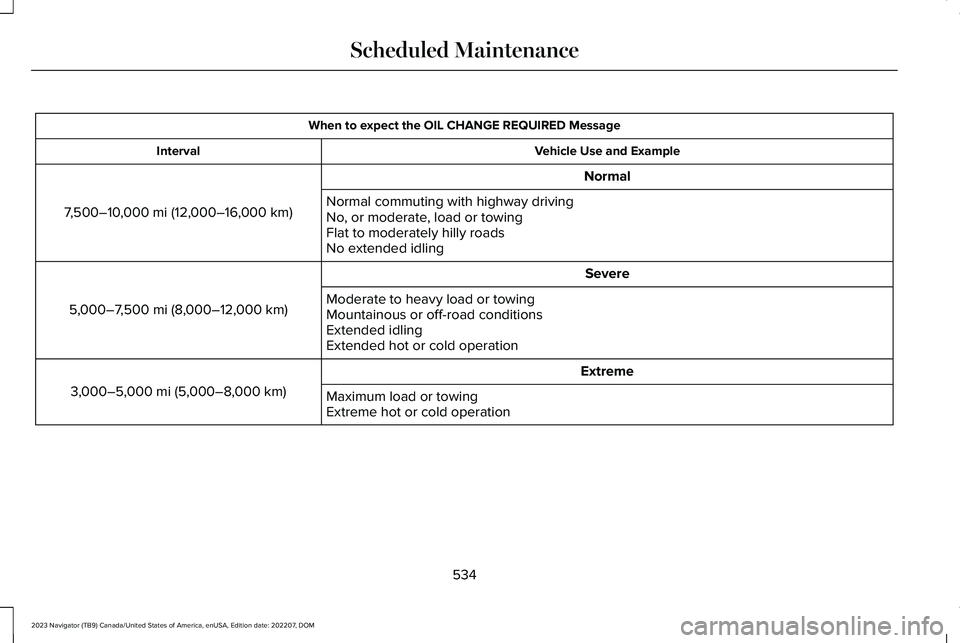
When to expect the OIL CHANGE REQUIRED Message
Vehicle Use and ExampleInterval
Normal
7,500–10,000 mi (12,000–16,000 km)Normal commuting with highway drivingNo, or moderate, load or towingFlat to moderately hilly roadsNo extended idling
Severe
5,000–7,500 mi (8,000–12,000 km)Moderate to heavy load or towingMountainous or off-road conditionsExtended idlingExtended hot or cold operation
Extreme
3,000–5,000 mi (5,000–8,000 km)Maximum load or towingExtreme hot or cold operation
534
2023 Navigator (TB9) Canada/United States of America, enUSA, Edition date: 202207, DOMScheduled Maintenance
Page 542 of 660
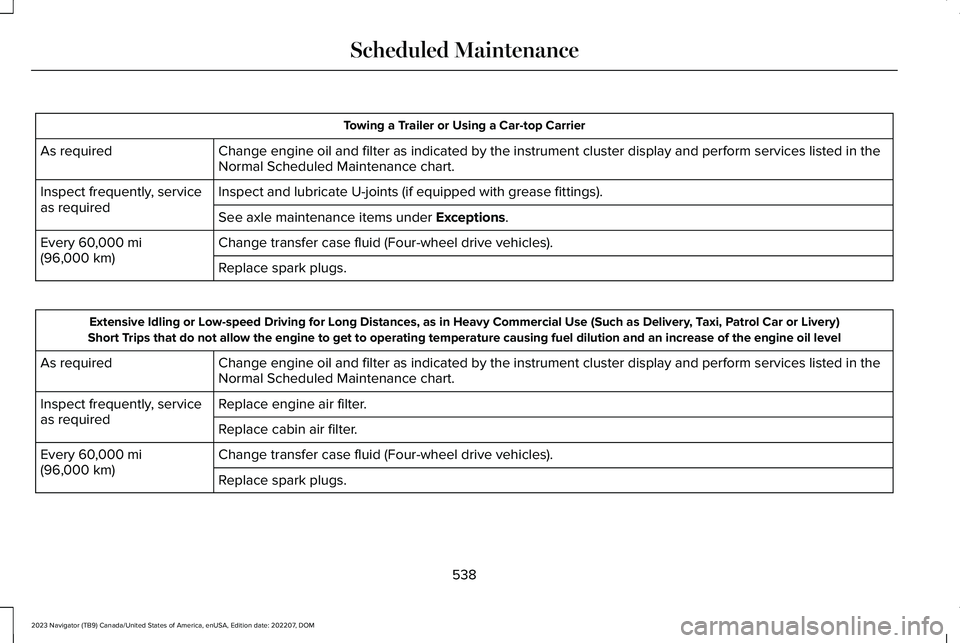
Towing a Trailer or Using a Car-top Carrier
Change engine oil and filter as indicated by the instrument cluster display and perform services listed in theNormal Scheduled Maintenance chart.As required
Inspect and lubricate U-joints (if equipped with grease fittings).Inspect frequently, serviceas requiredSee axle maintenance items under Exceptions.
Change transfer case fluid (Four-wheel drive vehicles).Every 60,000 mi(96,000 km)Replace spark plugs.
Extensive Idling or Low-speed Driving for Long Distances, as in Heavy Commercial Use (Such as Delivery, Taxi, Patrol Car or Livery)Short Trips that do not allow the engine to get to operating temperature causing fuel dilution and an increase of the engine oil level
Change engine oil and filter as indicated by the instrument cluster display and perform services listed in theNormal Scheduled Maintenance chart.As required
Replace engine air filter.Inspect frequently, serviceas requiredReplace cabin air filter.
Change transfer case fluid (Four-wheel drive vehicles).Every 60,000 mi(96,000 km)Replace spark plugs.
538
2023 Navigator (TB9) Canada/United States of America, enUSA, Edition date: 202207, DOMScheduled Maintenance
Page 605 of 660
you three incentives: (1) pay the greaterof the award or $1,000; (2) pay twice yourreasonable attorney’s fees, if any; and (3)reimburse any expenses (including expertwitness fees and costs) that your attorneyreasonably accrues for investigating,preparing, and pursuing your claim inarbitration. The arbitrator will determinethe amounts.
•ii. Disputes involving more than $75,000.The AAA rules will govern payment offiling fees and the AAA’s and arbitrator’sfees and expenses.
•iii. Disputes involving any amount. In anyarbitration you commence, FORDMOTOR COMPANY will seek its AAA orarbitrator’s fees and expenses, or Yourfiling fees it reimbursed, only if thearbitrator finds the arbitration frivolousor brought for an improper purpose. Inany arbitration FORD MOTOR COMPANYcommences, it will pay all filing, AAA, andarbitrator’s fees and expenses. It will notseek its attorney’s fees or expenses fromyou in any arbitration. Fees and expensesare not counted in determining howmuch a dispute involves.
(h) Claims or disputes must be filed withinone year. To the extent permitted by law,any claim or dispute under this EULA towhich this Section applies must be filedwithin one year in small claims court (Sectionc) or in arbitration (Section d). The one-yearperiod begins when the claim or dispute firstcould be filed. If such a claim or dispute isnot filed within one year, it is permanentlybarred.
(I) Severability. If the class action waiver(Section e) is found to be illegal orunenforceable as to all or some parts of adispute, then that portion of Section e willnot apply to those parts. Instead, those partswill be severed and proceed in a court oflaw, with the remaining parts proceeding inarbitration. If any other provision of thatportion Section e is found to be illegal orunenforceable, that provision will be severedwith the remainder of Section e remaining infull force and effect.
Telenav Software End User LicenseAgreement
Please read these terms and conditionscarefully before you use the TeleNavSoftware. Your use of the TeleNav Softwareindicates that you accept these terms andconditions. If you do not accept these termsand conditions, do not break the seal of thepackage, launch, or otherwise use theTeleNav Software. TeleNav may revise thisAgreement and the privacy policy at anytime, with or without notice to you. You agreeto visit http://www.telenav.com from time totime to review the then current version ofthis Agreement and of the privacy policy.
1. Safe and Lawful Use
You acknowledge that devoting attention tothe TeleNav Software may pose a risk ofinjury or death to you and others in situationsthat otherwise require your undividedattention, and you therefore agree to complywith the following when using the TeleNavSoftware:
(a) observe all traffic laws and otherwise drivesafely;
601
2023 Navigator (TB9) Canada/United States of America, enUSA, Edition date: 202207, DOMCustomer Information