tow LINCOLN NAVIGATOR 2023 Repair Manual
[x] Cancel search | Manufacturer: LINCOLN, Model Year: 2023, Model line: NAVIGATOR, Model: LINCOLN NAVIGATOR 2023Pages: 660, PDF Size: 14.04 MB
Page 357 of 660
WHAT IS THE MAXIMUM LOADEDTRAILER WEIGHT
The maximum loaded trailer weight isthe highest possible weight of a fullyloaded trailer the vehicle can tow.
CALCULATING THE MAXIMUMLOADED TRAILER WEIGHT FOR YOURVEHICLE
1.Start with the gross combined weightrating for your vehicle model andaxle ratio.
2.Subtract all of the following thatapply to your vehicle:
•Vehicle curb weight.
•Hitch hardware weight, for examplea draw bar, ball, locks or weightdistributing hardware.
•Driver weight.
•Passenger weight.
•Payload, cargo and luggage weight.
•Aftermarket equipment weight.
This equals the maximum loaded trailerweight for this combination.
Note:The trailer tongue load isconsidered part of the payload for yourvehicle. Reduce the total payload by thefinal trailer tongue weight.
Note:Consult an authorized dealer todetermine the maximum trailer weightallowed for your vehicle if you are notsure.
353
2023 Navigator (TB9) Canada/United States of America, enUSA, Edition date: 202207, DOMTowing a Trailer
Page 358 of 660
TOWING A TRAILER – TROUBLESHOOTING
TOWING A TRAILER – INFORMATION MESSAGES
DetailsMessage
The left-hand trailer turn lamp requires service.Trailer Left Turn Lamps Fault Check Lamps
The right-hand trailer turn lamp requires service.Trailer Right Turn Lamps Fault Check Lamps
The trailer battery voltage is too low to charge. If there is no trailerattached, the vehicle battery voltage is low.Trailer Battery Not Charging See Manual
The system detects a short created by the trailer lamps. Inspect andrepair the trailer wiring, or have the system checked as soon aspossible.
Trailer Lighting Module Fault See Manual
The trailer stoplamps require service.Trailer Stop Lamps Fault Check Lamps
Verify the trailer brake connections are secure and that the aftermarkettrailer brake controller device is correctly installed. Perform a trailerbrake and trailer light check if possible. If the message persists, haveyour vehicle checked as soon as possible.
Trailer brake system fault See manual
Perform a trailer brake and trailer light check if possible. If the messagepersists, have your vehicle checked as soon as possible.Trailer brake module fault
The trailer sway control detects trailer sway. Reduce the vehicle'sspeed.Trailer Sway Reduce Speed
354
2023 Navigator (TB9) Canada/United States of America, enUSA, Edition date: 202207, DOMTowing a Trailer
Page 359 of 660
DetailsMessage
Displays when one or more tires on the trailer is above the recom-mended temperature.Trailer Tire Over Temperature
One or more tires on your trailer is below the specified tire pressure.Trailer Tire Low Specified:
A trailer tire pressure sensor requires service. If the warning stays onor continues to come on, have the system checked as soon aspossible.
Trailer Tire Pressure Sensor Fault
The trailer tire pressure monitoring system requires service. If thewarning stays on or continues to come on, have the system checkedas soon as possible.
Trailer Tire Pressure Monitor Fault
The system cannot detect the trailer tire pressure monitoring system.Trailer Tire Pressure Monitor Capability Not Detected
The trailer tire pressure monitoring system is not setup.Trailer Tire Pressure Indication Not Setup See Manual
355
2023 Navigator (TB9) Canada/United States of America, enUSA, Edition date: 202207, DOMTowing a Trailer
Page 360 of 660
WHAT IS THE INTEGRATED
TRAILER BRAKE CONTROLLER
The trailer brake controller assists in smoothand effective trailer braking based on thetowing vehicle’s brake pressure.
INTEGRATED TRAILER BRAKE
CONTROLLER PRECAUTIONS
WARNING: Use the integrated trailerbrake controller to properly adjust thetrailer brakes and check all connectionsbefore towing a trailer. Failure to followthis instruction could result in the loss ofcontrol of your vehicle, personal injury ordeath.
•Only use the manual control lever forproper adjustment of the gain duringtrailer setup. Misuse, such as applicationduring trailer sway, could cause instabilityof trailer or tow vehicle.
•Avoid towing in adverse weatherconditions. The trailer brake controllerdoes not provide anti-lock control of thetrailer wheels. Trailer wheels can lock upon slippery surfaces, resulting in reducedstability of trailer and tow vehicle.
•The trailer brake controller is only afactory-installed or dealer-installed item.Ford is not responsible for warranty orperformance of the controller due tomisuse or customer installation.
Note:Do not attempt removal of the trailerbrake controller without consulting theWorkshop Manual. Damage to the unit mayresult.
Note:Make sure to set the integrated trailerbrake controller gain to 0 if you are usingan aftermarket trailer brake controller.
USING THE INTEGRATED TRAILER
BRAKE CONTROLLER
1.Make sure the trailer brakes are in goodworking condition, functioning normallyand properly adjusted. See your trailerdealer if necessary.
Note:An authorized dealer can diagnosethe trailer brake controller to determineexactly which trailer fault has occurred. Yourvehicle warranty does not cover issues withyour trailer.
2.Hook up the trailer and make theelectrical connections according to thetrailer manufacturer's instructions.
Note:Select default mode if the trailer hassurge brakes, or no brakes at all. The systemhas no effect on the braking performance ofthe trailer in either of these cases.
Note:If a trailer is connected by a four-pinconnector, the trailer braking function willnot be supported.
356
2023 Navigator (TB9) Canada/United States of America, enUSA, Edition date: 202207, DOMIntegrated Trailer Brake Controller (If Equipped)
Page 361 of 660
3.When you plug in a trailer with electric orelectric-over-hydraulic brakes, a messageconfirming connection appears in theinformation display.
4.Use the gain adjustment to find thedesired starting point. A gain setting of6.0 is a good starting point for heavierloads.
Note:Use the following steps to adjust thegain setting whenever road, weather andtrailer, or vehicle loading conditions, changefrom when you initially set the gain.
5.In a traffic-free environment, tow thetrailer on a dry, level surface and squeezethe manual control lever completely.
6.If the trailer wheels lock up, indicated bysquealing tires, reduce the gain setting.If the trailer wheels turn freely, increasethe gain setting. Repeat Steps 5 and 6until the gain setting is at a point justbelow trailer wheel lock-up. If towing aheavier trailer, trailer wheel lock-up maynot be attainable even with the maximumgain setting of 10.
Note:Only perform this procedure at speedsof approximately 20–25 mph (30–40 km/h).
Note:The trailer brake controller reducesoutput at vehicle speeds below 11 mph(18 km/h) so that trailer and vehicle brakingis not jerky or harsh. This feature is onlyavailable when applying the brakes usingyour vehicle's brake pedal, not the controller.
Note:Your vehicle's brake system and thetrailer brake system work independently ofeach other. Changing the gain setting on thecontroller does not affect the operation ofyour vehicle's brakes whether you attach atrailer or not.
Note:With the proper electrical connection,pressing your vehicle brake pedal or usingthe manual control lever illuminates bothtrailer and vehicle brake lamps.
Note:When you switch the engine off, thecontroller output is disabled and the displayand module shut down. The controllermodule and display turn on when you switchthe ignition on.
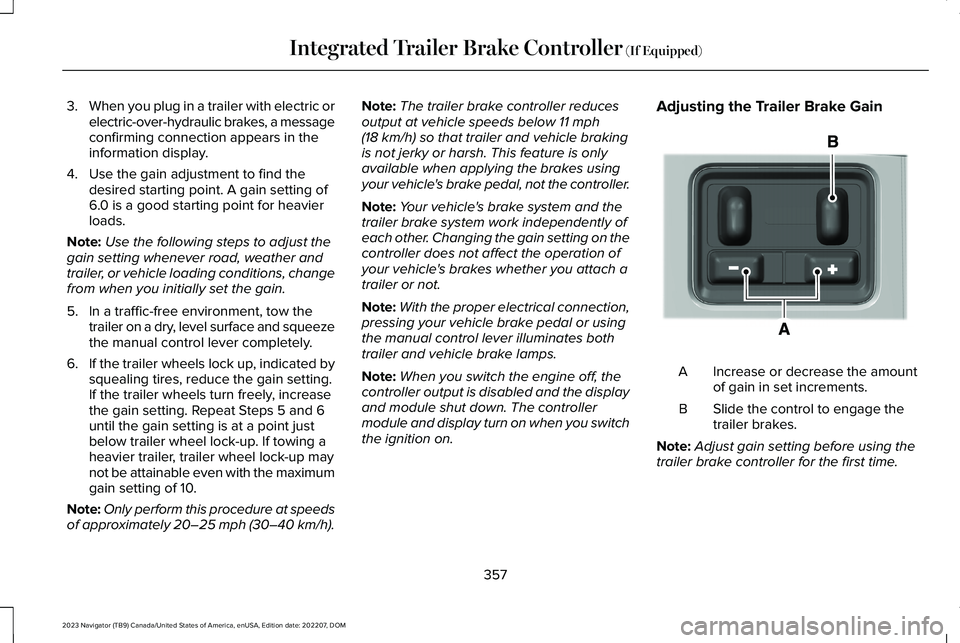
Adjusting the Trailer Brake Gain
Increase or decrease the amountof gain in set increments.A
Slide the control to engage thetrailer brakes.B
Note:Adjust gain setting before using thetrailer brake controller for the first time.
357
2023 Navigator (TB9) Canada/United States of America, enUSA, Edition date: 202207, DOMIntegrated Trailer Brake Controller (If Equipped)E333154
Page 365 of 660
HOW DOES TRAILER SWAY
CONTROL WORK
The system applies the brakes to theindividual wheels and reduces engine torqueto aid vehicle stability.
If the trailer begins to sway, the stabilitycontrol lamp flashes and the message TrailerSway Reduce Speed appears in theinformation display.
Stop your vehicle as soon as it is safe to doso. Check the vertical weight on the tow balland trailer load distribution.
TRAILER SWAY CONTROL
PRECAUTIONS
WARNING: Turning off trailer swaycontrol increases the risk of loss of vehiclecontrol, serious injury or death. Ford doesnot recommend disabling this featureexcept in situations where speed reductionmay be detrimental (such as hill climbing),the driver has significant trailer towingexperience, and can control trailer swayand maintain safe operation.
Note:This feature only activates whensignificant trailer sway occurs.
Note:This feature does not prevent trailersway, but reduces it once it begins.
Note:This feature cannot stop all trailersfrom swaying.
Note:In some cases, if vehicle speed is toohigh, the system may activate multiple times,gradually reducing vehicle speed.
SWITCHING TRAILER SWAY
CONTROL ON AND OFF
1.Press Features on the touchscreen.
2.Press Towing.
3.Switch Trailer Sway Control on or off.
The system turns on each time you start yourvehicle.
361
2023 Navigator (TB9) Canada/United States of America, enUSA, Edition date: 202207, DOMTrailer Sway Control
Page 366 of 660
WHAT IS TRAILER BACKUP
ASSISTANCE
Trailer backup assistance utilizes the controlknob on the instrument panel to help yousteer a trailer. Turn the control knob in thedirection you want the trailer to go and thesystem steers the vehicle.
HOW DOES TRAILER BACKUP
ASSISTANCE WORK
Trailer backup assistance uses a sticker todetect the trailer angle relative to the towingvehicle and provides instructions, graphicsand camera views on the touchscreen.
TRAILER BACKUP ASSISTANCE
PRECAUTIONS
WARNING: Driving while distractedcan result in loss of vehicle control, crashand injury. We strongly recommend thatyou use extreme caution when using anydevice that may take your focus off theroad. Your primary responsibility is the safeoperation of your vehicle. We recommendagainst the use of any hand-held devicewhile driving and encourage the use ofvoice-operated systems when possible.Make sure you are aware of all applicablelocal laws that may affect the use ofelectronic devices while driving.
WARNING: This system is an extradriving aid. It does not replace yourattention and judgment, or the need toapply the brakes. This system does NOTautomatically brake your vehicle. If you failto press the brake pedal when necessary,you may collide with another vehicle.
Note:The system is not a substitute for safedriving practices. Always be aware of yourvehicle and trailer combination, and thesurrounding environment.
Note:The system does not detect or preventyour vehicle or trailer from making contactwith obstacles in the surroundingenvironment.
Note:The front end of your vehicle swingsout when changing the direction of thetrailer.
Note:In certain conditions, the trailer couldturn faster or the trailer angle could increasemore than anticipated. Always monitor theclearance between the trailer and vehicleand the surroundings.
362
2023 Navigator (TB9) Canada/United States of America, enUSA, Edition date: 202207, DOMTrailer Backup Assistance (If Equipped)
Page 372 of 660
The red zone indicates you have exceededthe maximum controllable trailer angle forthe system. Immediately stop reversing. Putyour vehicle into drive (D) and pull forwarduntil the trailer is no longer in the red zone.
Setting the Trailer Angle Limit
1.Press Features on the touchscreen.
2.Press Towing.
3.Press Manage trailers.
4.Press the saved trailer you want tochange.
5.Press Pro Trailer Backup Assist.
6.Press Trailer Angle Limit.
7.Press a setting.
Normal Control Angle
Default setting. This provides a balanced limitthat returns from a turn to straight backingwith minimal change to the trailer direction.
Max Control Angle
Increases the trailer angle limit close to themaximum controllable angle to allow sharperturns but also causes more change in thetrailer direction when straightening out froma turn.
368
2023 Navigator (TB9) Canada/United States of America, enUSA, Edition date: 202207, DOMTrailer Backup Assistance (If Equipped)
Page 379 of 660
WHAT IS TRAILER REVERSE
GUIDANCE
Trailer reverse guidance provides views andgraphics on the touchscreen to help yousteer your vehicle when you backup a trailer.
HOW DOES TRAILER REVERSE
GUIDANCE WORK
Trailer reverse guidance uses a sticker todetect the trailer angle relative to the towingvehicle and provides instructions, graphicsand camera views on the touchscreen.
TRAILER REVERSE GUIDANCE
PRECAUTIONS
WARNING: Driving while distractedcan result in loss of vehicle control, crashand injury. We strongly recommend thatyou use extreme caution when using anydevice that may take your focus off theroad. Your primary responsibility is the safe
operation of your vehicle. We recommendagainst the use of any hand-held devicewhile driving and encourage the use ofvoice-operated systems when possible.Make sure you are aware of all applicablelocal laws that may affect the use ofelectronic devices while driving.
WARNING: This system is an extradriving aid. It does not replace yourattention and judgment, or the need toapply the brakes. This system does NOTautomatically brake your vehicle. If you failto press the brake pedal when necessary,you may collide with another vehicle.
Note:The system is not a substitute for safedriving practices. Always be aware of yourvehicle and trailer combination, and thesurrounding environment.
Note:The system does not detect or preventyour vehicle or trailer from making contactwith obstacles in the surroundingenvironment.
Note:The front end of your vehicle swingsout when changing the direction of thetrailer.
Note:In certain conditions, the trailer couldturn faster or the trailer angle could increasemore than anticipated. Always monitor theclearance between the trailer and vehicleand the surroundings.
SETTING UP TRAILER REVERSE
GUIDANCE FOR A CONVENTIONAL
TRAILER
CONFIGURING THE TRAILER
You must configure a trailer in the system touse trailer reverse guidance. This is aone-time setup process and the trailerinformation is saved in the system for thenext time you use that trailer.
The system only works with conventionaltrailers. It does not work with other typesincluding fifth-wheel and gooseneck trailers.The following illustration shows examples ofconventional trailers on the left-hand side.
375
2023 Navigator (TB9) Canada/United States of America, enUSA, Edition date: 202207, DOMTrailer Reverse Guidance (If Equipped)
Page 388 of 660
COLD WEATHER PRECAUTIONS
The functional operation of somecomponents and systems can be affected attemperatures below approximately -13°F(-25°C).
DRIVING ON SNOW AND ICE
WARNING: If you are driving inslippery conditions that require tire chainsor cables, then it is critical that you drivecautiously. Keep speeds down, allow forlonger stopping distances and avoidaggressive steering to reduce the chancesof a loss of vehicle control which can leadto serious injury or death. If the rear endof your vehicle slides while cornering, steerin the direction of the slide until you regaincontrol of your vehicle.
On ice and snow, you should drive moreslowly than usual. Your vehicle has a fourwheel anti-lock brake system, do not pumpthe brake pedal. See Anti-Lock BrakingSystem Limitations (page 232).
BREAKING-IN
Your vehicle requires a break-in period. Forthe first 1,000 mi (1,600 km), avoid driving athigh speeds, heavy braking, aggressiveshifting or using your vehicle to tow. Duringthis time, your vehicle may exhibit someunusual driving characteristics.
DRIVING ECONOMICALLY
The following helps to improve fuelconsumption:
•Drive smoothly, accelerate gently andanticipate the road ahead to avoid heavybraking.
•Regularly check your tire pressures andmake sure that they are inflated to thecorrect pressure.
•Follow the recommended maintenanceschedule and carry out therecommended checks.
•Plan your journey and check the trafficbefore you set off. It is more efficient tocombine errands into a single tripwhenever possible.
•Avoid idling the engine in cold weatheror for extended periods. Start the engineonly when you are ready to set off.
•Do not carry unnecessary weight in yourvehicle as extra weight wastes fuel.
•Do not add unnecessary accessories tothe exterior of your vehicle, for examplerunning boards. If you use a roof rack,remember to fold it down or remove itwhen not in use.
•Do not shift into neutral when you arebraking or when your vehicle is slowingdown.
•Shut all windows when driving at highspeeds.
•Switch off all electric systems when notin use, for example air conditioning. Makesure that you unplug any accessoriesfrom the auxiliary power points when notin use.
384
2023 Navigator (TB9) Canada/United States of America, enUSA, Edition date: 202207, DOMDriving Hints