wheel LINCOLN NAVIGATOR 2023 Owners Manual
[x] Cancel search | Manufacturer: LINCOLN, Model Year: 2023, Model line: NAVIGATOR, Model: LINCOLN NAVIGATOR 2023Pages: 660, PDF Size: 14.04 MB
Page 512 of 660
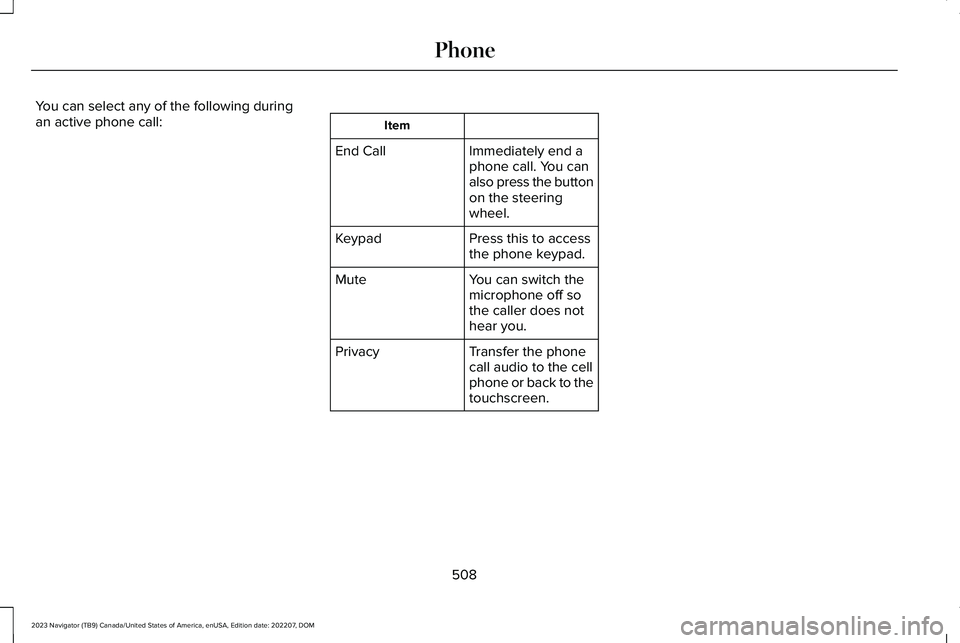
You can select any of the following duringan active phone call:Item
Immediately end aphone call. You canalso press the buttonon the steeringwheel.
End Call
Press this to accessthe phone keypad.Keypad
You can switch themicrophone off sothe caller does nothear you.
Mute
Transfer the phonecall audio to the cellphone or back to thetouchscreen.
Privacy
508
2023 Navigator (TB9) Canada/United States of America, enUSA, Edition date: 202207, DOMPhone
Page 539 of 660
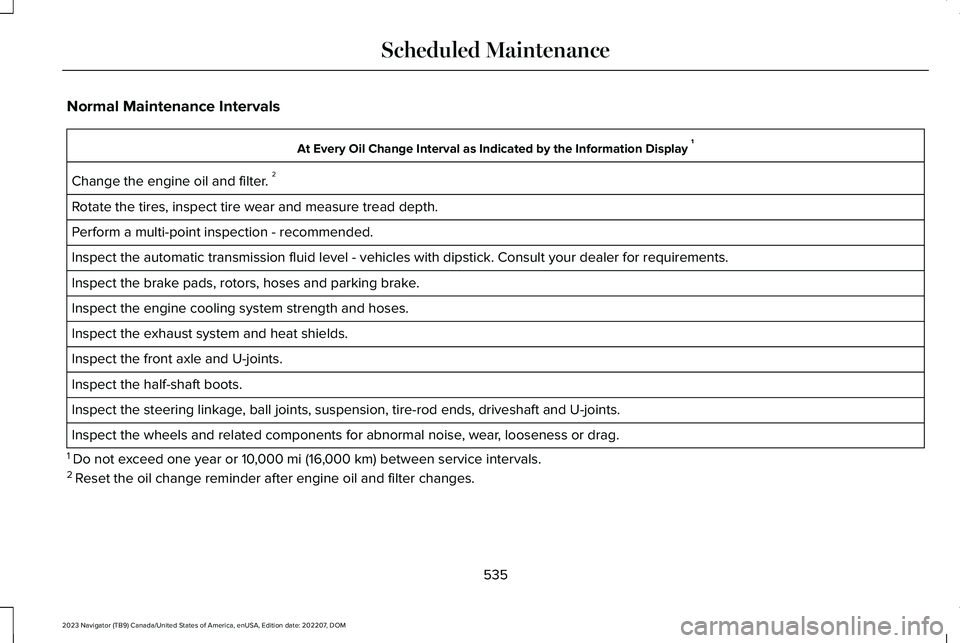
Normal Maintenance Intervals
At Every Oil Change Interval as Indicated by the Information Display 1
Change the engine oil and filter. 2
Rotate the tires, inspect tire wear and measure tread depth.
Perform a multi-point inspection - recommended.
Inspect the automatic transmission fluid level - vehicles with dipstick. Consult your dealer for requirements.
Inspect the brake pads, rotors, hoses and parking brake.
Inspect the engine cooling system strength and hoses.
Inspect the exhaust system and heat shields.
Inspect the front axle and U-joints.
Inspect the half-shaft boots.
Inspect the steering linkage, ball joints, suspension, tire-rod ends, driveshaft and U-joints.
Inspect the wheels and related components for abnormal noise, wear, looseness or drag.
1 Do not exceed one year or 10,000 mi (16,000 km) between service intervals.2 Reset the oil change reminder after engine oil and filter changes.
535
2023 Navigator (TB9) Canada/United States of America, enUSA, Edition date: 202207, DOMScheduled Maintenance
Page 540 of 660
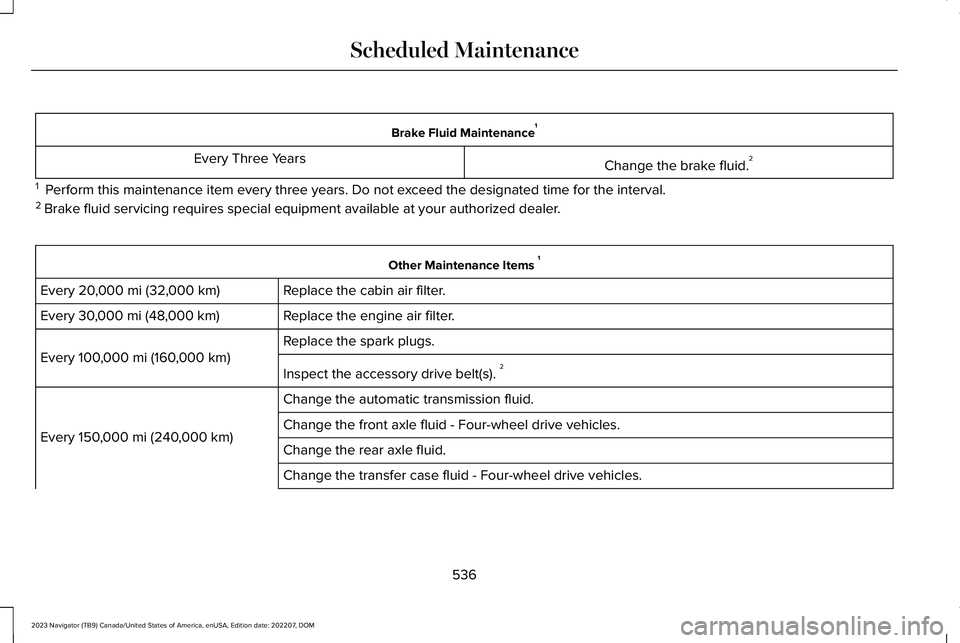
Brake Fluid Maintenance1
Change the brake fluid.2Every Three Years
1 Perform this maintenance item every three years. Do not exceed the designated time for the interval.2 Brake fluid servicing requires special equipment available at your authorized dealer.
Other Maintenance Items 1
Replace the cabin air filter.Every 20,000 mi (32,000 km)
Replace the engine air filter.Every 30,000 mi (48,000 km)
Replace the spark plugs.
Every 100,000 mi (160,000 km)
Inspect the accessory drive belt(s). 2
Change the automatic transmission fluid.
Every 150,000 mi (240,000 km)Change the front axle fluid - Four-wheel drive vehicles.
Change the rear axle fluid.
Change the transfer case fluid - Four-wheel drive vehicles.
536
2023 Navigator (TB9) Canada/United States of America, enUSA, Edition date: 202207, DOMScheduled Maintenance
Page 542 of 660
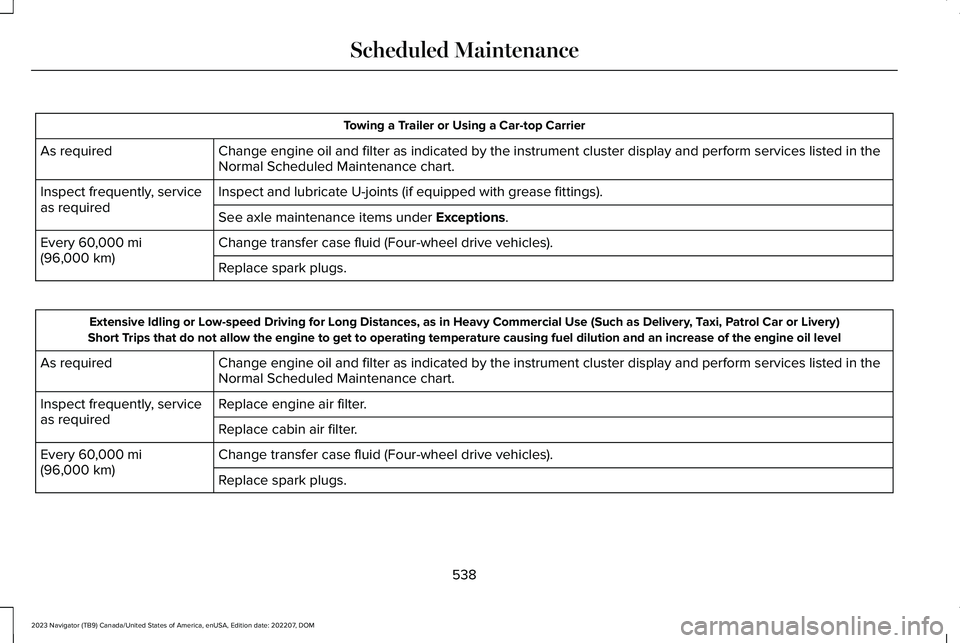
Towing a Trailer or Using a Car-top Carrier
Change engine oil and filter as indicated by the instrument cluster display and perform services listed in theNormal Scheduled Maintenance chart.As required
Inspect and lubricate U-joints (if equipped with grease fittings).Inspect frequently, serviceas requiredSee axle maintenance items under Exceptions.
Change transfer case fluid (Four-wheel drive vehicles).Every 60,000 mi(96,000 km)Replace spark plugs.
Extensive Idling or Low-speed Driving for Long Distances, as in Heavy Commercial Use (Such as Delivery, Taxi, Patrol Car or Livery)Short Trips that do not allow the engine to get to operating temperature causing fuel dilution and an increase of the engine oil level
Change engine oil and filter as indicated by the instrument cluster display and perform services listed in theNormal Scheduled Maintenance chart.As required
Replace engine air filter.Inspect frequently, serviceas requiredReplace cabin air filter.
Change transfer case fluid (Four-wheel drive vehicles).Every 60,000 mi(96,000 km)Replace spark plugs.
538
2023 Navigator (TB9) Canada/United States of America, enUSA, Edition date: 202207, DOMScheduled Maintenance
Page 543 of 660
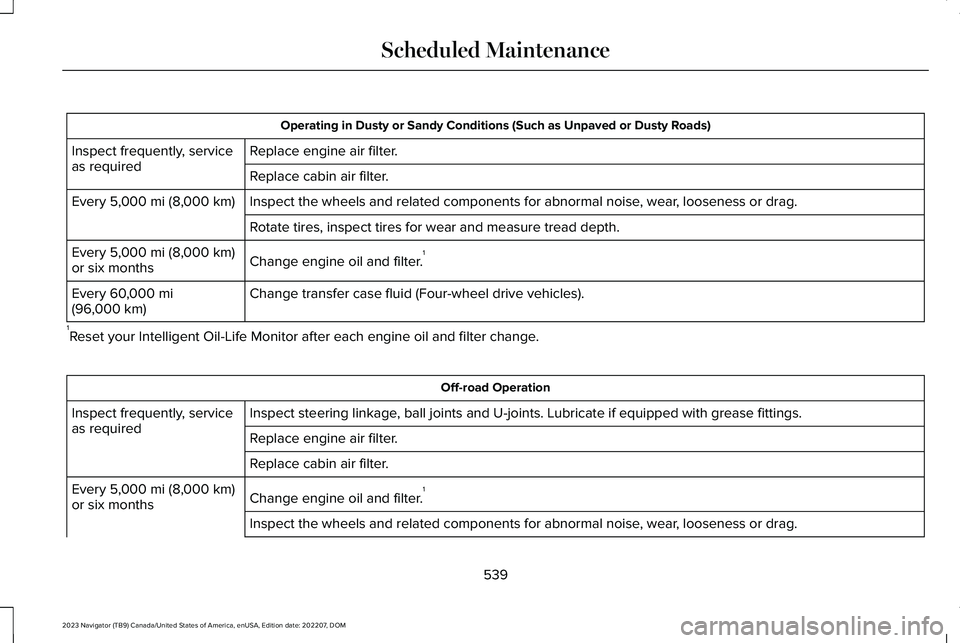
Operating in Dusty or Sandy Conditions (Such as Unpaved or Dusty Roads)
Replace engine air filter.Inspect frequently, serviceas requiredReplace cabin air filter.
Inspect the wheels and related components for abnormal noise, wear, looseness or drag.Every 5,000 mi (8,000 km)
Rotate tires, inspect tires for wear and measure tread depth.
Change engine oil and filter.1Every 5,000 mi (8,000 km)or six months
Change transfer case fluid (Four-wheel drive vehicles).Every 60,000 mi(96,000 km)
1Reset your Intelligent Oil-Life Monitor after each engine oil and filter change.
Off-road Operation
Inspect steering linkage, ball joints and U-joints. Lubricate if equipped with grease fittings.Inspect frequently, serviceas requiredReplace engine air filter.
Replace cabin air filter.
Change engine oil and filter.1Every 5,000 mi (8,000 km)or six months
Inspect the wheels and related components for abnormal noise, wear, looseness or drag.
539
2023 Navigator (TB9) Canada/United States of America, enUSA, Edition date: 202207, DOMScheduled Maintenance
Page 544 of 660
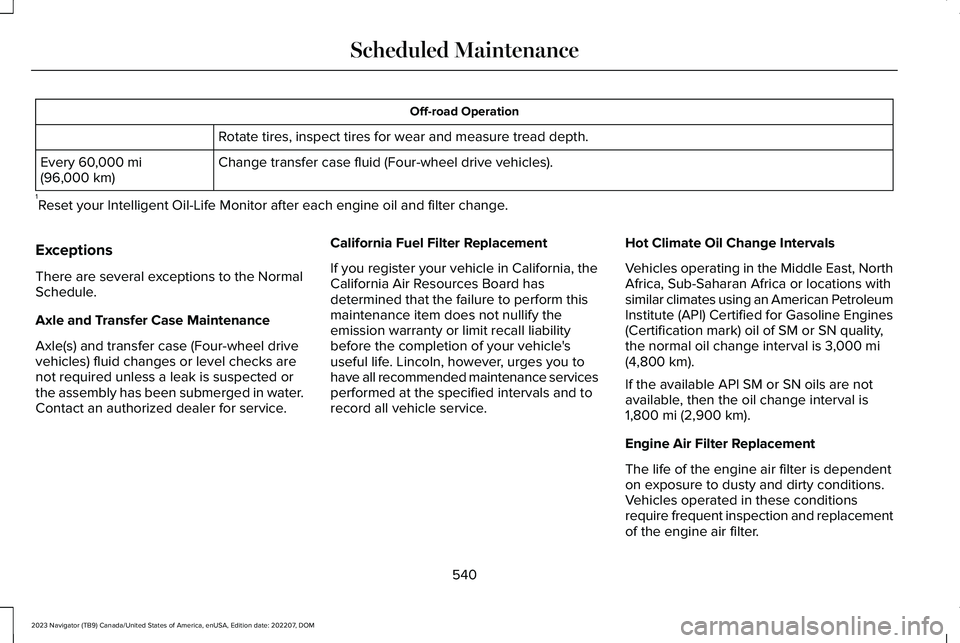
Off-road Operation
Rotate tires, inspect tires for wear and measure tread depth.
Change transfer case fluid (Four-wheel drive vehicles).Every 60,000 mi(96,000 km)
1Reset your Intelligent Oil-Life Monitor after each engine oil and filter change.
Exceptions
There are several exceptions to the NormalSchedule.
Axle and Transfer Case Maintenance
Axle(s) and transfer case (Four-wheel drivevehicles) fluid changes or level checks arenot required unless a leak is suspected orthe assembly has been submerged in water.Contact an authorized dealer for service.
California Fuel Filter Replacement
If you register your vehicle in California, theCalifornia Air Resources Board hasdetermined that the failure to perform thismaintenance item does not nullify theemission warranty or limit recall liabilitybefore the completion of your vehicle'suseful life. Lincoln, however, urges you tohave all recommended maintenance servicesperformed at the specified intervals and torecord all vehicle service.
Hot Climate Oil Change Intervals
Vehicles operating in the Middle East, NorthAfrica, Sub-Saharan Africa or locations withsimilar climates using an American PetroleumInstitute (API) Certified for Gasoline Engines(Certification mark) oil of SM or SN quality,the normal oil change interval is 3,000 mi(4,800 km).
If the available API SM or SN oils are notavailable, then the oil change interval is1,800 mi (2,900 km).
Engine Air Filter Replacement
The life of the engine air filter is dependenton exposure to dusty and dirty conditions.Vehicles operated in these conditionsrequire frequent inspection and replacementof the engine air filter.
540
2023 Navigator (TB9) Canada/United States of America, enUSA, Edition date: 202207, DOMScheduled Maintenance
Page 545 of 660
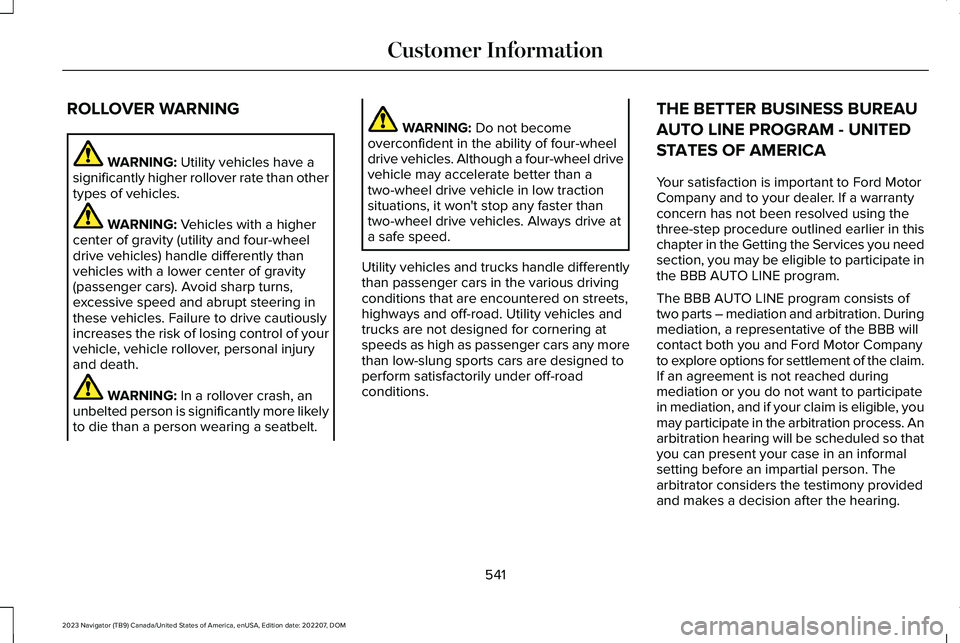
ROLLOVER WARNING
WARNING: Utility vehicles have asignificantly higher rollover rate than othertypes of vehicles.
WARNING: Vehicles with a highercenter of gravity (utility and four-wheeldrive vehicles) handle differently thanvehicles with a lower center of gravity(passenger cars). Avoid sharp turns,excessive speed and abrupt steering inthese vehicles. Failure to drive cautiouslyincreases the risk of losing control of yourvehicle, vehicle rollover, personal injuryand death.
WARNING: In a rollover crash, anunbelted person is significantly more likelyto die than a person wearing a seatbelt.
WARNING: Do not becomeoverconfident in the ability of four-wheeldrive vehicles. Although a four-wheel drivevehicle may accelerate better than atwo-wheel drive vehicle in low tractionsituations, it won't stop any faster thantwo-wheel drive vehicles. Always drive ata safe speed.
Utility vehicles and trucks handle differentlythan passenger cars in the various drivingconditions that are encountered on streets,highways and off-road. Utility vehicles andtrucks are not designed for cornering atspeeds as high as passenger cars any morethan low-slung sports cars are designed toperform satisfactorily under off-roadconditions.
THE BETTER BUSINESS BUREAU
AUTO LINE PROGRAM - UNITED
STATES OF AMERICA
Your satisfaction is important to Ford MotorCompany and to your dealer. If a warrantyconcern has not been resolved using thethree-step procedure outlined earlier in thischapter in the Getting the Services you needsection, you may be eligible to participate inthe BBB AUTO LINE program.
The BBB AUTO LINE program consists oftwo parts – mediation and arbitration. Duringmediation, a representative of the BBB willcontact both you and Ford Motor Companyto explore options for settlement of the claim.If an agreement is not reached duringmediation or you do not want to participatein mediation, and if your claim is eligible, youmay participate in the arbitration process. Anarbitration hearing will be scheduled so thatyou can present your case in an informalsetting before an impartial person. Thearbitrator considers the testimony providedand makes a decision after the hearing.
541
2023 Navigator (TB9) Canada/United States of America, enUSA, Edition date: 202207, DOMCustomer Information
Page 599 of 660
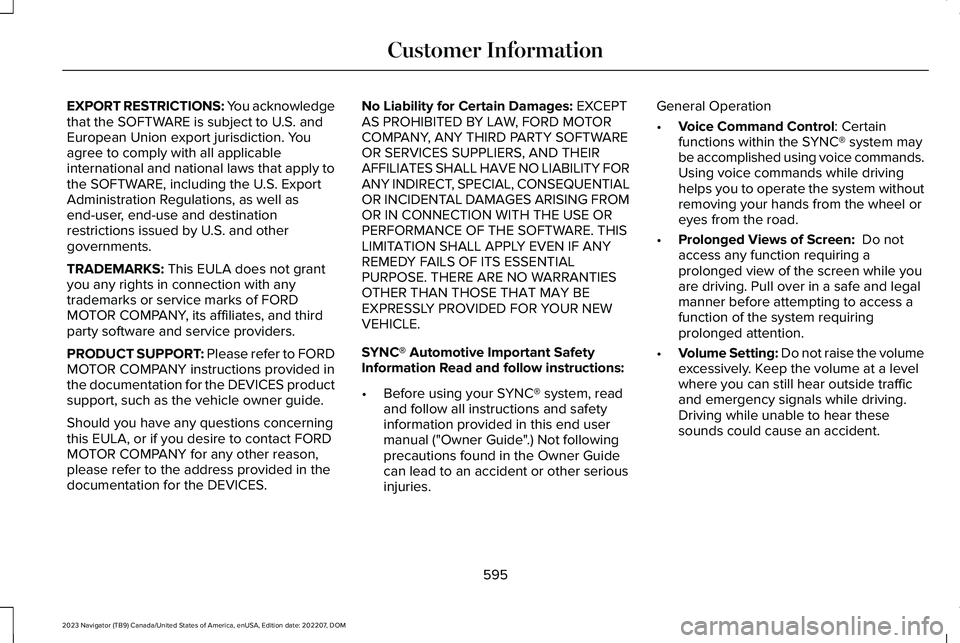
EXPORT RESTRICTIONS: You acknowledgethat the SOFTWARE is subject to U.S. andEuropean Union export jurisdiction. Youagree to comply with all applicableinternational and national laws that apply tothe SOFTWARE, including the U.S. ExportAdministration Regulations, as well asend-user, end-use and destinationrestrictions issued by U.S. and othergovernments.
TRADEMARKS: This EULA does not grantyou any rights in connection with anytrademarks or service marks of FORDMOTOR COMPANY, its affiliates, and thirdparty software and service providers.
PRODUCT SUPPORT: Please refer to FORDMOTOR COMPANY instructions provided inthe documentation for the DEVICES productsupport, such as the vehicle owner guide.
Should you have any questions concerningthis EULA, or if you desire to contact FORDMOTOR COMPANY for any other reason,please refer to the address provided in thedocumentation for the DEVICES.
No Liability for Certain Damages: EXCEPTAS PROHIBITED BY LAW, FORD MOTORCOMPANY, ANY THIRD PARTY SOFTWAREOR SERVICES SUPPLIERS, AND THEIRAFFILIATES SHALL HAVE NO LIABILITY FORANY INDIRECT, SPECIAL, CONSEQUENTIALOR INCIDENTAL DAMAGES ARISING FROMOR IN CONNECTION WITH THE USE ORPERFORMANCE OF THE SOFTWARE. THISLIMITATION SHALL APPLY EVEN IF ANYREMEDY FAILS OF ITS ESSENTIALPURPOSE. THERE ARE NO WARRANTIESOTHER THAN THOSE THAT MAY BEEXPRESSLY PROVIDED FOR YOUR NEWVEHICLE.
SYNC® Automotive Important SafetyInformation Read and follow instructions:
•Before using your SYNC® system, readand follow all instructions and safetyinformation provided in this end usermanual ("Owner Guide".) Not followingprecautions found in the Owner Guidecan lead to an accident or other seriousinjuries.
General Operation
•Voice Command Control: Certainfunctions within the SYNC® system maybe accomplished using voice commands.Using voice commands while drivinghelps you to operate the system withoutremoving your hands from the wheel oreyes from the road.
•Prolonged Views of Screen: Do notaccess any function requiring aprolonged view of the screen while youare driving. Pull over in a safe and legalmanner before attempting to access afunction of the system requiringprolonged attention.
•Volume Setting: Do not raise the volumeexcessively. Keep the volume at a levelwhere you can still hear outside trafficand emergency signals while driving.Driving while unable to hear thesesounds could cause an accident.
595
2023 Navigator (TB9) Canada/United States of America, enUSA, Edition date: 202207, DOMCustomer Information
Page 635 of 660
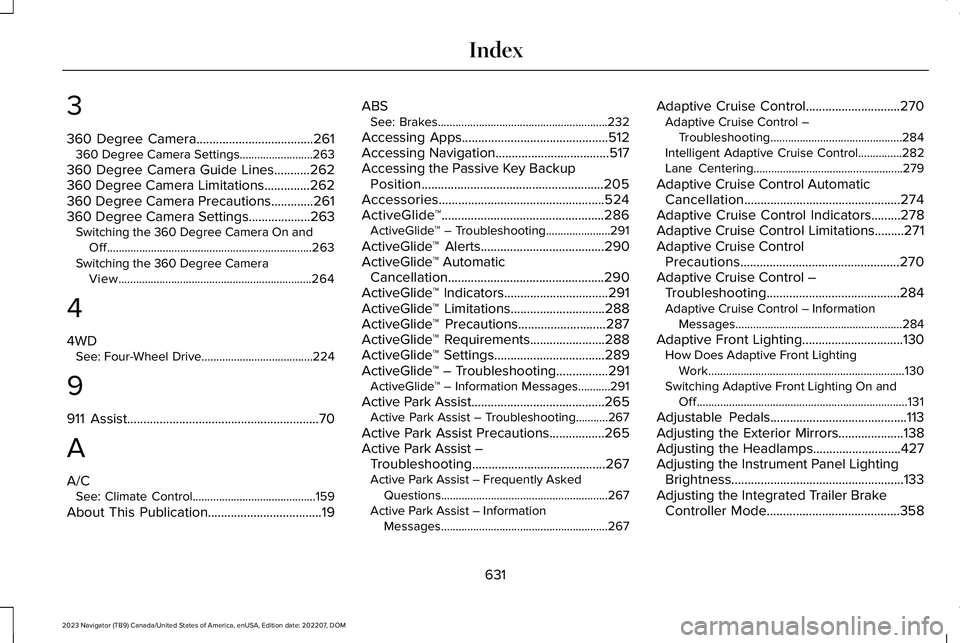
3
360 Degree Camera....................................261360 Degree Camera Settings.........................263
360 Degree Camera Guide Lines...........262360 Degree Camera Limitations..............262360 Degree Camera Precautions.............261360 Degree Camera Settings...................263Switching the 360 Degree Camera On andOff......................................................................263Switching the 360 Degree CameraView..................................................................264
4
4WDSee: Four-Wheel Drive......................................224
9
911 Assist...........................................................70
A
A/CSee: Climate Control..........................................159
About This Publication...................................19
ABSSee: Brakes..........................................................232
Accessing Apps.............................................512Accessing Navigation...................................517Accessing the Passive Key BackupPosition........................................................205Accessories...................................................524ActiveGlide™..................................................286ActiveGlide™ – Troubleshooting......................291
ActiveGlide™ Alerts......................................290ActiveGlide™ AutomaticCancellation................................................290ActiveGlide™ Indicators................................291ActiveGlide™ Limitations.............................288ActiveGlide™ Precautions...........................287ActiveGlide™ Requirements.......................288ActiveGlide™ Settings..................................289ActiveGlide™ – Troubleshooting................291ActiveGlide™ – Information Messages...........291
Active Park Assist.........................................265Active Park Assist – Troubleshooting...........267
Active Park Assist Precautions.................265Active Park Assist –Troubleshooting.........................................267Active Park Assist – Frequently AskedQuestions.........................................................267Active Park Assist – InformationMessages.........................................................267
Adaptive Cruise Control.............................270Adaptive Cruise Control –Troubleshooting.............................................284Intelligent Adaptive Cruise Control...............282Lane Centering...................................................279
Adaptive Cruise Control AutomaticCancellation................................................274Adaptive Cruise Control Indicators.........278Adaptive Cruise Control Limitations.........271Adaptive Cruise ControlPrecautions.................................................270Adaptive Cruise Control –Troubleshooting.........................................284Adaptive Cruise Control – InformationMessages.........................................................284
Adaptive Front Lighting...............................130How Does Adaptive Front LightingWork...................................................................130Switching Adaptive Front Lighting On andOff........................................................................131
Adjustable Pedals..........................................113Adjusting the Exterior Mirrors....................138Adjusting the Headlamps...........................427Adjusting the Instrument Panel LightingBrightness.....................................................133Adjusting the Integrated Trailer BrakeController Mode.........................................358
631
2023 Navigator (TB9) Canada/United States of America, enUSA, Edition date: 202207, DOMIndex
Page 636 of 660
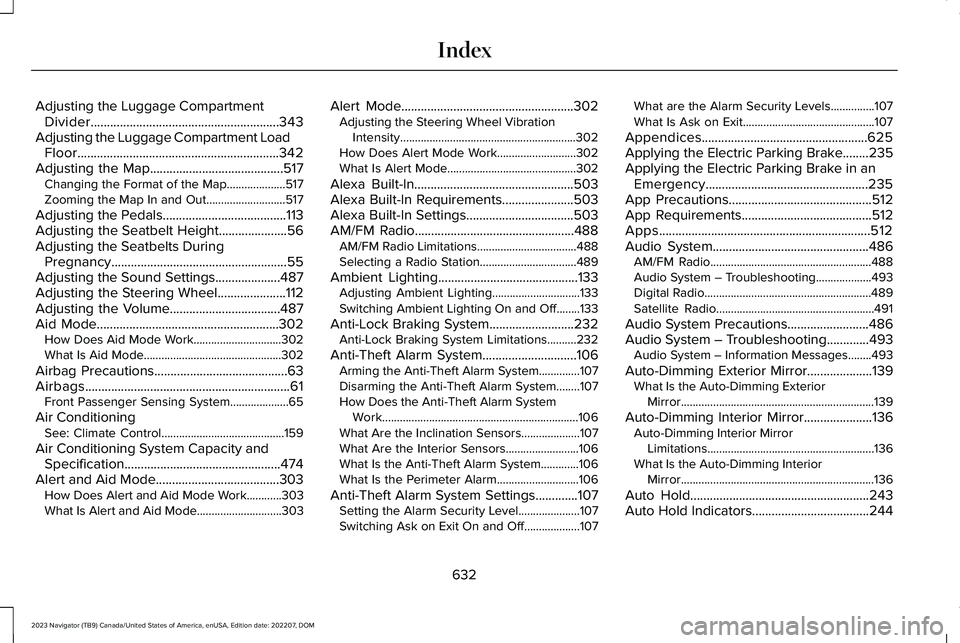
Adjusting the Luggage CompartmentDivider..........................................................343Adjusting the Luggage Compartment LoadFloor..............................................................342Adjusting the Map.........................................517Changing the Format of the Map....................517Zooming the Map In and Out...........................517
Adjusting the Pedals......................................113Adjusting the Seatbelt Height.....................56Adjusting the Seatbelts DuringPregnancy......................................................55Adjusting the Sound Settings....................487Adjusting the Steering Wheel.....................112Adjusting the Volume..................................487Aid Mode........................................................302How Does Aid Mode Work..............................302What Is Aid Mode...............................................302
Airbag Precautions.........................................63Airbags...............................................................61Front Passenger Sensing System....................65
Air ConditioningSee: Climate Control..........................................159
Air Conditioning System Capacity andSpecification................................................474Alert and Aid Mode......................................303How Does Alert and Aid Mode Work............303What Is Alert and Aid Mode.............................303
Alert Mode.....................................................302Adjusting the Steering Wheel VibrationIntensity............................................................302How Does Alert Mode Work...........................302What Is Alert Mode............................................302
Alexa Built-In.................................................503Alexa Built-In Requirements......................503Alexa Built-In Settings.................................503AM/FM Radio.................................................488AM/FM Radio Limitations..................................488Selecting a Radio Station.................................489
Ambient Lighting...........................................133Adjusting Ambient Lighting..............................133Switching Ambient Lighting On and Off........133
Anti-Lock Braking System..........................232Anti-Lock Braking System Limitations..........232
Anti-Theft Alarm System.............................106Arming the Anti-Theft Alarm System..............107Disarming the Anti-Theft Alarm System........107How Does the Anti-Theft Alarm SystemWork...................................................................106What Are the Inclination Sensors....................107What Are the Interior Sensors.........................106What Is the Anti-Theft Alarm System.............106What Is the Perimeter Alarm............................106
Anti-Theft Alarm System Settings.............107Setting the Alarm Security Level.....................107Switching Ask on Exit On and Off...................107
What are the Alarm Security Levels...............107What Is Ask on Exit.............................................107
Appendices...................................................625Applying the Electric Parking Brake........235Applying the Electric Parking Brake in anEmergency..................................................235App Precautions............................................512App Requirements........................................512Apps.................................................................512Audio System................................................486AM/FM Radio.......................................................488Audio System – Troubleshooting...................493Digital Radio.........................................................489Satellite Radio......................................................491
Audio System Precautions.........................486Audio System – Troubleshooting.............493Audio System – Information Messages........493
Auto-Dimming Exterior Mirror....................139What Is the Auto-Dimming ExteriorMirror..................................................................139
Auto-Dimming Interior Mirror.....................136Auto-Dimming Interior MirrorLimitations.........................................................136What Is the Auto-Dimming InteriorMirror..................................................................136
Auto Hold.......................................................243Auto Hold Indicators....................................244
632
2023 Navigator (TB9) Canada/United States of America, enUSA, Edition date: 202207, DOMIndex