audio LINCOLN NAVIGATOR 2023 User Guide
[x] Cancel search | Manufacturer: LINCOLN, Model Year: 2023, Model line: NAVIGATOR, Model: LINCOLN NAVIGATOR 2023Pages: 660, PDF Size: 14.04 MB
Page 416 of 660
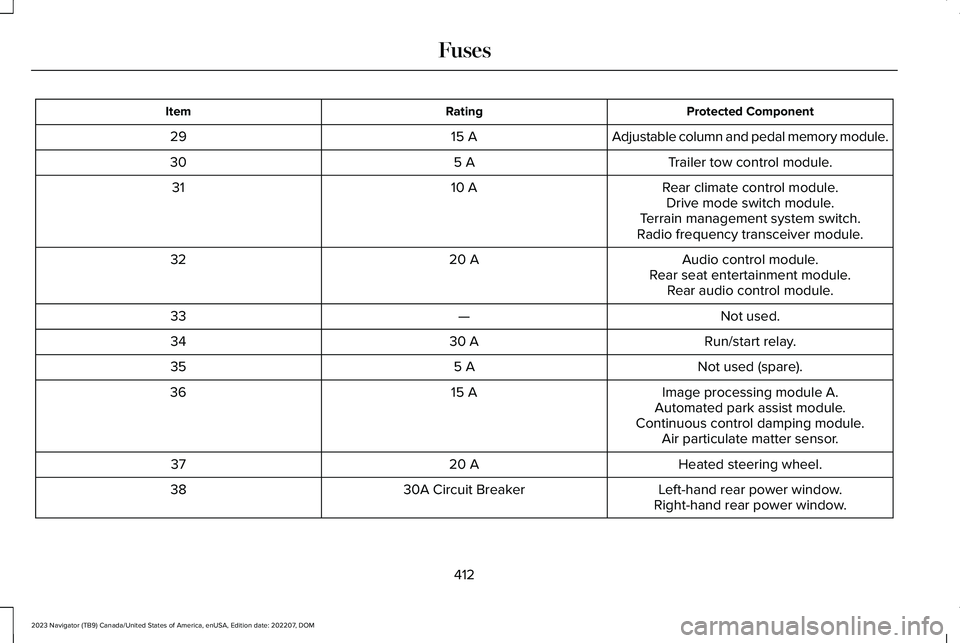
Protected ComponentRatingItem
Adjustable column and pedal memory module.15 A29
Trailer tow control module.5 A30
Rear climate control module.10 A31Drive mode switch module.Terrain management system switch.Radio frequency transceiver module.
Audio control module.20 A32Rear seat entertainment module.Rear audio control module.
Not used.—33
Run/start relay.30 A34
Not used (spare).5 A35
Image processing module A.15 A36Automated park assist module.Continuous control damping module.Air particulate matter sensor.
Heated steering wheel.20 A37
Left-hand rear power window.30A Circuit Breaker38Right-hand rear power window.
412
2023 Navigator (TB9) Canada/United States of America, enUSA, Edition date: 202207, DOMFuses
Page 429 of 660
For longer, trouble-free operation, keep thetop of the battery clean and dry and thebattery cables tightly fastened to the batteryterminals. If any corrosion is present on thebattery or terminals, remove the cables fromthe terminals and clean with a wire brush. You can neutralize the acid with a solutionof baking soda and water.
We recommend that you disconnect thenegative battery cable terminal from thebattery if you plan to store your vehicle foran extended period.
Note:If you only disconnect the negativebattery cable terminal, make sure it isisolated or placed away from the batteryterminal to avoid unintended connection orarcing.
If you replace the battery make sure itmatches the electrical requirements of yourvehicle.
If you disconnect or replace the battery andyour vehicle has an automatic transmission,it must relearn its adaptive strategy. Becauseof this, the transmission may shift firmly whenfirst driven. This is normal operation whilethe transmission fully updates its operationto optimum shift feel.
Battery Sensor Reset
When you install a new battery, reset thebattery sensor by doing the following:
1.Switch the ignition on, and leave theengine off.
Note:Complete Steps 2 and 3 within 10seconds.
2.Flash the high beam headlamps fivetimes, ending with the high beams off.
3.Press and release the brake pedal threetimes.
The battery warning lamp flashes three timesto confirm that the reset is successful.
Battery Management System (If Equipped)
The system monitors battery conditions andtakes actions to extend battery life. Ifexcessive battery drain is detected, thesystem temporarily disables some electricalsystems to protect the battery.
Systems included are:
•Heated rear window.
•Heated seats.
•Climate control.
•Heated steering wheel.
•Audio unit.
•Navigation system.
A message may appear in the informationdisplay to alert you that battery protectionactions are active. This message is only fornotification that an action is taking place, andnot intended to indicate an electrical problemor that the battery requires replacement.
425
2023 Navigator (TB9) Canada/United States of America, enUSA, Edition date: 202207, DOMMaintenance
Page 490 of 660
AUDIO SYSTEM PRECAUTIONS
WARNING: Driving while distractedcan result in loss of vehicle control, crashand injury. We strongly recommend thatyou use extreme caution when using anydevice that may take your focus off theroad. Your primary responsibility is the safeoperation of your vehicle. We recommendagainst the use of any hand-held devicewhile driving and encourage the use ofvoice-operated systems when possible.Make sure you are aware of all applicablelocal laws that may affect the use ofelectronic devices while driving.
Listening to loud audio for long periods oftime could damage your hearing.
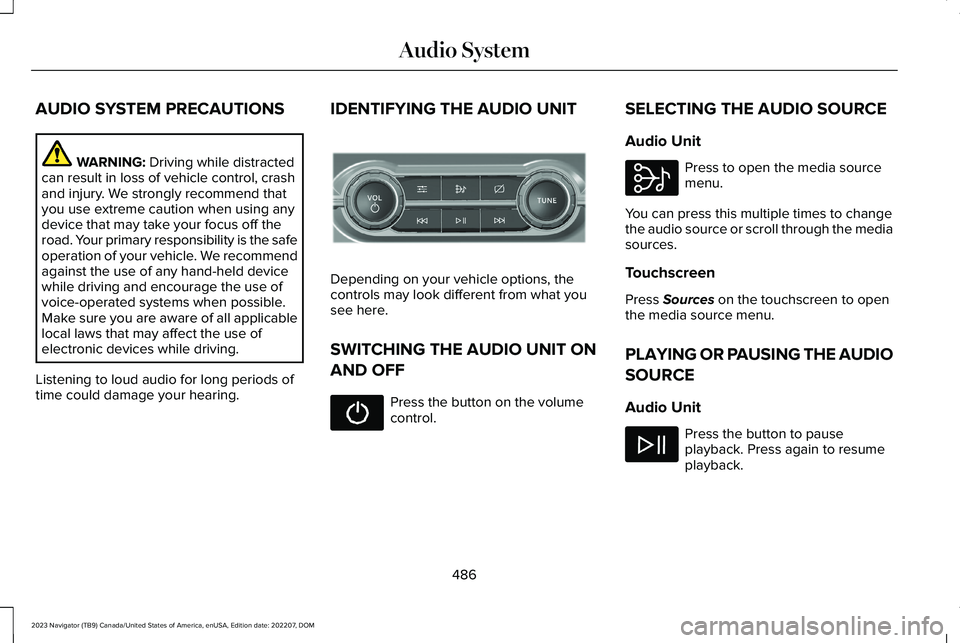
IDENTIFYING THE AUDIO UNIT
Depending on your vehicle options, thecontrols may look different from what yousee here.
SWITCHING THE AUDIO UNIT ON
AND OFF
Press the button on the volumecontrol.
SELECTING THE AUDIO SOURCE
Audio Unit
Press to open the media sourcemenu.
You can press this multiple times to changethe audio source or scroll through the mediasources.
Touchscreen
Press Sources on the touchscreen to openthe media source menu.
PLAYING OR PAUSING THE AUDIO
SOURCE
Audio Unit
Press the button to pauseplayback. Press again to resumeplayback.
486
2023 Navigator (TB9) Canada/United States of America, enUSA, Edition date: 202207, DOMAudio SystemE308144 E308143
Page 491 of 660
Touchscreen
Press the button to pauseplayback. Press again to resumeplayback.
Note:Not all sources can be paused.
ADJUSTING THE VOLUME
Turn to adjust the volume.
Some vehicles may be able to adjust thevolume using buttons on the steering wheel.
SWITCHING SHUFFLE MODE ON
AND OFF
Press the button on thetouchscreen to switch shufflemode on or off.
Note:Not all sources have shuffle mode.
SWITCHING REPEAT MODE ON
AND OFF
Press the button on thetouchscreen to switch repeat modeon or off.
Note:Not all sources have repeat mode.
SETTING A MEMORY PRESET
1.Select a station or channel.
2.Press and hold a memory preset buttonon the touchscreen.
Note:The audio mutes briefly while thesystem saves the preset and returns once itis stored.
Note:You can save presets from multiplesources to the memory preset bar.
MUTING THE AUDIO
Press to mute the signal. Pressagain to restore the signal.
ADJUSTING THE SOUND
SETTINGS
Balance and Fade (If Equipped)
1.Press Settings on the touchscreen.
2.Press Sound Settings.
3.Press Balance / Fade.
4.Press the arrows to adjust the settings.
487
2023 Navigator (TB9) Canada/United States of America, enUSA, Edition date: 202207, DOMAudio System E248939
Page 492 of 660
Tone Settings
1.Press Settings on the touchscreen.
2.Press Sound Settings.
3.Press Tone Settings.
4.Press the arrows or slider bar to adjustthe settings.
Speed Compensated Volume
1.Press Settings on the touchscreen.
2.Press Sound Settings.
3.Press Speed Compensated Volume.
4.Press a setting.
Occupancy Mode (If Equipped)
1.Press Settings on the touchscreen.
2.Press Sound Settings.
3.Press Occupancy Mode.
4.Press a setting.
Sound Mode (If Equipped)
1.Press Settings on the touchscreen.
2.Press Sound Settings.
3.Press Sound Mode.
4.Press a setting.
SETTING THE CLOCK AND DATE
1.Press Settings on the touchscreen.
2.Press Clock Settings.
3.Set the time.
Note:The AM and PM options are notavailable if 24-hour mode is on.
Switching Automatic Time Updates Onand Off
1.Press Settings on the touchscreen.
2.Press Clock Settings.
3.Switch Auto Time Update on or off.
AM/FM RADIO
AM/FM RADIO LIMITATIONS
The further you travel from an AM or FMstation, the weaker the signal and the weakerthe reception.
Hills, mountains, tall buildings, bridges,tunnels, freeway overpasses, parkinggarages, dense tree foliage andthunderstorms can interfere with thereception.
When you pass a ground-based broadcastrepeating tower, a stronger signal mayovertake a weaker one and result in theaudio system muting.
488
2023 Navigator (TB9) Canada/United States of America, enUSA, Edition date: 202207, DOMAudio System
Page 493 of 660
SELECTING A RADIO STATION
Manually Selecting a Radio Station
Turn to search through the radio frequencyband.
Using Direct Tune
1.Press Direct Tune to open the numberpad.
2.Enter the station you prefer.
Note:You can only enter a valid station forthe audio source you are currently listeningto.
Using Seek
Press either button. The systemstops at the first station it finds inthat direction.
Using the Station List
1.Press Browse.
Note:Available on FM radio only.
2.Press a station.
SWITCHING THE DISPLAY ON AND
OFF
Audio Unit
Press the button.
Touchscreen
To switch the display off:
1.Press Settings on the touchscreen.
2.Press Display Settings.
3.Press Display Off.
Note:The display defaults to on each timeyou switch your vehicle on.
To switch the display on, press anywhere onthe touchscreen.
DIGITAL RADIO
WHAT IS DIGITAL RADIO
HD Radio™ technology is the digital evolutionof analog AM/FM radio.
For additional information, visitwww.HDRadio.com.
489
2023 Navigator (TB9) Canada/United States of America, enUSA, Edition date: 202207, DOMAudio SystemE270235 E272035
Page 494 of 660
HD Radio Technology is manufactured underlicense from iBiquity Digital Corporation andforeign patents. HD Radio and the HD andHD Radio logos are proprietary trademarksof XPERI. The vehicle manufacturer andXPERI are not responsible for the contentsent using HD Radio technology. Contentmay be changed, added or deleted at anytime at the station owner's discretion.
HOW DOES DIGITAL RADIO WORK
Your system has a special receiver thatallows it to receive digital broadcasts inaddition to analog broadcasts.
HD1 signifies the main programming statusand is available in both analog and digitalbroadcasts. Other multicast stations are onlyavailable digitally and could contain new ordifferent content.
Note:When the system first receives an HD1station, it plays the station in the analogversion until it verifies the station is an HDRadio station. Then it shifts to the digitalversion.
Note:There is an audio mute delay whenswitching to an HD2 or HD3 station becausethe system has to reacquire and decode thedigital signal.
DIGITAL RADIO LIMITATIONS
If you are outside the reception area, thesystem could not work.
If you are on the fringe of the reception area,the station could mute due to weak signalstrength.
Note:If you are listening to HD1, the systemchanges back to the analog broadcast untilthe digital broadcast is available again. Ifyou are listening to any other multicastchannels, the station mutes and stays mutedunless it is able to connect to the digitalsignal again.
Depending on the station quality, you couldhear a slight sound change when the stationchanges between analog and digital audio.
You cannot access a saved HD station if yourvehicle is outside the station’s receptionarea.
SWITCHING DIGITAL RADIORECEPTION ON AND OFF
1.Press Settings on the touchscreen.
2.Press Radio Settings.
3.Switch AM HD Radio or FM HD Radioon or off.
DIGITAL RADIO INDICATORS
HD Radio Indicator
The indicator appears when HD Radio is onand you tune to a station broadcasting HDRadio technology.
The color of the indicator changes to indicatethe system status.
490
2023 Navigator (TB9) Canada/United States of America, enUSA, Edition date: 202207, DOMAudio SystemE142616
Page 495 of 660
Gray indicates the system is acquiring adigital station.
Orange indicates digital audio is playing.
Multicast Indicator
The multicast indicator appears if the currentstation is broadcasting multiple digitalbroadcasts. The highlighted numbersindicate additional digital channels available.
Note:For stations that have more than oneHD multicast, the HD indicator and radio textappears as a button. Press the button tocycle through all of the HD stations on thatspecific frequency.
SATELLITE RADIO (IF EQUIPPED)
WHAT IS SATELLITE RADIO
Your factory-installed SiriusXM radio systemincludes a limited subscription term, whichbegins on the date of sale or lease of yourvehicle. See an authorized dealer foravailability.
For additional information about extendedsubscription terms, visit www.SiriusXM.comin the United States, www.SiriusXM.ca inCanada, or call SiriusXM at 1-888-539-7474.
Note:SiriusXM reserves the unrestrictedright to change, rearrange, add or deleteprogramming including canceling, movingor adding particular channels, and its prices,at any time, with or without notice to you.Neither SiriusXM and its affiliates nor FordMotor Company and its affiliates will beliable to you or any third party for any suchmodification, suspension or termination.
SATELLITE RADIO LIMITATIONS
For optimal reception performance, keep theantenna clear of snow and ice build-up andkeep luggage and other material as far awayfrom the antenna as possible. Placingluggage over the antenna may reduceperformance. Factory-installed andaftermarket vehicle structures including, butnot limited to, roof racks and soft top roofsin a partially open position could reducereception performance.
Hills, mountains, tall buildings, bridges,tunnels, freeway overpasses, parkinggarages, dense tree foliage andthunderstorms can interfere with yourreception.
When you pass a ground-basedbroadcast-repeating tower, a stronger signalmay overtake a weaker one and could resultin the audio system muting. Your displaycould show an error message to indicate theinterference.
LOCATING THE SATELLITE RADIOIDENTIFICATION NUMBER
1.Select SiriusXM as the audio source.
2.Tune to channel 0.
SELECTING A CHANNEL
Manually Selecting a Channel
Press the button to find theprevious or next available radiochannel.
491
2023 Navigator (TB9) Canada/United States of America, enUSA, Edition date: 202207, DOMAudio SystemE328569 E328570
Page 496 of 660
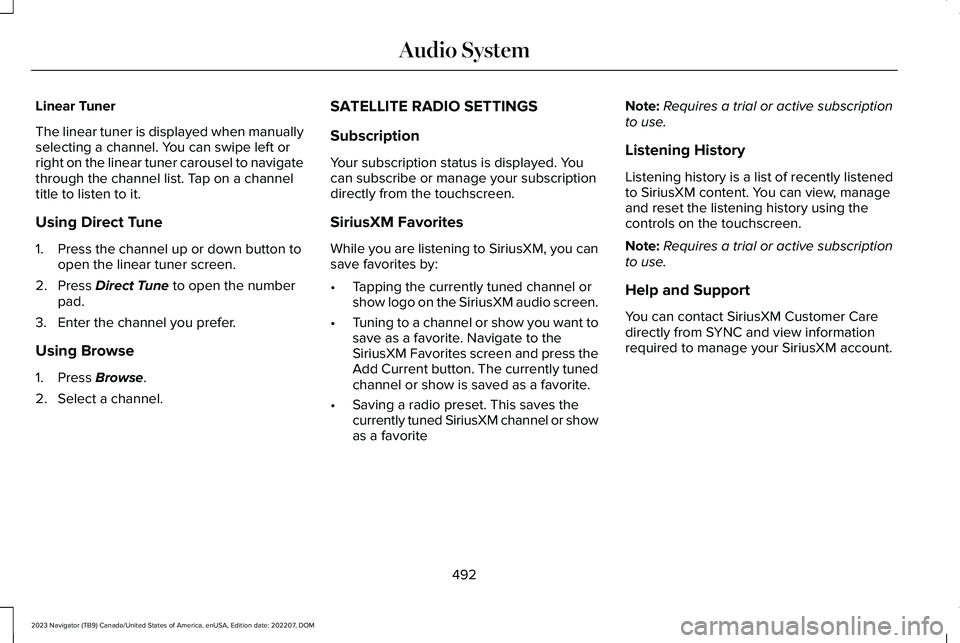
Linear Tuner
The linear tuner is displayed when manuallyselecting a channel. You can swipe left orright on the linear tuner carousel to navigatethrough the channel list. Tap on a channeltitle to listen to it.
Using Direct Tune
1.Press the channel up or down button toopen the linear tuner screen.
2.Press Direct Tune to open the numberpad.
3.Enter the channel you prefer.
Using Browse
1.Press Browse.
2.Select a channel.
SATELLITE RADIO SETTINGS
Subscription
Your subscription status is displayed. Youcan subscribe or manage your subscriptiondirectly from the touchscreen.
SiriusXM Favorites
While you are listening to SiriusXM, you cansave favorites by:
•Tapping the currently tuned channel orshow logo on the SiriusXM audio screen.
•Tuning to a channel or show you want tosave as a favorite. Navigate to theSiriusXM Favorites screen and press theAdd Current button. The currently tunedchannel or show is saved as a favorite.
•Saving a radio preset. This saves thecurrently tuned SiriusXM channel or showas a favorite
Note:Requires a trial or active subscriptionto use.
Listening History
Listening history is a list of recently listenedto SiriusXM content. You can view, manageand reset the listening history using thecontrols on the touchscreen.
Note:Requires a trial or active subscriptionto use.
Help and Support
You can contact SiriusXM Customer Caredirectly from SYNC and view informationrequired to manage your SiriusXM account.
492
2023 Navigator (TB9) Canada/United States of America, enUSA, Edition date: 202207, DOMAudio System
Page 497 of 660
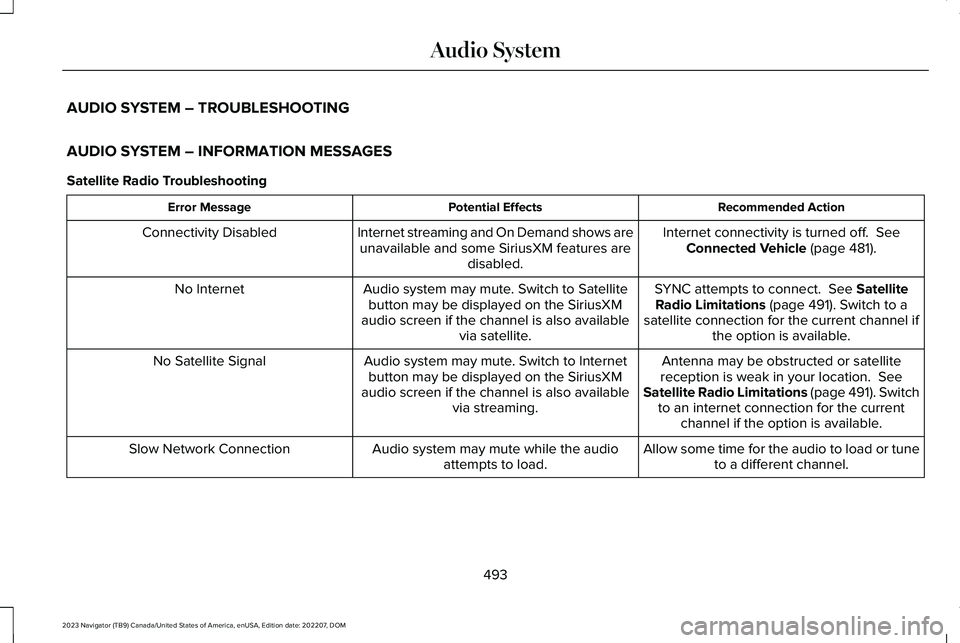
AUDIO SYSTEM – TROUBLESHOOTING
AUDIO SYSTEM – INFORMATION MESSAGES
Satellite Radio Troubleshooting
Recommended ActionPotential EffectsError Message
Internet connectivity is turned off. SeeConnected Vehicle (page 481).Internet streaming and On Demand shows areunavailable and some SiriusXM features aredisabled.
Connectivity Disabled
SYNC attempts to connect. See SatelliteRadio Limitations (page 491). Switch to asatellite connection for the current channel ifthe option is available.
Audio system may mute. Switch to Satellitebutton may be displayed on the SiriusXMaudio screen if the channel is also availablevia satellite.
No Internet
Antenna may be obstructed or satellitereception is weak in your location. SeeSatellite Radio Limitations (page 491). Switchto an internet connection for the currentchannel if the option is available.
Audio system may mute. Switch to Internetbutton may be displayed on the SiriusXMaudio screen if the channel is also availablevia streaming.
No Satellite Signal
Allow some time for the audio to load or tuneto a different channel.Audio system may mute while the audioattempts to load.Slow Network Connection
493
2023 Navigator (TB9) Canada/United States of America, enUSA, Edition date: 202207, DOMAudio System