sat nav LINCOLN NAVIGATOR 2023 User Guide
[x] Cancel search | Manufacturer: LINCOLN, Model Year: 2023, Model line: NAVIGATOR, Model: LINCOLN NAVIGATOR 2023Pages: 660, PDF Size: 14.04 MB
Page 495 of 660
Gray indicates the system is acquiring adigital station.
Orange indicates digital audio is playing.
Multicast Indicator
The multicast indicator appears if the currentstation is broadcasting multiple digitalbroadcasts. The highlighted numbersindicate additional digital channels available.
Note:For stations that have more than oneHD multicast, the HD indicator and radio textappears as a button. Press the button tocycle through all of the HD stations on thatspecific frequency.
SATELLITE RADIO (IF EQUIPPED)
WHAT IS SATELLITE RADIO
Your factory-installed SiriusXM radio systemincludes a limited subscription term, whichbegins on the date of sale or lease of yourvehicle. See an authorized dealer foravailability.
For additional information about extendedsubscription terms, visit www.SiriusXM.comin the United States, www.SiriusXM.ca inCanada, or call SiriusXM at 1-888-539-7474.
Note:SiriusXM reserves the unrestrictedright to change, rearrange, add or deleteprogramming including canceling, movingor adding particular channels, and its prices,at any time, with or without notice to you.Neither SiriusXM and its affiliates nor FordMotor Company and its affiliates will beliable to you or any third party for any suchmodification, suspension or termination.
SATELLITE RADIO LIMITATIONS
For optimal reception performance, keep theantenna clear of snow and ice build-up andkeep luggage and other material as far awayfrom the antenna as possible. Placingluggage over the antenna may reduceperformance. Factory-installed andaftermarket vehicle structures including, butnot limited to, roof racks and soft top roofsin a partially open position could reducereception performance.
Hills, mountains, tall buildings, bridges,tunnels, freeway overpasses, parkinggarages, dense tree foliage andthunderstorms can interfere with yourreception.
When you pass a ground-basedbroadcast-repeating tower, a stronger signalmay overtake a weaker one and could resultin the audio system muting. Your displaycould show an error message to indicate theinterference.
LOCATING THE SATELLITE RADIOIDENTIFICATION NUMBER
1.Select SiriusXM as the audio source.
2.Tune to channel 0.
SELECTING A CHANNEL
Manually Selecting a Channel
Press the button to find theprevious or next available radiochannel.
491
2023 Navigator (TB9) Canada/United States of America, enUSA, Edition date: 202207, DOMAudio SystemE328569 E328570
Page 496 of 660
Linear Tuner
The linear tuner is displayed when manuallyselecting a channel. You can swipe left orright on the linear tuner carousel to navigatethrough the channel list. Tap on a channeltitle to listen to it.
Using Direct Tune
1.Press the channel up or down button toopen the linear tuner screen.
2.Press Direct Tune to open the numberpad.
3.Enter the channel you prefer.
Using Browse
1.Press Browse.
2.Select a channel.
SATELLITE RADIO SETTINGS
Subscription
Your subscription status is displayed. Youcan subscribe or manage your subscriptiondirectly from the touchscreen.
SiriusXM Favorites
While you are listening to SiriusXM, you cansave favorites by:
•Tapping the currently tuned channel orshow logo on the SiriusXM audio screen.
•Tuning to a channel or show you want tosave as a favorite. Navigate to theSiriusXM Favorites screen and press theAdd Current button. The currently tunedchannel or show is saved as a favorite.
•Saving a radio preset. This saves thecurrently tuned SiriusXM channel or showas a favorite
Note:Requires a trial or active subscriptionto use.
Listening History
Listening history is a list of recently listenedto SiriusXM content. You can view, manageand reset the listening history using thecontrols on the touchscreen.
Note:Requires a trial or active subscriptionto use.
Help and Support
You can contact SiriusXM Customer Caredirectly from SYNC and view informationrequired to manage your SiriusXM account.
492
2023 Navigator (TB9) Canada/United States of America, enUSA, Edition date: 202207, DOMAudio System
Page 497 of 660
AUDIO SYSTEM – TROUBLESHOOTING
AUDIO SYSTEM – INFORMATION MESSAGES
Satellite Radio Troubleshooting
Recommended ActionPotential EffectsError Message
Internet connectivity is turned off. SeeConnected Vehicle (page 481).Internet streaming and On Demand shows areunavailable and some SiriusXM features aredisabled.
Connectivity Disabled
SYNC attempts to connect. See SatelliteRadio Limitations (page 491). Switch to asatellite connection for the current channel ifthe option is available.
Audio system may mute. Switch to Satellitebutton may be displayed on the SiriusXMaudio screen if the channel is also availablevia satellite.
No Internet
Antenna may be obstructed or satellitereception is weak in your location. SeeSatellite Radio Limitations (page 491). Switchto an internet connection for the currentchannel if the option is available.
Audio system may mute. Switch to Internetbutton may be displayed on the SiriusXMaudio screen if the channel is also availablevia streaming.
No Satellite Signal
Allow some time for the audio to load or tuneto a different channel.Audio system may mute while the audioattempts to load.Slow Network Connection
493
2023 Navigator (TB9) Canada/United States of America, enUSA, Edition date: 202207, DOMAudio System
Page 498 of 660
Recommended ActionPotential EffectsError Message
A temporary update may be in progress. Allowsome time before retrying to tune to thechannel. If the issue continues, the channelmay no longer be available.
Audio system may mute. Radio may tune to adifferent channel.Channel Unavailable
A temporary update may be in progress. Allowsome time before retrying to play the episode.If the issue continues, the episode may nolonger be available.
Audio system may mute. Radio may tune to adifferent channel.Episode Unavailable
Allow some time and retry the action.Audio system may mute. Radio may tune to adifferent channel.Something went wrong
Your subscription has expired or you have notyet subscribed for access to the listed content.Navigate to Subscription under the SatelliteRadio Settings menu. If you have an activesubscription which includes the listed channelor content and you see this error, you mayneed to refresh your radio. To refresh yourSiriusXM radio, visit www.siriusxm.com/refreshin the US, or www.siriusxm.ca/refresh inCanada.You may need to provide your SiriusXM Radioidentification number. See Locating theSatellite Radio Identification Number (page491).
Cannot listen to selected content. Contentmay appear grayed out and some featuresmay be disabled.
Subscribe to Listen
494
2023 Navigator (TB9) Canada/United States of America, enUSA, Edition date: 202207, DOMAudio System
Page 499 of 660
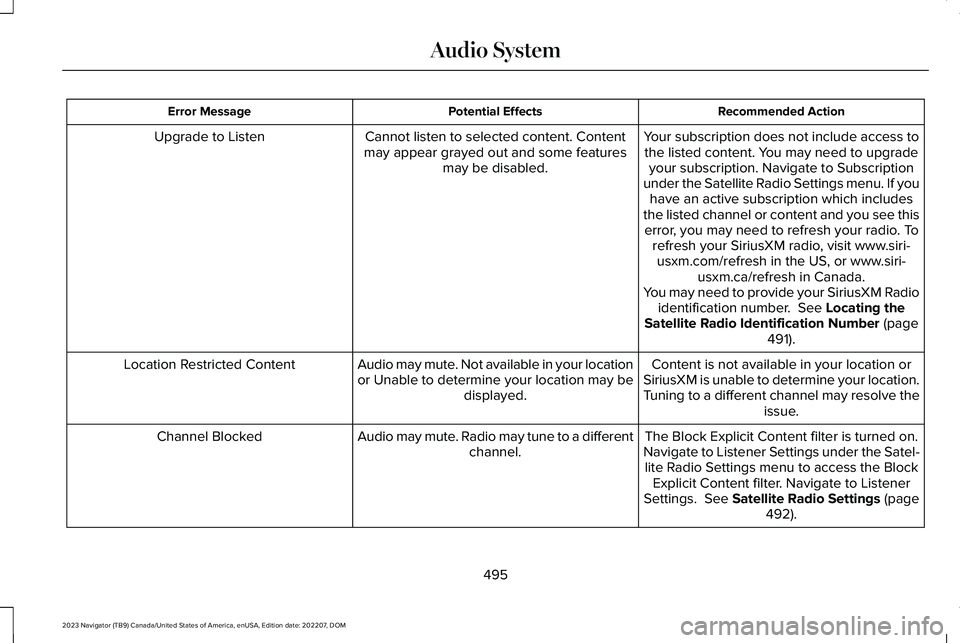
Recommended ActionPotential EffectsError Message
Your subscription does not include access tothe listed content. You may need to upgradeyour subscription. Navigate to Subscriptionunder the Satellite Radio Settings menu. If youhave an active subscription which includesthe listed channel or content and you see thiserror, you may need to refresh your radio. Torefresh your SiriusXM radio, visit www.siri-usxm.com/refresh in the US, or www.siri-usxm.ca/refresh in Canada.You may need to provide your SiriusXM Radioidentification number. See Locating theSatellite Radio Identification Number (page491).
Cannot listen to selected content. Contentmay appear grayed out and some featuresmay be disabled.
Upgrade to Listen
Content is not available in your location orSiriusXM is unable to determine your location.Tuning to a different channel may resolve theissue.
Audio may mute. Not available in your locationor Unable to determine your location may bedisplayed.
Location Restricted Content
The Block Explicit Content filter is turned on.Navigate to Listener Settings under the Satel-lite Radio Settings menu to access the BlockExplicit Content filter. Navigate to ListenerSettings. See Satellite Radio Settings (page492).
Audio may mute. Radio may tune to a differentchannel.Channel Blocked
495
2023 Navigator (TB9) Canada/United States of America, enUSA, Edition date: 202207, DOMAudio System
Page 500 of 660
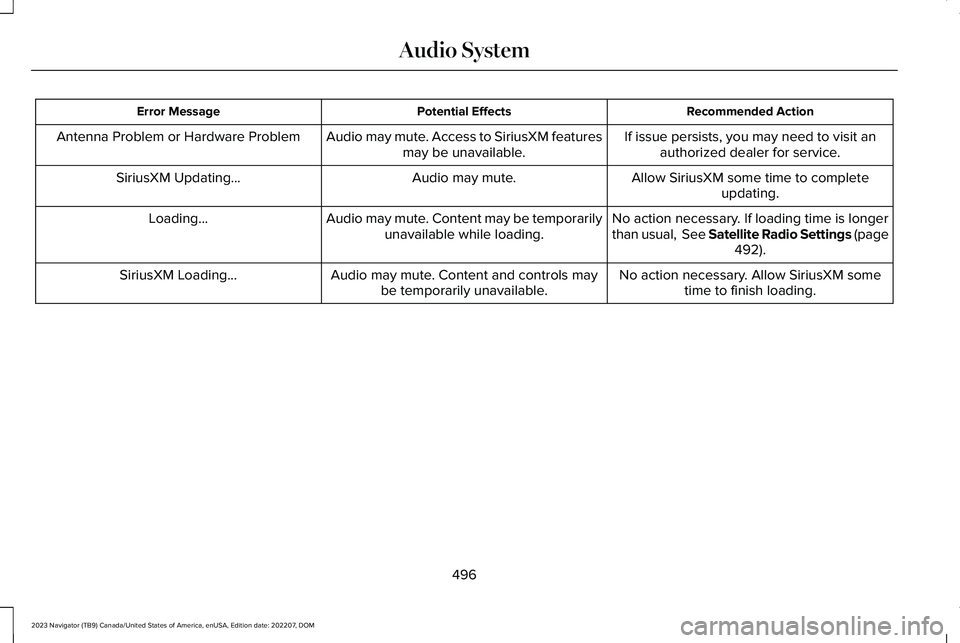
Recommended ActionPotential EffectsError Message
If issue persists, you may need to visit anauthorized dealer for service.Audio may mute. Access to SiriusXM featuresmay be unavailable.Antenna Problem or Hardware Problem
Allow SiriusXM some time to completeupdating.Audio may mute.SiriusXM Updating...
No action necessary. If loading time is longerthan usual, See Satellite Radio Settings (page492).
Audio may mute. Content may be temporarilyunavailable while loading.Loading...
No action necessary. Allow SiriusXM sometime to finish loading.Audio may mute. Content and controls maybe temporarily unavailable.SiriusXM Loading...
496
2023 Navigator (TB9) Canada/United States of America, enUSA, Edition date: 202207, DOMAudio System
Page 505 of 660
LINCOLN PERSONAL ASSISTANT
USING LINCOLN PERSONALASSISTANT
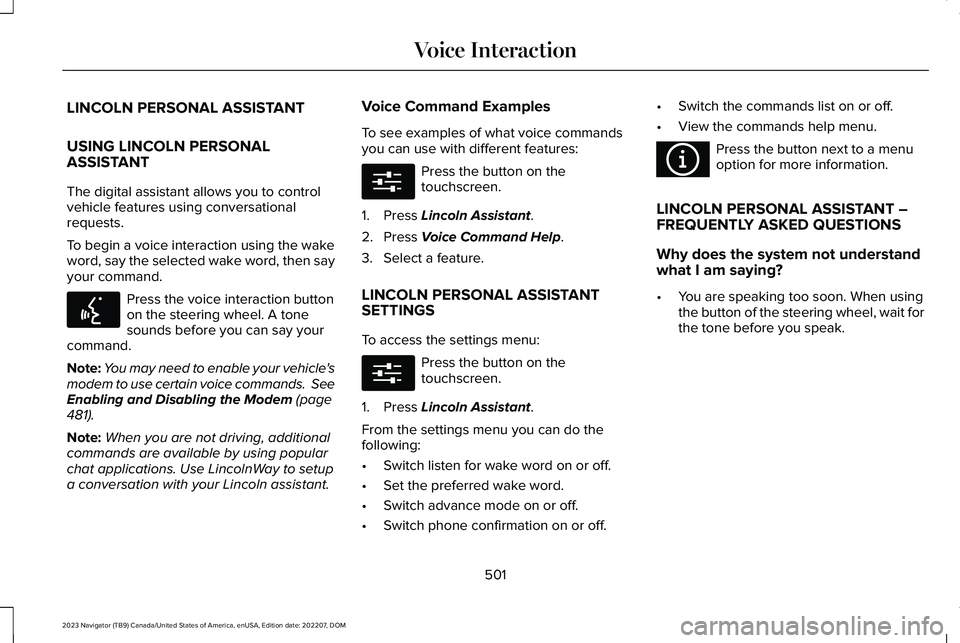
The digital assistant allows you to controlvehicle features using conversationalrequests.
To begin a voice interaction using the wakeword, say the selected wake word, then sayyour command.
Press the voice interaction buttonon the steering wheel. A tonesounds before you can say yourcommand.
Note:You may need to enable your vehicle'smodem to use certain voice commands. SeeEnabling and Disabling the Modem (page481).
Note:When you are not driving, additionalcommands are available by using popularchat applications. Use LincolnWay to setupa conversation with your Lincoln assistant.
Voice Command Examples
To see examples of what voice commandsyou can use with different features:
Press the button on thetouchscreen.
1.Press Lincoln Assistant.
2.Press Voice Command Help.
3.Select a feature.
LINCOLN PERSONAL ASSISTANTSETTINGS
To access the settings menu:
Press the button on thetouchscreen.
1.Press Lincoln Assistant.
From the settings menu you can do thefollowing:
•Switch listen for wake word on or off.
•Set the preferred wake word.
•Switch advance mode on or off.
•Switch phone confirmation on or off.
•Switch the commands list on or off.
•View the commands help menu.
Press the button next to a menuoption for more information.
LINCOLN PERSONAL ASSISTANT –FREQUENTLY ASKED QUESTIONS
Why does the system not understandwhat I am saying?
•You are speaking too soon. When usingthe button of the steering wheel, wait forthe tone before you speak.
501
2023 Navigator (TB9) Canada/United States of America, enUSA, Edition date: 202207, DOMVoice InteractionE142599 E280315 E280315 E366956
Page 545 of 660
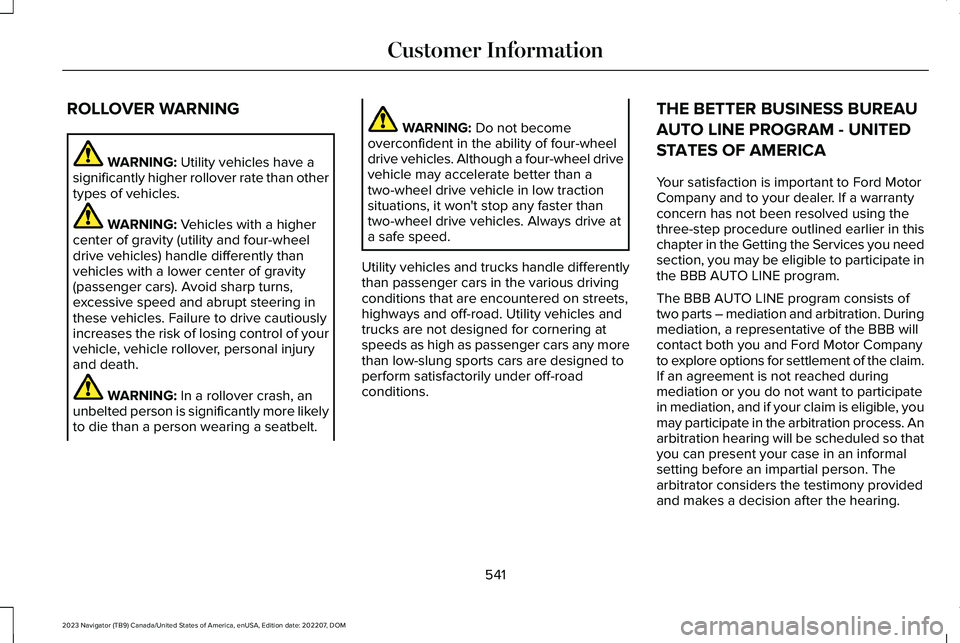
ROLLOVER WARNING
WARNING: Utility vehicles have asignificantly higher rollover rate than othertypes of vehicles.
WARNING: Vehicles with a highercenter of gravity (utility and four-wheeldrive vehicles) handle differently thanvehicles with a lower center of gravity(passenger cars). Avoid sharp turns,excessive speed and abrupt steering inthese vehicles. Failure to drive cautiouslyincreases the risk of losing control of yourvehicle, vehicle rollover, personal injuryand death.
WARNING: In a rollover crash, anunbelted person is significantly more likelyto die than a person wearing a seatbelt.
WARNING: Do not becomeoverconfident in the ability of four-wheeldrive vehicles. Although a four-wheel drivevehicle may accelerate better than atwo-wheel drive vehicle in low tractionsituations, it won't stop any faster thantwo-wheel drive vehicles. Always drive ata safe speed.
Utility vehicles and trucks handle differentlythan passenger cars in the various drivingconditions that are encountered on streets,highways and off-road. Utility vehicles andtrucks are not designed for cornering atspeeds as high as passenger cars any morethan low-slung sports cars are designed toperform satisfactorily under off-roadconditions.
THE BETTER BUSINESS BUREAU
AUTO LINE PROGRAM - UNITED
STATES OF AMERICA
Your satisfaction is important to Ford MotorCompany and to your dealer. If a warrantyconcern has not been resolved using thethree-step procedure outlined earlier in thischapter in the Getting the Services you needsection, you may be eligible to participate inthe BBB AUTO LINE program.
The BBB AUTO LINE program consists oftwo parts – mediation and arbitration. Duringmediation, a representative of the BBB willcontact both you and Ford Motor Companyto explore options for settlement of the claim.If an agreement is not reached duringmediation or you do not want to participatein mediation, and if your claim is eligible, youmay participate in the arbitration process. Anarbitration hearing will be scheduled so thatyou can present your case in an informalsetting before an impartial person. Thearbitrator considers the testimony providedand makes a decision after the hearing.
541
2023 Navigator (TB9) Canada/United States of America, enUSA, Edition date: 202207, DOMCustomer Information
Page 546 of 660
Disputes submitted to the BBB AUTO LINEprogram are usually decided within 40 daysafter you file your claim with the BBB. Youare not bound by the decision, and mayreject the decision and proceed to courtwhere all findings of the BBB Auto Linedispute, and decision, are admissible in thecourt action. Should you choose to acceptthe BBB AUTO LINE decision, Ford is thenbound by the decision, and must comply withthe decision within 30 days of receipt of youracceptance letter.
BBB AUTO LINE Application: Using theinformation that follows, call or write torequest a program application. You will beasked for your name and address, generalinformation about your new vehicle,information about your warranty concerns,and any steps you have already taken to tryto resolve them. A Customer Claim Form willbe mailed that needs to be completed,signed and returned to the BBB along withproof of ownership. Upon receipt, the BBBreviews the claim for eligibility under theProgram Summary Guidelines.
You can get more information by callingBBB AUTO LINE at 1-800-955-5100, orwriting to:
BBB AUTO LINE a Division of BBB NationalPrograms, Inc.1676 International Drive, Suite 550McLean, VA 22102
BBB AUTO LINE applications can also berequested by calling the Ford MotorCompany Customer Relationship Center at1-800-392-3673.
For additional information, refer to the BetterBusiness Bureau website.
Note:Ford Motor Company reserves theright to change eligibility limitations, modifyprocedures, or to discontinue this processat any time without notice and withoutobligation.
THE MEDIATION AND
ARBITRATION PROGRAM -
CANADA
For vehicles delivered to authorizedCanadian dealers. In those cases where youcontinue to feel that the efforts by Ford ofCanada and the authorized dealer to resolvea factory-related vehicle service concernhave been unsatisfactory, Ford of Canadaparticipates in an impartial third partymediation/arbitration program administeredby the Canadian Motor Vehicle ArbitrationPlan (CAMVAP).
The CAMVAP program is a straightforwardand relatively speedy alternative to resolvea disagreement when all other efforts toproduce a settlement have failed. Thisprocedure is without cost to you and isdesigned to eliminate the need for lengthyand expensive legal proceedings.
542
2023 Navigator (TB9) Canada/United States of America, enUSA, Edition date: 202207, DOMCustomer Information
Page 602 of 660
•You agree to each of the following:(a)Any use of the SOFTWARE while drivingan automobile or other vehicle inviolation of applicable law or otherwisedriving in an unsafe manner presents asignificant risk of distracted driving andshould not be attempted under anycircumstances;(b) Use of the SOFTWAREat excessive volume poses a significantrisk of hearing damage and should notbe attempted under anycircumstances;(c) The SOFTWARE maynot be compatible with new or differentversions of an operating system, thirdparty software, or third party services,and the SOFTWARE may potentiallycause a critical failure of an operatingsystem, third party software, or third partyservice.(d) Any third party serviceaccessed by or third party software usedwith the SOFTWARE (I) may charge anadditional fee for access, (ii) may notwork correctly, on an uninterrupted basis,or error free, (iii) may change streamingformats or discontinue operation, (iv) maycontain adult, profane or offensivecontent; and (v) may contain inaccurate,false or misleading traffic, weather,
financial or safety information or othercontent; and (e) Use of the SOFTWAREmay cause you to incur additionalcharges from your wireless serviceprovider (WSP) and any data or minutecalculators that may be included in thesoftware program are for reference only,are not warranted in any way and shouldnot be relied upon in anyway.
•When using the SOFTWARE, you agreeto be responsible for and assume theentire risk to the items set forth in Section(a) – (e) above.
Disclaimer of Warranty
YOU EXPRESSLY ACKNOWLEDGE ANDAGREE THAT USE OF THE DEVICES ANDSOFTWARE IS AT YOUR SOLE RISK ANDTHAT THE ENTIRE RISK AS TOSATISFACTORY QUALITY, PERFORMANCE,COMPATIBILITY, ACCURACY AND EFFORTIS WITH YOU. TO THE MAXIMUM EXTENTPERMITTED BY APPLICABLE LAW, THESOFTWARE AND ANY THIRD PARTYSOFTWARE OR THIRD-PARTY SERVICESARE PROVIDED "AS IS" AND “ASAVAILABLE”, WITH ALL FAULTS AND
WITHOUT WARRANTY OF ANY KIND, ANDFORD MOTOR COMPANY HEREBYDISCLAIMS ALL WARRANTIES ANDCONDITIONS WITH RESPECT TO THESOFTWARE, THIRD PARTY SOFTWARE, ANDTHIRD-PARTY SERVICES, EITHER EXPRESS,IMPLIED OR STATUTORY, INCLUDING, BUTNOT LIMITED TO, THE IMPLIEDWARRANTIES AND/OR CONDITIONS OFMERCHANTABILITY, OF SATISFACTORYQUALITY, OF FITNESS FOR AN ARTICULARPURPOSE, OF ACCURACY, OF QUIETENJOYMENT, AND NON-INFRINGEMENTOF THIRD-PARTY RIGHTS. FORD MOTORCOMPANY DOES NOT WARRANT (a)AGAINST INTERFERENCE WITH YOURENJOYMENT OF THE SOFTWARE, THIRDPARTY SOFTWARE, OR THIRD-PARTYSERVICES, (b) THAT THE SOFTWARE, THIRDPARTY SOFTWARE, OR THIRD-PARTYSERVICES WILL MEET YOURREQUIREMENTS, (c) THAT THE OPERATIONOF THE SOFTWARE, THIRD PARTYSOFTWARE, OR THIRD-PARTY SERVICESWILL BE UNINTERRUPTED OR ERROR-FREE,(d) OR THAT DEFECTS IN THE SOFTWARE,THIRD PARTY SOFTWARE, OR THIRD-PARTYSERVICES WILL BE CORRECTED. NO ORAL
598
2023 Navigator (TB9) Canada/United States of America, enUSA, Edition date: 202207, DOMCustomer Information