cruise control LINCOLN NAVIGATOR 2023 Owner's Manual
[x] Cancel search | Manufacturer: LINCOLN, Model Year: 2023, Model line: NAVIGATOR, Model: LINCOLN NAVIGATOR 2023Pages: 660, PDF Size: 14.04 MB
Page 286 of 660
LANE CENTERING INDICATORS
Illuminates when you switch lanecentering on. The color of theindicator changes to indicate thesystem status.
Gray status indicates the system is on but instandby mode.
Green status indicates the system is enabledand applying steering assistance to keep thevehicle in the center of the lane.
Amber status with an audible tone, that thenchanges to gray status, indicates a systemautomatic cancellation.
INTELLIGENT ADAPTIVE CRUISE
CONTROL
HOW DOES INTELLIGENT ADAPTIVECRUISE CONTROL WORK
Lincoln Co-Pilot 360 and 360+
Intelligent adaptive cruise control combinesspeed sign recognition with adaptive cruisecontrol to adjust the cruise set speed to thespeed limit detected by the speed signrecognition system. As the system detectsnew speed signs, the set speed updates.
There are limitations that affect the accuracyof the speed sign recognition system and itsability to determine the current speed limit.The intelligent adaptive cruise control systemand its ability to determine the current speedlimit shares these limitations. See SpeedSign Recognition (page 332).
Note:The adaptive cruise control gap settingoperates normally.
INTELLIGENT ADAPTIVE CRUISECONTROL PRECAUTIONS
WARNING: You are responsible forcontrolling your vehicle at all times. Thesystem is designed to be an aid and doesnot relieve you of your responsibility todrive with due care and attention. Failureto follow this instruction could result in theloss of control of your vehicle, personalinjury or death.
INTELLIGENT ADAPTIVE CRUISECONTROL REQUIREMENTS
Traffic sign recognition must be enabled forintelligent adaptive cruise control to beactive.
INTELLIGENT ADAPTIVE CRUISECONTROL LIMITATIONS
The speed limit information provided by thenavigation map data could be inaccurate orout of date.
282
2023 Navigator (TB9) Canada/United States of America, enUSA, Edition date: 202207, DOMAdaptive Cruise ControlE297977
Page 287 of 660
The system may not detect and read speedlimit signs with conditional information, forexample, when a sign is flashing, duringspecific time ranges, or when children arepresent.
Note:The system does not set the vehiclespeed to speed limits shown with asupplementary traffic sign.
Under certain conditions, the system maynot adjust the vehicle speed until after yourvehicle passes the speed limit.
SWITCHING INTELLIGENT MODE ONAND OFF
1.Press Features on the touchscreen.
2.Press Driver Assistance.
3.Press Cruise Control.
4.Press Speed Sign Recognition.
ADJUSTING THE SET SPEEDTOLERANCE
1.Press Features on the touchscreen.
2.Press Driver Assistance.
3.Press Cruise Control.
4.Press Adaptive Cruise Control.
5.Press Speed Sign Recognition.
6.Press Tolerance.
7.Use + and - to set the tolerance.
Note:You cannot set the tolerance morethan 20 mph (30 km/h) above or below therecognized speed.
INTELLIGENT ADAPTIVE CRUISECONTROL ALERTS
If you increase the set speed beyond thespeed limit or speed limit plus a positivetolerance value, the set speed indicatorflashes.
The warning does not occur if:
•You override the set speed using theaccelerator pedal.
•The vehicle speed exceeds the set speeddue to being on a downhill slope.
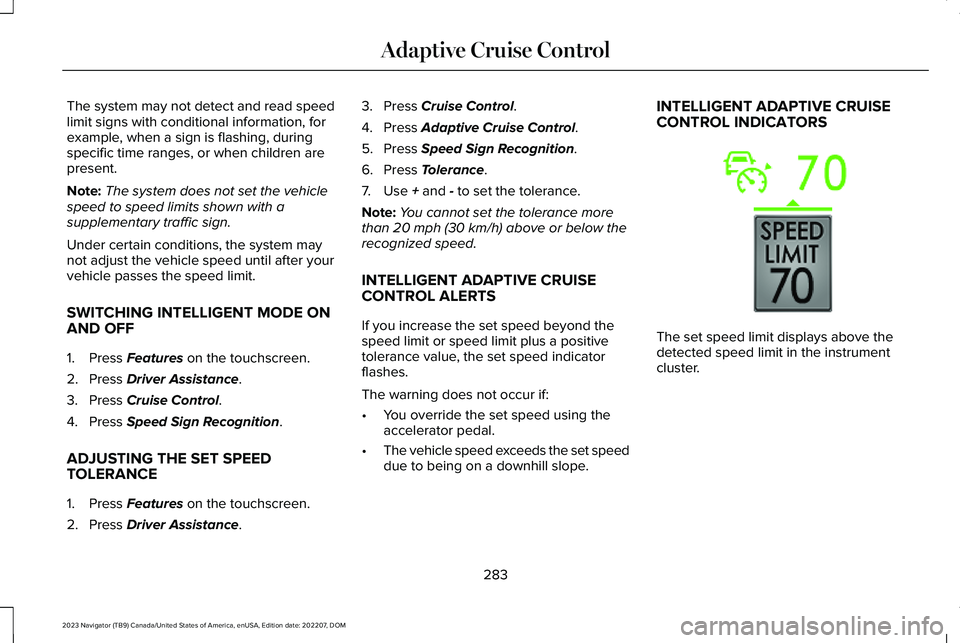
INTELLIGENT ADAPTIVE CRUISECONTROL INDICATORS
The set speed limit displays above thedetected speed limit in the instrumentcluster.
283
2023 Navigator (TB9) Canada/United States of America, enUSA, Edition date: 202207, DOMAdaptive Cruise ControlE353883
Page 288 of 660
ADAPTIVE CRUISE CONTROL –
TROUBLESHOOTING
ADAPTIVE CRUISE CONTROL –INFORMATION MESSAGES - VEHICLESWITH: LANE CENTERING
Note:Depending on your vehicle optionsand instrument cluster type, not all messagesdisplay or are available.
Note:The system could abbreviate orshorten certain messages depending uponwhich cluster type you have.
ActionMessage
Return your hands to the steering wheel and provide steering input to cancel the message.Keep Hands on Steering Wheel
To reset the feature when the vehicle is stationary, return the gear selector to park and turn thevehicle off. Restart the vehicle with your foot on the brake pedal.Lane Centering Assist Not Available
You must immediately take full control of the vehicle.Resume Control
Resume adaptive cruise control with lane centering by applying foot pressure on the acceleratorpedal. You can also resume the feature by pressing the resume button on the steering wheel.Press Accelerator Pedal to Resume
284
2023 Navigator (TB9) Canada/United States of America, enUSA, Edition date: 202207, DOMAdaptive Cruise Control
Page 289 of 660
ADAPTIVE CRUISE CONTROL –INFORMATION MESSAGES - VEHICLESWITH: STOP AND GO
Note:Depending on your vehicle optionsand instrument cluster type, not all messagesdisplay or are available.
Note:The system could abbreviate orshorten certain messages depending uponwhich cluster type you have.
ActionMessage
A malfunction is preventing the adaptive cruise from engaging.Adaptive Cruise Malfunction
Front Sensor Not AlignedContact an authorized dealer to have the radar checked for proper coverage and operation.
Conditions exist preventing the system from being available.Adaptive Cruise Not Available
You have a blocked radar because of poor radar visibility due to inclement weather or ice, mud,or water in front of the radar. You can typically clean the sensor to resolve this.Adaptive Cruise Not Available SensorBlocked See ManualDue to the nature of radar technology, it is possible to get a blockage warning with no actualblock. This happens, for example, when driving in sparse rural or desert environments. A falseblocked condition either self clears, or clears after you restart your vehicle.
You have selected normal cruise control. The system does not brake or react to traffic.Normal Cruise Active Adaptive Braking Off
Displays when the adaptive cruise control is going to cancel and you must take control.Adaptive Cruise - Driver Resume Control
Displays when the vehicle speed is too slow to activate the adaptive cruise control and there isno lead vehicle in range.Adaptive Cruise Speed Too Low toActivate
285
2023 Navigator (TB9) Canada/United States of America, enUSA, Edition date: 202207, DOMAdaptive Cruise Control
Page 290 of 660
WHAT IS ACTIVEGLIDE™
Lincoln ActiveGlide Driver-Assist Technology
ActiveGlide keeps your vehicle centered inthe lane and offers a hands-free drivingmode in certain situations when usingadaptive cruise control.
HOW DOES ACTIVEGLIDE™ WORK
ActiveGlide uses cameras to monitor yourvehicle position within a lane and appliessteering support to keep your vehiclecentered in the lane.
Using the cameras and location information,ActiveGlide allows you to remove your handsfrom the steering wheel and offers ahands-free driving mode in certain areas.
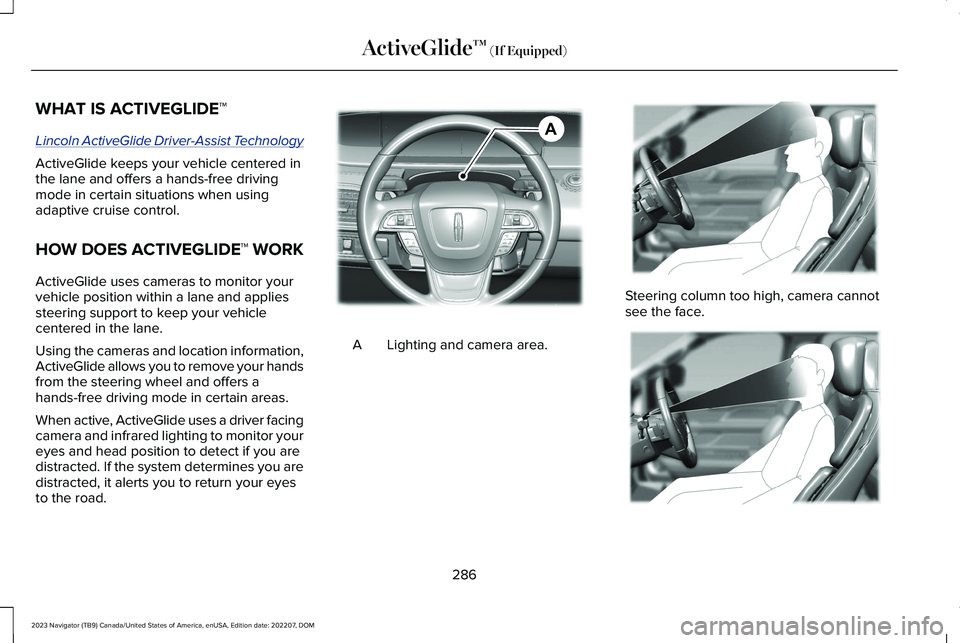
When active, ActiveGlide uses a driver facingcamera and infrared lighting to monitor youreyes and head position to detect if you aredistracted. If the system determines you aredistracted, it alerts you to return your eyesto the road.
Lighting and camera area.A
Steering column too high, camera cannotsee the face.
286
2023 Navigator (TB9) Canada/United States of America, enUSA, Edition date: 202207, DOMActiveGlide™ (If Equipped)AE351152 E381702 E381703
Page 292 of 660
WARNING: Pay close attention tochanging road conditions such as enteringor leaving a highway, on roads withintersections or roundabouts, roadswithout visible lanes of travel, roads thatare winding, slippery, unpaved, or steepslopes.
WARNING: The system is not a crashwarning or avoidance system.
WARNING: Large contrasts in outsidelighting can limit sensor performance.
WARNING: The system attempts tokeep your vehicle in the center of the laneas well as maintain speed and gap control.The system may not be able to performthese tasks in all situations. Do not use thesystem in complex or uncertain drivingconditions. Failure to follow this instructioncould result in the loss of control of yourvehicle, personal injury or death.
WARNING: Your vehicle could driftout of the lane of travel. Always beprepared to manually steer your vehicle.Failure to follow this instruction could resultin the loss of control of your vehicle,personal injury or death.
WARNING: The system will notoperate if the sensor cannot track the roadlane markings.
ACTIVEGLIDE™ REQUIREMENTS
ActiveGlide only activates when all of thefollowing occur:
•ActiveGlide is enabled in yourtouchscreen. See ActiveGlide™ Settings(page 289).
•Adaptive cruise control is on.
•The system detects both lane markings.
•Your hands are on the steering wheel.
•Your eyes are on the road.
Note:The system must meet certain locationrequirements for the hands-free mode ofActiveGlide to work.
Note:The system may require softwareupdates for hands-free mode. See VehicleSystem Reset (page 523).
ACTIVEGLIDE™ LIMITATIONS
Any of the following conditions could resultin ActiveGlide not operating correctly:
•You do not have your vehicle centeredin the lane.
•The lane is too narrow or too wide.
•The system does not detect at least onelane marking or when lanes merge orsplit.
•You have limited steering input.
•Using the system in areas underconstruction.
•If you make any aftermarket modificationsto the steering system.
•When using a spare tire.
288
2023 Navigator (TB9) Canada/United States of America, enUSA, Edition date: 202207, DOMActiveGlide™ (If Equipped)
Page 293 of 660
The driver-facing camera may not operatecorrectly due to any of the following:
•If you have a pre-existing eye condition,such as an eye misalignment, or havehad eye surgery.
•You cover your facial features by a mask,hat or other items.
•The lighting conditions changesignificantly.
•You are not in the field of view of thecamera.
•You position or tilt yourself to one side.
•You are moving around extensively.
•You are wearing glasses or sunglassesthat are too dark or reflective.
Note:The system has limited steeringassistance and may not be sufficient for alldriving situations.
Note:In exceptional conditions, such asinclement weather or direct sunlight, thesystem could deviate from the center line.
Note:The information provided by thenavigation map data could be inaccurate orout of date.
ACTIVEGLIDE™ SETTINGS
Enabling ActiveGlide
1.Press Features on the touchscreen.
2.Press Driver Assistance.
3.Press Cruise Control.
4.Press Adaptive Cruise Control.
5.Press Lane Centering with Hands-Free.
Enabling Activation Prompts
1.Press Features on the touchscreen.
2.Press Driver Assistance.
3.Press Cruise Control.
4.Press Adaptive Cruise Control.
5.Press Activation Prompts.
SWITCHING ACTIVEGLIDE™ ON
AND OFF
Switching ActiveGlide On
The controls are on the steering wheel.
Using Activation Prompts
When the prompt appears, pressthe button to switch ActiveGlideon.
The indicator appears in the instrumentcluster. When the system is on, the color ofthe indicator changes to indicate the systemstatus.
Note:You must enable activation promptsin the touchscreen.
Using Steering Wheel Controls
Using the adaptive cruise controland lateral support buttons, makesure both systems are active.ActiveGlide activates.
Switching ActiveGlide Off
Press either the lateral support oradaptive cruise control buttonwhen system is active or instandby mode.
ActiveGlide turns off through eachignition cycle.
289
2023 Navigator (TB9) Canada/United States of America, enUSA, Edition date: 202207, DOMActiveGlide™ (If Equipped)E144529 E308131 E144529 E308131 E144529
Page 307 of 660
The lane keeping system aids you when anunintentional lane departure occurs. Thesystem provides a small steering input tomove the vehicle towards the center of thelane.
ALERT AND AID MODE
WHAT IS ALERT AND AID MODE
Alert and aid mode uses multiple features tokeep you in your lane. The system firstprovides a small steering input to bring yourvehicle back towards the center of the lane.If your vehicle moves too far out of the centerof the lane the system alerts you withvibration in the steering wheel.
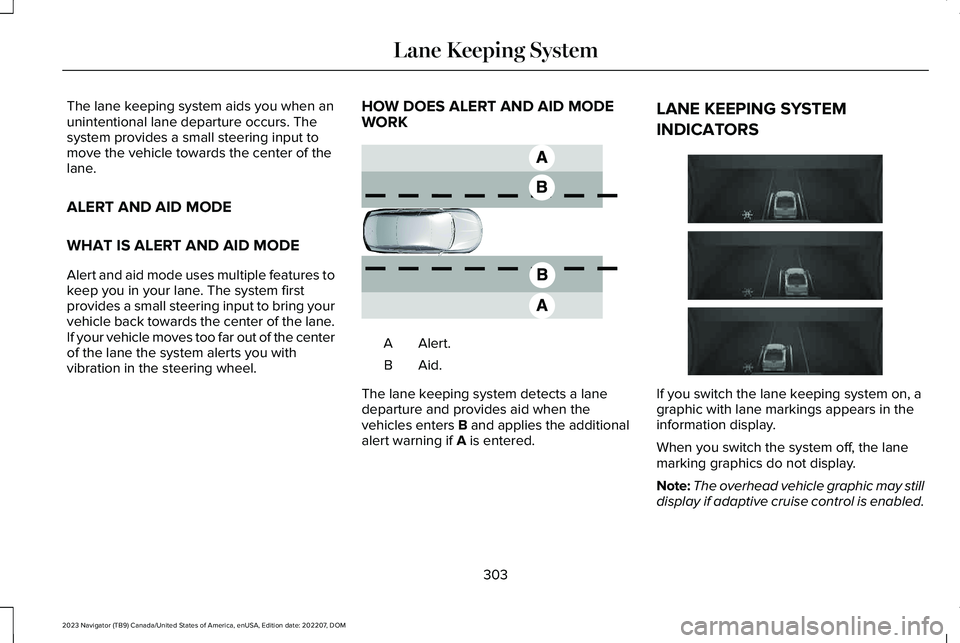
HOW DOES ALERT AND AID MODEWORK
Alert.A
Aid.B
The lane keeping system detects a lanedeparture and provides aid when thevehicles enters B and applies the additionalalert warning if A is entered.
LANE KEEPING SYSTEM
INDICATORS
If you switch the lane keeping system on, agraphic with lane markings appears in theinformation display.
When you switch the system off, the lanemarking graphics do not display.
Note:The overhead vehicle graphic may stilldisplay if adaptive cruise control is enabled.
303
2023 Navigator (TB9) Canada/United States of America, enUSA, Edition date: 202207, DOMLane Keeping SystemE165517 E335296
Page 327 of 660
Note:Brake support and automaticemergency braking are active at speeds upto 80 mph (130 km/h). If your vehicle has aradar sensor included with adaptive cruisecontrol, then brake support and automaticemergency braking are active up to themaximum speed of your vehicle.
Pedestrian Detection Limitations
Pedestrian detection is active at speeds upto 50 mph (80 km/h).
Pedestrian detection operates optimallywhen detected hazards are clearlyidentifiable. System performance may reducein situations where pedestrians are running,partly obscured, have a complexbackground, or cannot be distinguished froma group.
Cyclist Detection Limitations
Cyclist detection is active at speeds up to50 mph (80 km/h).
Cyclist detection functions optimally whendetected hazards are clearly identifiable.System performance may reduce insituations where cyclists are fast-moving,partly obscured, have a complexbackground, or cannot be distinguished froma group.
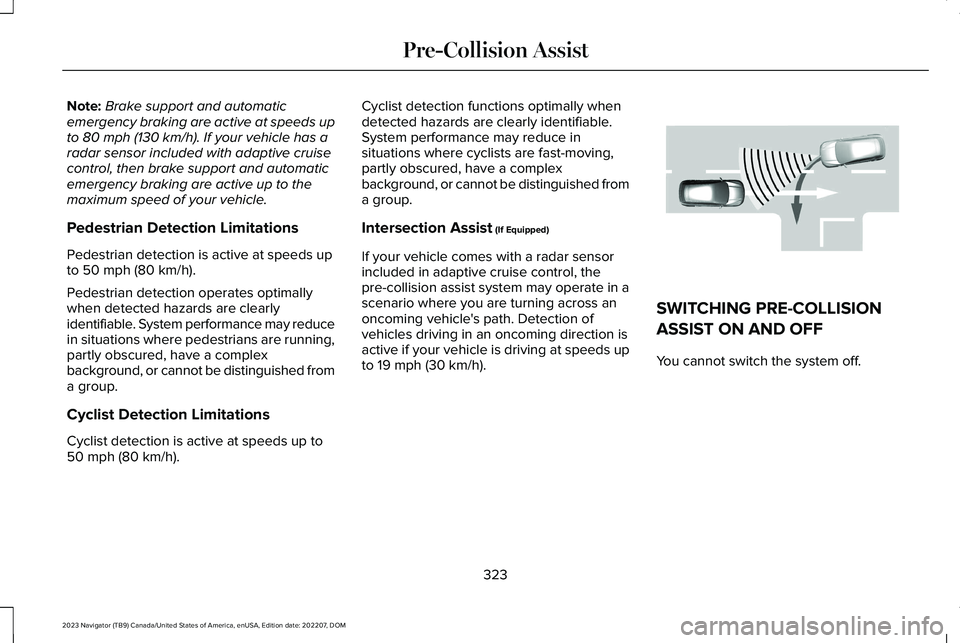
Intersection Assist (If Equipped)
If your vehicle comes with a radar sensorincluded in adaptive cruise control, thepre-collision assist system may operate in ascenario where you are turning across anoncoming vehicle's path. Detection ofvehicles driving in an oncoming direction isactive if your vehicle is driving at speeds upto 19 mph (30 km/h).
SWITCHING PRE-COLLISION
ASSIST ON AND OFF
You cannot switch the system off.
323
2023 Navigator (TB9) Canada/United States of America, enUSA, Edition date: 202207, DOMPre-Collision AssistE309750
Page 329 of 660
DISTANCE INDICATION
WHAT IS DISTANCE INDICATION
Distance indication displays the gap betweenyour vehicle and the vehicle ahead of you.Note:The graphic does not display if youswitch on cruise control or adaptive cruisecontrol.
Time GapDistance GapDistance Indicator ColorSystem SensitivityVehicle Speed
Greater than 0.9 seconds.Greater than 82 ft (25 m).Blue.Normal.62 mph (100 km/h).
0.6-0.9 seconds.56–82 ft (17–25 m).Yellow.
Less than 0.6 seconds.Less than 56 ft (17 m).Red.
325
2023 Navigator (TB9) Canada/United States of America, enUSA, Edition date: 202207, DOMPre-Collision Assist