maintenance schedule LINCOLN NAVIGATOR 2023 Owner's Manual
[x] Cancel search | Manufacturer: LINCOLN, Model Year: 2023, Model line: NAVIGATOR, Model: LINCOLN NAVIGATOR 2023Pages: 660, PDF Size: 14.04 MB
Page 542 of 660
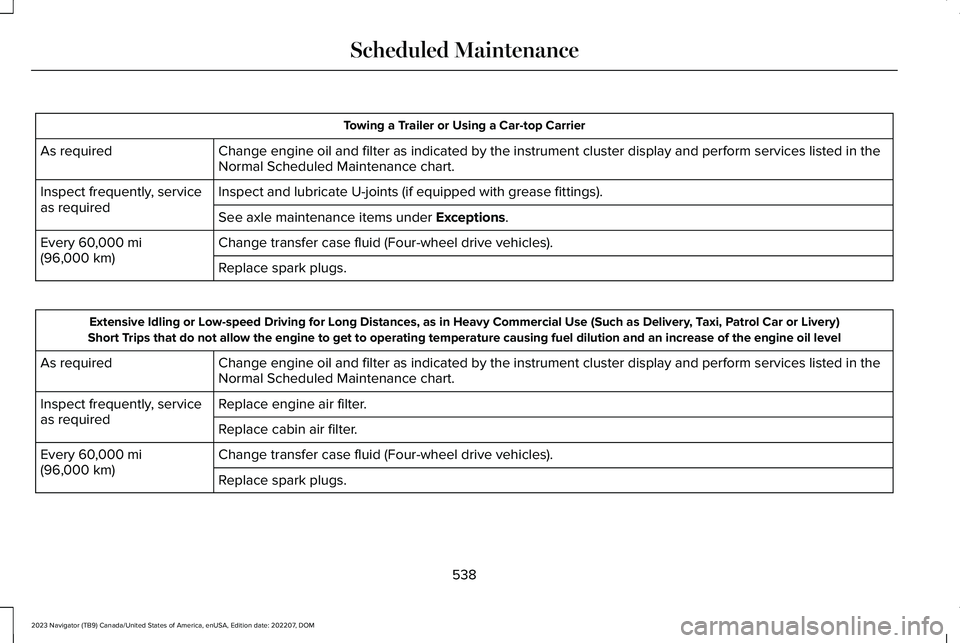
Towing a Trailer or Using a Car-top Carrier
Change engine oil and filter as indicated by the instrument cluster display and perform services listed in theNormal Scheduled Maintenance chart.As required
Inspect and lubricate U-joints (if equipped with grease fittings).Inspect frequently, serviceas requiredSee axle maintenance items under Exceptions.
Change transfer case fluid (Four-wheel drive vehicles).Every 60,000 mi(96,000 km)Replace spark plugs.
Extensive Idling or Low-speed Driving for Long Distances, as in Heavy Commercial Use (Such as Delivery, Taxi, Patrol Car or Livery)Short Trips that do not allow the engine to get to operating temperature causing fuel dilution and an increase of the engine oil level
Change engine oil and filter as indicated by the instrument cluster display and perform services listed in theNormal Scheduled Maintenance chart.As required
Replace engine air filter.Inspect frequently, serviceas requiredReplace cabin air filter.
Change transfer case fluid (Four-wheel drive vehicles).Every 60,000 mi(96,000 km)Replace spark plugs.
538
2023 Navigator (TB9) Canada/United States of America, enUSA, Edition date: 202207, DOMScheduled Maintenance
Page 543 of 660
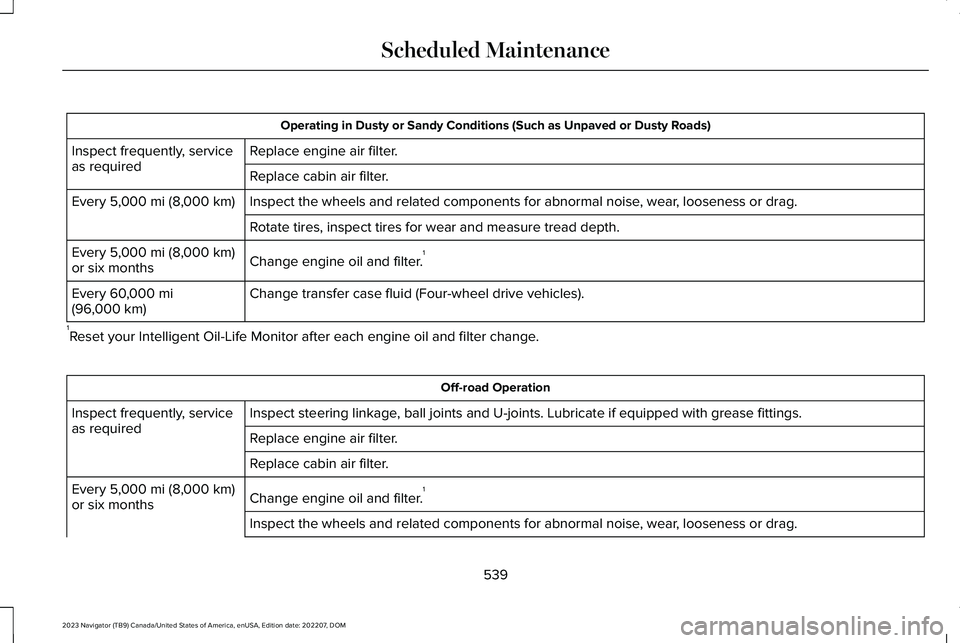
Operating in Dusty or Sandy Conditions (Such as Unpaved or Dusty Roads)
Replace engine air filter.Inspect frequently, serviceas requiredReplace cabin air filter.
Inspect the wheels and related components for abnormal noise, wear, looseness or drag.Every 5,000 mi (8,000 km)
Rotate tires, inspect tires for wear and measure tread depth.
Change engine oil and filter.1Every 5,000 mi (8,000 km)or six months
Change transfer case fluid (Four-wheel drive vehicles).Every 60,000 mi(96,000 km)
1Reset your Intelligent Oil-Life Monitor after each engine oil and filter change.
Off-road Operation
Inspect steering linkage, ball joints and U-joints. Lubricate if equipped with grease fittings.Inspect frequently, serviceas requiredReplace engine air filter.
Replace cabin air filter.
Change engine oil and filter.1Every 5,000 mi (8,000 km)or six months
Inspect the wheels and related components for abnormal noise, wear, looseness or drag.
539
2023 Navigator (TB9) Canada/United States of America, enUSA, Edition date: 202207, DOMScheduled Maintenance
Page 544 of 660
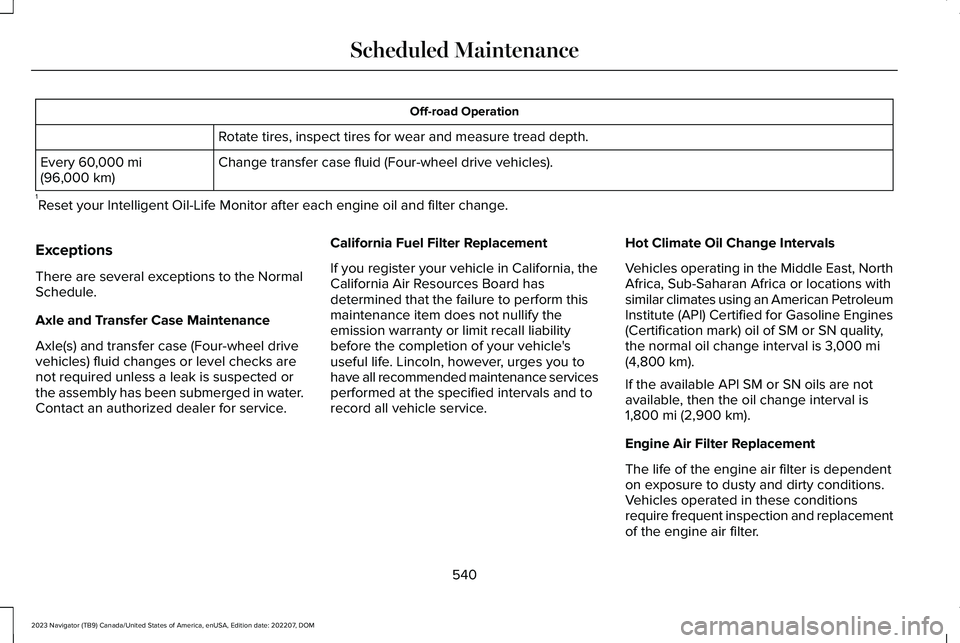
Off-road Operation
Rotate tires, inspect tires for wear and measure tread depth.
Change transfer case fluid (Four-wheel drive vehicles).Every 60,000 mi(96,000 km)
1Reset your Intelligent Oil-Life Monitor after each engine oil and filter change.
Exceptions
There are several exceptions to the NormalSchedule.
Axle and Transfer Case Maintenance
Axle(s) and transfer case (Four-wheel drivevehicles) fluid changes or level checks arenot required unless a leak is suspected orthe assembly has been submerged in water.Contact an authorized dealer for service.
California Fuel Filter Replacement
If you register your vehicle in California, theCalifornia Air Resources Board hasdetermined that the failure to perform thismaintenance item does not nullify theemission warranty or limit recall liabilitybefore the completion of your vehicle'suseful life. Lincoln, however, urges you tohave all recommended maintenance servicesperformed at the specified intervals and torecord all vehicle service.
Hot Climate Oil Change Intervals
Vehicles operating in the Middle East, NorthAfrica, Sub-Saharan Africa or locations withsimilar climates using an American PetroleumInstitute (API) Certified for Gasoline Engines(Certification mark) oil of SM or SN quality,the normal oil change interval is 3,000 mi(4,800 km).
If the available API SM or SN oils are notavailable, then the oil change interval is1,800 mi (2,900 km).
Engine Air Filter Replacement
The life of the engine air filter is dependenton exposure to dusty and dirty conditions.Vehicles operated in these conditionsrequire frequent inspection and replacementof the engine air filter.
540
2023 Navigator (TB9) Canada/United States of America, enUSA, Edition date: 202207, DOMScheduled Maintenance
Page 594 of 660
Zambia
PERCHLORATE
Certain components in your vehicle such asairbag modules, seatbelt pretensioners andremote control batteries may containperchlorate material. Special handling mayapply for service or vehicle end of lifedisposal.
For more information visit:www.dtsc.ca.gov/hazardouswaste/perchlorate.
REPLACEMENT PARTS
RECOMMENDATION
We have built your vehicle to the higheststandards using quality parts. Werecommend that you demand the use ofgenuine Ford and Motorcraft parts wheneveryour vehicle requires scheduledmaintenance or repair. You can clearlyidentify genuine Ford and Motorcraft partsby looking for the Ford, FoMoCo orMotorcraft branding on the parts or theirpackaging.
Scheduled Maintenance andMechanical Repairs
One of the best ways for you to make surethat your vehicle provides years of serviceis to have it maintained in line with ourrecommendations using parts that conformto the specifications detailed in this Owner’sManual.
Genuine Ford and Motorcraft parts meet orexceed these specifications.
Collision Repairs
We hope that you never experience acollision, but accidents happen sometimes.
Genuine Ford replacement collision partsmeet our stringent requirements for fit, finish,structural integrity, corrosion protection anddent resistance. During vehicle developmentwe validate that these parts deliver theintended level of protection as a wholesystem. A great way to know for sure youare getting this level of protection is to usegenuine Ford replacement collision parts.
Warranty on Replacement Parts
Genuine Ford and Motorcraft replacementparts are the only replacement parts thatbenefit from a Ford Warranty.
The Ford Warranty may not cover damagecaused to your vehicle as a result of failednon-Ford parts.
For additional information, refer to the termsand conditions of the Ford Warranty.
590
2023 Navigator (TB9) Canada/United States of America, enUSA, Edition date: 202207, DOMCustomer InformationE364773
Page 628 of 660
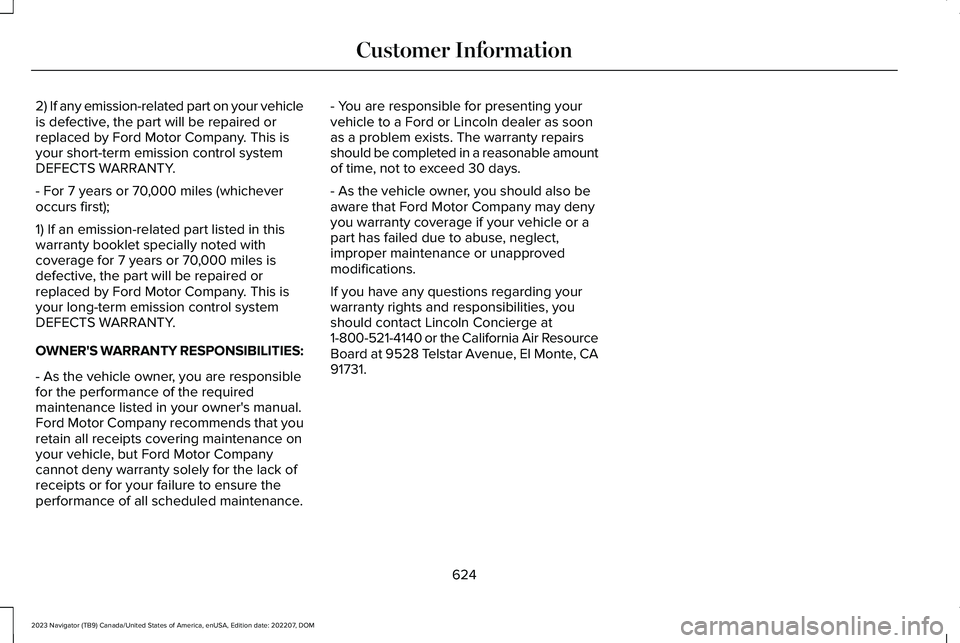
2) If any emission-related part on your vehicleis defective, the part will be repaired orreplaced by Ford Motor Company. This isyour short-term emission control systemDEFECTS WARRANTY.
- For 7 years or 70,000 miles (whicheveroccurs first);
1) If an emission-related part listed in thiswarranty booklet specially noted withcoverage for 7 years or 70,000 miles isdefective, the part will be repaired orreplaced by Ford Motor Company. This isyour long-term emission control systemDEFECTS WARRANTY.
OWNER'S WARRANTY RESPONSIBILITIES:
- As the vehicle owner, you are responsiblefor the performance of the requiredmaintenance listed in your owner's manual.Ford Motor Company recommends that youretain all receipts covering maintenance onyour vehicle, but Ford Motor Companycannot deny warranty solely for the lack ofreceipts or for your failure to ensure theperformance of all scheduled maintenance.
- You are responsible for presenting yourvehicle to a Ford or Lincoln dealer as soonas a problem exists. The warranty repairsshould be completed in a reasonable amountof time, not to exceed 30 days.
- As the vehicle owner, you should also beaware that Ford Motor Company may denyyou warranty coverage if your vehicle or apart has failed due to abuse, neglect,improper maintenance or unapprovedmodifications.
If you have any questions regarding yourwarranty rights and responsibilities, youshould contact Lincoln Concierge at1-800-521-4140 or the California Air ResourceBoard at 9528 Telstar Avenue, El Monte, CA91731.
624
2023 Navigator (TB9) Canada/United States of America, enUSA, Edition date: 202207, DOMCustomer Information
Page 648 of 660
Switching the Massage Seats On andOff.......................................................................182
Memory Function..........................................186Memory Function Precautions...................186Mislock..............................................................88Mislock Limitations...............................................88Switching Mislock On and Off...........................88What Is Mislock.....................................................88
Mobile Communications Equipment........591Mobile Device Data........................................27Moonroof Bounce-Back................................141Overriding Moonroof Bounce-Back................141What Is Moonroof Bounce-Back.......................141
Moonroof.........................................................140Moonroof Bounce-Back......................................141
Motorcraft Parts............................................468Muting the Audio..........................................487MyKey Settings................................................82Configurable MyKey Settings............................82Non-Configurable MyKey Settings...................82
MyKey – Troubleshooting............................85MyKey – Frequently Asked Questions...........86MyKey – Information Messages........................85
MyKey™..............................................................82MyKey Settings......................................................82MyKey – Troubleshooting...................................85
N
Navigation Map Updates.............................517Navigation.......................................................517Adjusting the Map...............................................517Live Traffic.............................................................517Route Guidance...................................................519Setting a Destination..........................................518Waypoints..............................................................518
Normal Scheduled Maintenance..............533
O
Opening and Closing the Hood................414Opening and Closing the LiftgateWindow.........................................................103Opening and Closing the Moonroof........140Opening and Closing the Sunshade........140Opening and Closing the Windows..........134Opening the Liftgate......................................98Opening the Hands-Free Liftgate....................99Opening the Liftgate From Inside YourVehicle................................................................98Opening the Liftgate From Outside YourVehicle................................................................98Opening the Liftgate Using the RemoteControl................................................................99
Operating the Doors From Inside YourVehicle............................................................87Opening the Doors From Inside YourVehicle.................................................................87Unlocking and Locking the Doors Using theCentral Locking.................................................87
Operating the Doors From Outside YourVehicle............................................................87Unlocking and Locking the Doors Using theKey Blade............................................................87Unlocking and Locking the Doors Using theRemote Control.................................................87
Ordering a Canadian French Owner'sManual..........................................................543OTASee: Software Update Settings......................520See: Vehicle Software Updates.....................520
Overhead Storage.......................................200Opening the Overhead StorageCompartment..................................................200
Overriding Reverse Braking Assist..........239Overriding the Set Speed..........................278Over the airSee: Software Update Settings......................520
Over-the-airSee: Software Update Settings......................520See: Vehicle Software Updates.....................520See: Vehicle Software Updates.....................520
644
2023 Navigator (TB9) Canada/United States of America, enUSA, Edition date: 202207, DOMIndex
Page 651 of 660
Remote Start...................................................156Remote Start Settings...................................157Removing the Key Blade...............................73Removing Your Vehicle FromStorage.........................................................436Repairing Minor Paint Damage.................434Replacement PartsRecommendation......................................590Replacing a Lost Key or RemoteControl............................................................75Replacing the Cabin Air Filter....................166Replacing the Front Wiper Blades.............116Replacing the Rear Wiper Blades...............117Reporting Safety Defects in Canada.......544Reporting Safety Defects in the UnitedStates............................................................543Resetting the Stopping Position.................112Restarting the Engine.................................208Resuming the Set Speed............................276Reverse Braking Assist Indicators...........239Reverse Braking Assist Precautions.......238Reverse Braking Assist...............................238Reverse Braking Assist –Troubleshooting.............................................240
Reverse Braking Assist –Troubleshooting.........................................240Reverse Braking Assist – Frequently AskedQuestions..........................................................241
Reverse Braking Assist – InformationMessages.........................................................240
Reverse Wipe..................................................115Reverse Wipe Settings........................................115What Is Reverse Wipe.........................................115
Roadside Assistance...................................389Rollover Warning...........................................541Roof Rack.......................................................340Roof Rack Load Capacities..............................340Roof Rack Precautions......................................340
Route Guidance.............................................519Adjusting the Guidance Prompt Volume......519Canceling Route Guidance...............................519Repeating an Instruction...................................519
Running-InSee: Breaking-In.................................................384
Running Out of Fuel.....................................213Adding Fuel From a Portable FuelContainer..........................................................213Filling a Portable Fuel Container.....................213
S
Satellite Radio................................................491Locating the Satellite Radio IdentificationNumber..............................................................491Satellite Radio Limitations.................................491Satellite Radio Settings.....................................492
Selecting a Channel...........................................491What Is Satellite Radio.......................................491
Saving a Preset Position..............................186Scheduled Maintenance............................529Seatbelt Extensions.......................................58Seatbelt Precautions.....................................52Seatbelt Reminder..........................................56How Does the Seatbelt Reminder Work.........56Seatbelt Reminder Audible Warnings..............57Seatbelt Reminder Indicators............................56Switching the Seatbelt Reminder On andOff.........................................................................57
Seatbelts...........................................................52Automatic Locking Mode....................................54Seatbelt Reminder................................................56Sensitive Locking Mode......................................54
Security............................................................106Anti-Theft Alarm System...................................106Anti-Theft Alarm System Settings...................107Passive Anti-Theft System................................106Security – Troubleshooting..............................108
Security – Troubleshooting........................108Security – Frequently Asked Questions.......109Security – Information Messages...................108
Selecting a Drive Mode..............................295Selecting a Four-Wheel Drive Mode.......226Selecting the Audio Source......................486
647
2023 Navigator (TB9) Canada/United States of America, enUSA, Edition date: 202207, DOMIndex
Page 652 of 660
Sending and Receiving a TextMessage......................................................509Sensitive Locking Mode................................54How Does Sensitive Locking ModeWork.....................................................................54What is Sensitive Locking Mode.......................54
Service Data.....................................................25Setting a Destination....................................518Setting a Destination Using a Point ofInterest...............................................................518Setting a Destination Using a PredictiveDestination.......................................................518Setting a Destination Using a RecentDestination.......................................................518Setting a Destination Using a SavedDestination.......................................................518Setting a Destination Using the MapScreen...............................................................518Setting a Destination Using the Text EntryScreen...............................................................518
Setting a Memory Preset............................487Settings Data...................................................26Setting the Adaptive Cruise ControlGap................................................................275Setting the Adaptive Cruise ControlSpeed............................................................274Setting the Blower Motor Speed..............160Setting the Clock and Date.......................488
Setting the Hill Descent Speed.................251Setting the Liftgate Opening Height........100Setting the Speed Sign Recognition SpeedTolerance.....................................................333Setting the Speed Sign Recognition SpeedWarning........................................................333Setting the Temperature.............................160Setting Up the Trailer Backup Assistancefor a Conventional Trailer........................363Applying the Trailer Reversing AidSticker...............................................................364Calibrating the System......................................365Configuring the Trailer......................................363
Setting Up Trailer Reverse Guidance for aConventional Trailer..................................375Applying the Trailer Reverse AidSticker...............................................................376Calibrating the System......................................377Configuring the Trailer.......................................375
Shifting Your Vehicle Into Gear..................221Side Parking Aid...........................................258Locating the Side Parking Aid Sensors........259Side Parking Aid Audible Warnings..............259Side Parking Aid Limitations...........................258What is the Side Parking Aid...........................258
Signing Into Your Account.........................503Sitting in the Correct Position....................167Software Update Indicators........................521
Software Update Settings.........................520Software UpdateSee: Software Update Settings......................520See: Vehicle Software Updates.....................520
Sounding the Panic Alarm............................73Special Operating Conditions ScheduledMaintenance...............................................537Speedometer..................................................143Speed Sign Recognition Indicators.........333Speed Sign Recognition Limitations.......332Speed Sign RecognitionPrecautions.................................................332Speed Sign Recognition.............................332Speed Sign Recognition –Troubleshooting.............................................334
Speed Sign Recognition –Troubleshooting.........................................334Speed Sign Recognition – Frequently AskedQuestions.........................................................335Speed Sign Recognition – InformationMessages.........................................................334
Stability Control Indicator...........................249Stability Control.............................................247Starting and Stopping the Engine –Precautions..................................................201Starting and Stopping the Engine.............201Automatic Engine Stop.....................................204Engine Block Heater.........................................203
648
2023 Navigator (TB9) Canada/United States of America, enUSA, Edition date: 202207, DOMIndex