radio LINCOLN NAVIGATOR 2023 Owner's Manual
[x] Cancel search | Manufacturer: LINCOLN, Model Year: 2023, Model line: NAVIGATOR, Model: LINCOLN NAVIGATOR 2023Pages: 660, PDF Size: 14.04 MB
Page 496 of 660
Linear Tuner
The linear tuner is displayed when manuallyselecting a channel. You can swipe left orright on the linear tuner carousel to navigatethrough the channel list. Tap on a channeltitle to listen to it.
Using Direct Tune
1.Press the channel up or down button toopen the linear tuner screen.
2.Press Direct Tune to open the numberpad.
3.Enter the channel you prefer.
Using Browse
1.Press Browse.
2.Select a channel.
SATELLITE RADIO SETTINGS
Subscription
Your subscription status is displayed. Youcan subscribe or manage your subscriptiondirectly from the touchscreen.
SiriusXM Favorites
While you are listening to SiriusXM, you cansave favorites by:
•Tapping the currently tuned channel orshow logo on the SiriusXM audio screen.
•Tuning to a channel or show you want tosave as a favorite. Navigate to theSiriusXM Favorites screen and press theAdd Current button. The currently tunedchannel or show is saved as a favorite.
•Saving a radio preset. This saves thecurrently tuned SiriusXM channel or showas a favorite
Note:Requires a trial or active subscriptionto use.
Listening History
Listening history is a list of recently listenedto SiriusXM content. You can view, manageand reset the listening history using thecontrols on the touchscreen.
Note:Requires a trial or active subscriptionto use.
Help and Support
You can contact SiriusXM Customer Caredirectly from SYNC and view informationrequired to manage your SiriusXM account.
492
2023 Navigator (TB9) Canada/United States of America, enUSA, Edition date: 202207, DOMAudio System
Page 497 of 660
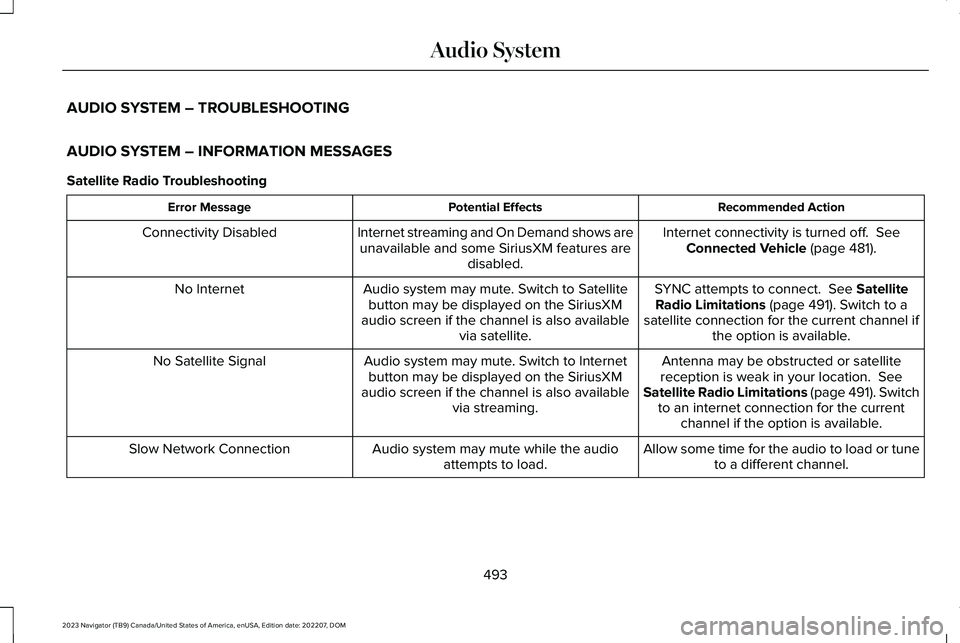
AUDIO SYSTEM – TROUBLESHOOTING
AUDIO SYSTEM – INFORMATION MESSAGES
Satellite Radio Troubleshooting
Recommended ActionPotential EffectsError Message
Internet connectivity is turned off. SeeConnected Vehicle (page 481).Internet streaming and On Demand shows areunavailable and some SiriusXM features aredisabled.
Connectivity Disabled
SYNC attempts to connect. See SatelliteRadio Limitations (page 491). Switch to asatellite connection for the current channel ifthe option is available.
Audio system may mute. Switch to Satellitebutton may be displayed on the SiriusXMaudio screen if the channel is also availablevia satellite.
No Internet
Antenna may be obstructed or satellitereception is weak in your location. SeeSatellite Radio Limitations (page 491). Switchto an internet connection for the currentchannel if the option is available.
Audio system may mute. Switch to Internetbutton may be displayed on the SiriusXMaudio screen if the channel is also availablevia streaming.
No Satellite Signal
Allow some time for the audio to load or tuneto a different channel.Audio system may mute while the audioattempts to load.Slow Network Connection
493
2023 Navigator (TB9) Canada/United States of America, enUSA, Edition date: 202207, DOMAudio System
Page 498 of 660
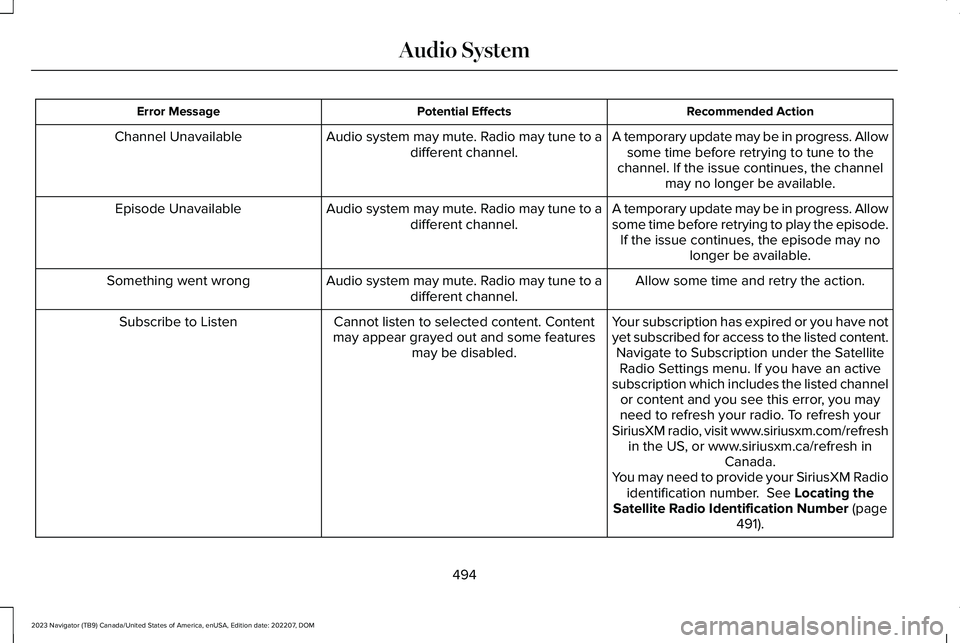
Recommended ActionPotential EffectsError Message
A temporary update may be in progress. Allowsome time before retrying to tune to thechannel. If the issue continues, the channelmay no longer be available.
Audio system may mute. Radio may tune to adifferent channel.Channel Unavailable
A temporary update may be in progress. Allowsome time before retrying to play the episode.If the issue continues, the episode may nolonger be available.
Audio system may mute. Radio may tune to adifferent channel.Episode Unavailable
Allow some time and retry the action.Audio system may mute. Radio may tune to adifferent channel.Something went wrong
Your subscription has expired or you have notyet subscribed for access to the listed content.Navigate to Subscription under the SatelliteRadio Settings menu. If you have an activesubscription which includes the listed channelor content and you see this error, you mayneed to refresh your radio. To refresh yourSiriusXM radio, visit www.siriusxm.com/refreshin the US, or www.siriusxm.ca/refresh inCanada.You may need to provide your SiriusXM Radioidentification number. See Locating theSatellite Radio Identification Number (page491).
Cannot listen to selected content. Contentmay appear grayed out and some featuresmay be disabled.
Subscribe to Listen
494
2023 Navigator (TB9) Canada/United States of America, enUSA, Edition date: 202207, DOMAudio System
Page 499 of 660
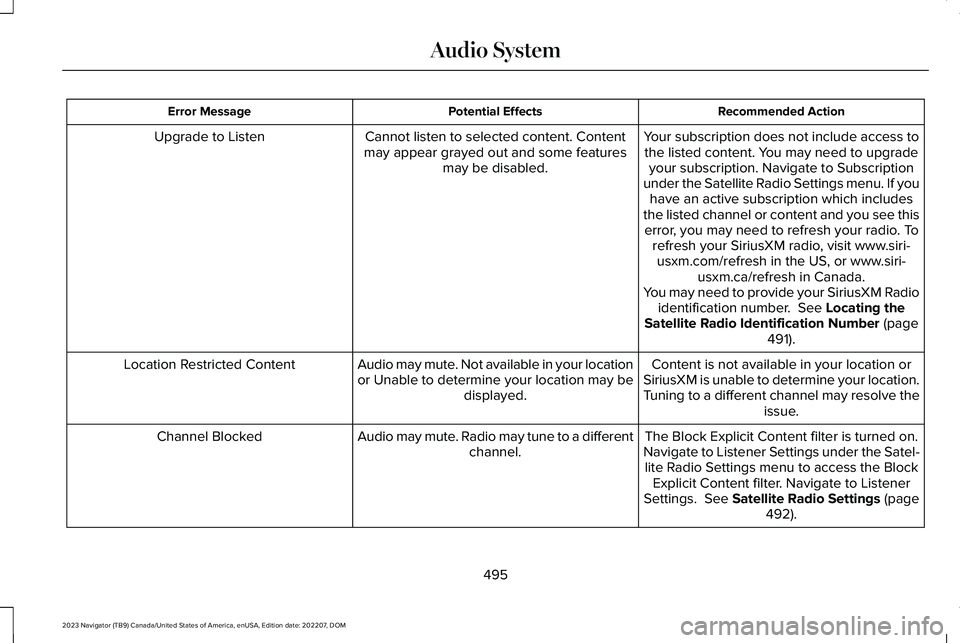
Recommended ActionPotential EffectsError Message
Your subscription does not include access tothe listed content. You may need to upgradeyour subscription. Navigate to Subscriptionunder the Satellite Radio Settings menu. If youhave an active subscription which includesthe listed channel or content and you see thiserror, you may need to refresh your radio. Torefresh your SiriusXM radio, visit www.siri-usxm.com/refresh in the US, or www.siri-usxm.ca/refresh in Canada.You may need to provide your SiriusXM Radioidentification number. See Locating theSatellite Radio Identification Number (page491).
Cannot listen to selected content. Contentmay appear grayed out and some featuresmay be disabled.
Upgrade to Listen
Content is not available in your location orSiriusXM is unable to determine your location.Tuning to a different channel may resolve theissue.
Audio may mute. Not available in your locationor Unable to determine your location may bedisplayed.
Location Restricted Content
The Block Explicit Content filter is turned on.Navigate to Listener Settings under the Satel-lite Radio Settings menu to access the BlockExplicit Content filter. Navigate to ListenerSettings. See Satellite Radio Settings (page492).
Audio may mute. Radio may tune to a differentchannel.Channel Blocked
495
2023 Navigator (TB9) Canada/United States of America, enUSA, Edition date: 202207, DOMAudio System
Page 500 of 660
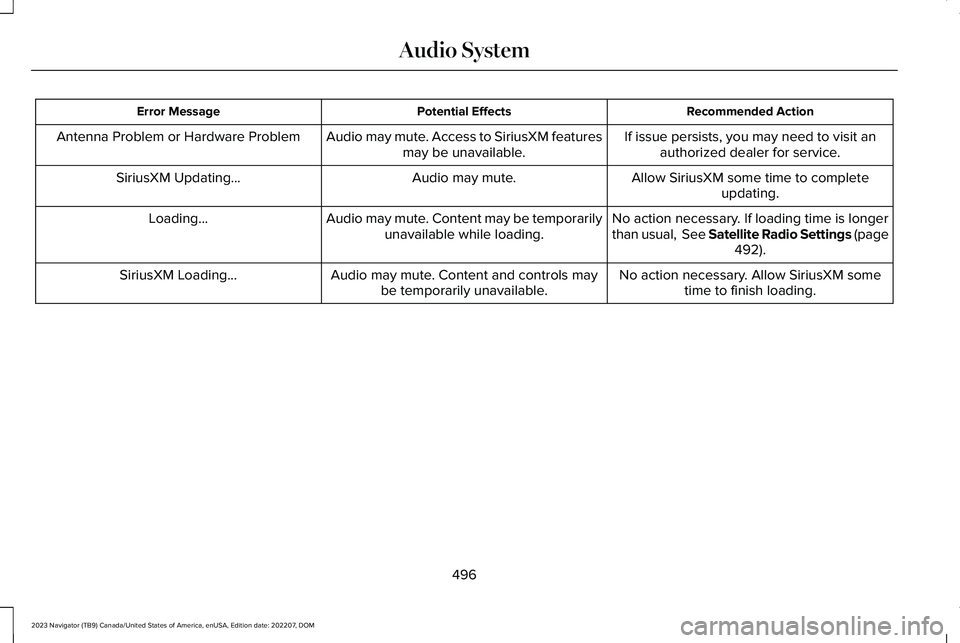
Recommended ActionPotential EffectsError Message
If issue persists, you may need to visit anauthorized dealer for service.Audio may mute. Access to SiriusXM featuresmay be unavailable.Antenna Problem or Hardware Problem
Allow SiriusXM some time to completeupdating.Audio may mute.SiriusXM Updating...
No action necessary. If loading time is longerthan usual, See Satellite Radio Settings (page492).
Audio may mute. Content may be temporarilyunavailable while loading.Loading...
No action necessary. Allow SiriusXM sometime to finish loading.Audio may mute. Content and controls maybe temporarily unavailable.SiriusXM Loading...
496
2023 Navigator (TB9) Canada/United States of America, enUSA, Edition date: 202207, DOMAudio System
Page 501 of 660
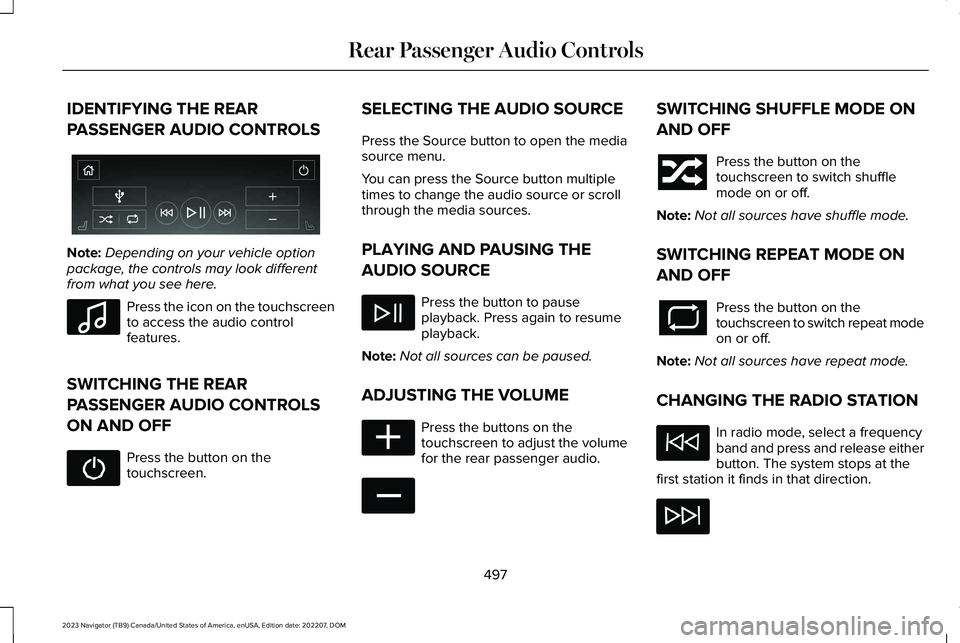
IDENTIFYING THE REAR
PASSENGER AUDIO CONTROLS
Note:Depending on your vehicle optionpackage, the controls may look differentfrom what you see here.
Press the icon on the touchscreento access the audio controlfeatures.
SWITCHING THE REAR
PASSENGER AUDIO CONTROLS
ON AND OFF
Press the button on thetouchscreen.
SELECTING THE AUDIO SOURCE
Press the Source button to open the mediasource menu.
You can press the Source button multipletimes to change the audio source or scrollthrough the media sources.
PLAYING AND PAUSING THE
AUDIO SOURCE
Press the button to pauseplayback. Press again to resumeplayback.
Note:Not all sources can be paused.
ADJUSTING THE VOLUME
Press the buttons on thetouchscreen to adjust the volumefor the rear passenger audio.
SWITCHING SHUFFLE MODE ON
AND OFF
Press the button on thetouchscreen to switch shufflemode on or off.
Note:Not all sources have shuffle mode.
SWITCHING REPEAT MODE ON
AND OFF
Press the button on thetouchscreen to switch repeat modeon or off.
Note:Not all sources have repeat mode.
CHANGING THE RADIO STATION
In radio mode, select a frequencyband and press and release eitherbutton. The system stops at thefirst station it finds in that direction.
497
2023 Navigator (TB9) Canada/United States of America, enUSA, Edition date: 202207, DOMRear Passenger Audio ControlsE356495 E100027 E356421 E356422
Page 503 of 660
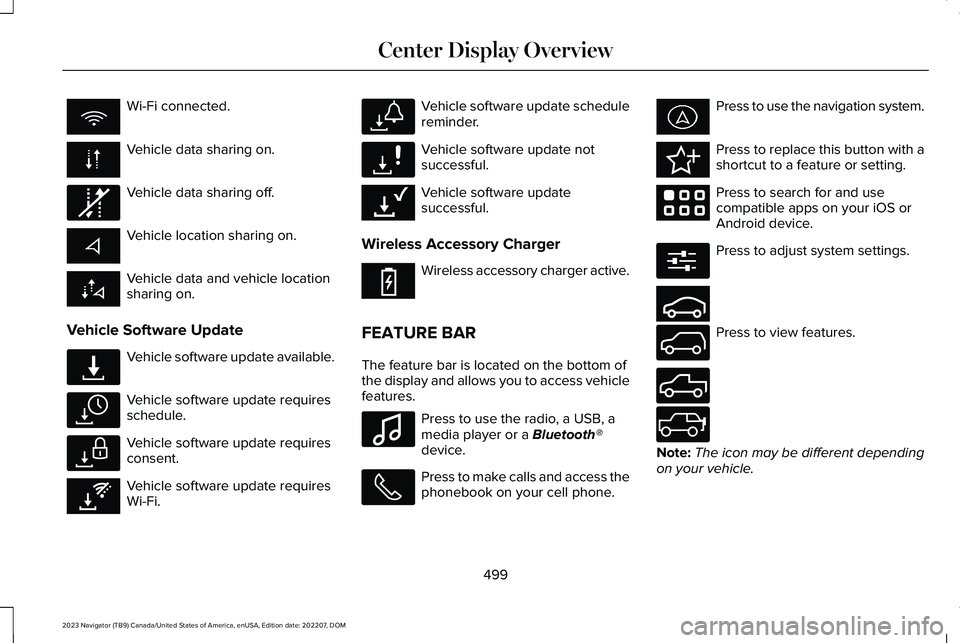
Wi-Fi connected.
Vehicle data sharing on.
Vehicle data sharing off.
Vehicle location sharing on.
Vehicle data and vehicle locationsharing on.
Vehicle Software Update
Vehicle software update available.
Vehicle software update requiresschedule.
Vehicle software update requiresconsent.
Vehicle software update requiresWi-Fi.
Vehicle software update schedulereminder.
Vehicle software update notsuccessful.
Vehicle software updatesuccessful.
Wireless Accessory Charger
Wireless accessory charger active.
FEATURE BAR
The feature bar is located on the bottom ofthe display and allows you to access vehiclefeatures.
Press to use the radio, a USB, amedia player or a Bluetooth®device.
Press to make calls and access thephonebook on your cell phone.
Press to use the navigation system.
Press to replace this button with ashortcut to a feature or setting.
Press to search for and usecompatible apps on your iOS orAndroid device.
Press to adjust system settings.
Press to view features.
Note:The icon may be different dependingon your vehicle.
499
2023 Navigator (TB9) Canada/United States of America, enUSA, Edition date: 202207, DOMCenter Display Overview E335292 E327789 E327785 E327786 E353217 E327787 E327788 E353218 E353214 E100027 E358432 E353220 E280315 E353210 E335299 E335300 E347104
Page 519 of 660
HOW DO PERSONAL PROFILES
WORK
This feature allows you to create multiplepersonal profiles enabling users topersonalize vehicle’s settings such as seatsand mirrors, as well as non-positional settingslike radio, navigation, driver assist systemsettings. Positional settings are saved byholding a memory seat button.Non-positional settings are saved youchange a setting while a profile is active. Youcan create one profile for each presetmemory seat button along with a guestprofile.
Recalling and Changing a Profile
You can recall a profile using thetouchscreen or the preset button youselected when you created your profile. Youcan also link a remote control and a mobiledevice to your profile, which are used torecall it.
ENABLING OR DISABLING
PERSONAL PROFILES
When you switch on the Personal Profilesfeature:
•Unlocking a door with a remote controlor mobile device that is not linked to adriver profile does not change the activeprofile, but remains in the last knownprofile. It does not change the positionalsettings.
•Pressing a memory seat button that isnot linked to a driver profile or saved toa preset setting does not change theactive profile, but remains in the lastknown profile. It does not change thepositional settings.
•Pressing a memory seat button that isnot linked to a driver profile but is savedto a preset setting does not change theactive profile, but remains in the lastknown profile. It recalls the positionalsettings that you saved to that memoryseat button.
When you switch off a Personal Profilesfeature:
•Unlocking a door with a remote controlor mobile device does not recall anynon-positional settings but still recallspositional settings from the driver profilewhich the remote control or mobiledevice is linked to.
•Pressing a memory seat button that isnot linked to a driver profile or saved toa preset setting does not change thepositional or non-positional settings.
•Pressing a memory seat button that islinked to a driver profile or has saved toa preset setting recalls the positionalsettings that you saved to that memoryseat button.
CREATING A PERSONAL PROFILE
Use the touchscreen to create a personalprofile.
1.Switch the vehicle on and leave thevehicle in park (P).
2.Select the Personal Profiles button underSettings.
515
2023 Navigator (TB9) Canada/United States of America, enUSA, Edition date: 202207, DOMPersonal Profiles
Page 528 of 660
For a complete listing of the accessories thatare available for your vehicle, please contactyour authorized dealer or visit the onlinestore website:
Web Address (United States)
https://accessories.lincoln.com/
Web Address (Canada)
www.lincolncanada.com
We will repair or replace any properlyauthorized dealer-installed Lincoln OriginalAccessory found to be defective infactory-supplied materials or workmanshipduring the warranty period, as well as anycomponent damaged by the defectiveaccessories.
We will warrant your Lincoln OriginalAccessory through the warranty that providesthe greatest benefit:
•24 months, unlimited mileage.
•The remainder of your new vehiclelimited warranty.
Lincoln Licensed Accessories
The accessory manufacturer designs,develops and therefore warrants LincolnLicensed Accessories, and does not designor test these accessories to Lincolnengineering requirements. Contact anauthorized Lincoln dealer for the accessorymanufacturer's limited warranty details andrequest a copy of the Lincoln LicensedAccessories product limited warranty fromthe accessory manufacturer. See yourwarranty guide for more information.
For maximum vehicle performance, keep thefollowing information in mind when addingaccessories or equipment to your vehicle:
•When adding accessories, equipment,passengers and luggage to your vehicle,do not exceed the total weight capacityof the vehicle or of the front or rear axle(GVWR or GAWR as indicated on theSafety Compliance Certification label). Ask an authorized dealer for specificweight information.
•The Federal CommunicationsCommission (FCC) and Canadian RadioTelecommunications Commission (CRTC)regulate the use of mobilecommunications systems that have radiotransmitters, for example two-way radios,telephones and theft alarms. Any suchequipment installed in your vehicleshould comply with FederalCommunications Commission (FCC) andCanadian Radio TelecommunicationsCommission (CRTC) regulations andshould only be installed by an authorizeddealer.
524
2023 Navigator (TB9) Canada/United States of America, enUSA, Edition date: 202207, DOMAccessories
Page 549 of 660
RADIO FREQUENCY CERTIFICATION
LABELS
BLIND SPOT INFORMATION SYSTEMSENSORS
Argentina
Belarus
Brazil
Canada
Short Range Radar Sensor SRR3-B
IC ID: 4135A-SRR3B
545
2023 Navigator (TB9) Canada/United States of America, enUSA, Edition date: 202207, DOMCustomer InformationE363578 E253816 E340204