windshield LINCOLN NAVIGATOR 2023 Owner's Manual
[x] Cancel search | Manufacturer: LINCOLN, Model Year: 2023, Model line: NAVIGATOR, Model: LINCOLN NAVIGATOR 2023Pages: 660, PDF Size: 14.04 MB
Page 312 of 660
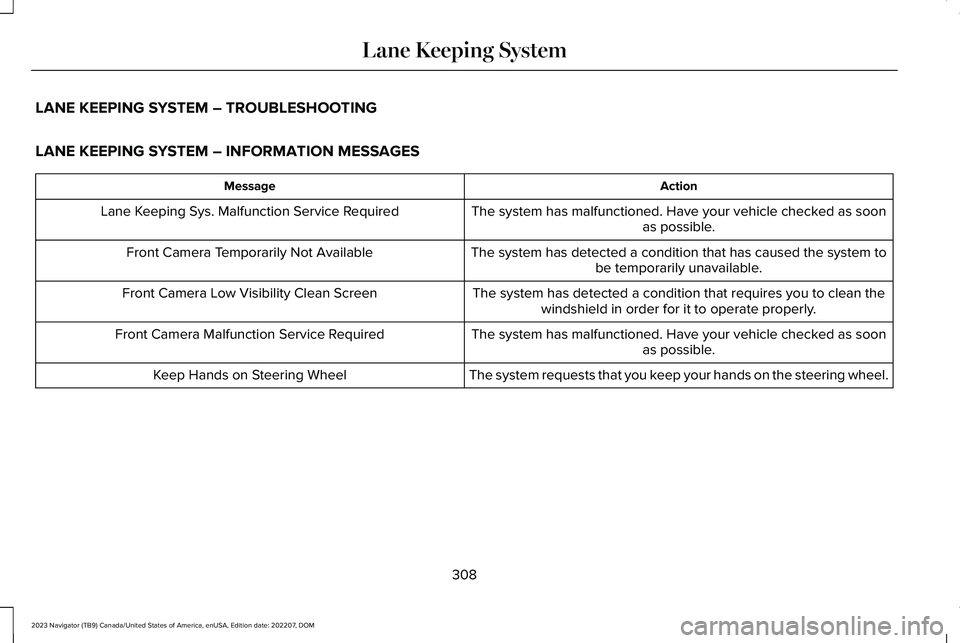
LANE KEEPING SYSTEM – TROUBLESHOOTING
LANE KEEPING SYSTEM – INFORMATION MESSAGES
ActionMessage
The system has malfunctioned. Have your vehicle checked as soonas possible.Lane Keeping Sys. Malfunction Service Required
The system has detected a condition that has caused the system tobe temporarily unavailable.Front Camera Temporarily Not Available
The system has detected a condition that requires you to clean thewindshield in order for it to operate properly.Front Camera Low Visibility Clean Screen
The system has malfunctioned. Have your vehicle checked as soonas possible.Front Camera Malfunction Service Required
The system requests that you keep your hands on the steering wheel.Keep Hands on Steering Wheel
308
2023 Navigator (TB9) Canada/United States of America, enUSA, Edition date: 202207, DOMLane Keeping System
Page 313 of 660
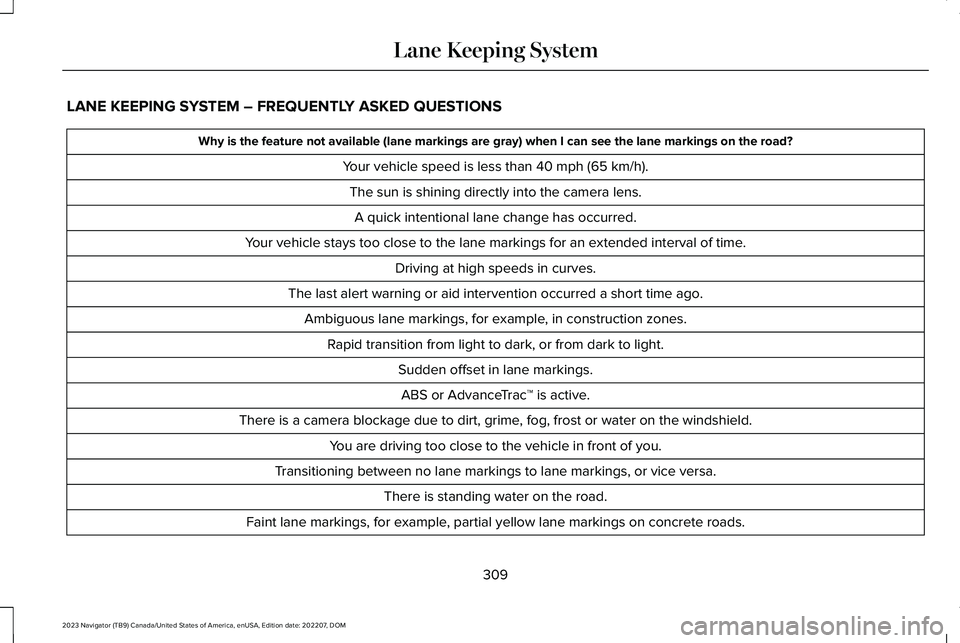
LANE KEEPING SYSTEM – FREQUENTLY ASKED QUESTIONS
Why is the feature not available (lane markings are gray) when I can see the lane markings on the road?
Your vehicle speed is less than 40 mph (65 km/h).
The sun is shining directly into the camera lens.
A quick intentional lane change has occurred.
Your vehicle stays too close to the lane markings for an extended interval of time.
Driving at high speeds in curves.
The last alert warning or aid intervention occurred a short time ago.
Ambiguous lane markings, for example, in construction zones.
Rapid transition from light to dark, or from dark to light.
Sudden offset in lane markings.
ABS or AdvanceTrac™ is active.
There is a camera blockage due to dirt, grime, fog, frost or water on the windshield.
You are driving too close to the vehicle in front of you.
Transitioning between no lane markings to lane markings, or vice versa.
There is standing water on the road.
Faint lane markings, for example, partial yellow lane markings on concrete roads.
309
2023 Navigator (TB9) Canada/United States of America, enUSA, Edition date: 202207, DOMLane Keeping System
Page 314 of 660
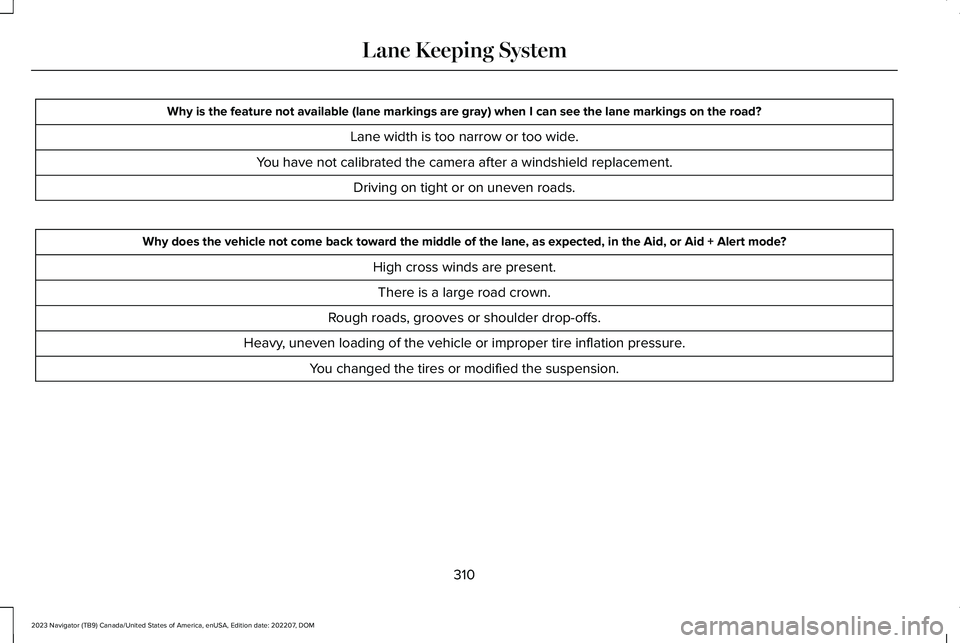
Why is the feature not available (lane markings are gray) when I can see the lane markings on the road?
Lane width is too narrow or too wide.
You have not calibrated the camera after a windshield replacement.
Driving on tight or on uneven roads.
Why does the vehicle not come back toward the middle of the lane, as expected, in the Aid, or Aid + Alert mode?
High cross winds are present.
There is a large road crown.
Rough roads, grooves or shoulder drop-offs.
Heavy, uneven loading of the vehicle or improper tire inflation pressure.
You changed the tires or modified the suspension.
310
2023 Navigator (TB9) Canada/United States of America, enUSA, Edition date: 202207, DOMLane Keeping System
Page 328 of 660
Adjusting the Pre-Collision AssistSettings
You can adjust the following settings byusing the touchscreen controls in thepre-collision assist menu:
•Change alert and distance alert sensitivityto one of three possible settings.
•Switch distance indication and alert onor off.
•If required, switch automatic emergencybraking on or off.
•If required, switch evasive steering assiston or off.
Note:Automatic emergency braking andevasive steering automatically turns on everytime you switch the ignition on.
Note:If you switch automatic emergencybraking off, evasive steering assist switchesoff.
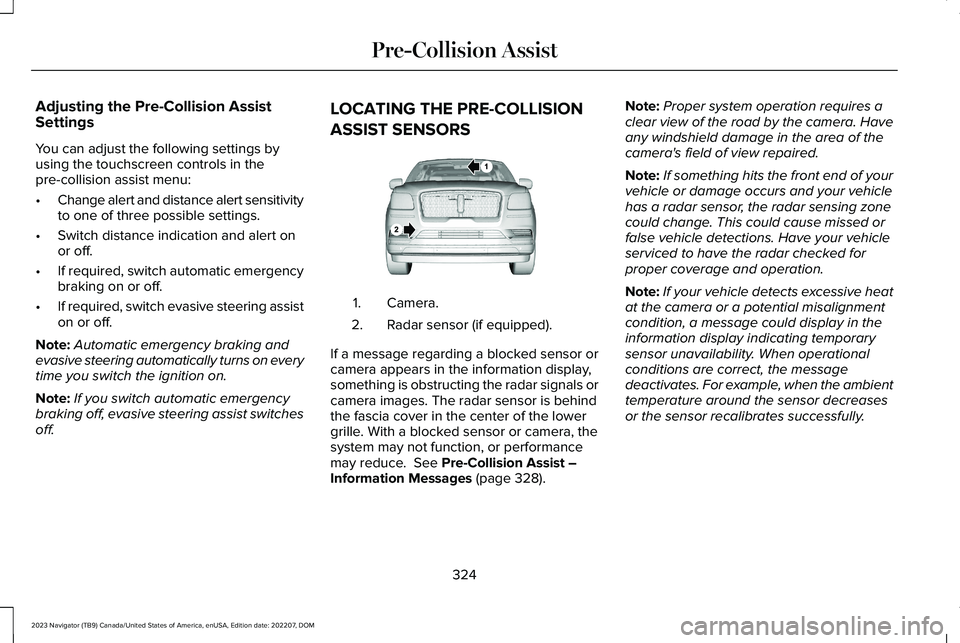
LOCATING THE PRE-COLLISION
ASSIST SENSORS
Camera.1.
Radar sensor (if equipped).2.
If a message regarding a blocked sensor orcamera appears in the information display,something is obstructing the radar signals orcamera images. The radar sensor is behindthe fascia cover in the center of the lowergrille. With a blocked sensor or camera, thesystem may not function, or performancemay reduce. See Pre-Collision Assist –Information Messages (page 328).
Note:Proper system operation requires aclear view of the road by the camera. Haveany windshield damage in the area of thecamera's field of view repaired.
Note:If something hits the front end of yourvehicle or damage occurs and your vehiclehas a radar sensor, the radar sensing zonecould change. This could cause missed orfalse vehicle detections. Have your vehicleserviced to have the radar checked forproper coverage and operation.
Note:If your vehicle detects excessive heatat the camera or a potential misalignmentcondition, a message could display in theinformation display indicating temporarysensor unavailability. When operationalconditions are correct, the messagedeactivates. For example, when the ambienttemperature around the sensor decreasesor the sensor recalibrates successfully.
324
2023 Navigator (TB9) Canada/United States of America, enUSA, Edition date: 202207, DOMPre-Collision AssistE253503
Page 333 of 660
PRE-COLLISION ASSIST –FREQUENTLY ASKED QUESTIONS
Camera Troubleshooting
The windshield in front of the camera isdirty or obstructed.
Clean the outside of the windshield infront of the camera.
The windshield in front of the camera isclean, but the message remains in theinstrument cluster display.
Wait a short time. It could take severalminutes for the camera to detect thatthere is no obstruction.
Radar Troubleshooting (If Equipped)
The surface of the radar in the grille is dirtyor obstructed.
Clean the grille surface in front of theradar or remove the object causing theobstruction.
The surface of the radar in the grille isclean, but the message remains in theinstrument cluster display.
Wait a short time. It could take severalminutes for the radar to detect that thereis no obstruction.
Heavy rain, spray or fog is interfering withthe radar signals.
The pre-collision assist system istemporarily disabled. Pre-collision assistreactivates a short time after theweather conditions improve.
Swirling water or snow or ice on the surfaceof the road could interfere with the radarsignals.
The pre-collision assist system istemporarily disabled. Pre-collision assistreactivates a short time after theweather conditions improve.
Radar is out of alignment due to a front endimpact.
Have your vehicle serviced to have theradar checked for proper coverage andoperation.
329
2023 Navigator (TB9) Canada/United States of America, enUSA, Edition date: 202207, DOMPre-Collision Assist
Page 334 of 660
WHAT IS DRIVER ALERT
Driver alert alerts you if it determines thatyou are becoming drowsy or if your drivingdeteriorates.
HOW DOES DRIVER ALERT WORK
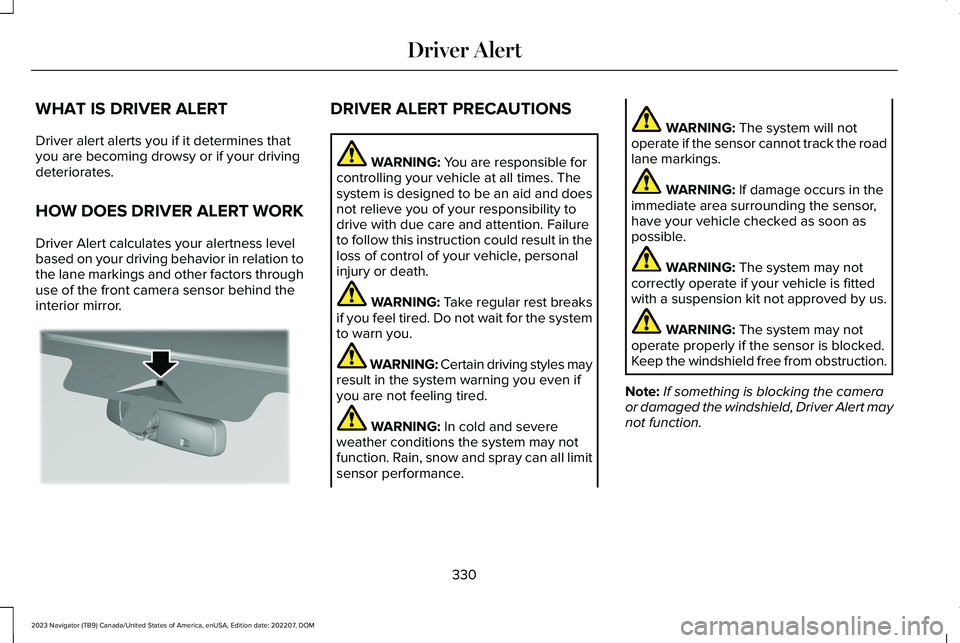
Driver Alert calculates your alertness levelbased on your driving behavior in relation tothe lane markings and other factors throughuse of the front camera sensor behind theinterior mirror.
DRIVER ALERT PRECAUTIONS
WARNING: You are responsible forcontrolling your vehicle at all times. Thesystem is designed to be an aid and doesnot relieve you of your responsibility todrive with due care and attention. Failureto follow this instruction could result in theloss of control of your vehicle, personalinjury or death.
WARNING: Take regular rest breaksif you feel tired. Do not wait for the systemto warn you.
WARNING: Certain driving styles mayresult in the system warning you even ifyou are not feeling tired.
WARNING: In cold and severeweather conditions the system may notfunction. Rain, snow and spray can all limitsensor performance.
WARNING: The system will notoperate if the sensor cannot track the roadlane markings.
WARNING: If damage occurs in theimmediate area surrounding the sensor,have your vehicle checked as soon aspossible.
WARNING: The system may notcorrectly operate if your vehicle is fittedwith a suspension kit not approved by us.
WARNING: The system may notoperate properly if the sensor is blocked.Keep the windshield free from obstruction.
Note:If something is blocking the cameraor damaged the windshield, Driver Alert maynot function.
330
2023 Navigator (TB9) Canada/United States of America, enUSA, Edition date: 202207, DOMDriver AlertE309385
Page 336 of 660
WHAT IS SPEED SIGN
RECOGNITION
Speed sign recognition detects speed limitsigns to inform you of the current speed limit.Detected speed signs appear in theinstrument cluster display.
HOW DOES SPEED SIGN
RECOGNITION WORK
Speed sign recognition uses a sensor behindthe interior mirror to detect speed signs.
If your vehicle has speed sign recognitionwith navigation, stored speed sign data mayinfluence the indicated speed limit value.
SPEED SIGN RECOGNITION
PRECAUTIONS
WARNING: You are responsible forcontrolling your vehicle at all times. Thesystem is designed to be an aid and doesnot relieve you of your responsibility todrive with due care and attention. Failureto follow this instruction could result in theloss of control of your vehicle, personalinjury or death.
WARNING: In cold and severeweather conditions the system may notfunction. Rain, snow and spray can all limitsensor performance.
WARNING: The system may notoperate properly if the sensor is blocked.Keep the windshield free from obstruction.
Note:Do not carry out windshield repairs inthe immediate area surrounding the sensor.
Note:If your vehicle has a suspension kitnot approved by Ford, the system may notcorrectly function.
Note:The system may not detect all speedsigns and may incorrectly read signs.
Note:Always fit our original parts whenreplacing headlamp bulbs. Other bulbs mayreduce system performance.
SPEED SIGN RECOGNITION
LIMITATIONS
Speed sign recognition may not operatecorrectly due to:
•Outdated map data.
•Incorrect recognition of speed limits bythe sensor of signs on parallel roads orexit ramps.
•Missed recognition of faded, dirty, ordistorted signs.
332
2023 Navigator (TB9) Canada/United States of America, enUSA, Edition date: 202207, DOMSpeed Sign Recognition (If Equipped)
Page 407 of 660
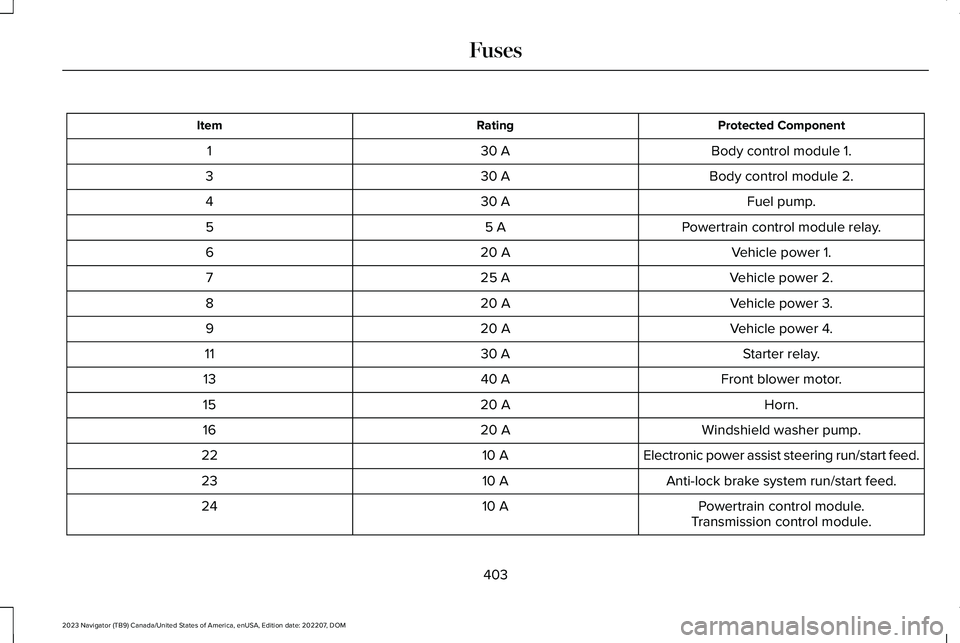
Protected ComponentRatingItem
Body control module 1.30 A1
Body control module 2.30 A3
Fuel pump.30 A4
Powertrain control module relay.5 A5
Vehicle power 1.20 A6
Vehicle power 2.25 A7
Vehicle power 3.20 A8
Vehicle power 4.20 A9
Starter relay.30 A11
Front blower motor.40 A13
Horn.20 A15
Windshield washer pump.20 A16
Electronic power assist steering run/start feed.10 A22
Anti-lock brake system run/start feed.10 A23
Powertrain control module.10 A24Transmission control module.
403
2023 Navigator (TB9) Canada/United States of America, enUSA, Edition date: 202207, DOMFuses
Page 419 of 660
2.Pull the secondary release lever underthe front of the hood near the center ofyour vehicle.
3.Raise the hood until the lift cylinders holdit open.4.To close, lower the hood and make surethat it fully latches.
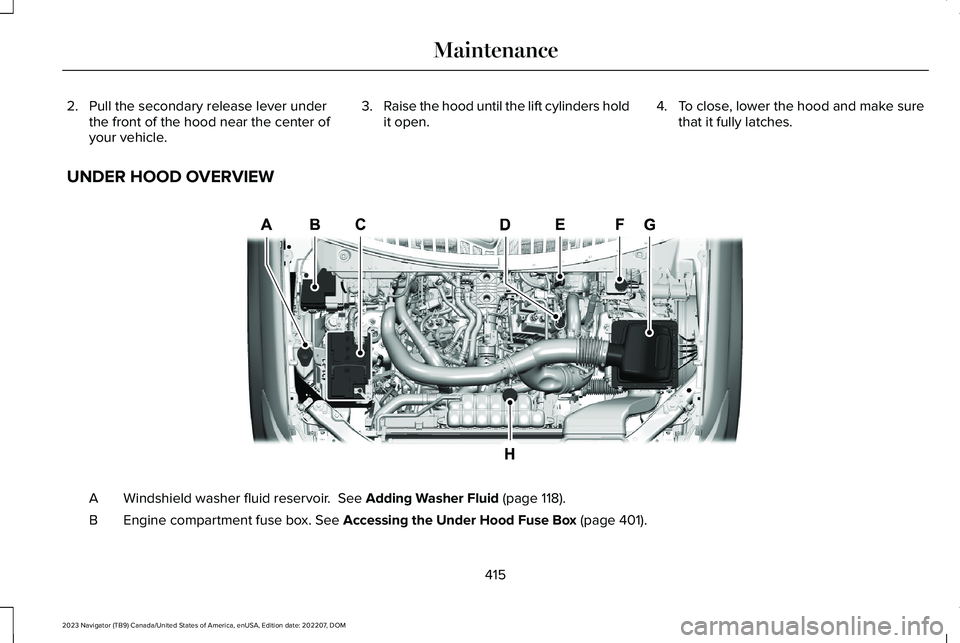
UNDER HOOD OVERVIEW
Windshield washer fluid reservoir. See Adding Washer Fluid (page 118).A
Engine compartment fuse box. See Accessing the Under Hood Fuse Box (page 401).B
415
2023 Navigator (TB9) Canada/United States of America, enUSA, Edition date: 202207, DOMMaintenanceE372162
Page 423 of 660
Adding Coolant
WARNING: Keep your hands andclothing clear of the cooling fan.
WARNING: Do not remove thecoolant reservoir cap when the engine ison or the cooling system is hot. Wait 10minutes for the cooling system to cooldown. Cover the coolant reservoir cap witha thick cloth to prevent the possibility ofscalding and slowly remove the cap.Failure to follow this instruction could resultin personal injury.
WARNING: Do not add coolant whenthe vehicle is on or the cooling system ishot. Failure to follow this instruction couldresult in personal injury.
WARNING: Do not add coolantfurther than the MAX mark.
WARNING: Do not put coolant in thewindshield washer reservoir. If sprayed onthe windshield, coolant could make itdifficult to see through the windshield.
WARNING: Do not allow the fluid totouch your skin or eyes. If this happens,rinse the affected areas immediately withplenty of water and contact your physician.
Note: Do not use stop leak pellets, coolingsystem sealants, or non-specified additivesas they can cause damage to the enginecooling or heating systems. Resultingcomponent damage may not be covered bythe vehicle Warranty.
Note:Automotive fluids are notinterchangeable.
It is very important to use prediluted coolantapproved to the correct specification in orderto avoid plugging the small passageways inthe engine cooling system. See Capacitiesand Specifications (page 467). Do not mixdifferent colors or types of coolant in yourvehicle. Mixing of engine coolants or usingan incorrect coolant may harm the engine orcooling system components and could voidthe vehicle Warranty.
Note:If prediluted coolant is not available,use the approved concentrated coolantdiluting it to 50/50 with deionized or distilledwater. See Capacities and Specifications(page 467). Using water that has not beendeionized may contribute to depositformation, corrosion and plugging of thesmall cooling system passageways.
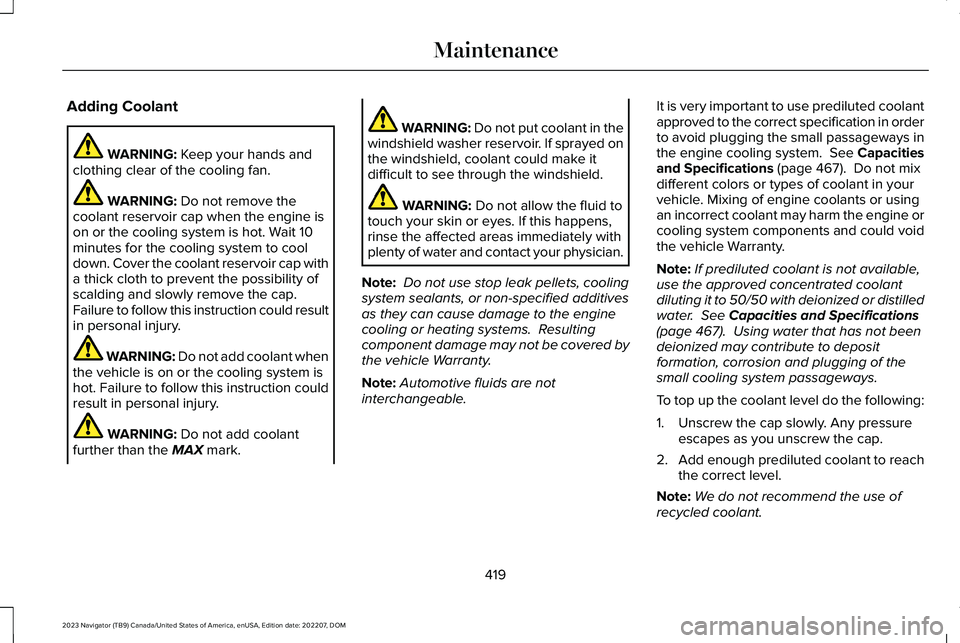
To top up the coolant level do the following:
1.Unscrew the cap slowly. Any pressureescapes as you unscrew the cap.
2.Add enough prediluted coolant to reachthe correct level.
Note:We do not recommend the use ofrecycled coolant.
419
2023 Navigator (TB9) Canada/United States of America, enUSA, Edition date: 202207, DOMMaintenance