wiper fluid LINCOLN NAVIGATOR 2023 Owners Manual
[x] Cancel search | Manufacturer: LINCOLN, Model Year: 2023, Model line: NAVIGATOR, Model: LINCOLN NAVIGATOR 2023Pages: 660, PDF Size: 14.04 MB
Page 121 of 660
4.Remove the wiper blade.
Note:Make sure that the wiper arm doesnot spring back against the glass when thewiper blade is not attached.
5.To install, reverse the removal procedure.
Note:Make sure that the wiper blade locksinto place.
REPLACING THE REAR WIPER
BLADES
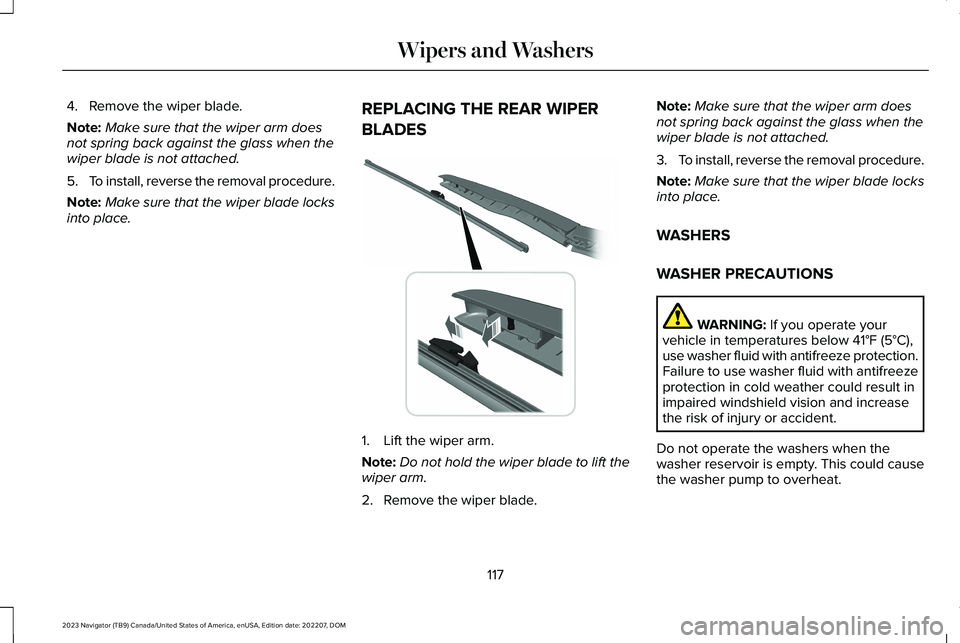
1.Lift the wiper arm.
Note:Do not hold the wiper blade to lift thewiper arm.
2.Remove the wiper blade.
Note:Make sure that the wiper arm doesnot spring back against the glass when thewiper blade is not attached.
3.To install, reverse the removal procedure.
Note:Make sure that the wiper blade locksinto place.
WASHERS
WASHER PRECAUTIONS
WARNING: If you operate yourvehicle in temperatures below 41°F (5°C),use washer fluid with antifreeze protection.Failure to use washer fluid with antifreezeprotection in cold weather could result inimpaired windshield vision and increasethe risk of injury or accident.
Do not operate the washers when thewasher reservoir is empty. This could causethe washer pump to overheat.
117
2023 Navigator (TB9) Canada/United States of America, enUSA, Edition date: 202207, DOMWipers and Washers E271380
Page 122 of 660
Keep the outside of the windshield clean. The rain sensor is very sensitive and thewipers may operate if dirt, mist or insects hitthe windshield.
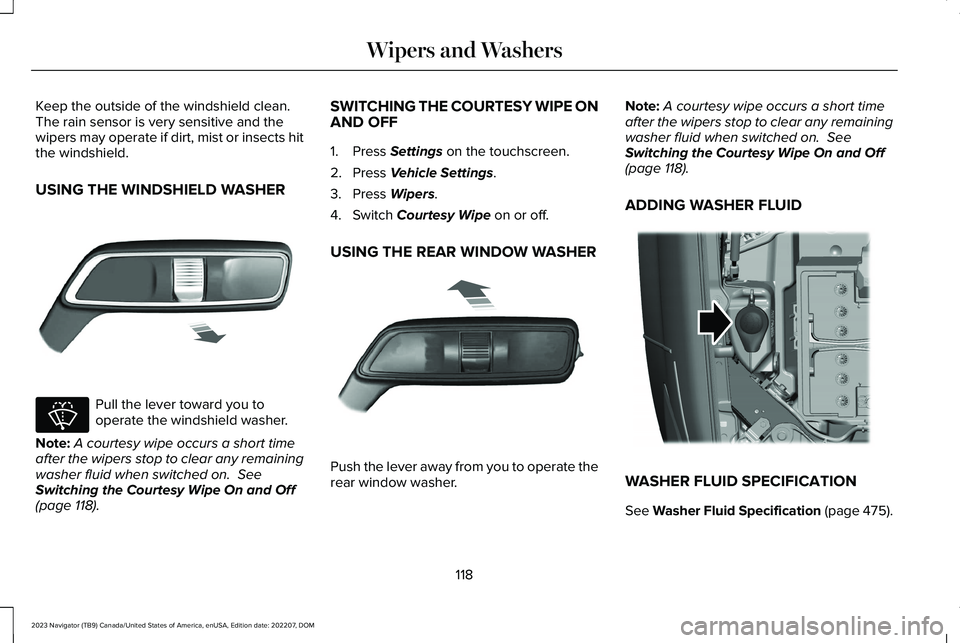
USING THE WINDSHIELD WASHER
Pull the lever toward you tooperate the windshield washer.
Note:A courtesy wipe occurs a short timeafter the wipers stop to clear any remainingwasher fluid when switched on. SeeSwitching the Courtesy Wipe On and Off(page 118).
SWITCHING THE COURTESY WIPE ONAND OFF
1.Press Settings on the touchscreen.
2.Press Vehicle Settings.
3.Press Wipers.
4.Switch Courtesy Wipe on or off.
USING THE REAR WINDOW WASHER
Push the lever away from you to operate therear window washer.
Note:A courtesy wipe occurs a short timeafter the wipers stop to clear any remainingwasher fluid when switched on. SeeSwitching the Courtesy Wipe On and Off(page 118).
ADDING WASHER FLUID
WASHER FLUID SPECIFICATION
See Washer Fluid Specification (page 475).
118
2023 Navigator (TB9) Canada/United States of America, enUSA, Edition date: 202207, DOMWipers and WashersE269412 E270967 E269727 E348204
Page 123 of 660
WIPERS AND WASHERS –
TROUBLESHOOTING
WIPERS AND WASHERS – WARNINGLAMPS
Illuminates when the windshieldwasher fluid is low.
WIPERS AND WASHERS –FREQUENTLY ASKED QUESTIONS
Why are there streaks and smears on thewindshield?
The wiper blades could be dirty, wornor damaged. Check the wiper blades.See Checking the Wiper Blades (page116). If the wiper blades are dirty, cleanthem with washer fluid or water appliedwith a soft sponge or cloth. If the wiperblades are worn or damaged, install newones. See Replacing the Front WiperBlades (page 116).
119
2023 Navigator (TB9) Canada/United States of America, enUSA, Edition date: 202207, DOMWipers and WashersE132353
Page 434 of 660
SpecificationName
Motorcraft® Spot and Stain Remover, ZC-14 (U.S.)
ESR-M14P5-AMotorcraft® Ultra-Clear Spray Glass Cleaner, ZC-23 (U.S.)
Motorcraft® Wheel and Tire Cleaner, ZC-37-A (U.S. & Canada)
CLEANING THE EXTERIOR
CLEANING THE EXTERIORPRECAUTIONS
Immediately remove fuel spillages, additiveresiduals, bird droppings, insect depositsand road tar. These may cause damage toyour vehicle’s paintwork or trim over time.Remove any exterior accessories, forexample antennas, before entering a carwash.
CLEANING HEADLAMPS AND REARLAMPS
We recommend that you only use cold orlukewarm water containing car shampoo toclean the headlamps and the rear lamps.
Do not scrape the lamps.
Do not wipe lamps when they are dry.
CLEANING WINDOWS AND WIPERBLADES
To clean the windshield and wiper blades:
•Clean the windshield with a non-abrasiveglass cleaner.
Note:When cleaning the interior of thewindshield, avoid getting any glass cleaneron the instrument panel or door panels. Wipeany glass cleaner off these surfacesimmediately.
•Clean the wiper blades with washer fluidor water applied with a soft sponge orcloth.
Note: Do not use razor blades or othersharp objects to clean or remove decals fromthe inside of the heated rear window. Thiscan cause damage not covered by thevehicle Warranty.
CLEANING CHROME, ALUMINIUM ORSTAINLESS STEEL
Lincoln Chrome Care
430
2023 Navigator (TB9) Canada/United States of America, enUSA, Edition date: 202207, DOMVehicle Care
Page 440 of 660
12 Volt Battery
•When storing your vehicle for greaterthan 30 days the state of charge shouldbe approximately 50%. Additionally, werecommend disconnecting the 12vbattery which will reduce system loadson the battery.
•Check and recharge as necessary. Keepconnections clean.
Note:It is necessary to reset memoryfeatures if you disconnect the battery cables.
Brakes
Make sure the brakes and parking brakerelease fully.
Note:If you intend on parking your vehiclefor an extended period after cleaning thewheels with a wheel cleaner, drive yourvehicle for a few minutes before doing so toreduce the risk of increased corrosion of thebrake discs, brake pads and linings.
Tires
Maintain recommended air pressure.
Note:If you intend on parking your vehiclefor an extended period after cleaning thewheels with a wheel cleaner, drive yourvehicle for a few minutes before doing so.This reduces the risk of corrosion of thebrake discs, brake pads and linings.
REMOVING YOUR VEHICLE FROM
STORAGE
When your vehicle is ready to come out ofstorage, do the following:
•We recommend that you change theengine oil before you use your vehicleagain.
•Wash your vehicle to remove any dirt orgrease film build-up on window surfaces.
•Check windshield wipers for anydeterioration.
•Check the underhood for any foreignmaterials such as mice or squirrel nests.
•Check the exhaust for any foreignmaterials.
•Check tire pressures and set tire inflationper the Tire Label.
•Check brake pedal operation. Corrodedbrake rotors could cause brake noise.Drive your vehicle and gently apply andrelease the brakes repeatedly over a10-minute drive to reduce the corrosionfrom the brakes.
•Check fluid levels (including coolant, oiland gas) to make sure there are no leaks,and fluids are at recommended levels.
•If you remove the battery, clean thebattery cable ends and check fordamage.
Contact an authorized dealer if you have anyconcerns or issues.
436
2023 Navigator (TB9) Canada/United States of America, enUSA, Edition date: 202207, DOMStoring Your Vehicle
Page 531 of 660
Transferable Coverage
If you sell your vehicle before your LincolnProtect extended service plan coverageexpires, you can transfer any remainingcoverage to the new owner. This should giveyou and your potential buyer a little morepeace of mind.
Less Cost to Properly Maintain Your Vehicle
The Lincoln Protect extended service planalso offers a Premium Maintenance Plan thatcovers all scheduled maintenance, andselected wear items. The coverage isprepaid, so you never have to worry aboutthe cost of your vehicle’s maintenance.
Covered maintenance includes:
•Windshield wiper blades.
•Spark plugs.
•The clutch disc - if equipped.
•Brake pads and linings.
•Shock absorbers and struts.
•Engine cooling hoses, clamps ando-rings.
•Engine belts.
•Diesel exhaust fluid replenishment - ifequipped.
Interest Free Finance Options
Just a 5% down payment will provide youwith an affordable, no interest, no feepayment program allowing you all thesecurity and benefits Lincoln Protectextended service plan has to offer whilepaying over time. You are pre-approved withno credit check or hassles. To learn more,call our Lincoln Protect extended serviceplan specialists at 800-367-3377.
Complete the information below and mail to:
Lincoln Protect Extended Service PlanP.O. Box 321067Detroit, MI 48232
Lincoln Protect (Canada Only)
You can get more protection for your vehicleby purchasing a Lincoln Protect extendedservice plan. The Lincoln Protect extendedservice plan is the only service contractbacked by Lincoln, Limited. Depending onthe plan you purchase, the Lincoln Protectextended service plan provides benefits suchas:
•Rental reimbursement.
•Coverage for certain maintenance andwear items.
•Protection against repair costs after yourNew Vehicle Limited Warranty Coverageexpires.
•Roadside Assistance benefits.
527
2023 Navigator (TB9) Canada/United States of America, enUSA, Edition date: 202207, DOMLincoln Protect
Page 537 of 660
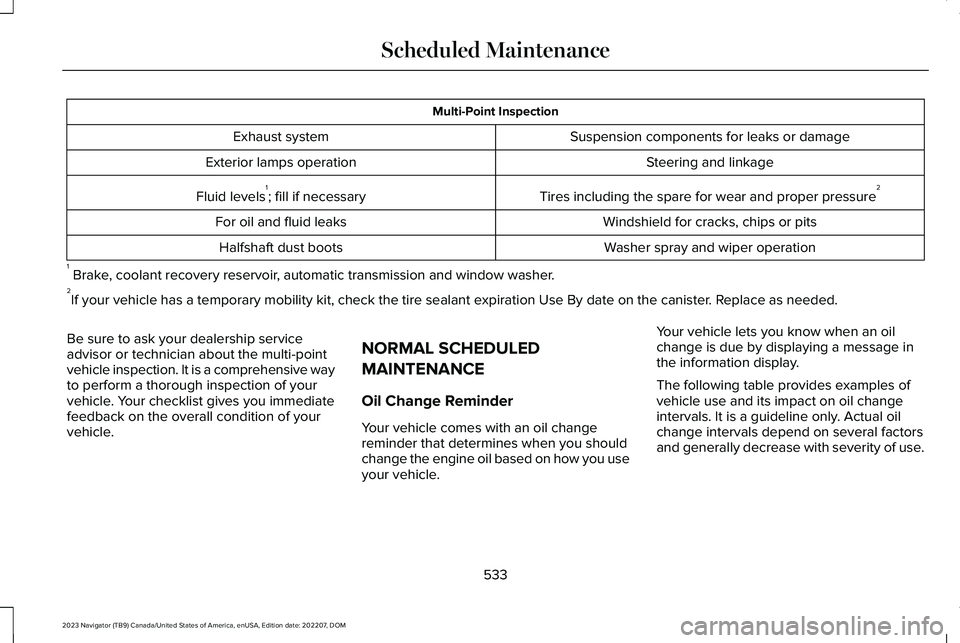
Multi-Point Inspection
Suspension components for leaks or damageExhaust system
Steering and linkageExterior lamps operation
Tires including the spare for wear and proper pressure2Fluid levels1; fill if necessary
Windshield for cracks, chips or pitsFor oil and fluid leaks
Washer spray and wiper operationHalfshaft dust boots
1 Brake, coolant recovery reservoir, automatic transmission and window washer.2If your vehicle has a temporary mobility kit, check the tire sealant expiration Use By date on the canister. Replace as needed.
Be sure to ask your dealership serviceadvisor or technician about the multi-pointvehicle inspection. It is a comprehensive wayto perform a thorough inspection of yourvehicle. Your checklist gives you immediatefeedback on the overall condition of yourvehicle.
NORMAL SCHEDULED
MAINTENANCE
Oil Change Reminder
Your vehicle comes with an oil changereminder that determines when you shouldchange the engine oil based on how you useyour vehicle.
Your vehicle lets you know when an oilchange is due by displaying a message inthe information display.
The following table provides examples ofvehicle use and its impact on oil changeintervals. It is a guideline only. Actual oilchange intervals depend on several factorsand generally decrease with severity of use.
533
2023 Navigator (TB9) Canada/United States of America, enUSA, Edition date: 202207, DOMScheduled Maintenance
Page 638 of 660
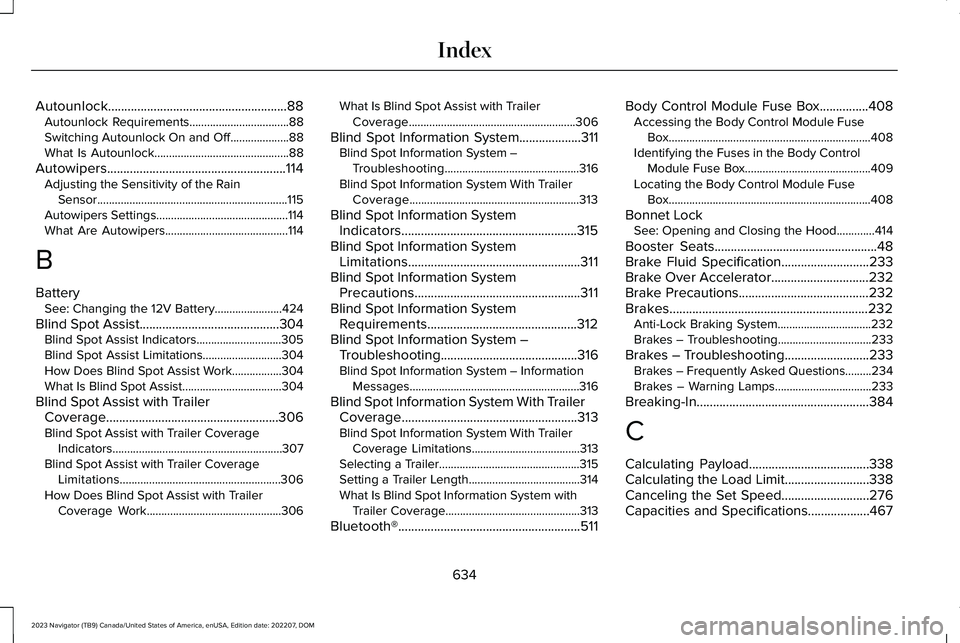
Autounlock.......................................................88Autounlock Requirements..................................88Switching Autounlock On and Off....................88What Is Autounlock..............................................88
Autowipers.......................................................114Adjusting the Sensitivity of the RainSensor.................................................................115Autowipers Settings.............................................114What Are Autowipers..........................................114
B
BatterySee: Changing the 12V Battery.......................424
Blind Spot Assist...........................................304Blind Spot Assist Indicators.............................305Blind Spot Assist Limitations...........................304How Does Blind Spot Assist Work.................304What Is Blind Spot Assist..................................304
Blind Spot Assist with TrailerCoverage.....................................................306Blind Spot Assist with Trailer CoverageIndicators..........................................................307Blind Spot Assist with Trailer CoverageLimitations.......................................................306How Does Blind Spot Assist with TrailerCoverage Work..............................................306
What Is Blind Spot Assist with TrailerCoverage.........................................................306
Blind Spot Information System...................311Blind Spot Information System –Troubleshooting..............................................316Blind Spot Information System With TrailerCoverage..........................................................313
Blind Spot Information SystemIndicators......................................................315Blind Spot Information SystemLimitations.....................................................311Blind Spot Information SystemPrecautions...................................................311Blind Spot Information SystemRequirements..............................................312Blind Spot Information System –Troubleshooting..........................................316Blind Spot Information System – InformationMessages..........................................................316
Blind Spot Information System With TrailerCoverage......................................................313Blind Spot Information System With TrailerCoverage Limitations.....................................313Selecting a Trailer................................................315Setting a Trailer Length......................................314What Is Blind Spot Information System withTrailer Coverage..............................................313
Bluetooth®........................................................511
Body Control Module Fuse Box...............408Accessing the Body Control Module FuseBox.....................................................................408Identifying the Fuses in the Body ControlModule Fuse Box...........................................409Locating the Body Control Module FuseBox.....................................................................408
Bonnet LockSee: Opening and Closing the Hood.............414
Booster Seats..................................................48Brake Fluid Specification...........................233Brake Over Accelerator..............................232Brake Precautions........................................232Brakes.............................................................232Anti-Lock Braking System................................232Brakes – Troubleshooting................................233
Brakes – Troubleshooting..........................233Brakes – Frequently Asked Questions.........234Brakes – Warning Lamps.................................233
Breaking-In.....................................................384
C
Calculating Payload.....................................338Calculating the Load Limit..........................338Canceling the Set Speed...........................276Capacities and Specifications...................467
634
2023 Navigator (TB9) Canada/United States of America, enUSA, Edition date: 202207, DOMIndex
Page 639 of 660
Catalytic Converter.......................................218Catalytic Converter – Troubleshooting.........219
Catalytic Converter Precautions...............218Catalytic Converter –Troubleshooting..........................................219Catalytic Converter – Warning Lamps...........219
Center Console............................................200Opening the Center Console.........................200
Center Display Limitations.........................498Center Display Overview...........................498Center Display Precautions.......................498Changing a Flat Tire....................................459Changing a Road Wheel............................459Changing the 12V Battery..........................424Changing the Fuel Filter.............................424Changing the Language...............................151Changing the Measurement Unit...............151Changing the Radio Station.......................497Changing the Remote Control Battery......73Changing the Temperature Unit.................151Changing the Tire Pressure Unit................151Changing the Vehicle Wi-Fi Hotspot Nameor Password................................................484Charging a Device........................................194Charging a Wireless Device.......................198Checking MyKey System Status.................84Checking the Brake Fluid..........................232Checking the Coolant..................................418
Checking the Seatbelts.................................58Checking the Tire Pressures.....................449Checking the Wiper Blades.........................116Childminder Mirror........................................136Childminder Mirror Precautions.......................136Locating the Childminder Mirror......................136
Children and Airbags.....................................65Child Restraint Anchor Points......................40Locating the Child Restraint Lower AnchorPoints...................................................................40Locating the Child Restraint Top TetherAnchor Points.....................................................41What Are the Child Restraint AnchorPoints...................................................................40
Child Restraints................................................41Child Restraint Position Information..................41Child Restraints Recommendation...................43
Child Safety......................................................39Child Restraint Anchor Points............................40Child Restraints.......................................................41Installing Child Restraints....................................44
Child Safety Locks...........................................51Child Safety Precautions...............................39Cleaning Products.......................................429Cleaning the Exterior..................................430Cleaning Camera Lenses and Sensors........432Cleaning Chrome, Aluminium or StainlessSteel..................................................................430
Cleaning Headlamps and Rear Lamps.........430Cleaning Stripes or Graphics............................431Cleaning the Engine Compartment................431Cleaning the Exterior Precautions.................430Cleaning the Underbody..................................432Cleaning Wheels..................................................431Cleaning Windows and Wiper Blades..........430
Cleaning the Interior....................................432Cleaning Carpets and Floor Mats..................433Cleaning Displays and Screens......................432Cleaning Fabric Seats and Headliners.........433Cleaning Leather and Vinyl..............................433Cleaning Moonroof Tracks...............................434Cleaning Plastic..................................................432Cleaning Seatbelts.............................................434Cleaning the Instrument Panel.......................432
Clearing All MyKeys.......................................84Climate Control..............................................159Auto Mode.............................................................161
Climate Control Hints...................................162Closing the Liftgate......................................100Closing the Hands-Free Liftgate.....................102Closing the Liftgate From Inside YourVehicle...............................................................100Closing the Liftgate From Outside YourVehicle................................................................101Closing the Liftgate Using the RemoteControl................................................................101
635
2023 Navigator (TB9) Canada/United States of America, enUSA, Edition date: 202207, DOMIndex
Page 656 of 660
Using the Remote Control............................72Using the Trailer Backup AssistanceController.....................................................366Using the Trailer Backup AssistanceViews............................................................367Using the Valet Mode....................................79Using This Publication...................................20Using Trailer Reverse GuidanceViews............................................................378
V
Vehicle Care..................................................429Cleaning the Exterior.........................................430Cleaning the Interior..........................................432
Vehicle Identification Number..................480Locating the Vehicle IdentificationNumber............................................................480Vehicle Identification NumberOverview..........................................................480
Vehicle Identification...................................480Vehicle Identification Number........................480
Vehicle Interior................................................33Vehicle Software Updates.........................520Vehicle System Reset..................................523
Vehicle Wi-Fi Hotspot –Troubleshooting.........................................485Vehicle Wi-Fi Hotspot – Frequently AskedQuestions.........................................................485
Vehicle Wi-Fi Hotspot..................................484Vehicle Wi-Fi Hotspot –Troubleshooting.............................................485
Ventilated Seats.............................................174Switching the Ventilated Seats On andOff........................................................................174Ventilated Seat Precautions.............................174
VentilationSee: Climate Control..........................................159
Venting the Moonroof...................................141Viewing the Tire Pressures.......................455Visual Search...................................................29Voice Interaction...........................................501Lincoln Personal Assistant................................501
W
Warranty Information...................................623Washer Fluid Specification.........................475Washers............................................................117Adding Washer Fluid...........................................118Switching the Courtesy Wipe On andOff........................................................................118Using the Rear Window Washer.......................118
Using the Windshield Washer...........................118Washer Fluid Specification................................118Washer Precautions.............................................117
WashersSee: Wipers and Washers..................................114
Waxing Your Vehicle....................................434Waypoints........................................................518Adding a Waypoint.............................................518Editing Waypoints...............................................519
What Are the Instrument ClusterIndicators......................................................146What Are the Instrument Cluster WarningLamps............................................................144What Is 911 Assist............................................70What Is a Connected Vehicle.....................481What Is ActiveGlide™...................................286What Is Active Park Assist.........................265What is Alexa Built-In..................................503What Is Auto-Start-Stop..............................208What Is Blind Spot InformationSystem............................................................311What Is Cross Traffic Alert...........................317What Is Drive Mode Control......................294What Is Driver Alert......................................330What Is Hill Descent Control.....................250What Is Hill Start Assist...............................242What Is Keyless Entry.....................................91What Is Lincoln Protect...............................526
652
2023 Navigator (TB9) Canada/United States of America, enUSA, Edition date: 202207, DOMIndex