lock LINCOLN TOWN CAR 1997 Owner's Manual
[x] Cancel search | Manufacturer: LINCOLN, Model Year: 1997, Model line: TOWN CAR, Model: LINCOLN TOWN CAR 1997Pages: 305, PDF Size: 2.68 MB
Page 116 of 305

112The door lock Horn Chirp is a programmable
feature. To deactivate the Horn Chirp feature:
1. Enter your permanent five-digit code (not the
user code you may have set).
2. Within five seconds, press and hold the 7/8
button.
3. Within five more seconds, press and release the
1/2 button.
4. Release the 7/8 button.
To reactivate the Horn Chirp feature, simply repeat
the instruction for deactivating the feature.Activating the remote personal alarmIf you wish to activate the remote personal alarm,
press the PANIC control. This will honk the horn
and flash the parking lamps and tail lamps for
approximately two minutes and forty-five seconds.You can turn it OFF by pressing the PANIC control
again or by turning the ignition key to the RUN
position.
Arming and Disarming the Alarm
SystemYour vehicle is equipped with the factory installed
anti-theft system. The remote entry system will
automatically arm it when the doors are locked
with the remote entry LOCK button. The remote
entry UNLOCK button will disarm or reset a
triggered anti-theft alarm.
The remote entry system is designed to work with
the factory installed anti-theft system. It may not
work with other anti-theft systems.
When you use the remote entry UNLOCK, TRUNK
or PANIC buttons, the illuminated entry system
turns on the interior lights for 25 seconds. You can
turn these lights off with the LOCK button or by
turning the ignition to the RUN position.
File:05fncft.ex
Update:Mon Jun 17 13:49:49 1996
Page 117 of 305

113
Memory Seat and Mirror Featureq
Remote Entry
Pressing the UNLOCK button on the remote
entry key fob unlocks the driver's door and
recalls all of the Memory settings. Two key fobs
are delivered with the vehicle. One is
programmed to always recall Memory 1 and the
other will always recall Memory 2. Memory 1
or 2 is indicated on the back of the key fob.
Memory recall from the remote key fob can be
disabled. This is done by sliding the switch on
the back of the key fob to OFF. Memory can
still be recalled using the keyless entry code or
the Memory 1 or Memory 2 switches.
q
Keyless Entry
Up to four unique keyless entry codes can be
programmed by the customer. Three of the
codes can be assigned to recall Memory 1,
Memory 2, or Memory 3. Each time the
five-digit code is entered on the keypad, the
driver's door will unlock and Memory 1,
Memory 2, or Memory 3 will be recalled.
q
Memory Switches
Pressing either the Memory 1 or Memory 2
switch on the driver's door will also recall the
memory settings as selected.
File:05fncft.ex
Update:Mon Jun 17 13:49:49 1996
Page 119 of 305

115
3. Press one button on each of the transmitters to
be programmed. Each transmitter button must
be pressed within seven (7) seconds of the
prior one. Each time a transmitter is
successfully programmed, all of the vehicle
doors will lock and then unlock to verify
programming. If the doors did not lock/unlock,
your transmitter was not programmed.
THIS DEVICE COMPLIES WITH PART 15 OF
THE FCC RULES. OPERATION IS SUBJECT TO
THE FOLLOWING TWO CONDITIONS: (1)
THIS DEVICE MAY NOT CAUSE HARMFUL
INTERFERENCE, AND (2) THIS DEVICE MUST
ACCEPT ANY INTERFERENCE RECEIVED,
INCLUDING INTERFERENCE THAT MAY
CAUSE UNDESIRED OPERATION.
NOTE:All transmitters to be used on your vehicle
must be programmed/reprogrammed at the same
time.
Battery SaverWhen the ignition is turned off, the vehicle will
turn off battery voltage to the vehicle lamps as
follows:q
Courtesy lights (lights which come on when a
door is opened): after 10 minutes.
q
Map/Glove compartment/Trunk/Hook lamps:
after 30 minutes.
q
Headlamps and park lamps (only if headlamp
switch is left in the headlamp position): after 10
minutes.
This will prevent draining of the battery if those
lights have been left on inadvertently or if a door is
not completely closed. Battery voltage to these
lamps will be restored when the keyless entry
keypad is used, the remote entry transmitter is
used, any door is opened, the trunk is opened, or
the ignition key is turned to the ON position.
File:05fncft.ex
Update:Mon Jun 17 13:49:49 1996
Page 120 of 305

116Anti-theft SystemWhen armed, this system helps protect your vehicle
against break-ins or theft by monitoring all doors,
the hood, and the trunk lock cylinder.
When an unauthorized entry occurs, the system
triggers and will:q
flash the headlamps, parking lamps, interior
lamps, and alarm indicator light
q
honk the horn
q
prevent the engine from starting
NOTE:The factory installed Remote Entry System
has a PANIC feature that also chirps the vehicle
horn and flashes the interior/exterior lamps when
the PANIC button on the remote entry transmitter
is pushed.The PANIC alarm and the Anti-Theft
alarm are two separate features.Both the
anti-theft alarm and the PANIC feature can be
active at the same time.To tell the difference between a PANIC alarm and
a triggered Anti-Theft alarm:
q
only the Anti-Theft alarm will cause the alarm
indicator light (located in the center of the
instrument cluster) to flash on and off.
q
only the Anti-Theft alarm will prevent the
engine from starting.
For more information on the PANIC alarm, see
Remote Entry Systemin the Index.
Arming the SystemTo arm the system, do the following four steps in
sequence.
1. Remove the key from the ignition.
2. Open any door. The alarm indicator light will
start flashing to remind you to arm the system.
File:05fncft.ex
Update:Mon Jun 17 13:49:49 1996
Page 121 of 305

117
3. Lock the doors by using the power door lock
switch, pressing the remote entry transmitter
LOCK button or pressing the last two buttons
(7/8, 9/0) of the keyless entry keypad.
The alarm indicator will now glow steadily.
4. Close all doors. The alarm indicator light will
then remain on steadily for approximately 30
more seconds and then go out. When the light
goes out the system is armed.
NOTE:Be sure to close all doors completely. If
not, the alarm indicator light will remain on.
Remember, your anti-theft system is armed only
after the alarm indicator light remains on steadily
for approximately 30 seconds after the last door is
closed, and then goes out.You can also arm the anti-theft system with the
factory installed remote entry system or the keyless
entry system by following this sequence:
1. Remove the key from the ignition.
2. Close all of the doors.
3. Press the remote entry transmitter LOCK
button or press the last two buttons (7/8, 9/0)
of the keyless entry keypad to lock the doors.
The alarm indicator will come on for 30
seconds to show the alarm is arming and then
turn off to show that the alarm has armed.
The anti-theft system is designed to work with the
factory installed remote entry system. It may not
work with other remote entry systems.
NOTE:The anti-theft system will not activate while
someone is sitting in the driver's seat or if there is
a heavy object in the driver's seat.
File:05fncft.ex
Update:Mon Jun 17 13:49:49 1996
Page 122 of 305

118Disarming an Untriggered Anti-Theft
SystemYou can disarm the system by:q
unlocking a front door with the key (turn the
key all the way to the end of travel or the
system will not disarm).
q
using the keyless entry unlock code.
q
using the UNLOCK button of the remote entry
transmitter.
If you armed the system while inside your vehicle,
you can disarm it by turning the ignition to the ON
or ACC position. This allows you to open the door
and exit without triggering the system.
Triggering the Alarm SystemThe armed system will be triggered if:q
any door is opened without disarming the
system (see previous paragraphs), or
q
there is an attempt to remove the trunk lock
cylinder (simply pulling on the lock cylinder will
trigger a switch), or
NOTE:You can open the trunk with your key
without setting off the alarm.
q
the hood is opened.
Disarming a Triggered SystemThe alarm can be disarmed by:q
unlocking a front door with the key
q
using the keyless entry unlock code
q
using the UNLOCK control on the remote entry
transmitter
NOTE:The flashing lights and honking horn will
shut off automatically approximately three minutes
after the system is triggered. It will trigger again if
another intrusion occurs. However, the engine will
not be allowed to start until the system is disarmed.
File:05fncft.ex
Update:Mon Jun 17 13:49:49 1996
Page 125 of 305
121
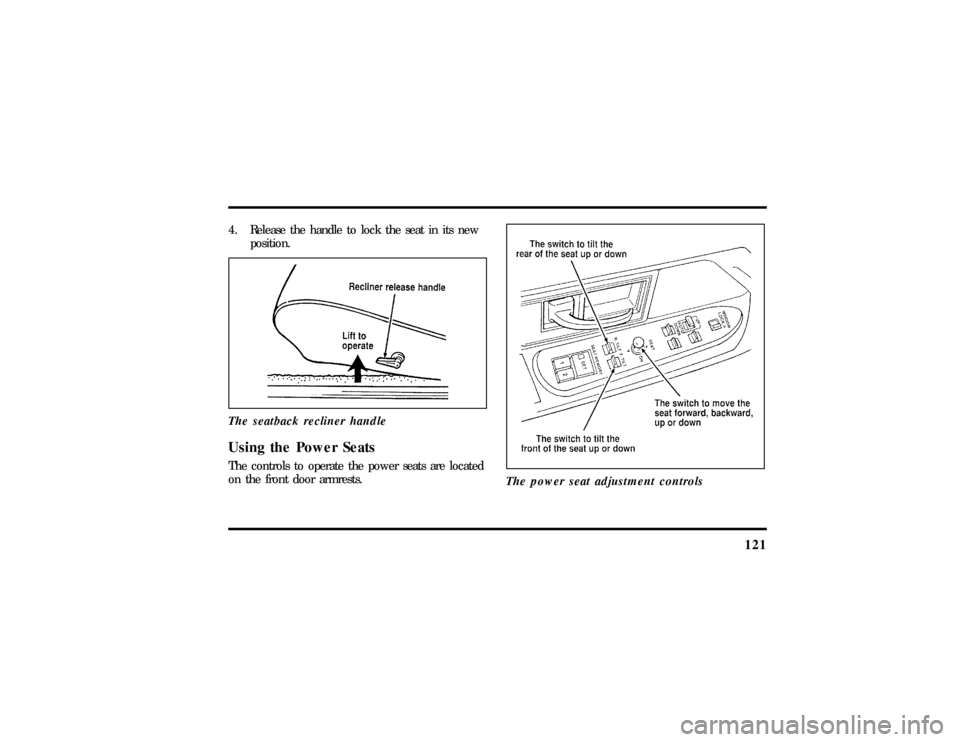
4. Release the handle to lock the seat in its new
position.
The seatback recliner handleUsing the Power SeatsThe controls to operate the power seats are located
on the front door armrests.
The power seat adjustment controls
File:06fnsst.ex
Update:Fri Jun 21 08:57:53 1996
Page 136 of 305
132combination seat belt is latched into the buckle, the
cinch tongue will allow the lap portion to become
shorter, but locks the webbing in place to restrict it
from becoming longer.
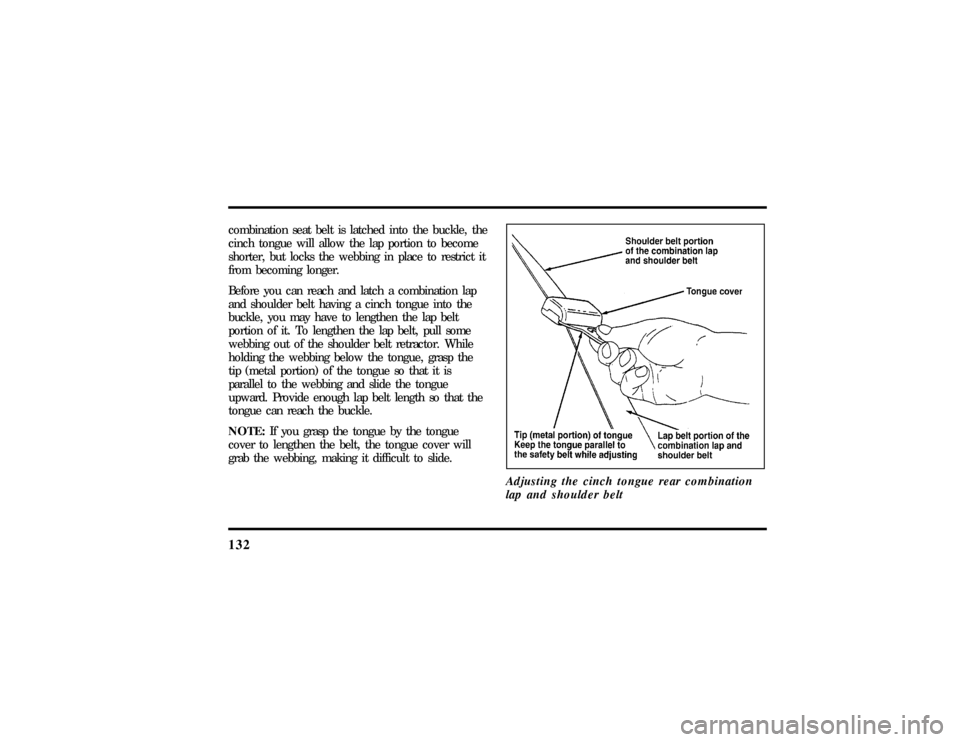
Before you can reach and latch a combination lap
and shoulder belt having a cinch tongue into the
buckle, you may have to lengthen the lap belt
portion of it. To lengthen the lap belt, pull some
webbing out of the shoulder belt retractor. While
holding the webbing below the tongue, grasp the
tip (metal portion) of the tongue so that it is
parallel to the webbing and slide the tongue
upward. Provide enough lap belt length so that the
tongue can reach the buckle.
NOTE:If you grasp the tongue by the tongue
cover to lengthen the belt, the tongue cover will
grab the webbing, making it difficult to slide.
Adjusting the cinch tongue rear combination
lap and shoulder belt
File:06fnsst.ex
Update:Fri Jun 21 08:57:53 1996
Page 138 of 305
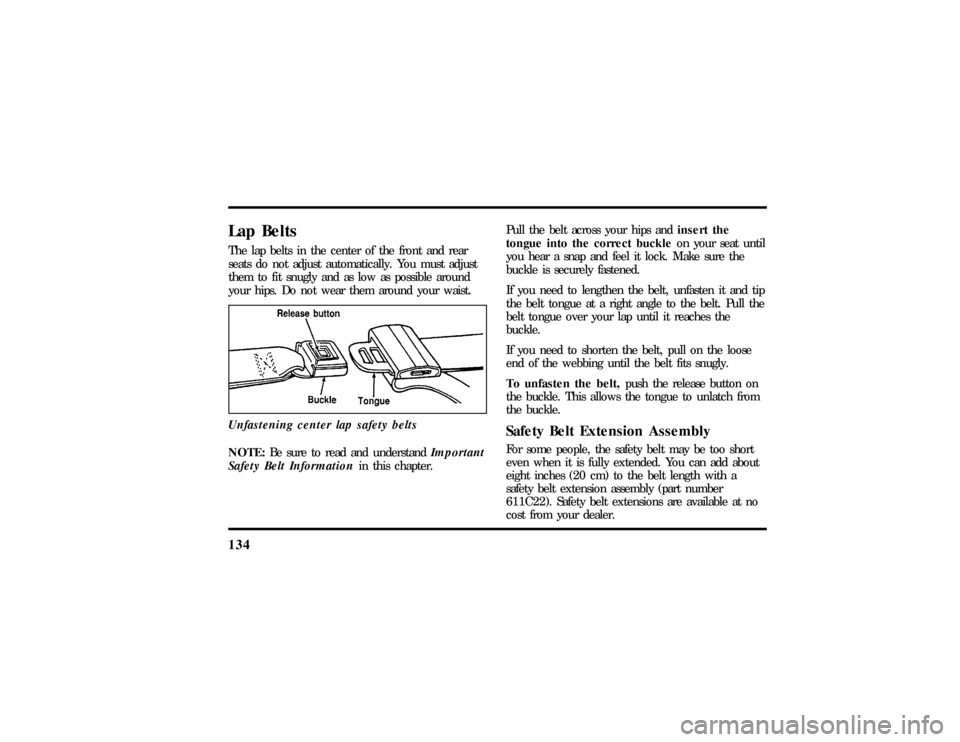
134Lap BeltsThe lap belts in the center of the front and rear
seats do not adjust automatically. You must adjust
them to fit snugly and as low as possible around
your hips. Do not wear them around your waist.
Unfastening center lap safety beltsNOTE:Be sure to read and understandImportant
Safety Belt Informationin this chapter.Pull the belt across your hips andinsert the
tongue into the correct buckleon your seat until
you hear a snap and feel it lock. Make sure the
buckle is securely fastened.
If you need to lengthen the belt, unfasten it and tip
the belt tongue at a right angle to the belt. Pull the
belt tongue over your lap until it reaches the
buckle.
If you need to shorten the belt, pull on the loose
end of the webbing until the belt fits snugly.
To unfasten the belt,push the release button on
the buckle. This allows the tongue to unlatch from
the buckle.
Safety Belt Extension AssemblyFor some people, the safety belt may be too short
even when it is fully extended. You can add about
eight inches (20 cm) to the belt length with a
safety belt extension assembly (part number
611C22). Safety belt extensions are available at no
cost from your dealer.
File:06fnsst.ex
Update:Fri Jun 21 08:57:53 1996
Page 150 of 305
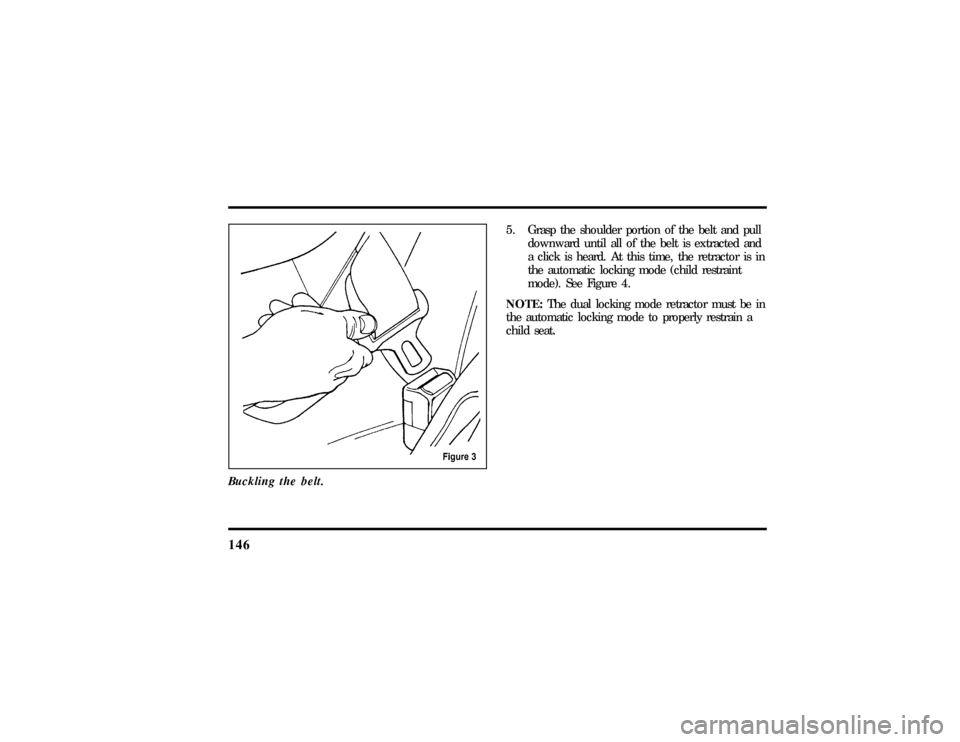
146Buckling the belt.
5. Grasp the shoulder portion of the belt and pull
downward until all of the belt is extracted and
a click is heard. At this time, the retractor is in
the automatic locking mode (child restraint
mode). See Figure 4.
NOTE:The dual locking mode retractor must be in
the automatic locking mode to properly restrain a
child seat.
File:06fnsst.ex
Update:Fri Jun 21 08:57:53 1996