turn LOTUS ELISE 2005 User Guide
[x] Cancel search | Manufacturer: LOTUS, Model Year: 2005, Model line: ELISE, Model: LOTUS ELISE 2005Pages: 205, PDF Size: 4.51 MB
Page 46 of 205
oh33e
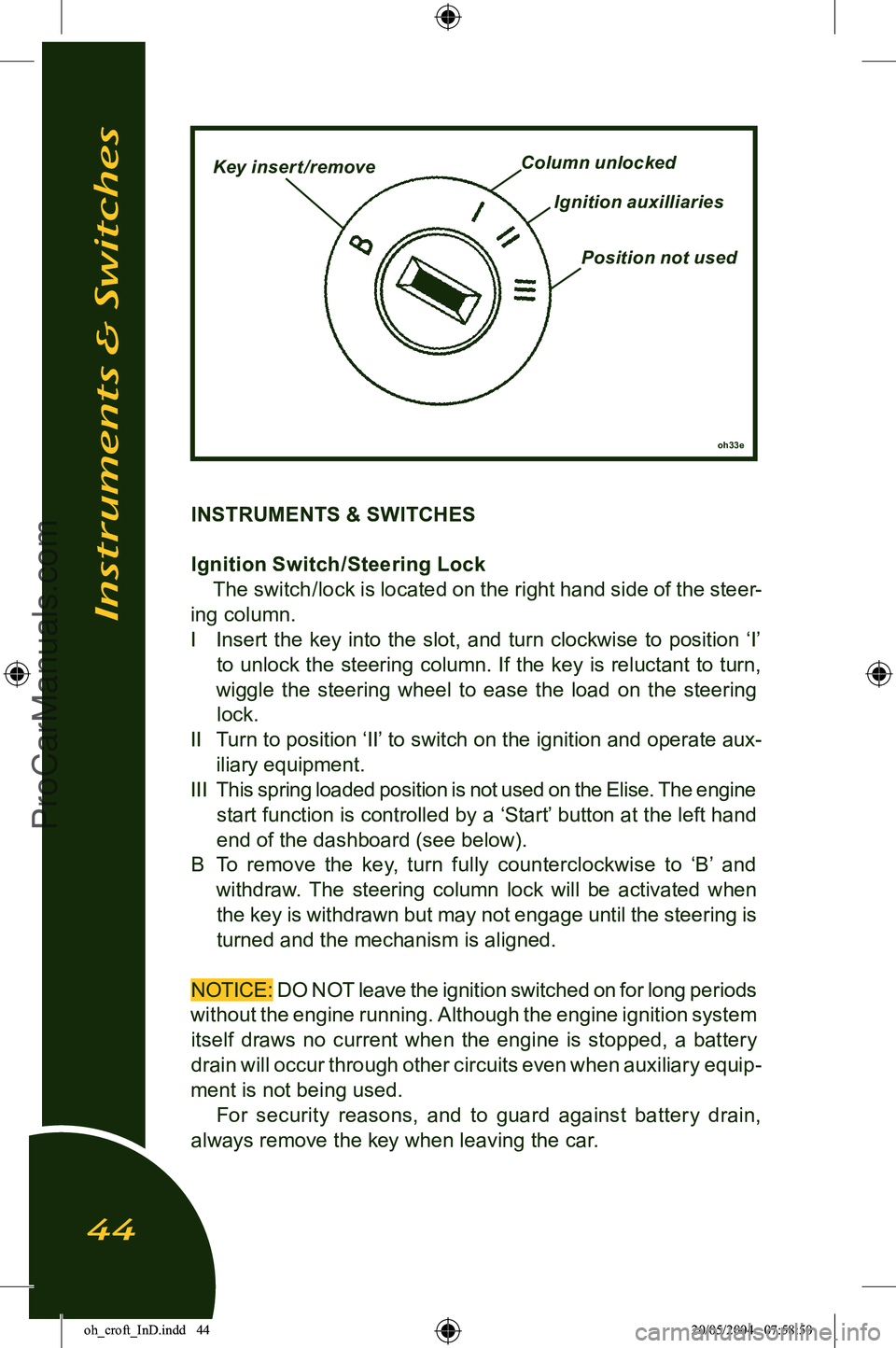
Key insert /removeColumn unlocked
Ignition auxilliaries
Position not used
INSTRUMENTS & SWITCHES
Ignition Switch /Steering LockThe switch/lock is located on the right hand side of the steer
-
ing column.
I Insert the key into the slot, and turn clockwise to position ‘I’ to unlock the steering column. If the key is reluctant to turn,
wiggle the steering wheel to ease the load on the steering
lock.
II Turn to position ‘II’ to switch on the ignition and operate aux-
iliary equipment.
III This spring loaded position is not used on the Elise. The engine
start function is controlled by a ‘Start’ button at the left hand
end of the dashboard (see below).
B To remove the key, turn fully counterclockwise to ‘B’ and withdraw. The steering column lock will be activated when the key is withdrawn but may not engage until the steering is
turned and the mechanism is aligned.
NOTICE: DO NOT leave the ignition switched on for long periods
without the engine running. Although the engine ignition system itself draws no current when the engine is stopped, a battery drain will occur through other circuits even when auxiliary equip
-
ment is not being used. For security reasons, and to guard against battery drain,
always remove the key when leaving the car.
Instruments & Switches
44
oh_croft_InD.indd 4420/05/2004 07:58:50ProCarManuals.com
Page 47 of 205
WARNING:
• Do not push or tow the car unless the key is first used to unlock the column and is then left in the lock. With
-
drawing the key will cause the steering to lock.
• Never remove the key from the ignition switch or turn off the ignition while the car is moving. Withdrawing the key
will cause the steering to lock and may cause an accident
resulting in serious injury or death.
• To reduce the risk of theft, or danger to a child remaining in the car, always remove the key when leaving a parked
car.
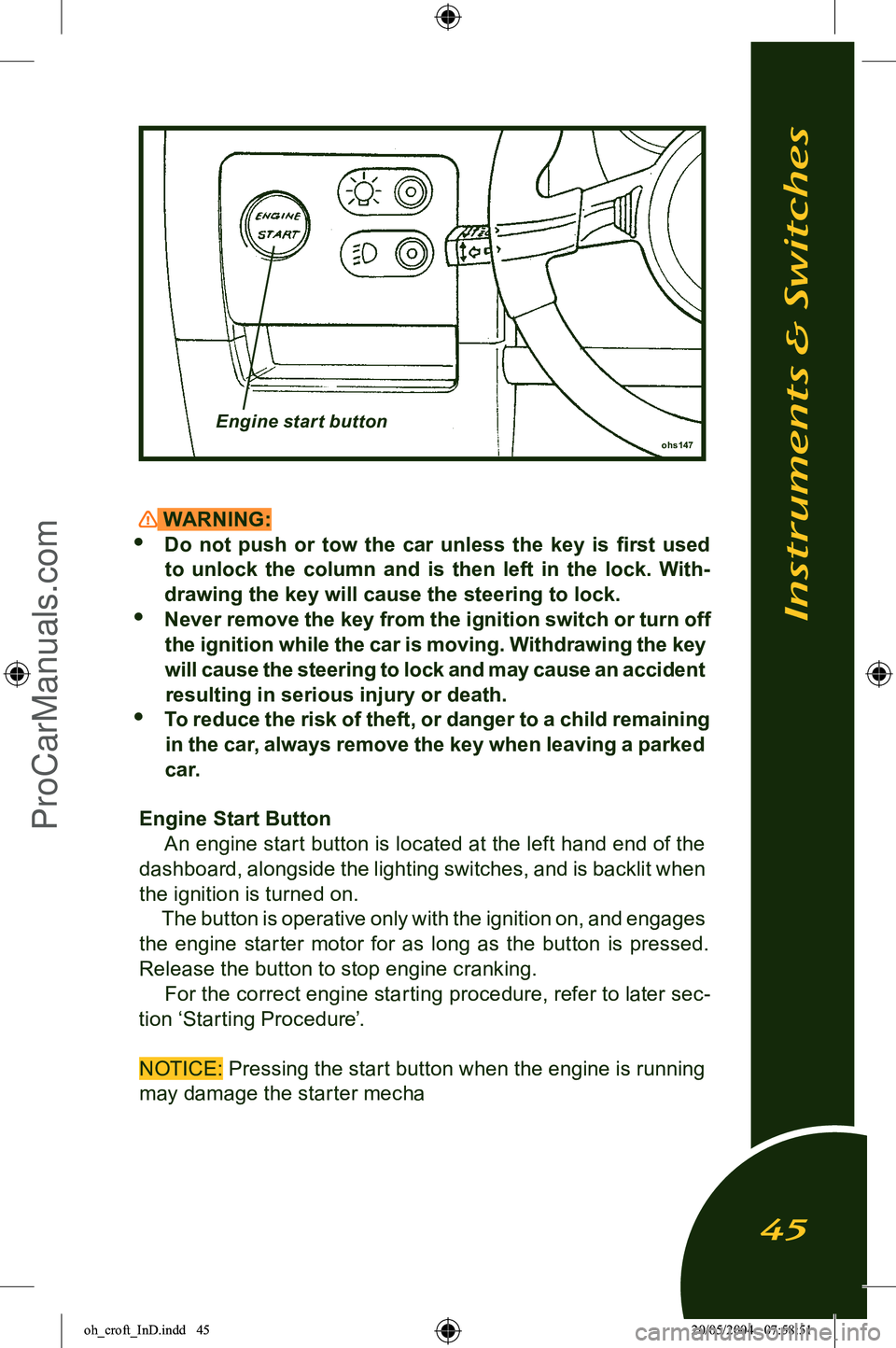
Engine Start Button An engine start button is located at the left hand end of the
dashboard, alongside the lighting switches, and is backlit when
the ignition is turned on. The button is operative only with the ignition on, and engages
the engine starter motor for as long as the button is pressed. Release the button to stop engine cranking.
For the correct engine starting procedure, refer to later sec
-
tion ‘Starting Procedure’.
NOTICE: Pressing the start button when the engine is running may damage the starter mecha
ohs147Engine start button
Instruments & Switches
45
oh_croft_InD.indd 4520/05/2004 07:58:51ProCarManuals.com
Page 48 of 205
Passive Ilisation: The start button will operate only when the
security tell tale in the tachometer face is out. If the tell tale is
flashing, the engine is immobilised; Press once,
and for a full second, the larger of the two buttons on the trans
-
mitter fob. The security tell tale will be extinguished. For further
information see ‘Car Security Alarm’.
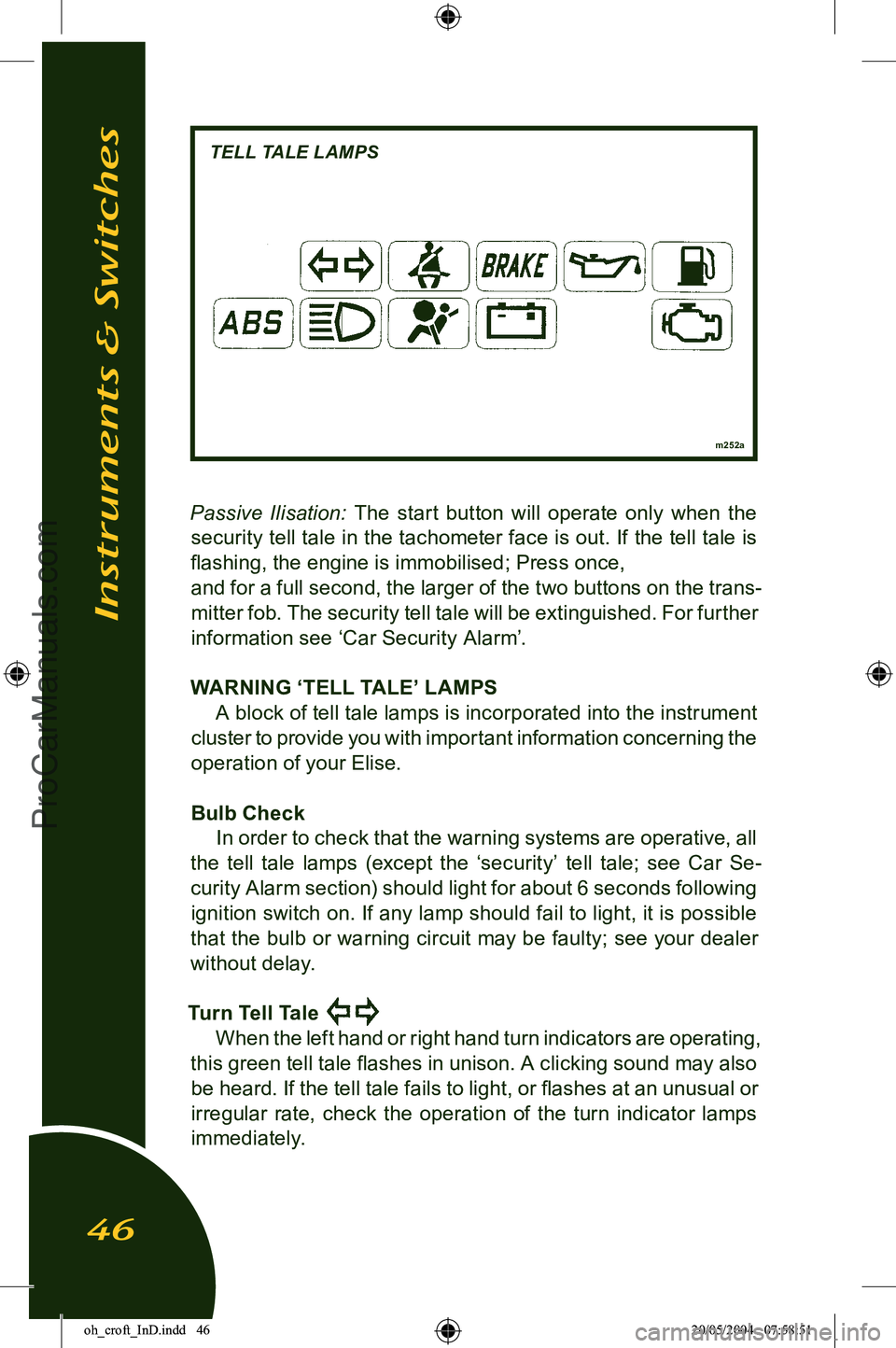
WARNING ‘TELL TALE’ LAMPS A block of tell tale lamps is incorporated into the instrument
cluster to provide you with important information concerning the
operation of your Elise.
Bulb Check In order to check that the warning systems are operative, all
the tell tale lamps (except the ‘security’ tell tale; see Car Se
-
curity Alarm section) should light for about 6 seconds following ignition switch on. If any lamp should fail to light, it is possible
that the bulb or warning circuit may be faulty; see your dealer
without delay.
Turn Tell Tale
When the left hand or right hand turn indicators are operating,
this green tell tale flashes in unison. A clicking sound may also be heard. If the tell tale fails to light, or flashes at an unusual or
irregular rate, check the operation of the turn indicator lamps
immediately.
m252a
Instruments & Switches
46
TELL TALE LAMPS
oh_croft_InD.indd 4620/05/2004 07:58:51ProCarManuals.com
Page 54 of 205
engine speed is being approached. When exploiting full accel-
eration, gearchange upshifts should be made immediately the
tell tale comes on.
Note that this lamp also functions as a security system tell
tale (see ‘Car Security’). Recalibration of the speedo and tacho needle zero positions
will occur during a 3 second period following ignition switch on,
but if a needle becomes ‘stranded‘ outside of the re-calibration
range, the following procedure should be followed:
With the car stationary;
• Open driver‘s door;
• Press and hold trip reset button on steering column shroud;
• Turn on ignition.
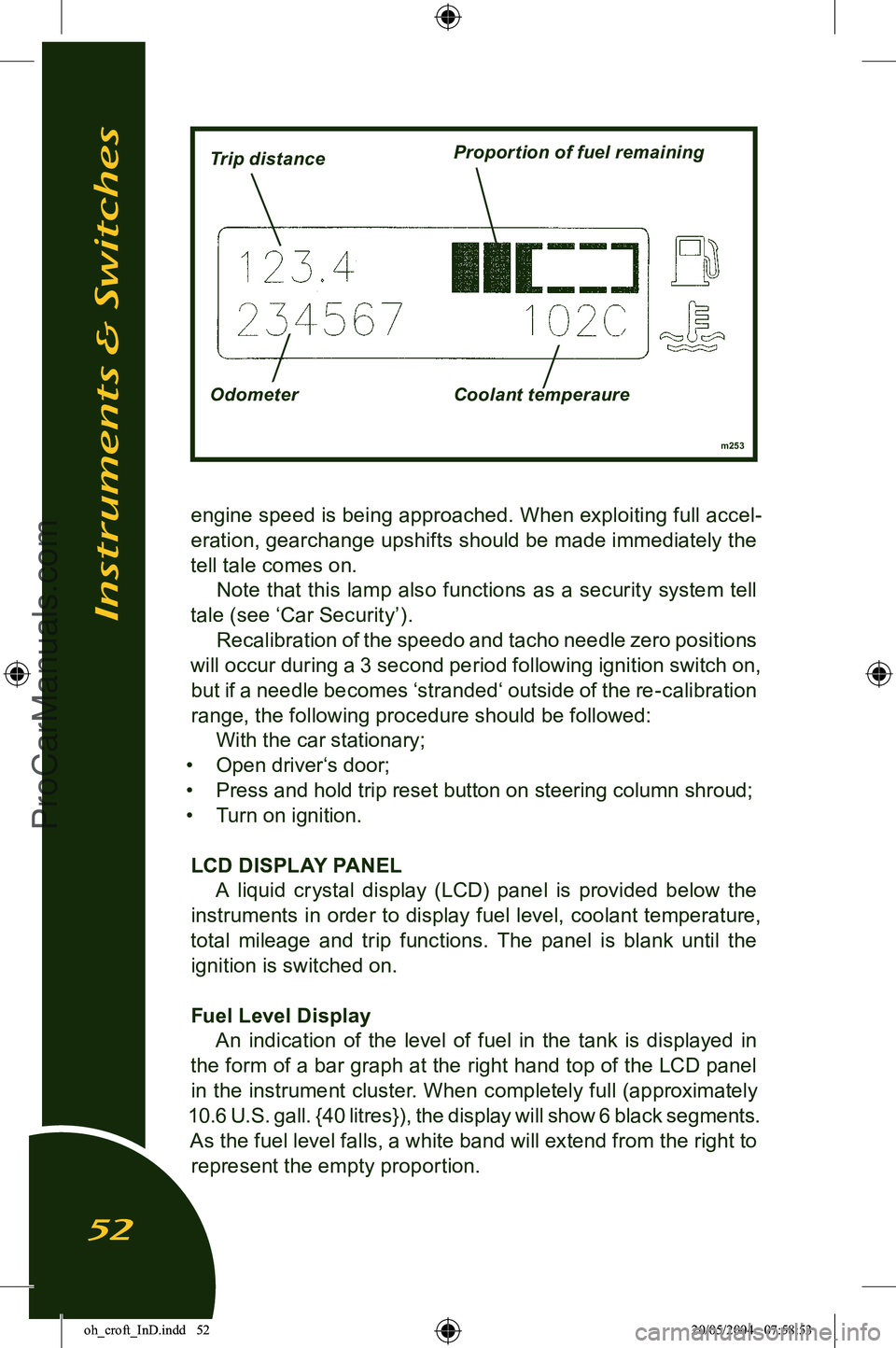
LCD DISPLAY PANEL A liquid crystal display (LCD) panel is provided below the
instruments in order to display fuel level, coolant temperature,
total mileage and trip functions. The panel is blank until the ignition is switched on.
Fuel Level Display An indication of the level of fuel in the tank is displayed in
the form of a bar graph at the right hand top of the LCD panel in the instrument cluster. When completely full (approximately
10.6 U.S. gall. {40 litres}), the display will show 6 black segments. As the fuel level falls, a white band will extend from the right to represent the empty proportion.
Instruments & Switches
52
m253
Trip distanceProportion of fuel remaining
Odometer Coolant temperaure
oh_croft_InD.indd 5220/05/2004 07:58:53ProCarManuals.com
Page 57 of 205
‘Lights On’ Buzzer If the lights are on when the ignition is switched off, a ‘lights on’
reminder buzzer will sound when the driver’s door is opened.
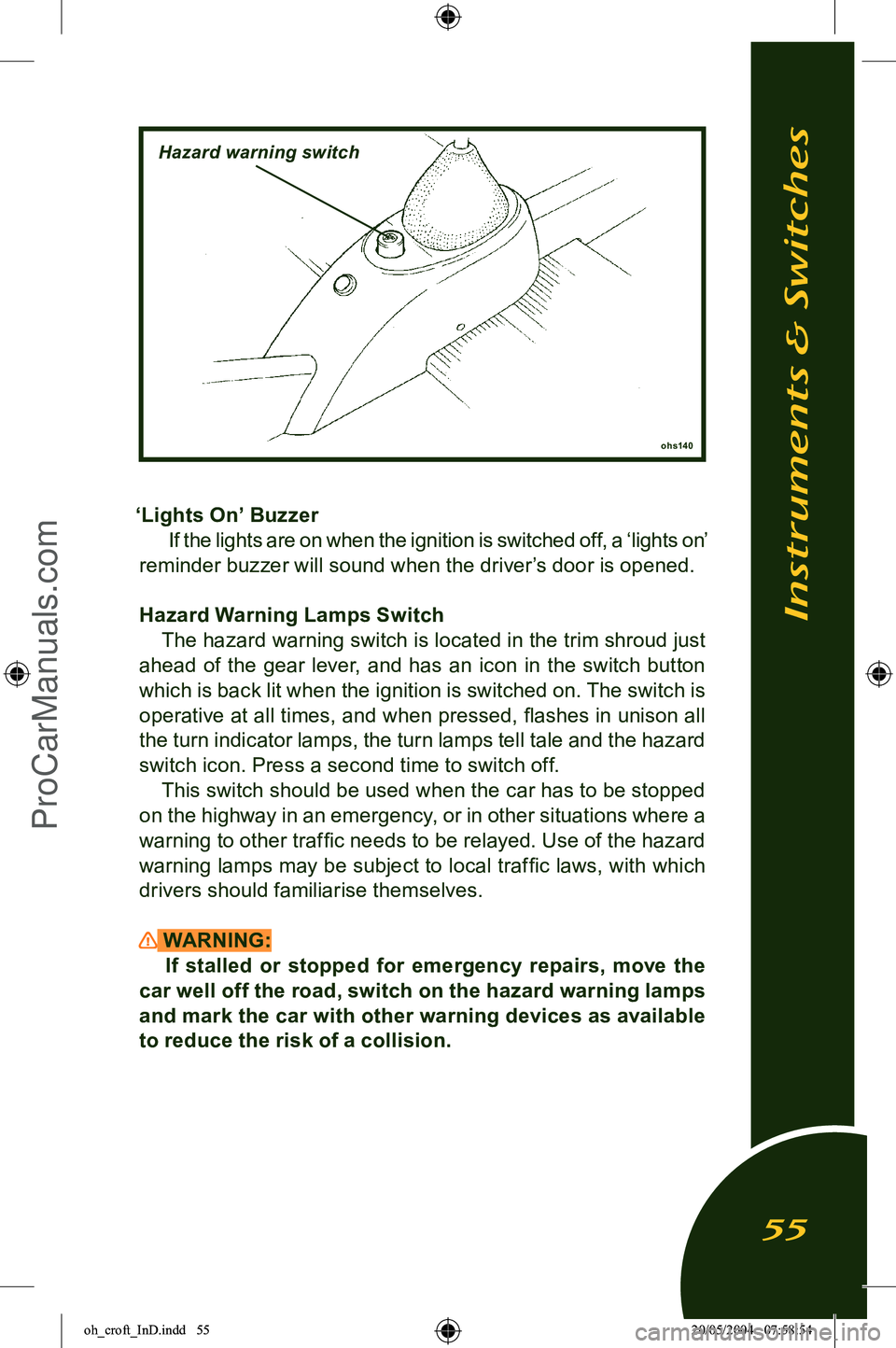
Hazard Warning Lamps Switch The hazard warning switch is located in the trim shroud just
ahead of the gear lever, and has an icon in the switch button
which is back lit when the ignition is switched on. The switch is operative at all times, and when pressed, flashes in unison all
the turn indicator lamps, the turn lamps tell tale and the hazard switch icon. Press a second time to switch off. This switch should be used when the car has to be stopped
on the highway in an emergency, or in other situations where a
warning to other traffic needs to be relayed. Use of the hazard
warning lamps may be subject to local traffic laws, with which drivers should familiarise themselves.
WARNING: If stalled or stopped for emergency repairs, move the
car well off the road, switch on the hazard warning lamps
and mark the car with other warning devices as available
to reduce the risk of a collision.
Instruments & Switches
55
ohs140
Hazard warning switch
oh_croft_InD.indd 5520/05/2004 07:58:54ProCarManuals.com
Page 60 of 205
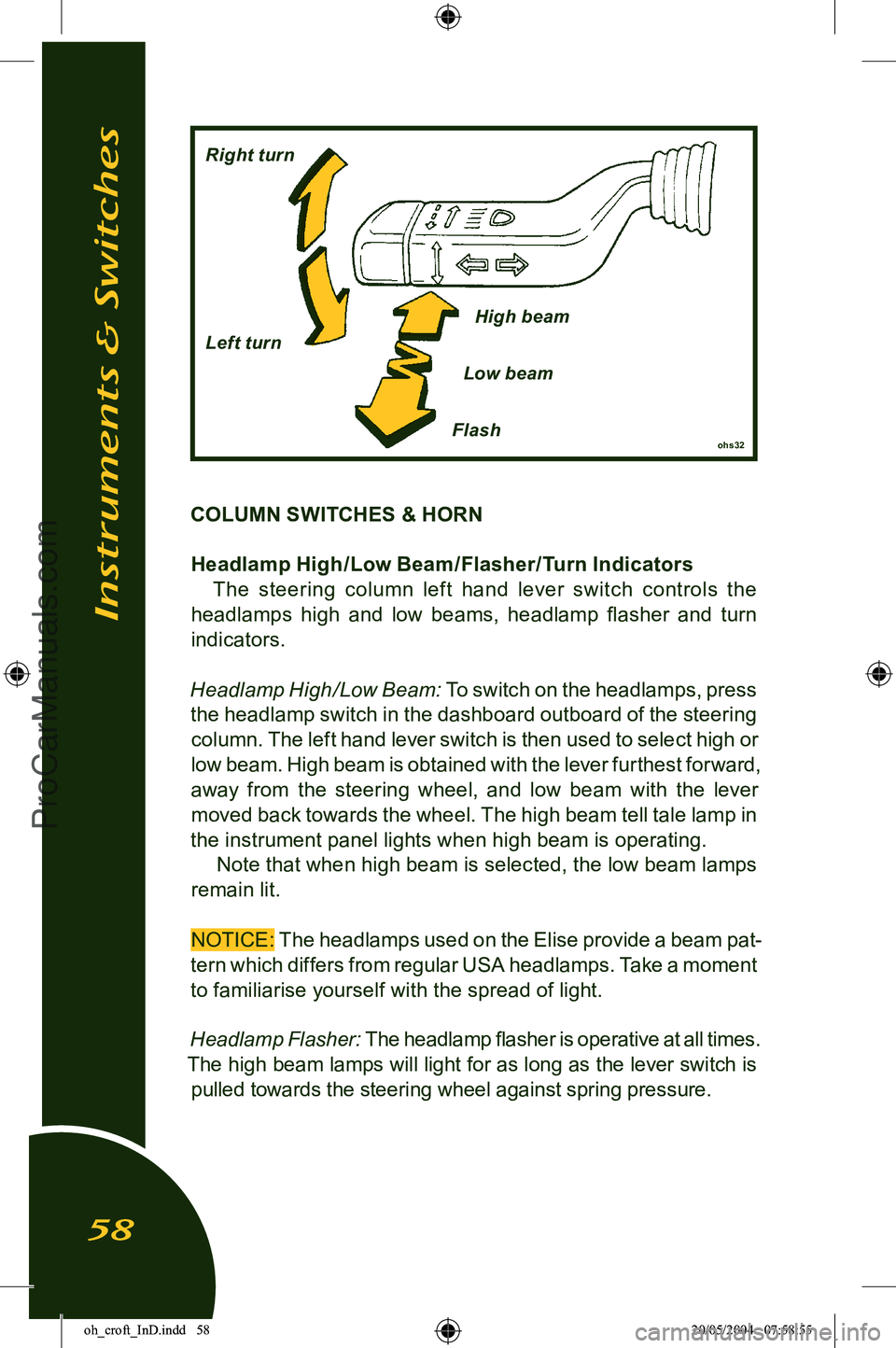
COLUMN SWITCHES & HORNHeadlamp High /Low Beam /Flasher/Turn Indicators The steering column lef t hand lever switch controls the
headlamps high and low beams, headlamp flasher and turn
indicators.
Headlamp High/Low Beam:
To switch on the headlamps, press
the headlamp switch in the dashboard outboard of the steering column. The left hand lever switch is then used to select high or
low beam. High beam is obtained with the lever furthest forward,
away from the steering wheel, and low beam with the lever moved back towards the wheel. The high beam tell tale lamp in
the instrument panel lights when high beam is operating.
Note that when high beam is selected, the low beam lamps
remain lit.
NOTICE:
The headlamps used on the Elise provide a beam pat-
tern which differs from regular USA headlamps. Take a moment
to familiarise yourself with the spread of light.
Headlamp Flasher:
The headlamp flasher is operative at all times.
The high beam lamps will light for as long as the lever switch is pulled towards the steering wheel against spring pressure.
Instruments & Switches
58
ohs32Flash
Right turn
Left turn
High beam
Low beam
oh_croft_InD.indd 5820/05/2004 07:58:55ProCarManuals.com
Page 61 of 205
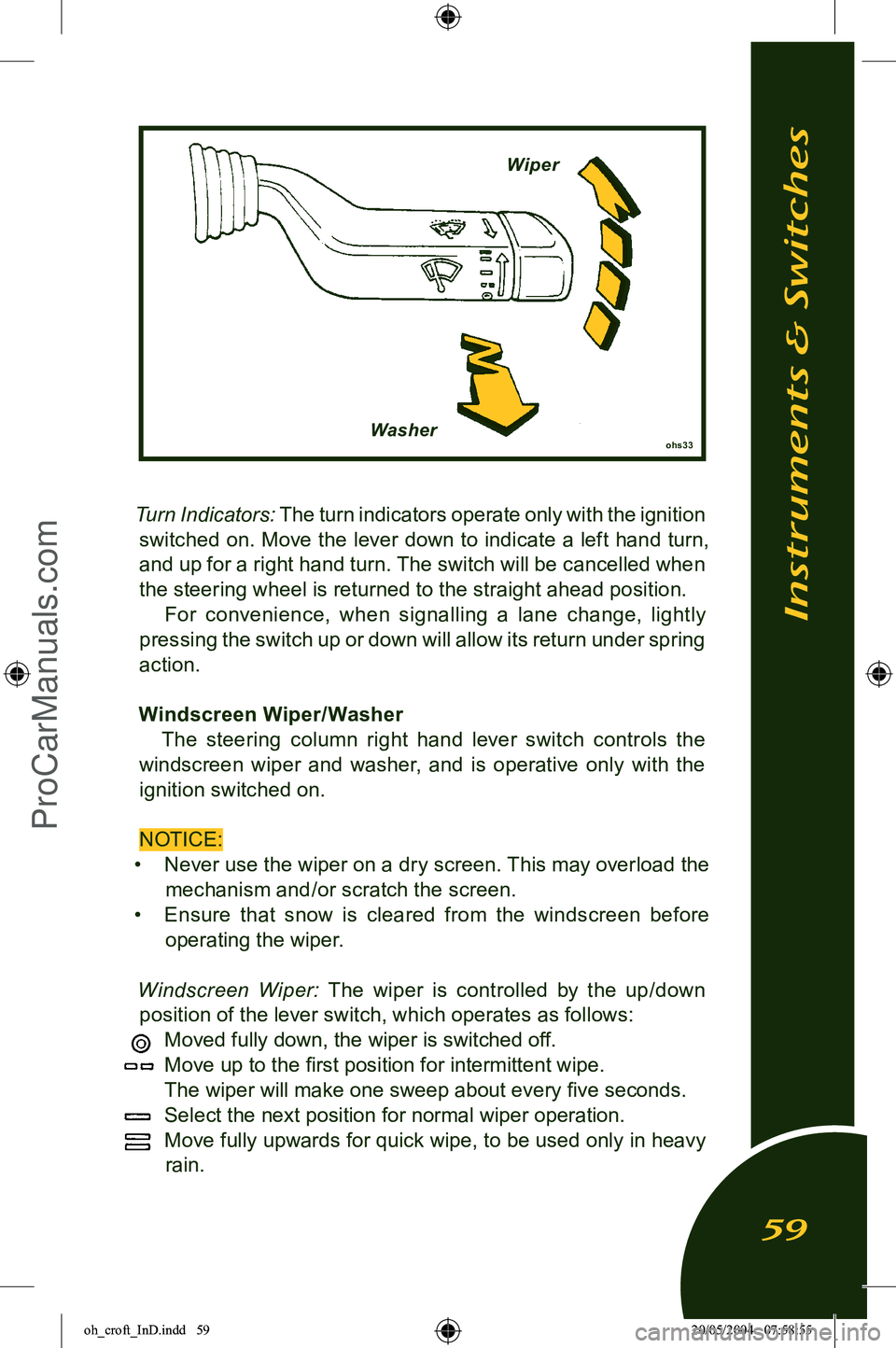
Turn Indicators: The turn indicators operate only with the ignition
switched on. Move the lever down to indicate a left hand turn, and up for a right hand turn. The switch will be cancelled when
the steering wheel is returned to the straight ahead position. For convenience, when signalling a lane change, lightly
pressing the switch up or down will allow its return under spring
action.
Windscreen Wiper/ Washer The steering column right hand lever switch controls the
windscreen wiper and washer, and is operative only with the ignition switched on.
NOTICE:
• Never use the wiper on a dry screen. This may overload the
mechanism and/or scratch the screen.
• Ensure th at snow is cleared from the windscreen before
operating the wiper.
Windscreen Wiper:
The wiper is controlled by the up/down
position of the lever switch, which operates as follows:
Moved fully down, the wiper is switched off.
Move up to the first position for intermittent wipe.
The wiper will make one sweep about every five seconds.
Select the next position for normal wiper operation.
Move fully upwards for quick wipe, to be used only in heavy
rain.
Instruments & Switches
59
ohs33Washer Wiper
oh_croft_InD.indd 5920/05/2004 07:58:55ProCarManuals.com
Page 63 of 205
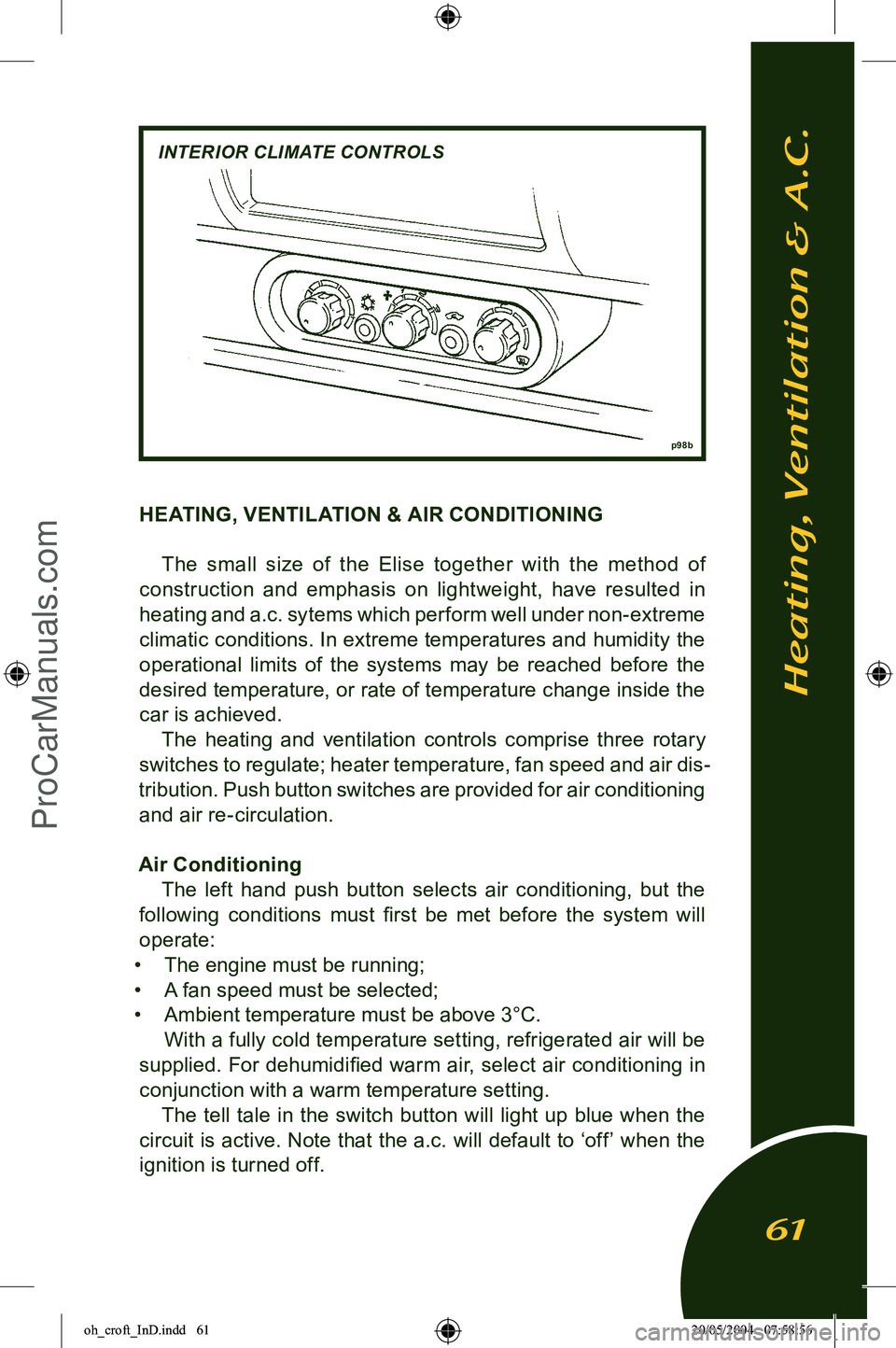
HEATING, VENTILATION & AIR CONDITIONINGThe small size of the Elise together with the method of
construction and emphasis on lightweight, have resulted in heating and a.c. sytems which perform well under non-extreme
climatic conditions. In extreme temperatures and humidity the operational limits of the systems may be reached before the
desired temperature, or rate of temperature change inside the
car is achieved. The heating and ventilation controls comprise three rotary
switches to regulate; heater temperature, fan speed and air dis
-
tribution. Push button switches are provided for air conditioning and air re-circulation.
Air Conditioning The left hand push button selects air conditioning, but the
following conditions must first be met before the system will
operate:
• The engine must be running;
• A fan speed must be selected;
• Ambient temperature must be above 3°C.
With a fully cold temperature setting, refrigerated air will be
supplied. For dehumidified warm air, select air conditioning in
conjunction with a warm temperature setting. The tell tale in the switch button will light up blue when the
circuit is active. Note that the a.c. will default to ‘off’ when the ignition is turned off.
Heating, Ventilation & A.C.
61
p 98b
INTERIOR CLIMATE CONTROLS
oh_croft_InD.indd 6120/05/2004 07:58:56ProCarManuals.com
Page 64 of 205
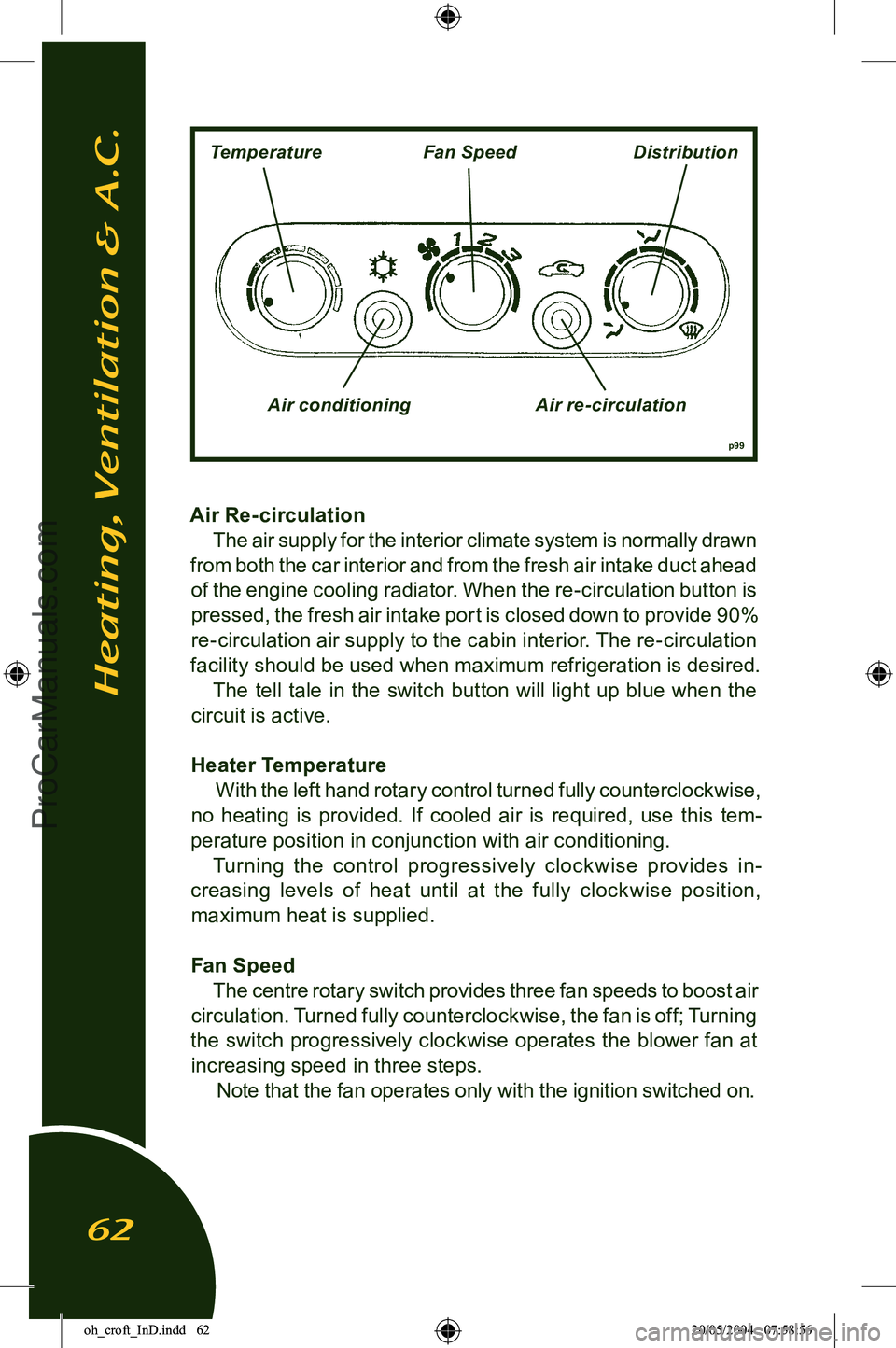
Air Re- circulation The air supply for the interior climate system is normally drawn
from both the car interior and from the fresh air intake duct ahead
of the engine cooling radiator. When the re-circulation button is pressed, the fresh air intake port is closed down to provide 90%
re-circulation air supply to the cabin interior. The re-circulation
facility should be used when maximum refrigeration is desired.
The tell tale in the switch button will light up blue when the
circuit is active.
Heater Temperature With the left hand rotary control turned fully counterclockwise,
no heating is provided. If cooled air is required, use this tem
-
perature position in conjunction with air conditioning. Turning the control progressively clock wise provides in
-
creasing levels of heat until at the fully clockwise position, maximum heat is supplied.
Fan Speed The centre rotary switch provides three fan speeds to boost air
circulation. Turned fully counterclockwise, the fan is off; Turning
the switch progressively clockwise operates the blower fan at increasing speed in three steps. Note that the fan operates only with the ignition switched on.
Heating, Ventilation & A.C.
62
p99
TemperatureFan SpeedDistribution
Air conditioning Air re-circulation
oh_croft_InD.indd 6220/05/2004 07:58:56ProCarManuals.com
Page 65 of 205
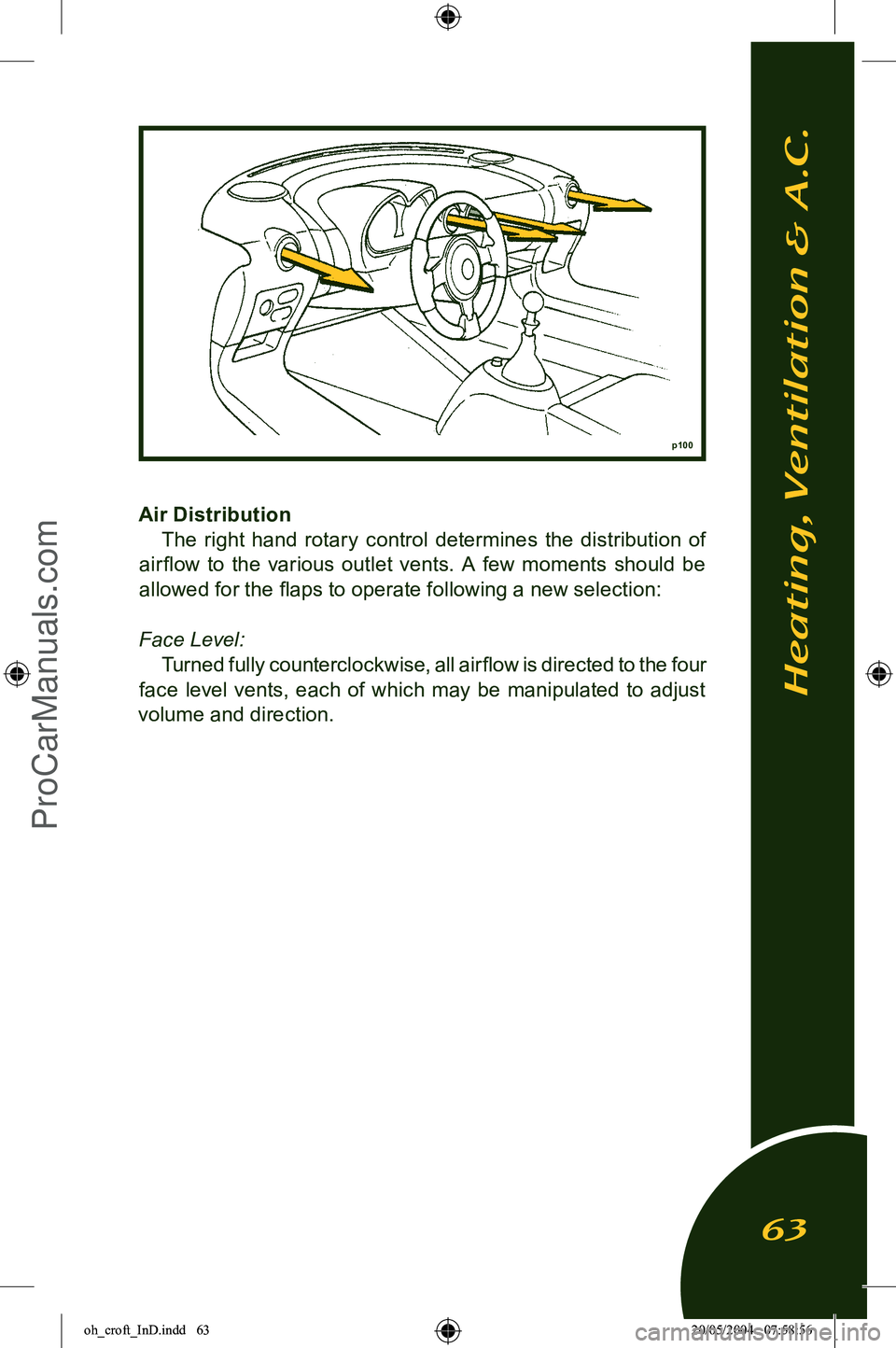
Air DistributionThe right hand rotary control determines the distribution of
air flow to the various outlet vents. A few moments should be
allowed for the flaps to operate following a new selection:
Face Level: Turned fully counterclockwise, all airflow is directed to the four
face level vents, each of which may be manipulated to adjust
volume and direction.
p100
Heating, Ventilation & A.C.
63
oh_croft_InD.indd 6320/05/2004 07:58:56ProCarManuals.com