key MASERATI GHIBLI 2019 Manual PDF
[x] Cancel search | Manufacturer: MASERATI, Model Year: 2019, Model line: GHIBLI, Model: MASERATI GHIBLI 2019Pages: 384, PDF Size: 13.33 MB
Page 203 of 384
soft-key for cooler temperature.
Touch the red
soft-key for warmer
temperature. The driver's temperature
setting will be displayed on the MTC+
between the soft-key
and . The
MTC+ display can also be used to
adjust the temperature by touching
and sliding the bar towards soft-key
, to increase temperature, or
towards soft-keys
to decrease it.
During this phase, a small pop-up on
the side will show the corresponding
temperature. You can increase or
decrease the temperature using the
rocker switch on the climate control
panel.
NOTE:
In “SYNC” mode, this control will also
automatically and simultaneously
adjust the passenger temperature.
4. Passenger temperature control
Provides the passenger with
independent temperature control.
Touch the
soft-key for cooler
temperature. Touch the
soft-key for
warmer temperature. The passenger's
temperature setting will be displayed
on the MTC+ screen between the
soft-keys
and . You can increase
or decrease the temperature using the rocker switch on the climate control
panel.
NOTE:
Pressing the 4 button/soft-key while in
“SYNC” mode will automatically exit
“SYNC”.
5. Recirculation
Press to change the current setting,
the LED indicator on the button and
the relevant soft-key illuminates to
indicate which recirculation function is
activated. For further details, see
paragraph “Dual zone Climate Control
Functions” in this chapter.
6. Blower control
Blower control is used to adjust the
amount of air forced through the
climate system. Eight levels of blower
speed can be selected. Adjusting the
blower will cause automatic mode to
switch to manual.
On the climate control panel, push the
rocker switch up to increase blower
speed. Push the rocker switch down to
decrease blower speed. Pushing down
the rocker switch when set blower is
at the first speed, causes the A/C
system shutdown (OFF condition).
On the MTC+ display, touch the small
icon of the blower to decrease the
speed, or the big icon to increase it. Between the two icons, bars will
appear to show the number of the
corresponding selected speed.
The blower can also be activated/
regulated by touching the bars
between the two blower icons.
When the MTC+ is displayed in any
mode other than “Climate”, the
blower speed is indicated by the
bright segments in the climate icon.
7 - 8. AUTO
This function automatically controls
the interior temperature by adjusting
the air flow rate and the air
distribution respectively on the driver
and on the passenger zone. Press
“AUTO” to switch the ATC between
manual and automatic mode. The LED
on the button and the “AUTO”
soft-key illuminates when the “AUTO”
function is activated. See “Automatic
Temperature Control (ATC)” in this
chapter for more information.
9. MAX defrosting/demisting
Press the
button or the MTC+
soft-key to switch the airflow setting
to the windshield and the front side
windows to get quick defrosting/
defogging. The LED on the button and
the MTC+ soft-key illuminates when
this feature is activated. Operating
this function will cause the ATC toDashboard Instruments and Controls
4
199
Page 204 of 384
switch into manual mode: so the
“AUTO” LED on the button and the
MTC+ soft-key will turn off. With
engine off, the blower will run at
minimum speed (1) and can be
increased manually: with engine on,
the blower speed will gradually
increase to the higher speed (8). MAX
defrosting/demisting shall also involve
REAR defrosting/demisting function. If
this function is turned off the climate
system will return to the previous
setting, switching on the A/C (“A/C”
LED on the button and the MTC+
soft-key illuminated).
10. REAR defrosting/demisting
Press the
button or the MTC+
soft-key to turn on the rear window
defroster and the heated outside
mirrors. The LED on the button and
the MTC+ soft-key will illuminate
when the rear window defroster and
the heated external mirrors are on.
The rear window defroster and the
heated external mirrors automatically
turn off after 10 minutes.
CAUTION!
Failure to observe the following
cautions may cause damage to the rear windows defroster:
• Use care when washing the inside of
the rear window. Do not use abrasive
window cleaners on the interior
surface of the window. Use a soft
cloth and a mild washing solution,
wiping parallel to the heating
elements. Labels can be peeled off
after soaking with warm water.
• Do not use scrapers, sharp
instruments, or abrasive window
cleaners on the interior surface of
the window.
• Keep all objects inside the vehicle at
a safe distance from the window.
11. MAX A/C
By
pressing the
“MAX A/C” button or
the MTC+ soft-key, the system
automatically switches to get the
maximum cold air flow in both zones.
12 - 13. Air flow distribution modes
The airflow distribution mode,
respectively on the driver and on the
passenger zone, can be adjusted so air
comes from the dashboard vents, vents
under the dashboard in direction of
the floor, vents under the front seats
and demist/defrost vents.
The MTC+ display contains the
relevant soft-keys used to set these
modes for each zone. The climate control panel features a single button
for each zone: press it several times to
select and set the required airflow
distribution mode.
Available settings are as follows:
• “Floor” mode
Air for each zone comes from the
front vents, located under the
dashboard and under the front
seats. A small portion of the airflow
is directed through the
defrost/demist vents to prevent
windows fogging.
• “Dashboard” mode
Air flows for each zone from four
adjustable vents of the dashboard,
two vents on the upper part of the
dashboard and two positioned at
the rear end of the central console.
Each of these vents can be singly
adjusted. The air grids or vanes of
the vents can be moved to adjust air
flow direction. A setting wheel,
placed near each vent, allows to
regulate or close the airflow.
• “Bi-Level” mode
Air for each zone comes from the
dashboard and central console
adjustable vents and the fixed floor
vents. A small portion of the airflow
is directed through theDashboard Instruments and Controls
4
200
Page 205 of 384

defrost/demist vents to prevent
windows fogging.
NOTE:
Bi-Level mode is designed to let cooler
air come in the dashboard and rear
part of the central console vents and
warmer air from the floor vents.
• “Defrost” mode
Air for each zone comes from the
dashboard defrost/demist vents to
prevent windows fogging.
• “Mix” mode
Air for each zone comes from the
defrost/demist vent, the vent under
the dashboard and from floor vent.
This mode is recommended for cold
climates, to improve comfort and
prevent windows fogging.
• “Hi-Level” mode
Air for each zone comes from the
dashboard defrost/demist vents,
from the dashboard and central
console adjustable vents and the
fixed floor vents.
• “Tri-Level” mode
Air for each zone comes from all the
adjustable/fixed and defrost/demist
vents. 14. “SYNC” mode
Touch the “SYNC” soft-key on the
MTC+ to switch the Sync feature
on/off. The “SYNC” soft-key
illuminates when this feature is
selected. This function is used to
synchronise the passenger
temperature setting with the driver
temperature setting.
Changing the passenger temperature
setting while in “SYNC” will
automatically exit this feature.
Dual Zone Climate Control
Functions Air Conditioning (A/C)
The “A/C” soft-key allows to manually
activate or deactivate the air
conditioning system. When the air
conditioning system is turned on, cool
dehumidified air will flow through the
vents into the cabin. For improved fuel
economy, touch the “A/C” soft-key to
turn off the air conditioning and
manually adjust the blower and
airflow mode settings.
When the “A/C” and “AUTO”
functions are switched off it is not
possible to have air at a lower
temperature than the outside. Recirculation
and Air Quality
Sensor
When outside air contains smoke,
odours, or high humidity, or if rapid
cooling is desired, you may wish to
recirculate interior air by pressing the
recirculation control button or the
relevant soft-key to activate the two
different functionalities.
The recirculation function, that allows
to open/close the A/C air inlet by
operating the
button on the
climate control panel or the MTC+ soft
key, is integrated with the Air Quality
Sensor.
This sensor, positioned upstream of
the A/C filter, in front of the air intake
of the A/C system, detects the
presence of polluting substances and
submits an electric signal to the A/C
control unit, that closes the intake of
the external air by activating the air
recirculation.
The
button or the MTC+ soft-key
can therefore enable three operating
modes, switchable in sequence.
Starting from the outside air condition
with LED on the button off and MTC+
soft-key not highlighted, in which the
external air is aspirated by the A/C
system and treated to be introduced
into the passenger compartment,
subsequent actuations of theDashboard Instruments and Controls
4
201
Page 206 of 384
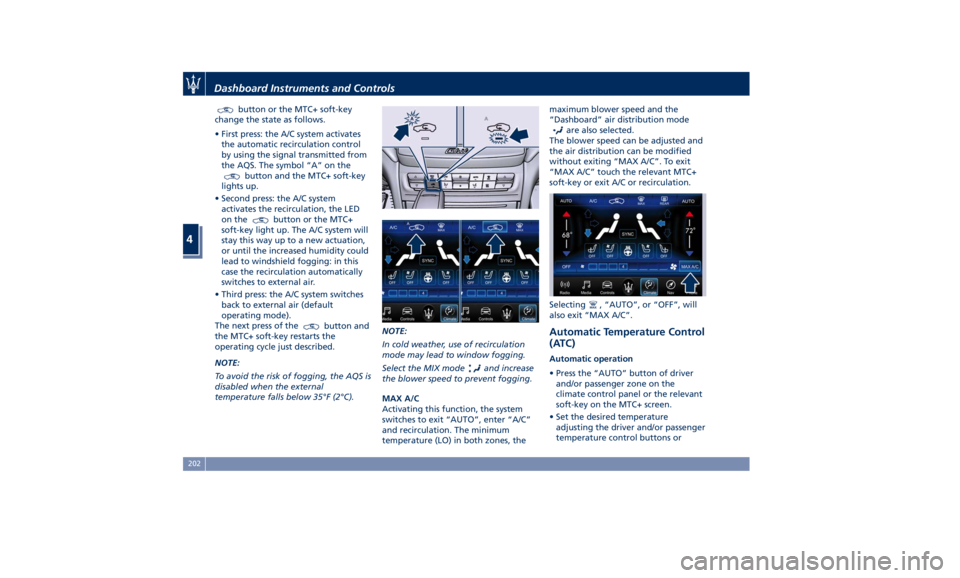
button or the MTC+ soft-key
change the state as follows.
• First press: the A/C system activates
the automatic recirculation control
by using the signal transmitted from
the AQS. The symbol “A” on the
button and the MTC+ soft-key
lights up.
• Second press: the A/C system
activates the recirculation, the LED
on the
button or the MTC+
soft-key light up. The A/C system will
stay this way up to a new actuation,
or until the increased humidity could
lead to windshield fogging: in this
case the recirculation automatically
switches to external air.
• Third press: the A/C system switches
back to external air (default
operating mode).
The next press of the
button and
the MTC+ soft-key restarts the
operating cycle just described.
NOTE:
To avoid the risk of fogging, the AQS is
disabled when the external
temperature falls below 35°F (2°C). NOTE:
In cold weather, use of recirculation
mode may lead to window fogging.
Select the MIX mode and increase
the blower speed to prevent fogging.
MAX A/C
Activating this function, the system
switches to exit “AUTO”, enter “A/C”
and recirculation. The minimum
temperature (LO) in both zones, the maximum blower speed and the
“Dashboard” air distribution mode
are also selected.
The blower speed can be adjusted and
the air distribution can be modified
without exiting “MAX A/C”. To exit
“MAX A/C” touch the relevant MTC+
soft-key or exit A/C or recirculation.
Selecting
, “AUTO”, or “OFF”, will
also exit “MAX A/C”.
Automatic Temperature Control
(ATC) Automatic operation
• Press the “AUTO” button of driver
and/or passenger zone on the
climate control panel or the relevant
soft-key on the MTC+ screen.
• Set the desired temperature
adjusting the driver and/or passenger
temperature control buttons orDashboard Instruments and Controls
4
202
Page 207 of 384
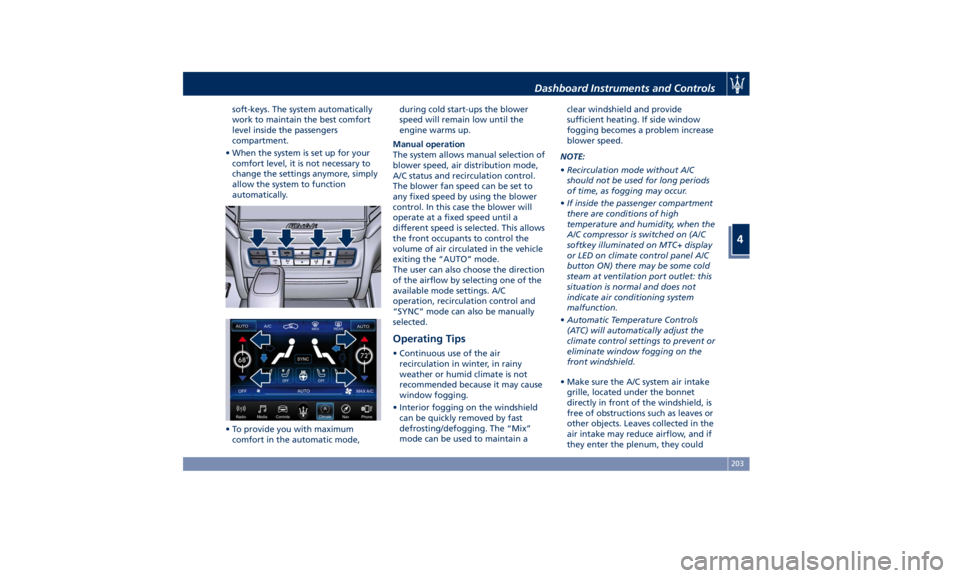
soft-keys. The system automatically
work to maintain the best comfort
level inside the passengers
compartment.
• When the system is set up for your
comfort level, it is not necessary to
change the settings anymore, simply
allow the system to function
automatically.
• To provide you with maximum
comfort in the automatic mode, during cold start-ups the blower
speed will remain low until the
engine warms up.
Manual operation
The system allows manual selection of
blower speed, air distribution mode,
A/C status and recirculation control.
The blower fan speed can be set to
any fixed speed by using the blower
control. In this case the blower will
operate at a fixed speed until a
different speed is selected. This allows
the front occupants to control the
volume of air circulated in the vehicle
exiting the “AUTO” mode.
The user can also choose the direction
of the airflow by selecting one of the
available mode settings. A/C
operation, recirculation control and
“SYNC” mode can also be manually
selected.
Operating Tips • Continuous use of the air
recirculation in winter, in rainy
weather or humid climate is not
recommended because it may cause
window fogging.
• Interior fogging on the windshield
can be quickly removed by fast
defrosting/defogging. The “Mix”
mode can be used to maintain a clear windshield and provide
sufficient heating. If side window
fogging becomes a problem increase
blower speed.
NOTE:
• Recirculation mode without A/C
should not be used for long periods
of time, as fogging may occur.
• If inside the passenger compartment
there are conditions of high
temperature and humidity, when the
A/C compressor is switched on (A/C
softkey illuminated on MTC+ display
or LED on climate control panel A/C
button ON) there may be some cold
steam at ventilation port outlet: this
situation is normal and does not
indicate air conditioning system
malfunction.
• Automatic Temperature Controls
(ATC) will automatically adjust the
climate control settings to prevent or
eliminate window fogging on the
front windshield.
• Make sure the A/C system air intake
grille, located under the bonnet
directly in front of the windshield, is
free of obstructions such as leaves or
other objects. Leaves collected in the
air intake may reduce airflow, and if
they enter the plenum, they couldDashboard Instruments and Controls
4
203
Page 212 of 384
Normal Starting of the
Engine WARNING!
It is dangerous to run the engine in an
enclosed area. The engine consumes
oxygen and discharges carbon
dioxide, carbon monoxide and other
toxic gases in the atmosphere.
WARNING!
California Proposition 65
Operating, servicing and maintaining
a passenger vehicle or off-road vehicle
can expose you to chemicals including
such as, engine exhaust, carbon
monoxide, phthalates and lead, that
which are known to the State of
California to cause cancer and birth
defects or other reproductive harm. To
minimize exposure, avoid breathing
exhaust, do not idle the engine except
as necessary, service your vehicle in a
well-ventilated area and wear gloves
or wash your hands frequently when
servicing your vehicle. For more
information go to: www.P65Warnings.ca.gov/passenger-
vehicle
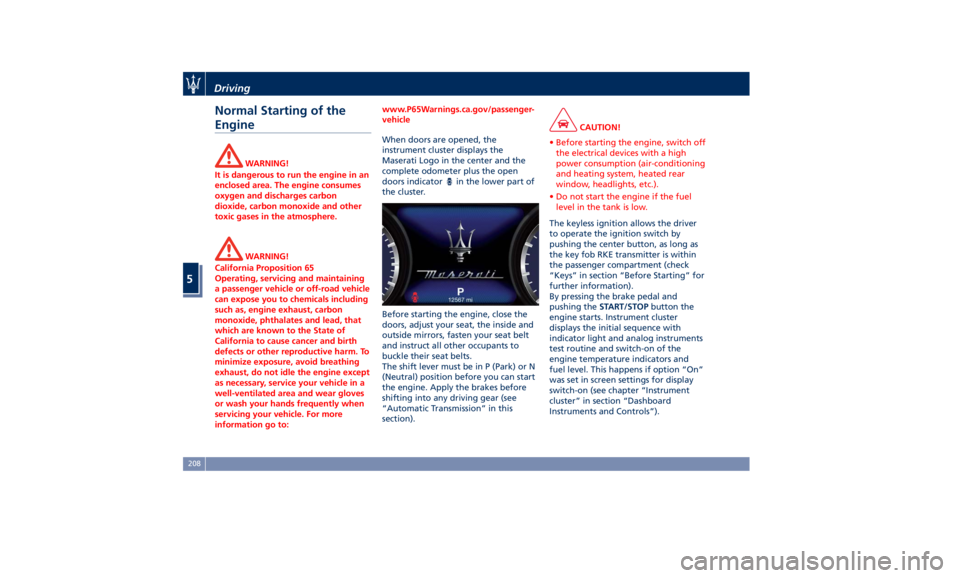
When doors are opened, the
instrument
cluster displays
the
Maserati Logo in the center and the
complete odometer plus the open
doors indicator
in the lower part of
the cluster.
Before starting the engine, close the
doors, adjust your seat, the inside and
outside mirrors, fasten your seat belt
and instruct all other occupants to
buckle their seat belts.
The shift lever must be in P (Park) or N
(Neutral) position before you can start
the engine. Apply the brakes before
shifting into any driving gear (see
“Automatic Transmission” in this
section). CAUTION!
• Before starting the engine, switch off
the electrical devices with a high
power consumption (air-conditioning
and heating system, heated rear
window, headlights, etc.).
• Do not start the engine if the fuel
level in the tank is low.
The keyless ignition allows the driver
to
operate the
ignition switch by
pushing the center button, as long as
the key fob RKE transmitter is within
the passenger compartment (check
“Keys” in section “Before Starting” for
further information).
By pressing the brake pedal and
pushing the START/STOP button the
engine starts. Instrument cluster
displays the initial sequence with
indicator light and analog instruments
test routine and switch-on of the
engine temperature indicators and
fuel level. This happens if option “On”
was set in screen settings for display
switch-on (see chapter “Instrument
cluster” in section “Dashboard
Instruments and Controls”).Driving
5
208
Page 213 of 384
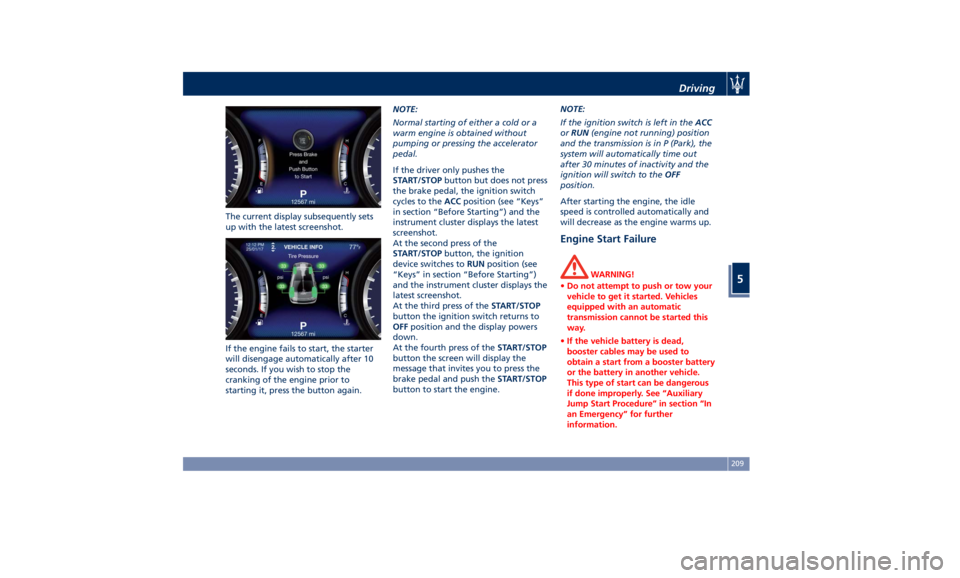
The current display subsequently sets
up with the latest screenshot.
If the engine fails to start, the starter
will disengage automatically after 10
seconds. If you wish to stop the
cranking of the engine prior to
starting it, press the button again. NOTE:
Normal starting of either a cold or a
warm engine is obtained without
pumping or pressing the accelerator
pedal.
If the driver only pushes the
START/STOP button but does not press
the brake pedal, the ignition switch
cycles to the ACC position (see “Keys”
in section “Before Starting”) and the
instrument cluster displays the latest
screenshot.
At the second press of the
START/STOP button, the ignition
device switches to RUN position (see
“Keys” in section “Before Starting”)
and the instrument cluster displays the
latest screenshot.
At the third press of the START/STOP
button the ignition switch returns to
OFF position and the display powers
down.
At the fourth press of the START/STOP
button the screen will display the
message that invites you to press the
brake pedal and push the START/STOP
button to start the engine. NOTE:
If the ignition switch is left in the ACC
or RUN (engine not running) position
and the transmission is in P (Park), the
system will automatically time out
after 30 minutes of inactivity and the
ignition will switch to the OFF
position.
After starting the engine, the idle
speed is controlled automatically and
will decrease as the engine warms up.
Engine Start Failure WARNING!
• Do not attempt to push or tow your
vehicle to get it started. Vehicles
equipped with an automatic
transmission cannot be started this
way.
• If the vehicle battery is dead,
booster cables may be used to
obtain a start from a booster battery
or the battery in another vehicle.
This type of start can be dangerous
if done improperly. See “Auxiliary
Jump Start Procedure” in section “In
an Emergency” for further
information.Driving
5
209
Page 217 of 384
possible to disable the Start & Stop
function in different ways.
Press the Start&Stop hard button on
the central console to the disable the
function (see instructions in chapter
“Drive Mode” in this section).
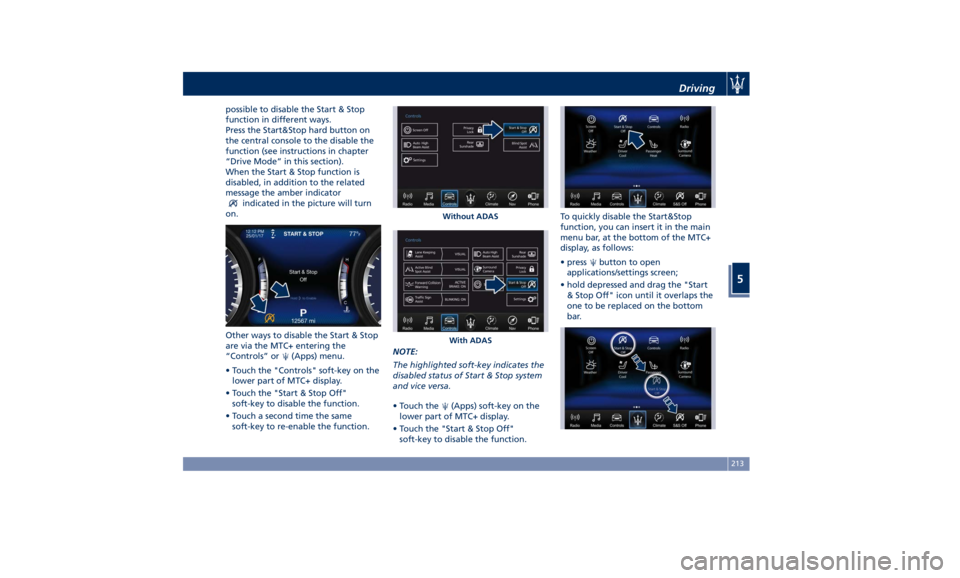
When the Start & Stop function is
disabled, in addition to the related
message the amber indicator
indicated in the picture will turn
on.
Other ways to disable the Start & Stop
are via the MTC+ entering the
“Controls” or
(Apps) menu.
• Touch the "Controls" soft-key on the
lower part of MTC+ display.
• Touch the "Start & Stop Off"
soft-key to disable the function.
• Touch a second time the same
soft-key to re-enable the function. NOTE:
The highlighted soft-key indicates the
disabled status of Start & Stop system
and vice versa.
• Touch the
(Apps) soft-key on the
lower part of MTC+ display.
• Touch the "Start & Stop Off"
soft-key to disable the function. To quickly disable the Start&Stop
function, you can insert it in the main
menu bar, at the bottom of the MTC+
display, as follows:
• press
button to open
applications/settings screen;
• hold depressed and drag the "Start
& Stop Off" icon until it overlaps the
one to be replaced on the bottom
bar.Without ADAS
With ADAS Driving
5
213
Page 219 of 384
2 nd
gear, it is necessary to keep the
brake pedal fully depressed.
WARNING!
• It is dangerous to move the shift
lever out of P (Park) or N (Neutral) if
the engine speed is higher than
idlespeed. If your foot is not firmly
pressing on the brake pedal, the
vehicle could accelerate quickly
forward or in reverse. You could lose
control of the vehicle and hit
someone or something. Only shift
into gear when the engine is idling
normally and when your foot is
firmly pressing on the brake pedal.
• Unintended movement of a vehicle
could injure those in or near the
vehicle. As with all vehicles, you
should never exit a vehicle while the
engine is running. Before exiting a
vehicle, always apply the electronic
parking brake, shift the transmission
into P (Park), and turn the engine
off.
• Never leave children alone in a
vehicle, or with access to an
unlocked vehicle. Allowing children
to be in a vehicle unattended is
dangerous for a number of reasons. A child or others could be seriously
or fatally injured. Children should be
warned not to touch the parking
brake, brake pedal or the shift lever.
• When leaving the vehicle, always
remove the key fob and lock your
vehicle.
• Do not leave the key fob in or near
the vehicle. A child could operate
power windows, other controls, or
move the vehicle.
This vehicle is equipped with a feature
which
requires the transmission to be
placed in P (Park) before the engine
can be turned off. This prevents the
driver from inadvertently leaving the
vehicle without having placed the
transmission in P (Park). This system
also locks the transmission in P (Park)
whenever the ignition switch is in the
OFF position.
Automatic Transmission Lever Automatic transmission is operated by
a shift lever with unlock button,
located on the central console, which
can have the following operating
positions:
• P (Park): button control;
• R (Reverse);
• N (Neutral); • D (Drive) automatic forward speed;
• M -/+ (Manual): “+” shifting to
higher gear or “–“ shifting to lower
gear in manual mode (see “Drive
Mode” in this section).
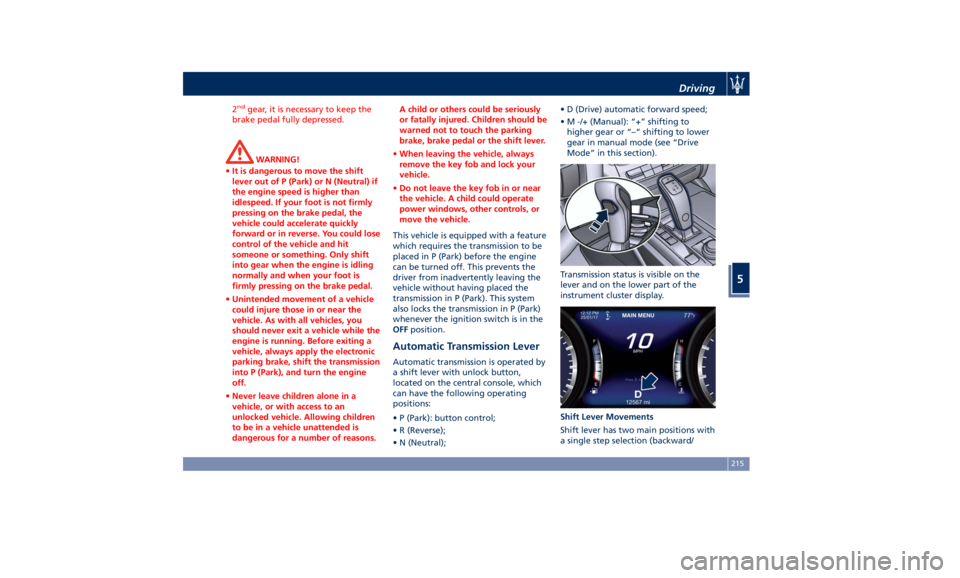
Transmission status is visible on the
lever and on the lower part of the
instrument cluster display.
Shift Lever Movements
Shift lever has two main positions with
a single step selection (backward/Driving
5
215
Page 228 of 384
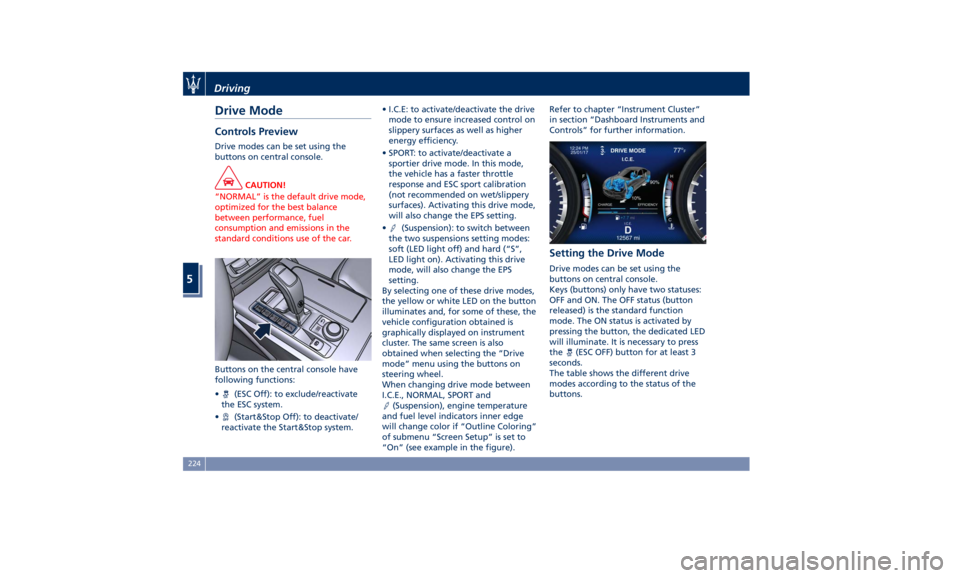
Drive Mode Controls Preview Drive modes can be set using the
buttons on central console.
CAUTION!
“NORMAL” is the default drive mode,
optimized for the best balance
between performance, fuel
consumption and emissions in the
standard conditions use of the car.
Buttons on the central console have
following
functions:
•
(ESC Off): to exclude/reactivate
the ESC system.
•
(Start&Stop Off): to deactivate/
reactivate the Start&Stop system. • I.C.E: to activate/deactivate the drive
mode to ensure increased control on
slippery surfaces as well as higher
energy efficiency.
• SPORT: to activate/deactivate a
sportier drive mode. In this mode,
the vehicle has a faster throttle
response and ESC sport calibration
(not recommended on wet/slippery
surfaces). Activating this drive mode,
will also change the EPS setting.
•
(Suspension): to switch between
the two suspensions setting modes:
soft (LED light off) and hard (“S”,
LED light on). Activating this drive
mode, will also change the EPS
setting.
By selecting one of these drive modes,
the yellow or white LED on the button
illuminates and, for some of these, the
vehicle configuration obtained is
graphically displayed on instrument
cluster. The same screen is also
obtained when selecting the “Drive
mode” menu using the buttons on
steering wheel.
When changing drive mode between
I.C.E., NORMAL, SPORT and
(Suspension), engine temperature
and fuel level indicators inner edge
will change color if “Outline Coloring”
of submenu “Screen Setup” is set to
“On” (see example in the figure). Refer to chapter “Instrument Cluster”
in section “Dashboard Instruments and
Controls” for further information.
Setting the Drive Mode Drive modes can be set using the
buttons on central console.
Keys (buttons) only have two statuses:
OFF and ON. The OFF status (button
released) is the standard function
mode. The ON status is activated by
pressing the button, the dedicated LED
will illuminate. It is necessary to press
the
(ESC OFF) button for at least 3
seconds.
The table shows the different drive
modes according to the status of the
buttons.Driving
5
224