buttons MASERATI GRANTURISMO 2019 User Guide
[x] Cancel search | Manufacturer: MASERATI, Model Year: 2019, Model line: GRANTURISMO, Model: MASERATI GRANTURISMO 2019Pages: 286, PDF Size: 8.08 MB
Page 103 of 286
General Information While programming HomeLink ®
,itis
advisable to disconnect the drive
motor of the gate/door to be remote
controlled, since the numerous driving
pulses launched for this operation
might damage it.
If the battery fails or is disconnected,
the stored settings are not deleted.
If the gate/door was manufactured
prior to April 1982 (not equipped with
safety systems or automatic stop in the
event of an obstacle in the range of
action), the gate/door cannot be
controlled by HomeLink ®
.
If you have questions, call (800)
355-3515.
WARNING!
California Proposition 65
Operating, servicing and maintaining
a passenger vehicle or off-road vehicle
can expose you to chemicals including
such as, engine exhaust, carbon
monoxide, phthalates and lead, that
which are know to the State of
California to cause cancer and birth
defects or other reproductive harm. To
minimize exposure, avoid breathing
exhaust, do not idle the engine except
as necessary, service your vehicle in a well-ventilated area and wear gloves
or wash your hands frequently when
servicing your vehicle. For more
information go to:
www.P65Warnings.ca.gov/passenger-
vehicle
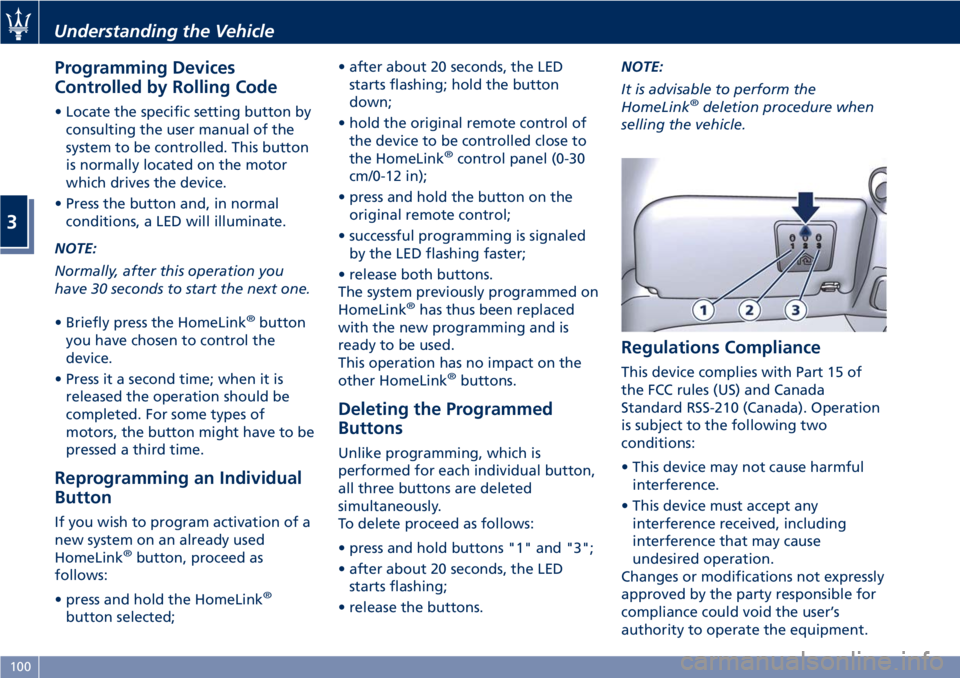
Programming • Press and hold buttons "1" and "3".
• After about 20 seconds, the LED
starts flashing.
• Release the buttons.
• Hold the remote control for the
device to be controlled close to the
HomeLink ®
control panel (0-30 cm/
0-12 in).
• Simultaneously press and hold the
button on the hand-held remote
control and one of the three
HomeLink ®
buttons "1", "2" or "3".
• Successful programming is signaled
by the LED flashing faster.
• Release the buttons.
To program the other buttons, repeat
the operations skipping the first three
steps.
Use
• When the signal of the device to be
activated reaches its operating range, press the dedicated
HomeLink ®
button.
• The LED remains on while the signal
is being transmitted.
The devices controlled through the
HomeLink ®
function can always be
activated using the original remote
controls.
Should the so programmed
HomeLink ®
not activate the system to
be controlled, this may be due to the
fact that this system is controlled by a
remote control with a rolling code.
A rolling activation code can be
recognized in the following ways:
• consulting the instruction manual
provided with the device to be
controlled;
• despite the fact that the HomeLink ®
programming procedure has been
carried out correctly, the HomeLink ®
function does not activate the
device;
• holding the dedicated HomeLink ®
button pressed down, the LED
briefly flashes fast and then remains
on for 2 seconds; this sequence is
repeated for about 20 seconds.Understanding the Vehicle
3
99
Page 104 of 286
Programming Devices
Controlled by Rolling Code • Locate the specific setting button by
consulting the user manual of the
system to be controlled. This button
is normally located on the motor
which drives the device.
• Press the button and, in normal
conditions, a LED will illuminate.
NOTE:
Normally, after this operation you
have 30 seconds to start the next one.
• Briefly press the HomeLink ®
button
you have chosen to control the
device.
• Press it a second time; when it is
released the operation should be
completed. For some types of
motors, the button might have to be
pressed a third time.
Reprogramming an Individual
Button If you wish to program activation of a
new system on an already used
HomeLink ®
button, proceed as
follows:
• press and hold the HomeLink ®
button selected; • after about 20 seconds, the LED
starts flashing; hold the button
down;
• hold the original remote control of
the device to be controlled close to
the HomeLink ®
control panel (0-30
cm/0-12 in);
• press and hold the button on the
original remote control;
• successful programming is signaled
by the LED flashing faster;
• release both buttons.
The system previously programmed on
HomeLink ®
has thus been replaced
with the new programming and is
ready to be used.
This operation has no impact on the
other HomeLink ®
buttons.
Deleting the Programmed
Buttons Unlike programming, which is
performed for each individual button,
all three buttons are deleted
simultaneously.
To delete proceed as follows:
• press and hold buttons "1" and "3";
• after about 20 seconds, the LED
starts flashing;
• release the buttons. NOTE:
It is advisable to perform the
HomeLink ®
deletion procedure when
selling the vehicle.
Regulations Compliance This device complies with Part 15 of
the FCC rules (US) and Canada
Standard RSS-210 (Canada). Operation
is subject to the following two
conditions:
• This device may not cause harmful
interference.
• This device must accept any
interference received, including
interference that may cause
undesired operation.
Changes or modifications not expressly
approved by the party responsible for
compliance could void the user’s
authority to operate the equipment.Understanding the Vehicle
3
100
Page 118 of 286
TFT Display: Menus and
Settings The TFT display performs the following
functions:
• provides general information while
driving;
• signals failures and warnings.
The user can interact with the system
by setting the parameters for the
information that can be recalled.
The screen page displayed following
the initial check cycle, in normal
operating conditions, (standard screen
page) contains the following
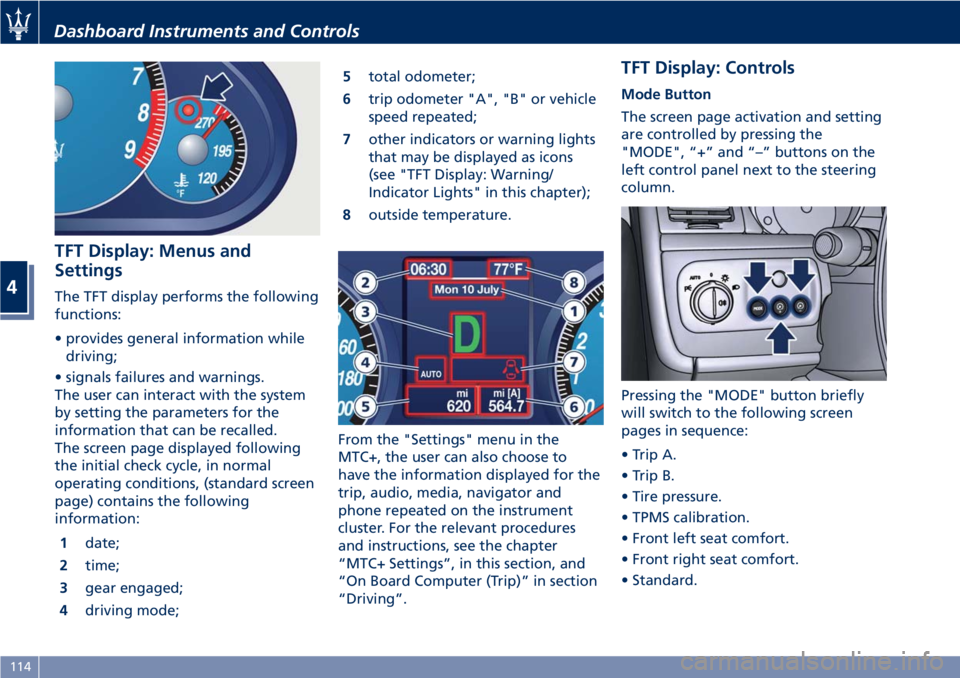
information:
1 date;
2 time;
3 gear engaged;
4 driving mode; 5 total odometer;
6 trip odometer "A", "B" or vehicle
speed repeated;
7 other indicators or warning lights
that may be displayed as icons
(see "TFT Display: Warning/
Indicator Lights" in this chapter);
8 outside temperature.
From the "Settings" menu in the
MTC+, the user can also choose to
have the information displayed for the
trip, audio, media, navigator and
phone repeated on the instrument
cluster. For the relevant procedures
and instructions, see the chapter
“MTC+ Settings”, in this section, and
“On Board Computer (Trip)” in section
“Driving”. TFT Display: Controls Mode Button
The screen page activation and setting
are controlled by pressing the
"MODE", “+” and “–” buttons on the
left control panel next to the steering
column.
Pressing the "MODE" button briefly
will switch to the following screen
pages in sequence:
• Trip A.
• Trip B.
• Tire pressure.
• TPMS calibration.
• Front left seat comfort.
• Front right seat comfort.
• Standard.Dashboard Instruments and Controls
4
114
Page 119 of 286
“+“ and “–” Buttons
By means of the “+ “ and “–” buttons,
the user can adjust the instrument
cluster brightness.
When a screen page is viewed, these
buttons can be used to select the
available options (see paragraph "TFT
Display: Screen Pages" in this chapter).
TFT Display: Screen Pages Trip Screen Page
The Trip screen page is recalled by
pressing the “MODE” button. Each
Trip screen page “A” or “B” is timed,
i.e. it is displayed for a maximum of 10
seconds, after which the screen page
previously active is displayed once
again.
Before the 10 second timing has
elapsed, pressing the “MODE” button
briefly (less than 2 seconds) will reset
the trip information relating to the
flashing odometer “A” or “B”.
When the “Trip A” or “Trip B” feature
is active, the following information is
viewed on the display:
• traveled distance (shown in the
lower right area);
• average fuel consumption (Avg.
cons.)
• average traveling speed (Avg.
speed); • trip time;
• fuel range (Range);
The unit for this data can be adjusted
by the user from the MTC+ Settings
menu.
NOTE:
Trip and Service information can be
viewed by accessing the “Trip” menu
on the MTC+ screen (see “On Board
Computer Trip (Trip)” in section
“Driving”).
Tire Pressure Screen Page
If the vehicle is equipped with the Tire
Pressure Monitoring System (TPMS), by
pressing the "MODE" button the user
will display information about the tire
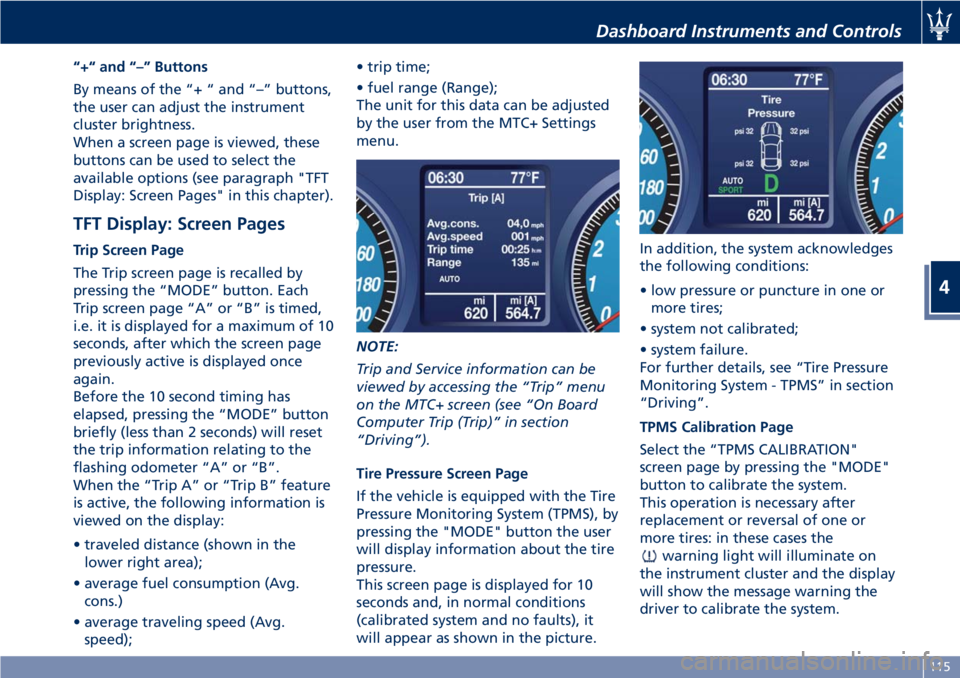
pressure.
This screen page is displayed for 10
seconds and, in normal conditions
(calibrated system and no faults), it
will appear as shown in the picture. In addition, the system acknowledges
the following conditions:
• low pressure or puncture in one or
more tires;
• system not calibrated;
• system failure.
For further details, see “Tire Pressure
Monitoring System - TPMS” in section
“Driving”.
TPMS Calibration Page
Select the “TPMS CALIBRATION"
screen page by pressing the "MODE"
button to calibrate the system.
This operation is necessary after
replacement or reversal of one or
more tires: in these cases the
warning light will illuminate on
the instrument cluster and the display
will show the message warning the
driver to calibrate the system.Dashboard Instruments and Controls
4
115
Page 132 of 286
Audio Controls The vehicle is equipped with audio
controls that allow both driver and
front passenger to operate the audio
system. These controls can be used to
adjust audio volume, change radio
station/channel or mode (FM, AM,
USB, etc).
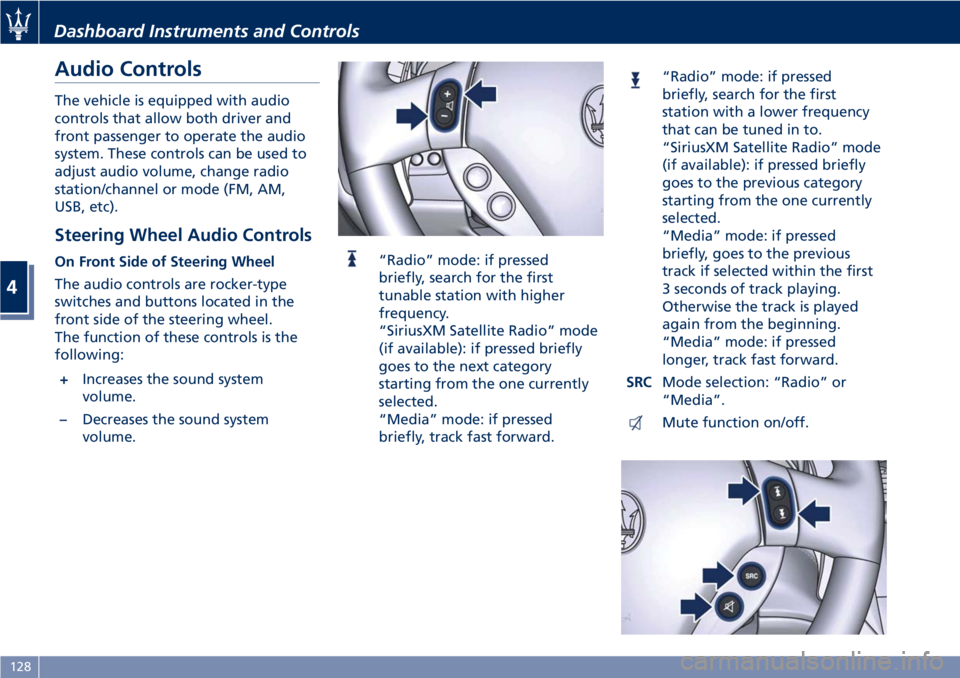
Steering Wheel Audio Controls On Front Side of Steering Wheel
The audio controls are rocker-type
switches and buttons located in the
front side of the steering wheel.
The function of these controls is the
following:
+ Increases the sound system
volume.
– Decreases the sound system
volume. “Radio” mode: if pressed
briefly, search for the first
tunable station with higher
frequency.
“SiriusXM Satellite Radio” mode
(if available): if pressed briefly
goes to the next category
starting from the one currently
selected.
“Media” mode: if pressed
briefly, track fast forward. “Radio” mode: if pressed
briefly, search for the first
station with a lower frequency
that can be tuned in to.
“SiriusXM Satellite Radio” mode
(if available): if pressed briefly
goes to the previous category
starting from the one currently
selected.
“Media” mode: if pressed
briefly, goes to the previous
track if selected within the first
3 seconds of track playing.
Otherwise the track is played
again from the beginning.
“Media” mode: if pressed
longer, track fast forward.
SRC Mode selection: “Radio” or
“Media”.
Mute function on/off.Dashboard Instruments and Controls
4
128
Page 133 of 286
NOTE:
“SiriusXM Satellite Radio” is the US
service only available in the 48
Continental United States and
Canadian markets. Subscription is
required. For further details refer to
the Maserati Touch Controls Plus
(MTC+) guide.
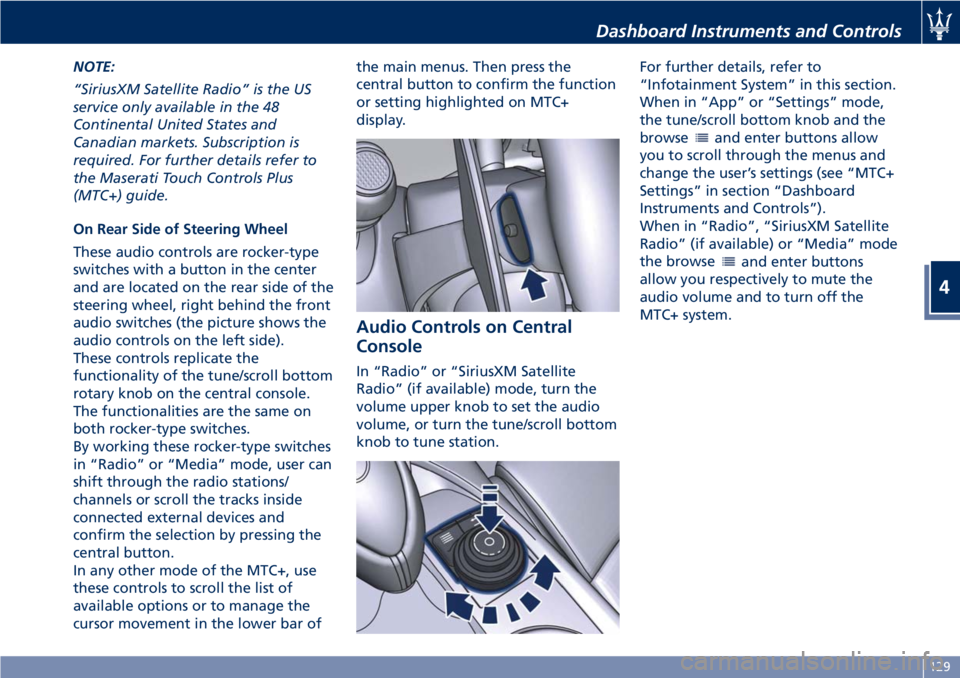
On Rear Side of Steering Wheel
These audio controls are rocker-type
switches with a button in the center
and are located on the rear side of the
steering wheel, right behind the front
audio switches (the picture shows the
audio controls on the left side).
These controls replicate the
functionality of the tune/scroll bottom
rotary knob on the central console.
The functionalities are the same on
both rocker-type switches.
By working these rocker-type switches
in “Radio” or “Media” mode, user can
shift through the radio stations/
channels or scroll the tracks inside
connected external devices and
confirm the selection by pressing the
central button.
In any other mode of the MTC+, use
these controls to scroll the list of
available options or to manage the
cursor movement in the lower bar of the main menus. Then press the
central button to confirm the function
or setting highlighted on MTC+
display.
Audio Controls on Central
Console In “Radio” or “SiriusXM Satellite
Radio” (if available) mode, turn the
volume upper knob to set the audio
volume, or turn the tune/scroll bottom
knob to tune station. For further details, refer to
“Infotainment System” in this section.
When in “App” or “Settings” mode,
the tune/scroll bottom knob and the
browse
and enter buttons allow
you to scroll through the menus and
change the user’s settings (see “MTC+
Settings” in section “Dashboard
Instruments and Controls”).
When in “Radio”, “SiriusXM Satellite
Radio” (if available) or “Media” mode
the browse
and enter buttons
allow you respectively to mute the
audio volume and to turn off the
MTC+ system.Dashboard Instruments and Controls
4
129
Page 146 of 286
• left-hand/right-hand vent air
distribution;
• fan speed (stepless change);
• compressor activation;
• air recirculation.
All the functions listed above can be
modified manually, i.e. the user can
select one or more of these functions
as desired, using the control panel.
The manual selections always have
priority over the automatic ones and
are memorized until the user chooses
the automatic control again.
When a function has been set
manually, the other automatic
functions will not be affected.
The following parameters/functions
can be set/modified manually:
• left-hand/right-hand side air
temperature;
• fan speed;
• air distribution on 7 positions
(left-hand/ right-hand);
• compressor activation;
• single/dual-zone distribution priority;
• defrosting/defogging function (MAX
DEF);
• air recirculation;
• automatic/manual control of the
system;
• heated rear window; • system deactivation;
• opening/closing of air duct leading
to rear vents.
Activation
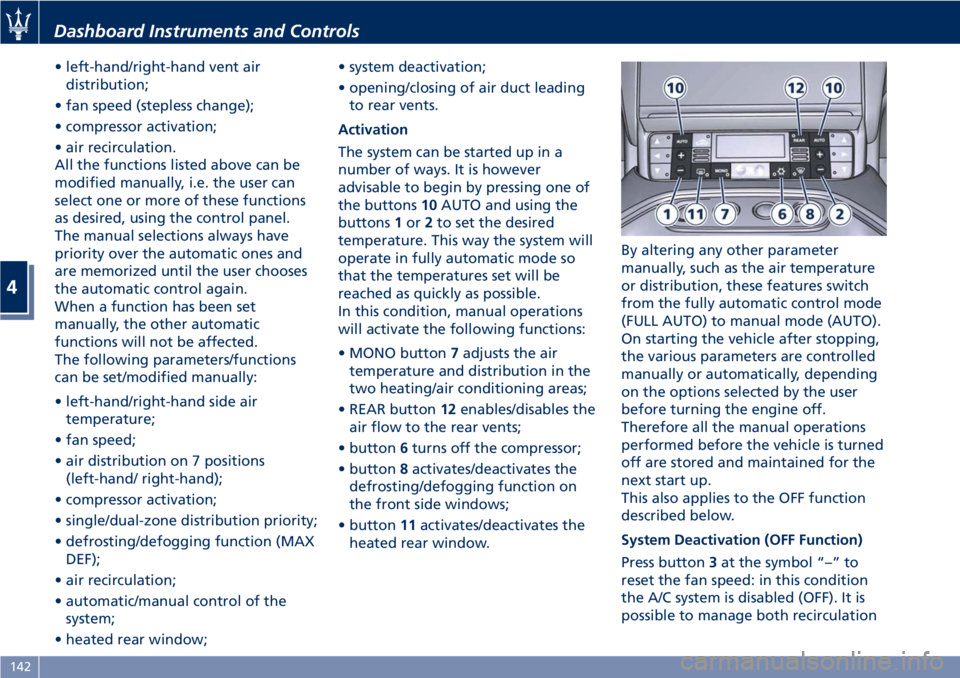
The system can be started up in a
number of ways. It is however
advisable to begin by pressing one of
the buttons 10 AUTO and using the
buttons 1 or 2 to set the desired
temperature. This way the system will
operate in fully automatic mode so
that the temperatures set will be
reached as quickly as possible.
In this condition, manual operations
will activate the following functions:
• MONO button 7 adjusts the air
temperature and distribution in the
two heating/air conditioning areas;
• REAR button 12 enables/disables the
air flow to the rear vents;
• button 6 turns off the compressor;
• button 8 activates/deactivates the
defrosting/defogging function on
the front side windows;
• button 11 activates/deactivates the
heated rear window. By altering any other parameter
manually, such as the air temperature
or distribution, these features switch
from the fully automatic control mode
(FULL AUTO) to manual mode (AUTO).
On starting the vehicle after stopping,
the various parameters are controlled
manually or automatically, depending
on the options selected by the user
before turning the engine off.
Therefore all the manual operations
performed before the vehicle is turned
off are stored and maintained for the
next start up.
This also applies to the OFF function
described below.
System Deactivation (OFF Function)
Press button 3 at the symbol “–” to
reset the fan speed: in this condition
the A/C system is disabled (OFF). It is
possible to manage both recirculationDashboard Instruments and Controls
4
142
Page 148 of 286
• compressor enabled (the LED on the
button is illuminated);
• defrosting/defogging function (MAX
DEF) deactivated (the LED on the
button is off);
• heated rear window deactivated (the
LED on the button is off);
• open recirculation (the LED on the
button is off);
• air ventilation and distribution are
set by the system;
• REAR disabled (the LED on the
button is off), the air flows to the
rear vents.
A/C Filter The climate control system filters
outside air containing dust, pollen and
some odors. Strong odors cannot be
totally removed by A/C filter at the
entrance of the air climate system. See
“Maintenance Procedures” in section
“Maintenance and Care” for filter
replacement instructions. Phone and Voice Controls
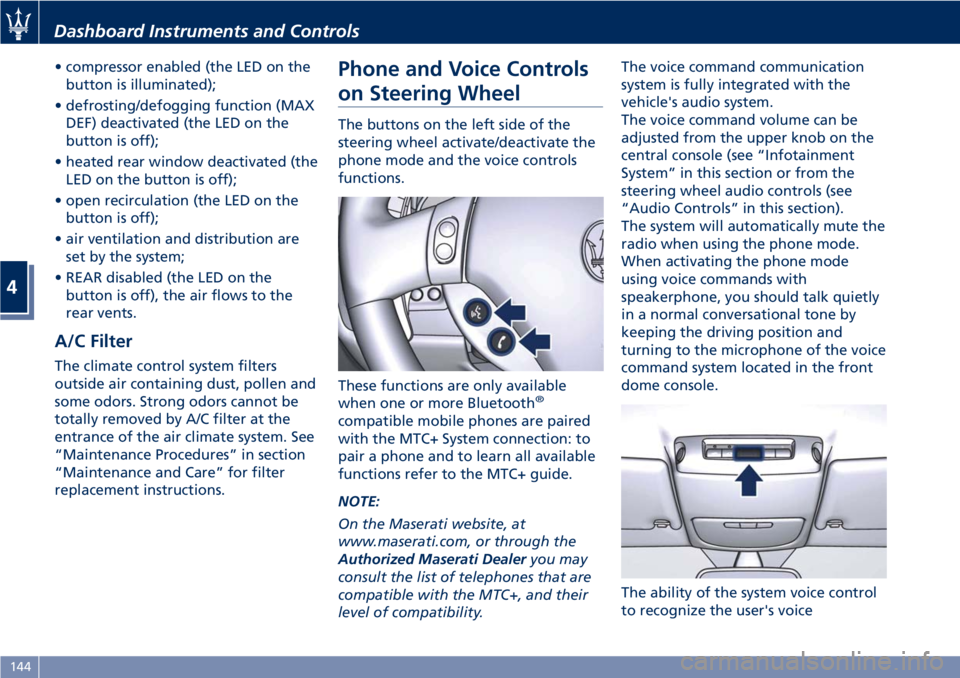
on Steering Wheel The buttons on the left side of the
steering wheel activate/deactivate the
phone mode and the voice controls
functions.
These functions are only available
when one or more Bluetooth ®
compatible mobile phones are paired
with the MTC+ System connection: to
pair a phone and to learn all available
functions refer to the MTC+ guide.
NOTE:
On the Maserati website, at
www.maserati.com, or through the
Authorized Maserati Dealer you may
consult the list of telephones that are
compatible with the MTC+, and their
level of compatibility. The voice command communication
system is fully integrated with the
vehicle's audio system.
The voice command volume can be
adjusted from the upper knob on the
central console (see “Infotainment
System” in this section or from the
steering wheel audio controls (see
“Audio Controls” in this section).
The system will automatically mute the
radio when using the phone mode.
When activating the phone mode
using voice commands with
speakerphone, you should talk quietly
in a normal conversational tone by
keeping the driving position and
turning to the microphone of the voice
command system located in the front
dome console.
The ability of the system voice control
to recognize the user's voiceDashboard Instruments and Controls
4
144
Page 163 of 286
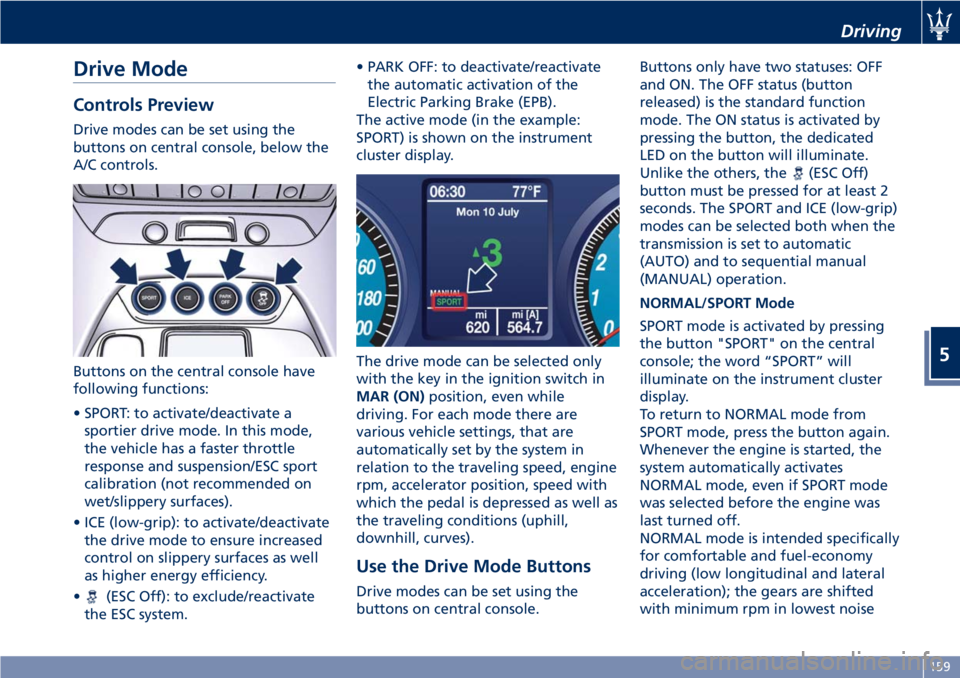
Drive Mode Controls Preview Drive modes can be set using the
buttons on central console, below the
A/C controls.
Buttons on the central console have
following functions:
• SPORT: to activate/deactivate a
sportier drive mode. In this mode,
the vehicle has a faster throttle
response and suspension/ESC sport
calibration (not recommended on
wet/slippery surfaces).
• ICE (low-grip): to activate/deactivate
the drive mode to ensure increased
control on slippery surfaces as well
as higher energy efficiency.
•
(ESC Off): to exclude/reactivate
the ESC system. • PARK OFF: to deactivate/reactivate
the automatic activation of the
Electric Parking Brake (EPB).
The active mode (in the example:
SPORT) is shown on the instrument
cluster display.
The drive mode can be selected only
with the key in the ignition switch in
MAR (ON) position, even while
driving. For each mode there are
various vehicle settings, that are
automatically set by the system in
relation to the traveling speed, engine
rpm, accelerator position, speed with
which the pedal is depressed as well as
the traveling conditions (uphill,
downhill, curves).
Use the Drive Mode Buttons
Drive modes can be set using the
buttons on central console. Buttons only have two statuses: OFF
and ON. The OFF status (button
released) is the standard function
mode. The ON status is activated by
pressing the button, the dedicated
LED on the button will illuminate.
Unlike the others, the
(ESC Off)
button must be pressed for at least 2
seconds. The SPORT and ICE (low-grip)
modes can be selected both when the
transmission is set to automatic
(AUTO) and to sequential manual
(MANUAL) operation.
NORMAL/SPORT Mode
SPORT mode is activated by pressing
the button "SPORT" on the central
console; the word “SPORT” will
illuminate on the instrument cluster
display.
To return to NORMAL mode from
SPORT mode, press the button again.
Whenever the engine is started, the
system automatically activates
NORMAL mode, even if SPORT mode
was selected before the engine was
last turned off.
NORMAL mode is intended specifically
for comfortable and fuel-economy
driving (low longitudinal and lateral
acceleration); the gears are shifted
with minimum rpm in lowest noise Driving
5
159
Page 242 of 286
(Continued)
quick coupling from the negative
pole (–) of the battery.
If the battery needs to be removed
from
its compartment, you must first
detach the terminal clamp from
negative pole (–) and then the other
terminal clamp from positive pole (+),
after removing the protective cover.
Battery poles are marked positive (+)
and negative (–) and are identified on
the battery case.
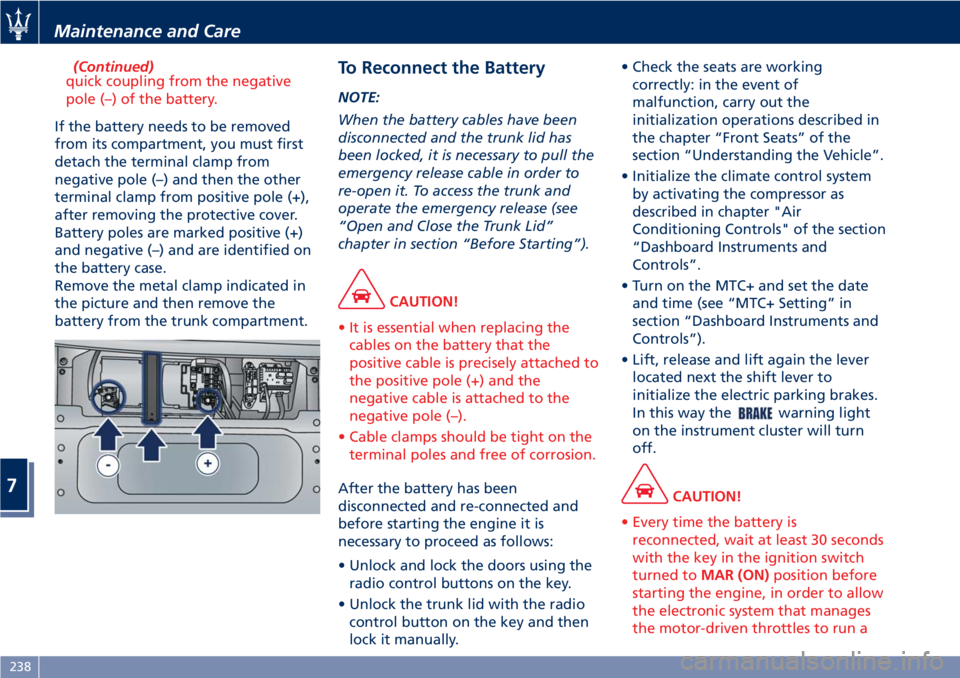
Remove the metal clamp indicated in
the picture and then remove the
battery from the trunk compartment. To Reconnect the Battery NOTE:
When the battery cables have been
disconnected and the trunk lid has
been locked, it is necessary to pull the
emergency release cable in order to
re-open it. To access the trunk and
operate the emergency release (see
“Open and Close the Trunk Lid”
chapter in section “Before Starting”).
CAUTION!
• It is essential when replacing the
cables on the battery that the
positive cable is precisely attached to
the positive pole (+) and the
negative cable is attached to the
negative pole (–).
• Cable clamps should be tight on the
terminal poles and free of corrosion.
After the battery has been
disconnected
and re-connected and
before starting the engine it is
necessary to proceed as follows:
• Unlock and lock the doors using the
radio control buttons on the key.
• Unlock the trunk lid with the radio
control button on the key and then
lock it manually. • Check the seats are working
correctly: in the event of
malfunction, carry out the
initialization operations described in
the chapter “Front Seats” of the
section “Understanding the Vehicle”.
• Initialize the climate control system
by activating the compressor as
described in chapter "Air
Conditioning Controls" of the section
“Dashboard Instruments and
Controls”.
• Turn on the MTC+ and set the date
and time (see “MTC+ Setting” in
section “Dashboard Instruments and
Controls”).
• Lift, release and lift again the lever
located next the shift lever to
initialize the electric parking brakes.
In this way the
warning light
on the instrument cluster will turn
off.
CAUTION!
• Every time the battery is
reconnected, wait at least 30 seconds
with the key in the ignition switch
turned to MAR (ON) position before
starting the engine, in order to allow
the electronic system that manages
the motor-driven throttles to run aMaintenance and Care
7
238