Order MASERATI GRANTURISMO 2019 Owner's Manual
[x] Cancel search | Manufacturer: MASERATI, Model Year: 2019, Model line: GRANTURISMO, Model: MASERATI GRANTURISMO 2019Pages: 286, PDF Size: 8.08 MB
Page 124 of 286
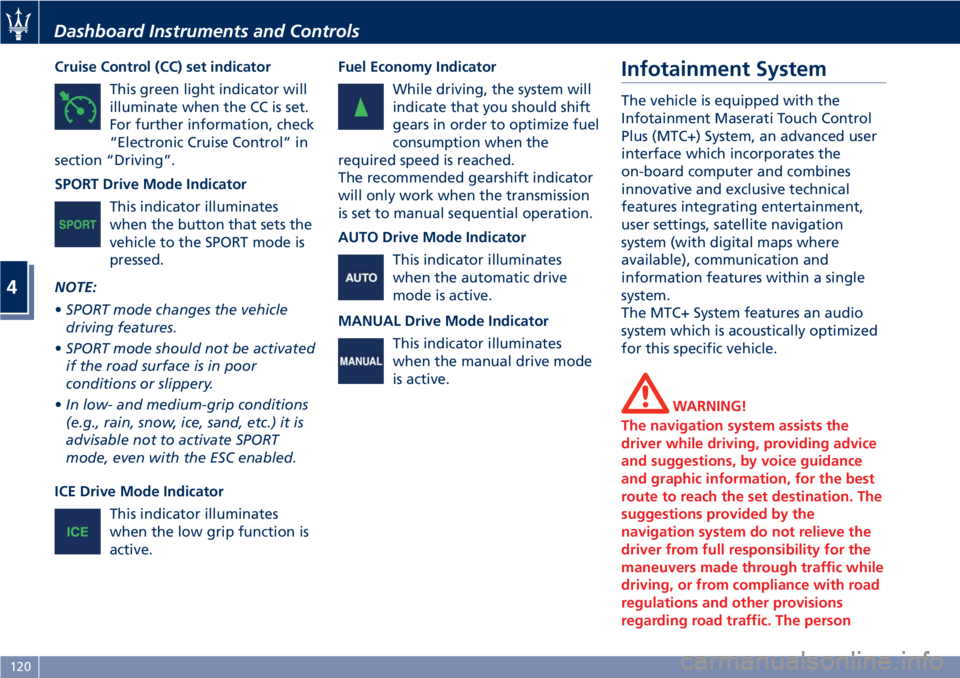
Cruise Control (CC) set indicator
This green light indicator will
illuminate when the CC is set.
For further information, check
“Electronic Cruise Control” in
section “Driving”.
SPORT Drive Mode Indicator
This indicator illuminates
when the button that sets the
vehicle to the SPORT mode is
pressed.
NOTE:
• SPORT mode changes the vehicle
driving features.
• SPORT mode should not be activated
if the road surface is in poor
conditions or slippery.
• In low- and medium-grip conditions
(e.g., rain, snow, ice, sand, etc.) it is
advisable not to activate SPORT
mode, even with the ESC enabled.
ICE Drive Mode Indicator
This indicator illuminates
when the low grip function is
active. Fuel Economy Indicator
While driving, the system will
indicate that you should shift
gears in order to optimize fuel
consumption when the
required speed is reached.
The recommended gearshift indicator
will only work when the transmission
is set to manual sequential operation.
AUTO Drive Mode Indicator
This indicator illuminates
when the automatic drive
mode is active.
MANUAL Drive Mode Indicator
This indicator illuminates
when the manual drive mode
is active. Infotainment System The vehicle is equipped with the
Infotainment Maserati Touch Control
Plus (MTC+) System, an advanced user
interface which incorporates the
on-board computer and combines
innovative and exclusive technical
features integrating entertainment,
user settings, satellite navigation
system (with digital maps where
available), communication and
information features within a single
system.
The MTC+ System features an audio
system which is acoustically optimized
for this specific vehicle.
WARNING!
The navigation system assists the
driver while driving, providing advice
and suggestions, by voice guidance
and graphic information, for the best
route to reach the set destination. The
suggestions provided by the
navigation system do not relieve the
driver from full responsibility for the
maneuvers made through traffic while
driving, or from compliance with road
regulations and other provisions
regarding road traffic. The personDashboard Instruments and Controls
4
120
Page 128 of 286
7. “Phone ” softkey
Touch this softkey to access the
MTC+ Phone feature that can be
set or monitored via MTC+.
Touch one of these softkeys to access
the list of functions that the user can
set.
Touchscreen Display Warnings
CAUTION!
• Do NOT attach any object to the
touchscreen, doing so can result in
damage to the touchscreen.
• Do not press the screen with any
hard or sharp objects (pen, USB stick,
jewelry, etc.) which could scratch the
touchscreen surface.
• Do not spray any liquid or caustic
chemicals directly on the screen. Use
a clean and dry micro fiber lens
cleaning cloth in order to clean the
touchscreen.
• If necessary, use a lint-free cloth
dampened with a cleaning solution,
such as isopropyl alcohol, or an
isopropyl alcohol and water solution
ratio of 50:50. Be sure to follow the
solvent manufacturer’s precautions
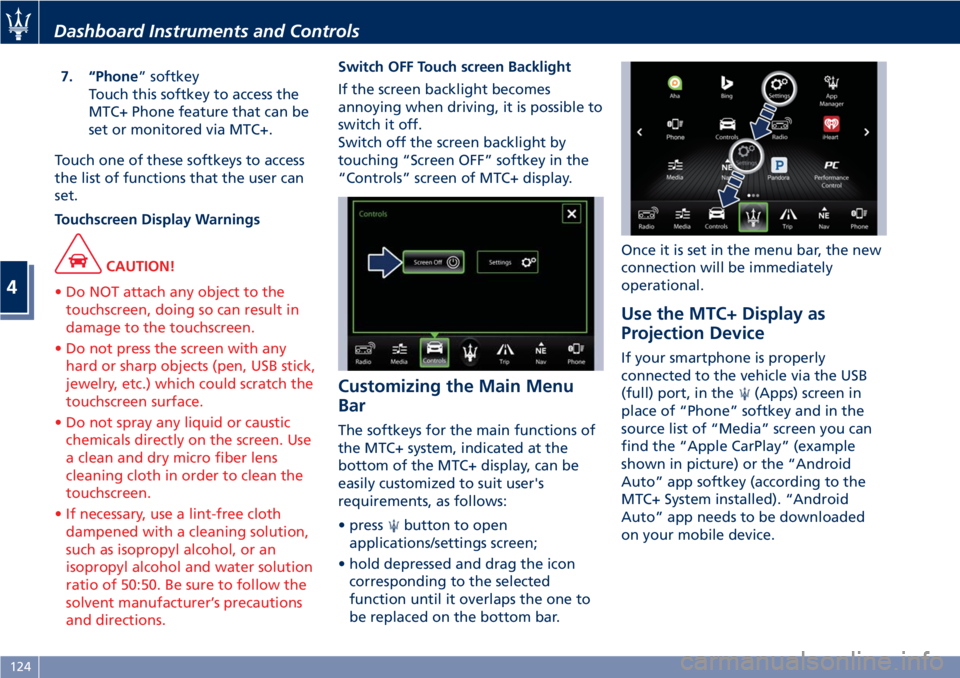
and directions. Switch OFF Touch screen Backlight
If
the screen backlight becomes
annoying when driving, it is possible to
switch it off.
Switch off the screen backlight by
touching “Screen OFF” softkey in the
“Controls” screen of MTC+ display.
Customizing the Main Menu
Bar The softkeys for the main functions of
the MTC+ system, indicated at the
bottom of the MTC+ display, can be
easily customized to suit user's
requirements, as follows:
• press
button to open
applications/settings screen;
• hold depressed and drag the icon
corresponding to the selected
function until it overlaps the one to
be replaced on the bottom bar. Once it is set in the menu bar, the new
connection will be immediately
operational.
Use the MTC+ Display as
Projection Device If your smartphone is properly
connected to the vehicle via the USB
(full) port, in the
(Apps) screen in
place of “Phone” softkey and in the
source list of “Media” screen you can
find the “Apple CarPlay” (example
shown in picture) or the “Android
Auto” app softkey (according to the
MTC+ System installed). “Android
Auto” app needs to be downloaded
on your mobile device.Dashboard Instruments and Controls
4
124
Page 138 of 286
• AutoShow Smartphone Display
Upon Connection
This feature allows to use the MTC+
display as a projection device
connected via USB port in order to
browse the Apple CarPlay and
Android Auto apps. By setting this
feature, automatic switch from
native screen to projection device
will happen every time you connect
your smartphone. For further details
refer to the “Maserati Touch Control
Plus (MTC+)” guide.
Units After pressing the “Units” and then
“Custom” softkey on the touch screen
you may select between Metric and
Imperial units of measure. Each unit of
measure can be independently
displayed in the TFT Display and in the
navigation system. The following
selectable units of measure are listed
below:
• Speed unit :
select from: “mph” or “km/h”.
• Consumption unit :
select from: “mpg US”, “mpg UK”,
“l/100km” and “km/l”.
• Distance unit :
select from: “mi or km”. • Pressure unit :
select from: “PSI” or “BAR”.
• Temperature unit :
select from: “°F” or “°C”.
Voice Commands After pressing “Voice” softkey the
following modes will be available.
• Voice Response Length
When in this display, you can change
the voice response length settings.
To change the voice response
length, touch the “Brief” or
“Detailed” softkey.
• Show Command List
When this feature is selected, it is
possible to select options during a
voice control session. Options for
available controls are: “Always”,
“w/Help” or “Never”.
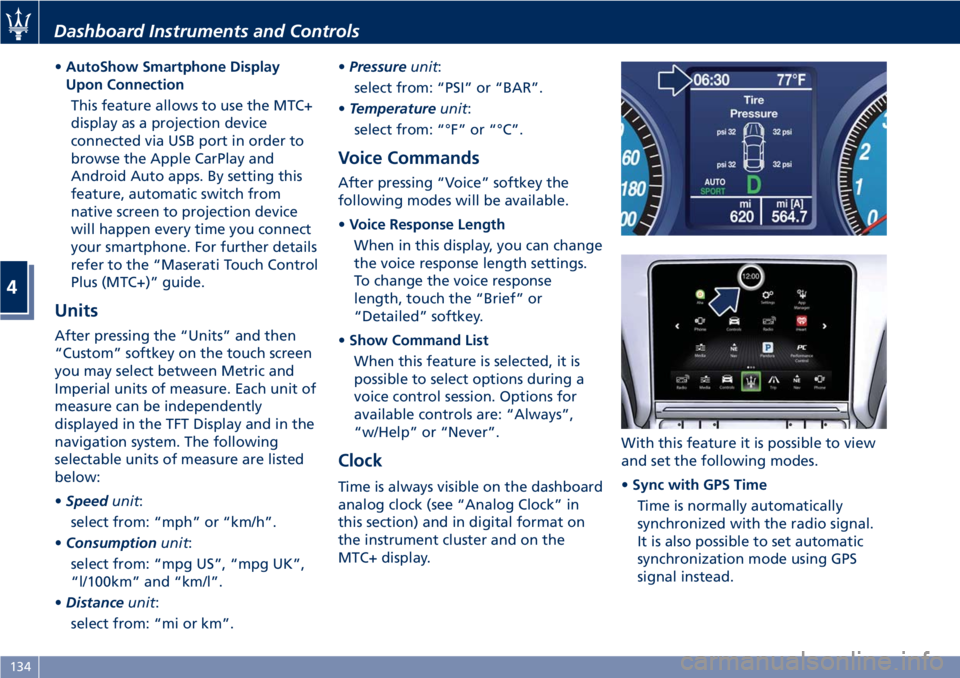
Clock Time is always visible on the dashboard
analog clock (see “Analog Clock” in
this section) and in digital format on
the instrument cluster and on the
MTC+ display. With this feature it is possible to view
and set the following modes.
• Sync with GPS Time
Time is normally automatically
synchronized with the radio signal.
It is also possible to set automatic
synchronization mode using GPS
signal instead.Dashboard Instruments and Controls
4
134
Page 142 of 286
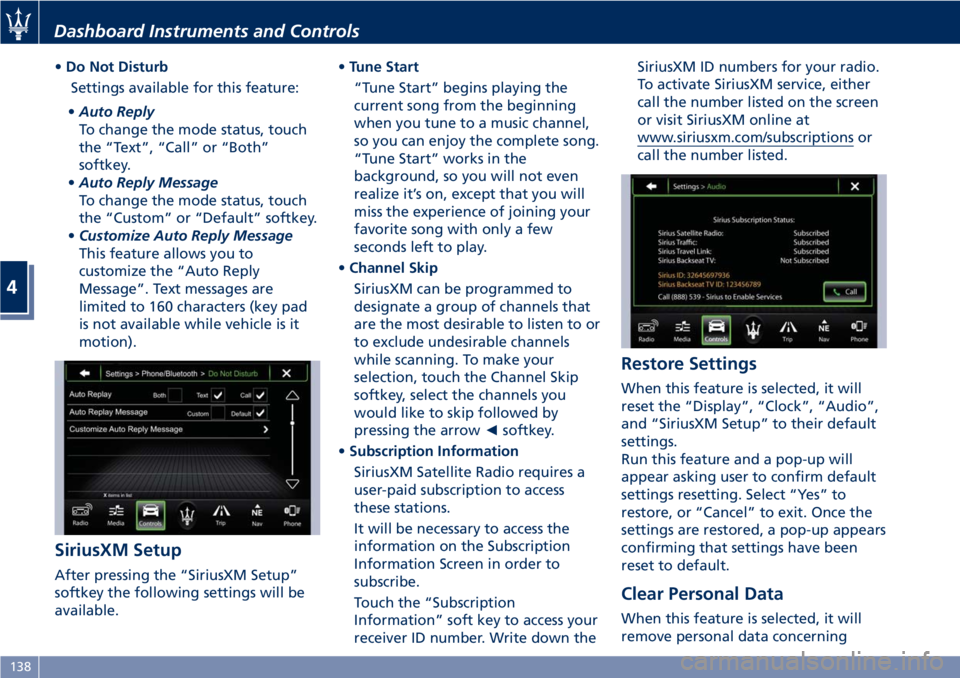
• Do Not Disturb
Settings available for this feature:
• Auto Reply
To change the mode status, touch
the “Text”, “Call” or “Both”
softkey.
• Auto Reply Message
To change the mode status, touch
the “Custom” or “Default” softkey.
• Customize Auto Reply Message
This feature allows you to
customize the “Auto Reply
Message”. Text messages are
limited to 160 characters (key pad
is not available while vehicle is it
motion).
SiriusXM Setup
After pressing the “SiriusXM Setup”
softkey the following settings will be
available. • Tune Start
“Tune Start” begins playing the
current song from the beginning
when you tune to a music channel,
so you can enjoy the complete song.
“Tune Start” works in the
background, so you will not even
realize it’s on, except that you will
miss the experience of joining your
favorite song with only a few
seconds left to play.
• Channel Skip
SiriusXM can be programmed to
designate a group of channels that
are the most desirable to listen to or
to exclude undesirable channels
while scanning. To make your
selection, touch the Channel Skip
softkey, select the channels you
would like to skip followed by
pressing the arrow ◄ softkey.
• Subscription Information
SiriusXM Satellite Radio requires a
user-paid subscription to access
these stations.
It will be necessary to access the
information on the Subscription
Information Screen in order to
subscribe.
Touch the “Subscription
Information” soft key to access your
receiver ID number. Write down the SiriusXM ID numbers for your radio.
To activate SiriusXM service, either
call the number listed on the screen
or visit SiriusXM online at
www.siriusxm.com/subscriptions or
call the number listed.
Restore Settings When this feature is selected, it will
reset the “Display”, “Clock”, “Audio”,
and “SiriusXM Setup” to their default
settings.
Run this feature and a pop-up will
appear asking user to confirm default
settings resetting. Select “Yes” to
restore, or “Cancel” to exit. Once the
settings are restored, a pop-up appears
confirming that settings have been
reset to default.
Clear Personal Data
When this feature is selected, it will
remove personal data concerningDashboard Instruments and Controls
4
138
Page 154 of 286
Automatic Transmission The electronic shift lever replaces the
conventional mechanical lever and has
no mechanical connection to the
transmission. The transmission is
operated by electrical actuators on the
hydraulic system and all commands to
the control system are transmitted by
the CAN network.
The automatic transmission has six
forward gear ratios and one reverse
gear. The gears can also be engaged
manually once you have shifted the
transmission shift lever to the sector
provided.
CAUTION!
In order to properly use the automatic
transmission, it is essential that you
read through the whole chapter, so
that you can understand right from
the start what the correct and
permitted operations are.
Damage to the transmission may occur
if the following precautions are not
observed:
• Shift into P (Park) only after the
vehicle has come to a complete stop.
This is the default position of the
lever and should be used every time the key in the ignition switch is
turned to STOP (OFF) position.
• Shift into or out of R (Reverse) only
after the vehicle has come to a
complete stop and the engine is at
idle speed.
• Do not shift between P (Park), R
(Reverse), N (Neutral) or D (Drive)
when the engine is above idle speed.
• To effect any change from vehicle
stop to R (Reverse), D (Drive), 1 st
or
2 nd
gear, it is necessary to keep the
brake pedal fully depressed.
WARNING!
• It is dangerous to move the shift
lever out of P (Park) or N (Neutral) if
the engine speed is higher than idle
speed. Only shift into gear when the
engine is idling normally and when
your foot is firmly pressing on the
brake pedal.
• As with all vehicles, you should
never exit a vehicle while the engine
is running. Before exiting a vehicle,
always apply the electronic parking
brake, shift the transmission into P
(Park), and turn the engine off.
• When leaving the vehicle, always
remove the key from the ignition switch and lock your vehicle.
• Do not leave the key in or near the
vehicle.
The transmission system is equipped
with
"Shift-Lock" and "Key-Lock"
safety functions.
Shift-Lock
This safety function allows you to shift
from P (Park) to another position only
if the brake pedal is depressed. This
prevents the vehicle from involuntarily
jumping forward or backward.
Key-Lock
This function allows you to remove the
key from the ignition switch only
when the transmission shift lever is in
P (Park) position and within a
maximum time of 30 seconds. When
this time has elapsed, the key can no
longer be removed.
Automatic Transmission Lever Automatic transmission is operated by
a lever with unlock button to engage
R (Reverse) and P (Park) located on the
central console.
By using the transmission shift lever it
is possible to select following
positions, indicated on the gear display
at the side of the transmission shiftDriving
5
150
Page 159 of 286
(Drive) to R (Reverse), and vice versa,
by pressing the unlock button on the
transmission shift lever.
• Vehicle moving: switching to N
(Neutral) from D (Drive) requires the
unlock button on the shift lever
pressed.
• From D (Drive) selected mode it is
always possible to switch to
MANUAL mode by shifting the
transmission shift lever to "+" or "–"
position.
The gears will be engaged in relation
to the traveling speed, engine RPM,
accelerator position, speed with which
the pedal is depressed as well as the
traveling conditions (uphill, downhill,
curves).
The system has been programmed to
classify all driving styles, in relation to
the above mentioned parameters, and
to associate them with the various
vehicle settings, which go from
extremely comfortable and economic
driving to racing-style driving. The
setting is selected automatically.
At extremely cold temperatures
(-30°C/-23°F or below), transmission
may be affected by the low
temperature of the engine and
transmission. Normal operation will
resume once the transmission temperature has risen to a normal
level.
Transmission Strategy in
Particular Driving Situations Downhill Driving
When the accelerator pedal is
released, the transmission system
detects that the vehicle is moving
downhill and deactivates upshifting.
When the accelerator pedal is
depressed, upshifting is reactivated
but will be delayed by a few seconds.
When the brake pedal is depressed,
the transmission system downshifts to
provide enhanced engine braking
power.
In other words, when driving
downhill, the transmission system
operates so as to avoid upshifting and
shifting gears when the accelerator
pedal is released, and delays gear
engagement by a few seconds when
the accelerator pedal is depressed.
In addition, when the brakes are
applied, it engages the lowest gear in
order to provide enhanced engine
braking power.
This strategy is aimed at making
downhill driving safer. Driving in Curves
The system detects when the vehicle
goes into a curve through the lateral
acceleration and the steering angle.
Detecting this condition, it controls
gearshifting using a specific mode.
This mode is exited when the vehicle
comes out of the curve, at a distance
that varies depending on the vehicle
speed.
Fast-off Strategy
When the accelerator pedal is fully
released, the system deactivates
upshifting.
The next time the pedal is depressed,
upshifting will be reactivated only
after a few seconds.
Upshifting is also deactivated when
the accelerator pedal is partially
released; the system waits the time
necessary to evaluate if the release
action is completed.
Hot-mode Situations
In the event that the engine oil or
coolant temperature is too high or
both, the transmission system reduces
the maximum engine speed to 4000
rpm.
Therefore, upshifting will occur at this
limit.
This strategy does not apply to
downhill driving, so as to always have Driving
5
155
Page 160 of 286
the efficiency of engine braking
together with the standard braking
system.
ESC System Operations
In order to prevent unstable driving
conditions, the ESC system may request
the transmission system to deactivate
gearshifting. The system handles this
request depending on the gear
engaged and on the rpm, and decides
whether to accept it or not.
Driving with Cruise Control
With the Cruise Control function
activated, the transmission system
selects such settings as to provide
enhanced comfort and fuel-economy.
MC Start Strategy (for MC version
only)
With the aim of optimizing standing
starts for performance driving (only
recommended for use in areas closed
to traffic and in accordance with the
Highway Code), the automatic
transmission system is equipped with
quick start strategy.
This strategy is activated when the
following conditions occur
simultaneously:
• AUTO and SPORT modes active;
•
ESC mode off;
• brake pedal depressed. In these conditions, the driver has the
possibility to accelerate and, keeping
the brake pedal depressed, keep the
vehicle standing until reaching an
engine speed between 2300 an 2500
rpm. Then, upon releasing the brake
pedal, have the best standing start
performance.
WARNING!
This strategy must only be used on
vehicles in areas closed to traffic, in
accordance with the Highway Code
and only by skilled drivers.
Transmission Malfunction and
Overheating Conditions Transmission Failure
Transmission function is electronically
monitored to detect abnormal
conditions. If a condition that could
result in transmission damage is
detected, Transmission Limp Home
Mode will be activated. In this
situation, the transmission may
operate only in certain gears, or may
not shift at all.
CAUTION!
In these conditions, we recommended that you stop the vehicle and turn off
the engine for at least one minute.
When restarting the engine, the
self-diagnosis system may cancel the
malfunction, which will in any case be
recorded by the ECU.
A message and the
warning light
in the instrument cluster will inform
the driver about the transmission
failure.
In failure conditions, the transmission
shift lever can however be shifted to R
(Reverse), N (Neutral) and D (Drive)
position.
When shifting to D (Drive) position,
only a few gears will be available,
depending on the malfunction found.
CAUTION!
If a transmission failure is signaled,
take your vehicle to the nearest
Authorized Maserati Dealer as soon as
possible to have the problem
corrected.
If the failure is signaled when the
engine
is started, it means that the
transmission ECU detected a fault
when the vehicle was last used. Also in
this case, take your vehicle to the
nearest Center of the AuthorizedDriving
5
156
Page 165 of 286
can be activated at any time and the
system limits the engine speed rate to
3000 rpm in all gears except for the
6th, unrequested gearshifts could take
place.
In any case, it is advisable to
deactivate
SPORT mode before
selecting ICE (low-grip) mode.
When sequential manual gearshifting
is active, regardless of the mode set
(NORMAL / SPORT / ICE), the
transmission will automatically upshift
or downshift when reaching the
minimum and maximum rpm. This is
to prevent engine overrevving or
underrevving.
(ESC Off) Mode
The ESC system is designed to
automatically activate every time the
engine is started and can be
deactivated by pressing
(ESC Off)
button on the central console for
about 2 seconds. The
(ESC Off)
amber warning light illuminates on
the instrument cluster as well as on
the display, where it is accompanied
by a specific message.
The ESC (Electronic Stability Control)
antiyawing system incorporates all of
the vehicle control systems: ABS, EBD,
ASR and MSR (see "Brake and Stability Control System" in this section for
further information).
The system is fitted with a unit that
predicts the vehicle behavior with
extreme accuracy. The system can
detect when the driver is about to lose
control of the vehicle. In this case, it
can activate the brake calipers
individually and engine control, in
order to create a torque sufficient to
resist the vehicle’s yawing moment.
Press
(ESC Off) button again to
reactivate the system.
The
(ESC On) amber warning light
on the instrument cluster flashes
during all the operating phases.
, the system is automatically disabled
and cannot be re-activated. While
driving, this condition is signaled by
the
(ESC On) amber warning light,
that illuminates both on the
instrument cluster as well as on the
multi-function display, where it is
accompanied by the message “ESC
unavailable go to dealer”.
When the engine is started, the system
malfunction is indicated by the
illumination of the
(ESC On) amber
warning light. CAUTION!
• In the event of a fault, and with the
ESC system disabled ( (ESC Off)
button pressed), the vehicle behaves
as if it were not equipped with this
system: however, we recommend
you contact the Authorized Maserati
Dealer as soon as possible to have
the system checked.
• If you have to tow the vehicle with 2
wheels raised, make sure the key in
the ignition switch is in the STOP
(OFF) position. Otherwise, with the
ESC system active (
(ESC Off)
button not pressed), the control unit
will store a malfunction with
consequent illumination of the
(ESC On) amber warning lights on
the instrument cluster and on the
display. Should this occur, contact
the Authorized Maserati Dealer to
have the system repaired.
• In low- and medium-grip conditions
(e.g., rain, snow, ice, sand, etc.) it is
advisable not to activate SPORT
mode, even with the ESC system
active (
(ESC Off) button not
pressed). Driving
5
161
Page 166 of 286
(Continued)
• Driving on parabolic curves will
deactivate the system.
PARK OFF Mode
T
o deactivate manual operation of the
parking brake, with the engine on,
press the "PARK OFF" button on the
central console. The words “PARK
OFF” appear on the instrument cluster
display for 5 seconds, after which they
remain displayed but in smaller size.
To reactivate automatic operation,
press the "PARK OFF" button once
again, the words “PARK ON” appear
on the display for 5 seconds.
CAUTION!
• In certain conditions when the
battery voltage is low, the electric
parking brake system may
temporarily be deactivated for safety
reasons. Therefore, typically upon
starting the engine, when the
battery voltage drops, the message
“PARK OFF” may temporarily be
displayed on the instrument cluster,
indicating that automatic operation
is temporarily disabled. • In the case of performance starting,
check that the electric parking brake
is disengaged.
For further information see "Parking
Brake"
in this section.
Sequential Manual Operation
(MANUAL)
In this mode, the transmission interacts
with the driver in order to allow
manual shift and ensure increased
control of the vehicle. The current
mode allows the gear system to
optimize the engine brake action,
remove undesired shifting into higher
and lower gears and improve the
overall performance of the vehicle.
With automatic transmission selected
(D (Drive) position), shift the
transmission shift lever to position “+”
o “–”.
When this mode is selected, the
symbol “+” or “–” illuminates on the
gear display, based on the position of
the transmission shift lever, and the
gear engaged is shown on the
instrument cluster display.
WARNING!
When sequential manual operation is selected, upshifting or downshifting
must be performed manually.
To engage the gears, shift the
transmission
shift lever to one of the
following two positions:
"+" (UP) to engage a higher gear;
"–" (DOWN) to engage a lower gear.
CAUTION!
• However, some conditions will
remain automatically controlled, for
example, when the engine is
overrevving or underrevving, the
system automatically engages a
higher or lower gear.
• If you request a gearshift in
conditions where the engine is
overrevving or underrevving, the
system will not accept the command.
• The ECU is programmed to control
one gearshift at a time, therefore,
fast and repeated actions will not
necessarily result in a gearshift. A
higher or lower gear is engaged only
if the previous procedure requested
has been completed.
When the system refuses to engage a
gear
, an acoustic signal will sound for a
few seconds.Driving
5
162
Page 167 of 286
Sequential manual operation can only
be selected from the D (Drive) position
whatever the function (SPORT,
NORMAL) active at the time of the
request. The gear selected by the
automatic transmission will remain
engaged when the transmission shift
lever is moved.
Shifting the lever back to D (Drive),
automatic operation will instantly be
resumed, and a gear will be engaged
based on the driving style and mode
selected.
In the event of a failure of the
sequential manual gearshift system,
the transmission ECU will select
automatic operation.
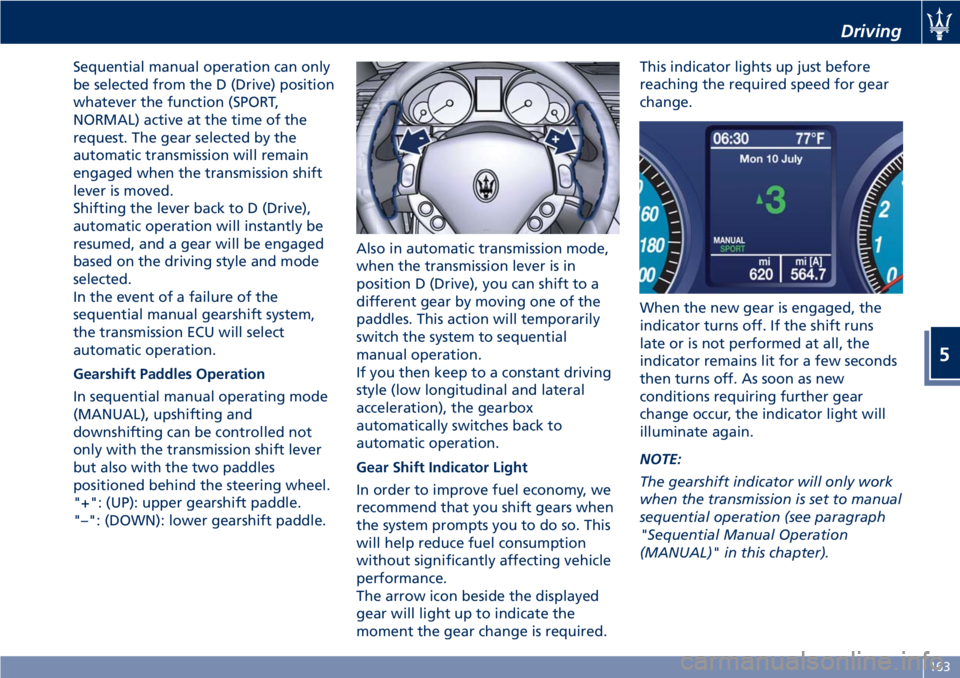
Gearshift Paddles Operation
In sequential manual operating mode
(MANUAL), upshifting and
downshifting can be controlled not
only with the transmission shift lever
but also with the two paddles
positioned behind the steering wheel.
"+": (UP): upper gearshift paddle.
"–": (DOWN): lower gearshift paddle. Also in automatic transmission mode,
when the transmission lever is in
position D (Drive), you can shift to a
different gear by moving one of the
paddles. This action will temporarily
switch the system to sequential
manual operation.
If you then keep to a constant driving
style (low longitudinal and lateral
acceleration), the gearbox
automatically switches back to
automatic operation.
Gear Shift Indicator Light
In order to improve fuel economy, we
recommend that you shift gears when
the system prompts you to do so. This
will help reduce fuel consumption
without significantly affecting vehicle
performance.
The arrow icon beside the displayed
gear will light up to indicate the
moment the gear change is required. This indicator lights up just before
reaching the required speed for gear
change.
When the new gear is engaged, the
indicator turns off. If the shift runs
late or is not performed at all, the
indicator remains lit for a few seconds
then turns off. As soon as new
conditions requiring further gear
change occur, the indicator light will
illuminate again.
NOTE:
The gearshift indicator will only work
when the transmission is set to manual
sequential operation (see paragraph
"Sequential Manual Operation
(MANUAL)" in this chapter). Driving
5
163