Stop MASERATI GRANTURISMO 2019 Owner's Guide
[x] Cancel search | Manufacturer: MASERATI, Model Year: 2019, Model line: GRANTURISMO, Model: MASERATI GRANTURISMO 2019Pages: 286, PDF Size: 8.08 MB
Page 127 of 286
for at least 2 seconds, it brings the
cursor back in the lower bar of the
main menus.
Enter Button
To confirm the function or setting
highlighted on MTC+ display. When in
"Radio" mode and the key in the
ignition switch in MAR (ON) position,
holding this button you can save your
preset stations.
With key not inserted in the ignition
switch or in STOP (OFF) position,
pressing and holding this button for
2-3 seconds will turn off the MTC+
system. If pressed again and held for
2-3 seconds, the MTC+ will turn back
on.
Main Menu Bar on MTC+
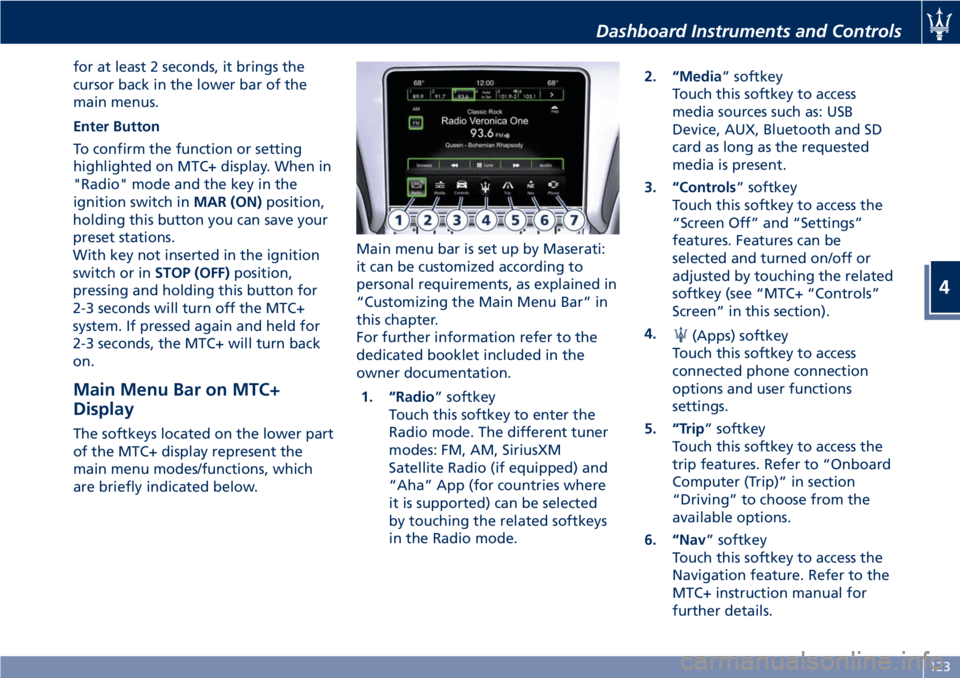
Display The softkeys located on the lower part
of the MTC+ display represent the
main menu modes/functions, which
are briefly indicated below. Main menu bar is set up by Maserati:
it can be customized according to
personal requirements, as explained in
“Customizing the Main Menu Bar” in
this chapter.
For further information refer to the
dedicated booklet included in the
owner documentation.
1. “Radio ” softkey
Touch this softkey to enter the
Radio mode. The different tuner
modes: FM, AM, SiriusXM
Satellite Radio (if equipped) and
“Aha” App (for countries where
it is supported) can be selected
by touching the related softkeys
in the Radio mode. 2. “Media ” softkey
Touch this softkey to access
media sources such as: USB
Device, AUX, Bluetooth and SD
card as long as the requested
media is present.
3. “Controls ” softkey
Touch this softkey to access the
“Screen Off” and “Settings”
features. Features can be
selected and turned on/off or
adjusted by touching the related
softkey (see “MTC+ “Controls”
Screen” in this section).
4.
(Apps) softkey
Touch this softkey to access
connected phone connection
options and user functions
settings.
5. “Trip ” softkey
Touch this softkey to access the
trip features. Refer to “Onboard
Computer (Trip)” in section
“Driving” to choose from the
available options.
6. “Nav ” softkey
Touch this softkey to access the
Navigation feature. Refer to the
MTC+ instruction manual for
further details.Dashboard Instruments and Controls
4
123
Page 139 of 286
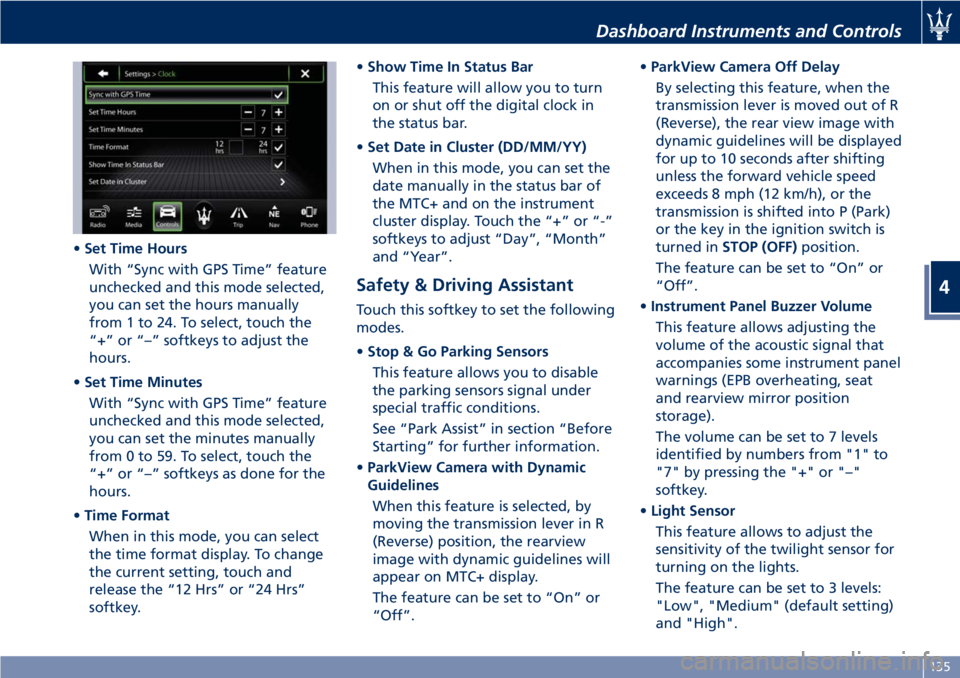
• Set Time Hours
With “Sync with GPS Time” feature
unchecked and this mode selected,
you can set the hours manually
from 1 to 24. To select, touch the
“+” or “–” softkeys to adjust the
hours.
• Set Time Minutes
With “Sync with GPS Time” feature
unchecked and this mode selected,
you can set the minutes manually
from 0 to 59. To select, touch the
“+” or “–” softkeys as done for the
hours.
• Time Format
When in this mode, you can select
the time format display. To change
the current setting, touch and
release the “12 Hrs” or “24 Hrs”
softkey. • Show Time In Status Bar
This feature will allow you to turn
on or shut off the digital clock in
the status bar.
• Set Date in Cluster (DD/MM/YY)
When in this mode, you can set the
date manually in the status bar of
the MTC+ and on the instrument
cluster display. Touch the “+” or “-”
softkeys to adjust “Day”, “Month”
and “Year”.
Safety & Driving Assistant Touch this softkey to set the following
modes.
• Stop & Go Parking Sensors
This feature allows you to disable
the parking sensors signal under
special traffic conditions.
See “Park Assist” in section “Before
Starting” for further information.
• ParkView Camera with Dynamic
Guidelines
When this feature is selected, by
moving the transmission lever in R
(Reverse) position, the rearview
image with dynamic guidelines will
appear on MTC+ display.
The feature can be set to “On” or
“Off”. • ParkView Camera Off Delay
By selecting this feature, when the
transmission lever is moved out of R
(Reverse), the rear view image with
dynamic guidelines will be displayed
for up to 10 seconds after shifting
unless the forward vehicle speed
exceeds 8 mph (12 km/h), or the
transmission is shifted into P (Park)
or the key in the ignition switch is
turned in STOP (OFF) position.
The feature can be set to “On” or
“Off”.
• Instrument Panel Buzzer Volume
This feature allows adjusting the
volume of the acoustic signal that
accompanies some instrument panel
warnings (EPB overheating, seat
and rearview mirror position
storage).
The volume can be set to 7 levels
identified by numbers from "1" to
"7" by pressing the "+" or "–"
softkey.
• Light Sensor
This feature allows to adjust the
sensitivity of the twilight sensor for
turning on the lights.
The feature can be set to 3 levels:
"Low", "Medium" (default setting)
and "High".Dashboard Instruments and Controls
4
135
Page 146 of 286
• left-hand/right-hand vent air
distribution;
• fan speed (stepless change);
• compressor activation;
• air recirculation.
All the functions listed above can be
modified manually, i.e. the user can
select one or more of these functions
as desired, using the control panel.
The manual selections always have
priority over the automatic ones and
are memorized until the user chooses
the automatic control again.
When a function has been set
manually, the other automatic
functions will not be affected.
The following parameters/functions
can be set/modified manually:
• left-hand/right-hand side air
temperature;
• fan speed;
• air distribution on 7 positions
(left-hand/ right-hand);
• compressor activation;
• single/dual-zone distribution priority;
• defrosting/defogging function (MAX
DEF);
• air recirculation;
• automatic/manual control of the
system;
• heated rear window; • system deactivation;
• opening/closing of air duct leading
to rear vents.
Activation
The system can be started up in a
number of ways. It is however
advisable to begin by pressing one of
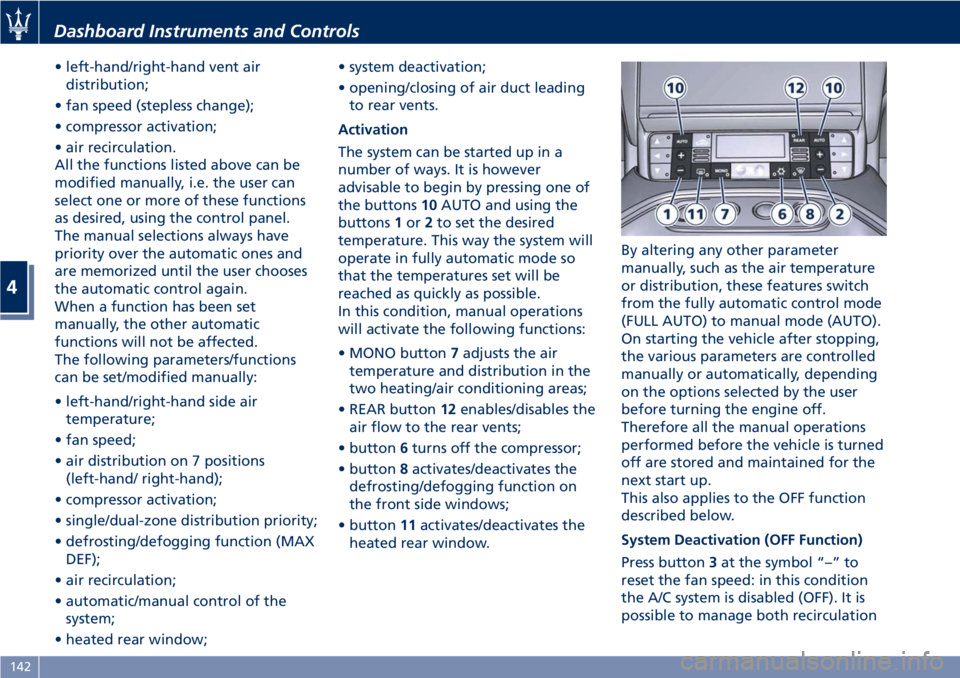
the buttons 10 AUTO and using the
buttons 1 or 2 to set the desired
temperature. This way the system will
operate in fully automatic mode so
that the temperatures set will be
reached as quickly as possible.
In this condition, manual operations
will activate the following functions:
• MONO button 7 adjusts the air
temperature and distribution in the
two heating/air conditioning areas;
• REAR button 12 enables/disables the
air flow to the rear vents;
• button 6 turns off the compressor;
• button 8 activates/deactivates the
defrosting/defogging function on
the front side windows;
• button 11 activates/deactivates the
heated rear window. By altering any other parameter
manually, such as the air temperature
or distribution, these features switch
from the fully automatic control mode
(FULL AUTO) to manual mode (AUTO).
On starting the vehicle after stopping,
the various parameters are controlled
manually or automatically, depending
on the options selected by the user
before turning the engine off.
Therefore all the manual operations
performed before the vehicle is turned
off are stored and maintained for the
next start up.
This also applies to the OFF function
described below.
System Deactivation (OFF Function)
Press button 3 at the symbol “–” to
reset the fan speed: in this condition
the A/C system is disabled (OFF). It is
possible to manage both recirculationDashboard Instruments and Controls
4
142
Page 152 of 286
Normal Starting of the
Engine WARNING!
It is dangerous to run the engine in an
enclosed area. The engine consumes
oxygen and discharges carbon
dioxide, carbon monoxide and other
toxic gases in the atmosphere.
WARNING!
California Proposition 65
Operating, servicing and maintaining
a passenger vehicle or off-road vehicle
can expose you to chemicals including
such as, engine exhaust, carbon
monoxide, phthalates and lead, that
which are know to the State of
California to cause cancer and birth
defects or other reproductive harm. To
minimize exposure, avoid breathing
exhaust, do not idle the engine except
as necessary, service your vehicle in a
well-ventilated area and wear gloves
or wash your hands frequently when
servicing your vehicle. For more
information go to: www.P65Warnings.ca.gov/passenger-
vehicle
When you open a door to get into the
car
, the instrument cluster turns on.
The TFT displays the complete
odometer, time, outside temperature
and the
open doors indicator.
Before starting the engine, close the
doors, adjust your seat, the inside and
outside mirrors, fasten your seat belt
and instruct all other occupants to
buckle their seat belts.
Make sure that the Electric Parking
Brake (EPB) is applied.
The shift lever must be in P (Park) or N
(Neutral) position before you can start
the engine. Apply the brakes before
shifting into any driving gear (see
“Automatic Transmission” in this
section).
CAUTION!
• Before starting the engine, switch off
the electrical devices with a high
power consumption (air-conditioning
and heating system, heated rear
window, headlights, etc.).
• Do not start the engine if the fuel
level in the tank is low. Press the brake pedal and turn the key
in
the ignition switch to MAR (ON)
position.
Instrument cluster displays the initial
sequence with warning light and
analog instruments test routine.
Turn the key into AVV position and
release it when the engine starts. The
key will return to MAR (ON) position
automatically.
Do not hold the key in AVV position
for a long time.
If the engine fails to start, the starter
will disengage automatically after 10
seconds. If you wish to stop the
cranking of the engine prior to
starting it, turn the key to STOP (OFF)
position.
If the engine does not start, turn the
key to STOP (OFF) position and wait
for the gear display to go off. Then
repeat the entire procedure.
NOTE:
Normal starting of either a cold or a
warm engine is obtained without
pumping or pressing the accelerator
pedal.Driving
5
148
Page 153 of 286
Engine Start Failure CAUTION!
• Do not attempt to push or tow your
vehicle to get it started. Vehicles
equipped with an automatic
transmission cannot be started this
way.
• If the vehicle battery is dead, booster
cables may be used to obtain a start
from a booster battery or the
battery in another vehicle. This type
of start can be dangerous if done
improperly. See “Auxiliary Jump
Start Procedure” in section “In an
Emergency” for further information.
Starting by cold engine
Start-of
f slowly, avoiding sudden
acceleration and rev the engine up at
low medium speeds. High-
performance driving should be
avoided until the engine temperature
reaches 65-70°C (149-158°F).
Engine Turn-Off • Place the shift lever in P (Park) (see
“Automatic Transmission” in this
section).
• With the engine at idle, turn the key
in the ignition switch to STOP (OFF) position. A burst on the accelerator
pedal before turning off the engine
has no purpose and increases fuel
consumption.
WARNING!
Never leave a vehicle out of the P
(Park) position, as it could move.
The key can only be removed from the
ignition
switch when the transmission
is in P (Park) position and within 30
seconds after turning the key to STOP
(OFF) position. If you do not remove
the key within 30 seconds, you will
need to turn it back to MAR (ON) and
then to STOP (OFF) position to have a
further 30 seconds within which to
remove the key from the ignition
switch.
In the event that the key unlocking
system fails or if it is not possible to
shift the transmission to P (Park)
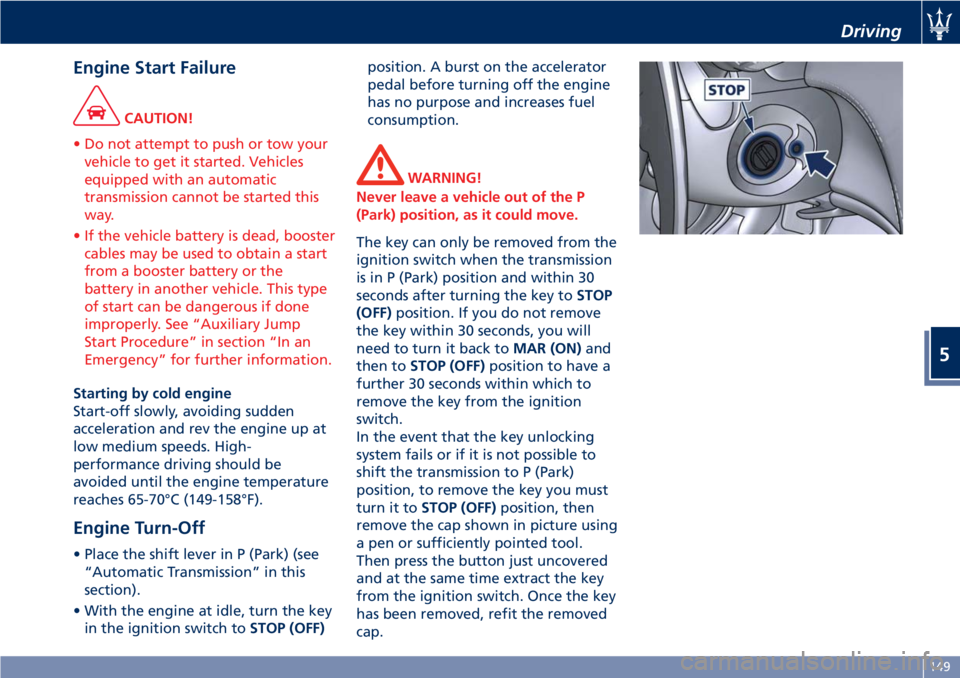
position, to remove the key you must
turn it to STOP (OFF) position, then
remove the cap shown in picture using
a pen or sufficiently pointed tool.
Then press the button just uncovered
and at the same time extract the key
from the ignition switch. Once the key
has been removed, refit the removed
cap. Driving
5
149
Page 154 of 286
Automatic Transmission The electronic shift lever replaces the
conventional mechanical lever and has
no mechanical connection to the
transmission. The transmission is
operated by electrical actuators on the
hydraulic system and all commands to
the control system are transmitted by
the CAN network.
The automatic transmission has six
forward gear ratios and one reverse
gear. The gears can also be engaged
manually once you have shifted the
transmission shift lever to the sector
provided.
CAUTION!
In order to properly use the automatic
transmission, it is essential that you
read through the whole chapter, so
that you can understand right from
the start what the correct and
permitted operations are.
Damage to the transmission may occur
if the following precautions are not
observed:
• Shift into P (Park) only after the
vehicle has come to a complete stop.
This is the default position of the
lever and should be used every time the key in the ignition switch is
turned to STOP (OFF) position.
• Shift into or out of R (Reverse) only
after the vehicle has come to a
complete stop and the engine is at
idle speed.
• Do not shift between P (Park), R
(Reverse), N (Neutral) or D (Drive)
when the engine is above idle speed.
• To effect any change from vehicle
stop to R (Reverse), D (Drive), 1 st
or
2 nd
gear, it is necessary to keep the
brake pedal fully depressed.
WARNING!
• It is dangerous to move the shift
lever out of P (Park) or N (Neutral) if
the engine speed is higher than idle
speed. Only shift into gear when the
engine is idling normally and when
your foot is firmly pressing on the
brake pedal.
• As with all vehicles, you should
never exit a vehicle while the engine
is running. Before exiting a vehicle,
always apply the electronic parking
brake, shift the transmission into P
(Park), and turn the engine off.
• When leaving the vehicle, always
remove the key from the ignition switch and lock your vehicle.
• Do not leave the key in or near the
vehicle.
The transmission system is equipped
with
"Shift-Lock" and "Key-Lock"
safety functions.
Shift-Lock
This safety function allows you to shift
from P (Park) to another position only
if the brake pedal is depressed. This
prevents the vehicle from involuntarily
jumping forward or backward.
Key-Lock
This function allows you to remove the
key from the ignition switch only
when the transmission shift lever is in
P (Park) position and within a
maximum time of 30 seconds. When
this time has elapsed, the key can no
longer be removed.
Automatic Transmission Lever Automatic transmission is operated by
a lever with unlock button to engage
R (Reverse) and P (Park) located on the
central console.
By using the transmission shift lever it
is possible to select following
positions, indicated on the gear display
at the side of the transmission shiftDriving
5
150
Page 156 of 286
(Continued)
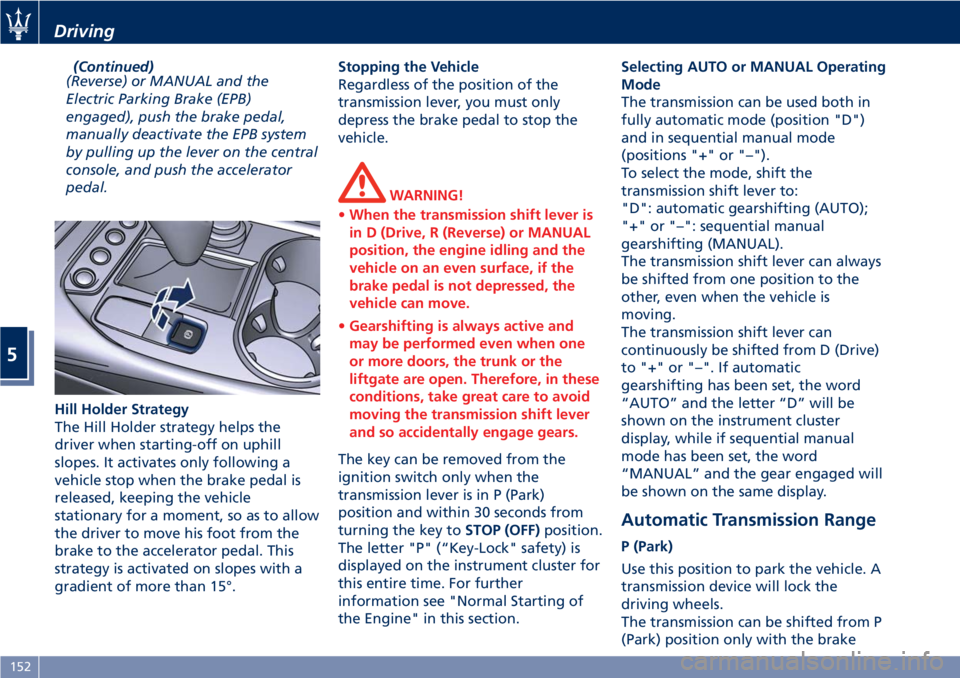
(Reverse) or MANUAL and the
Electric Parking Brake (EPB)
engaged), push the brake pedal,
manually deactivate the EPB system
by pulling up the lever on the central
console, and push the accelerator
pedal.
Hill Holder Strategy
The Hill Holder strategy helps the
driver when starting-off on uphill
slopes. It activates only following a
vehicle stop when the brake pedal is
released, keeping the vehicle
stationary for a moment, so as to allow
the driver to move his foot from the
brake to the accelerator pedal. This
strategy is activated on slopes with a
gradient of more than 15°. Stopping the Vehicle
Regardless of the position of the
transmission lever, you must only
depress the brake pedal to stop the
vehicle.
WARNING!
• When the transmission shift lever is
in D (Drive, R (Reverse) or MANUAL
position, the engine idling and the
vehicle on an even surface, if the
brake pedal is not depressed, the
vehicle can move.
• Gearshifting is always active and
may be performed even when one
or more doors, the trunk or the
liftgate are open. Therefore, in these
conditions, take great care to avoid
moving the transmission shift lever
and so accidentally engage gears.
The key can be removed from the
ignition
switch only when the
transmission lever is in P (Park)
position and within 30 seconds from
turning the key to STOP (OFF) position.
The letter "P" (“Key-Lock" safety) is
displayed on the instrument cluster for
this entire time. For further
information see "Normal Starting of
the Engine" in this section. Selecting AUTO or MANUAL Operating
Mode
The transmission can be used both in
fully automatic mode (position "D")
and in sequential manual mode
(positions "+" or "–").
To select the mode, shift the
transmission shift lever to:
"D": automatic gearshifting (AUTO);
"+" or "–": sequential manual
gearshifting (MANUAL).
The transmission shift lever can always
be shifted from one position to the
other, even when the vehicle is
moving.
The transmission shift lever can
continuously be shifted from D (Drive)
to "+" or "–". If automatic
gearshifting has been set, the word
“AUTO” and the letter “D” will be
shown on the instrument cluster
display, while if sequential manual
mode has been set, the word
“MANUAL” and the gear engaged will
be shown on the same display.
Automatic Transmission Range P (Park)
Use this position to park the vehicle. A
transmission device will lock the
driving wheels.
The transmission can be shifted from P
(Park) position only with the brakeDriving
5
152
Page 157 of 286
pedal pressed. To move the shift lever
from P (Park) position to any other
position, the engine must be switched
on. The engine can be regularly
started in P (Park) range. Never
attempt to use P (Park) while the
vehicle is in motion.
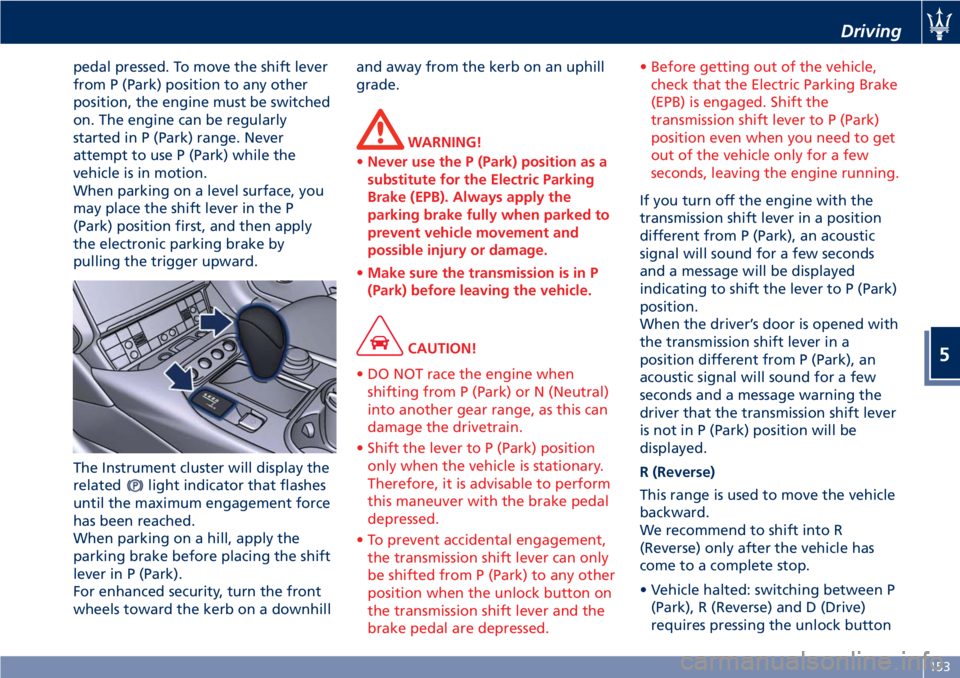
When parking on a level surface, you
may place the shift lever in the P
(Park) position first, and then apply
the electronic parking brake by
pulling the trigger upward.
The Instrument cluster will display the
related
light indicator that flashes
until the maximum engagement force
has been reached.
When parking on a hill, apply the
parking brake before placing the shift
lever in P (Park).
For enhanced security, turn the front
wheels toward the kerb on a downhill and away from the kerb on an uphill
grade.
WARNING!
• Never use the P (Park) position as a
substitute for the Electric Parking
Brake (EPB). Always apply the
parking brake fully when parked to
prevent vehicle movement and
possible injury or damage.
• Make sure the transmission is in P
(Park) before leaving the vehicle.
CAUTION!
• DO NOT race the engine when
shifting from P (Park) or N (Neutral)
into another gear range, as this can
damage the drivetrain.
• Shift the lever to P (Park) position
only when the vehicle is stationary.
Therefore, it is advisable to perform
this maneuver with the brake pedal
depressed.
• To prevent accidental engagement,
the transmission shift lever can only
be shifted from P (Park) to any other
position when the unlock button on
the transmission shift lever and the
brake pedal are depressed. • Before getting out of the vehicle,
check that the Electric Parking Brake
(EPB) is engaged. Shift the
transmission shift lever to P (Park)
position even when you need to get
out of the vehicle only for a few
seconds, leaving the engine running.
If you turn off the engine with the
transmission
shift lever in a position
different from P (Park), an acoustic
signal will sound for a few seconds
and a message will be displayed
indicating to shift the lever to P (Park)
position.
When the driver’s door is opened with
the transmission shift lever in a
position different from P (Park), an
acoustic signal will sound for a few
seconds and a message warning the
driver that the transmission shift lever
is not in P (Park) position will be
displayed.
R (Reverse)
This range is used to move the vehicle
backward.
We recommend to shift into R
(Reverse) only after the vehicle has
come to a complete stop.
• Vehicle halted: switching between P
(Park), R (Reverse) and D (Drive)
requires pressing the unlock button Driving
5
153
Page 160 of 286
the efficiency of engine braking
together with the standard braking
system.
ESC System Operations
In order to prevent unstable driving
conditions, the ESC system may request
the transmission system to deactivate
gearshifting. The system handles this
request depending on the gear
engaged and on the rpm, and decides
whether to accept it or not.
Driving with Cruise Control
With the Cruise Control function
activated, the transmission system
selects such settings as to provide
enhanced comfort and fuel-economy.
MC Start Strategy (for MC version
only)
With the aim of optimizing standing
starts for performance driving (only
recommended for use in areas closed
to traffic and in accordance with the
Highway Code), the automatic
transmission system is equipped with
quick start strategy.
This strategy is activated when the
following conditions occur
simultaneously:
• AUTO and SPORT modes active;
•
ESC mode off;
• brake pedal depressed. In these conditions, the driver has the
possibility to accelerate and, keeping
the brake pedal depressed, keep the
vehicle standing until reaching an
engine speed between 2300 an 2500
rpm. Then, upon releasing the brake
pedal, have the best standing start
performance.
WARNING!
This strategy must only be used on
vehicles in areas closed to traffic, in
accordance with the Highway Code
and only by skilled drivers.
Transmission Malfunction and
Overheating Conditions Transmission Failure
Transmission function is electronically
monitored to detect abnormal
conditions. If a condition that could
result in transmission damage is
detected, Transmission Limp Home
Mode will be activated. In this
situation, the transmission may
operate only in certain gears, or may
not shift at all.
CAUTION!
In these conditions, we recommended that you stop the vehicle and turn off
the engine for at least one minute.
When restarting the engine, the
self-diagnosis system may cancel the
malfunction, which will in any case be
recorded by the ECU.
A message and the
warning light
in the instrument cluster will inform
the driver about the transmission
failure.
In failure conditions, the transmission
shift lever can however be shifted to R
(Reverse), N (Neutral) and D (Drive)
position.
When shifting to D (Drive) position,
only a few gears will be available,
depending on the malfunction found.
CAUTION!
If a transmission failure is signaled,
take your vehicle to the nearest
Authorized Maserati Dealer as soon as
possible to have the problem
corrected.
If the failure is signaled when the
engine
is started, it means that the
transmission ECU detected a fault
when the vehicle was last used. Also in
this case, take your vehicle to the
nearest Center of the AuthorizedDriving
5
156
Page 161 of 286
Maserati Dealer to have the
transmission checked.
WARNING!
When the transmission is
malfunctioning, drive very carefully
considering that vehicle performance
is reduced. In addition, the reverse
gear safety lock may not be active:
absolutely do not shift the lever to R
(Reverse) when the vehicle is moving.
Transmission Oil Overtemperature
If
the transmission oil temperature
exceeds the operating limit, a message
and the
red warning light
illuminates on the instrument cluster.
In this case, slow down until
temperature returns to normal level
(the light will turn off).
If this is not sufficient, we recommend
to stop the vehicle, shift the lever to
position P (Park) or N (Neutral) and
keep the engine idle until the
red
temperature warning light turns off
and the message disappears from the
display. Resume driving without
demanding high engine performance.
If the
red warning light and the
related message turns on again, it is
advisable to stop the vehicle, turn off
the engine and wait for the engine/transmission assembly to fully
cool down.
Transmission Manual Release of P
(Park) Position
See chapter “Transmission Manual
Release of P (Park) Position” in section
“In an Emergency”.
Onboard Computer (Trip) The trip computer screen pages are
accessible through the “Trip” softkey
in the lower bar of the MTC+ main
menus.
The selectable submenus are the
following:
• Current Trip.
• Trip A.
• Trip B.
• Service.
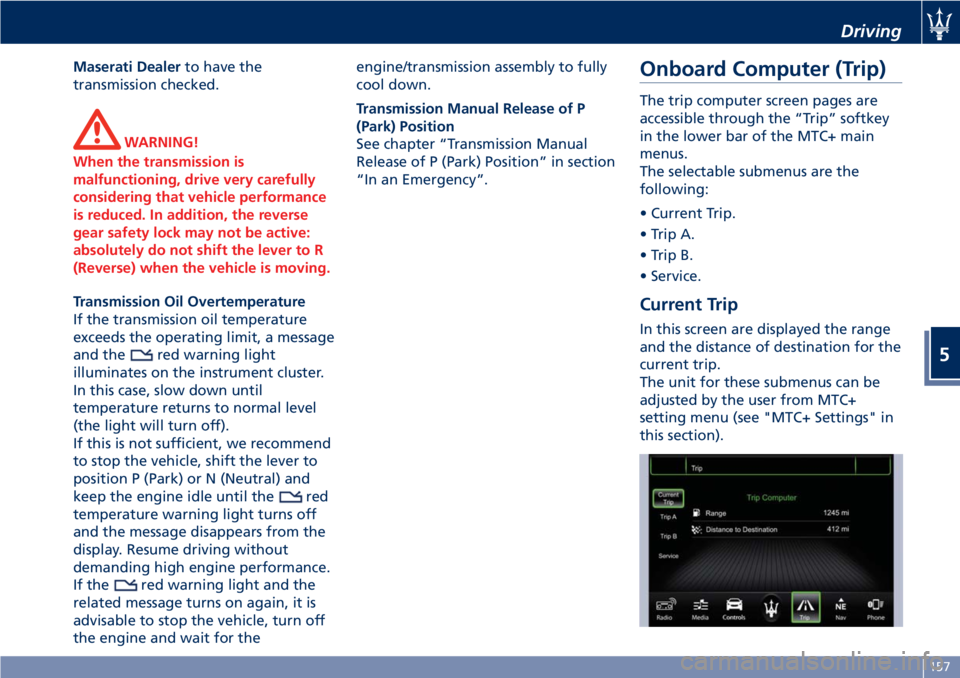
Current Trip In this screen are displayed the range
and the distance of destination for the
current trip.
The unit for these submenus can be
adjusted by the user from MTC+
setting menu (see "MTC+ Settings" in
this section). Driving
5
157