warning MASERATI GRANTURISMO 2019 Workshop Manual
[x] Cancel search | Manufacturer: MASERATI, Model Year: 2019, Model line: GRANTURISMO, Model: MASERATI GRANTURISMO 2019Pages: 286, PDF Size: 8.08 MB
Page 71 of 286
• Never place or install floor mats or
other floor coverings in the vehicle
that cannot be properly secured to
prevent them from moving and
interfering with the pedals.
• Never put floor mats or other floor
coverings on top of already installed
floor mats. Additional floor mats
and other coverings will reduce the
size of the pedal area and interfere
with the pedals.
• Check mounting of mats on a
regular basis. Always properly
reinstall and secure floor mats that
have been removed for cleaning.
• Always make sure that objects
cannot fall into the driver footwell
while the vehicle is moving. Objects
can become trapped under the
brake pedal and accelerator pedal
causing a loss of vehicle control.
• Mounting posts must be properly
installed, if not equipped from the
factory. Failure to properly follow
floor mat installation or mounting
can cause interference with the
brake pedal and accelerator pedal
operation causing loss of control of
the vehicle. Tires
•
Examine tires for excessive tread
wear and uneven wear patterns.
• Check for stones, nails, glass, or
other objects lodged in the tread or
sidewall.
• Inspect the tread for cuts and cracks.
• Inspect sidewalls for cuts, cracks and
bulges.
• Check the wheel nuts for tightness.
• Check the tires (see “Tire Inflation
Pressure” chapter in section
“Features and Specifications”) for
proper cold inflation pressure.
Lights and Indicator Lights
• Have someone observe the
operation of exterior lights while
you operate the controls (see
“Lights” chapter in section
“Understanding the Vehicle”).
• Check turn signal and high beam
indicator lights on the instrument
cluster (see “Instrument Cluster”
chapter in section “Dashboard
Instruments and Controls”).
Door Latches
• Check for positive closing, latching,
and locking of doors and trunk lid
(see chapter “Doors” and “Open and
Close the Trunk Lid” in this section). Fluid Leaks
• Check area under vehicle after
overnight parking for recent fluid
leaks (oil, fuel, etc.).
• If gasoline fumes are detected or
fluid leaks are suspected, contact an
Authorized Maserati Dealer .
WARNING!
California Proposition 65
Operating, servicing and maintaining
a passenger vehicle or off-road vehicle
can expose you to chemicals including
such as, engine exhaust, carbon
monoxide, phthalates and lead, that
which are know to the State of
California to cause cancer and birth
defects or other reproductive harm. To
minimize exposure, avoid breathing
exhaust, do not idle the engine except
as necessary, service your vehicle in a
well-ventilated area and wear gloves
or wash your hands frequently when
servicing your vehicle. For more
information go to:
www.P65Warnings.ca.gov/passenger-
vehicleBefore Starting
2
67
Page 78 of 286
Front Seats Seats and seat belts are part of the
Occupant Restraint System of the
vehicle. For further information, see
chapter “Occupant Restraint System”
in Section “Before Starting”.
WARNING!
Be sure everyone in your vehicle is in a
seat and using a seat belt properly.
Seat Adjustments The seats can only be adjusted with
the key in the ignition switch in MAR
(ON) position.
It is however possible, when the door
is closed, to operate the seat for
approx. 15 seconds after turning the
key to STOP (OFF) position and then
for other 15 seconds after the last
operation.
The power seats switches are located
on the outboard side of the seat
cushion.
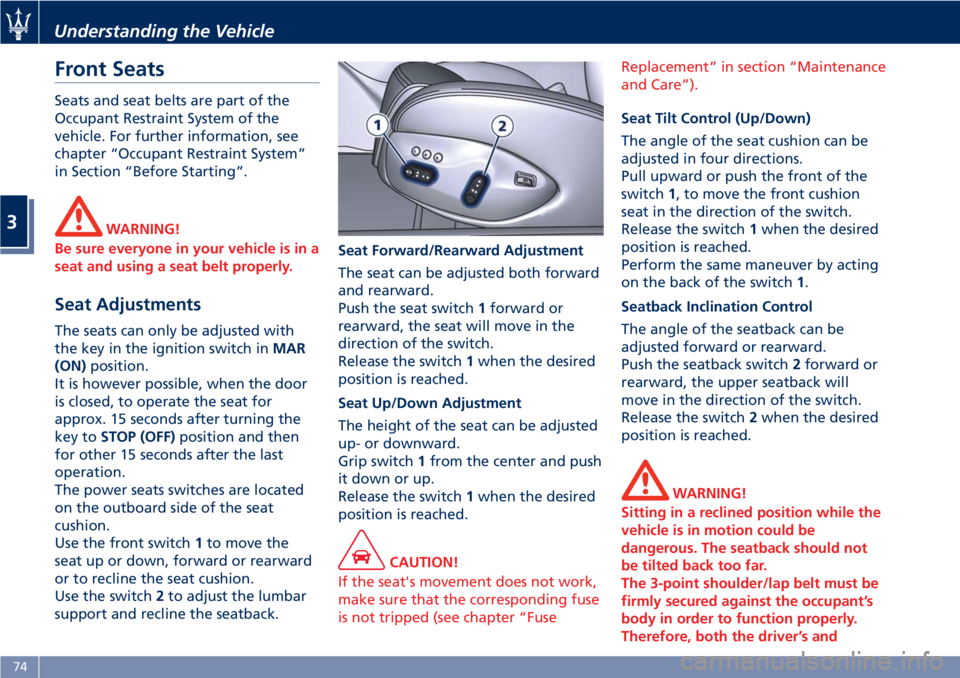
Use the front switch 1 to move the
seat up or down, forward or rearward
or to recline the seat cushion.
Use the switch 2 to adjust the lumbar
support and recline the seatback. Seat Forward/Rearward Adjustment
The seat can be adjusted both forward
and rearward.
Push the seat switch 1 forward or
rearward, the seat will move in the
direction of the switch.
Release the switch 1 when the desired
position is reached.
Seat Up/Down Adjustment
The height of the seat can be adjusted
up- or downward.
Grip switch 1 from the center and push
it down or up.
Release the switch 1 when the desired
position is reached.
CAUTION!
If the seat's movement does not work,
make sure that the corresponding fuse
is not tripped (see chapter “Fuse Replacement” in section “Maintenance
and Care”).
Seat Tilt Control (Up/Down)
The
angle of the seat cushion can be
adjusted in four directions.
Pull upward or push the front of the
switch 1 , to move the front cushion
seat in the direction of the switch.
Release the switch 1 when the desired
position is reached.
Perform the same maneuver by acting
on the back of the switch 1 .
Seatback Inclination Control
The angle of the seatback can be
adjusted forward or rearward.
Push the seatback switch 2 forward or
rearward, the upper seatback will
move in the direction of the switch.
Release the switch 2 when the desired
position is reached.
WARNING!
Sitting in a reclined position while the
vehicle is in motion could be
dangerous. The seatback should not
be tilted back too far.
The 3-point shoulder/lap belt must be
firmly secured against the occupant’s
body in order to function properly.
Therefore, both the driver’s andUnderstanding the Vehicle
3
74
Page 79 of 286
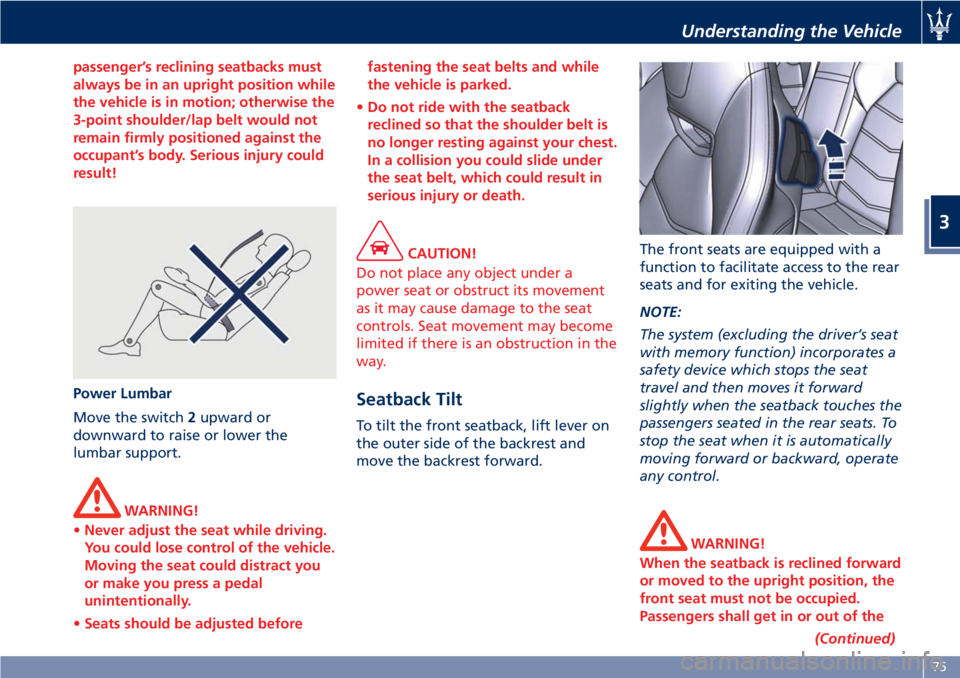
passenger’s reclining seatbacks must
always be in an upright position while
the vehicle is in motion; otherwise the
3-point shoulder/lap belt would not
remain firmly positioned against the
occupant’s body. Serious injury could
result!
Power Lumbar
Move
the switch 2 upward or
downward to raise or lower the
lumbar support.
WARNING!
• Never adjust the seat while driving.
You could lose control of the vehicle.
Moving the seat could distract you
or make you press a pedal
unintentionally.
• Seats should be adjusted before fastening the seat belts and while
the vehicle is parked.
• Do not ride with the seatback
reclined so that the shoulder belt is
no longer resting against your chest.
In a collision you could slide under
the seat belt, which could result in
serious injury or death.
CAUTION!
Do not place any object under a
power seat or obstruct its movement
as it may cause damage to the seat
controls. Seat movement may become
limited if there is an obstruction in the
way.
Seatback Tilt To tilt the front seatback, lift lever on
the outer side of the backrest and
move the backrest forward. The front seats are equipped with a
function to facilitate access to the rear
seats and for exiting the vehicle.
NOTE:
The system (excluding the driver’s seat
with memory function) incorporates a
safety device which stops the seat
travel and then moves it forward
slightly when the seatback touches the
passengers seated in the rear seats. To
stop the seat when it is automatically
moving forward or backward, operate
any control.
WARNING!
When the seatback is reclined forward
or moved to the upright position, the
front seat must not be occupied.
Passengers shall get in or out of the
(Continued)Understanding the Vehicle
3
75
Page 80 of 286
(Continued)
rear seats only when the front seat is
stopped. Make sure that passengers in
the rear seats (especially children) do
not touch the seat or any of it's
components when it's moving.
Comfort Pack Front Seats This includes:
• heating of the front seats;
• driver seat, steering wheel and
outside rearview mirrors memory
position (see paragraph "Driver
Memory Seat" in this chapter).
Front Heated Seats The front seats are equipped with
heaters in both seat cushions and
seatbacks.
WARNING!
• Persons with low skin sensitivity
because of advanced age, chronic
illness, diabetes, spinal cord injury,
medication, alcohol use, exhaustion
or other physical conditions must be
careful when using the seat heater. It
may cause irritation even at low
temperatures, especially if used for
long periods of time.
• Do not place anything on the seat
that insulates against heat, such as a
blanket or cushion. This may cause
the seat heater to overheat. NOTE:
Seat
heating also works with engine
off and key in ignition switch in ACC
or MAR (ON) position. To avoid
discharging the battery, it is
recommended to activate the feature
with engine running.
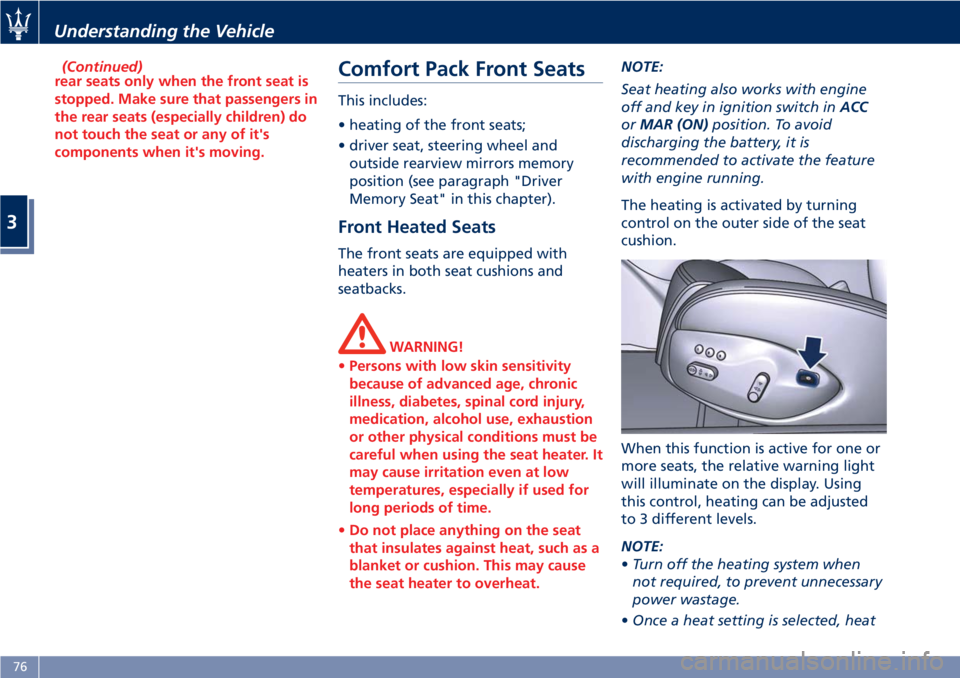
The heating is activated by turning
control on the outer side of the seat
cushion.
When this function is active for one or
more seats, the relative warning light
will illuminate on the display. Using
this control, heating can be adjusted
to 3 different levels.
NOTE:
• Turn off the heating system when
not required, to prevent unnecessary
power wastage.
• Once a heat setting is selected, heatUnderstanding the Vehicle
3
76
Page 82 of 286
To recall one of the stored positions
with the door open, press the relative
button “1”, “2” or “3” briefly.
To recall a stored position with the
door closed, press the corresponding
button until hearing a tone that
confirms the seat has stopped.
NOTE:
• To stop the seat, press one of the
buttons - “1”, “2” or “3” -, or one of
the adjustment controls.
• Malfunctioning of the seat control
unit is indicated by a sequence of 5
tones emitted when the key in the
ignition switch is turned to STOP
(OFF) position. Contact an
Authorized Maserati Dealer to have
the malfunction corrected.
Each system is independent of the
others and can be operated separately
using specific buttons for each seat.
System Initialization Procedure
Following any power cut-out (e.g.
after using the battery master switch
or dead battery), check the seats to
ensure that they are operating
properly when the power supply is
available.
Perform the following procedures on
both seats in the event of a
malfunction. The key in the ignition switch must be
in STOP (OFF) position and the door on
the side of the seat concerned closed.
Open the door and begin the
following procedure within 5 seconds,
then complete it within 10 seconds:
• forward - STOP;
• backward - STOP;
• forward - STOP;
• backward - STOP;
• tilt the seatback fully forward and
wait until the seat performs two
complete travels (forward and
backward);
• move the seatback to its normal
upright position.
NOTE:
If you need to disconnect the battery,
wait at least 30 seconds from the last
seat movement. If you disconnect the
battery before, you will have to run
the initialization procedure.
Seatback Facilitated Tilt
This function only active when the
door is open, moves the seat forward
automatically when the seatback is
reclined forward to facilitate access to
the rear seat or exiting the vehicle. The
seat returns to their original position
when the seatback is tilted back again. Rear Seats Rear seats can fit two passengers.
Seats and seat belts are parts of the
occupant restraint system of the
vehicle.
WARNING!
Be sure everyone in your vehicle is in a
seat and using a seat belt properly.
NOTE:
See
chapter “Occupants Restraint
Systems” in section “Before Starting”
for seat belt positioning.
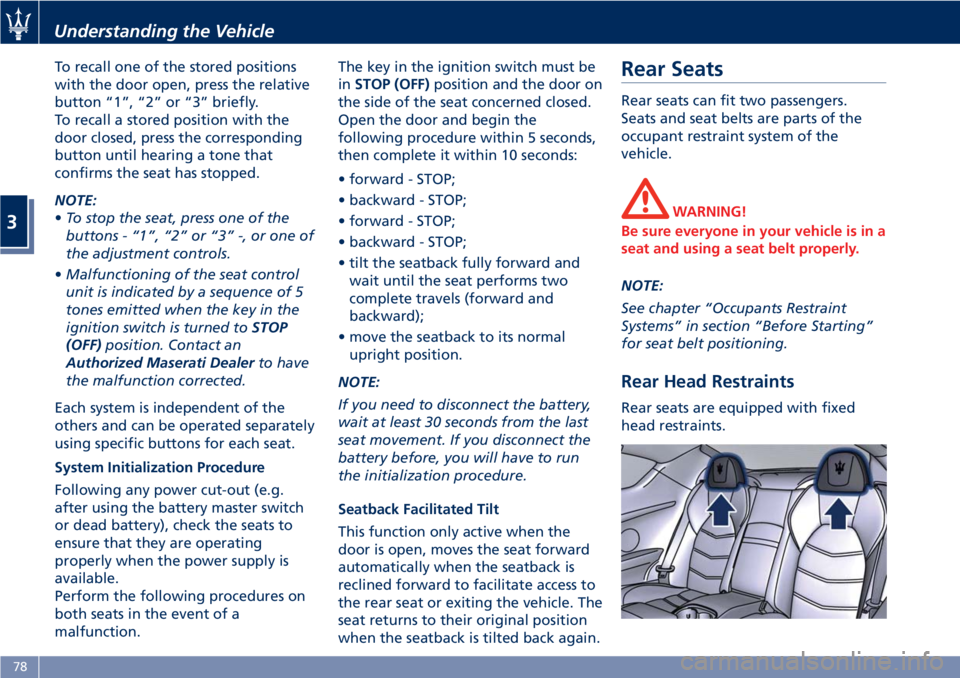
Rear Head Restraints Rear seats are equipped with fixed
head restraints.Understanding the Vehicle
3
78
Page 83 of 286
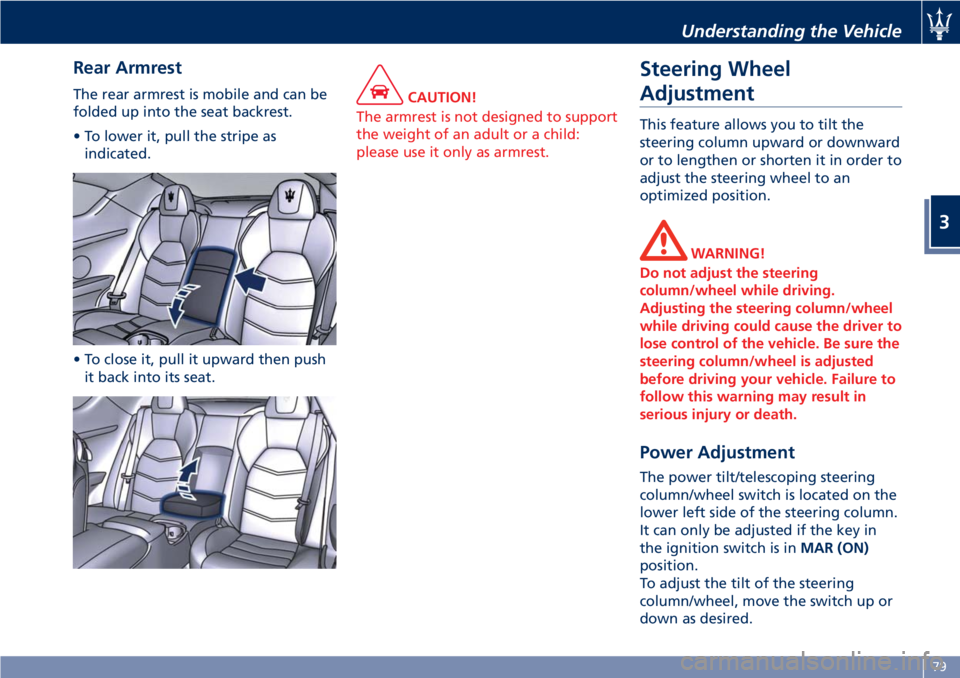
Rear Armrest The rear armrest is mobile and can be
folded up into the seat backrest.
• To lower it, pull the stripe as
indicated.
• To close it, pull it upward then push
it back into its seat. CAUTION!
The armrest is not designed to support
the weight of an adult or a child:
please use it only as armrest.
Steering Wheel
Adjustment This feature allows you to tilt the
steering column upward or downward
or to lengthen or shorten it in order to
adjust the steering wheel to an
optimized position.
WARNING!
Do not adjust the steering
column/wheel while driving.
Adjusting the steering column/wheel
while driving could cause the driver to
lose control of the vehicle. Be sure the
steering column/wheel is adjusted
before driving your vehicle. Failure to
follow this warning may result in
serious injury or death.
Power Adjustment The power tilt/telescoping steering
column/wheel switch is located on the
lower left side of the steering column.
It can only be adjusted if the key in
the ignition switch is in MAR (ON)
position.
To adjust the tilt of the steering
column/wheel, move the switch up or
down as desired.Understanding the Vehicle
3
79
Page 85 of 286
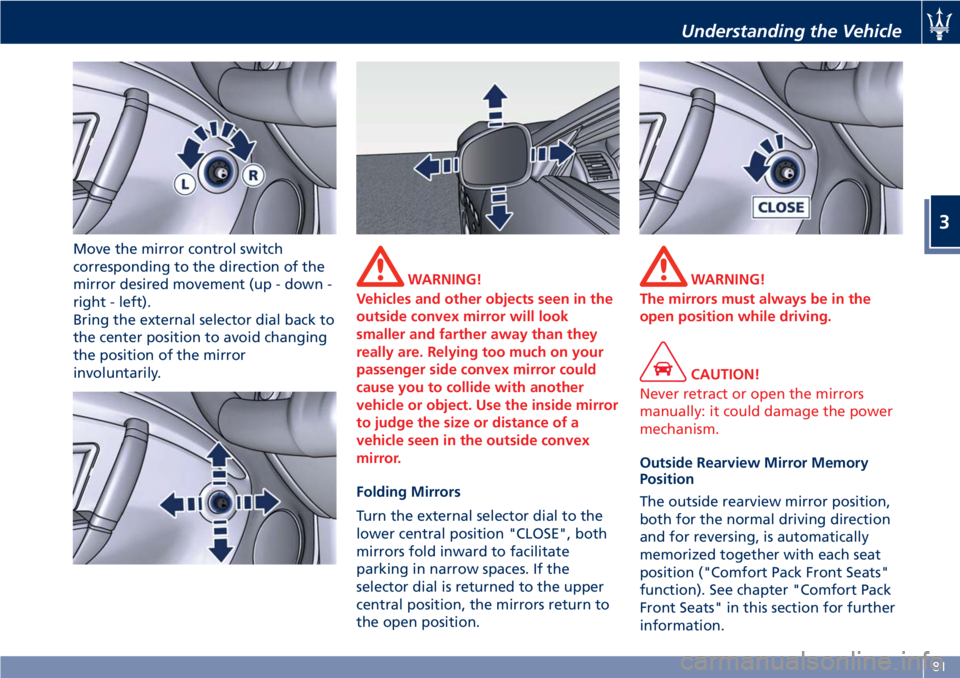
Move the mirror control switch
corresponding to the direction of the
mirror desired movement (up - down -
right - left).
Bring the external selector dial back to
the center position to avoid changing
the position of the mirror
involuntarily. WARNING!
Vehicles and other objects seen in the
outside convex mirror will look
smaller and farther away than they
really are. Relying too much on your
passenger side convex mirror could
cause you to collide with another
vehicle or object. Use the inside mirror
to judge the size or distance of a
vehicle seen in the outside convex
mirror.
Folding Mirrors
T
urn the external selector dial to the
lower central position "CLOSE", both
mirrors fold inward to facilitate
parking in narrow spaces. If the
selector dial is returned to the upper
central position, the mirrors return to
the open position. WARNING!
The mirrors must always be in the
open position while driving.
CAUTION!
Never retract or open the mirrors
manually: it could damage the power
mechanism.
Outside Rearview Mirror Memory
Position
The
outside rearview mirror position,
both for the normal driving direction
and for reversing, is automatically
memorized together with each seat
position ("Comfort Pack Front Seats"
function). See chapter "Comfort Pack
Front Seats" in this section for further
information.Understanding the Vehicle
3
81
Page 89 of 286
The electric arc requires very high
voltage for activation, but afterward
power is supplied at a lower voltage.
The headlights reach maximum
brightness about 0,5 seconds after
being turned on.
The strong light produced by this type
of headlight requires the use of an
automatic system to keep the position
of the headlights constant and to
prevent dazzling approaching cars, in
the case of braking, acceleration or
load transport.
WARNING!
If xenon headlamp replacement is
necessary, contact the Authorized
Maserati Dealer only: DANGER - RISK
OF ELECTRICAL SHOCK.
Parking Lights The parking lights only work with the
key in the ignition switch turned to
STOP (OFF) or ACC position, or with
the key removed.
They are activated by turning the light
switch to
position.
It is harder to turn the switch to
position than to the other
positions. This is to avoid activating the parking lights unintentionally and
wasting power.
When the parking lights are on, the
warning light on the instrument
cluster illuminates.
With parking lights on, move down
left-hand multifunction lever to switch
on position lights on left-hand side,
and move it up to switch on only the
ones on right-hand side.
Automatic Headlights When the light switch is turned to
"AUTO" position and the key in the
ignition switch is in MAR (ON)
position, the position lights, low beam
lights and license plate lights turn on
and off automatically, depending on
the light outside.
NOTE:
The high beams can only be turned on
manually by pushing the left-hand
multifunction lever forward.
WARNING!
• If the low beams are activated, they
will come on automatically every
time the lights are turned on. You
are therefore advised to turn off the
high beams every time the twilight sensor deactivates the external
lights.
• In case of fog during the day,
position lights and low beam lights
are not turned on automatically. The
driver must always be ready to turn
the lights on manually, including
rear fog lights, if necessary.
• The driver is always responsible for
turning on the external lights,
depending on the light outside and
in compliance with the applicable
legislation in the country of use. The
automatic system for activating/
deactivating the external lights must
be considered an aid for the driver.
If necessary, turn the lights on and
off manually.
NOTE:
After
external lights turn on
automatically, driver can always
manually turn on rear fog lights.
When external lights turn off
automatically, rear fog lights will turn
off automatically too, if on. Upon the
following automatic switch-on driver
must manually turn on rear fog lights,
if necessary.Understanding the Vehicle
3
85
Page 90 of 286
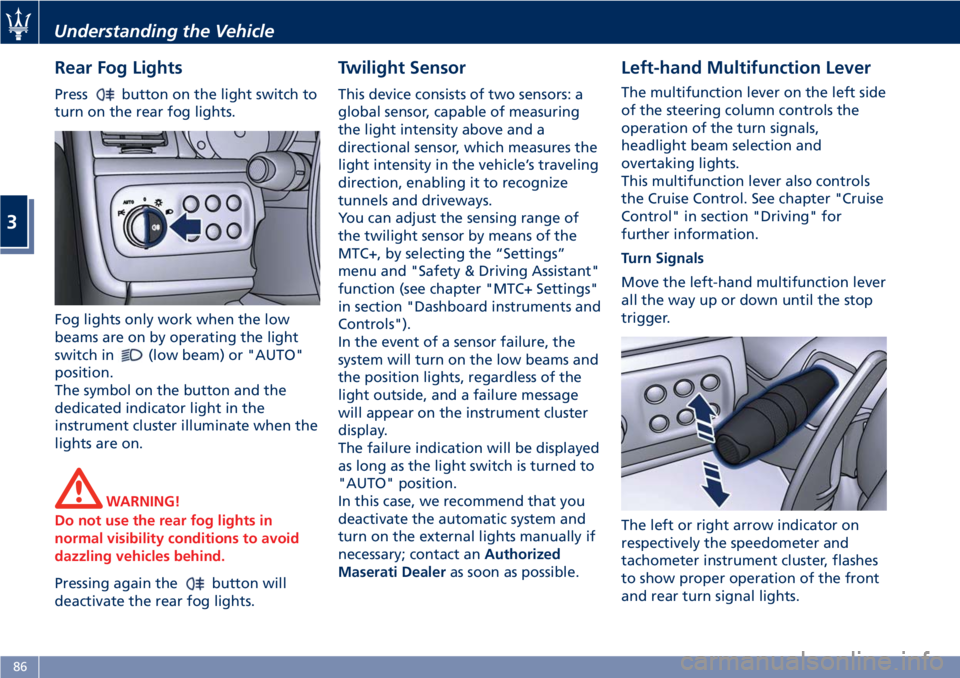
Rear Fog Lights Press button on the light switch to
turn on the rear fog lights.
Fog lights only work when the low
beams are on by operating the light
switch in
(low beam) or "AUTO"
position.
The symbol on the button and the
dedicated indicator light in the
instrument cluster illuminate when the
lights are on.
WARNING!
Do not use the rear fog lights in
normal visibility conditions to avoid
dazzling vehicles behind.
Pressing again the
button will
deactivate the rear fog lights. Twilight Sensor This device consists of two sensors: a
global sensor, capable of measuring
the light intensity above and a
directional sensor, which measures the
light intensity in the vehicle’s traveling
direction, enabling it to recognize
tunnels and driveways.
You can adjust the sensing range of
the twilight sensor by means of the
MTC+, by selecting the “Settings”
menu and "Safety & Driving Assistant"
function (see chapter "MTC+ Settings"
in section "Dashboard instruments and
Controls").
In the event of a sensor failure, the
system will turn on the low beams and
the position lights, regardless of the
light outside, and a failure message
will appear on the instrument cluster
display.
The failure indication will be displayed
as long as the light switch is turned to
"AUTO" position.
In this case, we recommend that you
deactivate the automatic system and
turn on the external lights manually if
necessary; contact an Authorized
Maserati Dealer as soon as possible. Left-hand Multifunction Lever The multifunction lever on the left side
of the steering column controls the
operation of the turn signals,
headlight beam selection and
overtaking lights.
This multifunction lever also controls
the Cruise Control. See chapter "Cruise
Control" in section "Driving" for
further information.
Turn Signals
Move the left-hand multifunction lever
all the way up or down until the stop
trigger.
The left or right arrow indicator on
respectively the speedometer and
tachometer instrument cluster, flashes
to show proper operation of the front
and rear turn signal lights.Understanding the Vehicle
3
86
Page 92 of 286
CAUTION!
The high beams can only be switched
on manually by pushing the left-hand
multifunction lever forward.
WARNING!
If the high beams are activated, they
will turn on automatically every time
the low beams are switched on either
manually or automatically. We
recommend therefore that you switch
them off when they are no longer
necessary and every time the twilight
sensor deactivates the external lights.
“Follow me Home” Function
This
function allows you to set a
timing for activation of the position
lights and low beams, so that they may
remain on for a set time after turning
off the vehicle.
This function is activated by pushing
the left-hand multifunction lever on
the steering column, used to flash the
headlights.
The position lights and low beams turn
on for 30 seconds, the message
“Follow me” appears on the
instrument cluster display for 20 seconds, and the light activation time
is displayed.
When this function is active, every
time the left-hand multifunction lever
for flashing the headlights is operated,
the time the lights remain on is
increased by 30 seconds, with a
maximum total time of 210 seconds.
The display will show the time set.
If the left-hand multifunction lever for
flashing the headlights is operated for
more than 2 seconds, the function is
deactivated, and the indicator on the
instrument cluster display goes off.
When the function is active, turning
the key in the ignition switch back to
MAR (ON) position deactivates the
system.
Front Domelights The front domelight includes a central
and two reading lights.
The central light automatically turns
on when one of the doors is opened
and turns off when the door is closed
(timed switching off). The light may be
switched on manually by pressing the
central button.
The reading lights are controlled by
the respective side buttons.
If they are turned on by pressing the
button, both central and reading lights
will stay on for about 15 minutes after turning the engine off, and will then
turn off gradually.
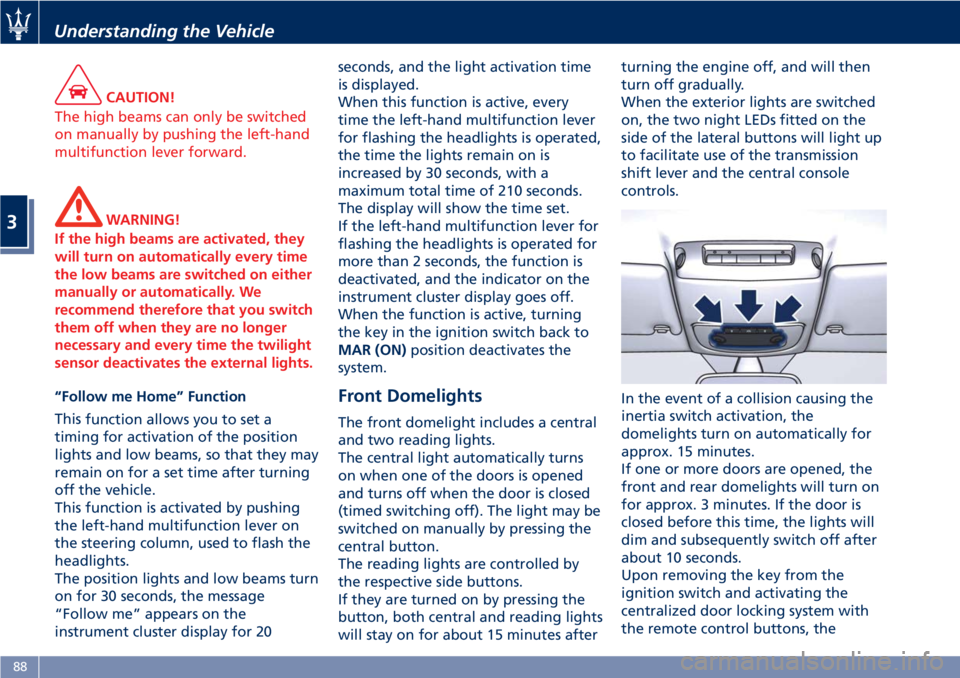
When the exterior lights are switched
on, the two night LEDs fitted on the
side of the lateral buttons will light up
to facilitate use of the transmission
shift lever and the central console
controls.
In the event of a collision causing the
inertia switch activation, the
domelights turn on automatically for
approx. 15 minutes.
If one or more doors are opened, the
front and rear domelights will turn on
for approx. 3 minutes. If the door is
closed before this time, the lights will
dim and subsequently switch off after
about 10 seconds.
Upon removing the key from the
ignition switch and activating the
centralized door locking system with
the remote control buttons, theUnderstanding the Vehicle
3
88