warning light MASERATI GRANTURISMO 2020 Service Manual
[x] Cancel search | Manufacturer: MASERATI, Model Year: 2020, Model line: GRANTURISMO, Model: MASERATI GRANTURISMO 2020Pages: 286, PDF Size: 6.7 MB
Page 119 of 286
“+“ and “–” Buttons
By means of the “+ “ and “–” buttons,
the user can adjust the instrument
cluster brightness.
When a screen page is viewed, these
buttons can be used to select the
available options (see paragraph "TFT
Display: Screen Pages" in this chapter).
TFT Display: Screen Pages
Trip Screen Page
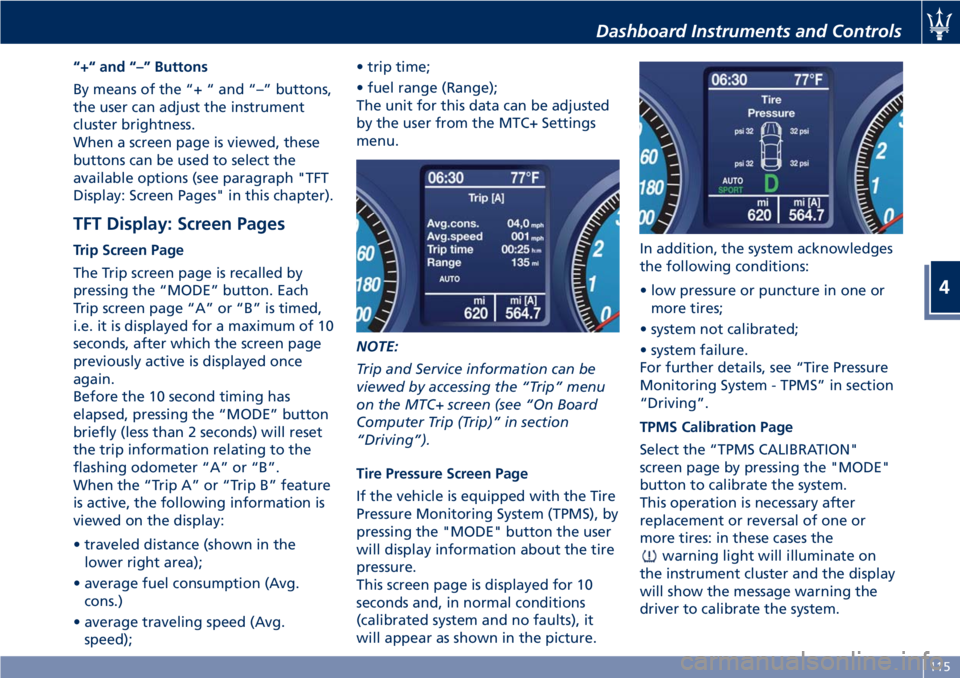
The Trip screen page is recalled by
pressing the “MODE” button. Each
Trip screen page “A” or “B” is timed,
i.e. it is displayed for a maximum of 10
seconds, after which the screen page
previously active is displayed once
again.
Before the 10 second timing has
elapsed, pressing the “MODE” button
briefly (less than 2 seconds) will reset
the trip information relating to the
flashing odometer “A” or “B”.
When the “Trip A” or “Trip B” feature
is active, the following information is
viewed on the display:
• traveled distance (shown in the
lower right area);
• average fuel consumption (Avg.
cons.)
• average traveling speed (Avg.
speed);• trip time;
• fuel range (Range);
The unit for this data can be adjusted
by the user from the MTC+ Settings
menu.
NOTE:
Trip and Service information can be
viewed by accessing the “Trip” menu
on the MTC+ screen (see “On Board
Computer Trip (Trip)” in section
“Driving”).
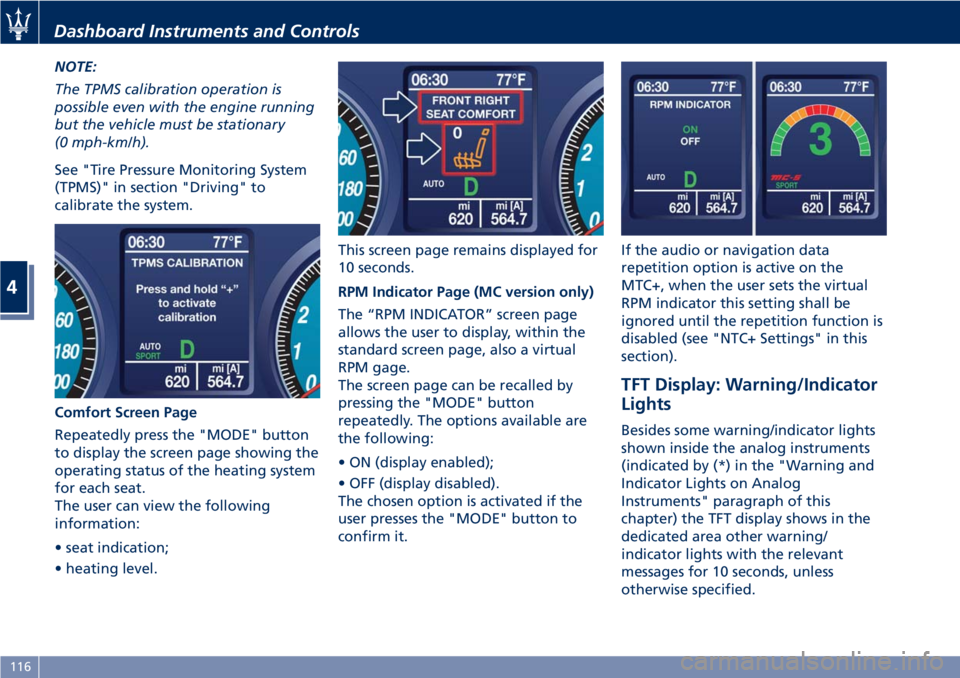
Tire Pressure Screen Page
If the vehicle is equipped with the Tire
Pressure Monitoring System (TPMS), by
pressing the "MODE" button the user
will display information about the tire
pressure.
This screen page is displayed for 10
seconds and, in normal conditions
(calibrated system and no faults), it
will appear as shown in the picture.In addition, the system acknowledges
the following conditions:
• low pressure or puncture in one or
more tires;
• system not calibrated;
• system failure.
For further details, see “Tire Pressure
Monitoring System - TPMS” in section
“Driving”.
TPMS Calibration Page
Select the “TPMS CALIBRATION"
screen page by pressing the "MODE"
button to calibrate the system.
This operation is necessary after
replacement or reversal of one or
more tires: in these cases the
warning light will illuminate on
the instrument cluster and the display
will show the message warning the
driver to calibrate the system.
Dashboard Instruments and Controls
4
115
Page 120 of 286
NOTE:
The TPMS calibration operation is
possible even with the engine running
but the vehicle must be stationary
(0 mph-km/h).
See "Tire Pressure Monitoring System
(TPMS)" in section "Driving" to
calibrate the system.
Comfort Screen Page
Repeatedly press the "MODE" button
to display the screen page showing the
operating status of the heating system
for each seat.
The user can view the following
information:
• seat indication;
• heating level.This screen page remains displayed for
10 seconds.
RPM Indicator Page (MC version only)
The “RPM INDICATOR” screen page
allows the user to display, within the
standard screen page, also a virtual
RPM gage.
The screen page can be recalled by
pressing the "MODE" button
repeatedly. The options available are
the following:
• ON (display enabled);
• OFF (display disabled).
The chosen option is activated if the
user presses the "MODE" button to
confirm it.If the audio or navigation data
repetition option is active on the
MTC+, when the user sets the virtual
RPM indicator this setting shall be
ignored until the repetition function is
disabled (see "NTC+ Settings" in this
section).
TFT Display: Warning/Indicator
Lights
Besides some warning/indicator lights
shown inside the analog instruments
(indicated by (*) in the "Warning and
Indicator Lights on Analog
Instruments" paragraph of this
chapter) the TFT display shows in the
dedicated area other warning/
indicator lights with the relevant
messages for 10 seconds, unless
otherwise specified.
Dashboard Instruments and Controls
4
116
Page 121 of 286
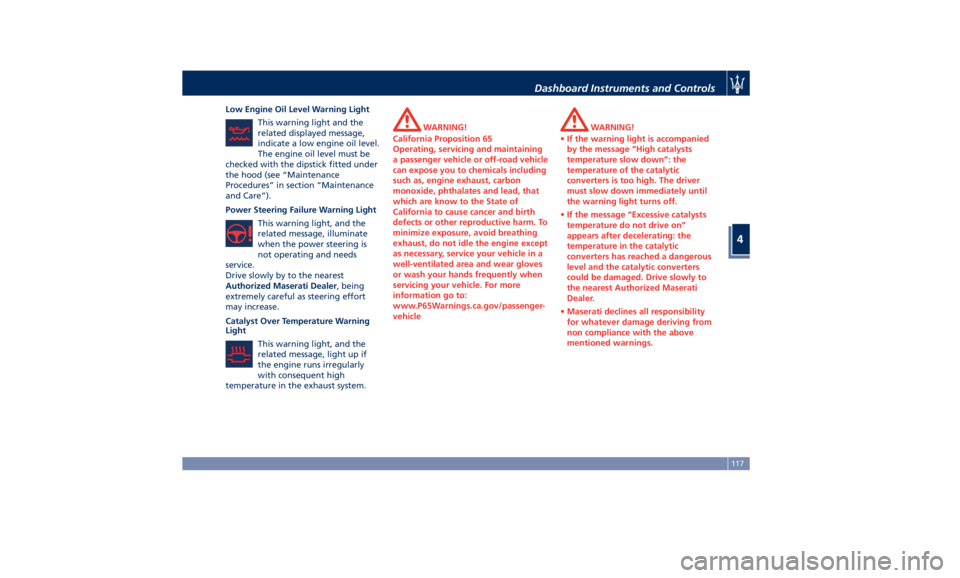
Low Engine Oil Level Warning Light
This warning light and the
related displayed message,
indicate a low engine oil level.
The engine oil level must be
checked with the dipstick fitted under
the hood (see “Maintenance
Procedures” in section “Maintenance
and Care”).
Power Steering Failure Warning Light
This warning light, and the
related message, illuminate
when the power steering is
not operating and needs
service.
Drive slowly by to the nearest
Authorized Maserati Dealer, being
extremely careful as steering effort
may increase.
Catalyst Over Temperature Warning
Light
This warning light, and the
related message, light up if
the engine runs irregularly
with consequent high
temperature in the exhaust system.
WARNING!
California Proposition 65
Operating, servicing and maintaining
a passenger vehicle or off-road vehicle
can expose you to chemicals including
such as, engine exhaust, carbon
monoxide, phthalates and lead, that
which are know to the State of
California to cause cancer and birth
defects or other reproductive harm. To
minimize exposure, avoid breathing
exhaust, do not idle the engine except
as necessary, service your vehicle in a
well-ventilated area and wear gloves
or wash your hands frequently when
servicing your vehicle. For more
information go to:
www.P65Warnings.ca.gov/passenger-
vehicleWARNING!
•If the warning light is accompanied
by the message “High catalysts
temperature slow down”: the
temperature of the catalytic
converters is too high. The driver
must slow down immediately until
the warning light turns off.
•If the message “Excessive catalysts
temperature do not drive on”
appears after decelerating: the
temperature in the catalytic
converters has reached a dangerous
level and the catalytic converters
could be damaged. Drive slowly to
the nearest Authorized Maserati
Dealer.
•Maserati declines all responsibility
for whatever damage deriving from
non compliance with the above
mentioned warnings.
Dashboard Instruments and Controls
4
117
Page 122 of 286
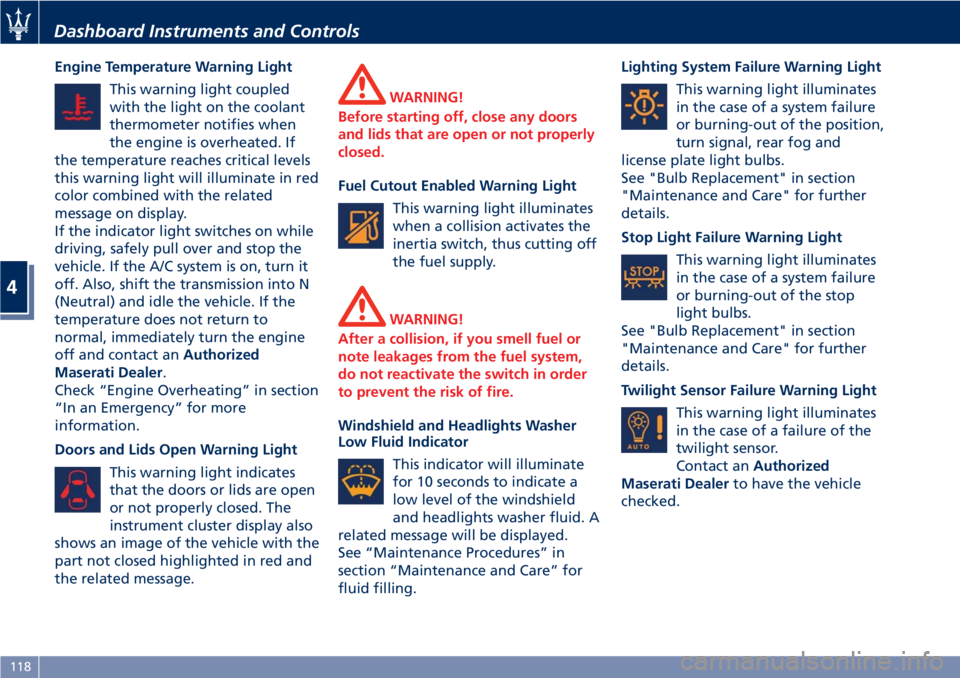
Engine Temperature Warning Light
This warning light coupled
with the light on the coolant
thermometer notifies when
the engine is overheated. If
the temperature reaches critical levels
this warning light will illuminate in red
color combined with the related
message on display.
If the indicator light switches on while
driving, safely pull over and stop the
vehicle. If the A/C system is on, turn it
off. Also, shift the transmission into N
(Neutral) and idle the vehicle. If the
temperature does not return to
normal, immediately turn the engine
off and contact anAuthorized
Maserati Dealer.
Check “Engine Overheating” in section
“In an Emergency” for more
information.
Doors and Lids Open Warning Light
This warning light indicates
that the doors or lids are open
or not properly closed. The
instrument cluster display also
shows an image of the vehicle with the
part not closed highlighted in red and
the related message.
WARNING!
Before starting off, close any doors
and lids that are open or not properly
closed.
Fuel Cutout Enabled Warning Light
This warning light illuminates
when a collision activates the
inertia switch, thus cutting off
the fuel supply.
WARNING!
After a collision, if you smell fuel or
note leakages from the fuel system,
do not reactivate the switch in order
to prevent the risk of fire.
Windshield and Headlights Washer
Low Fluid Indicator
This indicator will illuminate
for 10 seconds to indicate a
low level of the windshield
and headlights washer fluid. A
related message will be displayed.
See “Maintenance Procedures” in
section “Maintenance and Care” for
fluid filling.Lighting System Failure Warning Light
This warning light illuminates
in the case of a system failure
or burning-out of the position,
turn signal, rear fog and
license plate light bulbs.
See "Bulb Replacement" in section
"Maintenance and Care" for further
details.
Stop Light Failure Warning Light
This warning light illuminates
in the case of a system failure
or burning-out of the stop
light bulbs.
See "Bulb Replacement" in section
"Maintenance and Care" for further
details.
Twilight Sensor Failure Warning Light
This warning light illuminates
in the case of a failure of the
twilight sensor.
Contact anAuthorized
Maserati Dealerto have the vehicle
checked.
Dashboard Instruments and Controls
4
118
Page 123 of 286
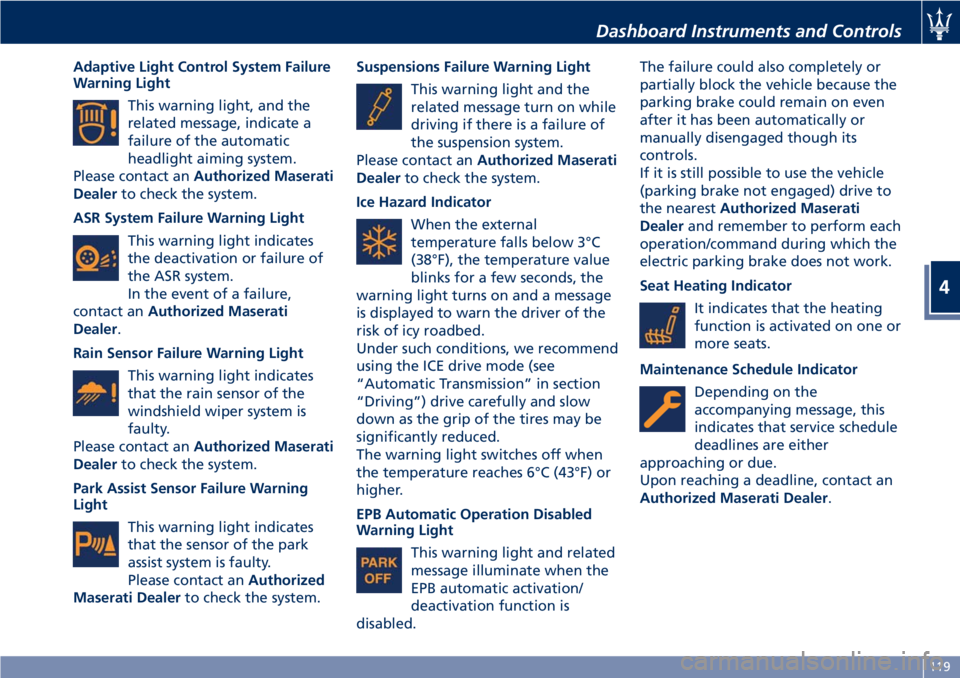
Adaptive Light Control System Failure
Warning Light
This warning light, and the
related message, indicate a
failure of the automatic
headlight aiming system.
Please contact anAuthorized Maserati
Dealerto check the system.
ASR System Failure Warning Light
This warning light indicates
the deactivation or failure of
the ASR system.
In the event of a failure,
contact anAuthorized Maserati
Dealer.
Rain Sensor Failure Warning Light
This warning light indicates
that the rain sensor of the
windshield wiper system is
faulty.
Please contact anAuthorized Maserati
Dealerto check the system.
Park Assist Sensor Failure Warning
Light
This warning light indicates
that the sensor of the park
assist system is faulty.
Please contact anAuthorized
Maserati Dealerto check the system.Suspensions Failure Warning Light
This warning light and the
related message turn on while
driving if there is a failure of
the suspension system.
Please contact anAuthorized Maserati
Dealerto check the system.
Ice Hazard Indicator
When the external
temperature falls below 3°C
(38°F), the temperature value
blinks for a few seconds, the
warning light turns on and a message
is displayed to warn the driver of the
risk of icy roadbed.
Under such conditions, we recommend
using the ICE drive mode (see
“Automatic Transmission” in section
“Driving”) drive carefully and slow
down as the grip of the tires may be
significantly reduced.
The warning light switches off when
the temperature reaches 6°C (43°F) or
higher.
EPB Automatic Operation Disabled
Warning Light
This warning light and related
message illuminate when the
EPB automatic activation/
deactivation function is
disabled.The failure could also completely or
partially block the vehicle because the
parking brake could remain on even
after it has been automatically or
manually disengaged though its
controls.
If it is still possible to use the vehicle
(parking brake not engaged) drive to
the nearestAuthorized Maserati
Dealerand remember to perform each
operation/command during which the
electric parking brake does not work.
Seat Heating Indicator
It indicates that the heating
function is activated on one or
more seats.
Maintenance Schedule Indicator
Depending on the
accompanying message, this
indicates that service schedule
deadlines are either
approaching or due.
Upon reaching a deadline, contact an
Authorized Maserati Dealer.
Dashboard Instruments and Controls
4
119
Page 124 of 286
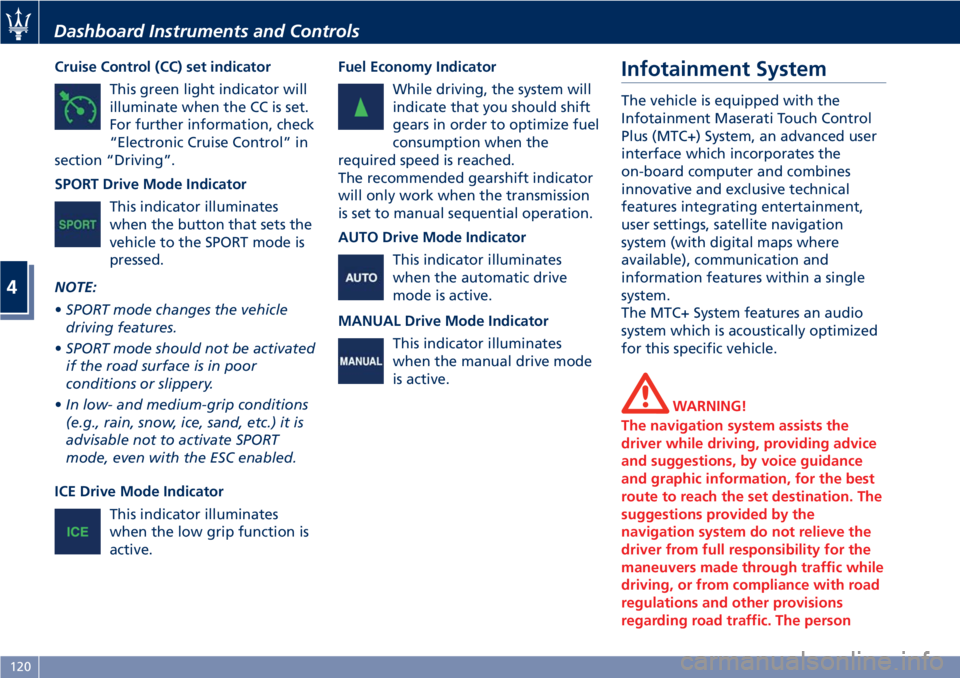
Cruise Control (CC) set indicator
This green light indicator will
illuminate when the CC is set.
For further information, check
“Electronic Cruise Control” in
section “Driving”.
SPORT Drive Mode Indicator
This indicator illuminates
when the button that sets the
vehicle to the SPORT mode is
pressed.
NOTE:
•SPORT mode changes the vehicle
driving features.
•SPORT mode should not be activated
if the road surface is in poor
conditions or slippery.
•In low- and medium-grip conditions
(e.g., rain, snow, ice, sand, etc.) it is
advisable not to activate SPORT
mode, even with the ESC enabled.
ICE Drive Mode Indicator
This indicator illuminates
when the low grip function is
active.Fuel Economy Indicator
While driving, the system will
indicate that you should shift
gears in order to optimize fuel
consumption when the
required speed is reached.
The recommended gearshift indicator
will only work when the transmission
is set to manual sequential operation.
AUTO Drive Mode Indicator
This indicator illuminates
when the automatic drive
mode is active.
MANUAL Drive Mode Indicator
This indicator illuminates
when the manual drive mode
is active.Infotainment System
The vehicle is equipped with the
Infotainment Maserati Touch Control
Plus (MTC+) System, an advanced user
interface which incorporates the
on-board computer and combines
innovative and exclusive technical
features integrating entertainment,
user settings, satellite navigation
system (with digital maps where
available), communication and
information features within a single
system.
The MTC+ System features an audio
system which is acoustically optimized
for this specific vehicle.
WARNING!
The navigation system assists the
driver while driving, providing advice
and suggestions, by voice guidance
and graphic information, for the best
route to reach the set destination. The
suggestions provided by the
navigation system do not relieve the
driver from full responsibility for the
maneuvers made through traffic while
driving, or from compliance with road
regulations and other provisions
regarding road traffic. The person
Dashboard Instruments and Controls
4
120
Page 128 of 286
7. “Phone” softkey
Touch this softkey to access the
MTC+ Phone feature that can be
set or monitored via MTC+.
Touch one of these softkeys to access
the list of functions that the user can
set.
Touchscreen Display Warnings
CAUTION!
• Do NOT attach any object to the
touchscreen, doing so can result in
damage to the touchscreen.
• Do not press the screen with any
hard or sharp objects (pen, USB stick,
jewelry, etc.) which could scratch the
touchscreen surface.
• Do not spray any liquid or caustic
chemicals directly on the screen. Use
a clean and dry micro fiber lens
cleaning cloth in order to clean the
touchscreen.
• If necessary, use a lint-free cloth
dampened with a cleaning solution,
such as isopropyl alcohol, or an
isopropyl alcohol and water solution
ratio of 50:50. Be sure to follow the
solvent manufacturer’s precautions
and directions.
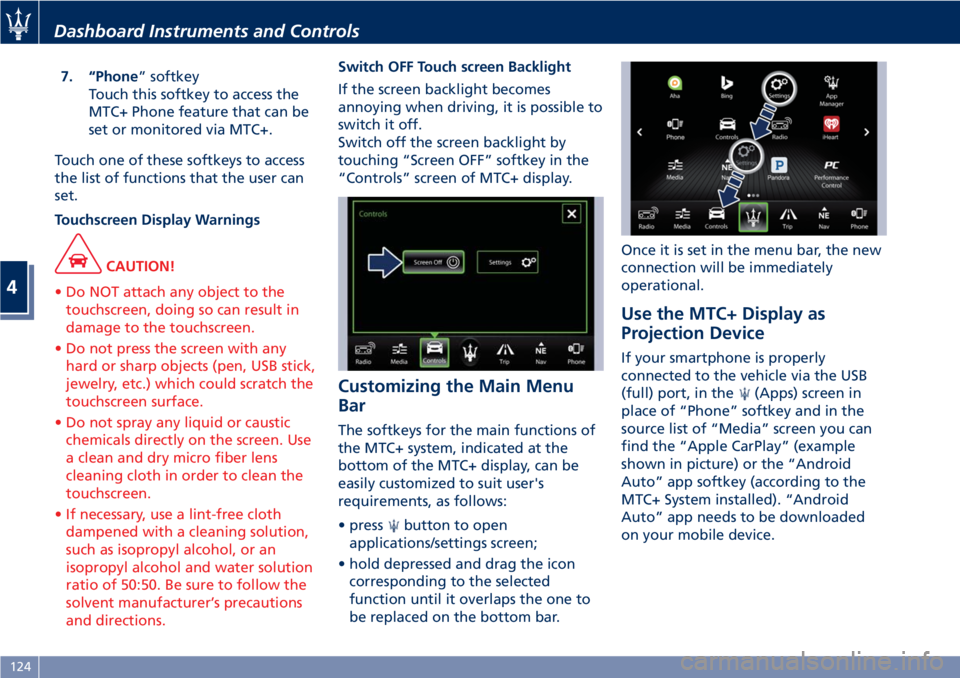
Switch OFF Touch screen Backlight
If the screen backlight becomes
annoying when driving, it is possible to
switch it off.
Switch off the screen backlight by
touching “Screen OFF” softkey in the
“Controls” screen of MTC+ display.
Customizing the Main Menu
Bar
The softkeys for the main functions of
the MTC+ system, indicated at the
bottom of the MTC+ display, can be
easily customized to suit user's
requirements, as follows:
• press
button to open
applications/settings screen;
• hold depressed and drag the icon
corresponding to the selected
function until it overlaps the one to
be replaced on the bottom bar.Once it is set in the menu bar, the new
connection will be immediately
operational.
Use the MTC+ Display as
Projection Device
If your smartphone is properly
connected to the vehicle via the USB
(full) port, in the
(Apps) screen in
place of “Phone” softkey and in the
source list of “Media” screen you can
find the “Apple CarPlay” (example
shown in picture) or the “Android
Auto” app softkey (according to the
MTC+ System installed). “Android
Auto” app needs to be downloaded
on your mobile device.
Dashboard Instruments and Controls
4
124
Page 139 of 286
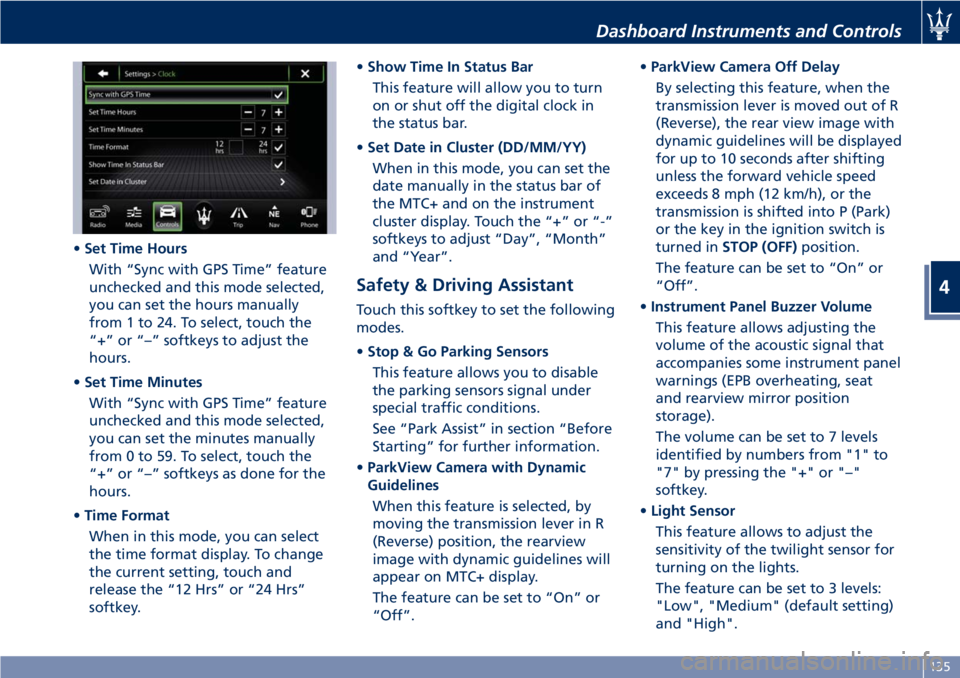
•Set Time Hours
With “Sync with GPS Time” feature
unchecked and this mode selected,
you can set the hours manually
from 1 to 24. To select, touch the
“+” or “–” softkeys to adjust the
hours.
•Set Time Minutes
With “Sync with GPS Time” feature
unchecked and this mode selected,
you can set the minutes manually
from 0 to 59. To select, touch the
“+” or “–” softkeys as done for the
hours.
•Time Format
When in this mode, you can select
the time format display. To change
the current setting, touch and
release the “12 Hrs” or “24 Hrs”
softkey.•Show Time In Status Bar
This feature will allow you to turn
on or shut off the digital clock in
the status bar.
•Set Date in Cluster (DD/MM/YY)
When in this mode, you can set the
date manually in the status bar of
the MTC+ and on the instrument
cluster display. Touch the “+” or “-”
softkeys to adjust “Day”, “Month”
and “Year”.
Safety & Driving Assistant
Touch this softkey to set the following
modes.
•Stop & Go Parking Sensors
This feature allows you to disable
the parking sensors signal under
special traffic conditions.
See “Park Assist” in section “Before
Starting” for further information.
•ParkView Camera with Dynamic
Guidelines
When this feature is selected, by
moving the transmission lever in R
(Reverse) position, the rearview
image with dynamic guidelines will
appear on MTC+ display.
The feature can be set to “On” or
“Off”.•ParkView Camera Off Delay
By selecting this feature, when the
transmission lever is moved out of R
(Reverse), the rear view image with
dynamic guidelines will be displayed
for up to 10 seconds after shifting
unless the forward vehicle speed
exceeds 8 mph (12 km/h), or the
transmission is shifted into P (Park)
or the key in the ignition switch is
turned inSTOP (OFF)position.
The feature can be set to “On” or
“Off”.
•Instrument Panel Buzzer Volume
This feature allows adjusting the
volume of the acoustic signal that
accompanies some instrument panel
warnings (EPB overheating, seat
and rearview mirror position
storage).
The volume can be set to 7 levels
identified by numbers from "1" to
"7" by pressing the "+" or "–"
softkey.
•Light Sensor
This feature allows to adjust the
sensitivity of the twilight sensor for
turning on the lights.
The feature can be set to 3 levels:
"Low", "Medium" (default setting)
and "High".
Dashboard Instruments and Controls
4
135
Page 143 of 286
settings and/or options that have been
modified compared to factory settings
and will also remove from system
memory Bluetooth
®devices and
presets.
To remove personal information,
select this feature and a pop-up will
appear asking confirmation to delete
all personal data. Select “OK” to clear,
or “Cancel” to exit. Once the data
have been cleared, a pop up appears
confirming that personal data have
been cleared.
System Information
When this feature is selected, the
display shows an information screen
with the software version installed on
MTC+.
Glove Compartments
The glove compartments may be used
to store devices, small items or
documents.
WARNING!
•Do not operate the vehicle with the
lid of glove compartment in the
open position.
•To help ensure passenger safety, the
glove compartment must always
remain closed while driving.
•Store objects or devices in glove
compartment to ensure they will not
move during the trip and prevent
them from hitting any person on
board.
CAUTION!
Do not place objects weighing over
22 lb (10 kg) in the glove
compartment.
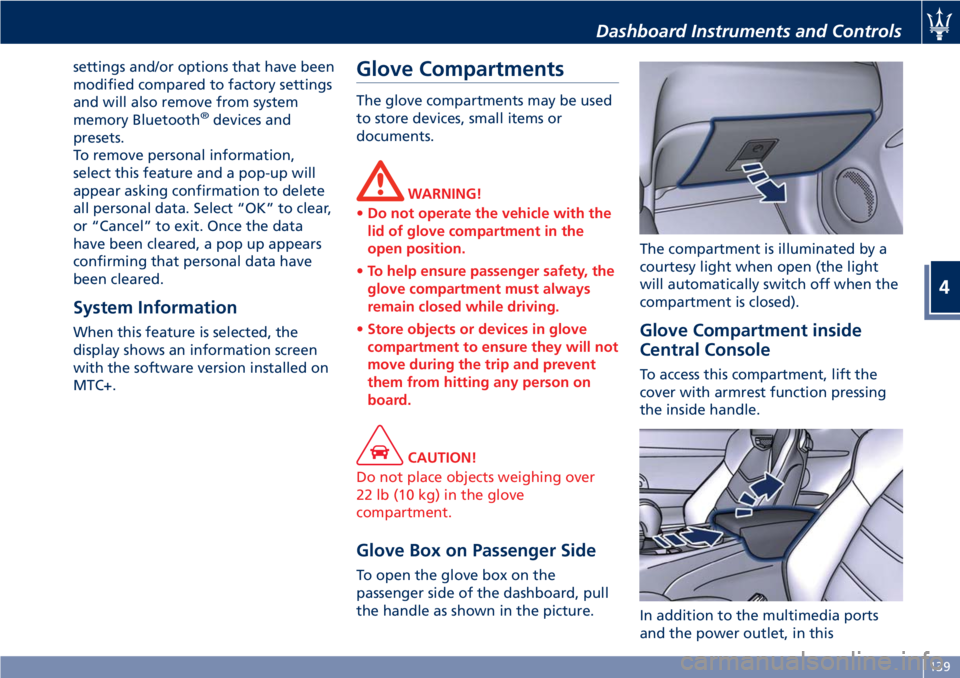
Glove Box on Passenger Side
To open the glove box on the
passenger side of the dashboard, pull
the handle as shown in the picture.The compartment is illuminated by a
courtesy light when open (the light
will automatically switch off when the
compartment is closed).
Glove Compartment inside
Central Console
To access this compartment, lift the
cover with armrest function pressing
the inside handle.
In addition to the multimedia ports
and the power outlet, in this
Dashboard Instruments and Controls
4
139
Page 152 of 286
Normal Starting of the
Engine
WARNING!
It is dangerous to run the engine in an
enclosed area. The engine consumes
oxygen and discharges carbon
dioxide, carbon monoxide and other
toxic gases in the atmosphere.
WARNING!
California Proposition 65
Operating, servicing and maintaining
a passenger vehicle or off-road vehicle
can expose you to chemicals including
such as, engine exhaust, carbon
monoxide, phthalates and lead, that
which are know to the State of
California to cause cancer and birth
defects or other reproductive harm. To
minimize exposure, avoid breathing
exhaust, do not idle the engine except
as necessary, service your vehicle in a
well-ventilated area and wear gloves
or wash your hands frequently when
servicing your vehicle. For more
information go to:www.P65Warnings.ca.gov/passenger-
vehicle
When you open a door to get into the
car, the instrument cluster turns on.
The TFT displays the complete
odometer, time, outside temperature
and the
open doors indicator.
Before starting the engine, close the
doors, adjust your seat, the inside and
outside mirrors, fasten your seat belt
and instruct all other occupants to
buckle their seat belts.
Make sure that the Electric Parking
Brake (EPB) is applied.
The shift lever must be in P (Park) or N
(Neutral) position before you can start
the engine. Apply the brakes before
shifting into any driving gear (see
“Automatic Transmission” in this
section).
CAUTION!
• Before starting the engine, switch off
the electrical devices with a high
power consumption (air-conditioning
and heating system, heated rear
window, headlights, etc.).
• Do not start the engine if the fuel
level in the tank is low.
Press the brake pedal and turn the key
in the ignition switch toMAR (ON)
position.
Instrument cluster displays the initial
sequence with warning light and
analog instruments test routine.
Turn the key intoAVVposition and
release it when the engine starts. The
key will return toMAR (ON)position
automatically.
Do not hold the key inAVVposition
for a long time.
If the engine fails to start, the starter
will disengage automatically after 10
seconds. If you wish to stop the
cranking of the engine prior to
starting it, turn the key toSTOP (OFF)
position.
If the engine does not start, turn the
key toSTOP (OFF)position and wait
for the gear display to go off. Then
repeat the entire procedure.
NOTE:
Normal starting of either a cold or a
warm engine is obtained without
pumping or pressing the accelerator
pedal.
Driving
5
148