warning light MASERATI GRANTURISMO 2020 Repair Manual
[x] Cancel search | Manufacturer: MASERATI, Model Year: 2020, Model line: GRANTURISMO, Model: MASERATI GRANTURISMO 2020Pages: 286, PDF Size: 6.7 MB
Page 174 of 286
WARNING!
The ABS helps prevent the wheels
from locking, but it does not increase
the physical grip limits between the
tires and the road. Therefore, always
keep a safe distance from the vehicle
in front of yours and reduce your
speed when entering a curve.
NOTE:
•When the vehicle's speed is higher
than 7 mph (11 km/h), you may also
hear a slight clicking sound as well as
other motor noises. The system is
performing a self-check cycle to
ensure that the ABS is working
properly.
•This self-check occurs each time the
vehicle is started and accelerated
past 7 mph (11 km/h).
ABS is activated during braking under
certain road or stopping conditions.
ABS-inducing conditions can include
ice, snow, gravel, bumps, railroad
tracks, loose debris.
You may also experience the following
when the brake system goes into Anti-
Lock:• The ABS motor running (it may
continue to run for a short time after
the vehicle stops).
• The clicking sound of solenoid valves.
• Brake pedal pulsations.
• A slight drop or fall away of the
brake pedal at the end of the stop.
These are all normal characteristics of
ABS functioning.WARNING!
•The ABS contains sophisticated
electronic equipment that may be
susceptible to interference caused by
improperly-installed or high-output
radio transmitting equipment. This
interference can cause possible loss
of anti-lock braking capability.
Installation of such equipment
should be performed by qualified
Maserati personnel.
•Pumping the Anti-Lock Brakes will
diminish their effectiveness and may
lead to a collision. Pumping brakes
makes the stopping distance longer.
Just press firmly and continuously on
your brake pedal when you need to
slow down or stop
ABS and EBD System Failure
In the event of a failure the ABS
system will be deactivated, but this will
not affect the efficiency of the
standard braking system.
The failure will be indicated by the
illumination of the
amber warning
light on the instrument cluster.
An EBD system failure is indicated by
the illumination of the
red
warning light on the instrument
cluster.
In this case we recommend that you
contact the nearestAuthorized
Maserati Dealerin order to identify
the fault as soon as possible, by means
of the system self-diagnostic function.
WARNING!
•The
failure warning light usually
illuminates with the engine running
to indicate a malfunction in the ABS
system only. In this case, the braking
system will remain fully functioning,
but will not use the ABS. In these
conditions, also the EBD system
efficiency may be affected. Drive
with the greatest care in order to
avoid sudden braking and have the
system immediately checked by the
Driving
5
170
Page 175 of 286
nearest Centre of the Authorized
Maserati Dealer.
•The
warning light illuminates
when the engine is running to
indicate an EBD system malfunction.
In this case, sharp braking may
cause an early locking of the rear
wheels, and the vehicle may skid.
Drive with the greatest care and
have the system immediately
checked by the nearest Centre of the
Authorized Maserati Dealer.
Hydraulic Brake Assistance
(HBA)
HBA completes the ABS system by
optimizing the vehicle braking
capacity during emergency braking.
In the event of a critical situation,
where the vehicle must stop in the
shortest possible distance, the driver
usually depresses the brake pedal
quickly, but often not strongly
enough: this increases the braking
distance. HBA has been designed to
solve this problem and acts by
applying the maximum braking force
during emergency braking, in order to
stop the vehicle in the shortest
possible distance.
HBA recognizes the emergency
condition by analyzing someparameters, such as the pressure on
the brake servo, the wheel speed and
activation of the third stop. The ABS
control unit cross-checks this data and
substitutes the driver by activating the
braking system’s full power and so
ensures optimal braking performance
in the shortest possible distance.
Brake Override System (BOS)
To complete the range of systems that
assist braking, the vehicle is equipped
withBOS, which is designed to stop
the vehicle even when it is being
accelerated. If the brake pedal is
depressed together with the
accelerator, the engine power should
be automatically reduced and, if the
driver continues to depress the
accelerator, the system may even cause
the vehicle to come to a complete
stop.
Additionally, if the brake pedal is
released when the accelerator is still
depressed, the corresponding engine
torque can be reached gradually.
Using the Brakes
CAUTION!
To obtain a good performance of
brake pads and discs, avoid sudden
braking during the first 190 mi
(300 km).
The pad wear limit is indicated by the
illumination
of the
warning light,
on the instrument cluster display.
In this event, please contact an
Authorized Maserati Dealer.
WARNING!
•Riding the brakes can lead to brake
failure and possibly an accident.
Driving with your foot resting or
riding on the brake pedal can result
in abnormally high brake
temperatures, excessive lining wear,
and possible brake damage. In an
emergency full braking capacity may
be impaired.
•If the
red warning light
illuminates when the engine is
running with the message that
indicates an insufficient brake fluid
level, stop the vehicle and check the
(Continued)
Driving
5
171
Page 177 of 286
Use of the Engine
Breaking-In
Today's most modern production
methods are designed to provide
extremely precise construction and
assembly of components. However,
moving parts do undergo a settling
process, basically in the first hours of
vehicle operation.
Do not drive keeping at a constant
high speed rate for a prolonged time.
While cruising, brief full-throttle
acceleration within the limits of local
traffic laws contributes to a good
break-in. Wide-open throttle
acceleration in low gear can be
detrimental and should be avoided.
The engine oil installed in the engine
at the factory is a high-quality energy
conserving type lubricant. Oil changes
should be consistent with anticipated
climate conditions under which vehicle
operations will occur. For the
recommended viscosity and quality
grades, see “Refillings” in section
“Features and Specifications”.
A new engine may consume some oil
during its first few thousand
kilometers of operation. This should
be considered as a normal part of thebreak-in and not interpreted as an
indication of malfunction.
Avoid exceeding 5000 rpm for the first
620 trip mi (1000 km).
After starting the vehicle, do not
exceed 4000 rpm until the engine has
warmed up sufficiently (coolant
temperature: 149-158°F/65-70°C).
While Driving
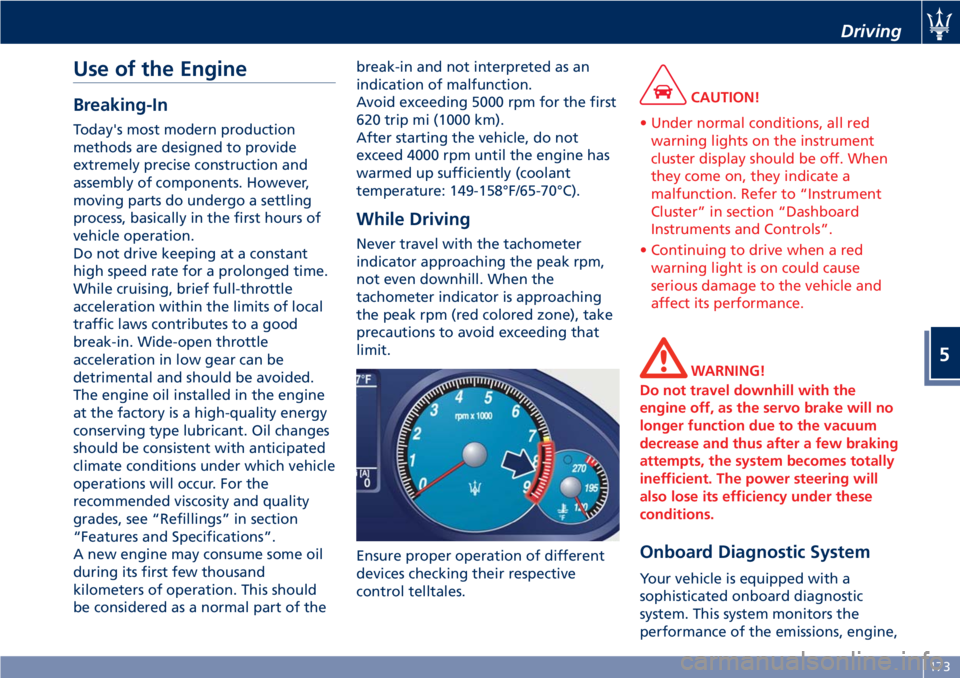
Never travel with the tachometer
indicator approaching the peak rpm,
not even downhill. When the
tachometer indicator is approaching
the peak rpm (red colored zone), take
precautions to avoid exceeding that
limit.
Ensure proper operation of different
devices checking their respective
control telltales.
CAUTION!
• Under normal conditions, all red
warning lights on the instrument
cluster display should be off. When
they come on, they indicate a
malfunction. Refer to “Instrument
Cluster” in section “Dashboard
Instruments and Controls”.
• Continuing to drive when a red
warning light is on could cause
serious damage to the vehicle and
affect its performance.
WARNING!
Do not travel downhill with the
engine off, as the servo brake will no
longer function due to the vacuum
decrease and thus after a few braking
attempts, the system becomes totally
inefficient. The power steering will
also lose its efficiency under these
conditions.
Onboard Diagnostic System
Your vehicle is equipped with a
sophisticated onboard diagnostic
system. This system monitors the
performance of the emissions, engine,
Driving
5
173
Page 178 of 286
and automatic transmission control
systems. When these systems are
operating properly, your vehicle will
provide excellent performance and
fuel economy, as well as engine
emissions well within current local
regulations of various countries.
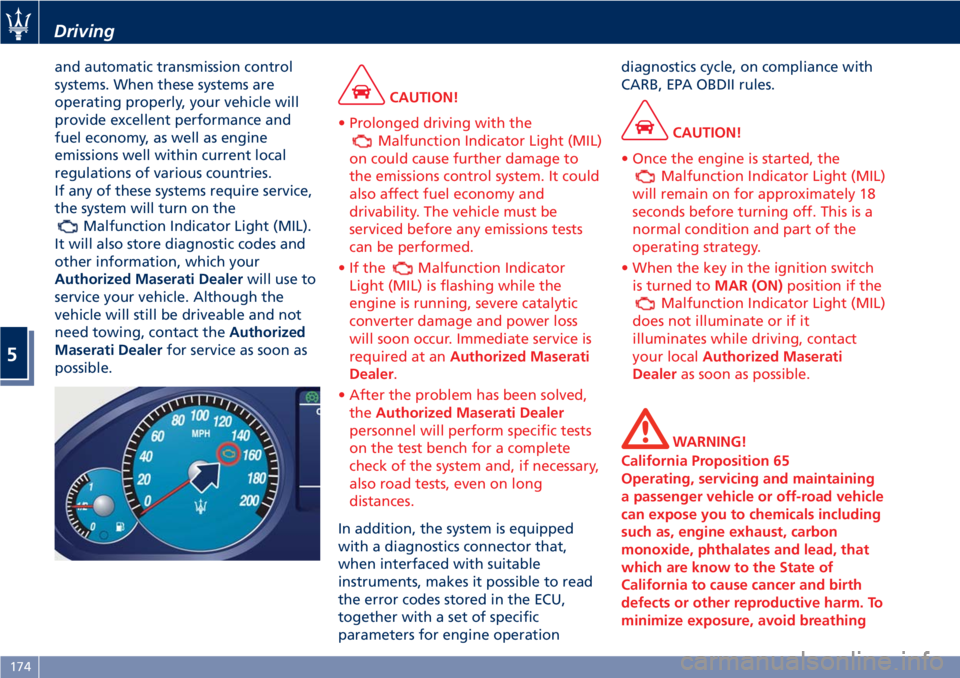
If any of these systems require service,
the system will turn on the
Malfunction Indicator Light (MIL).
It will also store diagnostic codes and
other information, which your
Authorized Maserati Dealerwill use to
service your vehicle. Although the
vehicle will still be driveable and not
need towing, contact theAuthorized
Maserati Dealerfor service as soon as
possible.
CAUTION!
• Prolonged driving with the
Malfunction Indicator Light (MIL)
on could cause further damage to
the emissions control system. It could
also affect fuel economy and
drivability. The vehicle must be
serviced before any emissions tests
can be performed.
•Ifthe
Malfunction Indicator
Light (MIL) is flashing while the
engine is running, severe catalytic
converter damage and power loss
will soon occur. Immediate service is
required at anAuthorized Maserati
Dealer.
• After the problem has been solved,
theAuthorized Maserati Dealer
personnel will perform specific tests
on the test bench for a complete
check of the system and, if necessary,
also road tests, even on long
distances.
In addition, the system is equipped
with a diagnostics connector that,
when interfaced with suitable
instruments, makes it possible to read
the error codes stored in the ECU,
together with a set of specific
parameters for engine operationdiagnostics cycle, on compliance with
CARB, EPA OBDII rules.
CAUTION!
• Once the engine is started, the
Malfunction Indicator Light (MIL)
will remain on for approximately 18
seconds before turning off. This is a
normal condition and part of the
operating strategy.
• When the key in the ignition switch
is turned toMAR (ON)position if the
Malfunction Indicator Light (MIL)
does not illuminate or if it
illuminates while driving, contact
your localAuthorized Maserati
Dealeras soon as possible.
WARNING!
California Proposition 65
Operating, servicing and maintaining
a passenger vehicle or off-road vehicle
can expose you to chemicals including
such as, engine exhaust, carbon
monoxide, phthalates and lead, that
which are know to the State of
California to cause cancer and birth
defects or other reproductive harm. To
minimize exposure, avoid breathing
Driving
5
174
Page 179 of 286
exhaust, do not idle the engine except
as necessary, service your vehicle in a
well-ventilated area and wear gloves
or wash your hands frequently when
servicing your vehicle. For more
information go to:
www.P65Warnings.ca.gov/passenger-
vehicle
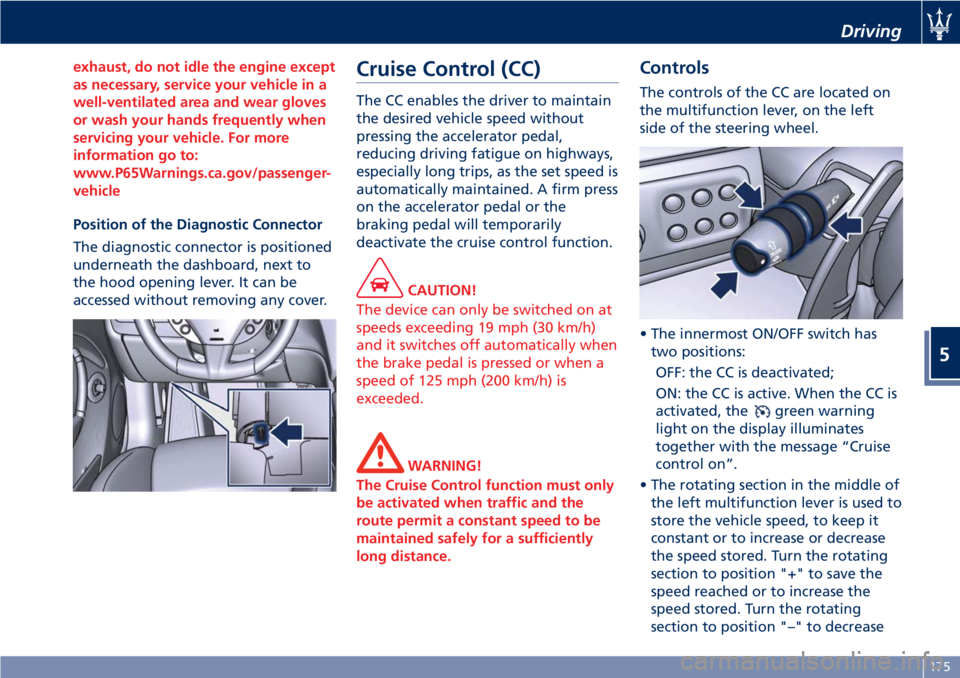
Position of the Diagnostic Connector
The diagnostic connector is positioned
underneath the dashboard, next to
the hood opening lever. It can be
accessed without removing any cover.
Cruise Control (CC)
The CC enables the driver to maintain
the desired vehicle speed without
pressing the accelerator pedal,
reducing driving fatigue on highways,
especially long trips, as the set speed is
automatically maintained. A firm press
on the accelerator pedal or the
braking pedal will temporarily
deactivate the cruise control function.
CAUTION!
The device can only be switched on at
speeds exceeding 19 mph (30 km/h)
and it switches off automatically when
the brake pedal is pressed or when a
speed of 125 mph (200 km/h) is
exceeded.
WARNING!
The Cruise Control function must only
be activated when traffic and the
route permit a constant speed to be
maintained safely for a sufficiently
long distance.
Controls
The controls of the CC are located on
the multifunction lever, on the left
side of the steering wheel.
• The innermost ON/OFF switch has
two positions:
OFF: the CC is deactivated;
ON: the CC is active. When the CC is
activated, the
green warning
light on the display illuminates
together with the message “Cruise
control on”.
• The rotating section in the middle of
the left multifunction lever is used to
store the vehicle speed, to keep it
constant or to increase or decrease
the speed stored. Turn the rotating
section to position "+" to save the
speed reached or to increase the
speed stored. Turn the rotating
section to position "–" to decrease
Driving
5
175
Page 180 of 286
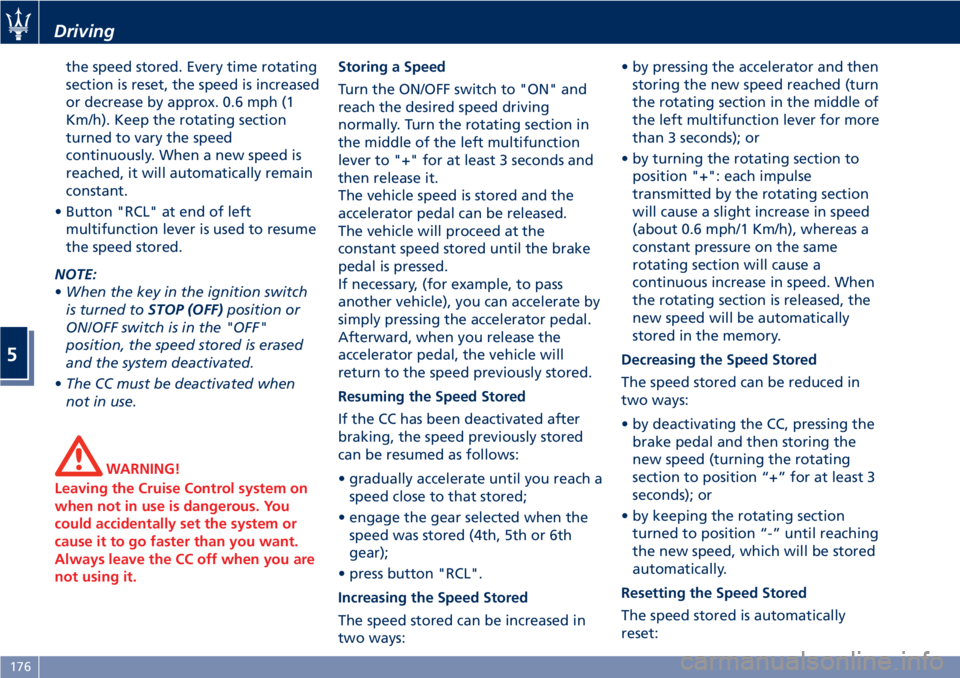
the speed stored. Every time rotating
section is reset, the speed is increased
or decrease by approx. 0.6 mph (1
Km/h). Keep the rotating section
turned to vary the speed
continuously. When a new speed is
reached, it will automatically remain
constant.
• Button "RCL" at end of left
multifunction lever is used to resume
the speed stored.
NOTE:
•When the key in the ignition switch
is turned toSTOP (OFF)position or
ON/OFF switch is in the "OFF"
position, the speed stored is erased
and the system deactivated.
•The CC must be deactivated when
not in use.
WARNING!
Leaving the Cruise Control system on
when not in use is dangerous. You
could accidentally set the system or
cause it to go faster than you want.
Always leave the CC off when you are
not using it.
Storing a Speed
Turn the ON/OFF switch to "ON" and
reach the desired speed driving
normally. Turn the rotating section in
the middle of the left multifunction
lever to "+" for at least 3 seconds and
then release it.
The vehicle speed is stored and the
accelerator pedal can be released.
The vehicle will proceed at the
constant speed stored until the brake
pedal is pressed.
If necessary, (for example, to pass
another vehicle), you can accelerate by
simply pressing the accelerator pedal.
Afterward, when you release the
accelerator pedal, the vehicle will
return to the speed previously stored.
Resuming the Speed Stored
If the CC has been deactivated after
braking, the speed previously stored
can be resumed as follows:
• gradually accelerate until you reach a
speed close to that stored;
• engage the gear selected when the
speed was stored (4th, 5th or 6th
gear);
• press button "RCL".
Increasing the Speed Stored
The speed stored can be increased in
two ways:• by pressing the accelerator and then
storing the new speed reached (turn
the rotating section in the middle of
the left multifunction lever for more
than 3 seconds); or
• by turning the rotating section to
position "+": each impulse
transmitted by the rotating section
will cause a slight increase in speed
(about 0.6 mph/1 Km/h), whereas a
constant pressure on the same
rotating section will cause a
continuous increase in speed. When
the rotating section is released, the
new speed will be automatically
stored in the memory.
Decreasing the Speed Stored
The speed stored can be reduced in
two ways:
• by deactivating the CC, pressing the
brake pedal and then storing the
new speed (turning the rotating
section to position “+” for at least 3
seconds); or
• by keeping the rotating section
turned to position “-” until reaching
the new speed, which will be stored
automatically.
Resetting the Speed Stored
The speed stored is automatically
reset:
Driving
5
176
Page 181 of 286
• by turning the engine off; or
• by turning ON/OFF switch to "OFF"
position.
Warnings while Driving with CC
WARNING!
•When driving with CC activated, do
not shift to N (Neutral) position. It is
advisable to activate CC only when
traffic and road conditions permit
safe use of this device, that is: on
straight and dry roads, expressways
or highways, smooth flowing traffic
and smooth asphalt. Do not activate
this device when driving in town or
in heavy traffic.
•CC can only be activated at speeds
exceeding 19 mph (30 km/h).
•CC can only be activated in 4th, 5th
or 6th gear, depending upon the
vehicle speed.
•When driving downhill with the CC
activated, the vehicle may pick up
speed slightly exceeding the speed
stored, due to the change in the
engine load.
•In the event of malfunctioning or
failure of CC, turn ON/OFF switch to
"OFF" position and contact the
Authorized Maserati Dealer afterhaving checked that the relative
fuse is in proper working order.
•ON/OFF switch can be always left at
"ON" position without damaging
the CC. In any case, it is advisable to
deactivate the CC when it is not in
use. Turn ON/OFF switch to "OFF"
position to prevent any speeds from
being unintentionally stored.
Tires - General
Information
Tire Safety Information
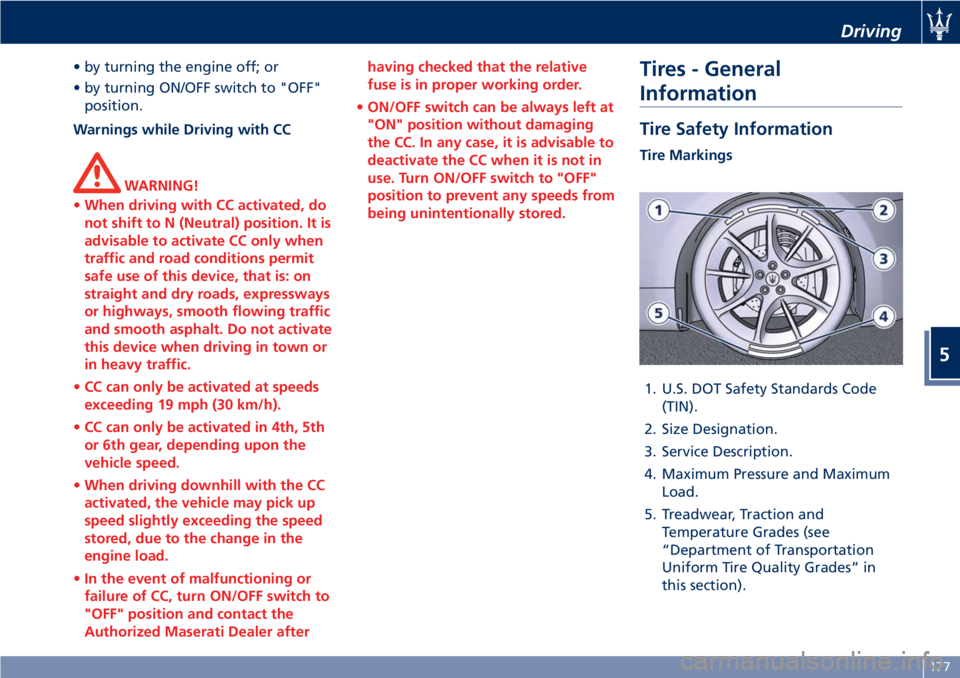
Tire Markings
1. U.S. DOT Safety Standards Code
(TIN).
2. Size Designation.
3. Service Description.
4. Maximum Pressure and Maximum
Load.
5. Treadwear, Traction and
Temperature Grades (see
“Department of Transportation
Uniform Tire Quality Grades” in
this section).
Driving
5
177
Page 190 of 286
(Continued)
style. Aftermarket wheels can cause
sensor damage. Do not use
aftermarket tire sealants or balance
beads, as damage to the sensors may
result.
• The system can temporarily
experience radio-electric interference
emitted by devices using similar
frequencies.
• After inspecting or adjusting the tire
pressure, always reinstall the valve
stem cap. This will prevent moisture
and dirt from entering the valve
stem and damage the TPMS internal
sensor.
NOTE:
•Driving on a significantly
underinflated tire causes the tire to
overheat and may lead to tire failure.
Under-inflation also reduces fuel
efficiency and tire tread life, and may
affect the vehicle’s handling and
stopping ability.
•The TPMS is not a substitute for
proper tire maintenance, and it is the
driver’s responsibility to maintain
correct tire pressure using an
accurate tire pressure gage, even if
under-inflation has not reached thelevel to trigger illumination of the
TPMS light
.
•Seasonal temperature changes will
affect tire pressure, and the TPMS
will monitor the actual tire pressure
in the tire.
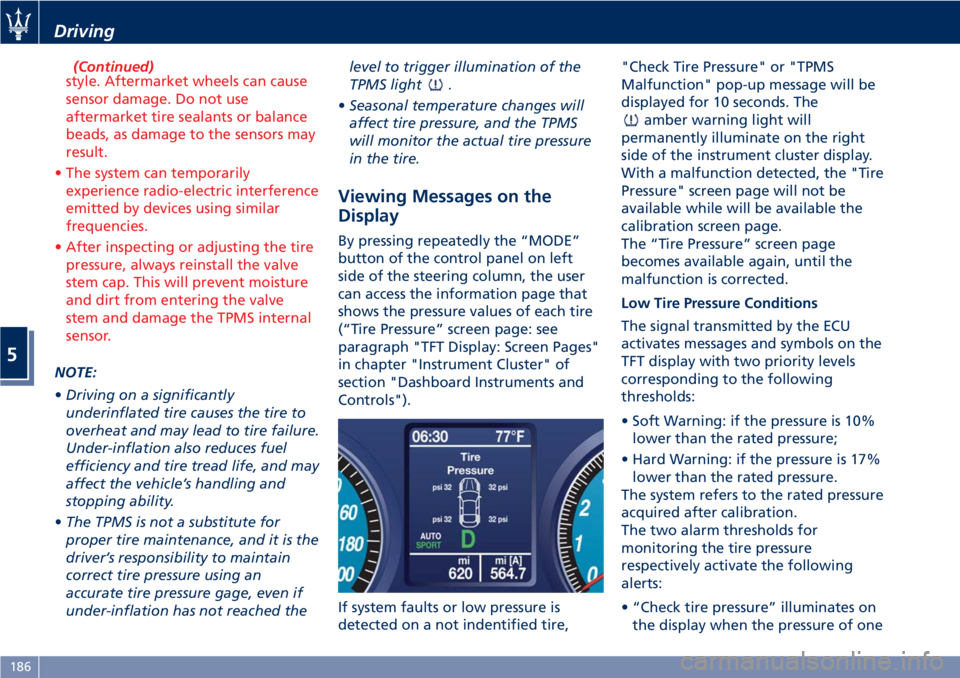
Viewing Messages on the
Display
By pressing repeatedly the “MODE”
button of the control panel on left
side of the steering column, the user
can access the information page that
shows the pressure values of each tire
(“Tire Pressure” screen page: see
paragraph "TFT Display: Screen Pages"
in chapter "Instrument Cluster" of
section "Dashboard Instruments and
Controls").
If system faults or low pressure is
detected on a not indentified tire,"Check Tire Pressure" or "TPMS
Malfunction" pop-up message will be
displayed for 10 seconds. The
amber warning light will
permanently illuminate on the right
side of the instrument cluster display.
With a malfunction detected, the "Tire
Pressure" screen page will not be
available while will be available the
calibration screen page.
The “Tire Pressure” screen page
becomes available again, until the
malfunction is corrected.
Low Tire Pressure Conditions
The signal transmitted by the ECU
activates messages and symbols on the
TFT display with two priority levels
corresponding to the following
thresholds:
• Soft Warning: if the pressure is 10%
lower than the rated pressure;
• Hard Warning: if the pressure is 17%
lower than the rated pressure.
The system refers to the rated pressure
acquired after calibration.
The two alarm thresholds for
monitoring the tire pressure
respectively activate the following
alerts:
• “Check tire pressure” illuminates on
the display when the pressure of one
Driving
5
186
Page 191 of 286
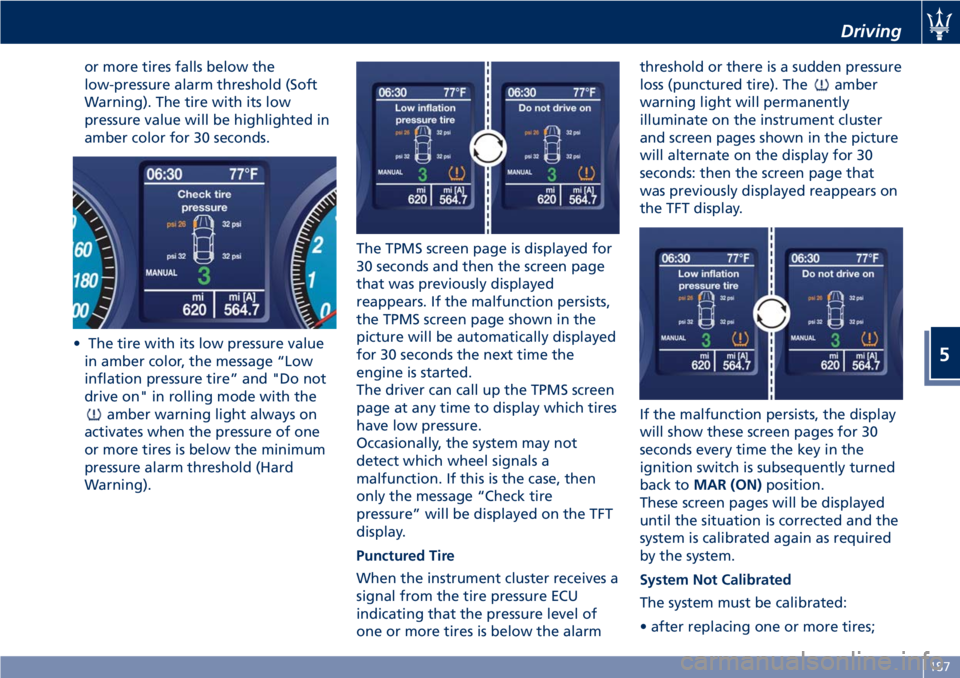
or more tires falls below the
low-pressure alarm threshold (Soft
Warning). The tire with its low
pressure value will be highlighted in
amber color for 30 seconds.
• The tire with its low pressure value
in amber color, the message “Low
inflation pressure tire” and "Do not
drive on" in rolling mode with the
amber warning light always on
activates when the pressure of one
or more tires is below the minimum
pressure alarm threshold (Hard
Warning).The TPMS screen page is displayed for
30 seconds and then the screen page
that was previously displayed
reappears. If the malfunction persists,
the TPMS screen page shown in the
picture will be automatically displayed
for 30 seconds the next time the
engine is started.
The driver can call up the TPMS screen
page at any time to display which tires
have low pressure.
Occasionally, the system may not
detect which wheel signals a
malfunction. If this is the case, then
only the message “Check tire
pressure” will be displayed on the TFT
display.
Punctured Tire
When the instrument cluster receives a
signal from the tire pressure ECU
indicating that the pressure level of
one or more tires is below the alarmthreshold or there is a sudden pressure
loss (punctured tire). The
amber
warning light will permanently
illuminate on the instrument cluster
and screen pages shown in the picture
will alternate on the display for 30
seconds: then the screen page that
was previously displayed reappears on
the TFT display.
If the malfunction persists, the display
will show these screen pages for 30
seconds every time the key in the
ignition switch is subsequently turned
back toMAR (ON)position.
These screen pages will be displayed
until the situation is corrected and the
system is calibrated again as required
by the system.
System Not Calibrated
The system must be calibrated:
• after replacing one or more tires;
Driving
5
187
Page 192 of 286
• after inverting the wheels;
• if you are not sure whether at least
one of the operations above was
performed.
If you simply corrected the tire
inflation pressure, you do not need to
recalibrate the system.
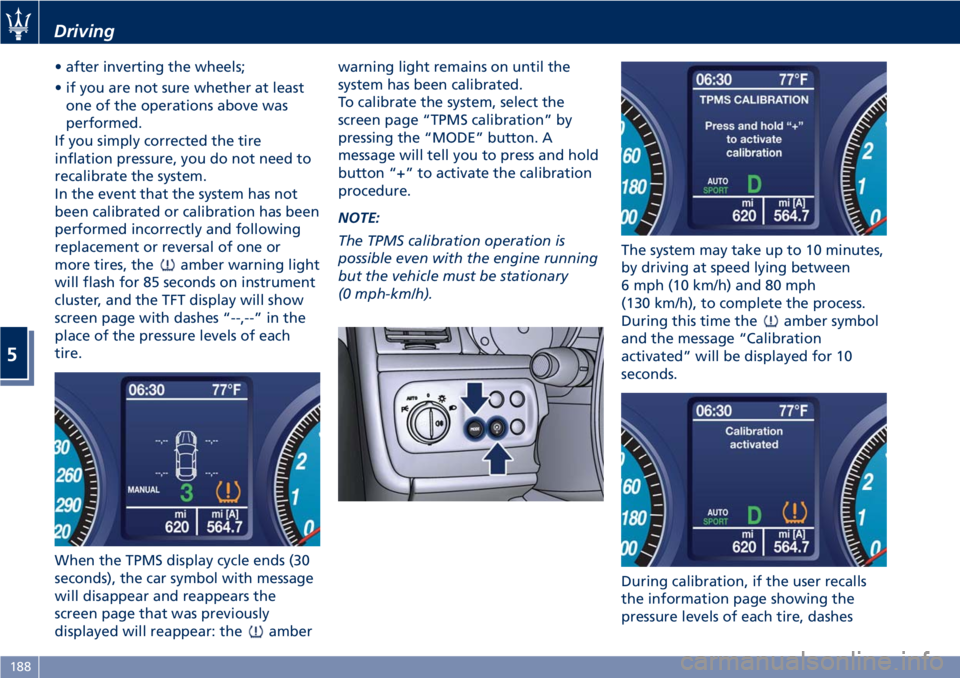
In the event that the system has not
been calibrated or calibration has been
performed incorrectly and following
replacement or reversal of one or
more tires, the
amber warning light
will flash for 85 seconds on instrument
cluster, and the TFT display will show
screen page with dashes “--,--” in the
place of the pressure levels of each
tire.
When the TPMS display cycle ends (30
seconds), the car symbol with message
will disappear and reappears the
screen page that was previously
displayed will reappear: the
amberwarning light remains on until the
system has been calibrated.
To calibrate the system, select the
screen page “TPMS calibration” by
pressing the “MODE” button. A
message will tell you to press and hold
button “+” to activate the calibration
procedure.
NOTE:
The TPMS calibration operation is
possible even with the engine running
but the vehicle must be stationary
(0 mph-km/h).The system may take up to 10 minutes,
by driving at speed lying between
6 mph (10 km/h) and 80 mph
(130 km/h), to complete the process.
During this time the
amber symbol
and the message “Calibration
activated” will be displayed for 10
seconds.
During calibration, if the user recalls
the information page showing the
pressure levels of each tire, dashes
Driving
5
188