Passive entry MASERATI LEVANTE 2019 User Guide
[x] Cancel search | Manufacturer: MASERATI, Model Year: 2019, Model line: LEVANTE, Model: MASERATI LEVANTE 2019Pages: 436, PDF Size: 15.24 MB
Page 48 of 436
(Continued)
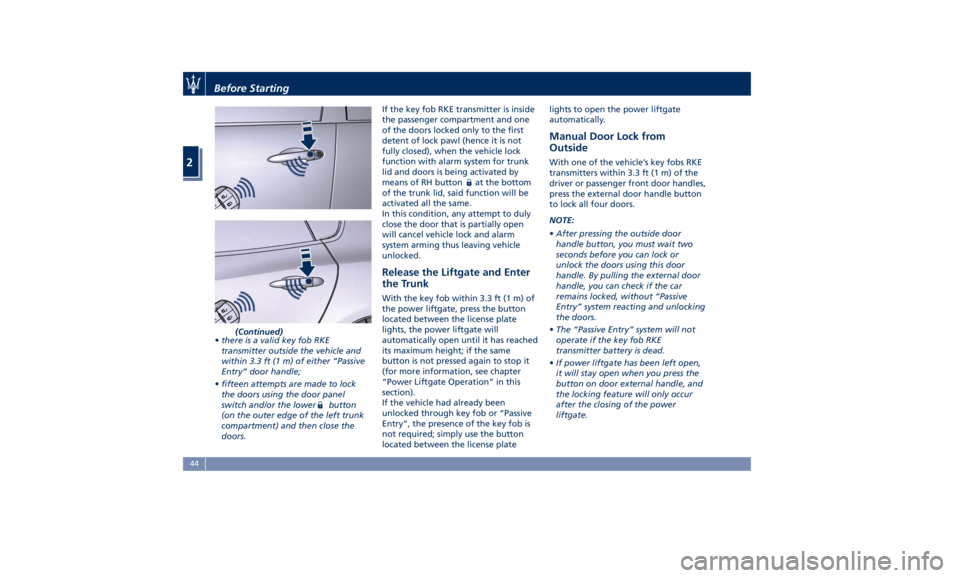
• there is a valid key fob RKE
transmitter outside the vehicle and
within 3.3 ft (1 m) of either “Passive
Entry” door handle;
• fifteen attempts are made to lock
the doors using the door panel
switch and/or the lower
button
(on the outer edge of the left trunk
compartment) and then close the
doors. If the key fob RKE transmitter is inside
the passenger compartment and one
of the doors locked only to the first
detent of lock pawl (hence it is not
fully closed), when the vehicle lock
function with alarm system for trunk
lid and doors is being activated by
means of RH button
at the bottom
of the trunk lid, said function will be
activated all the same.
In this condition, any attempt to duly
close the door that is partially open
will cancel vehicle lock and alarm
system arming thus leaving vehicle
unlocked.
Release the Liftgate and Enter
the Trunk With the key fob within 3.3 ft (1 m) of
the power liftgate, press the button
located between the license plate
lights, the power liftgate will
automatically open until it has reached
its maximum height; if the same
button is not pressed again to stop it
(for more information, see chapter
“Power Liftgate Operation” in this
section).
If the vehicle had already been
unlocked through key fob or “Passive
Entry”, the presence of the key fob is
not required; simply use the button
located between the license plate lights to open the power liftgate
automatically.
Manual Door Lock from
Outside With one of the vehicle’s key fobs RKE
transmitters within 3.3 ft (1 m) of the
driver or passenger front door handles,
press the external door handle button
to lock all four doors.
NOTE:
• After pressing the outside door
handle button, you must wait two
seconds before you can lock or
unlock the doors using this door
handle. By pulling the external door
handle, you can check if the car
remains locked, without “Passive
Entry” system reacting and unlocking
the doors.
• The “Passive Entry” system will not
operate if the key fob RKE
transmitter battery is dead.
• If power liftgate has been left open,
it will stay open when you press the
button on door external handle, and
the locking feature will only occur
after the closing of the power
liftgate.Before Starting
2
44
Page 55 of 436
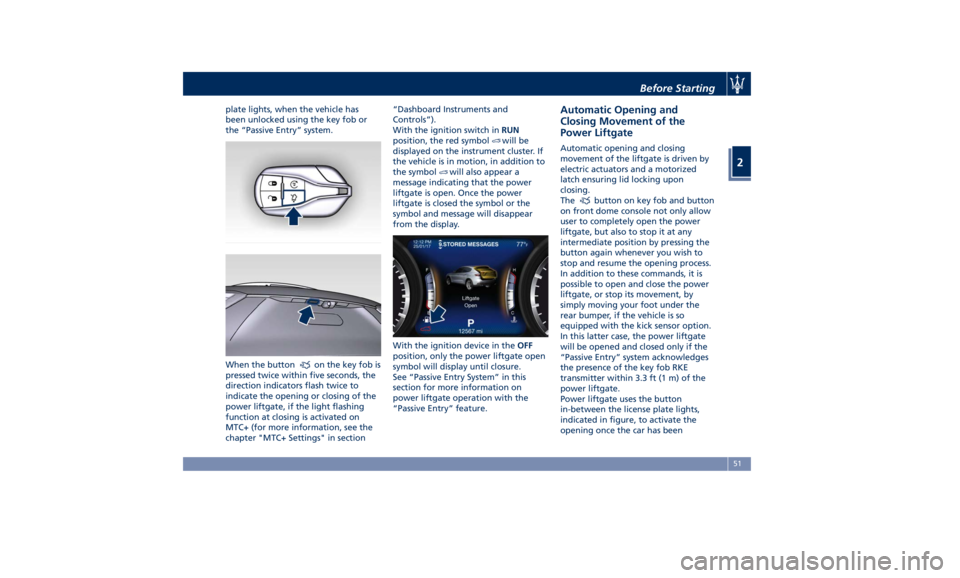
plate lights, when the vehicle has
been unlocked using the key fob or
the “Passive Entry” system.
When the button
on the key fob is
pressed twice within five seconds, the
direction indicators flash twice to
indicate the opening or closing of the
power liftgate, if the light flashing
function at closing is activated on
MTC+ (for more information, see the
chapter "MTC+ Settings" in section “Dashboard Instruments and
Controls”).
With the ignition switch in RUN
position, the red symbol
will be
displayed on the instrument cluster. If
the vehicle is in motion, in addition to
the symbol
will also appear a
message indicating that the power
liftgate is open. Once the power
liftgate is closed the symbol or the
symbol and message will disappear
from the display.
With the ignition device in the OFF
position, only the power liftgate open
symbol will display until closure.
See “Passive Entry System” in this
section for more information on
power liftgate operation with the
“Passive Entry” feature. Automatic Opening and
Closing Movement of the
Power Liftgate Automatic opening and closing
movement of the liftgate is driven by
electric actuators and a motorized
latch ensuring lid locking upon
closing.
The
button on key fob and button
on front dome console not only allow
user to completely open the power
liftgate, but also to stop it at any
intermediate position by pressing the
button again whenever you wish to
stop and resume the opening process.
In addition to these commands, it is
possible to open and close the power
liftgate, or stop its movement, by
simply moving your foot under the
rear bumper, if the vehicle is so
equipped with the kick sensor option.
In this latter case, the power liftgate
will be opened and closed only if the
“Passive Entry” system acknowledges
the presence of the key fob RKE
transmitter within 3.3 ft (1 m) of the
power liftgate.
Power liftgate uses the button
in-between the license plate lights,
indicated in figure, to activate the
opening once the car has beenBefore Starting
2
51
Page 56 of 436
unlocked by the key fob or by the
“Passive Entry” function.
By pressing this button when the
power liftgate is closed, you can open
it completely, or by pressing the
button again stop the opening
process, or by pressing the button
again invert the movement and close it
completely.
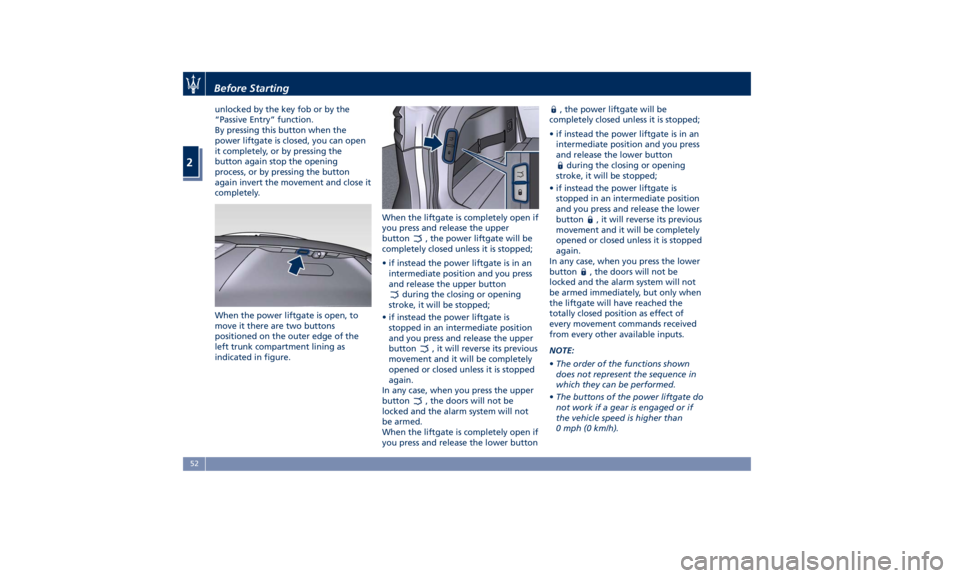
When the power liftgate is open, to
move it there are two buttons
positioned on the outer edge of the
left trunk compartment lining as
indicated in figure. When the liftgate is completely open if
you press and release the upper
button
, the power liftgate will be
completely closed unless it is stopped;
• if instead the power liftgate is in an
intermediate position and you press
and release the upper button
during the closing or opening
stroke, it will be stopped;
• if instead the power liftgate is
stopped in an intermediate position
and you press and release the upper
button
, it will reverse its previous
movement and it will be completely
opened or closed unless it is stopped
again.
In any case, when you press the upper
button
, the doors will not be
locked and the alarm system will not
be armed.
When the liftgate is completely open if
you press and release the lower button , the power liftgate will be
completely closed unless it is stopped;
• if instead the power liftgate is in an
intermediate position and you press
and release the lower button
during the closing or opening
stroke, it will be stopped;
• if instead the power liftgate is
stopped in an intermediate position
and you press and release the lower
button
, it will reverse its previous
movement and it will be completely
opened or closed unless it is stopped
again.
In any case, when you press the lower
button
, the doors will not be
locked and the alarm system will not
be armed immediately, but only when
the liftgate will have reached the
totally closed position as effect of
every movement commands received
from every other available inputs.
NOTE:
• The order of the functions shown
does not represent the sequence in
which they can be performed.
• The buttons of the power liftgate do
not work if a gear is engaged or if
the vehicle speed is higher than
0 mph (0 km/h).Before Starting
2
52
Page 58 of 436
Apart from activating indicators
blinking when power liftgate is
operated, it is also possible to activate
a sound warning by selecting the
relevant function within MTC+ user
settings (see “MTC+ Settings” in
section “Dashboard Instruments and
Controls”).
When power liftgate edge reaches the
car body, the motor locking the latch is
activated automatically.
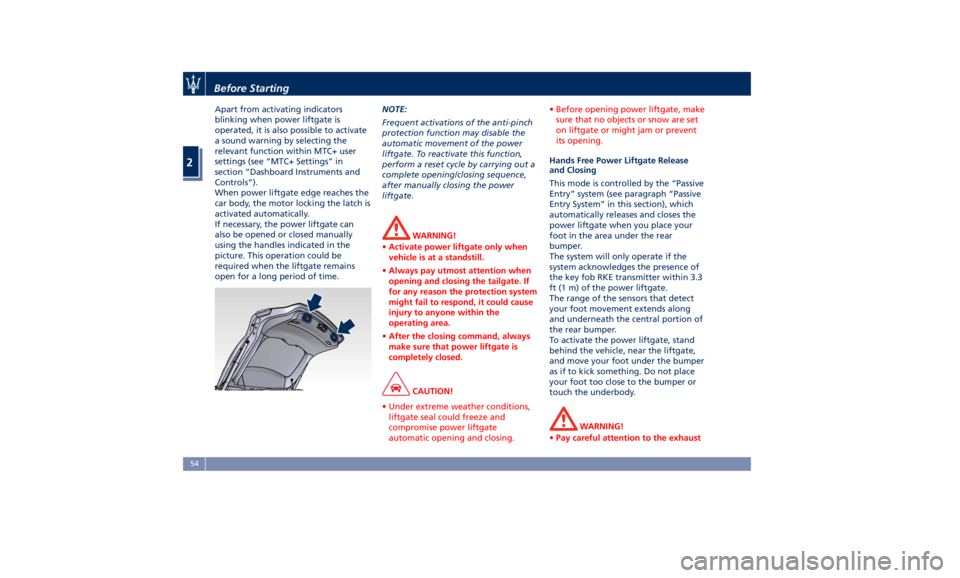
If necessary, the power liftgate can
also be opened or closed manually
using the handles indicated in the
picture. This operation could be
required when the liftgate remains
open for a long period of time. NOTE:
Frequent activations of the anti-pinch
protection function may disable the
automatic movement of the power
liftgate. To reactivate this function,
perform a reset cycle by carrying out a
complete opening/closing sequence,
after manually closing the power
liftgate.
WARNING!
• Activate power liftgate only when
vehicle is at a standstill.
• Always pay utmost attention when
opening and closing the tailgate. If
for any reason the protection system
might fail to respond, it could cause
injury to anyone within the
operating area.
• After the closing command, always
make sure that power liftgate is
completely closed.
CAUTION!
• Under extreme weather conditions,
liftgate seal could freeze and
compromise power liftgate
automatic opening and closing. • Before opening power liftgate, make
sure that no objects or snow are set
on liftgate or might jam or prevent
its opening.
Hands Free Power Liftgate Release
and Closing
This mode is
controlled by the “Passive
Entry” system (see paragraph “Passive
Entry System” in this section), which
automatically releases and closes the
power liftgate when you place your
foot in the area under the rear
bumper.
The system will only operate if the
system acknowledges the presence of
the key fob RKE transmitter within 3.3
ft (1 m) of the power liftgate.
The range of the sensors that detect
your foot movement extends along
and underneath the central portion of
the rear bumper.
To activate the power liftgate, stand
behind the vehicle, near the liftgate,
and move your foot under the bumper
as if to kick something. Do not place
your foot too close to the bumper or
touch the underbody.
WARNING!
• Pay careful attention to the exhaustBefore Starting
2
54
Page 101 of 436
13 Door lock button with “Passive
Entry” function.
14 Door outboard opening lock.
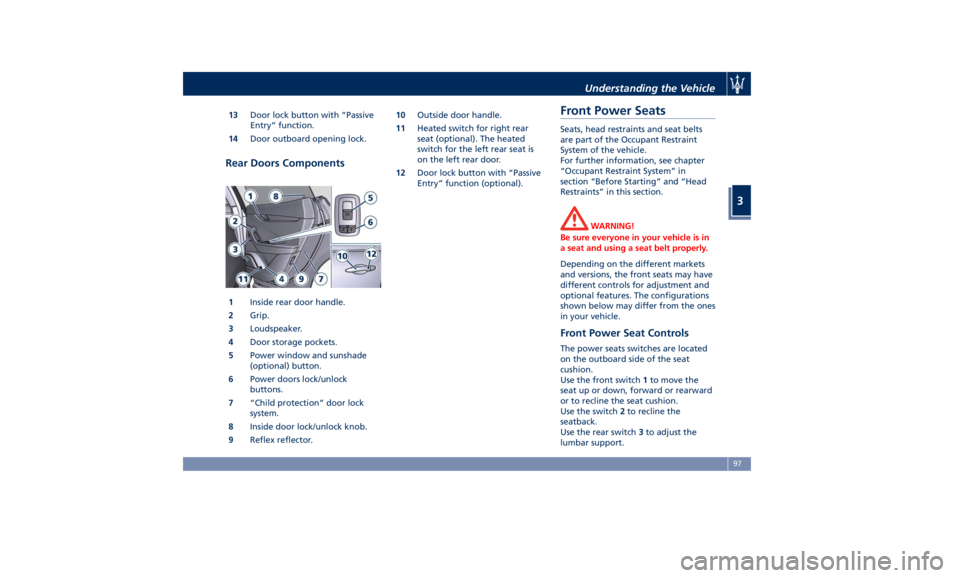
Rear Doors Components
1 Inside rear door handle.
2 Grip.
3 Loudspeaker.
4 Door storage pockets.
5 Power window and sunshade
(optional) button.
6 Power doors lock/unlock
buttons.
7 “Child protection” door lock
system.
8 Inside door lock/unlock knob.
9 Reflex reflector. 10 Outside door handle.
11 Heated switch for right rear
seat (optional). The heated
switch for the left rear seat is
on the left rear door.
12 Door lock button with “Passive
Entry” function (optional).
Front Power Seats Seats, head restraints and seat belts
are part of the Occupant Restraint
System of the vehicle.
For further information, see chapter
“Occupant Restraint System” in
section “Before Starting” and “Head
Restraints” in this section.
WARNING!
Be sure everyone in your vehicle is in
a seat and using a seat belt properly.
Depending on the different markets
and versions, the front
seats may have
different controls for adjustment and
optional features. The configurations
shown below may differ from the ones
in your vehicle.
Front Power Seat Controls The power seats switches are located
on the outboard side of the seat
cushion.
Use the front switch 1 to move the
seat up or down, forward or rearward
or to recline the seat cushion.
Use the switch 2 to recline the
seatback.
Use the rear switch 3 to adjust the
lumbar support.Understanding the Vehicle
3
97
Page 105 of 436
Driver Memory Seat This feature allows the driver to store
up to two different memory profiles
for easy recall through a memory
switch. Each memory profile contains
desired position settings for the driver
seat, external side mirrors, adjustable
pedals (optional), and power tilt and
telescopic steering column and a set of
programmed radio stations.
Your key fob RKE transmitter can also
be set to recall the same positions by
pressing the
button.
NOTE:
• Only one key fob RKE transmitter
can be linked to each of the memory
positions.
• “Passive Entry” door handles cannot
be linked to the memory function.
Use either the memory recall switch
or the key fob RKE transmitter (if
linked to the memory feature) to
recall memory positions 1 or 2.
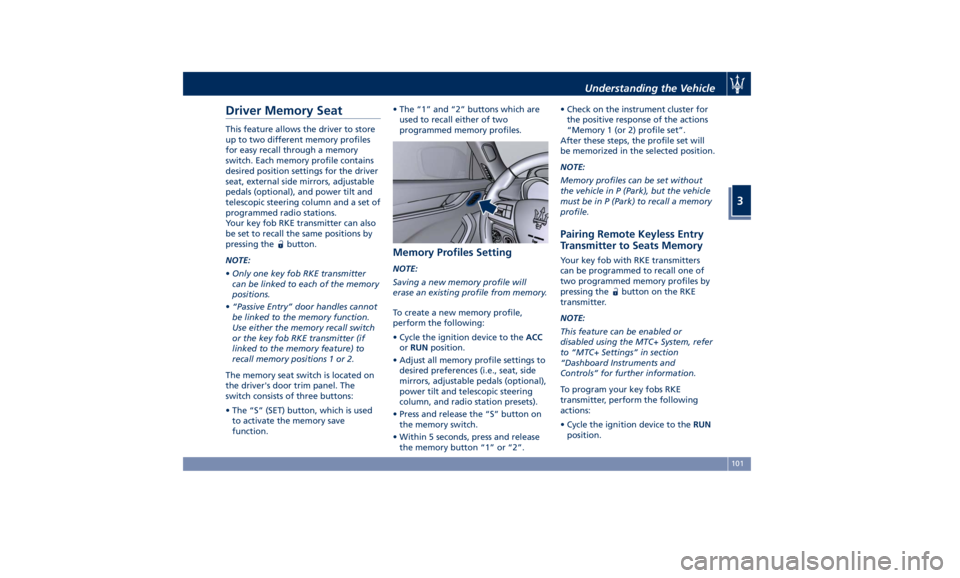
The memory seat switch is located on
the driver's door trim panel. The
switch consists of three buttons:
• The “S” (SET) button, which is used
to activate the memory save
function. • The “1” and “2” buttons which are
used to recall either of two
programmed memory profiles.
Memory Profiles Setting NOTE:
Saving a new memory profile will
erase an existing profile from memory.
To create a new memory profile,
perform the following:
• Cycle the ignition device to the ACC
or RUN position.
• Adjust all memory profile settings to
desired preferences (i.e., seat, side
mirrors, adjustable pedals (optional),
power tilt and telescopic steering
column, and radio station presets).
• Press and release the “S” button on
the memory switch.
• Within 5 seconds, press and release
the memory button “1” or “2”. • Check on the instrument cluster for
the positive response of the actions
“Memory 1 (or 2) profile set”.
After these steps, the profile set will
be memorized in the selected position.
NOTE:
Memory profiles can be set without
the vehicle in P (Park), but the vehicle
must be in P (Park) to recall a memory
profile.
Pairing Remote Keyless Entry
Transmitter to Seats Memory Your key fob with RKE transmitters
can be programmed to recall one of
two programmed memory profiles by
pressing the
button on the RKE
transmitter.
NOTE:
This feature can be enabled or
disabled using the MTC+ System, refer
to “MTC+ Settings” in section
“Dashboard Instruments and
Controls” for further information.
To program your key fobs RKE
transmitter, perform the following
actions:
• Cycle the ignition device to the RUN
position.Understanding the Vehicle
3
101
Page 187 of 436
that a system fault requiring servicing
at an Authorized Maserati Dealer .Itis
nevertheless possible to drive the
vehicle without using this function
(for further details, refer to “Forward
Collision Warning - FCW” in section
“Driving”).
General Fault for Driving with a Trailer
(NOT for TROFEO version)
The warning light and the
relevant message are
displayed to indicate a fault or
failure of the connection
between vehicle and trailer. In these
cases please contact an Authorized
Maserati Dealer as soon as possible,
and avoid using the vehicle with a
trailer.
AWD Failure Warning Light
This warning light turns on to
indicate a fault of the AWD
system otherwise a fault or
overheating due to excessive
wheel spin.. Contact an Authorized
Maserati Dealer as soon as possible,
and avoid using the vehicle in heavy
duty conditions.
Set Passive Speed Limit
This indicator light indicates
the passive speed limit set via
the controls on the RH side of the steering wheel (for further details,
refer to “TFT Display: Menus and
Settings” in this chapter).
Passive Speed Limit Exceeded
This indicator light informs
the driver that the speed limit
that was set has been
exceeded.
Stiff Suspension Setting Indicator
This indicator light indicate
that the stiff suspensions
program (“S”) is on.
For further details, refer to
“Drive Mode” in section “Driving”.
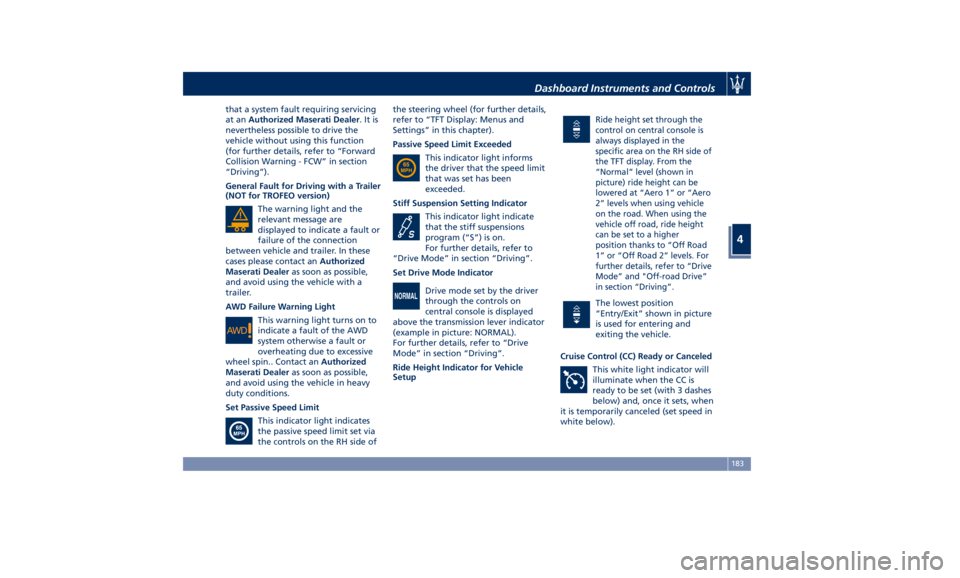
Set Drive Mode Indicator
Drive mode set by the driver
through the controls on
central console is displayed
above the transmission lever indicator
(example in picture: NORMAL).
For further details, refer to “Drive
Mode” in section “Driving”.
Ride Height Indicator for Vehicle
Setup Ride height set through the
control on central console is
always displayed in the
specific area on the RH side of
the TFT display. From the
“Normal” level (shown in
picture) ride height can be
lowered at “Aero 1” or “Aero
2” levels when using vehicle
on the road. When using the
vehicle off road, ride height
can be set to a higher
position thanks to “Off Road
1” or “Off Road 2” levels. For
further details, refer to “Drive
Mode” and "Off-road Drive”
in section “Driving”.
The lowest position
“Entry/Exit” shown in picture
is used for entering and
exiting the vehicle.
Cruise Control (CC) Ready or Canceled
This white light indicator will
illuminate when the CC is
ready to be set (with 3 dashes
below) and, once it sets, when
it is temporarily canceled (set speed in
white below).Dashboard Instruments and Controls
4
183
Page 208 of 436
• Headlight Illumination on Approach
By selecting this feature, the driver
can choose to have the headlight off
or lit for 30, 60, or 90 seconds when
the doors are unlocked with the key
fob RKE transmitter.
• Headlights with Wipers
By selecting this feature, while the
headlight lever is in “AUTO”
position, the headlight will turn on
approximately 10 seconds after the
wipers are activated. The headlight
will also turn off when the wipers
deactivate if they were activated in
the current mode. The feature can
be set to“On” or “Off”.
• Auto Dim High Beams
By selecting this feature, the high
beam headlight will deactivate
automatically under certain
conditions. See “Lights” in section “Understanding the Vehicle” for
further information.
• Headlight Dip (Traffic Changeover) (if
equipped)
By selecting this feature, the
headlights will change their light
distribution when a left-hand-drive
vehicle enter a Country with
right-hand-drive system and vice
versa. The feature can be set to
“On” or “Off”.
• Daytime Running Lights (DRL)
By selecting and check-mark this
feature, the DRL lights will turn on
whenever the engine running. The
feature can be set to “On” or “Off”.
• Adaptive Front Light
By selecting this feature, the
headlights rotate following the
steering wheel direction change and
change their flux distribution at
high speeds, when the vehicle enters
an town area and when it's raining.
The feature can be set to “On” or
“Off”. See “Lights” in section
“Understanding the Vehicle” for
further details.
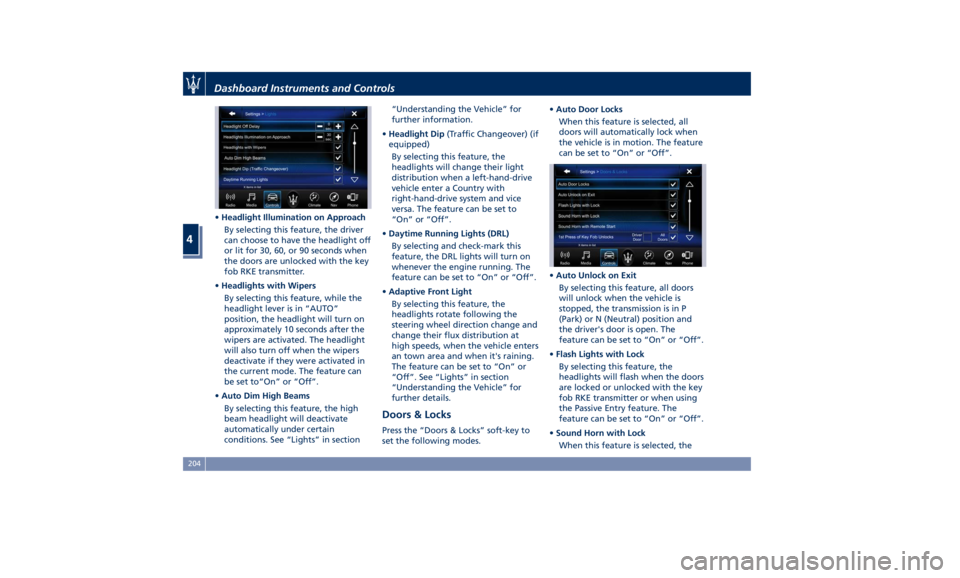
Doors & Locks Press the “Doors & Locks” soft-key to
set the following modes. • Auto Door Locks
When this feature is selected, all
doors will automatically lock when
the vehicle is in motion. The feature
can be set to “On” or “Off”.
• Auto Unlock on Exit
By selecting this feature, all doors
will unlock when the vehicle is
stopped, the transmission is in P
(Park) or N (Neutral) position and
the driver's door is open. The
feature can be set to “On” or “Off”.
• Flash Lights with Lock
By selecting this feature, the
headlights will flash when the doors
are locked or unlocked with the key
fob RKE transmitter or when using
the Passive Entry feature. The
feature can be set to “On” or “Off”.
• Sound Horn with Lock
When this feature is selected, theDashboard Instruments and Controls
4
204
Page 209 of 436
horn will sound when the doors are
locked with the key fob RKE
transmitter. You can choose from
the following options: “Off” (no
sound), “1st Press” (sound on the
first press of the
button) and
“2nd Press” (sound on the second
press of the
button).
• Sound Horn with Remote Start
When this feature is selected, the
horn will sound when you use the
key fob RKE transmitter to start the
engine. The feature can be set to
“On” or “Off”. See “Remote Start
System” in section “Before Starting”
for further details.
• Remote Unlock Sequence
By selecting this feature you may set
up only the driver's door or all
doors mode will unlock on the first
press of the key fob RKE transmitter
button. When “Driver Door” is
selected, you must press the key fob
RKE transmitter
button twice to
unlock also the passenger's doors.
When unlocking “All Doors” by first
press selection mode, all doors will unlock on the first press of the key
fob RKE transmitter
button.
If the vehicle is programmed on “1st
Press of Key Fob Unlocks”:
• all doors will unlock no matter
which “Passive Entry” equipped
door handle is grasped;
• only the driver’s door will unlock
when the driver’s door is grasped;
• with “Passive Entry”, touching the
handle more than once will only
result in the driver’s door opening.
If driver door first is selected, once
the driver door is opened, the
interior door lock/unlock switch can
be used to unlock all doors (or use
key fob RKE transmitter).
• Passive Entry
This feature allows you to lock and
unlock the vehicle door(s) without
having to push the key fob RKE
transmitter
or buttons. By
selecting this feature, “Passive
Entry” may be set to “On” or “Off”.
The default status is “On”. With
“Passive Entry” deactivated, also the
“Pre-Short Drop” function is
disabled (for further information,
refer to “Bodywork Maintenance
and Care” in section “Maintenance
and Care”). • Personal Settings Linked to Key Fob
This selected mode enables to
combine the key fob to personal
driver’s position settings. These
settings will be implemented when
pressing the
button on the key
fob RKE transmitter with ignition
device in RUN position.
• Power Liftgate Alert
When this feature is available, if it
selected, further to turn indicators
flashing, an acoustic warning will
also be triggered when opening
and closing the liftgate and also
when the fully open position of the
liftgate is set by the user. The
feature can be set to “On” or “Off”.
• Hands Free Power Liftgate
To prevent the accidental opening
of the power liftgate/Hand free
(optional) with the movement of
the foot, it is possible to disable the
“Hand Free” function. The feature
can be set to “On” or “Off”. This
operation is recommended when
you have to wash the car (for
further information, refer to
“Power Liftgate Operation” in
section “Before Starting”).Dashboard Instruments and Controls
4
205
Page 404 of 436
any other equipment such as
brushes, steel wool, abrasives or any
other equipment for cleaning.
• After cleaning, please rinse the
aluminum trim with a lot of clear
water.
• While cleaning in the car, please
make sure that the moldings and
aluminum trims only get in contact
with soft brushes or textiles.
Engine Compartment
At the end of each winter season,
carefully wash the engine
compartment, remembering to avoid
directing the jet of water for too long
on the electric parts.
To perform this operation, you must
contact an Authorized Maserati
Dealer .
Pre-Short Drop Function When in a car wash, if the driver keeps
the RKE Transmitter in his/her pocket,
or in any place outside the vehicle
within 3.3 ft (1 m) distance, the front
windows will perform a pre-short
drop. This is a shorter drop compared
to the normal short drop performed by
the “Passive Entry” function when you
grab the door handle to enter the
vehicle. In order to prevent water from
entering the vehicle between the
upper edge of the glass window and
the door outline on the bodywork,
while the car is being washed, it is
advisable to disable the “Passive
Entry” from the MTC+ System, for
further information refer to chapter
“MTC+ Settings” in section
“Dashboard Instruments and controls”.
When deactivating the “Passive Entry”,
also the “Pre-Short Drop” function will
be disabled.
Interior Maintenance and
Care Interior trim should be cleaned
starting with a damp cloth. Do not use
harsh cleaners.
The leather upholstery can be best
preserved by regular cleaning with a
damp soft cloth. Small particles of dirt
can act as an abrasive and damage the
leather upholstery and should be
removed promptly with a damp cloth.
Stubborn soils stains can be removed
easily with a soft cloth and
appropriate products. Avoid soaking
the leather upholstery with any liquid.
Please do not use polishes, oils,
cleaning fluids, solvents, detergents, or
ammonia-based cleaners to clean your
leather upholstery.
Application of a leather conditioner is
not required to maintain the original
condition.
Check at regular intervals that there is
no water trapped under the mats (due
to drips off shoes, umbrellas etc.)
which may cause the metal parts to
oxidize.
CAUTION!
Do not use alcohol, petrol or solventsMaintenance and Care
7
400