roof MASERATI LEVANTE 2019 User Guide
[x] Cancel search | Manufacturer: MASERATI, Model Year: 2019, Model line: LEVANTE, Model: MASERATI LEVANTE 2019Pages: 436, PDF Size: 15.24 MB
Page 149 of 436
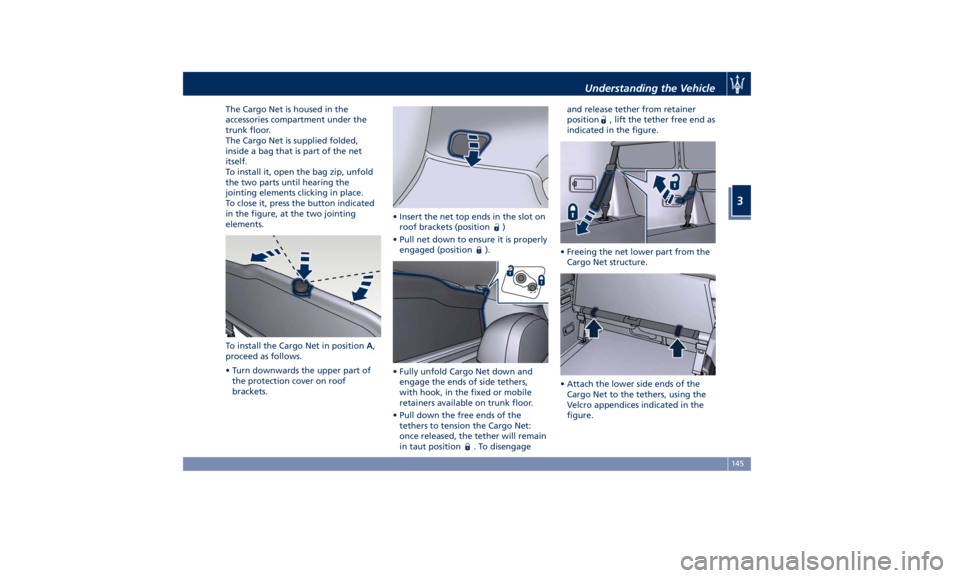
The Cargo Net is housed in the
accessories compartment under the
trunk floor.
The Cargo Net is supplied folded,
inside a bag that is part of the net
itself.
To install it, open the bag zip, unfold
the two parts until hearing the
jointing elements clicking in place.
To close it, press the button indicated
in the figure, at the two jointing
elements.
To install the Cargo Net in position A ,
proceed as follows.
• Turn downwards the upper part of
the protection cover on roof
brackets. • Insert the net top ends in the slot on
roof brackets (position
)
• Pull net down to ensure it is properly
engaged (position
).
• Fully unfold Cargo Net down and
engage the ends of side tethers,
with hook, in the fixed or mobile
retainers available on trunk floor.
• Pull down the free ends of the
tethers to tension the Cargo Net:
once released, the tether will remain
in taut position
. To disengage and release tether from retainer
position
, lift the tether free end as
indicated in the figure.
• Freeing the net lower part from the
Cargo Net structure.
• Attach the lower side ends of the
Cargo Net to the tethers, using the
Velcro appendices indicated in the
figure.Understanding the Vehicle
3
145
Page 150 of 436
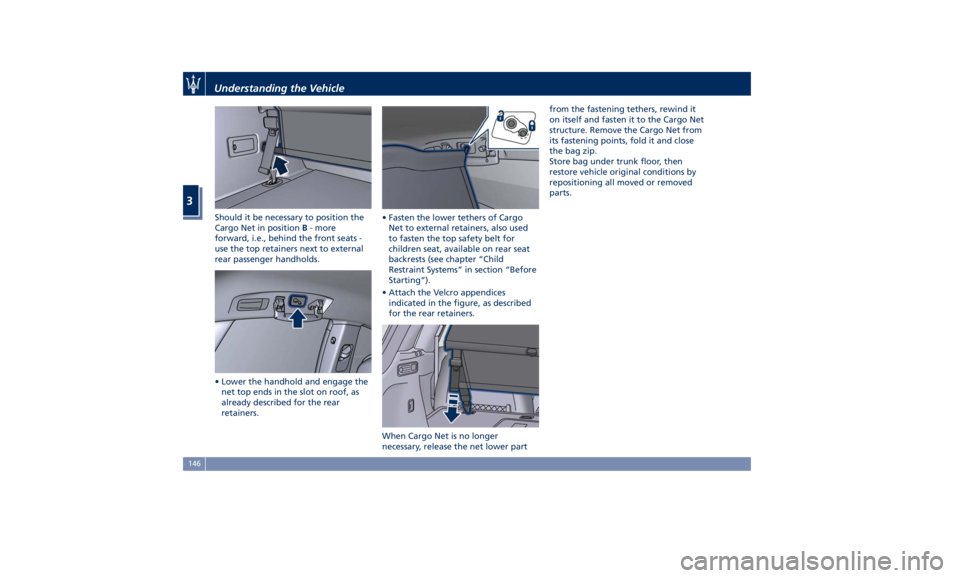
Should it be necessary to position the
Cargo Net in position B - more
forward, i.e., behind the front seats -
use the top retainers next to external
rear passenger handholds.
• Lower the handhold and engage the
net top ends in the slot on roof, as
already described for the rear
retainers. • Fasten the lower tethers of Cargo
Net to external retainers, also used
to fasten the top safety belt for
children seat, available on rear seat
backrests (see chapter “Child
Restraint Systems” in section “Before
Starting”).
• Attach the Velcro appendices
indicated in the figure, as described
for the rear retainers.
When Cargo Net is no longer
necessary, release the net lower part from the fastening tethers, rewind it
on itself and fasten it to the Cargo Net
structure. Remove the Cargo Net from
its fastening points, fold it and close
the bag zip.
Store bag under trunk floor, then
restore vehicle original conditions by
repositioning all moved or removed
parts.Understanding the Vehicle
3
146
Page 151 of 436
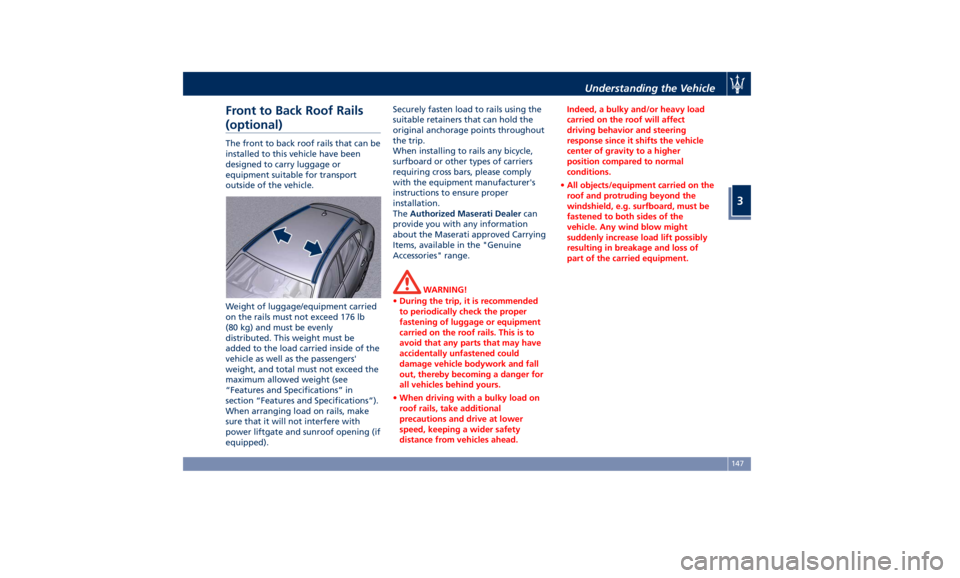
Front to Back Roof Rails
(optional) The front to back roof rails that can be
installed to this vehicle have been
designed to carry luggage or
equipment suitable for transport
outside of the vehicle.
Weight of luggage/equipment carried
on the rails must not exceed 176 lb
(80 kg) and must be evenly
distributed. This weight must be
added to the load carried inside of the
vehicle as well as the passengers'
weight, and total must not exceed the
maximum allowed weight (see
“Features and Specifications” in
section “Features and Specifications”).
When arranging load on rails, make
sure that it will not interfere with
power liftgate and sunroof opening (if
equipped). Securely fasten load to rails using the
suitable retainers that can hold the
original anchorage points throughout
the trip.
When installing to rails any bicycle,
surfboard or other types of carriers
requiring cross bars, please comply
with the equipment manufacturer's
instructions to ensure proper
installation.
The Authorized Maserati Dealer can
provide you with any information
about the Maserati approved Carrying
Items, available in the "Genuine
Accessories" range.
WARNING!
• During the trip, it is recommended
to periodically check the proper
fastening of luggage or equipment
carried on the roof rails. This is to
avoid that any parts that may have
accidentally unfastened could
damage vehicle bodywork and fall
out, thereby becoming a danger for
all vehicles behind yours.
• When driving with a bulky load on
roof rails, take additional
precautions and drive at lower
speed, keeping a wider safety
distance from vehicles ahead. Indeed, a bulky and/or heavy load
carried on the roof will affect
driving behavior and steering
response since it shifts the vehicle
center of gravity to a higher
position compared to normal
conditions.
• All objects/equipment carried on the
roof and protruding beyond the
windshield, e.g. surfboard, must be
fastened to both sides of the
vehicle. Any wind blow might
suddenly increase load lift possibly
resulting in breakage and loss of
part of the carried equipment.Understanding the Vehicle
3
147
Page 152 of 436
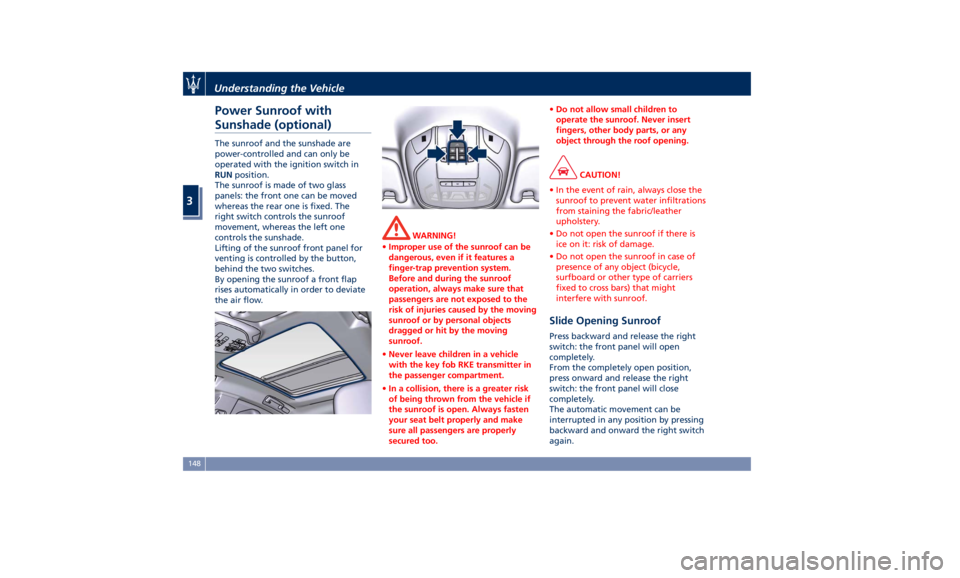
Power Sunroof with
Sunshade (optional) The sunroof and the sunshade are
power-controlled and can only be
operated with the ignition switch in
RUN position.
The sunroof is made of two glass
panels: the front one can be moved
whereas the rear one is fixed. The
right switch controls the sunroof
movement, whereas the left one
controls the sunshade.
Lifting of the sunroof front panel for
venting is controlled by the button,
behind the two switches.
By opening the sunroof a front flap
rises automatically in order to deviate
the air flow. WARNING!
• Improper use of the sunroof can be
dangerous, even if it features a
finger-trap prevention system.
Before and during the sunroof
operation, always make sure that
passengers are not exposed to the
risk of injuries caused by the moving
sunroof or by personal objects
dragged or hit by the moving
sunroof.
• Never leave children in a vehicle
with the key fob RKE transmitter in
the passenger compartment.
• In a collision, there is a greater risk
of being thrown from the vehicle if
the sunroof is open. Always fasten
your seat belt properly and make
sure all passengers are properly
secured too. • Do not allow small children to
operate the sunroof. Never insert
fingers, other body parts, or any
object through the roof opening.
CAUTION!
• In the event of rain, always close the
sunroof to prevent water infiltrations
from staining the fabric/leather
upholstery.
• Do not open the sunroof if there is
ice on it: risk of damage.
• Do not open the sunroof in case of
presence of any object (bicycle,
surfboard or other type of carriers
fixed to cross bars) that might
interfere with sunroof.
Slide Opening Sunroof Press backward and release the right
switch: the front panel will open
completely.
From the completely open position,
press onward and release the right
switch: the front panel will close
completely.
The automatic movement can be
interrupted in any position by pressing
backward and onward the right switch
again.Understanding the Vehicle
3
148
Page 153 of 436

Venting Sunroof Press and release the rear button; the
sunroof front panel will open to the
vent position. Where this function is
available, this type of opening can be
activated regardless of the sunroof
position. During this opening
operation, any movement of the
button will stop the sunroof.
By pressing the rear button when the
sunroof is completely closed, the latter
will open to the venting position.
Sunshade Press backward and release the left
switch: the sunshade will move to the
vehicle rear side until completely
open.
From this position, press onward and
release the left switch to move the
sunshade to the vehicle front side
until completely closed.
During the opening and closing
operations, work on backward and
onward the left switch to interrupt
the sunshade movement in any
position.
Pinch Protect Feature This feature will detect an obstruction
in the roof opening during the
automatic closure or a constant obstruction of the sunroof front
panel. If an obstruction is detected by
the safety system during the closing
movement, the sunroof front panel
will automatically retract. If this
occurs, remove the obstruction then
press onwards and release the right
switch to reactivate the sunroof
automatic closure.
NOTE:
• If three consecutive attempts to
close the sunroof result in pinch
protect reversals, the fourth attempt
will be manual, with pinch protect
feature disabled.
• Pinch protection is disabled while
pressing the switch/es.
Initialization Procedure In case of a fault in the automatic
opening/closing movements or in case
of battery removal, it is necessary to
initialize the automatic operation of
the sunroof.
Proceed as follows:
• bring the sunroof in the completely
closed position;
• push the ignition switch to OFF
position and keep this condition for
10 seconds; • push the ignition switch to RUN
position;
• press the right switch onwards and
keep it pressed for at least 10
seconds after which you should hear
the sunroof electric motor mechanic
stop;
• within 5 seconds, press the right
switch onwards again and keep it
pressed: the sunroof performs an
automatic complete opening and
closing cycle. Should this not
happen, repeat the procedure from
the beginning;
• press the right switch onwards and
keep it pressed until the sunroof is
completely closed: the initialization
procedure is then completed.
Wind Buffeting Wind buffeting can be described as
the perception of pressure or a
helicopter-type sound. Your vehicle
may exhibit wind buffeting with the
windows down, or the sunroof in
certain open or partially open
positions. This is a normal occurrence
and can be minimized. If the buffeting
occurs with the rear windows open,
then open the front and rear windows
together to minimize the buffeting. If
the buffeting occurs with the sunroofUnderstanding the Vehicle
3
149
Page 154 of 436
open, then adjust the sunroof opening
to minimize the buffeting.
Ignition Off Operation The power sunroof controls will
remain active for up to approximately
ten minutes after the ignition switch is
in OFF position. Opening either front
door will cancel this feature. The
ignition system timing can be set using
the MTC+ System (see “MTC+ Settings”
in section “Dashboard Instruments and
Controls”).
Sunroof Maintenance Use only a nonabrasive cleaner and a
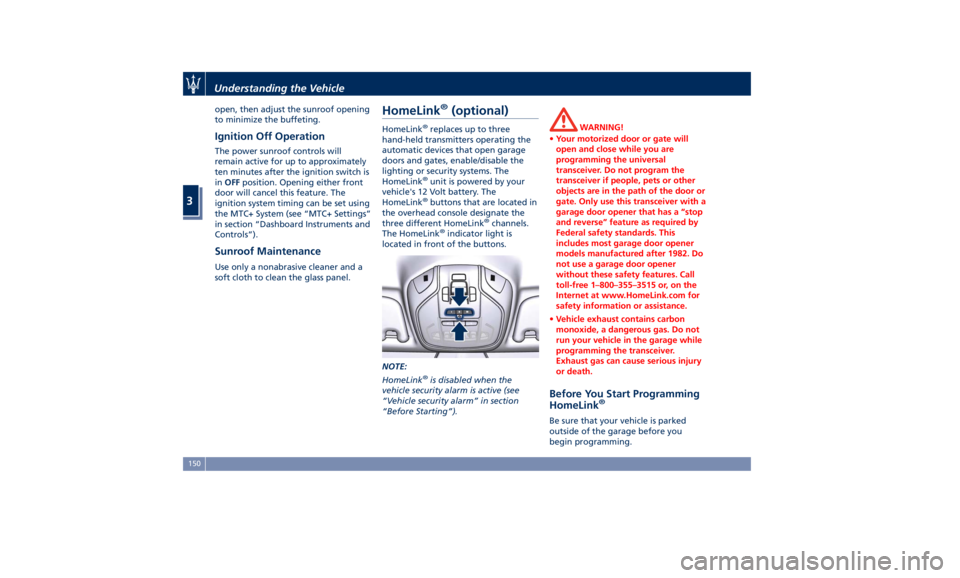
soft cloth to clean the glass panel. HomeLink ®
(optional) HomeLink ®
replaces up to three
hand-held transmitters operating the
automatic devices that open garage
doors and gates, enable/disable the
lighting or security systems. The
HomeLink ®
unit is powered by your
vehicle's 12 Volt battery. The
HomeLink ®
buttons that are located in
the overhead console designate the
three different HomeLink ®
channels.
The HomeLink ®
indicator light is
located in front of the buttons.
NOTE:
HomeLink ®
is disabled when the
vehicle security alarm is active (see
“Vehicle security alarm” in section
“Before Starting”). WARNING!
• Your motorized door or gate will
open and close while you are
programming the universal
transceiver. Do not program the
transceiver if people, pets or other
objects are in the path of the door or
gate. Only use this transceiver with a
garage door opener that has a “stop
and reverse” feature as required by
Federal safety standards. This
includes most garage door opener
models manufactured after 1982. Do
not use a garage door opener
without these safety features. Call
toll-free 1–800–355–3515 or, on the
Internet at www.HomeLink.com for
safety information or assistance.
• Vehicle exhaust contains carbon
monoxide, a dangerous gas. Do not
run your vehicle in the garage while
programming the transceiver.
Exhaust gas can cause serious injury
or death.
Before You Start Programming
HomeLink ®
Be sure that your vehicle is parked
outside of the garage before you
begin programming.Understanding the Vehicle
3
150
Page 210 of 436
Auto-On Comfort & Remote
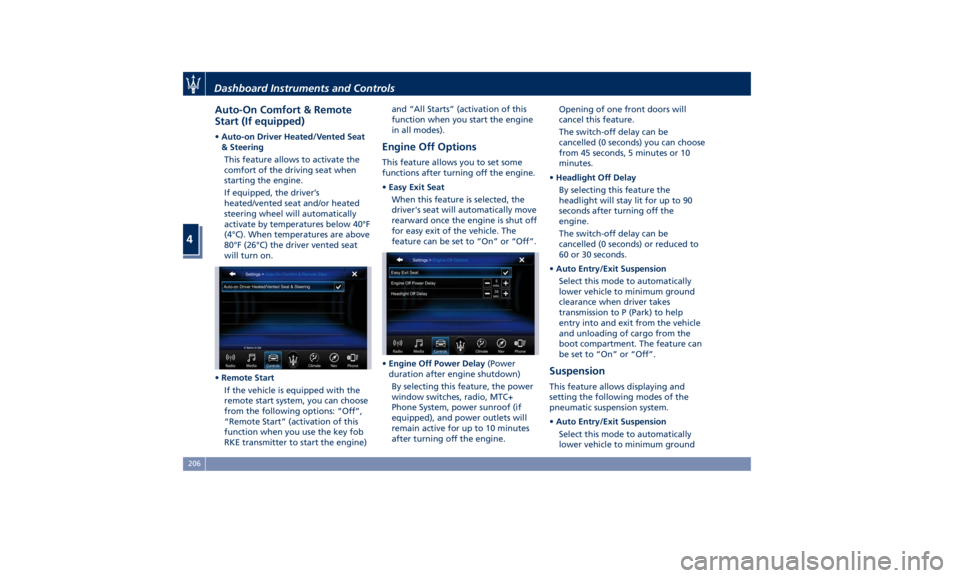
Start (If equipped) • Auto-on Driver Heated/Vented Seat
& Steering
This feature allows to activate the
comfort of the driving seat when
starting the engine.
If equipped, the driver’s
heated/vented seat and/or heated
steering wheel will automatically
activate by temperatures below 40°F
(4°C). When temperatures are above
80°F (26°C) the driver vented seat
will turn on.
• Remote Start
If the vehicle is equipped with the
remote start system, you can choose
from the following options: “Off”,
“Remote Start” (activation of this
function when you use the key fob
RKE transmitter to start the engine) and “All Starts” (activation of this
function when you start the engine
in all modes).
Engine Off Options This feature allows you to set some
functions after turning off the engine.
• Easy Exit Seat
When this feature is selected, the
driver's seat will automatically move
rearward once the engine is shut off
for easy exit of the vehicle. The
feature can be set to “On” or “Off”.
• Engine Off Power Delay (Power
duration after engine shutdown)
By selecting this feature, the power
window switches, radio, MTC+
Phone System, power sunroof (if
equipped), and power outlets will
remain active for up to 10 minutes
after turning off the engine. Opening of one front doors will
cancel this feature.
The switch-off delay can be
cancelled (0 seconds) you can choose
from 45 seconds, 5 minutes or 10
minutes.
• Headlight Off Delay
By selecting this feature the
headlight will stay lit for up to 90
seconds after turning off the
engine.
The switch-off delay can be
cancelled (0 seconds) or reduced to
60 or 30 seconds.
• Auto Entry/Exit Suspension
Select this mode to automatically
lower vehicle to minimum ground
clearance when driver takes
transmission to P (Park) to help
entry into and exit from the vehicle
and unloading of cargo from the
boot compartment. The feature can
be set to “On” or “Off”.
Suspension This feature allows displaying and
setting the following modes of the
pneumatic suspension system.
• Auto Entry/Exit Suspension
Select this mode to automatically
lower vehicle to minimum groundDashboard Instruments and Controls
4
206
Page 394 of 436

Ref. Type Function
16 Maxi – 40A Rear window
defrost relay coil
(HVAC module)
17 Maxi – 30A Rear LH door
module
18 Maxi – 30A Rear RH door
module Ref. Type Function
19 Maxi – 25A Power liftgate
module
20 Maxi – 20A “Premium”
stereo amplifier
unit (2)
21 Maxi – 40A ELDOR coil (V8
engines only) Ref. Type Function
22 Mini – 7,5A Rear HVAC
module
23 Mini – 10A Fuel door relay
and RF Hub
module
24 Mini – 10A ITM module,
ceiling light unit
(front and rear),
rain/lights sensor
25 Mini – 25A Sunroof module
26 – –
27 – –
31 Mini – 30A LH front seat
movement
32 Mini – 15A Trailer module
LH side (not for
TROFEO version)
33 Mini – 15A Trailer module
RH side (not for
TROFEO version)
34 Mini – 20A Soft Door Close
latch
35 Mini – 20A Rear doors
sunshadeMaintenance and Care
7
390
Page 395 of 436
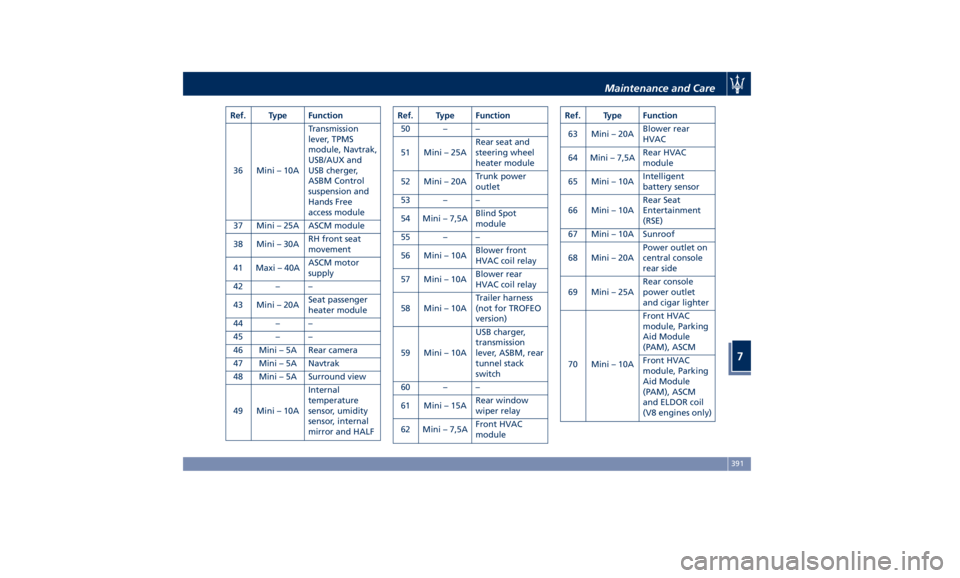
Ref. Type Function
36 Mini – 10A Transmission
lever, TPMS
module, Navtrak,
USB/AUX and
USB cherger,
ASBM Control
suspension and
Hands Free
access module
37 Mini – 25A ASCM module
38 Mini – 30A RH front seat
movement
41 Maxi – 40A ASCM motor
supply
42 – –
43 Mini – 20A Seat passenger
heater module
44 – –
45 – –
46 Mini – 5A Rear camera
47 Mini – 5A Navtrak
48 Mini – 5A Surround view
49 Mini – 10A Internal
temperature
sensor, umidity
sensor, internal
mirror and HALF Ref. Type Function
50 – –
51 Mini – 25A Rear seat and
steering wheel
heater module
52 Mini – 20A Trunk power
outlet
53 – –
54 Mini – 7,5A Blind Spot
module
55 – –
56 Mini – 10A Blower front
HVAC coil relay
57 Mini – 10A Blower rear
HVAC coil relay
58 Mini – 10A Trailer harness
(not for TROFEO
version)
59 Mini – 10A USB charger,
transmission
lever, ASBM, rear
tunnel stack
switch
60 – –
61 Mini – 15A Rear window
wiper relay
62 Mini – 7,5A Front HVAC
module Ref. Type Function
63 Mini – 20A Blower rear
HVAC
64 Mini – 7,5A Rear HVAC
module
65 Mini – 10A Intelligent
battery sensor
66 Mini – 10A Rear Seat
Entertainment
(RSE)
67 Mini – 10A Sunroof
68 Mini – 20A Power outlet on
central console
rear side
69 Mini – 25A Rear console
power outlet
and cigar lighter
70 Mini – 10A Front HVAC
module, Parking
Aid Module
(PAM), ASCM
Front HVAC
module, Parking
Aid Module
(PAM), ASCM
and ELDOR coil
(V8 engines only)Maintenance and Care
7
391
Page 422 of 436
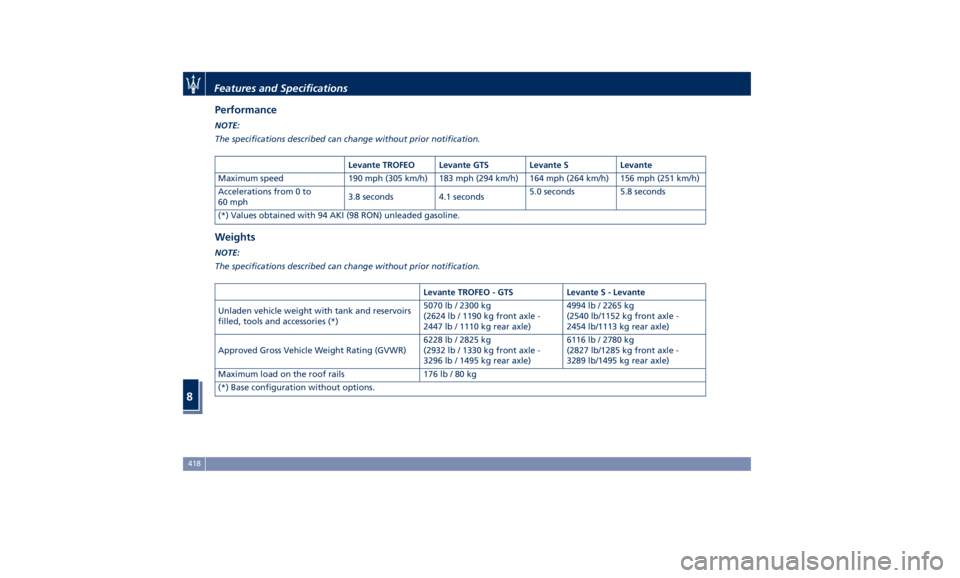
Performance NOTE:
The specifications described can change without prior notification.
Levante TROFEO Levante GTS Levante S Levante
Maximum speed 190 mph (305 km/h) 183 mph (294 km/h) 164 mph (264 km/h) 156 mph (251 km/h)
Accelerations from 0 to
60 mph 3.8 seconds 4.1 seconds 5.0 seconds 5.8 seconds
(*) Values obtained with 94 AKI (98 RON) unleaded gasoline.
Weights NOTE:
The specifications described can change without prior notification.
Levante TROFEO - GTS Levante S - Levante
Unladen vehicle weight with tank and reservoirs
filled, tools and accessories (*) 5070 lb / 2300 kg
(2624 lb / 1190 kg front axle -
2447 lb / 1110 kg rear axle) 4994 lb / 2265 kg
(2540 lb/1152 kg front axle -
2454 lb/1113 kg rear axle)
Approved Gross Vehicle Weight Rating (GVWR) 6228 lb / 2825 kg
(2932 lb / 1330 kg front axle -
3296 lb / 1495 kg rear axle) 6116 lb / 2780 kg
(2827 lb/1285 kg front axle -
3289 lb/1495 kg rear axle)
Maximum load on the roof rails 176 lb / 80 kg
(*) Base configuration without options.Features and Specifications
8
418