engine MASERATI LEVANTE 2019 Owner's Guide
[x] Cancel search | Manufacturer: MASERATI, Model Year: 2019, Model line: LEVANTE, Model: MASERATI LEVANTE 2019Pages: 436, PDF Size: 15.24 MB
Page 119 of 436
Automatic Headlights This system automatically turns the
headlights on or off according to
ambient light intensity detected by
the twilight sensor positioned on the
inner surface of the windshield, over
the rear view mirror. To turn the
system on, rotate the lights switch
clockwise to “AUTO” position.
When the automatic system is
activated, the headlight time delay
feature is activated as well. This means
the headlights will stay on for up to 90
seconds after you place the ignition
device into OFF position.
To turn the automatic system off,
move the lights switch out of “AUTO”
position.
NOTE:
The engine must be running and the
twilight sensor in “NIGHT” mode
before the headlights turn on in
automatic mode.
WARNING!
The responsibility for turning on the
lights, depending on the daylight and
regulations in force in the country of
use, always lies with the driver. The
automatic system for switching on and off the external lights is to be
considered as an aid for the driver. If
necessary, switch the lights including
the front and rear fog lights on and
off manually.
Headlights On with Wipers When this feature is active, the
headlights will turn on approximately
10 seconds after activation of the
wipers, if the lights switch is placed in
the “AUTO” position. The headlights
will additionally turn off by
deactivation of the wipers if
previously activated with this function.
NOTE:
The headlights with wipers feature
may be turned on and off using the
MTC+ System, refer to “MTC+
Settings” in section “Dashboard
Instruments and Controls”.
Headlights Time Delay This safety feature provides headlight
illumination for up to 90 seconds
(programmable) when leaving your
vehicle in an unlit area. To activate the
delay feature, place the ignition
switch in the OFF or ACC position
while the headlights are still on. Then turn off the headlights within 45
seconds.
The delay interval begins when the
lights switch is turned off (position
“0”). If you turn the headlights or
position lights on, or place the
ignition switch in RUN , the system will
cancel the delay.
If you turn the headlights off (“0”
position) before the ignition, they will
turn off in the normal mode.
NOTE:
• To activate this feature the lights
must be turned off (“0” position)
within 45 seconds of placing the
ignition switch in the OFF or ACC
position.
• The headlight delay time is
programmable using the MTC+
System, see “MTC+ Settings” in
section “Dashboard Instruments and
Controls”.
• If the low beam bulbs/LEDs are
active due to “Headlights with
Wipers”, then the headlamps delay
feature will not be activated when
the ignition switch is set in OFF
position.Understanding the Vehicle
3
115
Page 120 of 436
SmartBeam™ System (for
versions/markets, where
provided) The SmartBeam™ system provides
increased forward lighting for a more
comfortable and secure driving
experience without resulting in glare
to other vehicles in certain traffic
situations. The SmartBeam™ system
uses a forward facing digital camera,
located on the windshield behind the
internal rear-view mirror, and an
electronical headlights controller in
order to dynamically adapt the front
light distribution according to the
traffic scenario.
The digital camera works like a human
eye, it is able to see which is the traffic
context while the headlight electronic
controller works like a human brain,
using information from the camera to
command an headlight reaction that
gives to the driver the “best” light
distribution (best is always in reference
to the specific traffic environment).
The camera gives information to the
electronical headlight controller about
environmental brightness, traffic
participants vehicle and obstacles
lights, distances and velocities. Using a
proper combination of all these data
the smart beam system is able to dynamically modify the light shape
produced by the dipped beam and by
the full beam as well, to make the
driver visibility as much comfortable as
possible in every condition without
glaring other traffic participants.
System Limitations
There are some cases in which the
SmartBeam TM
system may not function
properly temporarily, and cause
glaring for other vehicles especially
with “Auto High Beam Assist” feature
activated on MTC+ “Controls” page
(see “MTC+ “Controls” Screen” in
section "Dashboard Instruments and
Controls").
These cases could be related to:
• Vehicles headlight and/or rear light
(one or both of them) not visible in
the field of view of the camera.
• Heavy rainy weather.
• Heavy foggy weather.
• Snowing weather.
• Windshield dirt or impurities in
camera lens zone.
• Camera lens obstruction or logging.
In all these cases, it will be the driver’s
responsibility to avoid this glaring by
acting manually on the system,
switching off the high beam by means
of steering wheel multifunction lever. Daytime Running Lights (DRL) The lighting system uses the same high
or low intensity headlamps LED,
respectively, for the DRL lights and
front position lights.
DRL lights will turn on when the
twilight sensor is in “DAY” mode, the
engine is running and the light switch
is in
or “AUTO” position.
If a turn signal is activated, the DRL
LED on the same side of the vehicle
will turn off for the duration of the
turn signal activation. Once the turn
signal is deactivated, the DRL LED will
light up again.
NOTE:
On Canadian vehicles DRL are always
on. On USA vehicles the DRL lights can
be turned on and off using the MTC+
System, see “MTC+ Settings” in section
“Dashboard Instruments and Controls”
for further information.Understanding the Vehicle
3
116
Page 126 of 436
the “Auto High Beam Assist” soft-key,
as shown in the previous paragraph
"Automatic High Beams".
The “Glare Free” feature will be
engaged after the following actions:
• Engine run.
• Feature enabled by MTC+.
• Low beam on.
• Interior light switch in position
“Auto”.
• Multifunction lever in “High beam”
activated position.
The “Glare Free” feature will work if:
• The vehicle speed is equal or greater
than 21.7 mph (35 km/h) in the
engagement phase of the feature.
• Environmental brightness is not
sufficient for a safe and comfortable
drive.
• Traffic scenario out of urban context.
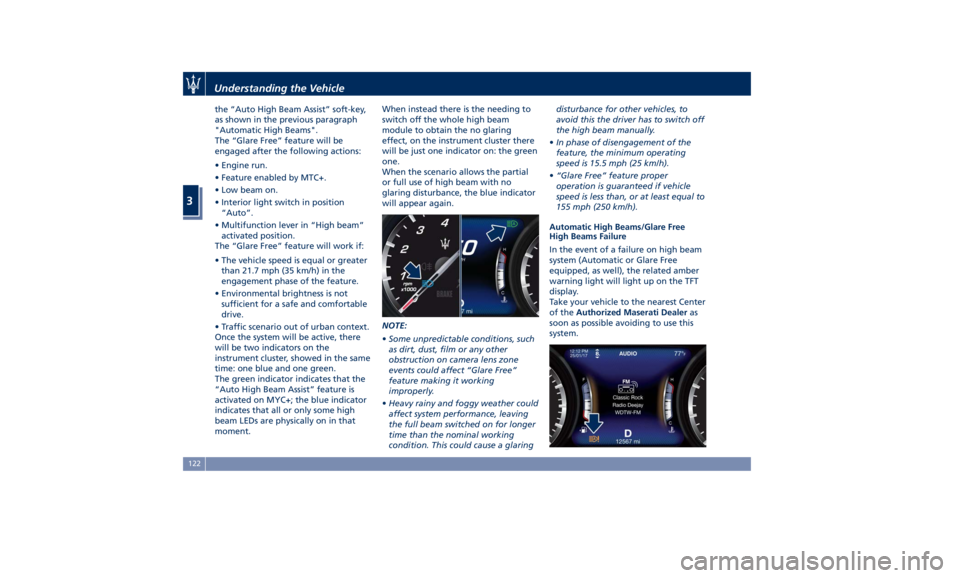
Once the system will be active, there
will be two indicators on the
instrument cluster, showed in the same
time: one blue and one green.
The green indicator indicates that the
“Auto High Beam Assist” feature is
activated on MYC+; the blue indicator
indicates that all or only some high
beam LEDs are physically on in that
moment. When instead there is the needing to
switch off the whole high beam
module to obtain the no glaring
effect, on the instrument cluster there
will be just one indicator on: the green
one.
When the scenario allows the partial
or full use of high beam with no
glaring disturbance, the blue indicator
will appear again.
NOTE:
• Some unpredictable conditions, such
as dirt, dust, film or any other
obstruction on camera lens zone
events could affect “Glare Free”
feature making it working
improperly.
• Heavy rainy and foggy weather could
affect system performance, leaving
the full beam switched on for longer
time than the nominal working
condition. This could cause a glaring disturbance for other vehicles, to
avoid this the driver has to switch off
the high beam manually.
• In phase of disengagement of the
feature, the minimum operating
speed is 15.5 mph (25 km/h).
• “Glare Free” feature proper
operation is guaranteed if vehicle
speed is less than, or at least equal to
155 mph (250 km/h).
Automatic High Beams/Glare Free
High Beams Failure
In the event of a failure on high beam
system (Automatic or Glare Free
equipped, as well), the related amber
warning light will light up on the TFT
display.
Take your vehicle to the nearest Center
of the Authorized Maserati Dealer as
soon as possible avoiding to use this
system.Understanding the Vehicle
3
122
Page 130 of 436
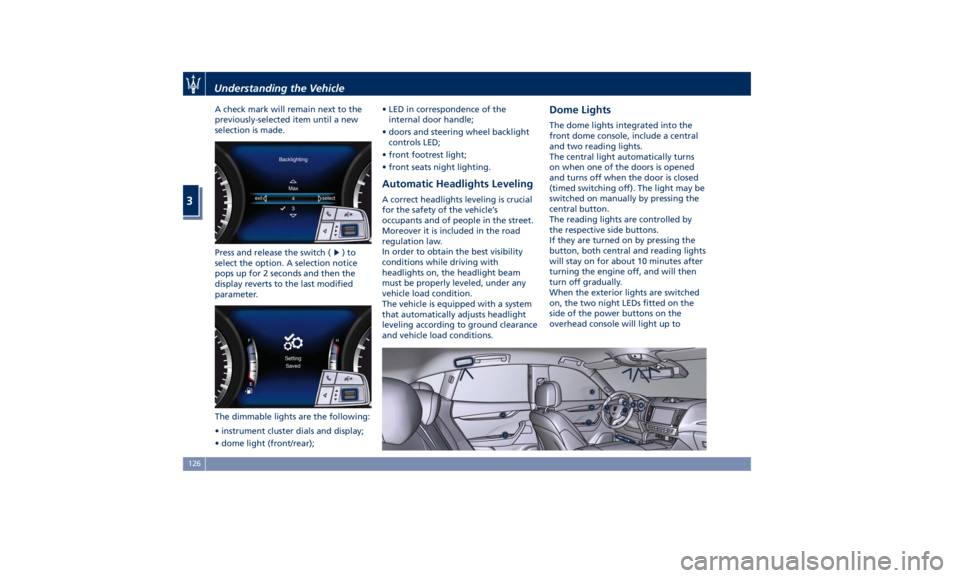
A check mark will remain next to the
previously-selected item until a new
selection is made.
Press and release the switch (
)to
select the option. A selection notice
pops up for 2 seconds and then the
display reverts to the last modified
parameter.
The dimmable lights are the following:
• instrument cluster dials and display;
• dome light (front/rear); • LED in correspondence of the
internal door handle;
• doors and steering wheel backlight
controls LED;
• front footrest light;
• front seats night lighting.
Automatic Headlights Leveling A correct headlights leveling is crucial
for the safety of the vehicle’s
occupants and of people in the street.
Moreover it is included in the road
regulation law.
In order to obtain the best visibility
conditions while driving with
headlights on, the headlight beam
must be properly leveled, under any
vehicle load condition.
The vehicle is equipped with a system
that automatically adjusts headlight
leveling according to ground clearance
and vehicle load conditions. Dome Lights The dome lights integrated into the
front dome console, include a central
and two reading lights.
The central light automatically turns
on when one of the doors is opened
and turns off when the door is closed
(timed switching off). The light may be
switched on manually by pressing the
central button.
The reading lights are controlled by
the respective side buttons.
If they are turned on by pressing the
button, both central and reading lights
will stay on for about 10 minutes after
turning the engine off, and will then
turn off gradually.
When the exterior lights are switched
on, the two night LEDs fitted on the
side of the power buttons on the
overhead console will light up toUnderstanding the Vehicle
3
126
Page 133 of 436
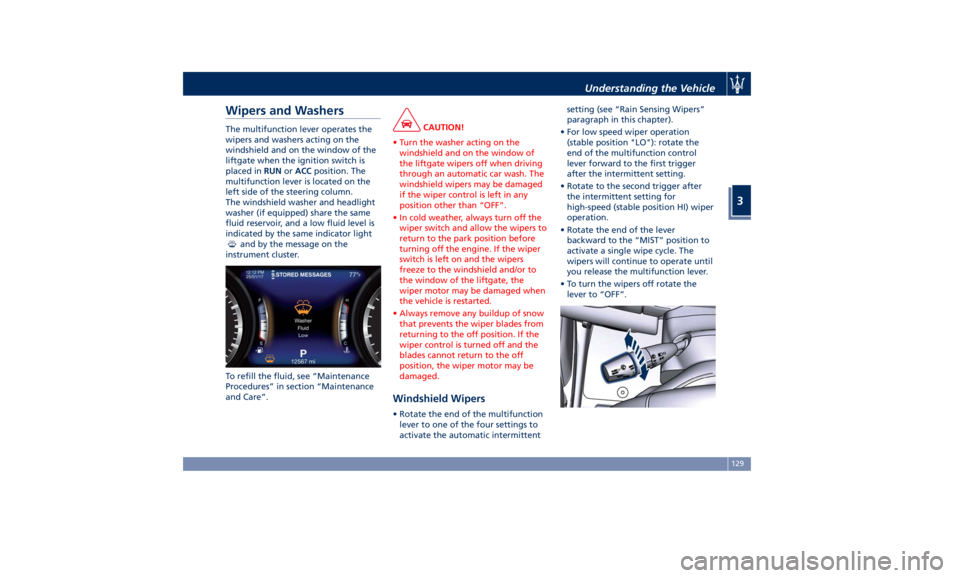
Wipers and Washers The multifunction lever operates the
wipers and washers acting on the
windshield and on the window of the
liftgate when the ignition switch is
placed in RUN or ACC position. The
multifunction lever is located on the
left side of the steering column.
The windshield washer and headlight
washer (if equipped) share the same
fluid reservoir, and a low fluid level is
indicated by the same indicator light
and by the message on the
instrument cluster.
To refill the fluid, see “Maintenance
Procedures” in section “Maintenance
and Care”. CAUTION!
• Turn the washer acting on the
windshield and on the window of
the liftgate wipers off when driving
through an automatic car wash. The
windshield wipers may be damaged
if the wiper control is left in any
position other than “OFF”.
• In cold weather, always turn off the
wiper switch and allow the wipers to
return to the park position before
turning off the engine. If the wiper
switch is left on and the wipers
freeze to the windshield and/or to
the window of the liftgate, the
wiper motor may be damaged when
the vehicle is restarted.
• Always remove any buildup of snow
that prevents the wiper blades from
returning to the off position. If the
wiper control is turned off and the
blades cannot return to the off
position, the wiper motor may be
damaged.
Windshield Wipers • Rotate the end of the multifunction
lever to one of the four settings to
activate the automatic intermittent setting (see “Rain Sensing Wipers”
paragraph in this chapter).
• For low speed wiper operation
(stable position "LO"): rotate the
end of the multifunction control
lever forward to the first trigger
after the intermittent setting.
• Rotate to the second trigger after
the intermittent setting for
high-speed (stable position HI) wiper
operation.
• Rotate the end of the lever
backward to the “MIST” position to
activate a single wipe cycle. The
wipers will continue to operate until
you release the multifunction lever.
• To turn the wipers off rotate the
lever to “OFF”.Understanding the Vehicle
3
129
Page 134 of 436
Rain Sensing Windshield
Wipers This feature detects moisture on the
windshield through an internal
rearview mirror integrated sensor,
which automatically activates the
relative wipers.
Rotate forward the end of the
multifunction lever to one of four
settings to adjust the detection system.
First wiper delay position is the least
sensitive, and fourth wiper delay
position is the most sensitive. Third
position should be used for normal
rain conditions.
The rain sense wipers will
automatically change between an
intermittent wipe, slow wipe and a
fast wipe depending on the amount of
detected moisture sensed by a
particular area of the windshield.
Place the wiper switch in the “OFF”
position when you do not want to use
the automatic intermittent system.
The rain sensing feature can be turned
on and off using the MTC+ System, see
“MTC+ Settings” in section
“Dashboard Instruments and Controls”
for further information. CAUTION!
• The rain sensing feature may not
function properly by ice or dried salt
water on the windshield.
• Use on the windshield of RainX ®
or
products containing wax or silicone
may reduce rain sensor performance.
The rain sensing system has protective
features for the wiper
blades and
arms. It will not operate under the
following conditions:
• Low Temperature Wipe Inhibit : the
rain sensing feature will not operate
when the ignition is in RUN position,
the vehicle is stationary and the
outside temperature is below 32°F
(0°C). To resume, set the automatic
feature on the multifunction lever,
start the engine and drive or wait
until the outside temperature rises
above freezing.
• Wipe Inhibit with Transmission in
Neutral Position : the rain sensing
feature will not operate when the
ignition is placed in the RUN
position, the transmission shift lever
is in the N (Neutral) position and the
vehicle speed is less than 5 mph
(8 km/h). To resume, set the multifunction lever to the automatic
function or move the shift lever out
of N (Neutral).
Headlights On with Windshield
Wipers When activating this function, the
headlights will light up approximately
10 seconds after the wipers acting on
the windshield are turned on if the
light switch is placed in “AUTO”
position. In addition, the headlights
switch off when the wipers are turned
off (position “OFF”) if they were
previously turned by using this
function. Powering on Headlights with
wipers can be activated and
deactivated with the MTC+ System, see
“MTC+ Settings” in section
“Dashboard Instruments and Controls”
for further information.
Wiper Blade Maintenance When the wiper arms acting on the
windshield are in the rest position it is
not possible to check or replace the
blades (Service position) as they are
folded under the hood. To service the
blades (see paragraph “Wiper
Maintenance and Blades
Replacement” in chapter
“Maintenance Procedures” of section
“Maintenance and Care”) it isUnderstanding the Vehicle
3
130
Page 136 of 436
(Continued)
washer use.
WARNING!
California Proposition 65
Operating, servicing and maintaining
a passenger vehicle or off-road vehicle
can expose you to chemicals including
such as, engine exhaust, carbon
monoxide, phthalates and lead, that
which are known to the State of
California to cause cancer and birth
defects or other reproductive harm. To
minimize exposure, avoid breathing
exhaust, do not idle the engine except
as necessary, service your vehicle in a
well-ventilated area and wear gloves
or wash your hands frequently when
servicing your vehicle. For more
information go to:
www.P65Warnings.ca.gov/passenger-
vehicle
Headlight Washers (if provided)
The
multifunction lever also
operates
the headlight washers when the
ignition switch is in RUN position and
the headlights are turned on.
The headlight washers will spray a
timed high-pressure spray of washer fluid onto each headlight lens every 11
windshield wipers cycles.
Heated Windshield Washer Nozzles
(optional)
To avoid fluid freezing inside at low
external temperatures, a fluid supply
nozzles can be heated by internal
resistors.
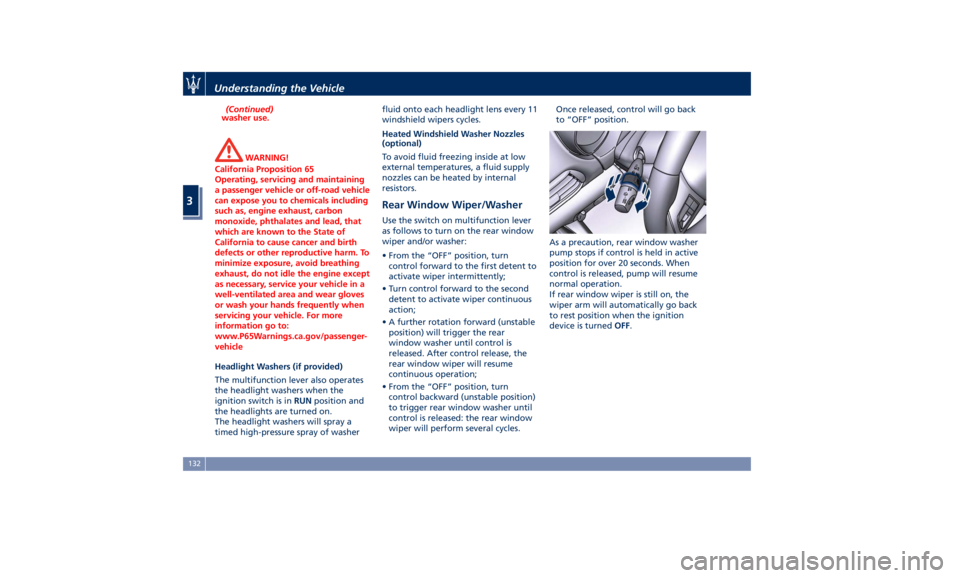
Rear Window Wiper/Washer Use the switch on multifunction lever
as follows to turn on the rear window
wiper and/or washer:
• From the “OFF” position, turn
control forward to the first detent to
activate wiper intermittently;
• Turn control forward to the second
detent to activate wiper continuous
action;
• A further rotation forward (unstable
position) will trigger the rear
window washer until control is
released. After control release, the
rear window wiper will resume
continuous operation;
• From the “OFF” position, turn
control backward (unstable position)
to trigger rear window washer until
control is released: the rear window
wiper will perform several cycles. Once released, control will go back
to “OFF” position.
As a precaution, rear window washer
pump stops if control is held in active
position for over 20 seconds. When
control is released, pump will resume
normal operation.
If rear window wiper is still on, the
wiper arm will automatically go back
to rest position when the ignition
device is turned OFF .Understanding the Vehicle
3
132
Page 137 of 436
Interior Features Electric Power Outlets The vehicle is equipped with four 12
Volt (13 Amp) electric power outlets,
two available for the front seat
passengers, one for rear seat
passengers and one fitted in the trunk
compartment.
In vehicles equipped with “Smoking
Kit” the electric power outlet inside
the cupholder is replaced with a
cigarette lighter.
All power outlets are supplied only
when the engine is started or the
ignition device set to ACC or RUN .
Power outlets are protected by a fuse.
Insert a cigar lighter or accessory plug
into the power outlets to ensure
proper operation. Otherwise, check
the matching fuse integrity, see “Fuse
Replacement” in section
“Maintenance and Care” for further
information.
CAUTION!
• Do not plug in accessories that
exceed the maximum power of 160
Watts (13 Amps) at 12 Volts.
• Power outlets are designed for
accessory plugs only. Do not insert any other object in the power
outlets as this will damage the outlet
and blow the fuse. Damages caused
by improper use of the power outlet
are not covered by the New Vehicle
Limited Warranty.
WARNING!
To avoid serious injury or death:
• Only devices designed for use in this
type of outlet should be inserted
into any 12 Volt outlet.
• Replacing the fuses that protect
power outlets with others of higher
amperage, there is the risk of fire.
• Do not touch with wet hands.
• Close the lids when the plug is not
used and while driving the vehicle.
• If this outlet is mishandled, it may
cause an electric shock and failure.
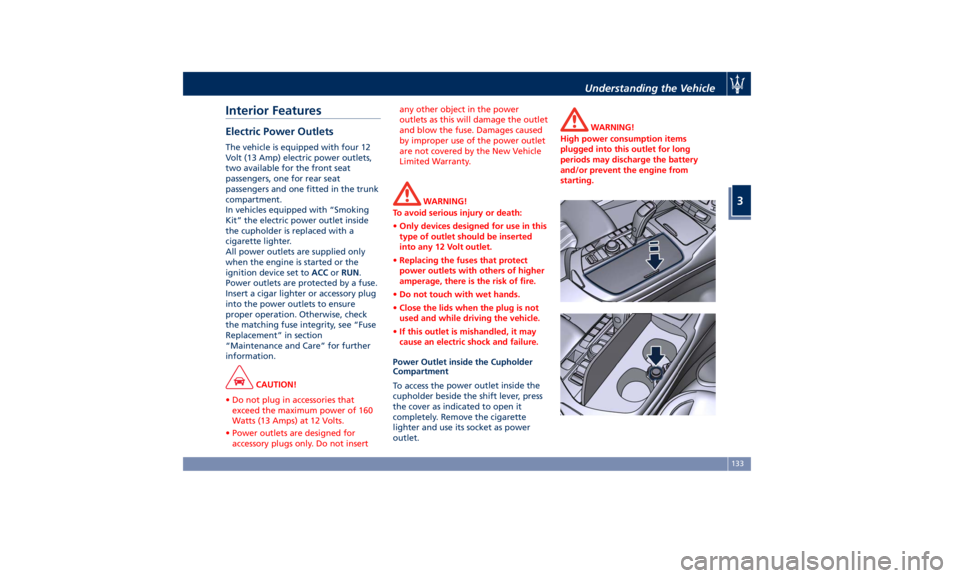
Power Outlet inside the Cupholder
Compartment
To access the power outlet inside the
cupholder beside the shift lever, press
the cover as indicated to open it
completely. Remove the cigarette
lighter and use its socket as power
outlet. WARNING!
High power consumption items
plugged into this outlet for long
periods may discharge the battery
and/or prevent the engine from
starting.Understanding the Vehicle
3
133
Page 155 of 436
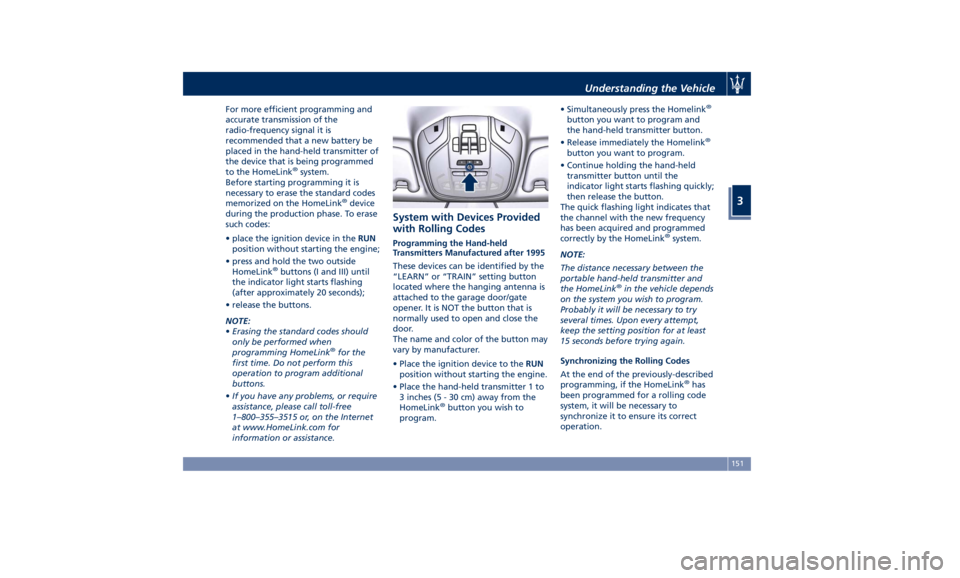
For more efficient programming and
accurate transmission of the
radio-frequency signal it is
recommended that a new battery be
placed in the hand-held transmitter of
the device that is being programmed
to the HomeLink ®
system.
Before starting programming it is
necessary to erase the standard codes
memorized on the HomeLink ®
device
during the production phase. To erase
such codes:
• place the ignition device in the RUN
position without starting the engine;
• press and hold the two outside
HomeLink ®
buttons (I and III) until
the indicator light starts flashing
(after approximately 20 seconds);
• release the buttons.
NOTE:
• Erasing the standard codes should
only be performed when
programming HomeLink ®
for the
first time. Do not perform this
operation to program additional
buttons.
• If you have any problems, or require
assistance, please call toll-free
1–800–355–3515 or, on the Internet
at www.HomeLink.com for
information or assistance. System with Devices Provided
with Rolling Codes Programming the Hand-held
Transmitters Manufactured after 1995
These devices can be identified by the
“LEARN” or “TRAIN” setting button
located where the hanging antenna is
attached to the garage door/gate
opener. It is NOT the button that is
normally used to open and close the
door.
The name and color of the button may
vary by manufacturer.
• Place the ignition device to the RUN
position without starting the engine.
• Place the hand-held transmitter 1 to
3 inches (5 - 30 cm) away from the
HomeLink ®
button you wish to
program. • Simultaneously press the Homelink ®
button you want to program and
the hand-held transmitter button.
• Release immediately the Homelink ®
button you want to program.
• Continue holding the hand-held
transmitter button until the
indicator light starts flashing quickly;
then release the button.
The quick flashing light indicates that
the channel with the new frequency
has been acquired and programmed
correctly by the HomeLink ®
system.
NOTE:
The distance necessary between the
portable hand-held transmitter and
the HomeLink ®
in the vehicle depends
on the system you wish to program.
Probably it will be necessary to try
several times. Upon every attempt,
keep the setting position for at least
15 seconds before trying again.
Synchronizing the Rolling Codes
At the end of the previously-described
programming, if the HomeLink ®
has
been programmed for a rolling code
system, it will be necessary to
synchronize it to ensure its correct
operation.Understanding the Vehicle
3
151
Page 156 of 436
• Locate the “LEARN” or “TRAINING”
setting button of the opening motor.
Firmly press it and then release it. On
some garage door openers/devices
there may be a light that blinks
when the garage door opener/device
is in the LEARN/TRAIN mode.
NOTE:
You have 30 seconds to initiate the
next step after the setting button has
been pressed.
• Return to the vehicle and press the
programmed HomeLink ®
button for
two seconds and then release it.
• Repeat this operation a second time.
If the garage door opening device
activates, the programming/
synchronization phase is complete.
NOTE:
If the garage door opening device
does not activate, press the button a
third time for two seconds and then
release it to complete the
programming/synchronization phase.
• To program the remaining two
HomeLink ®
buttons, repeat the same
step for each remaining button. DO
NOT erase the channels. Reprogramming a Single HomeLink ®
Button
To reprogram a channel that has been
previously trained, follow these steps:
• Place the ignition device to the RUN
position without starting the engine.
• Press and hold the desired
HomeLink ®
button.
• Without releasing the button
proceed with “Programming the
hand-held transmitters” from second
step and follow all remaining steps.
System with Devices Without
Rolling Code Programming the Hand-held
Transmitters Manufactured before
1995
• Turn the ignition device to the RUN
position without starting the engine.
• Place the hand-held transmitter 1 to
3 inches (5 to 30 cm) away from the
HomeLink ®
button you wish to
program.
• Simultaneously press and hold both
buttons until the indicator light
starts flashing quickly; then release
both buttons.
The quick flashing light indicates that
the channel with the new frequency has been acquired and programmed
correctly by the HomeLink ®
system.
NOTE:
The distance necessary between the
portable hand-held transmitter and
the HomeLink ®
in the vehicle depends
on the system you wish to program.
Probably it will be necessary to try
several times. Upon every attempt,
keep the setting position for at least
15 seconds before trying again.
• Press and hold the programmed
HomeLink ®
button.
If the garage door opener/device
activates, programming is complete. To
program the remaining two
HomeLink ®
buttons, repeat each step
for the same remaining button. Do not
erase the channels.
Reprogramming a Single HomeLink ®
Button
To reprogram a channel that has been
previously trained, follow these steps:
• Place the ignition device to the RUN
position without starting the engine.
• Press and hold the desired
HomeLink ®
button.
• Without releasing the button
proceed with “Programming theUnderstanding the Vehicle
3
152