lock MASERATI LEVANTE 2019 Manual Online
[x] Cancel search | Manufacturer: MASERATI, Model Year: 2019, Model line: LEVANTE, Model: MASERATI LEVANTE 2019Pages: 436, PDF Size: 15.24 MB
Page 243 of 436
WARNING!
• Never use the P (Park) mode as a
substitute for the electric parking
brake. Always apply the parking
brake fully when parked to prevent
vehicle movement and possible
injury or damage.
• Make sure the transmission is in P
(Park) before leaving the vehicle.
CAUTION!
• DO NOT race the engine when
shifting from P (Park) or N (Neutral)
into another gear range, as this can
damage the drivetrain.
• The following indicators should be
used to ensure that you have
engaged the shift lever into the “P”
position:
– when shifting into P (Park), push
the “P” button on the shift lever.
– with the brake pedal released,
verify that “P” position is
illuminated on the shift lever and
in the instrument cluster display. R (Reverse)
This
range is used to move the vehicle
backward.
Switching to R (Reverse) starting from
N (Neutral) is only possible if the
vehicle is moving backwards.
We recommend to shift into R
(Reverse) only after the vehicle has
come to a complete stop.
• Vehicle stationary: switching
between R (Reverse) and D (Drive),
passing from N (Neutral), requires
brake pedal pressed and action on
the lever.
• Vehicle moving: the driver can switch
from R (Reverse) to N (Neutral)
acting on the shift lever without
pressing the unlock button and the
brake pedal.
N (Neutral)
• Vehicle stationary and engine
started: switching from N (Neutral)
to P (Park) requires “P” button
pressed only. Switching from N
(Neutral) to R (Reverse) and/or D
(Drive) requires brake pedal and
unlock button pressed and the
action on the shift lever.
• Vehicle moving: switching from N
(Neutral) to R (Reverse) and/or D
(Drive) requires pressing the unlock button and the action on the shift
lever. Switching to R (Reverse)
starting from N (Neutral) is only
possible if the vehicle is moving
backwards, while switching to D
(Drive) starting from N (Neutral) is
only possible if the vehicle is moving
forwards.
Set the parking brake and shift the
transmission into P (Park) mode if you
must leave the vehicle.
WARNING!
Do not switch to N (Neutral) and/or
never turn off the ignition to coast
downhill. These are unsafe practices
that limit driver’s response to
changing traffic or road conditions.
CAUTION!
Towing the vehicle, coasting, or
driving for any other reason with the
transmission in N (Neutral) can result
in transmission damage. Refer to
“Towing a Disabled Vehicle” in section
“Emergency” for further information.
D (Drive)
This
range should be used for most
city and highway driving. It providesDriving
5
239
Page 244 of 436
the smoothest upshifts and downshifts
and the best fuel economy. The
transmission automatically shifts up
and down through all gears. The D
(Drive) mode provides optimum
driving characteristics under all normal
operating conditions of the vehicle.
• Vehicle stationary: to switch from D
(Drive) to R (Reverse) requires brake
pedal and unlock button pressed and
the action on the shift lever: to reach
N (Neutral) starting from D (Drive) is
possible by only acting on the shift
lever.
• To enable special operations while
the car is moving at a low speed,
such as getting out of marsh or snow,
it is possible to run quickly from D
(Drive) to R (Reverse), and vice versa,
by pressing the unlock button and
acting on the shift lever passing from
N (Neutral).
• Vehicle moving: switching to N
(Neutral) from D (Drive) it is not
necessary to press brake pedal.
• From D (Drive) selected mode it is
always possible to switch to M +/-
(Manual) mode, by move the shift
lever to the left (see following
paragraph); to return to “D”
position, move the shift lever to the
right. It is possible to shift from D (Drive) mode to M +/- (Manual) mode
regardless of car speed.
• When in D (Drive) mode, using the
paddles behind the steering wheel (if
equipped), will cause the system to
enter a temporary function and
enable the manual shift mode. This
range is indicated with the symbols
“+/-” above and below “D” letter on
the gear range field of the display.
The system will then switch back to
automatic mode according to time
elapsed in “temporary” mode and
driving conditions.
At extremely cold temperatures (-23°F /
-30°C or below), transmission may be
affected by the low temperature of
the engine and transmission. Normal
operation will resume once the
transmission temperature has risen to
a normal level.
M +/- (Manual)
This mode is obtained by moving the
shift lever to the left in “M +/-“
position.
In this mode, the transmission interacts
with the driver in order to allow
manual shift and ensure increased
control of the vehicle. The current
mode allows the transmission system
to optimise the engine brake action,
remove undesired shifting into higher and lower gears and improve the
overall performance of the vehicle.
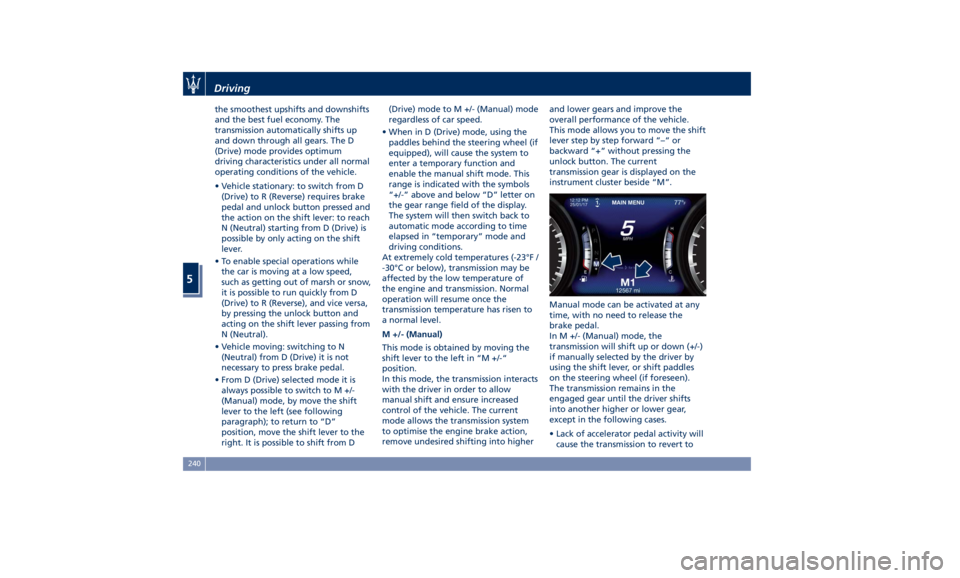
This mode allows you to move the shift
lever step by step forward “–“ or
backward “+” without pressing the
unlock button. The current
transmission gear is displayed on the
instrument cluster beside “M”.
Manual mode can be activated at any
time, with no need to release the
brake pedal.
In M +/- (Manual) mode, the
transmission will shift up or down (+/-)
if manually selected by the driver by
using the shift lever, or shift paddles
on the steering wheel (if foreseen).
The transmission remains in the
engaged gear until the driver shifts
into another higher or lower gear,
except in the following cases.
• Lack of accelerator pedal activity will
cause the transmission to revert toDriving
5
240
Page 274 of 436
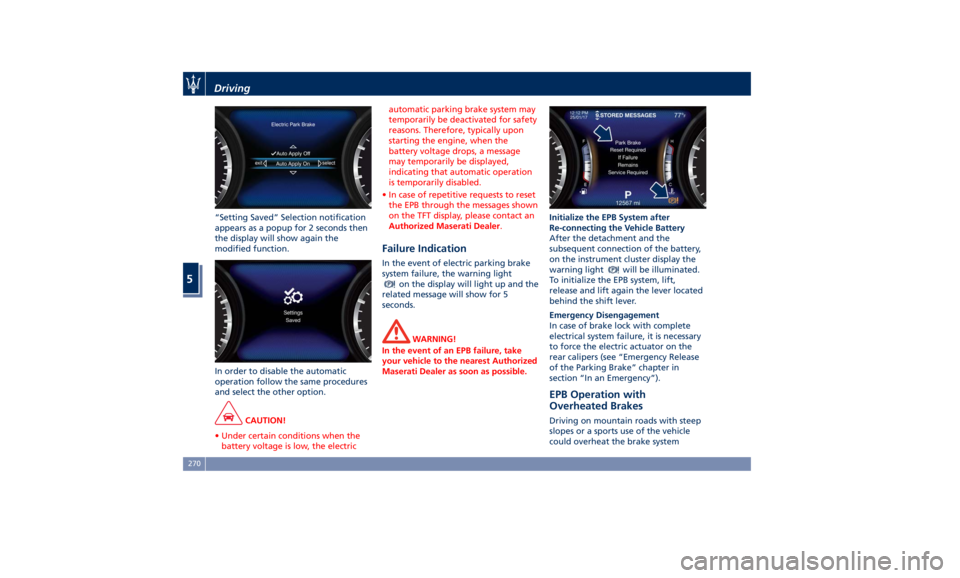
“Setting Saved” Selection notification
appears as a popup for 2 seconds then
the display will show again the
modified function.
In order to disable the automatic
operation follow the same procedures
and select the other option.
CAUTION!
• Under certain conditions when the
battery voltage is low, the electric automatic parking brake system may
temporarily be deactivated for safety
reasons. Therefore, typically upon
starting the engine, when the
battery voltage drops, a message
may temporarily be displayed,
indicating that automatic operation
is temporarily disabled.
• In case of repetitive requests to reset
the EPB through the messages shown
on the TFT display, please contact an
Authorized Maserati Dealer .
Failure Indication In the event of electric parking brake
system failure, the warning light
on the display will light up and the
related message will show for 5
seconds.
WARNING!
In the event of an EPB failure, take
your vehicle to the nearest Authorized
Maserati Dealer as soon as possible. Initialize the EPB System after
Re-connecting
the V ehicle Battery
After the detachment and the
subsequent connection of the battery,
on the instrument cluster display the
warning light
will be illuminated.
To initialize the EPB system, lift,
release and lift again the lever located
behind the shift lever.
Emergency Disengagement
In case of brake lock with complete
electrical system failure, it is necessary
to force the electric actuator on the
rear calipers (see “Emergency Release
of the Parking Brake” chapter in
section “In an Emergency”).
EPB Operation with
Overheated Brakes Driving on mountain roads with steep
slopes or a sports use of the vehicle
could overheat the brake systemDriving
5
270
Page 275 of 436
components. In these conditions the
parking brake must not be used since
the push of the power actuator might
not be sufficient to ensure vehicle
braking, especially on a slope.
Drive normally without braking to
allow the brakes to cool down a few
minutes before stopping. In this way,
the automatic or manual activation of
the parking brake will ensure vehicle
braking.
Parking Before leaving the vehicle, make sure
that the parking brake is fully applied
and place the transmission lever in the
P (Park) position by pressing the “P”
button.
WARNING!
• Always check that the vehicle is
locked before leaving it.
• Never leave children unattended in
the vehicle.
• Do not park the vehicle on paper,
grass, dry leaves or other flammable
materials.
• Do not leave the engine running
while the vehicle is unattended.
CAUTION!
• When you need to park the vehicle
on a steep slope, both with the
engine on or off, it is recommended
not only to engage the parking
brake, but also to shift the
transmission lever to P (Park) before
leaving the vehicle.
• When parking on uneven surfaces
(rocks, sidewalks, etc..) do not activate the Entry/Exit ride height to
avoid any contact of the bottom of
the car with the protrusions of the
ground.
When parking on hill roads, it is
important
to turn the
front wheels
toward the curb on a downhill grade
and away from the curb on an uphill
grade.
Apply the parking brake before
placing the shift lever in P (Park),
otherwise the load on the
transmission locking mechanism may
make it difficult to move the shift
lever out of P (Park).
In certain conditions, it is however
advisable to disengage the parking
brake manually and slightly apply the
service brake for starting off. This is
advisable when there are obstacles
very close to the vehicle in the
direction in which you intend to move.Driving
5
271
Page 276 of 436
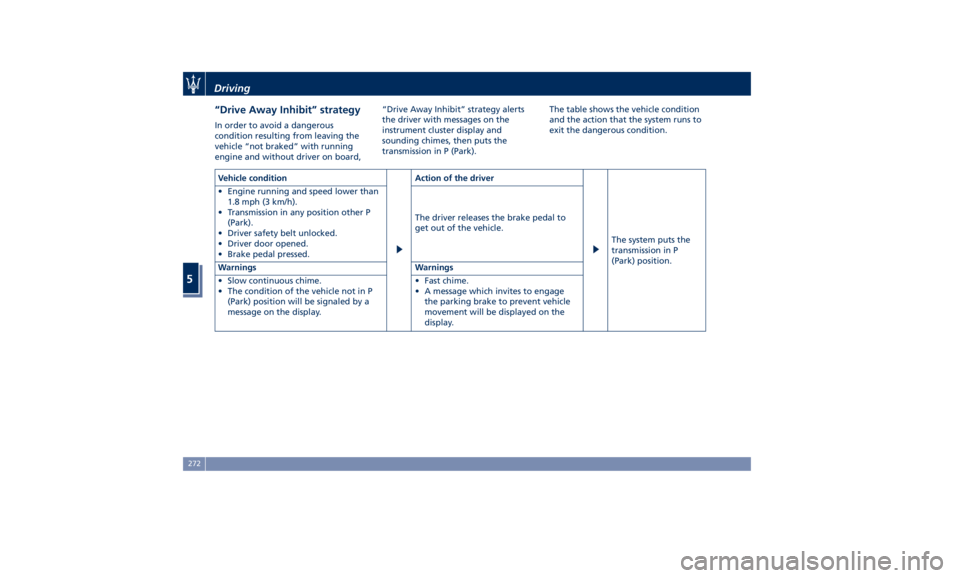
“Drive Away Inhibit” strategy In order to avoid a dangerous
condition resulting from leaving the
vehicle “not braked” with running
engine and without driver on board, “Drive Away Inhibit” strategy alerts
the driver with messages on the
instrument cluster display and
sounding chimes, then puts the
transmission in P (Park). The table shows the vehicle condition
and the action that the system runs to
exit the dangerous condition.
Vehicle condition Action of the driver
The system puts the
transmission in P
(Park) position.• Engine running and speed lower than
1.8 mph (3 km/h).
• Transmission in any position other P
(Park).
• Driver safety belt unlocked.
• Driver door opened.
• Brake pedal pressed. The driver releases the brake pedal to
get out of the vehicle.
Warnings Warnings
• Slow continuous chime.
• The condition of the vehicle not in P
(Park) position will be signaled by a
message on the display. • Fast chime.
• A message which invites to engage
the parking brake to prevent vehicle
movement will be displayed on the
display.Driving
5
272
Page 277 of 436
Brake and Stability
Control System The vehicle is equipped with an
Electronic Stability Control System
(ESC), which helps to maintain
directional control in the event of loss
of grip of the tires. The system is able
to detect potentially dangerous
situations for the stability of the
vehicle and automatically sets the
brakes on all four wheels in a
differentiated manner, in order to
provide a torque settlement of the
vehicle.
ESC includes the following subsystems:
• ABS (Anti-lock Braking System);
• EBD (Electronic Brake-force
Distribution);
• TCS (Traction Control System);
• BAS (Brake Assist System);
• BTO (Brake Throttle Override);
• HSA (Hill Start Assist);
• ROM (Roll-Over Mitigation);
• TSM (Trailer Sway Mitigation);
• HDC (Hill Descent Control).
WARNING!
• These systems cannot prevent the natural laws of physics from
affecting the vehicle, nor can they
increase traction, braking or steering
efficiency beyond that afforded by
the condition of the vehicle brakes
and tires.
• These systems cannot prevent
collisions, including those resulting
from excessive speed in turns,
following another vehicle too
closely, or hydroplaning.
• The capabilities of a vehicle
equipped with these systems must
never be exploited in a reckless or
dangerous manner that could
jeopardize the driver’s and the
passenger’s safety or the safety of
others.
Electronic Stability Control
(ESC) This system enhances directional
control and stability of the vehicle
under various driving conditions. The
ESC corrects over steering and under
steering of the vehicle by applying the
brake to the appropriate wheel.
Engine power may also be reduced to
assist in counteracting the conditions
of instability and maintain the right
direction. The system is also able to
reduce the engine power. Through sensors fitted on the vehicle,
the ESC system detects the driver’s
chosen direction comparing it to the
one maintained while running. In case
of discrepancy between the required
trajectory and the current one, the
ESC system brakes the appropriate
wheel to counteract over or under
steering.
• Oversteer - when the vehicle is
turning more than appropriate for
the steering wheel position.
• Understeer - when the vehicle is
turning less than appropriate for the
steering wheel position.
The ESC system has two available
operating modes:
ESC on
This is the normal ESC operating
mode. At each start-up of the vehicle,
the ESC system is set in this mode and
should be used for most driving
conditions. The ESC should only be
turned off for specific reasons as
pointed out in the following
paragraphs.
ESC off
The “ESC off” mode is aimed for a
more spirited driving experience but
also purposeful for driving in sand, or
gravel. The current mode disables the
TCS portion of the ESC and raises theDriving
5
273
Page 278 of 436
threshold for ESC activation, allowing
higher wheel spin than normally
granted by the ESC system. The
(ESC
OFF) button is fitted beside the gear
shift lever: to deactivate the system see
“Drive Mode” in this section.
WARNING!
In SPORT mode the ESC control
thresholds are higher for maximum
performance on dry road surface. To
ensure maximum security of the ESC,
it is recommended not to activate
SPORT mode on surfaces with
medium- and low-grip (e.g., wet,
snow, dirt, etc..) with ESC system
active (
(ESC OFF) button not
pressed).
NOTE:
• When in “ESC of f” mode, the TCS
functionality of ESC is deactivated
(except for the limited slip feature
described in the TCS paragraph of
this chapter). All other stability
features of ESC function regularly.
• To improve the vehicle's traction
when driving with snow chains, or
when starting off in deep snow,
sand, or gravel, it may be desirable
to switch to the “ESC off” mode by pressing the
(ESC OFF) button and
remain in this operational mode no
longer than needed. Once the
situation requiring “ESC off” mode is
overcome, turn the ESC on again by
pressing the
(ESC OFF) button. This
may also be performed while in
motion.
Anti-Lock Braking System (ABS)
and Electronic Brake-force
Distribution (EBD) The Anti-Lock Braking System (ABS)
provides increased vehicle stability and
brake performance under most
braking conditions. The system
automatically “pumps” the brakes
during severe braking to prevent
wheel lock-up.
The Electronic Brake-force Distribution
(EBD) prevents the rear wheels from
over-braking and provides greater
control of available braking forces
applied to the rear axle.
WARNING!
The ABS helps prevent the wheels
from locking, but it does not increase
the physical grip limits between the
tires and the road. Therefore, always
keep a safe distance from the vehicle in front of yours and reduce your
speed when entering a curve.
NOTE:
• When
the vehicle's speed is higher
than 7 mph (11 km/h), you may hear
a slight clicking sound as well as
other motor noises. The system is
performing a self-check cycle to
ensure that the ABS is working
properly.
• This self-check occurs each time the
vehicle is started and accelerated
past 7 mph (11 km/h).
ABS is activated during braking under
certain road or stopping conditions.
ABS-inducing conditions can include
ice, snow, gravel, bumps, railroad
tracks, loose debris.
You may also experience the following
when the brake system goes into Anti-
Lock:
• The ABS motor running (it may
continue to run for a short time after
the vehicle stops).
• The clicking sound of solenoid valves.
• Brake pedal pulsations.
• A slight drop or fall away of the
brake pedal at the end of the stop.
These are all normal characteristics of
ABS functioning.Driving
5
274
Page 279 of 436
WARNING!
• The ABS contains sophisticated
electronic equipment that may be
susceptible to interference caused
by improperly installed or high
output radio transmitting
equipment. This interference can
cause possible loss of anti-lock
braking capability. Installation of
such equipment should be
performed by qualified Maserati
personnel.
• Pumping the Anti-Lock Brakes will
diminish their effectiveness.
Pumping brakes makes the stopping
distance longer. Just press firmly on
your brake pedal when you need to
slow down or stop.
• The ABS installed to this vehicle
does not control trailer braking
system. Pay utmost attention when
driving on slippery ground since the
trailer traction might get poorer.
• Do not modify the vehicle braking
system to control the trailer brakes.
The hydraulic system controlling
vehicle braking must remain
independent from trailer braking
system. Traction Control System (TCS) The current device is an integral part
of the ESC system. It operates
automatically by reducing the power
transmitted by the engine in case of
slipping, loss of grip on wet floor
(aquaplaning), acceleration on
slippery snow-covered or frozen
surfaces, etc.
Activating under slip conditions
different control systems:
• if slippage affects both drive wheels,
it reduces the power transmitted by
the engine;
• if slippage only affects one drive
wheel, it brakes the slipping wheel
automatically.
Brake Assist System (BAS) This system completes the ABS system
by optimizing the vehicle braking
capacity during emergency brake
maneuvers. The system detects an
emergency braking situation by
sensing the rate and amount of brake
application and then applies optimum
pressure to the brakes in order to help
reduce braking distances.
The quick brake coupling is optimal
for BAS performances. In order to fully
exploit the system, apply continuous
brake pedal pressure during the entire vehicle stop sequence. Do not reduce
brake pedal pressure earlier than
required. Once the brake pedal is
released, the BAS is deactivated.
Brake Throttle Override (BTO) To complete the range of systems that
assist braking, the vehicle is equipped
with BTO, which is designed to stop
the vehicle even when it is during
acceleration. If the brake pedal is
depressed together with the
accelerator, the system does not
consider as “conflict” the sequence
“brake-first-then-accelerator” of pedal
application and it will not engage the
BTO. When the system recognizes that
the accelerator pedal is stuck pressed
and the sequence “accelerator-first-
then-brake-pressed” (this sequence is
recognized as a “conflict”), the engine
power will be automatically reduced
and, if the driver continues to depress
the accelerator and the brake pedal,
the system can make the vehicle come
to a complete stop.
Additionally, if the brake pedal is
released when the accelerator is still
stuck pressed, the corresponding
engine torque increase gradually to a
safe value.
During this event, the ETC light
indicator will illuminate. The systemDriving
5
275
Page 295 of 436
accelerator pedal (see “ACC
Operation Before and During Stop”
in this chapter).
• The ACC system maintains set speed
when driving up hill and down hill.
However, a slight speed change on
moderate hills is normal. In addition,
downshifting may occur while
climbing uphill or descending
downhill. This is normal operation
and necessary to maintain set speed.
When driving uphill and downhill,
the ACC system will cancel if the
braking temperature exceeds normal
range.
Temporary Deactivation A soft tap on the brake pedal, pushing
the multifunction control (CANC), or
normal brake pressure while slowing
the vehicle will temporarily deactivate
the ACC without erasing the set speed
memory. The
white light will appear
on the display with below the set
speed.
Conditions for Disabling and
Deactivation Besides the cases specified in the
previous paragraph, the following
conditions will disable the system:
• Anti-Lock Brake (ABS) kicks in. • Transmission lever is not in D (Drive).
• “CORSA” drive mode (TROFEO
version only) is set.
• Ride height is set to “Off Road 1” or
“Off Road 2”.
• The Electronic Stability Control and
the Traction Control System
(ESC/TCS) activate.
• Vehicle parking brake is operated.
• The driver safety belt is unbuckled at
low speed.
• The driver door is ajar at low speed.
• The driver disabled the ESC using the
(ESC OFF) button on central
console.
• The road is too steep both uphill and
downhill at low speed.
The system is deactivated and set
speed is deleted from system memory,
if the ACC ON/OFF button is pressed or
if ignition device is turned to OFF .
Resuming Speed If a speed setting is stored in system
memory, press the multifunction
control (RES +) up and take foot off
the accelerator pedal. The last set
speed will be displayed. WARNING!
The resume function should be used
only when road and traffic conditions
allow it. Resuming a too high or too
low speed for current traffic and road
conditions could cause a harsh vehicle
acceleration or deceleration which
could increase the risk of collisions
and death or serious injury.
Setting the ACC Gap The specified ACC gap can be set by
varying the distance setting among
the four possible options identified by
the number of horizontal bars:
• Maximum (longest) distance: 4 bars.
• Long distance: 3 bars (default
distance).
• Medium distance: 2 bars.
• Short distance: 1 bar.
Using this distance setting and the
vehicle speed, ACC calculates and sets
the gap to the vehicle ahead.
If system does not detect the presence
of any vehicles ahead, only the bars
referred to set distance will be
displayed.
When system detects the presence of a
vehicle ahead, it is displayed in front
of the bars (see example in the figure).Driving
5
291
Page 310 of 436
The BSA system monitors the detection
zones on both sides of the vehicle
when the vehicle speed reaches
approximately 6 mph (10 km/h) or
higher and will alert the driver of
vehicles in these areas.
WARNING!
• The BSA system does NOT alert the
driver about rapidly approaching
vehicles that are outside the
detection zones.
• The BSA might alert the driver too
late especially in case of rapidly
approaching vehicles.
WARNING!
Risk of accident despite Blind Spot
Assist (BSA).
BSA does not detect/react to the
following:
• Overtaking vehicles close on the
side, placing them in the blind spot
area. As a result, BSA may neither
give warnings nor intervene in such
situations. • Always pay attention to the traffic
situation and maintain a safe
distance at the side of the vehicle.
NOTE:
If
your vehicle has
experienced any
damage in the area where the sensor
is located, even if the fascia is not
damaged, the sensor may have
become misaligned. Take your vehicle
at an Authorized Maserati Dealer to
verify sensor alignment. Having a
sensor that is misaligned will result in
the BSA not operating to specification.
The area on the rear bumper fascia
where the radar sensors are located
must remain free of snow, ice, and
dirt/road contamination so that the
BSA system can function properly. Do
not cover or block the area of the rear
bumper fascia where the radar sensors
are located with foreign objects
(bumper stickers, spoilers, bicycle racks,
etc.).
The BSA system notifies the driver of
vehicles or objects in the detection
zones by illuminating the BSA warning
light located in the outside mirrors in
addition to sounding an audible
(chime) alert and reducing the radio
volume (if the radio is on). Refer to “BSA and RCP Setting” in this chapter
for further information.
The BSA system monitors the detection
zone from three different entry points
(side, rear, overtaking traffic) while
driving to see if an alert is necessary.
The BSA system will issue an alert
whenever a vehicle enters any one
detection zone as outlined below.
Speed Range of Use
Speed mph (km/h)
Minimum 6 (10)
Engaged/activated 6 (10)
Maximum – (–)
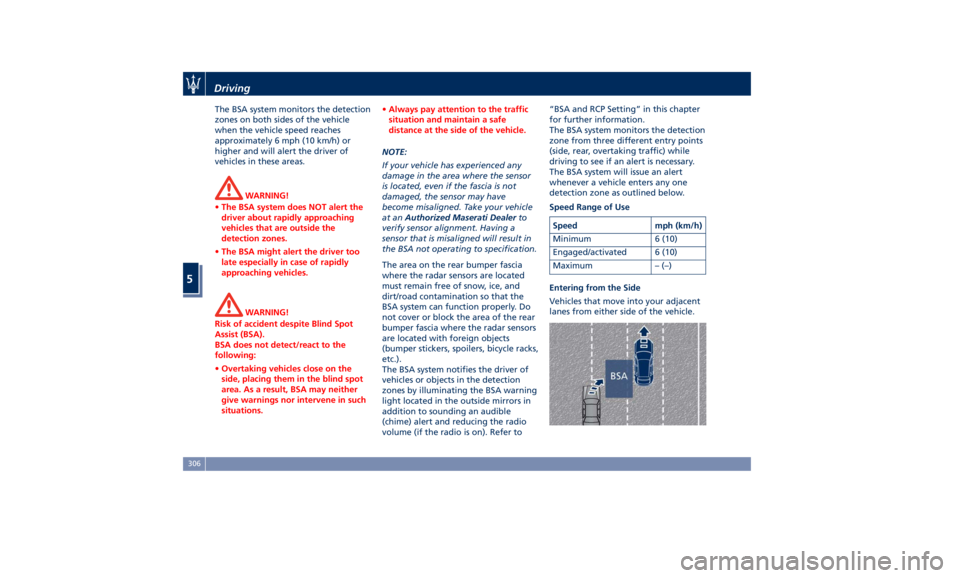
Entering from the Side
Vehicles that move into your adjacent
lanes from either side of the vehicle.Driving
5
306