high MASERATI QUATTROPORTE 2019 Repair Manual
[x] Cancel search | Manufacturer: MASERATI, Model Year: 2019, Model line: QUATTROPORTE, Model: MASERATI QUATTROPORTE 2019Pages: 396, PDF Size: 13.9 MB
Page 222 of 396
Normal Starting of the
Engine WARNING!
It is dangerous to run the engine in an
enclosed area. The engine consumes
oxygen and discharges carbon
dioxide, carbon monoxide and other
toxic gases in the atmosphere.
WARNING!
California Proposition 65
Operating, servicing and maintaining
a passenger vehicle or off-road vehicle
can expose you to chemicals including
such as, engine exhaust, carbon
monoxide, phthalates and lead, that
which are known to the State of
California to cause cancer and birth
defects or other reproductive harm. To
minimize exposure, avoid breathing
exhaust, do not idle the engine except
as necessary, service your vehicle in a
well-ventilated area and wear gloves
or wash your hands frequently when
servicing your vehicle. For more
information go to: www.P65Warnings.ca.gov/passenger-
vehicle
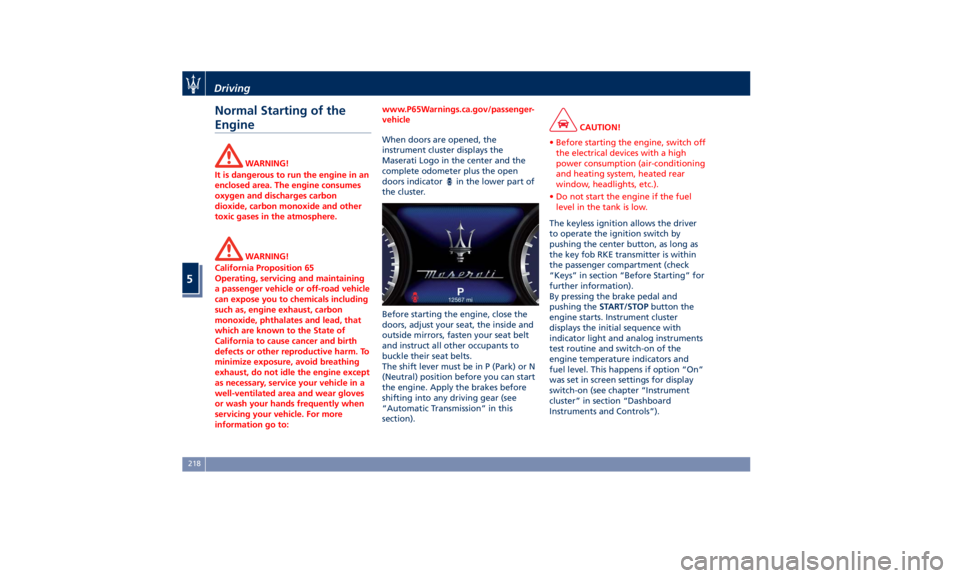
When doors are opened, the
instrument
cluster displays
the
Maserati Logo in the center and the
complete odometer plus the open
doors indicator
in the lower part of
the cluster.
Before starting the engine, close the
doors, adjust your seat, the inside and
outside mirrors, fasten your seat belt
and instruct all other occupants to
buckle their seat belts.
The shift lever must be in P (Park) or N
(Neutral) position before you can start
the engine. Apply the brakes before
shifting into any driving gear (see
“Automatic Transmission” in this
section). CAUTION!
• Before starting the engine, switch off
the electrical devices with a high
power consumption (air-conditioning
and heating system, heated rear
window, headlights, etc.).
• Do not start the engine if the fuel
level in the tank is low.
The keyless ignition allows the driver
to
operate the
ignition switch by
pushing the center button, as long as
the key fob RKE transmitter is within
the passenger compartment (check
“Keys” in section “Before Starting” for
further information).
By pressing the brake pedal and
pushing the START/STOP button the
engine starts. Instrument cluster
displays the initial sequence with
indicator light and analog instruments
test routine and switch-on of the
engine temperature indicators and
fuel level. This happens if option “On”
was set in screen settings for display
switch-on (see chapter “Instrument
cluster” in section “Dashboard
Instruments and Controls”).Driving
5
218
Page 224 of 396
Starting with a Cold Engine
Start-off slowly, avoiding sudden
acceleration and rev the engine up at
low medium speeds. High-
performance driving should be
avoided until the engine temperature
reaches 149-158°F (65-70°C).
Engine Turn-Off • With the shift lever in P (Park), D
(Drive) or R (Reverse) positions (see
“Automatic Transmission” in this
section) and vehicle standstill, press
and release the START/STOP button
to switch off the engine. A burst on
the accelerator pedal before turning
off the engine has no purpose and
increases fuel consumption.
• If the shift lever is in N (Neutral) and
the START/STOP button is pressed
once, the instrument cluster will
display a “Vehicle Not in Park”
message and the engine will remain
running.
WARNING!
Never leave a vehicle out of the P
(Park) position, as it could move. NOTE:
If
the ignition switch is left in the ACC
or RUN (engine not running) position
and the transmission is in P (Park), the
system will automatically time out
after 30 minutes of inactivity and the
ignition will switch to OFF position.
Engine Turn Off when in Automatic
Start&Stop
When the engine has been turned off
by the Start&Stop system, press and
release the START/STOP button. The
ignition switch will return to the OFF
position and the vehicle is off.
“Panic Stop” Strategy In panic conditions, if driver stops
engine in any non-standard manner
while driving at a speed over 2 mph
(3 km/h), the “Panic Stop” strategy can
manage the situation by checking
gearchange condition upon engine
cutting, driver’s action on brakes, road
condition (flat or slope) so as to set
gearchange to the most suitable
condition.
The “Panic Stop” strategy considers
that the driver should stop the engine
by pressing the ignition switch at least
3 times or holding it depressed for at
least 2 seconds.Automatic Start&Stop
System The Maserati Start&Stop system allows
the engine to automatically switch off
when the vehicle stops and to restart
when the driver intends to drive. This
feature can reduce fuel consumption
up to 6% according to different drive
conditions. During the “Stop
(AutoStop)” phase the ignition is still
on and all security features are
available.
In order for the Start&Stop to activate,
the vehicle must be stationary and the
brake pedal adequately pressed.
NOTE:
If the brake pedal is not sufficiently
pressed the Start&Stop may not
function even if the vehicle is stopped.
When the Start&Stop switches off the
engine, the related light
illuminates on the instrument
cluster.
As soon as the brake pedal is released,
the engine turns on.
While the vehicle is stopped, the
transmission can be placed in P (Park)
pressing the “P” button on the shift
lever.Driving
5
220
Page 227 of 396
possible to disable the Start & Stop
function in different ways.
Press the Start&Stop hard button on
the central console to the disable the
function (see instructions in chapter
“Drive Mode” in this section).
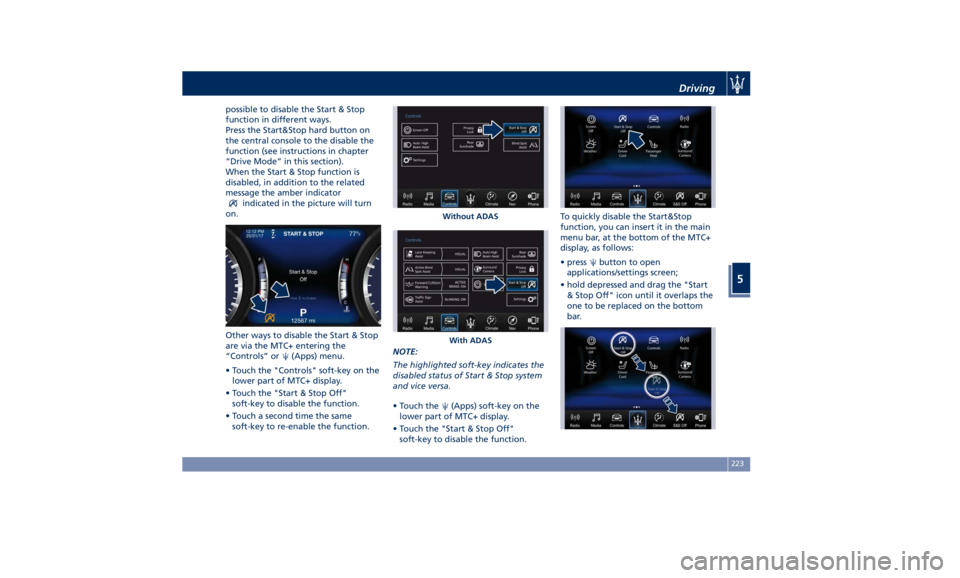
When the Start & Stop function is
disabled, in addition to the related
message the amber indicator
indicated in the picture will turn
on.
Other ways to disable the Start & Stop
are via the MTC+ entering the
“Controls” or
(Apps) menu.
• Touch the "Controls" soft-key on the
lower part of MTC+ display.
• Touch the "Start & Stop Off"
soft-key to disable the function.
• Touch a second time the same
soft-key to re-enable the function. NOTE:
The highlighted soft-key indicates the
disabled status of Start & Stop system
and vice versa.
• Touch the
(Apps) soft-key on the
lower part of MTC+ display.
• Touch the "Start & Stop Off"
soft-key to disable the function. To quickly disable the Start&Stop
function, you can insert it in the main
menu bar, at the bottom of the MTC+
display, as follows:
• press
button to open
applications/settings screen;
• hold depressed and drag the "Start
& Stop Off" icon until it overlaps the
one to be replaced on the bottom
bar.Without ADAS
With ADAS Driving
5
223
Page 229 of 396
2 nd
gear, it is necessary to keep the
brake pedal fully depressed.
WARNING!
• It is dangerous to move the shift
lever out of P (Park) or N (Neutral) if
the engine speed is higher than
idlespeed. If your foot is not firmly
pressing on the brake pedal, the
vehicle could accelerate quickly
forward or in reverse. You could lose
control of the vehicle and hit
someone or something. Only shift
into gear when the engine is idling
normally and when your foot is
firmly pressing on the brake pedal.
• Unintended movement of a vehicle
could injure those in or near the
vehicle. As with all vehicles, you
should never exit a vehicle while the
engine is running. Before exiting a
vehicle, always apply the electronic
parking brake, shift the transmission
into P (Park), and turn the engine
off.
• Never leave children alone in a
vehicle, or with access to an
unlocked vehicle. Allowing children
to be in a vehicle unattended is
dangerous for a number of reasons. A child or others could be seriously
or fatally injured. Children should be
warned not to touch the parking
brake, brake pedal or the shift lever.
• When leaving the vehicle, always
remove the key fob and lock your
vehicle.
• Do not leave the key fob in or near
the vehicle. A child could operate
power windows, other controls, or
move the vehicle.
This vehicle is equipped with a feature
which
requires the transmission to be
placed in P (Park) before the engine
can be turned off. This prevents the
driver from inadvertently leaving the
vehicle without having placed the
transmission in P (Park). This system
also locks the transmission in P (Park)
whenever the ignition switch is in the
OFF position.
Automatic Transmission Lever Automatic transmission is operated by
a shift lever with unlock button,
located on the central console, which
can have the following operating
positions:
• P (Park): button control;
• R (Reverse);
• N (Neutral); • D (Drive) automatic forward speed;
• M -/+ (Manual): “+” shifting to
higher gear or “–“ shifting to lower
gear in manual mode (see “Drive
Mode” in this section).
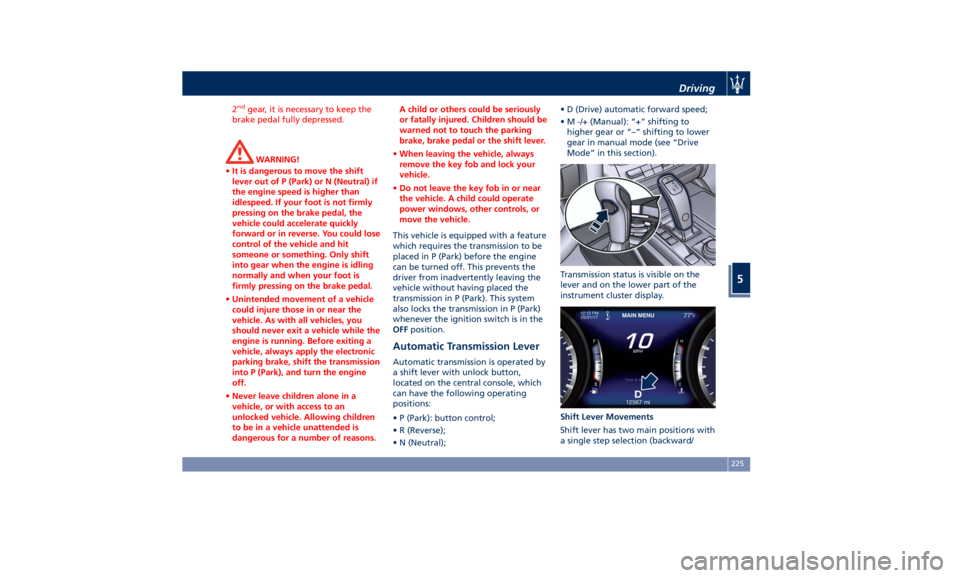
Transmission status is visible on the
lever and on the lower part of the
instrument cluster display.
Shift Lever Movements
Shift lever has two main positions with
a single step selection (backward/Driving
5
225
Page 233 of 396
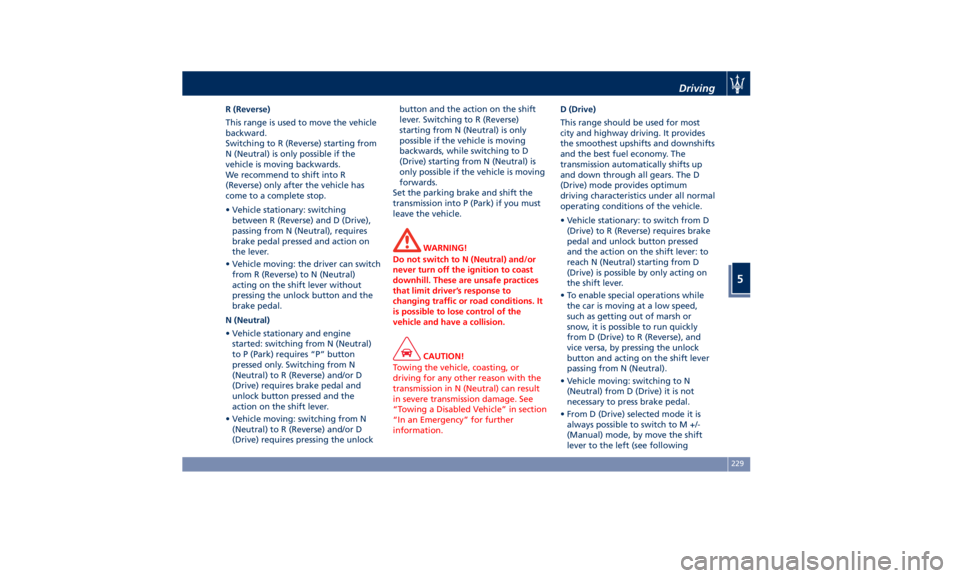
R (Reverse)
This range is used to move the vehicle
backward.
Switching to R (Reverse) starting from
N (Neutral) is only possible if the
vehicle is moving backwards.
We recommend to shift into R
(Reverse) only after the vehicle has
come to a complete stop.
• Vehicle stationary: switching
between R (Reverse) and D (Drive),
passing from N (Neutral), requires
brake pedal pressed and action on
the lever.
• Vehicle moving: the driver can switch
from R (Reverse) to N (Neutral)
acting on the shift lever without
pressing the unlock button and the
brake pedal.
N (Neutral)
• Vehicle stationary and engine
started: switching from N (Neutral)
to P (Park) requires “P” button
pressed only. Switching from N
(Neutral) to R (Reverse) and/or D
(Drive) requires brake pedal and
unlock button pressed and the
action on the shift lever.
• Vehicle moving: switching from N
(Neutral) to R (Reverse) and/or D
(Drive) requires pressing the unlock button and the action on the shift
lever. Switching to R (Reverse)
starting from N (Neutral) is only
possible if the vehicle is moving
backwards, while switching to D
(Drive) starting from N (Neutral) is
only possible if the vehicle is moving
forwards.
Set the parking brake and shift the
transmission into P (Park) if you must
leave the vehicle.
WARNING!
Do not switch to N (Neutral) and/or
never turn off the ignition to coast
downhill. These are unsafe practices
that limit driver’s response to
changing traffic or road conditions. It
is possible to lose control of the
vehicle and have a collision.
CAUTION!
Towing the vehicle, coasting, or
driving for any other reason with the
transmission in N (Neutral) can result
in severe transmission damage. See
“Towing a Disabled Vehicle” in section
“In an Emergency” for further
information. D (Drive)
This
range should
be used for most
city and highway driving. It provides
the smoothest upshifts and downshifts
and the best fuel economy. The
transmission automatically shifts up
and down through all gears. The D
(Drive) mode provides optimum
driving characteristics under all normal
operating conditions of the vehicle.
• Vehicle stationary: to switch from D
(Drive) to R (Reverse) requires brake
pedal and unlock button pressed
and the action on the shift lever: to
reach N (Neutral) starting from D
(Drive) is possible by only acting on
the shift lever.
• To enable special operations while
the car is moving at a low speed,
such as getting out of marsh or
snow, it is possible to run quickly
from D (Drive) to R (Reverse), and
vice versa, by pressing the unlock
button and acting on the shift lever
passing from N (Neutral).
• Vehicle moving: switching to N
(Neutral) from D (Drive) it is not
necessary to press brake pedal.
• From D (Drive) selected mode it is
always possible to switch to M +/-
(Manual) mode, by move the shift
lever to the left (see followingDriving
5
229
Page 234 of 396
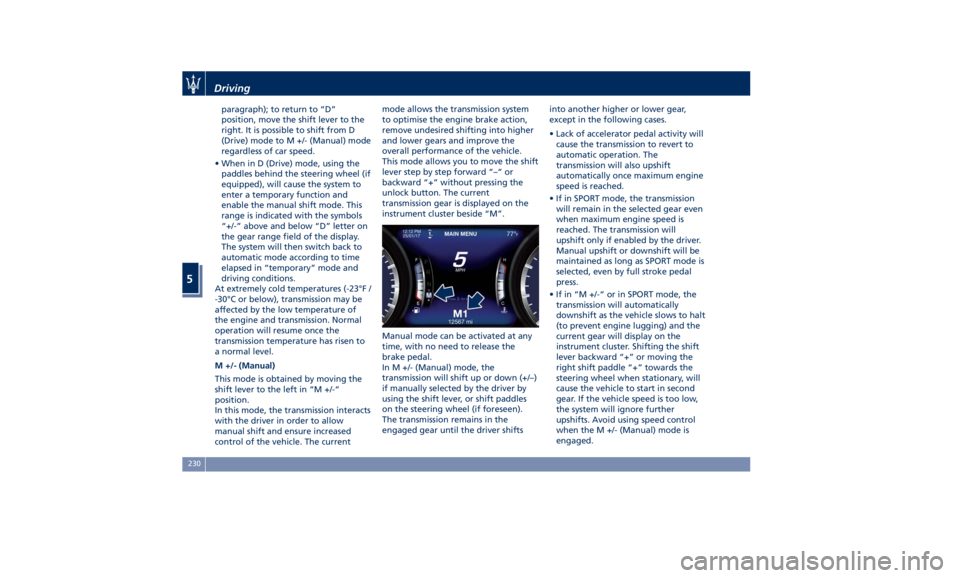
paragraph); to return to “D”
position, move the shift lever to the
right. It is possible to shift from D
(Drive) mode to M +/- (Manual) mode
regardless of car speed.
• When in D (Drive) mode, using the
paddles behind the steering wheel (if
equipped), will cause the system to
enter a temporary function and
enable the manual shift mode. This
range is indicated with the symbols
“+/-” above and below “D” letter on
the gear range field of the display.
The system will then switch back to
automatic mode according to time
elapsed in “temporary” mode and
driving conditions.
At extremely cold temperatures (-23°F /
-30°C or below), transmission may be
affected by the low temperature of
the engine and transmission. Normal
operation will resume once the
transmission temperature has risen to
a normal level.
M +/- (Manual)
This mode is obtained by moving the
shift lever to the left in “M +/-“
position.
In this mode, the transmission interacts
with the driver in order to allow
manual shift and ensure increased
control of the vehicle. The current mode allows the transmission system
to optimise the engine brake action,
remove undesired shifting into higher
and lower gears and improve the
overall performance of the vehicle.
This mode allows you to move the shift
lever step by step forward “–“ or
backward “+” without pressing the
unlock button. The current
transmission gear is displayed on the
instrument cluster beside “M”.
Manual mode can be activated at any
time, with no need to release the
brake pedal.
In M +/- (Manual) mode, the
transmission will shift up or down (+/–)
if manually selected by the driver by
using the shift lever, or shift paddles
on the steering wheel (if foreseen).
The transmission remains in the
engaged gear until the driver shifts into another higher or lower gear,
except in the following cases.
• Lack of accelerator pedal activity will
cause the transmission to revert to
automatic operation. The
transmission will also upshift
automatically once maximum engine
speed is reached.
• If in SPORT mode, the transmission
will remain in the selected gear even
when maximum engine speed is
reached. The transmission will
upshift only if enabled by the driver.
Manual upshift or downshift will be
maintained as long as SPORT mode is
selected, even by full stroke pedal
press.
• If in “M +/-“ or in SPORT mode, the
transmission will automatically
downshift as the vehicle slows to halt
(to prevent engine lugging) and the
current gear will display on the
instrument cluster. Shifting the shift
lever backward “+” or moving the
right shift paddle “+” towards the
steering wheel when stationary, will
cause the vehicle to start in second
gear. If the vehicle speed is too low,
the system will ignore further
upshifts. Avoid using speed control
when the M +/- (Manual) mode is
engaged.Driving
5
230
Page 235 of 396
When the car stops in M +/- (Manual)
mode, the transmission automatically
moves the shift lever and inserts P
(Park).
If you enter the I.C.E. drive mode
when the gearshift is in “M +/-”
position, the system activates the
automatic return of the shift lever in D
(Drive) mode.
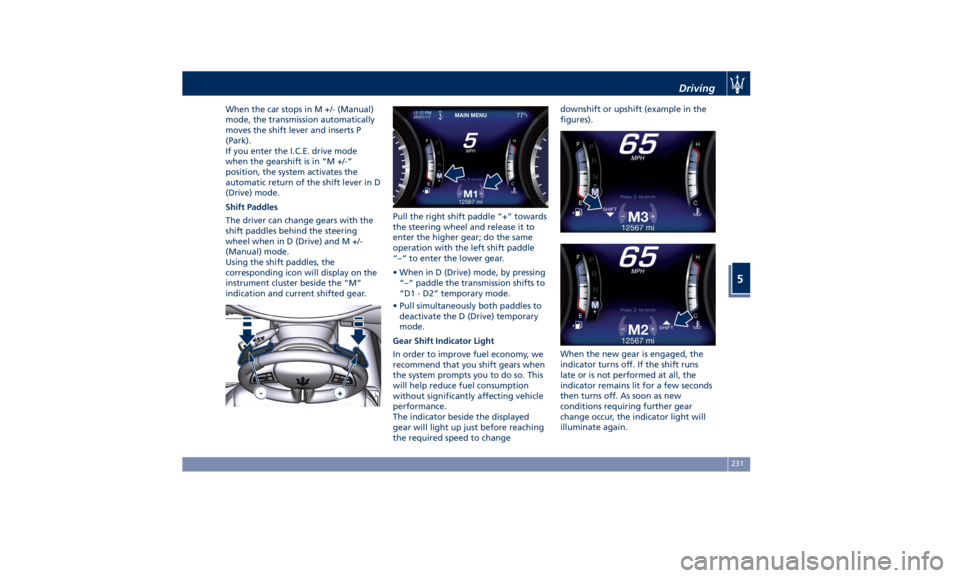
Shift Paddles
The driver can change gears with the
shift paddles behind the steering
wheel when in D (Drive) and M +/-
(Manual) mode.
Using the shift paddles, the
corresponding icon will display on the
instrument cluster beside the “M”
indication and current shifted gear. Pull the right shift paddle “+” towards
the steering wheel and release it to
enter the higher gear; do the same
operation with the left shift paddle
“–“ to enter the lower gear.
• When in D (Drive) mode, by pressing
“–“ paddle the transmission shifts to
“D1 - D2” temporary mode.
• Pull simultaneously both paddles to
deactivate the D (Drive) temporary
mode.
Gear Shift Indicator Light
In order to improve fuel economy, we
recommend that you shift gears when
the system prompts you to do so. This
will help reduce fuel consumption
without significantly affecting vehicle
performance.
The indicator beside the displayed
gear will light up just before reaching
the required speed to change downshift or upshift (example in the
figures).
When the new gear is engaged, the
indicator turns off. If the shift runs
late or is not performed at all, the
indicator remains lit for a few seconds
then turns off. As soon as new
conditions requiring further gear
change occur, the indicator light will
illuminate again.Driving
5
231
Page 236 of 396
NOTE:
The gearshift indicator will only work
when the transmission is set in M +/-
(Manual) mode.
Transmission Malfunction and
Overheating Conditions Transmission Emergency Control
Transmission function is electronically
monitored to detect abnormal
conditions. If a condition that could
result in transmission damage is
detected, “Transmission Limp Home
Mode” will be activated. In this
situation, the transmission may
operate only in certain gears, or may
not shift at all. In some situations, the
transmission system may not
re-engage if the engine is turned off
and restarted.
A message in the instrument cluster
will inform the driver about the more
serious transmission conditions, and
indicate what actions may be
necessary.
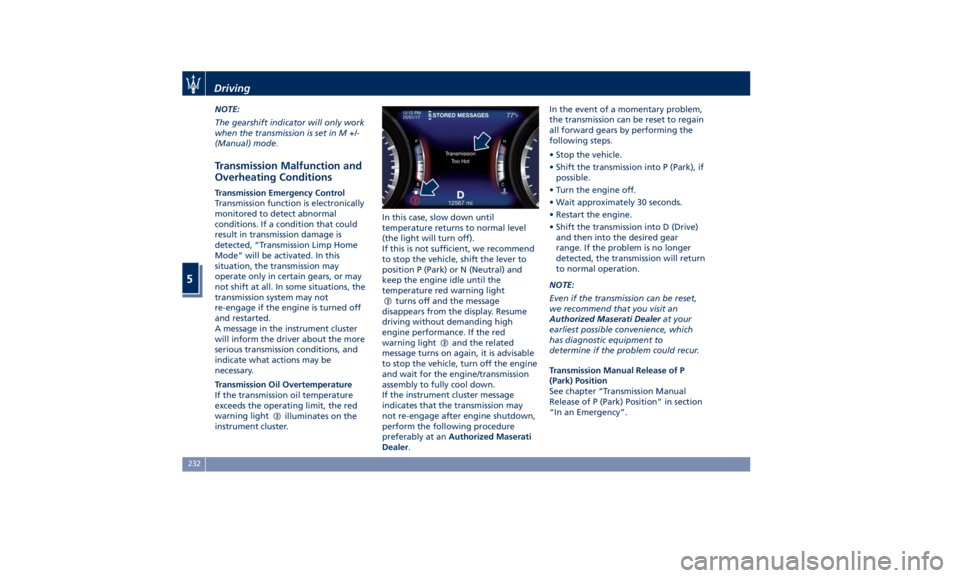
Transmission Oil Overtemperature
If the transmission oil temperature
exceeds the operating limit, the red
warning light
illuminates on the
instrument cluster. In this case, slow down until
temperature returns to normal level
(the light will turn off).
If this is not sufficient, we recommend
to stop the vehicle, shift the lever to
position P (Park) or N (Neutral) and
keep the engine idle until the
temperature red warning light
turns off and the message
disappears from the display. Resume
driving without demanding high
engine performance. If the red
warning light
and the related
message turns on again, it is advisable
to stop the vehicle, turn off the engine
and wait for the engine/transmission
assembly to fully cool down.
If the instrument cluster message
indicates that the transmission may
not re-engage after engine shutdown,
perform the following procedure
preferably at an Authorized Maserati
Dealer . In the event of a momentary problem,
the transmission can be reset to regain
all forward gears by performing the
following steps.
• Stop the vehicle.
• Shift the transmission into P (Park), if
possible.
• Turn the engine off.
• Wait approximately 30 seconds.
• Restart the engine.
• Shift the transmission into D (Drive)
and then into the desired gear
range. If the problem is no longer
detected, the transmission will return
to normal operation.
NOTE:
Even if the transmission can be reset,
we recommend that you visit an
Authorized Maserati Dealer at your
earliest possible convenience, which
has diagnostic equipment to
determine if the problem could recur.
Transmission Manual Release of P
(Park) Position
See chapter “Transmission Manual
Release of P (Park) Position” in section
“In an Emergency”.Driving
5
232
Page 238 of 396
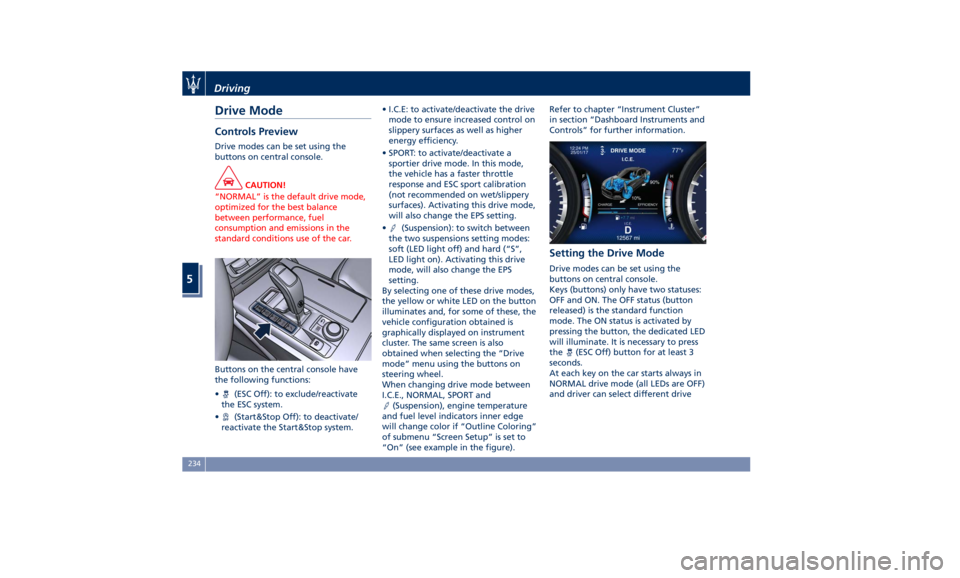
Drive Mode Controls Preview Drive modes can be set using the
buttons on central console.
CAUTION!
“NORMAL” is the default drive mode,
optimized for the best balance
between performance, fuel
consumption and emissions in the
standard conditions use of the car.
Buttons on the central console have
the
following functions:
•
(ESC Off): to exclude/reactivate
the ESC system.
•
(Start&Stop Off): to deactivate/
reactivate the Start&Stop system. • I.C.E: to activate/deactivate the drive
mode to ensure increased control on
slippery surfaces as well as higher
energy efficiency.
• SPORT: to activate/deactivate a
sportier drive mode. In this mode,
the vehicle has a faster throttle
response and ESC sport calibration
(not recommended on wet/slippery
surfaces). Activating this drive mode,
will also change the EPS setting.
•
(Suspension): to switch between
the two suspensions setting modes:
soft (LED light off) and hard (“S”,
LED light on). Activating this drive
mode, will also change the EPS
setting.
By selecting one of these drive modes,
the yellow or white LED on the button
illuminates and, for some of these, the
vehicle configuration obtained is
graphically displayed on instrument
cluster. The same screen is also
obtained when selecting the “Drive
mode” menu using the buttons on
steering wheel.
When changing drive mode between
I.C.E., NORMAL, SPORT and
(Suspension), engine temperature
and fuel level indicators inner edge
will change color if “Outline Coloring”
of submenu “Screen Setup” is set to
“On” (see example in the figure). Refer to chapter “Instrument Cluster”
in section “Dashboard Instruments and
Controls” for further information.
Setting the Drive Mode Drive modes can be set using the
buttons on central console.
Keys (buttons) only have two statuses:
OFF and ON. The OFF status (button
released) is the standard function
mode. The ON status is activated by
pressing the button, the dedicated LED
will illuminate. It is necessary to press
the
(ESC Off) button for at least 3
seconds.
At each key on the car starts always in
NORMAL drive mode (all LEDs are OFF)
and driver can select different driveDriving
5
234
Page 240 of 396
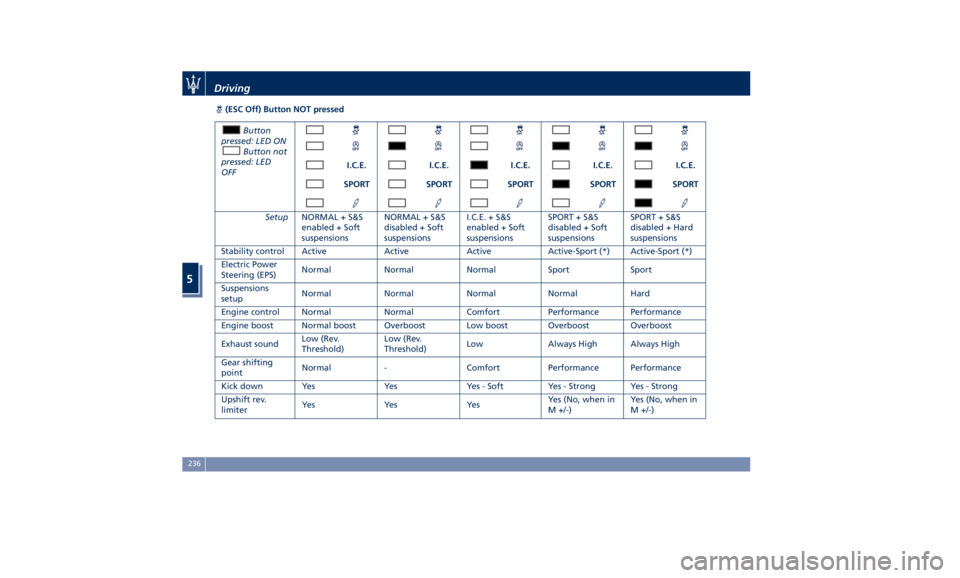
(ESC Off) Button NOT pressed
Button
pressed: LED ON
Button not
pressed: LED
OFF I.C.E. I.C.E. I.C.E. I.C.E. I.C.E.
SPORT SPORT SPORT SPORT SPORT
Setup NORMAL + S&S
enabled + Soft
suspensions NORMAL + S&S
disabled + Soft
suspensions I.C.E. + S&S
enabled + Soft
suspensions SPORT + S&S
disabled + Soft
suspensions SPORT + S&S
disabled + Hard
suspensions
Stability control Active Active Active Active-Sport (*) Active-Sport (*)
Electric Power
Steering (EPS) Normal Normal Normal Sport Sport
Suspensions
setup Normal Normal Normal Normal Hard
Engine control Normal Normal Comfort Performance Performance
Engine boost Normal boost Overboost Low boost Overboost Overboost
Exhaust sound Low (Rev.
Threshold) Low (Rev.
Threshold) Low Always High Always High
Gear shifting
point Normal - Comfort Performance Performance
Kick down Yes Yes Yes - Soft Yes - Strong Yes - Strong
Upshift rev.
limiter Ye s Ye s Ye s Yes (No, when in
M +/-) Yes (No, when in
M +/-)Driving
5
236