park assist MAZDA CX3 2023 User Guide
[x] Cancel search | Manufacturer: MAZDA, Model Year: 2023, Model line: CX3, Model: MAZDA CX3 2023Pages: 595, PDF Size: 32.7 MB
Page 311 of 595

360° View Monitor*
▼360° View Monitor
The 360°View Monitor consists of the
following functions
which assist the
driver in checking the area surrounding
the vehicle using various indications in
the center display and a warning sound
while the vehicle is being driven at low
speeds or while parking.
To p v i e w
The top view displays an image of
the vehicle from directly above on
the center display by combining the
images taken from the 4 cameras set
on all sides of the vehicle. The top
view displays on the right side of the
screen when the front view or rear
view screen is being displayed. The
top view assists the driver in
checking the area surrounding the
vehicle when the vehicle is moving
forward or in reverse.
Front view/front wide view
The image from the front of the
vehicle is displayed on the center
display.
The view from the front assists the
driver in checking the front of the
vehicle by displaying guide lines on
the displayed image taken from the
front of the vehicle.
Side view
The images taken from the front left
and right sides of the vehicle are
displayed on the center display.
The side view assists the driver in
checking the front sides of the
vehicle by displaying guide lines on
the displayed image taken from the
front left and right sides of the
vehicle.
Rear view/rear wide view
The image from the rear of the
vehicle is displayed on the center
display.
The image from the rear assists the
driver in checking the rear of the
vehicle by displaying guide lines on
the displayed image taken from the
rear of the vehicle.
Parking sensor
If there are any obstructions near the
vehicle while the top view/side view
is displayed, an obstruction
detection indication turns on around
the bumper in the center display.
The parking sensors use ultrasonic
sensors to detect obstructions
around the vehicle when the vehicle
is driven at low speeds, such as
during garage or parallel parking,
and notifies the driver of the
approximate distance from the
vehicle to the surrounding
obstruction using sound and an
obstruction detection indication.
Refer to Parking Sensor System on
page 4-231.
Front Cross Traffic Alert (FCTA)
If there is the possibility of a collision
with an approaching vehicle while
the front view/front wide view/side
view is displayed, a warning is
displayed on the center display.
The Front Cross Traffic Alert (FCTA) is
designed to assist the driver in
checking both sides of the vehicle
when the vehicle starts to drive at an
intersection.
Refer to Front Cross Traffic Alert
(FCTA) on page 4-121.
When Driving
i-ACTIVSENSE
4-164*Some models.
CX-30_8KN2-EA-21L_Edition1_new 2021-9-15 19:39:56
Page 323 of 595

▼Top View/Front View
Use the top view/front view to assist in checking the safety of the surrounding area
when accelerating from a stop, parking, or stopping the vehicle.
Display range
1. Target object
NOTE
In the top view screen, the areas in black at the front and rear of the vehicle image
and the seams where each of the camera images merge are blind spots.
Because images displayed in the top view screen are processed from each camera,
the top view screen may display in the following ways.
Depending on the surrounding enviro
nment, the color of objects may be
displayed on the screen in a color different from the actual one.
Depending on the surrounding environment, it may take a few seconds for the
color of the screen display to adjust.
Obstructions displayed in the front view
may not display on the top view screen.If the position or angle of each camera changes due to tilting of the vehicle, the
image may appear distorted.
Lines on the road may appear distorted at the seams where each of the camera
images merge.
The screen area for each camera may appear bright/dark depending on the
illumination level around any of the cameras.
When Driving
i-ACTIVSENSE
4-176
CX-30_8KN2-EA-21L_Edition1_new 2021-9-15 19:39:56
Page 328 of 595

▼Side View
Use the side view to assist in checking the safety of the surrounding area when
accelerating from a stop, parking , or stopping the vehicle.
Display range
1. Target object
When Driving
i-ACTIVSENSE
4-181
CX-30_8KN2-EA-21L_Edition1_new
2021-9-15 19:39:56
Page 331 of 595

NOTE
Because there might be a difference between the image displayed on the screen
and the actual conditions, always check the safety of the surrounding area using
the mirrors and directly with your eyes when driving.
Even though the object displayed on the screen, such as a road curb or a division
line of a parking space, and the vehicle parallel guide lines appear parallel, they
may not actually be parallel.
▼ Top View/Rear View
Use the top view/rear view to assist in checking the safety of the surrounding area
when accelerating from a stop, parking, or stopping the vehicle.
Range of displayed screen image
1. Target object
NOTE
In the top view screen, the areas in black at the front and rear of the vehicle image
and the seams where each of the camera images merge are blind spots.
Because images displayed in the top view screen are processed from each camera,
the top view screen may display in the following ways.
Depending on the surrounding enviro
nment, the color of objects may be
displayed on the screen in a color different from the actual one.
Depending on the surrounding environment, it may take a few seconds for the
color of the screen display to adjust.
Obstructions displayed in the rear view may not display on the top view screen.
When Driving
i-ACTIVSENSE
4-184
CX-30_8KN2-EA-21L_Edition1_new 2021-9-15 19:39:56
Page 336 of 595

▼Top View/Rear Wide View
Use the top view/rear wide view to assist in checking the safety of the surrounding
area when accelerating from a stop, parking , or stopping the vehicle.
Range of displayed screen image
1. Target object
NOTE
In the top view screen, the areas in black
at the front and rear of the vehicle image
and the seams where each of the camera images merge are blind spots.
Because images displayed in the top view screen are processed from each camera,
the top view screen may display in the following ways.
Depending on the surrounding environment, the color of objects may be
displayed on the screen in a co lor different from the actual one.
Depending on the surrounding environment, it may take a few seconds for the
color of the screen display to adjust.
Obstructions displayed in the front view may not display on the top view screen.If the position or angle of each camera changes due to tilting of the vehicle, the
image may appear distorted.
Lines on the road may appear distorted at the seams where each of the camera
images merge.
The screen area for each camera may appear bright/dark depending on the
illumination level around any of the cameras.
When Driving
i-ACTIVSENSE
4-189
CX-30_8KN2-EA-21L_Edition1_new 2021-9-15 19:39:56
Page 348 of 595
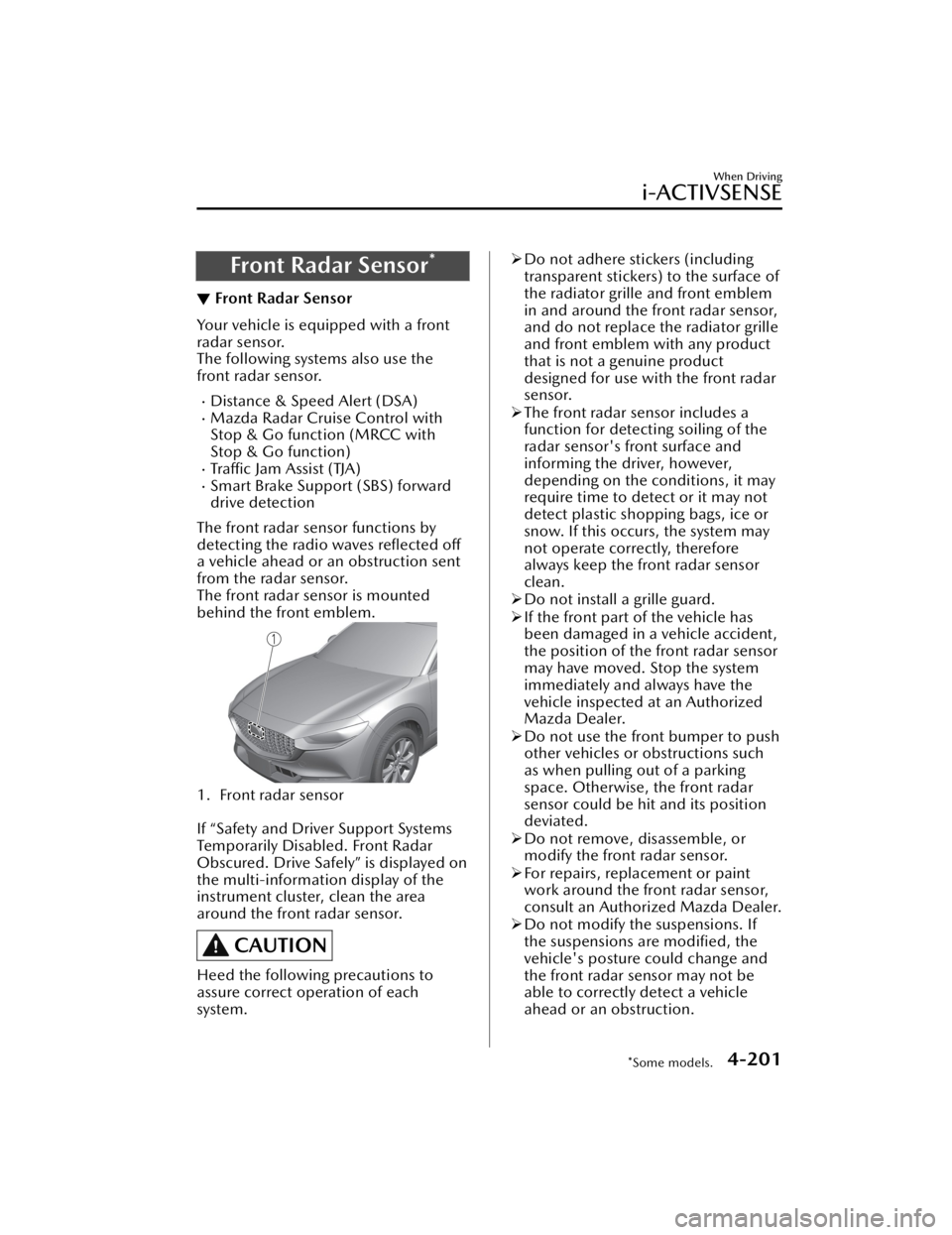
Front Radar Sensor*
▼Front Radar Sensor
Your vehicle is equipped with a front
radar sensor.
The following systems also use the
front radar sensor.
Distance & Speed Alert (DSA)Mazda Radar Cruise Control with
Stop & Go function (MRCC with
Stop & Go function)
Tra ffi c
Jam Assist (TJA)Smart Brake Support (SBS) forward
drive detection
The front radar sensor functions by
detecting the radio waves reflected off
a vehicle ahead or an obstruction sent
from the radar sensor.
The front radar sensor is mounted
behind the front emblem.
1. Front radar sensor
If “Safety and Driver Support Systems
Temporarily Disabled. Front Radar
Obscured. Drive Safely” is displayed on
the multi-information display of the
instrument cluster, clean the area
around the front radar sensor.
CAUTION
Heed the following precautions to
assure correct operation of each
system.
Do not adhere stickers (including
transparent stickers) to the surface of
the radiator grille and front emblem
in and around the front radar sensor,
and do not replace the radiator grille
and front emblem with any product
that is not a genuine product
designed for use with the front radar
sensor.
The front radar sensor includes a
function for detecting soiling of the
radar sensor's front surface and
informing the driver, however,
depending on the conditions, it may
require time to detect or it may not
detect plastic shopping bags, ice or
snow. If this occurs, the system may
not operate correctly, therefore
always keep the front radar sensor
clean.
Do not install a grille guard.
If the front part of the vehicle has
been damaged in a vehicle accident,
the position of the front radar sensor
may have moved. Stop the system
immediately and always have the
vehicle inspected at an Authorized
Mazda Dealer.
Do not use the front bumper to push
other vehicles or obstructions such
as when pulling out of a parking
space. Otherwise, the front radar
sensor could be hit and its position
deviated.
Do not remove, disassemble, or
modify the front radar sensor.
For repairs, replacement or paint
work around the front radar sensor,
consult an Authorized Mazda Dealer.
Do not modify the suspensions. If
the suspensions are modified, the
vehicle's posture could change and
the front radar sensor may not be
able to correctly detect a vehicle
ahead or an obstruction.
When Driving
i-ACTIVSENSE
*Some models.4-201
CX-30_8KN2-EA-21L_Edition1_new 2021-9-15 19:39:56
Page 363 of 595

Rear View Monitor*
▼Rear View Monitor
The rear view monitor provides visual
images of the rear of the vehicle when
reversing.
WARNING
Always drive carefully confirming the
safety of the rear and the surrounding
conditions by looking directly with
your eyes:
Reversing the vehicle by only looking at
the screen is dangerous as it may cause
an accident or a collision with an
object. The rear view monitor is only a
visual assist device when reversing the
vehicle. The images on the screen may
be
different from the actual conditions.
CAUTION
Do not use the rear view monitor
under the following conditions:
Using the rear view monitor under
the following conditions is
dangerous and could result in injury
or vehicle damage or both.
Icy or snow-covered roads.
Tire chains or a temporary spare
tire is installed.
The trunk lid is not fully closed.
The vehicle is on a road incline.
Bumpy roads.
When the display is cold, images
may course across the monitor or the
screen and may be dimmer than
usual, which could cause
difficulty in
confirming the surrounding
conditions of the vehicle. Always
drive carefully confirming the safety
of the rear and the surrounding
conditions by looking directly with
your eyes.
Do not apply excessive force to the
camera. The camera position and
angle may deviate.
Do not disassemble, modify, or
remove it as it may no longer be
waterproof.
The camera cover is made of plastic.
Do not apply degreasing agents,
organic solvents, wax, or glass
coating agents to the camera cover.
If any are spilled on the cover, wipe
off with a soft cloth immediately.
Do not rub the camera cover
forcefully with an abrasive or hard
brush. The camera cover or lens may
be scratched which might affect the
images.
If a camera lens is severely damaged
by flying gravel, have the camera
replaced. For camera replacement,
consult an Authorized Mazda Dealer.
NOTE
If water, snow, or mud is stuck on
the camera lens, wipe it off using a
soft cloth. If it cannot be wiped off,
use a mild detergent.
If the camera temperature changes
rapidly (Hot to cold, cold to hot), the
rear view monitor may not operate
correctly.
When replacing the tires, consult an
Authorized Mazda Dealer. Replacing
the tires could result in deviation of
the guide lines which appear on the
display.
If the vehicle's front, side, or rear has
been involved in a collision, the
alignment of the rear view parking
camera (location, installation angle)
may have deviated. Always consult
an Authorized Mazda Dealer to have
the vehicle inspected.
When Driving
Rear View Monitor
4-216*Some models.
CX-30_8KN2-EA-21L_Edition1_new 2021-9-15 19:39:56
Page 364 of 595

If “No camera signal.” is indicated in
the display, there could be a
problem with the camera. Have your
vehicle inspected at an Authorized
Mazda Dealer.
(Predicted vehicle path assist lines
display type)
If force is applied to the steering
wheel, the guide lines may not
display. Loosen your grip on the
steering wheel to allow the guide
lines to display.
▼Rear View Parking Camera
Location
1. Rear view parking camera
When Driving
Rear View Monitor
4-217
CX-30_8KN2-EA-21L_Edition1_new
2021-9-15 19:39:56
Page 367 of 595

▼Viewing the Display
Predicted vehicle path assist lines display type
The projected path guidance mode displays the predicted path of the vehicle after
you turn the steering wheel.
Use this mode for parking your vehi
cle in a parking space or garage.
a) Projected vehicle path (yellow)
These lines are displayed as a reference for the projected path of the vehicle.
The lines displaying the projected vehicle path change after you turn the steering
wheel.
b) Extended vehicle width lines (blue) These lines indicate the vehicle's extended width.
These lines are not displayed when the vehicle's wheels are in the straight-ahead
position.
c) Distance guide lines (red) These lines indicate the approximate distance to a point measured from the
vehicle's rear (from the end of the bumper).
The blue line indicates the point about 0.5 m (19 in) from the rear bumper.
The red and yellow lines, which change position after you turn the steering wheel,
indicate the points about 0.5 m (19 in) for the red line and 1.0 m (39 in) and 2.0
m (78 in) for the yellow lines from the rear bumper (at the center point of each of
the lines).
A degree of error occurs when the wheels are not in the straight-ahead position.
In the above illustration, the right side of the vehicle is in a position closer to the
actual distance displayed by the distance guide lines (red: about 0.5 m (19 in)
point, yellow: about 1.0 m (39 in), and yellow: about 2.0 m (78 in) point behind
the rear bumper), whereas the left side is in a position farther away.
CAUTION
The indicated position of the guide lines on the display changes depending on the
vehicle conditions (such as the number of occupants/cargo load) and the road
conditions (such as a steep gradient to the rear of the vehicle).
Always check the area to the vehicle's rear and the surrounding area directly with
your eyes while backing up.
When Driving
Rear View Monitor
4-220
CX-30_8KN2-EA-21L_Edition1_new 2021-9-15 19:39:56
Page 368 of 595

Fixed assist lines display type
Guide lines which indicate the width of the vehicle are displayed on the screen as a
reference to the approximate width of the vehicle in comparison to the width of the
parking space you are about to back into.
Use this display view for parking your vehicle in a parking space or garage.
a) Vehicle width guide lines
Guide lines serve as a reference to the approximate width of the vehicle.
b) Distance guide lines These guide lines indicate the approximate distance to a point measured from the
vehicle's rear (from the end of the bumper).
The red line indicates the point about 0.5 m (19 in) from the rear bumper.
The yellow lines indicate the points abou t 1.0 m (39 in) and 2.0 m (78 in) from
the rear bumper.
CAUTION
The guide lines on the screen are fixed li nes. They are not synced to the driver's
turning of the steering wheel. Always be careful and check the area to the vehicle's
rear and the surrounding area directly with your eyes while backing up.
▼ Rear View Monitor Operation
The operation of the rear view monitor when reversing the vehicle varies depending
on the traffic, road, and vehicle conditions. The amount of steering and the timing
also varies depending on conditions, so confirm the surrounding conditions directly
with your eyes and steer the vehicle in accordance with the conditions.
Be well aware of the above cautions prior to using the rear view monitor.
When Driving
Rear View Monitor
4-221
CX-30_8KN2-EA-21L_Edition1_new
2021-9-15 19:39:56