brake MAZDA CX3 2023 Owner's Manual
[x] Cancel search | Manufacturer: MAZDA, Model Year: 2023, Model line: CX3, Model: MAZDA CX3 2023Pages: 595, PDF Size: 32.7 MB
Page 161 of 595

The temperature setting dial of the
air conditioner is in the maximum
heating or maximum cooling (A/C
ON) position.
(Automatic climate control system)
The cabin temperature is largelydifferent from the set temperature of
the air conditioner.
The brakes are released slightly on a
slope and the vehicle begins to
move.
Two minutes have elapsed since the
idling was stopped.
(Without M Hybrid)
The battery power is depleted.
(With M Hybrid)
The M Hybrid battery power is
depleted.
(Engine idling is stopped while the
vehicle is stopped)
The accelerator pedal is depressed
with the selector lever in the D or
M (not in second gear fixed mode)
position.
The selector lever is shifted to the R
position.
The selector lever is shifted from N
or P position to D or M (not in
second gear fixed mode) position.
The steering wheel is operated
with the selector lever in the D or
M (not in second gear fixed mode)
position.
The selector lever is in the M
position and the second gear fixed
mode is selected.
With the selector lever in the P or
N position, or the D/M range, the
driver's seat belt is unfastened, the
driver's door is opened, or the
hood is opened.
The steering wheel is operated.
(Engine idling is stopped while
driving (With M Hybrid))
The selector lever is in a position
other than the D position.
The accelerator pedal is depressed.Sport mode is selected.The steering wheel is operated.The shift lever is shifted to the R
position.
The brake pedal is depressed with
the shift lever in the N position.
The accelerator pedal is depressed.
Selector lever is operated while
engine idling is stopped
If the selector lever is shifted from D or
M (not in second gear fixed mode)
position to N or P position while
engine idling is stopped, the engine
does not restart even when the brake
pedal is released. The engine will
restart if the brake pedal is depressed
again or the selector lever is shifted to
the D, M (not in second gear fixed
mode), or R position. (For the
purposes of safety, always keep the
brake pedal depressed when shifting
the selector lever.)
If the selector lever is shifted from the
D or M (not in second gear fixed
mode) to the N or P position, and the
driver's seat belt is unfastened or the
driver's door is opened, the engine
restarts.
Battery terminals have been
disconnected
Engine idling may not stop right after
the battery terminals have been
disconnected. In addition, if the
battery is replaced, the i-stop functions
must be verified. Consult an
Authorized Mazda Dealer.
▼ i-stop OFF Switch
When pressing the switch, the i-stop
function stops and the i-stop OFF
When Driving
Start/Stop Engine
4-14
CX-30_8KN2-EA-21L_Edition1_new
2021-9-15 19:39:56
Page 162 of 595

switch indicator light turns on. If the
switch is pressed again, the i-stop
function becomes operational and the
i-stop OFF switch indicator light turns
off.
1. Indicator light
NOTE
If the engine is stopped with the i-stop
function stopped, the i-stop function
becomes operational again when the
engine is started the next time.
▼Vehicle Roll Prevention Function
Vehicles with the i-
stop function are
equipped with a vehicle roll prevention
function. This function prevents the
vehicle from rolling, such as when
releasing the brake pedal while on a
slope under the following conditions:
While engine idling is stopped
(prevents the vehicle from rolling
back)
When the engine restarts after
releasing the brake pedal (prevents
the vehicle's sudden movement due
to vehicle creep), sudden movement
of the vehicle is prevented by
controlling the brakes.
1. Release foot from brake pedal
2. Vehicle brake force maintained
3. Engine restarted
4. Acceleration
When Driving
Start/Stop Engine
4-15
CX-30_8KN2-EA-21L_Edition1_new 2021-9-15 19:39:56
Page 163 of 595

WARNING
Do not rely completely on the vehicle
roll prevention function.
The vehicle roll prevention function
is a supplementary function which
operates for a maximum of 2
seconds after releasing the brake
pedal and accelerating the vehicle
from an engine idling stop condition.
Over reliance on the system may
result in an unexpected accident if
the vehicle were to suddenly
accelerate. Before starting to drive
the vehicle, always confirm the safety
of the surroundings and operate the
selector lever, brake pedal, and
accelerator pedal appropriately.
Note that the vehicle may move
suddenly depending on the vehicle's
load or if it is towing something.
Note that the vehicle may move
suddenly after the vehicle roll
prevention function is released while
the vehicle is under the following
conditions:
The selector lever is in the N
position.
If the selector lever is shifted to the
N position and the brake pedal is
released while the i-stop function
is operating, the brake force is
gradually released. To accelerate
the vehicle, release the brake pedal
after the engine restarts and shift
the selector lever to a position
other than the N position.
NOTE
When the vehicle is stopped on a
steep grade, the vehicle roll
prevention function does not
operate because engine idling is not
stopped.
The brake pedal response may
change, sound may occur from the
brakes, or the brake pedal could
vibrate from the operation of the
vehicle roll prevention function.
However, this does not indicate a
malfunction.
▼ i-stop Warning Light (Amber)/
i-stop Indicator Light (Green)
The i-stop system constantly monitors
the driver's operations, the vehicle's
interior and exterior environment, and
the operational status of the vehicle,
and uses the i-stop warning light
(amber) and i-stop indicator light
(green) to inform the driver of various
cautions and warnings.
NOTE
On vehicles equipped with the center
display, the i-stop operation status is
displayed in the fuel efficiency monitor
display.
Refer to the Fuel Efficiency Monitor
section in the Mazda Connect
Owner's Manual.
i-stop warning light (amber)
When the light is turned on
The light turns on when the ignition
is switched ON and turns off when
the engine is started.
If the i-stop warning light (amber)
remains on while the engine is
running , the battery performance
may have decreased. Have your
vehicle inspected by an Authorized
Mazda Dealer.
When Driving
Start/Stop Engine
4-16
CX-30_8KN2-EA-21L_Edition1_new
2021-9-15 19:39:56
Page 174 of 595

▼i-ACTIVSENSE Display*
Displays the system status.
Refer to Lane Departure Warning
System (LDWS) on page 4-104.
Refer to Blind Spot Monitoring
(BSM) on page 4-108.
Refer to Traffic Sign Recognition
System (TSR) on page 4-112.
Refer to Distance & Speed Alert
(DSA) on page 4-117.
Refer to Driver Attention Alert (DAA)
on page 4-119.
Refer to Driver Monitoring (DM) on
page 4-120.
Refer to Front Cross Traffic Alert
(FCTA) on page 4-121.
Refer to Mazda Rada
r Cruise Control
with Stop & Go function (MRCC
with Stop & Go function) on page
4-130.
Refer to Tra ffi c Jam Assist (TJA) on
page 4-141.
Refer to Lane-keep Assist System
(LAS) on page 4-154.
Refer to Smart Brake Support (SBS)
on page 4-156.
Refer to Cruise Control on page
4-209.
▼ Compass Display
The direction the vehicle is moving is
displayed in one of eight directions
while the vehicle is being driven.
Display
Direction
NN orth
SS outh
EE ast
WW est
NE Northeast
NW Northwest
SE Southeast
SW Southwest
When Driving
Instrument Cluster and Display
*Some models.4-27
CX-30_8KN2-EA-21L_Edition1_new 2021-9-15 19:39:56
Page 176 of 595

▼Warning Indication/Warning Lights
These lights turn on or flash to notify th
e user of the system operation status or a
system malfunction.
Signal Warning Refer to
Brake System Warning Indication/Warning Light*17-22
ABS Warning Indication/Warning Light*1
Electronic
Brake Force
Distribution
System Warn- ing
7-23
ABS warning 7-25
Charging System Warning Indication/Warning Light*17-24
Engine Oil Warning Indication/Warning Light*17-24
High Engine Coolant Temperature Warning Indication 7-24
Power Steering Malfunction Indication/Indicator Light*17-25
Master Warning Indication7-25
Brake Control System Warning Indication/Warning Light*17-26
Brake Override Warning Indication7-26
Check Engine Indication/Light*17-26
(Amber)
*i-stop Warning Indication/Warning Light*17-27
Automatic Transmission Warning Indication/Warning Light*17-27
When Driving
Instrument Cluster and Display
*Some models.4-29
CX-30_8KN2-EA-21L_Edition1_new 2021-9-15 19:39:56
Page 179 of 595
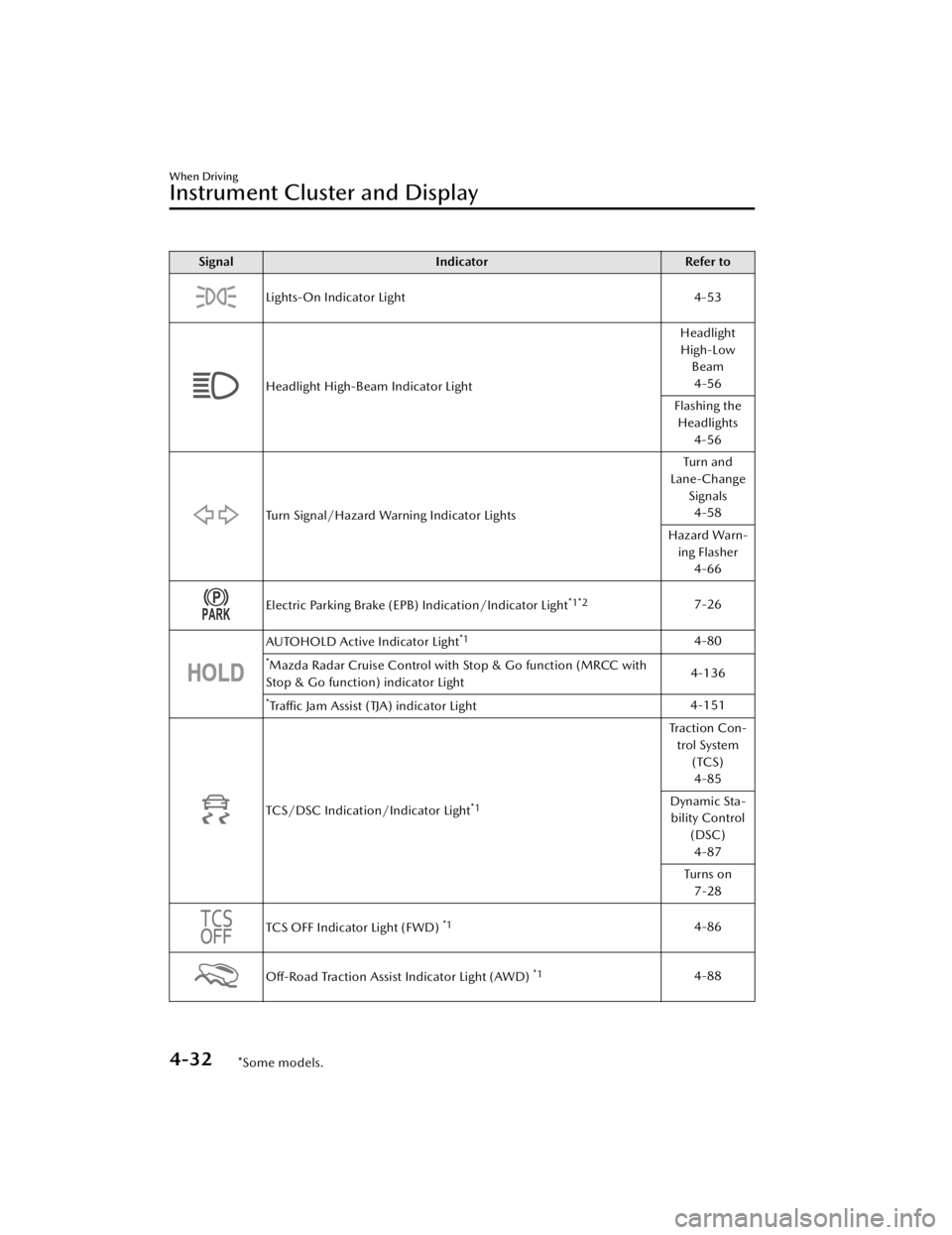
SignalIndicator Refer to
Lights-On Indicator Light 4-53
Headlight High-Beam Indicator LightHeadlight
High-Low Beam
4-56
Flashing the Headlights 4-56
Turn Signal/Hazard Warning Indicator Lights Tu r n a n d
Lane-Change
Signals4-58
Hazard Warn- ing Flasher 4-66
Electric Parking Brake (EPB) Indication/Indicator Light*1*27-26
AUTOHOLD Active Indicator Light*14-80
*Mazda Radar Cruise Control with Stop & Go function (MRCC with
Stop & Go function) indicator Light 4-136
*Tra ffi c
Jam Assist (TJA) indicator Light 4-151
TCS/DSC Indication/Indicator Light*1
Tra c t i o n C o n -
trol System (TCS)4-85
Dynamic Sta- bility Control
(DSC)4-87
Tu r n s o n 7-28
TCS OFF Indicator Light (FWD) *14-86
Off-Road Traction Assist Indicator Light (AWD) *14-88
When Driving
Instrument Cluster and Display
4-32*Some models.
CX-30_8KN2-EA-21L_Edition1_new 2021-9-15 19:39:56
Page 180 of 595

SignalIndicator Refer to
*Select Mode Indicator Light 4-91
(White)
*i-ACTIVSENSE Status Symbol (Warning/Risk Avoidance Support Sys-
tem) 4-97
(Green)
(Amber)
*i-ACTIVSENSE OFF Symbol (Warning/Risk Avoidance Support Sys-
tem) 4-97
(Green)
*High Beam Control System (HBC) Indicator Light
4-101
(White)
*Mazda Radar Cruise Control with Stop & Go function (MRCC with
Stop & Go function) Standby Indication 4-132
*Traffic Jam Assist (TJA) Standby Indication
4-144
(Green)
*Mazda Radar Cruise Control with Stop & Go function (MRCC with
Stop & Go function) Set Indication 4-132
*Traffic Jam Assist (TJA) Set Indication
4-144
*Smart Brake Support (SBS) OFF Indicator Light*14-163
(White)
*Cruise Standby Indication4-208
(Green)
*Cruise Set Indication4-208
*1 The light turns on when the ignition is switched on for an operation check, and
turns off a few seconds later or when the en gine is started. If the light does not
turn on or remains turned on, have the vehicle inspected at an Authorized
Mazda Dealer.
When Driving
Instrument Cluster and Display
*Some models.4-33
CX-30_8KN2-EA-21L_Edition1_new 2021-9-15 19:39:56
Page 181 of 595

*2 The light turns on continuously when the parking brake is applied.
▼Wrench Indication/Indicator Light
The wrench indication/indicator light
is displayed/turns on under the
following conditions.
When the preset maintenance
period has arrived.
Refer to the Information section in
the Mazda Connect Owner's
Manual.
CAUTION
When the maintenance period
arrives, have your vehicle inspected
by an Authorized Mazda Dealer as
soon as possible. If maintenance is
neglected, a decrease in vehicle
performance may occur which
could cause damage. Have your
vehicle inspected before the
maintenance pe riod arrives.
If the vehicle continues to be
driven after the engine oil
replacement period has passed, it
could cause damage to the engine.
Replace the engine oil before the
maintenance pe riod arrives.
NOTE
The wrench indication/indicator
light may display/turn on earlier than
the preset period depending on
vehicle usage conditions.
Whenever the engine oil is replaced,
a reset of the vehicle engine control
unit is necessary.
Refer to the Information section in
the Mazda Connect Owner's
Manual.
When Driving
Instrument Cluster and Display
4-34
CX-30_8KN2-EA-21L_Edition1_new 2021-9-15 19:39:56
Page 183 of 595

The active driving display indicates the following information:
Lane Departure Warning System (LDWS) Warnings*
Refer to Lane Departure Warning System (LDWS) on page 4-104.Blind Spot Monitoring (BSM) Operation Conditions and Warnings*
Refer to Blind Spot Monitoring (BSM) on page 4-105.Traffic Sign Recognition System (TSR) traffic signs and Warnings*
Refer to Traffic Sign Recognition System (TSR) on page 4-110.Front Cross Traffic Alert (FCTA) Operation Conditions and Warning*
Refer to Front Cross Traffic Al ert (FCTA) on page 4-121.Mazda Radar Cruise Control with Stop & Go function (MRCC with Stop & Go
function) Operation Conditions and Warnings*
Refer to Mazda Radar Cruise Control with Stop & Go function (MRCC with Stop
& Go function) on page 4-128.
Traffic Jam Assist (TJA) Operation Conditions and Warnings*
Refer to Tra ffi c Jam Assist (TJA) on page 4-138.Lane-keep Assist System (LAS) Warnings*
Refer to Lane-keep Assist System (LAS) on page 4-152.Smart Brake Support (SBS) Operation Conditions and Warnings*
Refer to Smart Brake Support (SBS) on page 4-156.Cruise Control Operation Conditions
Refer to Cruise Control on page 4-208.
Navigation Guidance (vehicles with navigation system)Intersection Name (vehicles with navigation system)Street name (vehicles with navigation system)Lane Guidance (vehicles with navigation system)Speed limit indicator (vehicles with navigation system)Vehicle Speed
The active driving display settin gs can be changed or adjusted.
Refer to the Settings section in the Mazda Connect Owner's Manual.
NOTE
The desired driving position (display position, brightness level, display
information) can be called up after programming the position.
Refer to Driving Position Memory on page 2-10.
The street name may not be displayed depending on the market and region.
When Driving
Instrument Cluster and Display
4-36*Some models.
CX-30_8KN2-EA-21L_Edition1_new 2021-9-15 19:39:56
Page 184 of 595

Automatic Transmission Controls
▼Automatic Transmission Controls
1. Lock-release button
2. Selector lever
Indication Various Lockouts
Indicates that you must depress
the brake pedal and hold in the
lock-release button to shift (The ig-
nition must be switched ON).
Indicates the selector lever can be
shifted freely into any position.
Indicates that you must hold in the
lock-release button to shift.
NOTE
The Sport AT has an option that is not
included in the traditional automatic
transmission that gives the driver the
option of selecting each gear instead of
leaving it to the tr ansmission to shift
gears. Even if you intend to use the
automatic transmission functions as a
traditional automatic, you should also
be aware that you can inadvertently
shift into manual shift mode and an
inappropriate gear may be retained as
the vehicle speed increases. If you
notice the engine speed going higher
or hear the engine racing, confirm you
have not accidentally slipped into
manual shift mode (page 4-41).
When Driving
Automatic Transmission
4-37
CX-30_8KN2-EA-21L_Edition1_new 2021-9-15 19:39:56