lights MAZDA CX30 2023 Owner's Manual
[x] Cancel search | Manufacturer: MAZDA, Model Year: 2023, Model line: CX30, Model: MAZDA CX30 2023Pages: 595, PDF Size: 21.06 MB
Page 178 of 595

SignalWarning Refer to
Liftgate-Ajar Warning Indication 7-32
Door-Ajar Warning Light7-32
*1 The light turns on when the ignition is switched on for an operation check, and turns off a few
seconds later or when the engine is started. If the light does not turn on or remains turned on, have
the vehicle inspected at an Authorized Mazda Dealer.
▼ Indication/Indicator Lights
These lights turn on or flash to notify th
e user of the system operation status or a
system malfunction.
Signal Indicator Refer to
(Green)Seat Belt Indicator Light (Rear seat)
2-25
*Front Passenger Air Bag Deactivation Indicator Light2-67
Security Indicator LightImmobilizer
System3-47
Theft-Deterrent System
3-48
Malfunction 7-29
(Green) KEY Indicator Light
4-5
(Green)
*i-stop Indicator Light4-16
Wrench Indication/Indicator Light*14-34
*Shift Position Indication4-40
When Driving
Instrument Cluster and Display
*Some models.4-31
CX-30_8LD3-EA-22J_Edition1_new
2022-6-7 13:06:59
Page 179 of 595

SignalIndicator Refer to
Lights-On Indicator Light 4-53
Headlight High-Beam Indicator LightHeadlight
High-Low Beam
4-56
Flashing the Headlights 4-56
Turn Signal/Hazard Warning Indicator Lights Tu r n a n d
Lane-Change
Signals4-58
Hazard Warn- ing Flasher 4-65
Electric Parking Brake (EPB) Indication/Indicator Light*1*27-26
AUTOHOLD Active Indicator Light*14-79
*Mazda Radar Cruise Control with Stop & Go function (MRCC with
Stop & Go function) indicator Light 4-135
*Tra ffi c
Jam Assist (TJA) indicator Light 4-150
TCS/DSC Indication/Indicator Light*1
Tra c t i o n C o n -
trol System (TCS)4-84
Dynamic Sta- bility Control
(DSC)4-86
Tu r n s o n 7-28
TCS OFF Indicator Light (FWD) *14-85
Off-Road Traction Assist Indicator Light (AWD) *14-87
When Driving
Instrument Cluster and Display
4-32*Some models.
CX-30_8LD3-EA-22J_Edition1_new 2022-6-7 13:06:59
Page 200 of 595

Lighting Control
▼Headlights
Turn the headlight switch to turn the headli
ghts and other exterior lights on or off.
When the taillights, parking lights, license plate lights, and the side-marker lights are
turned on, the lights-on indicator ligh t in the instrument cluster turns on.
NOTE
If the light switch is left on, the lights will automatically switch off approximately
30 seconds after switching the ignition off.
The time setting can be changed.
Refer to the Settings section in the Mazda Connect Owner's Manual.
To prevent discharging the battery, do not leave the lights on while the engine is
off unless safety requires them.
Without auto-light control
Ignition Position ACC or OFF ON
Switch Position OFF
OFF
Headlights Off Off
Off*1Off Off On
Daytime running
lights Off Off Off
On
*2On*2*3Off
Taillights
Parking lights
License plate lights
Side-marker lights Off
On
*1On*1Off On On
*1 The lights are turned on for the specified period by the auto headlight off function.
When Driving
Switches and Controls
4-53
CX-30_8LD3-EA-22J_Edition1_new
2022-6-7 13:06:59
Page 201 of 595
*2 When the light switch is switched to a different position from the OFF, position while the
vehicle is stopped, the daytime running lights turn off. When starting to drive the vehicle, the daytime
running lights turn on again.
*3 When the light switch is switched to the OFF position, and then to the position again, the
daytime running lights turn off directly after star ting the engine. The daytime running lights turn on
when you begin driving the vehicle.
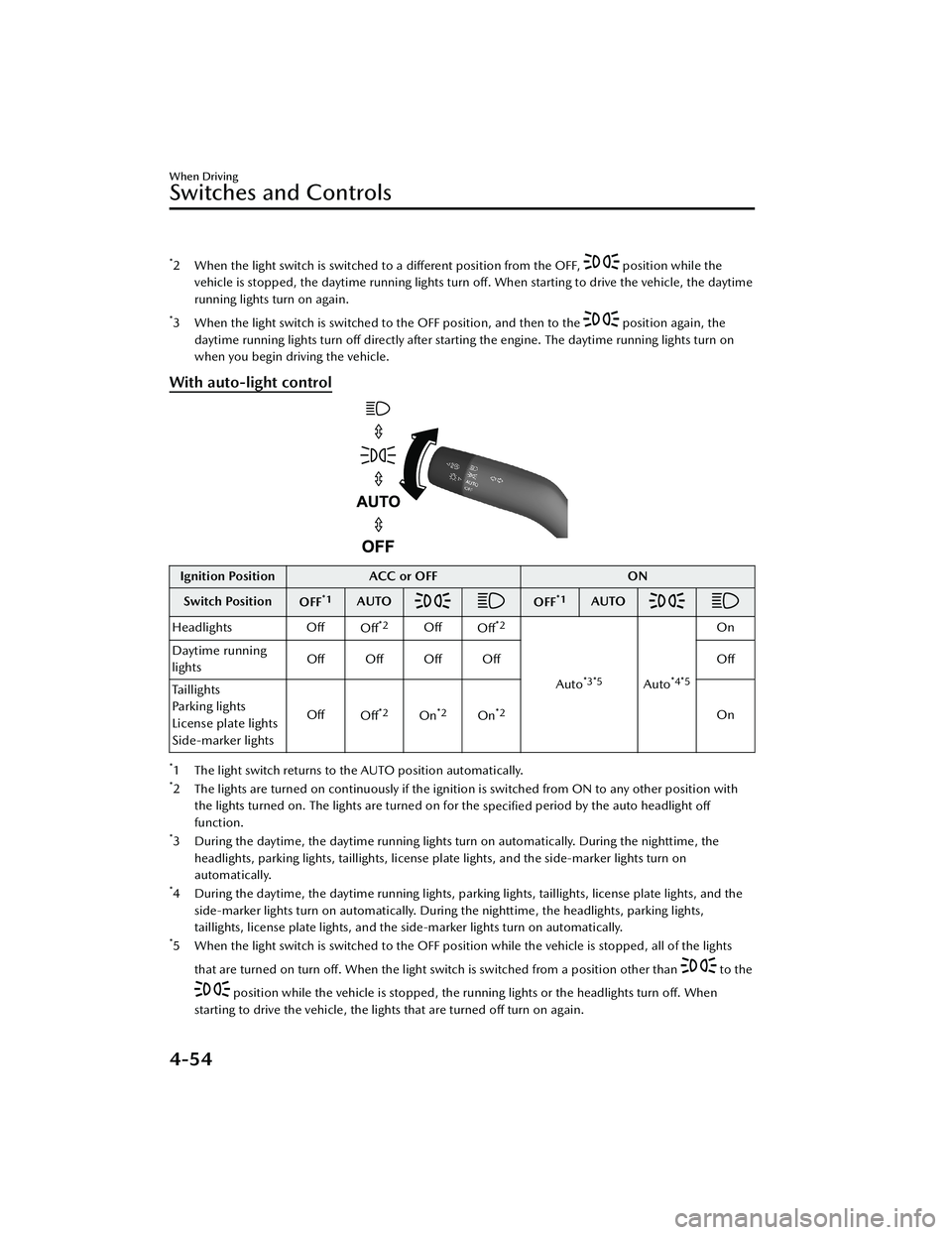
With auto-light control
Ignition Position ACC or OFF ON
Switch Position OFF
*1AUTOOFF*1AUTO
Headlights Off
Off*2OffOff*2
Auto*3*5Auto*4*5
On
Daytime running
lights Off Off Off Off
Off
Taillights
Parking lights
License plate lights
Side-marker lights Off
Off
*2On*2On*2On
*1 The light switch returns to the AUTO position automatically.*2 The lights are turned on continuously if the ignition is switched from ON to any other position with
the lights turned on. The lights are turned on for the specified period by the auto headlight
off
function.
*3 During the daytime, the daytime running lights turn on automatically. During the nighttime, the
headlights, parking lights, taillights, license plate lights, and the side-marker lights turn on
automatically.
*4 During the daytime, the daytime running lights, parking lights, taillights, license plate lights, and theside-marker lights turn on automatically. During the nighttime, the headlights, parking lights,
taillights, license plate lights, and the side-marker lights turn on automatically.
*5 When the light switch is switched to the OFF posit ion while the vehicle is stopped, all of the lights
that are turned on turn off. When the light switch is switched from a position other than
to the
position while the vehicle is stopped, the running lights or the headlights turn
off. When
starting to drive the vehicle, the lights that are turned off turn on again.
When Driving
Switches and Controls
4-54
CX-30_8LD3-EA-22J_Edition1_new 2022-6-7 13:06:59
Page 202 of 595

Auto-light control*
When the headlight switch is in a position other than and the ignition is
switched ON, the light sensor senses th e surrounding lightness or darkness and
automatically turns the headlights an d other exterior lights on or off.
CAUTION
Do not shade the light sensor by adhering a sticker or a label on the windshield.
Otherwise the light sensor will not operate correctly.
The light sensor also works as a rain sensor for the auto-wiper control. Keep hands
and scrapers clear of the windshield when the wiper lever is in the AUTO position
and the ignition is switched ON as fingers could be pinched or the wipers and
wiper blades could be damaged when the wipers activate automatically. If you are
going to clean the windshield, be sure the wipers are turned off completely when
it is particularly tempting to leave the engine running. This is particularly important
when clearing ice and snow.
NOTE
The headlights and other exterior lights may not turn off immediately even if the
surrounding area becomes well-lit because the light sensor determines that it is
night time if the surrounding area is cont inuously dark for several minutes such as
inside long tunnels, traffic jams inside tunnels, or in indoor parking lots.
If the headlight switch and the windshield wiper switch are in AUTO, and the
wipers are operated at low or high speed by the auto wiper control for several
seconds, bad weather conditions are determined and the headlights may be
turned on.
The sensitivity of the auto-light control may be changed.
Refer to the Settings section in the Mazda Connect Owner's Manual.
When Driving
Switches and Controls
*Some models.4-55
CX-30_8LD3-EA-22J_Edition1_new 2022-6-7 13:06:59
Page 203 of 595

▼Headlight High-Low Beam
The headlights switch between high
and low beams by moving the lever
forward or backward.
1. High beam
2. Low beam
When the headlight high-beams are
on, the headlight high-beam indicator
light is turned on.
▼Flashing the Headlights
When the ignition is switched ON, and
regardless of the headlight position,
the headlights switch to high beams
while the lever is being pulled.
1. OFF
2. Headlight flashing
The headlight high-beam indicator
light in the instrument cluster
illuminates simultaneously. The lever
will return to the normal position when
released.
▼ Coming Home Light
The coming home light turns on the
headlights (low beams) when the lever
is operated.
To turn on the lights
When the lever is pulled with the
ignition switched to ACC or OFF, the
low beam headlights turn on.
The headlights turn off after a certain
period of time has elapsed after all of
the doors are closed.
NOTE
The time until the headlights turn
off
after all of the doors are closed can
be changed.
Refer to the Settings section in the
Mazda Connect Owner's Manual.
If no operations are done for 3
minutes after the lever is pulled, the
headlights turn off.
The headlights turn off if the lever is
pulled again while the headlights are
illuminated.
When Driving
Switches and Controls
4-56
CX-30_8LD3-EA-22J_Edition1_new 2022-6-7 13:06:59
Page 204 of 595

▼Leaving Home Light
The leaving home light turns on the
lights when the transmitter unlock
button is pressed while away from the
vehicle.
The following lights turn on when the
leaving home light is operated.
Low beams, Parking lights, Taillights,
License plate lights.
To turn on the lights
When the ignition switch and the
headlight switch are in the following
conditions, the headlights will
illuminate when the transmitter unlock
button is pressed and the vehicle
receives the transmitter signal. The
headlights turn off after a certain
period of time has elapsed (30
seconds).
Ignition switch: off
Headlight switch: AUTO, , or
1. Lock button
2. Unlock button
NOTE
Operation of the leaving home light
can be turned on or off.
Refer to the Settings section in the
Mazda Connect Owner's Manual.
When the transmitter lock button is
pressed and the vehicle receives the
transmitter signal, the headlights turn
off.
When the headlight switch is turned
to the OFF position, the headlights
turn off.
▼ Headlight Leveling*
The number of passengers and weight
of cargo in the luggage compartment
change the angle of the headlights.
The angle of the headlights will be
automatically adjusted when turning
on the headlights.
A system malfunction or operation
conditions are indicated by a warning.
Refer to Exterior Light Warning
Indication/Warning Light on page
7-30.
▼Daytime Running Lights
Some countries require moving
vehicles to have their lights on
(daytime running lights) during the
daytime.
The daytime running lights turn on
automatically.
NOTE
(Except Canada)
The daytime running lights can be
deactivated.
Refer to the Settings section in the
Mazda Connect Owner's Manual.
When Driving
Switches and Controls
*Some models.4-57
CX-30_8LD3-EA-22J_Edition1_new
2022-6-7 13:06:59
Page 205 of 595
Turn and Lane-ChangeSignals
▼Turn and Lane-Change Signals
The ignition must be switched ON to
use the turn and lane-change signals.
▼Tu r n S i g n a l s
Move the signal lever down (for a left
turn) or up (for a right turn) to the stop
position. The signal will self-cancel
after the turn is completed.
If the indicator light continues to flash
after a turn, manually return the lever
to its original position.
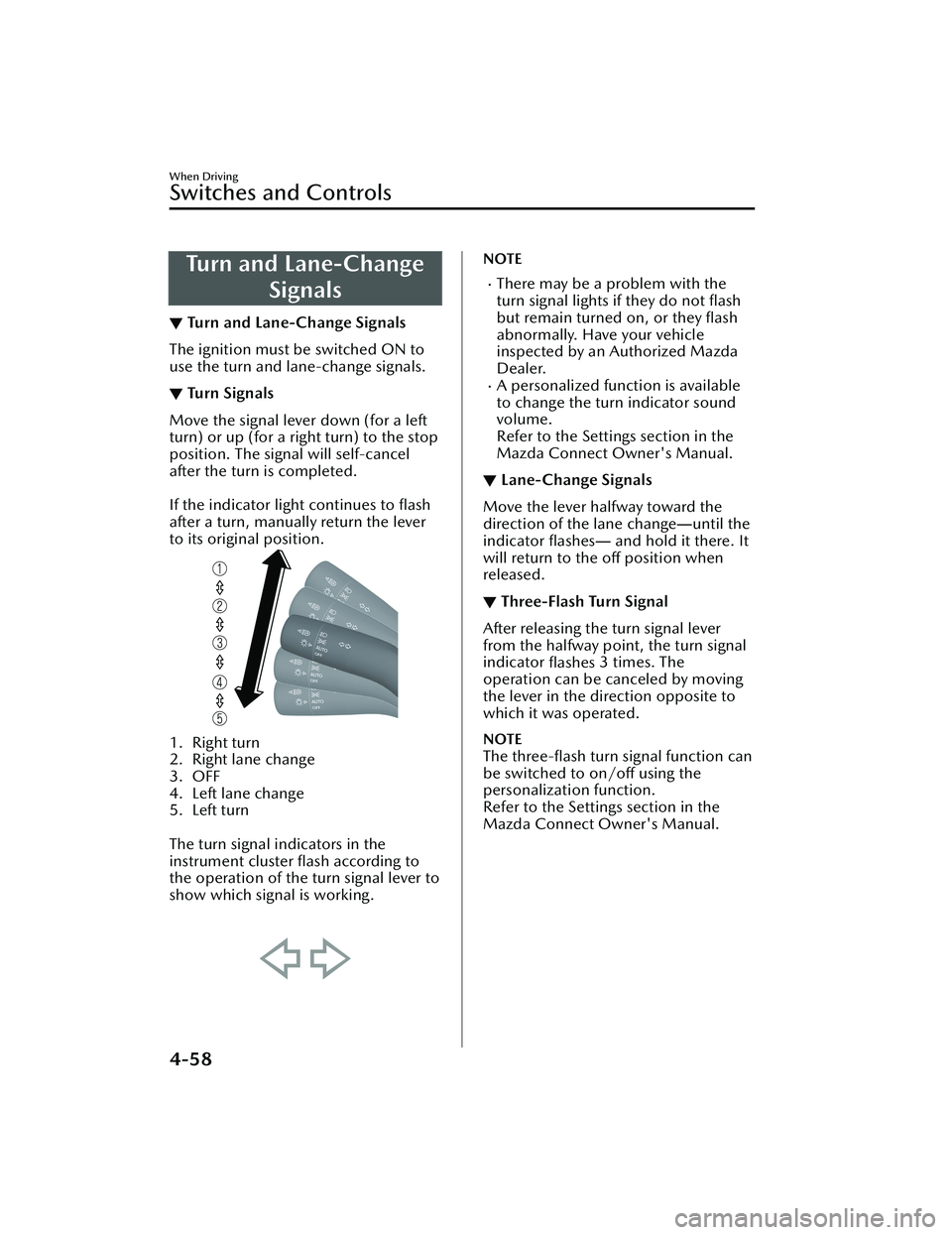
1. Right turn
2. Right lane change
3. OFF
4. Left lane change
5. Left turn
The turn signal indicators in the
instrument cluster flash according to
the operation of the turn signal lever to
show which signal is working.
NOTE
There may be a problem with the
turn signal lights if they do not flash
but remain turned on, or they flash
abnormally. Have your vehicle
inspected by an Authorized Mazda
Dealer.
A personalized function is available
to change the turn indicator sound
volume.
Refer to the Settings section in the
Mazda Connect Owner's Manual.
▼ Lane-Change Signals
Move the lever halfway toward the
direction of the lane change
―until the
indicator flashes― and hold it there. It
will return to the off position when
released.
▼ Three-Flash Turn Signal
After releasing the turn signal lever
from the halfway point, the turn signal
indicator
flashes 3 times. The
operation can be canceled by moving
the lever in the direction opposite to
which it was operated.
NOTE
The three-flash turn signal function can
be switched to on/off using the
personalization function.
Refer to the Settings section in the
Mazda Connect Owner's Manual.
When Driving
Switches and Controls
4-58
CX-30_8LD3-EA-22J_Edition1_new 2022-6-7 13:06:59
Page 209 of 595

If the headlight switch and the
windshield wiper switch are in
AUTO, and the wipers are operated
at low or high speed by the auto
wiper control for several seconds,
bad weather conditions are
determined and the headlights may
be turned on.
The auto-wiper control functions can
be turned off.
Refer to the Settings section in the
Mazda Connect Owner's Manual.
▼Windshield Washer
Pull the wiper lever toward you to
spray washer fluid and operate the
windshield wipers several times. The
washer fluid is sprayed only while the
windshield wipers move out of their
stowed positions to the point where
they start reversing back.
1. OFF
2. Washer
NOTE
If the windshield washer is turned on
when the windshield wipers are not
operating, the windshield wipers
operate a few times.
If you pull the wiper lever while the
windshield wipers are reversing back
to their stowed positions, the next
time the washer fluid is sprayed is
during the next cycle.
If the washer does not work, inspect
the fluid level (page 6-20). If the fluid
level is normal, consult an Authorized
Mazda Dealer.
Rear Window Wiper and Washer
▼Rear Window Wiper and Washer
The ignition must be switched ON to
use the wiper.
▼Rear Window Wiper
Turn the wiper on by turning the rear
wiper/washer switch.
Switch Posi-
tion Wiper operation
Spray washer fluid and operate
the rear wiper
ON Normal INT Intermittent
OFF Stop
Spray washer fluid and operate
the rear wiper
When Driving
Switches and Controls
4-62
CX-30_8LD3-EA-22J_Edition1_new 2022-6-7 13:06:59
Page 212 of 595

Horn
▼Horn
To sound the horn, press the
mark on the steering wheel.
Hazard Warning Flasher
▼Hazard Warning Flasher
The hazard warning lights should
always be used when you stop on or
near a roadway in an emergency.
The hazard warning lights warn other
drivers that your vehicle is a traffic
hazard and that they must take
extreme caution when near it.
Depress the hazard warning flasher
and all the turn sign
als will flash. The
hazard warning indicator lights in the
instrument cluster flash simultaneously.
NOTE
The turn signals do not work when
the hazard warning lights are on.
Check local regulations about the
use of hazard warning lights while
the vehicle is being towed to verify
that it is not in violation of the law.
When Driving
Switches and Controls
4-65
CX-30_8LD3-EA-22J_Edition1_new 2022-6-7 13:06:59