Speed alert MAZDA CX5 2023 User Guide
[x] Cancel search | Manufacturer: MAZDA, Model Year: 2023, Model line: CX5, Model: MAZDA CX5 2023Pages: 583, PDF Size: 32.58 MB
Page 307 of 583

360° View Monitor*
▼360° View Monitor
The 360°View Monitor consists of the
following functions
which assist the
driver in checking the area surrounding
the vehicle using various indications in
the center display and a warning sound
while the vehicle is being driven at low
speeds or while parking.
To p v i e w
The top view displays an image of
the vehicle from directly above on
the center display by combining the
images taken from the 4 cameras set
on all sides of the vehicle. The top
view displays on the right side of the
screen when the front view or rear
view screen is being displayed. The
top view assists the driver in
checking the area surrounding the
vehicle when the vehicle is moving
forward or in reverse.
Front view/front wide view
The image from the front of the
vehicle is displayed on the center
display.
The view from the front assists the
driver in checking the front of the
vehicle by displaying guide lines on
the displayed image taken from the
front of the vehicle.
Side view
The images taken from the front left
and right sides of the vehicle are
displayed on the center display.
The side view assists the driver in
checking the front sides of the
vehicle by displaying guide lines on
the displayed image taken from the
front left and right sides of the
vehicle.
Rear view/rear wide view
The image from the rear of the
vehicle is displayed on the center
display.
The image from the rear assists the
driver in checking the rear of the
vehicle by displaying guide lines on
the displayed image taken from the
rear of the vehicle.
Parking sensor
If there are any obstructions near the
vehicle while the top view/side view
is displayed, an obstruction
detection indication turns on around
the bumper in the center display.
The parking sensors use ultrasonic
sensors to detect obstructions
around the vehicle when the vehicle
is driven at low speeds, such as
during garage or parallel parking,
and notifies the driver of the
approximate distance from the
vehicle to the surrounding
obstruction using sound and an
obstruction detection indication.
Refer to Parking Sensor System on
page 4-215.
Rear Cross Traffic Alert (RCTA)
If there is the possibility of a collision
with an approaching vehicle while
the rear view/rear wide view is
displayed, a warning is displayed on
the center display.
The Rear Cross Traffic Alert (RCTA)
uses rear side radar sensor to detect
vehicles approaching from the rear
left and right sides of the vehicle,
and it assists the driver in checking
the rear of the vehicle while reversing
by flashing the Blind Spot Monitoring
(BSM) warning lights and activating
the warning sound.
Refer to Rear Cross Traffic Alert
(RCTA) on page 4-113.
When Driving
i-ACTIVSENSE
4-156*Some models.
CX-50_8KB8-EA-22A_Edition2_new 2022-1-6 14:55:18
Page 340 of 583

Forward Sensing Camera(FSC)
*
▼Forward Sensing Camera (FSC)
Your vehicle is equipped with a
Forward Sensing Camera (FSC). The
Forward Sensing Camera (FSC) is
positioned near the rearview mirror
and used by the following systems.
High Beam Control System (HBC)Lane Departure Warning System
(LDWS)
Tra ffi c
Sign Recognition System (TSR)Distance & Speed Alert (DSA)Driver Attention Alert (DAA)Mazda Radar Cruise Control with
Stop & Go function (MRCC with
Stop & Go function)
Lane-keep Assist System (LAS)Tra ffi c Jam Assist (TJA)Emergency Lane Keeping (ELK)Smart Brake Support (SBS) forward
drive detection
1. Forward Sensing Camera (FSC)
The Forward Sensing Camera (FSC)
determines the conditions ahead of
the vehicle while traveling at night and
detects traffic lanes. The distance in
which the Forward Sensing Camera
(FSC) can detect objects varies
depending on the surrounding
conditions.
WARNING
Do not modify the suspension:
If the vehicle height or inclination is
changed, the system will not be able to
correctly detect vehicles ahead. This
will result in the system not operating
normally or mistakenly operating,
which could cause a serious accident.
CAUTION
Do not apply accessories, stickers or
film to the windshield near the
Forward Sensing Camera (FSC).
If the area in front of the Forward
Sensing Camera (FSC) lens is
obstructed, it will cause the system
to not operate correctly.
Consequently, each system may not
operate normally which could lead
to an unexpected accident.
Do not disassemble or modify the
Forward Sensing Camera (FSC).
Disassembly or modification of the
Forward Sensing Camera (FSC) will
cause a malfunction or mistaken
operation. Consequently, each
system may not operate normally
which could lead to an unexpected
accident.
Heed the following cautions to
assure the correct operation of the
Forward Sensing Camera (FSC).
Be careful not to scratch the
Forward Sensing Camera (FSC)
lens or allow it to get dirty.
Do not remove the Forward
Sensing Camera (FSC) cover.
Do not place objects on the
dashboard which reflect light.
When Driving
i-ACTIVSENSE
*Some models.4-189
CX-50_8KB8-EA-22A_Edition2_new 2022-1-6 14:55:18
Page 341 of 583

Always keep the windshield glass
around the camera clean by
removing dirt or fogging. Use the
windshield defroster to remove
fogging on the windshield.
Consult an Authorized Mazda
Dealer regarding cleaning the
interior side of the windshield
around the Forward Sensing
Camera (FSC).
Consult an Authorized Mazda
Dealer before performing repairs
around the Forward Sensing
Camera (FSC).
The Forward Sensing Camera (FSC)
is installed to the windshield.
Consult an Authorized Mazda
Dealer for windshield repair and
replacement.
When cleaning the windshield, do
not allow glass cleaners or similar
cleaning fluids to get on the
Forward Sensing Camera (FSC)
lens. In addition, do not touch the
Forward Sensing Camera (FSC)
lens.
When performing repairs around
the rearview mirror, consult an
Authorized Mazda Dealer.
Consult an Authorized Mazda
Dealer regarding cleaning of the
camera lens.
Do not hit or apply strong force to
the Forward Sensing Camera (FSC)
or the area around it. If the
Forward Sensing Camera (FSC) is
severely hit or if there are cracks or
damage caused by flying gravel or
debris in the area around it, stop
using the following systems and
consult an Authorized Mazda
Dealer.
High Beam Control System
(HBC)
Lane Departure Warning System
(LDWS)Traffic Sign Recognition System
(TSR)
Distance & Speed Alert (DSA)
Driver Attention Alert (DAA)
Mazda Radar Cruise Control
with Stop & Go function (MRCC
with Stop & Go function)
Lane-keep Assist System (LAS)
Traffic Jam Assist (TJA)
Emergency Lane Keeping (ELK)
Smart Brake Support (SBS)
forward drive detection
The direction in which the Forward
Sensing Camera (FSC) is pointed
has been finely adjusted. Do not
change the installation position of
the Forward Sensing Camera (FSC)
or remove it. Otherwise, it could
result in damage or malfunction.
Always use tires for all wheels that
are of the specified size, and the
same manufacturer, brand, and tread
pattern. In addition, do not use tires
with
significantly
different wear
patterns on the same vehicle as the
system may not operate normally.
The Forward Sensing Camera (FSC)
includes a function for detecting a
soiled windshield and informing the
driver, however, depending on the
conditions, it may not detect plastic
shopping bags, ice or snow on the
windshield. In such cases, the system
cannot accurately determine a
vehicle ahead and may not be able
to operate normally. Always drive
carefully and pay attention to the
road ahead.
NOTE
In the following cases, the Forward
Sensing Camera (FSC) cannot detect
target objects correctly, and each
system may be unable to operate
normally.
When Driving
i-ACTIVSENSE
4-190
CX-50_8KB8-EA-22A_Edition2_new 2022-1-6 14:55:18
Page 344 of 583
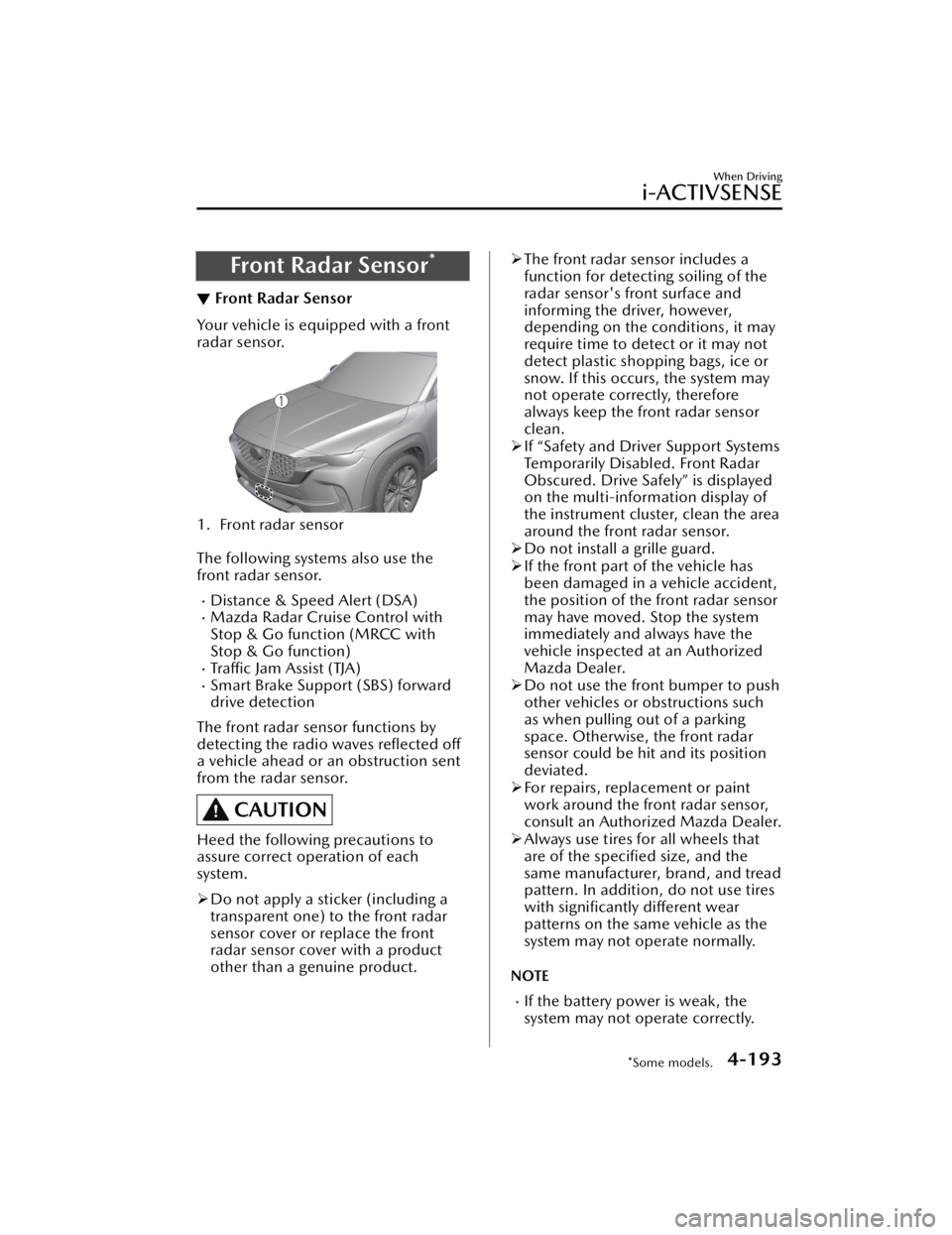
Front Radar Sensor*
▼Front Radar Sensor
Your vehicle is equipped with a front
radar sensor.
1. Front radar sensor
The following systems also use the
front radar sensor.
Distance & Speed Alert (DSA)Mazda Radar Cruise Control with
Stop & Go function (MRCC with
Stop & Go function)
Tra ffi c
Jam Assist (TJA)Smart Brake Support (SBS) forward
drive detection
The front radar sensor functions by
detecting the radio waves reflected off
a vehicle ahead or an obstruction sent
from the radar sensor.
CAUTION
Heed the following precautions to
assure correct operation of each
system.
Do not apply a sticker (including a
transparent one) to the front radar
sensor cover or replace the front
radar sensor cover with a product
other than a genuine product.
The front radar sensor includes a
function for detecting soiling of the
radar sensor's front surface and
informing the driver, however,
depending on the conditions, it may
require time to detect or it may not
detect plastic shopping bags, ice or
snow. If this occurs, the system may
not operate correctly, therefore
always keep the front radar sensor
clean.
If “Safety and Driver Support Systems
Temporarily Disabled. Front Radar
Obscured. Drive Safely” is displayed
on the multi-information display of
the instrument cluster, clean the area
around the front radar sensor.
Do not install a grille guard.
If the front part of the vehicle has
been damaged in a vehicle accident,
the position of the front radar sensor
may have moved. Stop the system
immediately and always have the
vehicle inspected at an Authorized
Mazda Dealer.
Do not use the front bumper to push
other vehicles or obstructions such
as when pulling out of a parking
space. Otherwise, the front radar
sensor could be hit and its position
deviated.
For repairs, replacement or paint
work around the front radar sensor,
consult an Authorized Mazda Dealer.
Always use tires for all wheels that
are of the specified size, and the
same manufacturer, brand, and tread
pattern. In addition, do not use tires
with significantly different wear
patterns on the same vehicle as the
system may not operate normally.
NOTE
If the battery power is weak, the
system may not operate correctly.
When Driving
i-ACTIVSENSE
*Some models.4-193
CX-50_8KB8-EA-22A_Edition2_new 2022-1-6 14:55:18
Page 429 of 583
Scheduled Maintenance
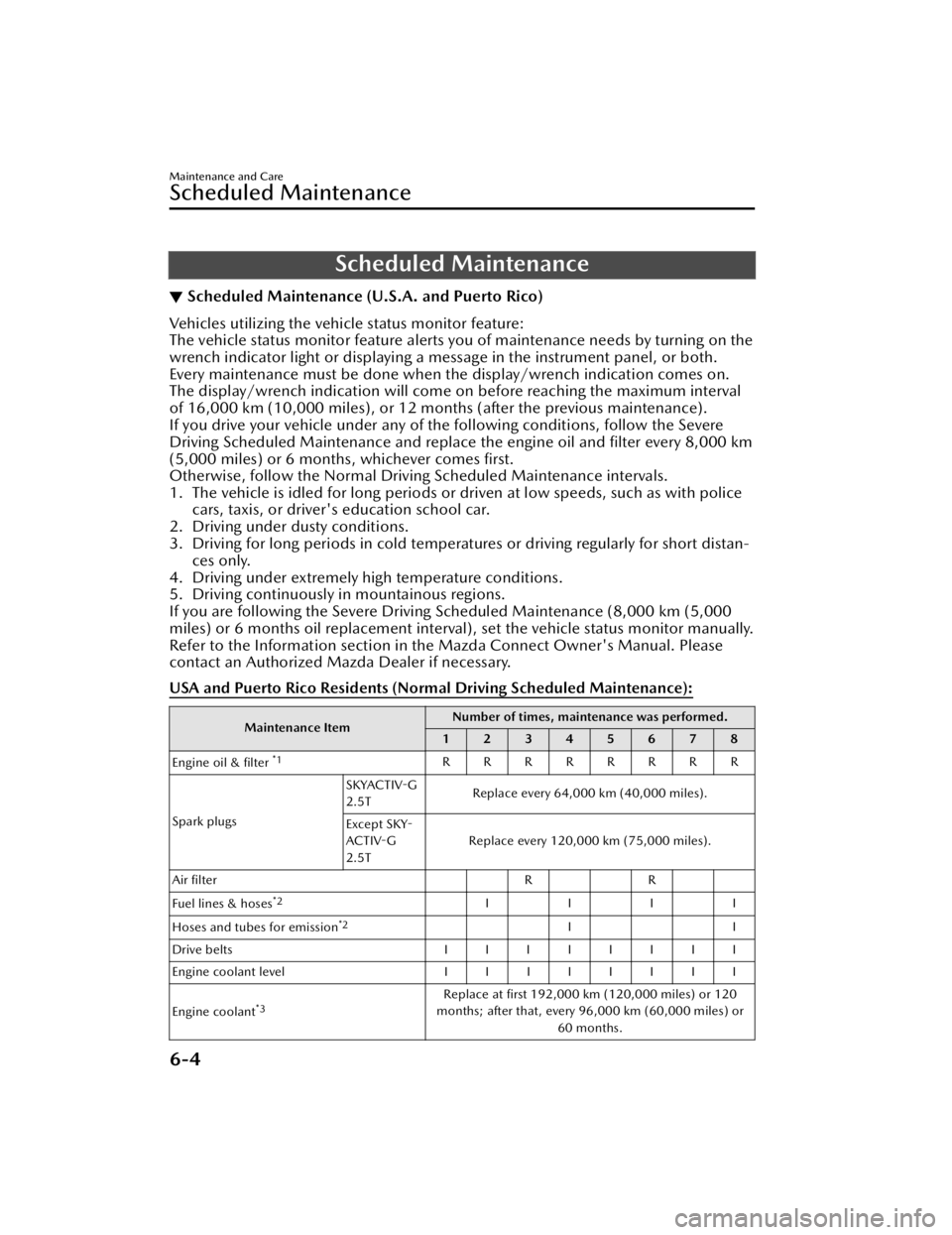
▼Scheduled Maintenance (U.S.A. and Puerto Rico)
Vehicles utilizing the vehicle status monitor feature:
The vehicle status monitor feature alerts you of maintenance needs by turning on the
wrench indicator light or displaying a message in the instrument panel, or both.
Every maintenance must be done when the display/wrench indication comes on.
The display/wrench indication will come
on before reaching the maximum interval
of 16,000 km (10,000 miles), or 12 mont hs (after the previous maintenance).
If you drive your vehicle under any of th e following conditions, follow the Severe
Driving Scheduled Maintenance and replace the engine oil and filter every 8,000 km
(5,000 miles) or 6 months, whichever comes first.
Otherwise, follow the Normal Driv ing Scheduled Maintenance intervals.
1. The vehicle is idled for long periods or driven at low speeds, such as with police cars, taxis, or driver's education school car.
2. Driving under dusty conditions.
3. Driving for long periods in cold temperatures or driving regularly for short distan- ces only.
4. Driving under extremely high temperature conditions.
5. Driving continuously in mountainous regions.
If you are following the Severe Driving Scheduled Maintenance (8,000 km (5,000
miles) or 6 months oil replacement interval), set the vehicle status monitor manually.
Refer to the Information section in the Mazda Connect Owner's Manual. Please
contact an Authorized Mazda Dealer if necessary.
USA and Puerto Rico Residents (Nor mal Driving Scheduled Maintenance):
Maintenance ItemNumber of times, maintenance was performed.
12345678
Engine oil & filter
*1RRRRRRRR
Spark plugs SKYACTIV-G
2.5T
Replace every 64,000 km (40,000 miles).
Except SKY-
ACTIV-G
2.5T Replace every 120,000 km (75,000 miles).
Air filter RR
Fuel lines & hoses
*2IIII
Hoses and tubes for emission
*2II
Drive belts IIIIIIII
Engine coolant level IIIIIIII
Engine coolant
*3Replace at first 192,000 km (120,000 miles) or 120
months; after that, every 96,000 km (60,000 miles) or 60 months.
Maintenance and Care
Scheduled Maintenance
6-4
CX-50_8KB8-EA-22A_Edition2_new 2022-1-6 14:55:18
Page 433 of 583

Remarks:
*1 Reset the engine oil data whenever replacing the engine oil regardless of the message/wrenchindicator light display.
*2 If you drive your vehicle under any of the following conditions, replace the engine oil & filter every8,000 km (5,000 miles) or 6 months, whichever comes first.
1. The vehicle is idled for long periods or driven at low speeds, such as with police cars, taxis, or driver's education school vehicles.
2. Driving under dusty conditions.
3. Driving for long periods in cold temperatures or driving regularly for short distances only.
4. Driving under extremely high temperature conditions.
5. Driving continuously in mountainous regions.
*3 Also inspect the air conditioner drive belts, if equipped. If the vehicle is operated primarily under any of the following conditions, inspect the drive belts more
often than the recommended intervals.
a) Driving under dusty conditions.
b) The vehicle is idled for long periods or driven at low speeds.
c) Driving for long periods in cold temperatures or driving regularly for short distances only.
d) Driving under extremely high temperature conditions.
e) Driving continuously in mountainous regions.
f) Driving for long period in extremely wet or heavy rain condition.
*4 Use of FL-22 is recommended when replacing engine coolant. Using engine coolant other than FL-22
may cause serious damage to the engine and cooling system.
*5 According to state/provincial and federal regulati ons, failure to perform maintenance on these items
will not void your emissions warranties. However, Mazda recommends that all maintenance services
be performed at the recommended time or mileage/kilometer period to ensure long-term reliability.
*6 Inspect a spare tire if equipped.
▼ Scheduled Maintenance (Mexico)
Vehicles utilizing the vehicle status monitor feature:
The vehicle status monitor feature alerts you of maintenance needs by turning on the
wrench indicator light or displaying a message in the instrument panel, or both.
Every maintenance must be done when the display/wrench indication comes on.
The display/wrench indication will come
on before reaching the maximum interval
of 10,000 km, or 6 months (after the previous maintenance).
If you drive your vehicle under any of th e following conditions, follow the Severe
Driving Scheduled Maintenance and replace the engine oil and filter every 5,000 km
or 3 months, whichever comes first.
Otherwise, follow the Normal Driv ing Scheduled Maintenance intervals.
1. The vehicle is idled for long periods or driven at low speeds, such as with police cars, taxis, or driver's education school car.
2. Driving under dusty conditions.
3. Driving for long periods in cold temperatures or driving regularly for short distan- ces only.
4. Driving under extremely high temperature conditions.
Maintenance and Care
Scheduled Maintenance
6-8
CX-50_8KB8-EA-22A_Edition2_new 2022-1-6 14:55:18
Page 510 of 583
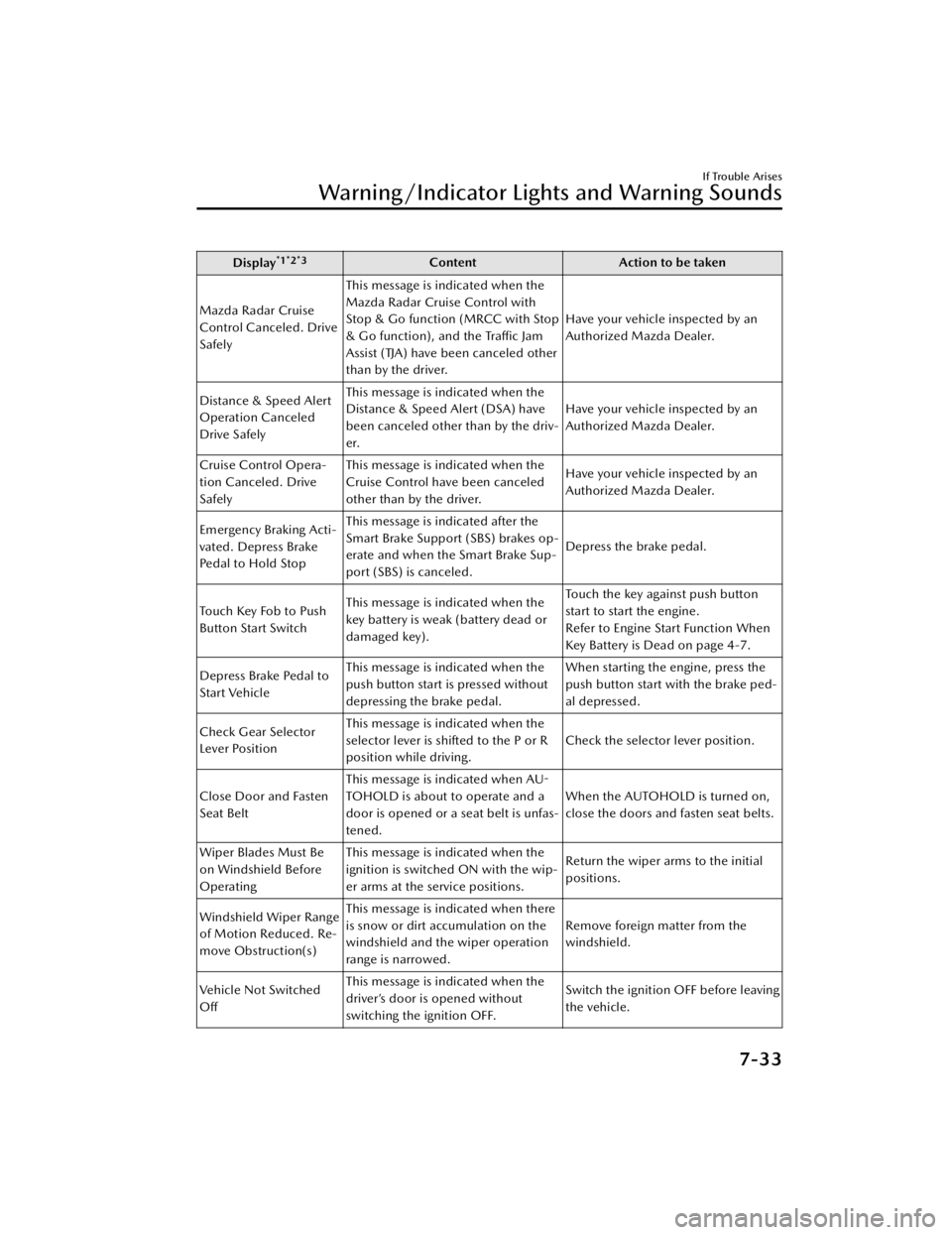
Display*1*2*3ContentAction to be taken
Mazda Radar Cruise
Control Canceled. Drive
Safely This message is indicated when the
Mazda Radar Cruise Control with
Stop & Go function (MRCC with Stop
& Go function), and the Traffic Jam
Assist (TJA) have been canceled other
than by the driver.
Have your vehicle inspected by an
Authorized Mazda Dealer.
Distance & Speed Alert
Operation Canceled
Drive Safely This message is indicated when the
Distance & Speed Alert (DSA) have
been canceled other than by the driv-
er.
Have your vehicle inspected by an
Authorized Mazda Dealer.
Cruise Control Opera-
tion Canceled. Drive
Safely This message is indicated when the
Cruise Control have been canceled
other than by the driver.
Have your vehicle inspected by an
Authorized Mazda Dealer.
Emergency Braking Acti-
vated. Depress Brake
Pedal to Hold Stop This message is indicated after the
Smart Brake Support (SBS) brakes op-
erate and when the Smart Brake Sup-
port (SBS) is canceled.
Depress the brake pedal.
Touch Key Fob to Push
Button Start Switch This message is indicated when the
key battery is weak (battery dead or
damaged key). Touch the key against push button
start to start the engine.
Refer to Engine Start Function When
Key Battery is Dead on page 4-7.
Depress Brake Pedal to
Start Vehicle This message is indicated when the
push button start is pressed without
depressing the brake pedal. When starting the engine, press the
push button start with the brake ped-
al depressed.
Check Gear Selector
Lever Position This message is indicated when the
selector lever is shifted to the P or R
position while driving.
Check the selector lever position.
Close Door and Fasten
Seat Belt This message is indicated when AU-
TOHOLD is about to operate and a
door is opened or a seat belt is unfas-
tened. When the AUTOHOLD is turned on,
close the doors and fasten seat belts.
Wiper Blades Must Be
on Windshield Before
Operating This message is indicated when the
ignition is switched ON with the wip-
er arms at the service positions.
Return the wiper arms to the initial
positions.
Windshield Wiper Range
of Motion Reduced. Re-
move Obstruction(s) This message is indicated when there
is snow or dirt accumulation on the
windshield and the wiper operation
range is narrowed.
Remove foreign matter from the
windshield.
Ve h i c l e N o t S w i t c h e d
Off This message is indicated when the
driver’s door is opened without
switching the ignition OFF.
Switch the ignition OFF before leaving
the vehicle.
If Trouble Arises
Warning/Indicator Lights and Warning Sounds
7-33
CX-50_8KB8-EA-22A_Edition2_new
2022-1-6 14:55:18
Page 576 of 583

Index
Cruise Control........................ 4-198Cruise control switch.......... 4-198
Cruise standby indication (white)/
cruise set indication (green) ..........
......................................... 4-198
Cup Holder.............................. 5-47
Customer Assistance (Canada)..... 8-6
Customer Assistance (Mexico)..... 8-9
Customer Assistance (Puerto
Rico).......................................... 8-8
Customer Assistance (U.S.A.)....... 8-2
Cylinder Deactivation................ 4-10
D
Daytime Running Lights............. 4-53
Defogger.................................. 4-59 Mirror.................................. 4-60
Rear window........................ 4-59
Dimensions.................................9-6
Display..................................... 4-18
Distance & Speed Alert (DSA).. 4-110 Indication on display...........4-111
Door Locks............................... 3-11
Door-ajar Warning Beep............ 7-40
Driver Attention Alert (DAA).... 4-111
Driving In Flooded Area............. 3-51
Driving on Uneven Road............ 3-52
Driving Position Memory........... 2-10
Driving Tips...............................3-46 Automatic transmission......... 4-48
Break-in period.................... 3-46
Driving in flooded area......... 3-51
Driving on uneven road.........3-52
Floor mat............................. 3-48
Hazardous driving.................3-47
Overloading......................... 3-51
Rocking the vehicle...............3-49
Saving fuel and protection of the
environment.........................3-46
Turbocharged vehicles (SKYACTIV-
G 2.5T)................................ 3-52
Winter driving...................... 3-49
Dynamic Stability Control
(DSC)....................................... 4-81 TCS/DSC indicator light........4-81
E
Electric Parking Brake (EPB)........ 4-68
Electric Parking Brake (EPB) Warning
Beep.........................................7-39
Emergency Lane Keeping (ELK) ..........
.............................................. 4-141Blind Spot Assist................. 4-141
Road Keep Assist................ 4-144
Emergency Starting Push-starting........................ 7-14
Starting a flooded engine...... 7-14
Emergency Towing Tiedown hooks..................... 7-18
Towing description............... 7-17
Emission Control System............ 3-28
Engine Coolant............................... 6-19
Engine compartment
overview.............................. 6-14
Exhaust gas.......................... 3-28
Hood release....................... 6-12
Oil....................................... 6-16
Starting.................................. 4-5
Essential Information................... 6-2
Event Data Recorder.................. 8-18
Excessive Speed Warning........... 7-40
Exterior Care............................. 6-43 Aluminum wheel
maintenance........................ 6-48
Bright-metal maintenance..... 6-47
Maintaining the finish........... 6-44
Plastic part maintenance....... 6-48
10-3
CX-50_8KB8-EA-22A_Edition2_new 2022-1-6 14:55:18
Page 578 of 583

Index
Message Display................... 4-28
Message indicated on multi-
information display............... 7-32
Multi-information display...... 4-20
Odometer............................ 4-22
Outside temperature
display................................. 4-25
Speedometer....................... 4-18
Tachometer.......................... 4-19
Trip meter............................ 4-22
Warning indication/warning
lights....................................4-29
Interior Care............................. 6-49 Active driving display
maintenance........................ 6-51
Cleaning the floor mats......... 6-52
Cleaning the window
interiors............................... 6-52
Instrument panel top (Soft pad)
maintenance........................ 6-51
Leather upholstery
maintenance........................ 6-50
Panel maintenance............... 6-51
Plastic part maintenance....... 6-50
Seat belt maintenance.......... 6-49
Upholstery maintenance....... 6-50
Vinyl upholstery
maintenance........................ 6-50
Interior Lights............................ 5-39 Luggage compartment light... 5-39
Map lights............................5-39
Overhead lights.................... 5-39
i-ACTIVSENSE........................... 4-89 Active safety technology........ 4-89
Adaptive Front Lighting System
(AFS)................................... 4-93
Blind Spot Monitoring
(BSM).................................. 4-99
Camera and sensors............. 4-89
Distance & Speed Alert
(DSA)................................ 4-110Driver Attention Alert
(DAA)................................ 4-111
Emergency Lane Keeping
(ELK).................................. 4-141
Forward Sensing Camera
(FSC)................................. 4-189
Front camera/side cameras/rear
camera...............................4-197
Front radar sensor...............4-193
High Beam Control System
(HBC).................................. 4-93
i-ACTIVSENSE OFF Switch..... 4-92
i-ACTIVSENSE status symbol
(warning/risk avoidance support
system)................................ 4-90
Lane Departure Warning System
(LDWS)................................ 4-95
Lane-keep Assist System
(LAS)..................................4-137
Mazda Radar Cruise Control with
Stop & Go function (MRCC with
Stop & Go function)........... 4-117
Pre-crash safety technology... 4-89
Rear Cross Traffic Alert
(RCTA)............................... 4-113
Rear side radar sensor......... 4-195
Smart Brake Support (SBS)...4-148
Tra ffi c Jam Assist (TJA)......... 4-124
Tra ffi c Sign Recognition
System (TSR)...................... 4-104
Ultrasonic sensor................ 4-196
360°view monitor...............4-156
i-ACTIV AWD Operation........... 4-86
i-stop....................................... 4-11 Indicator light (Green).......... 4-16
i-stop OFF switch................. 4-15
Vehicle roll prevention
function............................... 4-15
Warning light (Amber).......... 4-16
i-stop warning beep.................. 7-38
10-5
CX-50_8KB8-EA-22A_Edition2_new 2022-1-6 14:55:18
Page 583 of 583

Index
Key left-in-vehicle warning beep
(With the advanced keyless
function).............................. 7-38
Key removed from vehicle warning
beep.................................... 7-37
Lane/Road Departure Warning
Beep.................................... 7-39
Liftgate Door-lock Switch
Inoperable Warning Beep...... 7-37
Lights-on reminder............... 7-36
Mazda Radar Cruise Control with
Stop & Go function (MRCC with
Stop & Go function) system
warnings.............................. 7-40
Power Liftgate Warning
Beep.................................... 7-38
Rear Cross Tra ffi c Alert (RCTA)
Warning Beep...................... 7-39
Seat belt warning beep......... 7-36
Shift position warning beep... 7-38
Touch sensor inoperable warning
beep (With the advanced keyless
function).............................. 7-37
Vehicle problem warning
beep.................................... 7-39
Warranty................................... 8-14
Weights...................................... 9-6
WindowsPower windows.................... 3-36
Windshield Washer................... 4-58
Windshield Wipers.................... 4-55
Windshield Wipers Operate at High
Speed....................................... 7-43
Windshield Wiper De-icer..........4-60
Winter Driving...........................3-49
Wiper Replacing Rear Window Wiper
Blade................................... 6-25
Replacing windshield wiper
blades..................................6-23
Wireless Charger (Qi)................ 5-43
0-9
360°View Monitor.................. 4-156 How to use the system........ 4-165
Margin of error between road
surface on screen and actual road
surface............................... 4-182
Side view........................... 4-173
Top view/front view............4-168
Top view/front wide view.... 4-171
Top view/rear view............. 4-176
Top view/rear wide view..... 4-181
Types of images displayed on the
screen................................ 4-160
10-10
CX-50_8KB8-EA-22A_Edition2_new 2022-1-6 14:55:18