Speed alert MAZDA CX5 2023 Owners Manual
[x] Cancel search | Manufacturer: MAZDA, Model Year: 2023, Model line: CX5, Model: MAZDA CX5 2023Pages: 583, PDF Size: 32.58 MB
Page 153 of 583

High Beam Control System
(HBC)
*................................ 4-93
Lane Departure Warning System
(LDWS)
*.............................. 4-95
Blind Spot Monitoring (BSM)
*......
.......................................... 4-99 Traffic Sign Recognition System
(TSR)
*................................4-104
Distance & Speed Alert (DSA)
*.....
........................................ 4-110
Driver Attention Alert (DAA)
*.......
........................................ 4-111
Rear Cross Traffic Alert (RCTA)
*....
........................................ 4-113
Mazda Radar Cruise Control with
Stop & Go function (MRCC with
Stop & Go function)
*......... 4-117
Traffic Jam Assist (TJA)
*....... 4-124
Lane-keep Assist System (LAS)
*.....
........................................ 4-137
Emergency Lane Keeping
(ELK)
*................................ 4-141
Smart Brake Support (SBS)
*..........
........................................ 4-148
360° View Monitor*........... 4-156
Forward Sensing Camera
(FSC)
*............................... 4-189
Front Radar Sensor
*........... 4-193
Rear Side Radar Sensor
*..... 4-195
Rear/Rear Corner Ultrasonic
Sensor
*..............................4-196
Front Camera/Side Cameras/
Rear Camera
*.................... 4-197
Cruise Control......................4-198 Cruise Control
*.................. 4-198
Tire Pressure Monitoring System
(TPMS)................................ 4-202 Tire Pressure Monitoring System
(TPMS)..............................4-202
Rear View Monitor................4-206 Rear View Monitor
*........... 4-206
Parking Sensor System........... 4-215 Parking Sensor System
*....... 4-215
4-2*Some models.
CX-50_8KB8-EA-22A_Edition2_new 2022-1-6 14:55:18
Page 178 of 583

▼i-ACTIVSENSE Display*
Displays the system status.
Refer to Lane Departure Warning
System (LDWS) on page 4-98.
Refer to Blind Spot Monitoring
(BSM) on page 4-102.
Refer to Traffic Sign Recognition
System (TSR) on page 4-106.
Refer to Distance & Speed Alert
(DSA) on page 4-111.
Refer to Driver Attention Alert (DAA)
on page 4-113.
Refer to Mazda Rada
r Cruise Control
with Stop & Go function (MRCC
with Stop & Go function) on page
4-118.
Refer to Traffic Jam Assist (TJA) on
page 4-128.
Refer to Lane-keep Assist System
(LAS) on page 4-140.
Refer to Emergency Lane Keeping
(ELK) on page 4-141.
Refer to Smart Brake Support (SBS)
on page 4-148.
Refer to Cruise Control on page
4-199.
▼ Compass Display
The direction the vehicle is moving is
displayed in one of eight directions
while the vehicle is being driven.
Display
Direction
NN orth
SS outh
EE ast
WW est
NE Northeast
NW Northwest
SE Southeast
SW Southwest
When Driving
Instrument Cluster and Display
*Some models.4-27
CX-50_8KB8-EA-22A_Edition2_new 2022-1-6 14:55:18
Page 240 of 583

i-ACTIVSENSE*
▼i-ACTIVSENSE
i-ACTIVSENSE is a collective term
covering a series of advanced safety
and driver support systems which
make use of cameras and sensors. The
systems consist of active safety and
pre-crash safety systems.
These systems are designed to assist
the driver in safer driving by reducing
the load on the driver and helping to
avert collisions or reduce their severity.
However, because each system has its
limitations, always drive carefully and
do not rely solely on the systems.
▼Active Safety Technology
Active Safety Technology supports safer
driving by helping the driver to
recognize potential hazards and avert
accidents.
Driver awareness support systems
Nighttime visibility
Adaptive Front Lighting System
(AFS).................................. page 4-93
High Beam Control System
(HBC).................................page 4-93
Left/right side and rear side detection
Lane Departure Warning System
(LDWS).............................. page 4-95
Blind Spot Monitoring (BSM)...............
.......................................... page 4-99
Road sign recognition
Traffic Sign Recognition System
(TSR)................................ page 4-104
Inter-vehicle distance recognition
Distance & Speed Alert (DSA) .............
........................................ page 4-110
Rear obstruction detection when
leaving a parking space
Rear Cross Traffic Alert (RCTA) .............
........................................ page 4-113
Full-surround recognition
360°View Monitor............ page 4-156
Driver fatigue detection
Driver Attention Alert (DAA) ...............
........................................ page 4-111
Driver support systems
Inter-vehicle distance
Mazda Radar Cruise Control with Stop
& Go function (MRCC with Stop & Go
function).......................... page 4-117
Lane departure
Lane-keep Assist System (LAS) .............
........................................ page 4-137
Inter-vehicle distance and lane
keeping
Traffic Jam Assist (TJA)........ page 4-124
▼Pre-Crash Safety Technology
Pre-crash safety technology is designed
to assist the driver in averting collisions
or reducing their severity in situations
where they cannot be avoided.
Collision damage reduction
Smart Brake Support (SBS) ..................
........................................ page 4-148
▼Camera and Sensors
Forward Sensing Camera (FSC)
The Forward Sensing Camera (FSC)
detects lane indications and recognizes
headlights, tailligh
ts and city lights
during nighttime driving. In addition, it
also detects the vehicle ahead,
pedestrians, or obstructions. The
When Driving
i-ACTIVSENSE
*Some models.4-89
CX-50_8KB8-EA-22A_Edition2_new 2022-1-6 14:55:18
Page 241 of 583

following systems use the Forward
Sensing Camera (FSC).
High Beam Control system (HBC)Lane Departure Warning System
(LDWS)
Tra ffi c Sign Recognition System (TSR)Distance & Speed Alert (DSA)Driver Attention Alert (DAA)Mazda Radar Cruise Control with
Stop & Go function (MRCC with
Stop & Go function)
Lane-keep Assist System (LAS)Tra ffi c Jam Assist (TJA)Emergency Lane Keeping (ELK)Smart Brake Support (SBS) forward
drive detection
The Forward Sensing Camera (FSC) is
installed at the top of the windshield
near the rearview mirror.
Refer to Forward Sensing Camera
(FSC) on page 4-189.
Front radar sensor
The front radar sensor detects radio
waves reflected off a vehicle ahead
sent from the radar sensor. The
following systems use the front radar
sensor.
Distance & Speed Alert (DSA)Mazda Radar Cruise Control with
Stop & Go function (MRCC with
Stop & Go function)
Tra ffi c Ja m A s s i s t ( TJ A )Smart Brake Support (SBS) forward
drive detection
The front radar sensor is mounted
behind the radiator grille.
Refer to Front Radar Sensor on page
4-193.
Rear side radar sensor
The rear side radar sensors emit radio
waves and detect the radio waves
reflected off a vehicle approaching
from the rear or an obstruction. The
following systems use the rear side
radar sensor.
Blind Spot Monitoring (BSM)Rear Cross Traffic Alert (RCTA)Emergency Lane Keeping (ELK)Smart Brake Support (SBS) reverse
drive detection
The rear side radar sensors are installed
inside the rear bumper, one on the left
side and one on the right side.
Refer to Rear Side Radar Sensor on
page 4-195.
Rear/rear corner ultrasonic sensor
The ultrasonic sensor detects ultrasonic
waves reflected off obstructions at the
rear sent from the ultrasonic sensors.
The following systems use the
ultrasonic sensor.
Smart Brake Support (SBS) reverse
drive detection
The ultrasonic sensors are mounted in
the rear bumper.
Refer to Rear/Rear corner Ultrasonic
Sensor on page 4-196.
Front camera/side cameras/rear
camera
The front camera, side cameras, and
rear camera shoot images of the area
surrounding the vehicle. The 360°View
Monitor uses each camera.
Cameras are installed to the front
bumper, door mirrors, and liftgate.
Refer to Front Camera/Side Cameras/
Rear Camera on page 4-197.
▼ i-ACTIVSENSE Status Symbol
(Warning/Risk Avoidance Support
System)
*
The system notifies the driver of any of
the following system status using the
color or OFF indication of the
When Driving
i-ACTIVSENSE
4-90*Some models.
CX-50_8KB8-EA-22A_Edition2_new
2022-1-6 14:55:18
Page 242 of 583

i-ACTIVSENSE status symbol
(Warning/risk avoidance support
system).
Lane Departure Warning System
(LDWS)
Blind Spot Monitoring (BSM)Distance & Speed Alert (DSA)Rear Cross Traffic Alert (RCTA)Lane-keep Assist System (LAS)
NOTE
The status of the system turned on
using the personalization feature is
displayed.
i-ACTIVSENSE status symbol
(warning/risk avoidance support
system) (white)
System stand-by status
If none of the systems are activated or
if there is a problem with the system,
the i-ACTIVSENSE status symbol
(warning/risk avoidance support
system) (white) is displayed.
NOTE
For example, even when the Blind Spot
Monitoring (BSM) is operating
normally, if the Lane Departure
Warning System (LDWS) has a
problem, the i-ACTIVSENSE status
symbol (warning/risk avoidance
support system) (white) is displayed.
i-ACTIVSENSE status symbol
(warning/risk avoidance support
system) (green)
System activated status
If any one of the systems is activated,
the i-ACTIVSENSE status symbol
(warning/risk avoidance support
system) (green) is displayed.
NOTE
Even if the i-ACTIVSENSE status symbol
(warning/risk avoidance support
system) (green) is displayed, systems
which do not meet the operation
conditions will not operate.
i-ACTIVSENSE status symbol
(warning/risk avoidance support
system) (amber)
System warning status
If any system warning is activated, the
i-ACTIVSENSE status symbol (warning/
risk avoidance support system)
(amber) is displayed.
i-ACTIVSENSE OFF symbol (warning/
risk avoidance support system)
When Driving
i-ACTIVSENSE
4-91
CX-50_8KB8-EA-22A_Edition2_new2022-1-6 14:55:18
Page 243 of 583

System OFF status
If all the systems are canceled using the
personalization features or the
i-ACTIVSENSE OFF switch, the
i-ACTIVSENSE OFF symbol (Warning/
risk avoidance support system) is
displayed.
▼i-ACTIVSENSE OFF Switch*
When the i-ACTIVSENSE OFF switch is
pressed, the following systems are
canceled and the i-ACTIVSENSE OFF
symbol (Warning/risk avoidance
support system) in the instrument
cluster is displayed.
Lane Departure Warning System
(LDWS)
Blind Spot Monitoring (BSM)Distance & Speed Alert (DSA)Rear Cross Traffic Alert (RCTA)Lane-keep Assist System (LAS)
i-ACTIVSENSE OFF switch
i-ACTIVSENSE OFF symbol (Warning/
risk avoidance support system)
If the i-ACTIVSENSE OFF switch is
pressed again, the systems return to
their original operation status and the
i-ACTIVSENSE OFF symbol (Warning/
risk avoidance support system) turns
off.
If the ignition is switched OFF while
you have canceled the systems using
the i-ACTIVSENSE OFF switch, the
systems are automatically enabled the
next time the ignition is switched ON.
However, if the systems are canceled
using the personalization features, the
systems are not automatically enabled.
NOTE
You can select systems you want to
cancel using the personalization
features.
Refer to the Settings section in the
Mazda Connect Owner's Manual.
When Driving
i-ACTIVSENSE
4-92*Some models.
CX-50_8KB8-EA-22A_Edition2_new 2022-1-6 14:55:18
Page 259 of 583

▼Excessive Speed Warning
If the vehicle speed exceeds the speed limi
t sign displayed in the active driving
display/instrument cluster, the area around the speed limit sign flashes in amber and
the warning sound is activated at the same time. If the vehicle speed continues to
exceed the displayed speed limit sign, the indication stops flashing and remains on.
Check the surrounding conditions and adju st the vehicle speed to the legal speed
using the appropriate operation such as depressing the brake pedal.
1. Vehicle is doing 55 mph when 50 mph speed limit sign is recognized.
2. Vehicle continues to do 55 mph after 50 mph speed limit sign is recognized.
3. Active driving display indication
4. Instrument cluster
The excessive speed warning is initially set to inoperable. If you want to activate the
excessive speed warning, change the setting in the personalization features. In
addition, the warning pattern and the warning activation timing differ depending on
the setting contents.
Refer to the Settings section in the Mazda Connect Owner's Manual.
Speed Limit Sign Alert setting
Off: The excessive speed warning is not activated.Visual: The area around the speed limit sign displayed in the display flashes in
amber, and if the vehicle speed continues to exceed the displayed speed limit
sign, the indication stops flashing and remains on.
Visual + Audible: The area around the speed limit sign displayed in the display
flashes in amber and the warning sound is activated at the same time. If the
vehicle speed continues to exceed the di splayed speed limit sign, the indication
When Driving
i-ACTIVSENSE
4-108
CX-50_8KB8-EA-22A_Edition2_new 2022-1-6 14:55:18
Page 261 of 583

Distance & Speed Alert(DSA)
*
▼Distance & Speed Alert (DSA)
The DSA is designed to assist your
driving using the display indications so
that the distance between your vehicle
and a vehicle ahead can be maintained
appropriately.
WARNING
Do not rely completely on the DSA
and always drive carefully:
The DSA may not be able to detect a
vehicle ahead depending on the type
of vehicle ahead and its conditions, the
weather conditions, and the road
conditions. In addition, the system is
not for maintaining the distance
between your vehicle and a vehicle
ahead. If you neglect to operate the
accelerator and brake pedals correctly,
it could lead to an accident.
Always check the surrounding
conditions and depress the brake
pedal or accelerator pedal while
keeping a safe distance from a vehicle
ahead or a vehicle following behind
you.
Operation conditions
The DSA operates when all of the
following conditions are met.
The ignition is switched ON.The DSA is on.The selector lever is in a position
other than R.
The vehicle speed is about 30 km/h
(19 mph) or faster.
i-ACTIVSENSE status symbol
(warning/risk av
oidance support
system) (green) is displayed.
The vehicle ahead is a vehicle with
four wheels.
NOTE
The DSA may also operate in the
presence of motorcycles and
bicycles.
The DSA does not operate with the
following objects.
On-coming vehiclesPed e st r i an sStationary objects (such as
stopped vehicles, obstructions)
If a vehicle ahead is traveling at an
extremely low speed, the system may
not detect it correctly.
The DSA can be set to inoperable.
However, when the ignition is
switched OFF while the DSA is
canceled, the DSA is automatically
enabled the next time the ignition is
switched ON.
Refer to the Settings section in the
Mazda Connect Owner's Manual.
Refer to i-ACTIVSENSE OFF Switch
on page 4-92.
When Driving
i-ACTIVSENSE
4-110*Some models.
CX-50_8KB8-EA-22A_Edition2_new 2022-1-6 14:55:18
Page 287 of 583

If the steering wheel is held lightly, or depending on the road conditions, the
system determines that you have released the steering wheel even if you are
holding it, and an alert is indicated on the multi-information display and the active
driving display.
To resume operation
If the TJA is temporarily canceled, it will resume operation at the previously set speed
by pressing the RES switch after all of the operation conditions have been met.
NOTE
If the set speed is not indicated on the di splay, the system does not operate even if
the RES switch is pressed.
After the operation, the steering assist operation may not operate for a period of 5
seconds at the most until the lane lines are detected or a vehicle ahead is
recognized.
Tu r n i n g off
When the TJA switch is pressed while the TJA is operating, the TJA turns off.
▼Stop Hold Control
While in headway control using the
TJA, your vehicle will stop when a
vehicle ahead stops. When the vehicle
is stopped and the stop hold control
operates, the TJA indicator light turns
on.
NOTE
Even if the TJA is temporarily
canceled during stop hold control,
the vehicle is held in its stopped
position.
The parking brake is automatically
applied and the vehicle is held in its
stopped position when 10 minutes
or longer have passed since the stop
hold control operated. When this
occurs, the TJA is temporarily
canceled.
The brake lights turn on during stop
hold control.
To resume driving
After the vehicle ahead starts moving
while your vehicle is stopped under
stop hold control, press the RES switch
or depress the accelerator pedal to
cancel the stop hold control and start
driving.
When Driving
i-ACTIVSENSE
4-136
CX-50_8KB8-EA-22A_Edition2_new 2022-1-6 14:55:18
Page 296 of 583
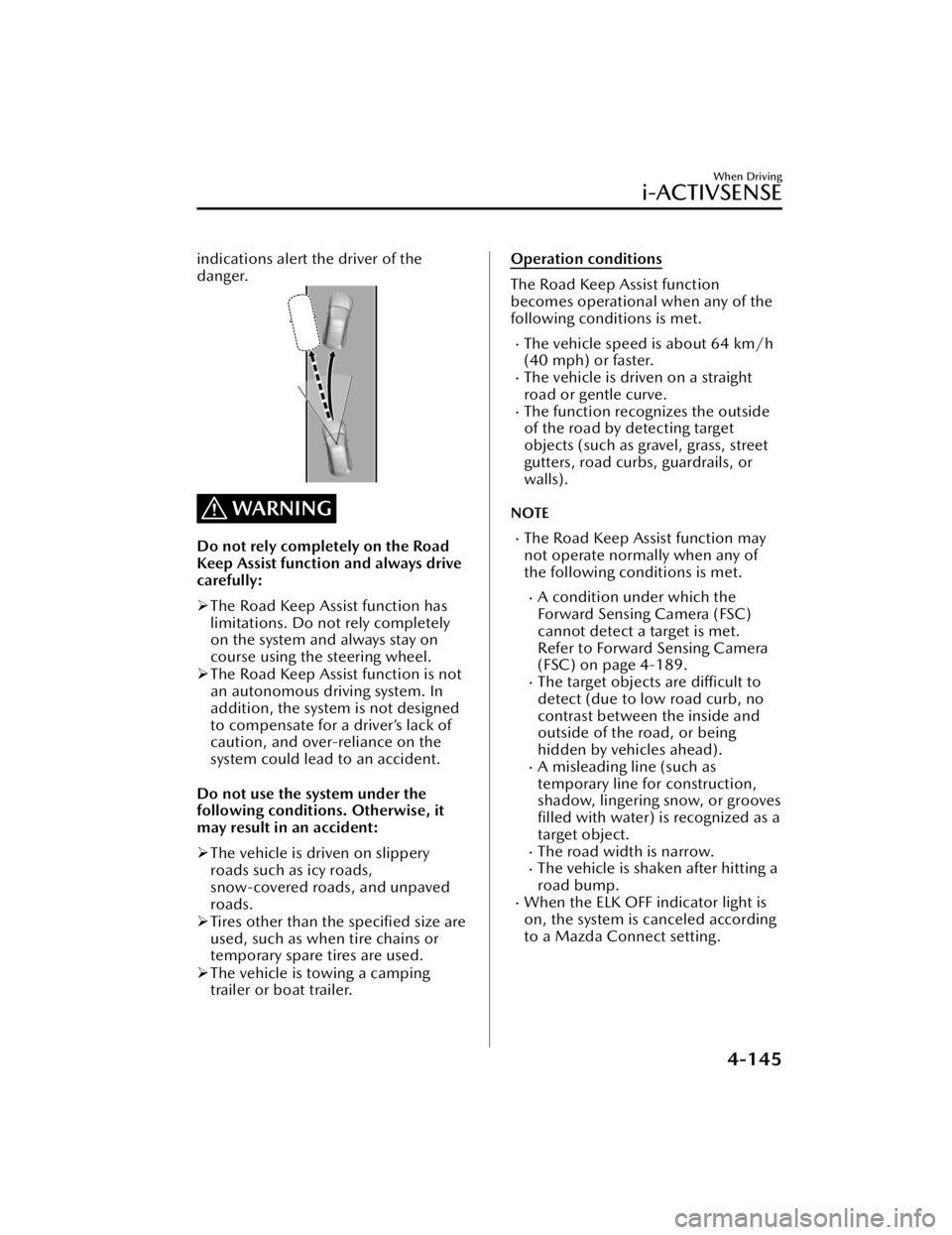
indications alert the driver of the
danger.
WARNING
Do not rely completely on the Road
Keep Assist function and always drive
carefully:
The Road Keep Assist function has
limitations. Do not rely completely
on the system and always stay on
course using the steering wheel.
The Road Keep Assist function is not
an autonomous driving system. In
addition, the system is not designed
to compensate for a driver’s lack of
caution, and over-reliance on the
system could lead to an accident.
Do not use the system under the
following conditions. Otherwise, it
may result in an accident:
The vehicle is driven on slippery
roads such as icy roads,
snow-covered roads, and unpaved
roads.
Tires other than the specified size are
used, such as when tire chains or
temporary spare tires are used.
The vehicle is towing a camping
trailer or boat trailer.
Operation conditions
The Road Keep Assist function
becomes operational when any of the
following conditions is met.
The vehicle speed is about 64 km/h
(40 mph) or faster.
The vehicle is driven on a straight
road or gentle curve.
The function recognizes the outside
of the road by detecting target
objects (such as gravel, grass, street
gutters, road curbs, guardrails, or
walls).
NOTE
The Road Keep Assist function may
not operate normally when any of
the following conditions is met.
A condition under which the
Forward Sensing Camera (FSC)
cannot detect a target is met.
Refer to Forward Sensing Camera
(FSC) on page 4-189.
The target objects are
difficult to
detect (due to low road curb, no
contrast between the inside and
outside of the road, or being
hidden by vehicles ahead).
A misleading line (such as
temporary line for construction,
shadow, lingering snow, or grooves filled with water) is recognized as a
target object.
The road width is narrow.The vehicle is shaken after hitting a
road bump.
When the ELK OFF indicator light is
on, the system is canceled according
to a Mazda Connect setting.
When Driving
i-ACTIVSENSE
4-145
CX-50_8KB8-EA-22A_Edition2_new 2022-1-6 14:55:18