trailer MAZDA CX5 2023 User Guide
[x] Cancel search | Manufacturer: MAZDA, Model Year: 2023, Model line: CX5, Model: MAZDA CX5 2023Pages: 583, PDF Size: 32.58 MB
Page 149 of 583

4. Firmly apply the parking brake.
5. Shift the transmission into P, and stop the engine.
To restart after parking on an incline:
1. With the transmission in P, start the engine. (Be sure to depress and hold thebrake pedal.)
2. Shift into gear.
3. Release the parking brake (also the foot brake) and pull away from the wheel blocks. Stop; apply the parking brake and shift into P.
4. Have a helper retrieve the wheel blocks.
Fuel consumption
Trailer towing causes higher fuel consumption.
Maintenance
If you tow a trailer frequently, have your vehicle serviced as shown in Scheduled
Maintenance (page 6-4).
Before Driving
To w i n g
3-60
CX-50_8KB8-EA-22A_Edition2_new 2022-1-6 14:55:18
Page 234 of 583
NOTE
If the Mi-Drive cannot be switched to
sport mode, the select mode indicator
light flashes to notify the driver.Mazda intelligent Drive
Select (Mi-Drive) (AWD)
*
▼ Mazda intelligent Drive Select
(Mi-Drive)
Mi-drive is a system that switches the
drive modes depending on the driving
conditions, road conditions and
vehicle conditions.
The mode can be switched from
normal to sport, off-road or towing.
Sport mode
This mode enhances vehicle
responsiveness when the accelerator
pedal is depressed.
This provides additional quick
acceleration which may be needed to
safely make maneuvers such as lane
changes, merging onto freeways, or
passing other vehicles.
Off-road mode
This mode helps prevent drive-wheel
spinning during off-road driving and
improves driving performance.
Use this mode to drive the vehicle on
slippery roads such as muddy, sandy,
or deep-snowy roads.
Towing mode (SKYACTIV-G 2.5T)
This mode suppresses the reduction of
driving performance due to increased
weight during trailer towing and
promotes vehicle stability.
Use this mode when towing a trailer.
Warnings and cautions when using
Mi-Drive
WARNING
Do not rely completely on the
Mi-Drive system.
When Driving
Mazda intelligent Drive Select (Mi-Drive)
*Some models.4-83
CX-50_8KB8-EA-22A_Edition2_new 2022-1-6 14:55:18
Page 235 of 583
Vehicle stability is limited even when
Mi-drive is activated.
Always drive the vehicle safely. Do
not drive the vehicle recklessly,
otherwise it may result in an
accident.
CAUTION
Do not use the sport mode when
driving on slippery roads such as wet
or snow-covered roads. It may cause
tire slipping.
Heed the following cautions so that
the system can operate normally.
Always use tires of the specified
size, same manufacturer, brand,
and pattern (tread pattern) for the
front and rear wheels.
Do not use tires with significantly
different wear patterns on the
same vehicle.
Do not use the sport mode when
driving on slippery roads such as wet
or snow-covered roads. It may cause
tire slipping.
Drive carefully when using tire
chains.
Because the diameter of the tires
differs, the system may not operate
normally.
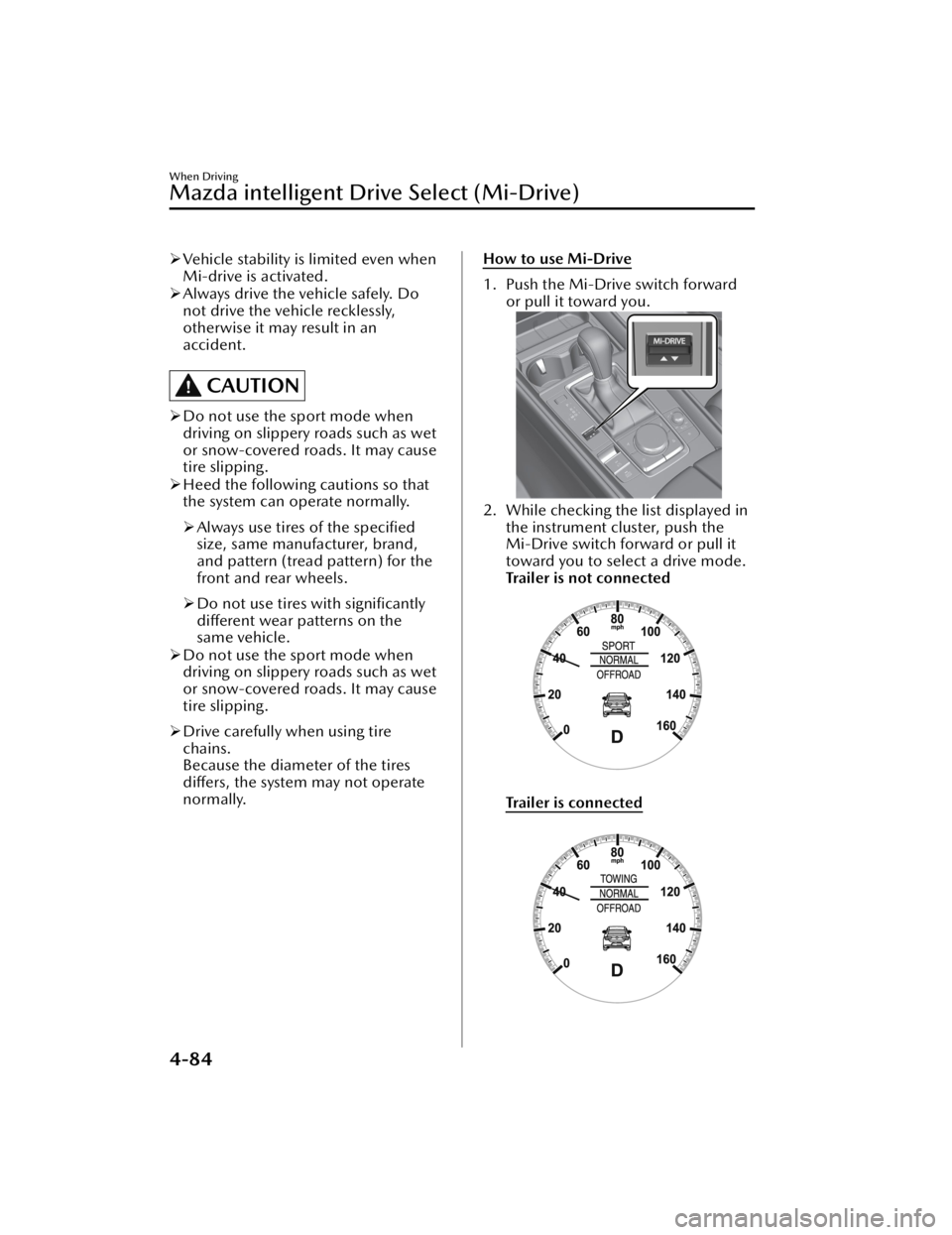
How to use Mi-Drive
1. Push the Mi-Drive switch forward
or pull it toward you.
2. While checking the list displayed inthe instrument cluster, push the
Mi-Drive switch forward or pull it
toward you to select a drive mode.
Trailer is not connected
Tra i l e r i s co n n e c te d
When Driving
Mazda intelligent Drive Select (Mi-Drive)
4-84
CX-50_8KB8-EA-22A_Edition2_new 2022-1-6 14:55:18
Page 236 of 583

When the drive mode is set, the
display in the instrument cluster
changes.
Refer to Mazda intelligent Drive
Select (Mi-Drive) Display on page
4-20.
NOTE
Depending on the driving conditions
when sport mode is selected, the
vehicle may perform shift-down or
slightly accelerate.
When the sport mode is selected,
driving at higher engine speeds
increases and it may increase fuel
consumption. Mazda recommends
that you cancel the sport mode on
normal driving.
Towing mode can be selected only
when a trailer is connected.
The driving mode in which the
display in the instrument cluster is
grayed out cannot be selected.
Towing mode can be selected only
when electrically connected to the
trailer using a Mazda genuine trailer
hitch. In addition, it may take some
time until the connection is detected
and towing mode is displayed.
When towing mode is selectable,
sport mode cannot be selected.
When the ignition is switched OFF,
the mode returns to normal mode.
However, towing mode before
switching the ignition OFF is
maintained only when the trailer is
connected in towing mode.
When Driving
Mazda intelligent Drive Select (Mi-Drive)
4-85
CX-50_8KB8-EA-22A_Edition2_new2022-1-6 14:55:18
Page 252 of 583

The BSM warning indicator light may
turn on and the vehicle detection
screen may be displayed in the
display in reaction to stationary
objects (guardrails, tunnels,
sidewalls, and parked vehicles) on
the road or the roadside.
1. Objects such as guardrails andconcrete walls running alongside
the vehicle.
1. Places where the width between
guardrails or walls on each side of
the vehicle narrows.
1. The walls at the entrance and exits of tunnels, turnouts.
A BSM warning indicator light mayflash or the warning beep may be
activated several times when making
a turn at a city intersection.
Turn off the BSM while pulling a
trailer or while an accessory such as a
bicycle carrier is installed to the rear
of the vehicle. Otherwise, the radar’s
radio waves will be blocked causing
the system to not operate normally.
If a Mazda genuine trailer hitch is
used, the BSM is automatically
turned off.
In the following cases, it may be difficult to view the illumination/
flashing of the BSM warning
indicator lights equipped on the
door mirrors.
Snow or ice is adhering to the door
mirrors.
The front door glass is fogged or
covered in snow, frost or dirt.
The rear side radar sensor of the BSM
may be regulated under the radio
wave related laws of the country
where the vehicle is driven. If this
system is used abroad, it may be
necessary to turn off the system.
Refer to Rear Side Radar Sensor on
page 4-195.
The system switches to the Rear
Cross Tra ffi c Alert (RCTA) function
when the selector lever is shifted to
the reverse (R) position.
Refer to Rear Cross Traffic Alert
(RCTA) on page 4-113.
When Driving
i-ACTIVSENSE
4-101
CX-50_8KB8-EA-22A_Edition2_new 2022-1-6 14:55:18
Page 267 of 583

In the following cases, it may bedifficult to view the illumination/
flashing of the Blind Spot Monitoring
(BSM) warning indicator lights
equipped on the door mirrors.
Snow or ice adheres to the door
mirrors.
The front door glass is fogged or
covered in snow, frost or dirt.
Turn off the RCTA system while
pulling a trailer or while an accessory
such as a bicycle carrier is installed to
the rear of the vehicle. Otherwise,
the radio waves emitted by the radar
will be blocked causing the system to
not operate normally.
The rear side radar sensor of the
RCTA may be regulated under the
radio wave related laws of the
country where the vehicle is driven. If
this system is used abroad, it may be
necessary to turn off the system.
Refer to Rear Side Radar Sensor on
page 4-195.
If a Mazda genuine trailer hitch is
used, the RCTA is automatically
turned off.
▼ Canceling Operation of Rear Cross
Traffic Alert (RCTA)
The RCTA can be set to inoperable.
(If only the RCTA is turned
off)
Refer to the Settings section in the
Mazda Connect Owner's Manual.
(If the RCTA is turned off by
operating the i-ACTIVSENSE OFF
switch)
Refer to i-ACTIVSENSE OFF Switch
on page 4-92.
NOTE
If the ignition is switched OFF while
you have canceled the system using the
i-ACTIVSENSE OFF switch, the system
is automatically enabled the next time
the ignition is switched ON. However,
if the system is canceled using the
personalization features, the system is
not automatically enabled.
When Driving
i-ACTIVSENSE
4-116
CX-50_8KB8-EA-22A_Edition2_new 2022-1-6 14:55:18
Page 276 of 583

When entering and exiting
interchanges, service areas, and
parking areas of expressways (If you
exit an expressway while headway
control is in use, the vehicle ahead
will no longer be tracked and your
vehicle may accelerate to the set
speed).
Slippery roads such as icy or
snow-covered roads (Tires could spin
causing you to lose vehicle control,
or the stop hold control may not
operate.)
Long, descending slopes (to
maintain distance between vehicles,
the system automatically and
continuously applies the brakes
which could result in the loss of
brake power.)
Two-wheeled vehicles such as
motorcycles or bicycles are ahead.
Slopes with a steep gradient (The
vehicle ahead may not be detected
correctly, your vehicle may slip while
stopped by the stop hold control, or
it may accelerate suddenly after it
starts moving.)
Driving under bad weather
conditions (rain, fog, and snow).
The vehicle is driven on slippery
roads such as icy or snow-covered
roads and unpaved roads (Tires
could spin causing you to lose
vehicle control, or the stop hold
control may not operate.)
Tires of a different specified size are
used, such as a temporary spare tire.
Tires with
insufficient tread are used.
The tire pressures are not adjusted to
the specified pressure.
The vehicle is being used to tow a
camper or boat trailer.
Tire chains are used.The vehicle is driven on roads with
lane lines other than white (yellow)
lines, such as an expressway.
Do not get out of the vehicle while
the stop hold control is operating.
Getting out of the vehicle while the
stop hold control is operating is
dangerous as the vehicle may move
unexpectedly and result in an accident.
Before getting out of the vehicle,
switch the TJA off, apply the parking
brake, and then shift the selector lever
to the P position.
CAUTION
Turn the system off when the vehicle is
running on a chassis roller.
Heed the following cautions so that
the TJA can operate normally.
Turn the system off when the vehicle
is running on a chassis roller.
Do not modify the vehicle's
suspensions.
Always use wheels of the specified
size for the front and rear wheels.
Consult an Authorized Mazda Dealer
for tire replacement.
NOTE
The headway control does not detect
the following as physical objects.
Vehicles approaching in the
opposite direction
Pe de st r ia nsStationary objects (stopped
vehicles, obstructions)
If a vehicle ahead is traveling at an
extremely low speed, the system may
not detect it correctly.
When Driving
i-ACTIVSENSE
4-125
CX-50_8KB8-EA-22A_Edition2_new 2022-1-6 14:55:18
Page 289 of 583

The functions of the LAS have
limitations. Always stay on course
using the steering wheel and drive
with care.
Do not use the LAS under the
following circumstances, otherwise it
may result in an accident.
The vehicle is driven on slippery
roads such as icy or snow-covered
roads, and unpaved roads.
Tires of a
different
specified size
are used, such as a temporary
spare tire.
Tires with
insufficient tread are
used.
The tire pressures are not adjusted
to the
specified pressure.
The vehicle is being used to tow a
camper or boat trailer.
Tire chains are used.
The vehicle is driven on roads with
lane lines other than white (yellow)
lines, such as an expressway.
CAUTION
Heed the following cautions so that
the LAS can operate normally.
Do not modify the vehicle's
suspensions.
Always use tires of the specified type
and size for the front and rear
wheels. Consult an Authorized
Mazda Dealer for tire replacement.
NOTE
The system may not operate normally
under the following conditions.
The white (yellow) lane lines are less
visible because of dirt or paint
flaking.
White (yellow) lane lines are less
visible because of bad weather (rain,
fog, or snow).
The vehicle is driven on a temporary
lane or section with a closed lane
resulting from construction where
there might be multiple white
(yellow) lane lines, or they are
interrupted.
The camera picks up an obscure line,
such as a temporary line being used
for construction, or because of
shade, unmelted snow, or groovesfilled with water.
The surrounding brightness suddenly
changes such as when entering or
exiting a tunnel.
Back-light is reflected off the road
surface.
The road surface is wet and shiny
after rain, or there are puddles on
the road.
The width of a lane is excessively
narrow.
The vehicle is driven on roads with
tight curves.
Heavy luggage is loaded in the
luggage compartment or on the rear
seat causing the vehicle to tilt.
The vehicle is driven through a fork in
the road or a junction.
The shade of a guardrail parallel to a
white (yellow) lane line is cast on the
road.
The illumination of the headlights is
weakened because of dirt or the
optical axis is deviated at night.
The road is excessively uneven.The vehicle is shaken after hitting a
road bump.
A vehicle in front of your vehicle is
running near a white (yellow) lane
line making it less visible.
The windshield is dirty or foggy.Strong light is directed from the front
of the vehicle (such as sunlight, or
headlights (high-beam) of
on-coming vehicles).
When Driving
i-ACTIVSENSE
4-138
CX-50_8KB8-EA-22A_Edition2_new 2022-1-6 14:55:18
Page 293 of 583
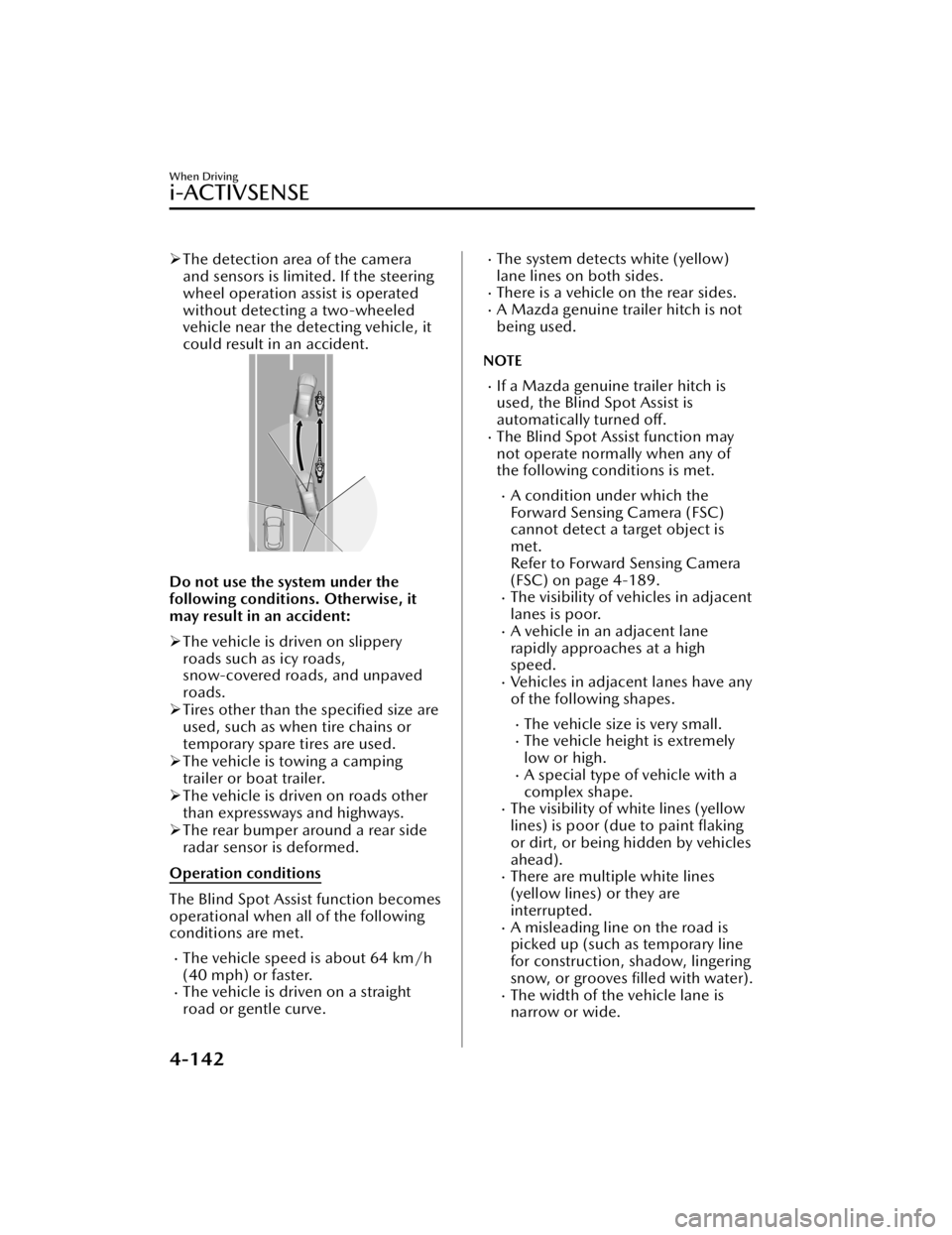
The detection area of the camera
and sensors is limited. If the steering
wheel operation assist is operated
without detecting a two-wheeled
vehicle near the detecting vehicle, it
could result in an accident.
Do not use the system under the
following conditions. Otherwise, it
may result in an accident:
The vehicle is driven on slippery
roads such as icy roads,
snow-covered roads, and unpaved
roads.
Tires other than the specified size are
used, such as when tire chains or
temporary spare tires are used.
The vehicle is towing a camping
trailer or boat trailer.
The vehicle is driven on roads other
than expressways and highways.
The rear bumper around a rear side
radar sensor is deformed.
Operation conditions
The Blind Spot Assist function becomes
operational when all of the following
conditions are met.
The vehicle speed is about 64 km/h
(40 mph) or faster.
The vehicle is driven on a straight
road or gentle curve.
The system detects white (yellow)
lane lines on both sides.
There is a vehicle on the rear sides.A Mazda genuine trailer hitch is not
being used.
NOTE
If a Mazda genuine trailer hitch is
used, the Blind Spot Assist is
automatically turned off.
The Blind Spot Assist function may
not operate normally when any of
the following conditions is met.
A condition under which the
Forward Sensing Camera (FSC)
cannot detect a target object is
met.
Refer to Forward Sensing Camera
(FSC) on page 4-189.
The visibility of vehicles in adjacent
lanes is poor.
A vehicle in an adjacent lane
rapidly approaches at a high
speed.
Vehicles in adjacent lanes have any
of the following shapes.
The vehicle size is very small.The vehicle height is extremely
low or high.
A special type of vehicle with a
complex shape.
The visibility of white lines (yellow
lines) is poor (due to paint flaking
or dirt, or being hidden by vehicles
ahead).
There are multiple white lines
(yellow lines) or they are
interrupted.
A misleading line on the road is
picked up (such as temporary line
for construction, shadow, lingering
snow, or grooves filled with water).
The width of the vehicle lane is
narrow or wide.
When Driving
i-ACTIVSENSE
4-142
CX-50_8KB8-EA-22A_Edition2_new 2022-1-6 14:55:18
Page 296 of 583
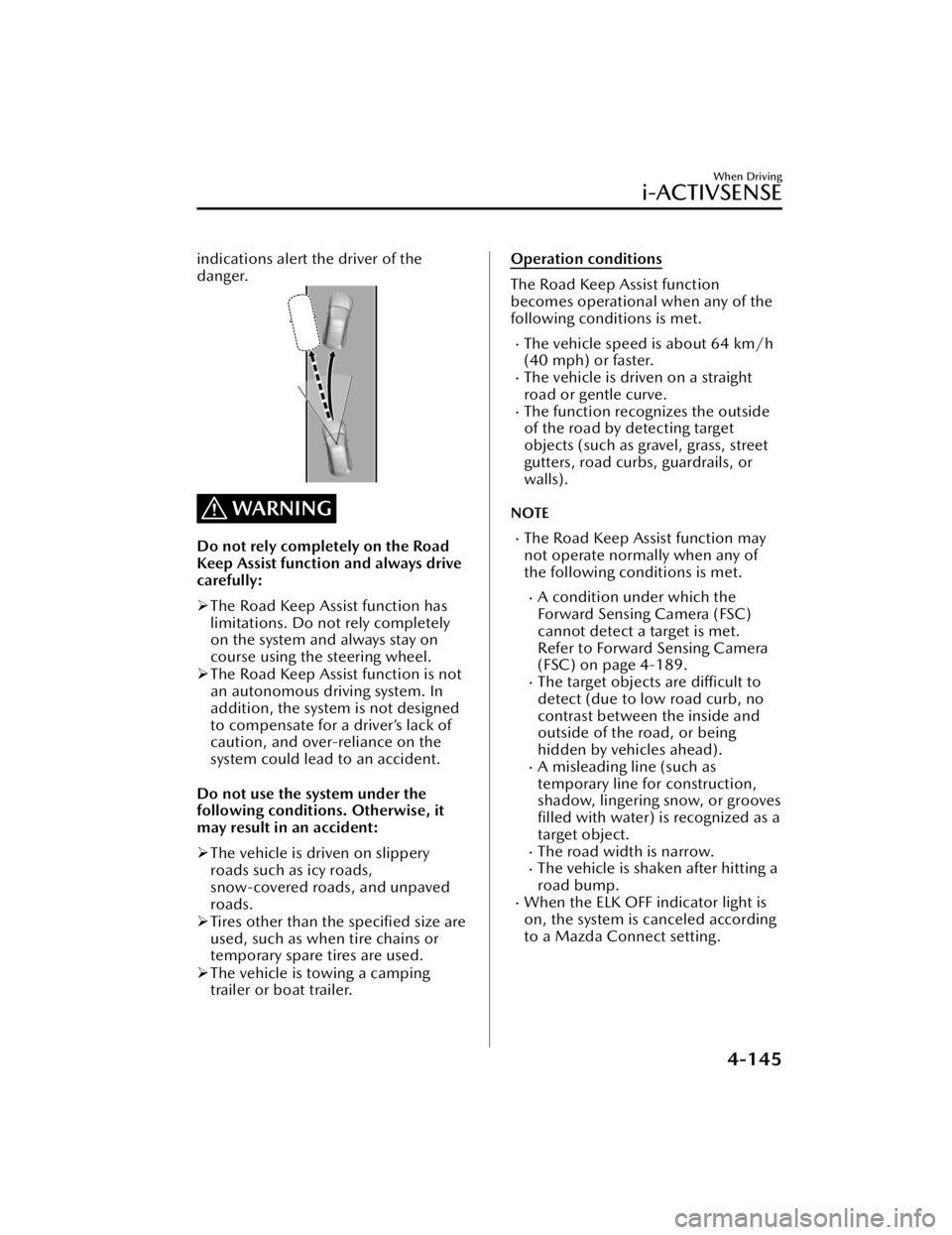
indications alert the driver of the
danger.
WARNING
Do not rely completely on the Road
Keep Assist function and always drive
carefully:
The Road Keep Assist function has
limitations. Do not rely completely
on the system and always stay on
course using the steering wheel.
The Road Keep Assist function is not
an autonomous driving system. In
addition, the system is not designed
to compensate for a driver’s lack of
caution, and over-reliance on the
system could lead to an accident.
Do not use the system under the
following conditions. Otherwise, it
may result in an accident:
The vehicle is driven on slippery
roads such as icy roads,
snow-covered roads, and unpaved
roads.
Tires other than the specified size are
used, such as when tire chains or
temporary spare tires are used.
The vehicle is towing a camping
trailer or boat trailer.
Operation conditions
The Road Keep Assist function
becomes operational when any of the
following conditions is met.
The vehicle speed is about 64 km/h
(40 mph) or faster.
The vehicle is driven on a straight
road or gentle curve.
The function recognizes the outside
of the road by detecting target
objects (such as gravel, grass, street
gutters, road curbs, guardrails, or
walls).
NOTE
The Road Keep Assist function may
not operate normally when any of
the following conditions is met.
A condition under which the
Forward Sensing Camera (FSC)
cannot detect a target is met.
Refer to Forward Sensing Camera
(FSC) on page 4-189.
The target objects are
difficult to
detect (due to low road curb, no
contrast between the inside and
outside of the road, or being
hidden by vehicles ahead).
A misleading line (such as
temporary line for construction,
shadow, lingering snow, or grooves filled with water) is recognized as a
target object.
The road width is narrow.The vehicle is shaken after hitting a
road bump.
When the ELK OFF indicator light is
on, the system is canceled according
to a Mazda Connect setting.
When Driving
i-ACTIVSENSE
4-145
CX-50_8KB8-EA-22A_Edition2_new 2022-1-6 14:55:18