warning MAZDA CX9 2023 Owners Manual
[x] Cancel search | Manufacturer: MAZDA, Model Year: 2023, Model line: CX9, Model: MAZDA CX9 2023Pages: 739, PDF Size: 11.69 MB
Page 595 of 739

Wa t e r M a r k s
Occurrence
Rain, fog, dew, and even tap water can
contain harmful minerals such as salt and
lime. If moisture containing these minerals
settles on the vehicle and evaporates, the
minerals will concentrate and harden to
form white rings. The rings can damage
your vehicle's finish.
Prevention
It is necessary to wash and wax your
vehicle to preserve its finish according to
the instructions in this section. These steps
should be taken immediately after you find
water marks on your vehicle's finish.
Paint Chipping
Occurrence
Paint chipping occurs when gravel thrown
in the air by another vehicle's tires hits
your vehicle.
How to avoid paint chipping
Keeping a safe distance between you and
the vehicle ahead reduces the chances of
having your paint chipped by flying
gravel.
NOTE
The paint chipping zone varies with the
speed of the vehicle. For example, when
traveling at 90 km/h (56 mph), the paint
chipping zone is 50 m (164 ft).
In low temperatures a vehicle's finish
hardens. This increases the chance of
paint chipping.
Chipped paint can lead to rust forming
on your Mazda. Before this happens,
repair the damage by using Mazda
touch-up paint according to the
instructions in this section. Failure to
repair the affected area could lead to
serious rusting and expensive repairs.
Follow all label and container directions
when using a chemical cleaner or polish.
Read all warnings and cautions.
▼ Maintaining the Finish
Wa s h i n g
CAUTION
When the ignition is switched ON and
the wiper lever is in the AUTO position,
the windshield wipers may operate
automatically in the following cases:
The area of the windshield above the
rain sensor is touched or wiped with a
cloth.
The windshield or the rain sensor area
in the cabin is hit.
When the ignition is switched ON and
the wiper lever is in the AUTO position,
do not touch the windshield or the
windshield wipers Otherwise, the
windshield wipers will operate
automatically which could catch your fingers or damage the windshield wipers.
When removing ice or snow, or cleaning
the windshield, always make sure the
wiper lever is in the OFF position.
Maintenance and Care
Appearance Care
6-56
CX-9_8LJ2-EA-22H_Edition1_old 2022-6-9 13:33:08
Page 604 of 739

7If Trouble Arises
Helpful information on what to do if a problem arises with the vehicle.
Parking in an Emergency................. 7-2 Parking in an Emergency..............7-2
Flat Tire.............................................. 7-3 Spare Tire and Tool Storage......... 7-3
Changing a Flat Tire..................... 7-9
Battery Runs Out............................ 7-19 Jump-Starting............................. 7-19
Emergency Starting.........................7-22 Starting a Flooded Engine.......... 7-22
Push-Starting.............................. 7-22
Overheating......................................7-23 Overheating................................ 7-23
Emergency Towing.......................... 7-25 Towing Description.................... 7-25
Towing Hooks (Mexico ).............7-26
Warning/Indicator Lights and
Warning Sounds.............................. 7-28
If a Warning Light Turns On or
Flashes........................................ 7-28
Message Indicated on
Display........................................7-43
Message Indicated in Multi-
information Display
*.................. 7-45
Warning Sound is Activated....... 7-47
When Liftgate Cannot be
Opened..............................................7-52 When Liftgate Cannot be
Opened........................................7-52
Active Driving Display Does Not
Operate
*........................................... 7-53
If the Active Driving Display Does
Not Operate................................ 7-53
*Some models.7-1
CX-9_8LJ2-EA-22H_Edition1_old 2022-6-9 13:33:08
Page 605 of 739

Parking in an Emergency
The hazard warning lights should always
be used when you stop on or near a
roadway in an emergency.
The hazard warning lights warn other
drivers that your vehicle is a traffic hazard
and that they must take extreme caution
when near it.
Depress the hazard warning flasher and all
the turn signals will flash. The hazard
warning indicator lights in the instrument
cluster flash simultaneously.
NOTE
The turn signals do not work when the
hazard warning lights are on.
Check local regulations about the use of
hazard warning lights while the vehicle
is being towed to verify that it is not in
violation of the law.
If Trouble Arises
Parking in an Emergency
7-2
CX-9_8LJ2-EA-22H_Edition1_old 2022-6-9 13:33:08
Page 612 of 739

Changing a Flat Tire
NOTE
If the following occurs while driving, it
could indicate a flat tire.
Steering becomes difficult.
The vehicle begins to vibrate
excessively.
The vehicle pulls in one direction.
If you have a flat tire , drive slowly to a
level spot that is well off the road and out
of the way of traffic to change the tire.
Stopping in traffic or on the shoulder of a
busy road is dangerous.
WA R N I N G
Be sure to follow the directions for
changing a tire:
Changing a tire is dangerous if not done
properly. The vehicle can slip off the jack
and seriously injure someone.
No person should place any portion of their
body under a vehicle th at is supported by a
jack.
Never allow anyone inside a vehicle
supported by a jack:
Allowing someone to remain in a vehicle
supported by a jack is dangerous. The
occupant could cause the vehicle to fall
resulting in serious injury.
NOTE
Make sure the jack is well lubricated
before using it.
1. Park on a hard, le vel surface off the
right-of-way and firm ly set the parking
brake.
2. Shift into Park (P ) and turn off the
engine.
3. Turn on the hazard warning flasher.
4. Have passengers get out of the vehicle and away from the vehicle and traffic.
5. Remove any luggage, the jack, tools, and spare tire (page 7-3).
6. Block the wheel diagonally opposite the flat tire. When blocking a wheel,
place a tire block both in front and
behind the tire.
NOTE
When blocking a tire, use rocks or
wood blocks of sufficient size if
possible to hold the tire in place.
▼Removing a Flat Tire
WA R N I N G
When jacking-up a vehicle, always shift the
selector lever to P, apply the parking brake,
and place wheel blocks in the position
diagonally opposed to the jack:
Changing a flat tire without using wheel
blocks is dangerous because the vehicle
may move and fall off the jack even with
the select lever is in P, which could result in
an accident.
If Trouble Arises
Flat Tire
7-9
CX-9_8LJ2-EA-22H_Edition1_old
2022-6-9 13:33:08
Page 615 of 739

NOTE
When raising the jack head into the
jacking position and aligning the
groove in the jack head with the rail
under the vehicle body, the top of the
jack head contacts the vehicle's
underbody without the rail contacting
the bottom of the groove.
6. Insert the jack lever and attach the lug wrench to tire jack.
7. Turn the jack handle clockwise and
raise the vehicle high enough so that
the spare tire can be installed. Before
removing the lug nuts, make sure your
Mazda is firmly in position and that it
cannot slip or move.
WARNING
Do not jack up the vehicle higher than
is necessary:
Jacking up the vehicle higher than is
necessary is dangerous as it could
destabilize the vehicle resulting in an
accident.
Do not start the engine or shake the
vehicle while it is jacked up:
Starting the engine or shaking the
vehicle while it is jacked up is
dangerous as it could cause the vehicle
to fall off the jack resulting in an
accident.
Never go under the vehicle while it is
jacked up:
Going under the vehicle while it is
jacked up is dangerous as it could result
in death or serious in jury if the vehicle
were to fall off the jack.
8. Remove the lug nuts by turning them counterclockwise; then remove the
wheel and center cap.
▼Locking Lug Nuts
If your Mazda is equipped with the
optional antitheft wheel lug nuts, a special
key must be used to unlock the locking lug
nut for each wheel. The key is stored in
the glove compartment, center console
storage, storage box,
or trunk. Register the
key and lug nuts with the lock
manufacturer by filling out the registration
card and mailing it in using the
accompanying envelope. If the key is lost,
consult an Authorized Mazda Dealer or
use the lock manufacturer’s order form to
order a new key.
If Trouble Arises
Flat Tire
7-12
CX-9_8LJ2-EA-22H_Edition1_old 2022-6-9 13:33:08
Page 617 of 739

WARNING
Make sure the mounting surfaces of the
wheel, hub and lug nuts are clean
before changing or replacing tires:
When changing or replacing a tire, not
removing dirt and grime from the
mounting surfaces of the wheel, hub
and hub bolts is dangerous. The lug
nuts could loosen while driving and
cause the tire to come off, resulting in
an accident.
2. Mount the spare tire.
3. Install the lug nuts with the beveled edge inward; tighten them by hand.
WARNING
Do not apply oil or grease to lug nuts
and bolts and do not tighten the lug
nuts beyond the recommended
tightening torque:
Applying oil or grease to lug nuts and
bolts is dangerous. The lug nuts could
loosen while driving and cause the tire
to come off, resulting in an accident. In
addition, lug nuts and bolts could be
damaged if tightened more than
necessary.
4. Turn the lug wrench counterclockwise and lower the vehicle.
5. Use the lug wrench to tighten the nuts in the order shown.
If you are unsure of how tight the nuts
should be, have them inspected at an
Authorized Mazda Dealer.
Nut tightening torque
Nꞏm (kgfꞏm, ftꞏlbf) 108―147 (12―14,
80―108)
If Trouble Arises
Flat Tire
7-14
CX-9_8LJ2-EA-22H_Edition1_old 2022-6-9 13:33:08
Page 626 of 739

Overheating
If the temperature gauge indicates
overheating or the high engine coolant
temperature warning light turns on, the
vehicle loses power, or you hear a loud
knocking or pinging noise, the engine is
probably too hot.
WA R N I N G
Pull over to a safe location, then switch
the ignition off and make sure the fan is
not running before attempting to work
near the cooling fan:
Working near the cooling fan when it is
running is dangerous. The fan could
continue running indefinitely even if the
engine has stopped and the engine
compartment temperature is high. You
could be hit by the fan and seriously
injured.
Do not remove either cooling
system cap when the engine and radiator
are hot:
When the engine and radiator are hot,
scalding coolant and steam may shoot out
under pressure and cause serious injury.
Open the hood ONLY after steam is no
longer escaping from the engine:
Steam from an overheated engine is
dangerous. The escaping steam could
seriously burn you.
If the temperature gauge indicates
overheating or the high engine coolant
temperature warning light turns on:
1. Drive safely to the side of the road and park off the right-of-way.
2. Shift into park (P).
3. Apply the parking brake.
4. Turn off the air conditioner.
5. Check whether coolant or steam is escaping from the engine
compartment.
If steam is coming from the engine
compartment:
Do not go near the front of the vehicle.
Stop the engine.
Wait until the steam dissipates, then
open the hood and start the engine.
If neither coolant nor steam is
escaping:
Open the hood and idle the engine
until it cools.
CAUTION
If the cooling fan does not operate
while the engine is running, the engine
temperature will increase. Stop the
engine and call an Authorized Mazda
Dealer.
6. Make sure the cooling fan is operating, then turn off the engine after the
temperature has decreased.
If Trouble Arises
Overheating
7-23
CX-9_8LJ2-EA-22H_Edition1_old 2022-6-9 13:33:08
Page 631 of 739

If a Warning Light Turns On or Flashes
If any warning light turns on/flashes, take appropriate action for each light. There is no
problem if the light turns off, however if the light does not t urn off or turns on/flashes again,
consult an Authorized Mazda Dealer.
The details for some warnings can be viewed on the center displ ay or multi-information
display (Type A/Type B) in the instrument cluster.
Center display
Mazda Connect (Type A)
1. If the warning light is turned on, select the
icon on the home screen to display the
Applications screen.
2. Select “Vehicle Status Monitor”.
3. Select “Warning Guidance” to display the current warnings.
4. Select the applicable warning to view the warning details.
Mazda Connect (Type B)
1. Select “Information” on the home screen.
2. Select “Vehicle Status Monitor”.
3. Select the applicable warning to view the warning details.
NOTE
You can also display the currently occurring warning by sliding the commander knob to the
left while on the home scre en of the center display.
Multi-information dis play (Type A/Type B)
1. Press the INFO switch on the steering switch to display the w arning indication screen.
Refer to Multi-information Di splay (Type A) on page 4-13.
Refer to Multi-information Di splay (Type B) on page 4-30.
▼Stop Vehicle in Safe Place Immediately
If any of the following
warning lights turns on, the system may have a malfunction. Stop the
vehicle in a safe place immediately and contact an Authorized M azda Dealer.
If Trouble Arises
Warning/Indicator Lights and Warning Sounds
7-28
CX-9_8LJ2-EA-22H_Edition1_old 2022-6-9 13:33:08
Page 632 of 739

SignalWarning
Brake System Warning
Indication/Warning
Light This warning has the
following functions:
Parking brake warning/Warning light inspection
The light illuminates when the par king brake is applied with the ignition switched to
START or ON. It turns off when the parking brake is released.
When the light turns on
If the brake system warning light remains turned on even though the parking brake is
released, the brake fluid may be low or there could be a problem with the brake sys‐
tem. Park the vehicle in a safe place immediately and contact a n Authorized Mazda
Dealer.
When the light is flashing
The light flashes if the Electric Parking Brake (EPB) has a malfunction.
If the light remains flashing ev en if the Electric Parking Brake (EPB) switch is oper‐
ated, consult an Authorized Mazd a Dealer as soon as possible.
WA R N I N G
Do not drive with the brake system warning light illuminated. Contact an Authorized
Mazda Dealer to have the brakes inspected as soon as possible:
Driving with the brake system warning light illuminated is dangerous. It indicates that
your brakes may not work at all or that they could completely fail at any time. If this
light remains illuminated, after checking that the parking brake is fully released, have
the brakes inspected immediately.
CAUTION
In addition, the effectiveness of the braking may diminish so you may need to depress
the brake pedal more st rongly than normal to stop the vehicle.
Electronic Brake Force
Distribution System Wa r n i n g If the electronic brake force di
stribution control unit determines that some compo‐
nents are operating incorrectly , the control unit may illuminate the brake system
warning light and the ABS warning light simultaneously. The problem is likely to be
the electronic brake forc e distribution system.
WA R N I N G
Do not drive with both the ABS warning light and brake warning light illuminated.
Have the vehicle towed to an Authorized Mazda Dealer to have the brakes inspected as
soon as possible:
Driving when the brake system warning lig ht and ABS warning light are illuminated
simultaneously is dangerous.
When both lights are illuminated, the rear wheels could lock more quickly in an emer‐
gency stop than under normal circumstances.
If Trouble Arises
Warning/Indicator Lights and Warning Sounds
7-29
CX-9_8LJ2-EA-22H_Edition1_old 2022-6-9 13:33:08
Page 633 of 739
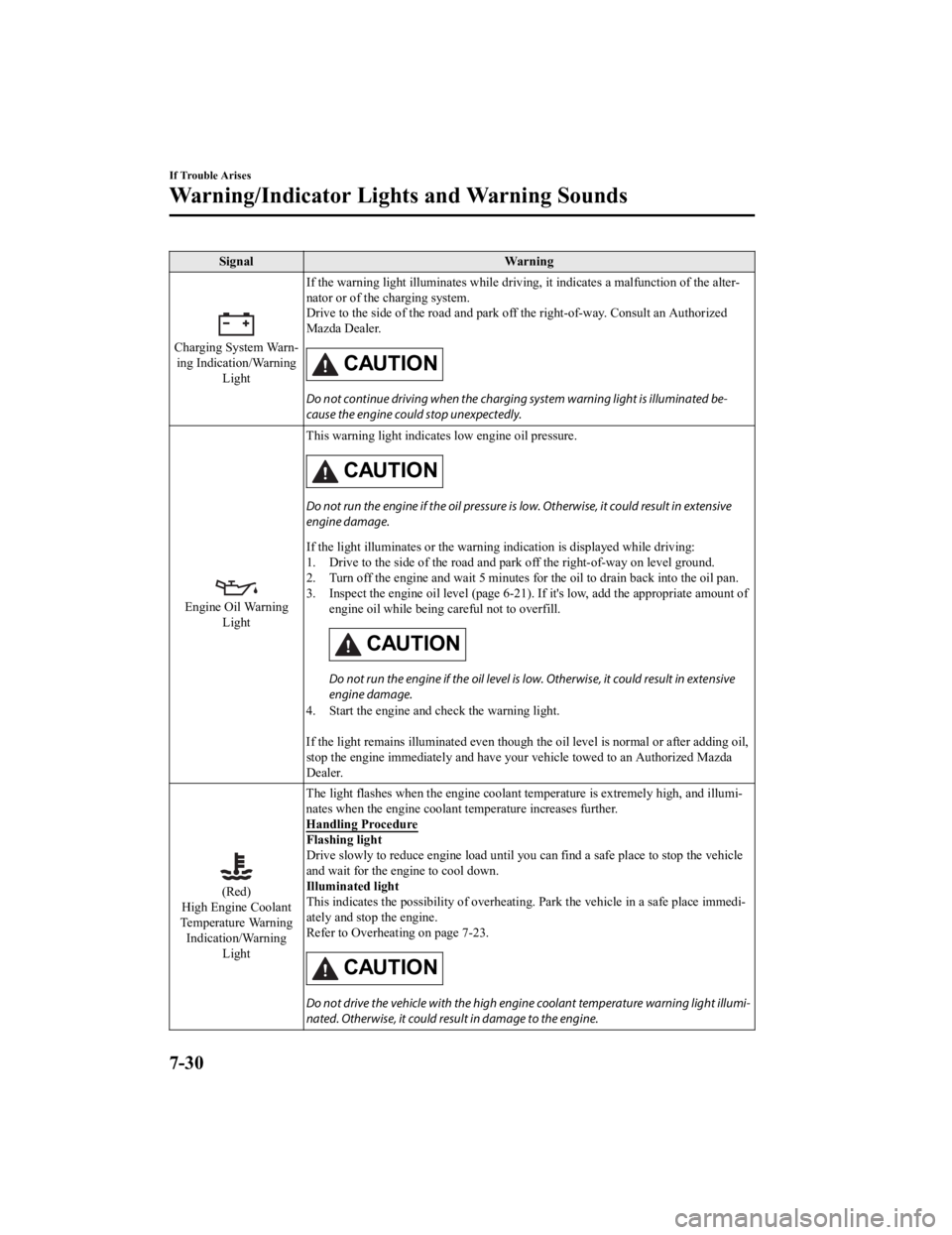
SignalWarning
Charging System Warn‐
ing Indication/Warning Light If the warning light illuminates while driving, it indicates a
malfunction of the alter‐
nator or of the charging system.
Drive to the side of the road and park off the right-of-way. Co nsult an Authorized
Mazda Dealer.
CAUTION
Do not continue driving when the charging system warning light is illuminated be‐
cause the engine could stop unexpectedly.
Engine Oil Warning Light This warning light indicates low engine oil pressure.
CAUTION
Do not run the engine if the oil pressure is
low. Otherwise, it could result in extensive
engine damage.
If the light illuminates or the w arning indication is displayed while driving:
1. Drive to the side of the road and park off the right-of-way o n level ground.
2. Turn off the engine and wait 5 minutes for the oil to drain b ack into the oil pan.
3. Inspect the engine oil level (p age 6-21). If it's low, add the appropriate amount of
engine oil while being careful not to overfill.
CAUTION
Do not run the engine if the oil level is low. Otherwise, it could result in extensive
engine damage.
4. Start the engine and check the warning light.
If the light remains illuminated even though the oil level is normal or after adding oil,
stop the engine immediately and have your vehicle towed to an Authorized Mazda
Dealer.
(Red)
High Engine Coolant
Temperature Warning Indication/Warning Light The light flashes when the engine
coolant temperature is extremely high, and illumi‐
nates when the engine coolant temperature increases further.
Handling Procedure
Flashing light
Drive slowly to reduce engine load until you can find a safe pl ace to stop the vehicle
and wait for the engine to cool down.
Illuminated light
This indicates the possibility of overheating. Park the vehicle in a safe place immedi‐
ately and stop the engine.
Refer to Overheating on page 7-23.
CAUTION
Do not drive the vehicle with the high engine coolant temperature warning light illumi‐
nated. Otherwise, it could resu lt in damage to the engine.
If Trouble Arises
Warning/Indicator Lights and Warning Sounds
7-30
CX-9_8LJ2-EA-22H_Edition1_old 2022-6-9 13:33:08