warning MAZDA CX9 2023 Owners Manual
[x] Cancel search | Manufacturer: MAZDA, Model Year: 2023, Model line: CX9, Model: MAZDA CX9 2023Pages: 739, PDF Size: 11.69 MB
Page 332 of 739

The LAS & LDWS goes on stand-by
status in the following cases:
The system cannot detect white (yellow)
lane lines.
The vehicle speed is less than about 60
km/h (37 mph).
The vehicle is making a sharp curve.
The vehicle is making a curve at an
inappropriate speed.
NOTE
The LAS & LDWS remains on stand-by
until it detects white (yellow) lines on
both the left and right sides, or on either
side.
When the system detects a white
(yellow) lane line on one side only, the
system will not activate warnings for the
lane line on the side that is not being
detected.
The distance and warning sensitivity
(likelihood of a warning) which the
system uses to determine the possibility
of a lane departure can be changed.
(Mazda Connect (Type A) only)
Refer to the Settings section in the
Mazda Connect Owner's Manual.
Vehicle lane line display
When the LAS & LDWS becomes
operational while on standby, the vehicle
lane lines are displayed in the
multi-information display. The system
changes to operational status display when
the system detects a w hite (yellow) line on
either the left or right.
(Stand-by status)
(Operational status)
Auto cancel
In the following cases, the LAS & LDWS
is automatically canceled, the LAS &
LDWS warning indicat ion (amber) turns
on, and an alert is displayed. When the
LAS & LDWS become operational, the
system turns back on automatically.
The temperature inside the camera is
high or low.
The windshield around the camera is
foggy.
The windshield around the camera is
blocked by an obstruction, causing poor
forward visibility.
(Auto cancel of warnings)
When the following operations are
performed, the LAS & LDWS determines
that the driver inte nds to make a lane
change and the system operation is
canceled automatically. The LAS &
LDWS resumes automatically after the
operation.
The steering wheel is operated abruptly.
The brake pedal is depressed.
The accelerator pedal is depressed.
When Driving
i-ACTIVSENSE
4-167
CX-9_8LJ2-EA-22H_Edition1_old 2022-6-9 13:33:08
Page 333 of 739
(To cancel the automatic sensitivity
cancel function, deselect “Warning
sensitivity” in the personalization
features setting.) (Mazda Connect (Type
A) only)
The turn signal lever is operated.
The vehicle crosses a lane line.
▼System Canceling
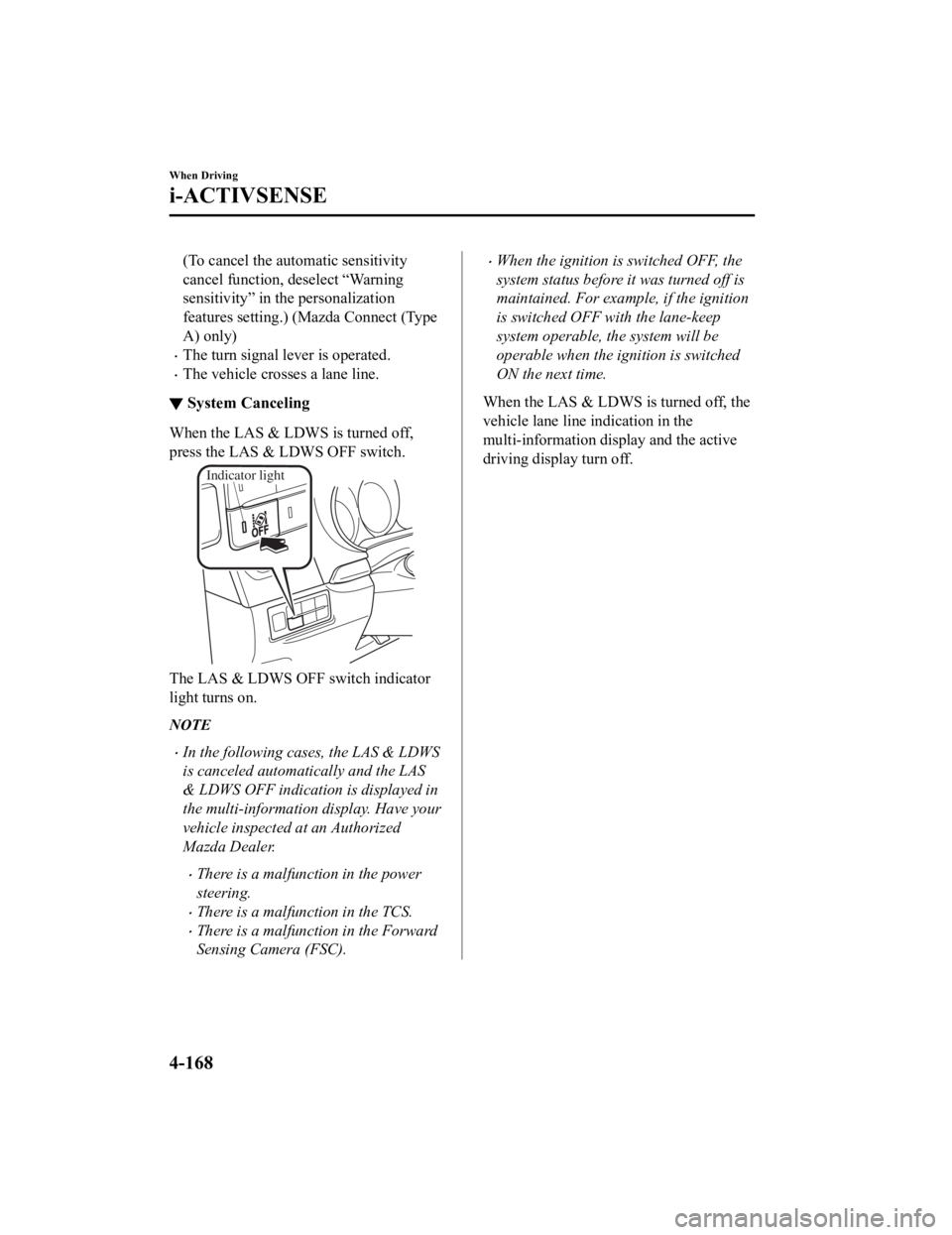
When the LAS & LDWS is turned off,
press the LAS & LDWS OFF switch.
Indicator light
The LAS & LDWS OFF switch indicator
light turns on.
NOTE
In the following cases, the LAS & LDWS
is canceled automatically and the LAS
& LDWS OFF indication is displayed in
the multi-information display. Have your
vehicle inspected at an Authorized
Mazda Dealer.
There is a malfunction in the power
steering.
There is a malfunction in the TCS.
There is a malfunction in the Forward
Sensing Camera (FSC).
When the ignition is switched OFF, the
system status before
it was turned off is
maintained. For example, if the ignition
is switched OFF with the lane-keep
system operable, the system will be
operable when the ignition is switched
ON the next time.
When the LAS & LDWS is turned off, the
vehicle lane line indication in the
multi-information di splay and the active
driving display turn off.
When Driving
i-ACTIVSENSE
4-168
CX-9_8LJ2-EA-22H_Edition1_old 2022-6-9 13:33:08
Page 334 of 739

▼Lane Departure Warning
If the system determines that the vehicle may deviate from its
lane, the lane departure
warning (beep sound, rumble sound (Mazda Connect (Type A) only)
*1, or steering wheel
vibration) is activated and the direction in which the system d etermines that the vehicle may
deviate is indicated in the multi-information display and the a ctive driving display.
If the system determines that the vehicle may deviate from its lane, the color of the lane line
on the side being detected by the system changes from white to amber, and flashes.
Multi-information Display Active Driving Display
NOTE
If you have set the lane departure warning sound to the beep sound/rumble sound (Mazda
Connect (Type A) only)
*1 setting, the warning sound may not be heard depending on the
surrounding noise conditions.
If you have set the lane departure warning system to the steering wheel vibrations setting,
the vibration may not be felt depending on the road surface conditions.
When the setting for the steering operation assist is changed to operational, the warnings
can be set to activate/not activate. (When the setting for the steering operation assist is
changed to non-operational, the warnings cannot be set to not activate.)
Refer to the Settings section in the Mazda Connect Owner's Manual.
The LAS & LDWS can be changed to the following settings regardless of whether the
steering operation assist has been set to operational/non-operational. Always check the
setting status when driving the vehicle and make setting changes if necessary.
Refer to the Settings section in the Mazda Connect Owner's Manual.
Steering wheel vibration: Strong/weak
Warning sound volume
Types of warnings (steering wheel vibration/beep sound/rumble sound (Mazda Connect
(Type A) only)
*1)
*1 A rumble strip is a series of grooves in the road pavement surface positioned at specific
intervals, and when the vehicle passes over it a vibration and rumble sound is produced
which alerts the driver that the vehicle is departing from the lane.
When Driving
i-ACTIVSENSE
4-169
CX-9_8LJ2-EA-22H_Edition1_old 2022-6-9 13:33:08
Page 336 of 739

Advanced Smart City Brake Support (Advanced SCBS)*
The Advanced SCBS alerts the driver of a possible collision usi ng the display and a warning
sound when the Forward Sensing Camera (FSC) detects a vehicle a head or pedestrian and
determines that a collision with the object is unavoidable whil e the vehicle is driven at a
vehicle speed of about 4 to 80 km/h (2 to 50 mph) if the object is a vehicle ahead and about
10 to 80 km/h (6.2 to 50 mph) if the object is a pedestrian. In addition, the system reduces
damage in the event of a collision by operating the brake contr ol (Advanced SCBS brake)
when the system determines that a collision is unavoidable. In addition, when the driver
depresses the brake pedal, the brakes are applied firmly and qu ickly to assist. (Brake Assist
(Advanced SCBS brake assist))
Forward Sensing
Camera (FSC)
WA R N I N G
Do not rely completely on the Advanced SCBS system:
The Advanced SCBS system is only designed to reduce damage in the event of a collision.
Over reliance on the system leading to the accelerator pedal or brake pedal being
mistakenly operated could result in an accident.
The Advanced SCBS system operates in response to a vehicle ahead or a pedestrian. The
system does not operate in response to obstru ctions such as a wall, 2-wheeled vehicles, or
animals.
When Driving
i-ACTIVSENSE
*Some models.4-171
CX-9_8LJ2-EA-22H_Edition1_old 2022-6-9 13:33:08
Page 337 of 739

CAUTION
In the following cases, turn the system off to prevent a mis-operation:
The vehicle is being towed or when towing another vehicle.
The vehicle is on a chassis roller.
When driving on rough roads such as in areas of dense grass or off-road.
Refer to Stopping the Advanced Smart City Brake Support (Advanced SCBS) System Operation
on page 4-173 on how to turn off the Advanced SCBS system.
NOTE
The Advanced SCBS system will operate under the following conditions.
The engine is running.
The Smart City Brake Support (SCBS) warning indication (amber) does not illuminate.
(Object is vehicle ahead)
The vehicle speed is between about 4 to 80 km/h (2 to 50 mph).
(Object is a pedestrian)
The vehicle speed is between about 10 to 80 km/h (6.2 to 50 mph).
The Advanced SCBS system is not turned off.
Under the following conditions, the Advanced SCBS system may not operate normally:
The Advanced SCBS system will not operate if the driver is deliberately performing
driving operations (accelerator pedal and steering wheel).
If there is the possibility of pa rtial contact with a vehicle ahead.
The vehicle is driven on a slippery road surface such as wet roads or icy or snow-bound
roads.
The braking performance is adversely affected due to cold temperatures or wet brakes.
The vehicle is driven at the same speed as the vehicle ahead.
The accelerator pedal is depressed.
The brake pedal is depressed.
The steering wheel is being operated.
The selector lever is being operated.
In the following cases, the Advanced SCBS may operate.
Objects on the road at the entrance to a curve.
Vehicles passing in the opposite lane while making a curve.
When passing through a toll gate.
When passing through low gates, narrow gates, car washing machines, or tunnels.
If you suddenly come close to a vehicle ahead.
2-wheeled vehicles, animals, or standing trees.
When Driving
i-ACTIVSENSE
4-172
CX-9_8LJ2-EA-22H_Edition1_old 2022-6-9 13:33:08
Page 338 of 739

During the Advanced SCBS brake control, the brake pedal may move rearward or become
stiff. The brakes are operating, but continue to depress the brake pedal.
▼Collision Warning
If there is the possibili
ty of a collision with
a vehicle ahead, the beep sounds
continuously and a warning is indicated in
the multi-information di splay or the active
driving display.
NOTE
The operation distance and volume of the
collision warning can be changed. Refer
to the Settings se ction in the Mazda
Connect Owner's Manual.
▼ Automatic Brake
Operation Display
The automatic brake operation display is
indicated on the multi- information display
after the Advanced SCBS is operated.
NOTE
The collision warning beep sounds
intermittently while the Advanced SCBS
brake or brake assist (Advanced SCBS
brake assist) is operating.
If the vehicle is stopped by the Advanced
SCBS operation and the brake pedal is
not depressed, the warning beep sounds
1 time after about 2 seconds and the
Advanced SCBS brake is automatically
released.
▼ Stopping the Advanced Smart City
Brake Support (Advanced SCBS)
System Operation
The Advanced SCBS system can be
temporarily deactivated.
Refer to the Settings section in the Mazda
Connect Owner's Manual.
When the Advanced SCBS system is
turned off, the Smart City Brake Support
(SCBS) OFF indicator light turns on.
When the engine is restarted, the system
becomes operational.
NOTE
When the Advanced SCBS system is set to
inoperable, the Smart City Brake Support
[Reverse] (SCBS R) system and the Smart
Brake Support (SBS) are also set to
inoperable.
When Driving
i-ACTIVSENSE
4-173
CX-9_8LJ2-EA-22H_Edition1_old
2022-6-9 13:33:08
Page 339 of 739
![MAZDA CX9 2023 Owners Manual Smart City Brake Support [Forward] (SCBS F)*
The SCBS F system alerts the driver of a possible collision using an indication in the
display and a warning sound when the Forward Sensing Camera (FS C) d](/img/28/59017/w960_59017-338.png "MAZDA CX9 2023 Owners Manual Smart City Brake Support [Forward] (SCBS F)*
The SCBS F system alerts the driver of a possible collision using an indication in the
display and a warning sound when the Forward Sensing Camera (FS C) d")
Smart City Brake Support [Forward] (SCBS F)*
The SCBS F system alerts the driver of a possible collision using an indication in the
display and a warning sound when the Forward Sensing Camera (FS C) detects a vehicle
ahead and determines that a colli sion with a vehicle ahead is unavoidable while the vehicle
is being driven at a vehicle speed of about 4 to 80 km/h (2 to 50 mph). In addition, the
system reduces damage in the event of a collision by operating the brake control (Smart City
Brake Support (SCBS) brake) when t he system determines that a collision is unavoidable
while the vehicle is being driven at a vehicle speed of about 4 to 30 km/h (2 to 18 mph). It
may also be possible to avoid a collision if the relative speed between your vehicle and the
vehicle in front of you is les s than about 20 km/h (12 mph). In addition, when the driver
depresses the brake pedal while the system is in the operation range at about 4 to 30 km/h (2
to 18 mph), the brakes are applied firmly and quickly to assist . (Brake Assist (Smart City
Brake Support (SCBS) brake assist))
Forward Sensing
Camera (FSC)
WA R N I N G
Do not rely completely on the SCBS F system:
The SCBS F system is only designed to red uce damage in the event of a collision. Over
reliance on the system leading to the accel erator pedal or brake pedal being mistakenly
operated could result in an accident.
The SCBS F is a system which operates in response to a vehicle ahead. The system may not
be able to detect or react to 2-wheeled vehicles or pedestrians.
When Driving
i-ACTIVSENSE
4-174*Some models.
CX-9_8LJ2-EA-22H_Edition1_old 2022-6-9 13:33:08
Page 340 of 739

CAUTION
In the following cases, turn the system off to prevent a mis-operation:
The vehicle is being towed or when towing another vehicle.
The vehicle is on a chassis roller.
When driving on rough roads such as in areas of dense grass or off-road.
Refer to Stopping the Smart Ci ty Brake Support (SCBS) system Operation on page 4-176 on
how to turn off the SCBS F system.
NOTE
The SCBS F system will operate under the following conditions.
The engine is running.
The Smart Brake Support/Smart City Brake Support (SBS/SCBS) system warning
indication (amber) does not illuminate.
(Rear-end collision warning)
The vehicle speed is about 4 to 80 km/h (2 to 50 mph).
(Brake control (Smart City Brake Support (SCBS) brake))
The vehicle speed is about 4 to 30 km/h (2 to 18 mph).
The SCBS F system is not turned off.
Under the following conditions, the SCBS F system may not operate normally:
The SCBS F system will not operate if the driver is deliberately performing driving
operations (accelerator pedal and steering wheel).
If there is the possibility of partial contact with a vehicle ahead.
The vehicle is driven on a slippery road surface such as wet roads or icy or snow-bound
roads.
The braking performance is adversely affected due to cold temperatures or wet brakes.
The vehicle is driven at the same speed as the vehicle ahead.
The accelerator pedal is depressed.
The brake pedal is depressed.
The steering wheel is being operated.
The selector lever is being operated.
In the following cases, the Forward Sensing Camera (FSC) determines that there is a
vehicle ahead and the SCBS F may operate.
Objects on the road at the entrance to a curve.
Vehicles passing in the opposite lane while making a curve.
Metal objects, bumps, or protruding objects on the road.
When passing through a toll gate.
When passing through low gates, narrow gates, car washing machines, or tunnels.
When Driving
i-ACTIVSENSE
4-175
CX-9_8LJ2-EA-22H_Edition1_old 2022-6-9 13:33:08
Page 341 of 739

If you suddenly come close to a vehicle ahead.
2-wheeled vehicles, pedestrians, animals or standing trees.
Vehicle is driven with some of the tires having significant wear.
During the SCBS F brake control, the brake pedal may move rearward or become stiff.
The brakes are operating, but continue to depress the brake pedal.
▼Smart City Brake Support (SCBS)
Indicator Light (Red)*
If the Smart City Brake Support (SCBS) is
operating, the indicator light (red) flashes.
▼
Collision Warning*
If there is the possibil
ity of a collision with
a vehicle ahead, the beep sounds
continuously and a warning is indicated in
the multi-informati on display and the
active driving display.
NOTE
The operation distance and volume of the
collision warning can be changed. Refer
to the Settings section in the Mazda
Connect Owner's Manual.
▼ Automatic Brake Operation
Display*
The automatic b
rake operation display is
indicated on the multi-information display
after the SCBS F is operated.
NOTE
The collision warning beep sounds
intermittently while the SCBS F brake or
brake assist (SCBS F brake assist) is
operating.
If the vehicle is stopped by the SCBS F
operation and the brake pedal is not
depressed, the warning beep sounds 1
time after about 2 seconds and the SCBS
F brake is automatically released.
▼ Stopping the Smart City Brake
Support [Forward] (SCBS F)
System Operation
The SCBS F system can be temporarily
deactivated.
Refer to the Settings section in the Mazda
Connect Owner's Manual.
When Driving
i-ACTIVSENSE
4-176*Some models.
CX-9_8LJ2-EA-22H_Edition1_old
2022-6-9 13:33:08
Page 345 of 739

The obstruction is small.
The obstruction is thin such as a signpost.
The obstruction is positioned away from the center of the vehicle.
The surface of the obstruction is not pointed vertically relative to the vehicle.
The obstruction is soft such as a hanging curtain or snow stuck to a vehicle.
The obstruction is shaped irregularly.
The obstruction is extremely close.
In the following cases, the ultrasonic sensors (rear) cannot detect obstructions correctly
and the SCBS R may not operate.
Something is stuck on the bumper near an ultrasonic sensor (rear).
The steering wheel is turned sharply, or the brake or accelerator pedal is operated.
There is another obstruction near one obstruction.
During inclement weather such as rain, fog and snow.
High or low humidity.
High or low temperatures
Strong winds.
The path of travel is not flat.
Heavy luggage is loaded in the luggage compartment or on the rear seat.
Objects such as a wireless antenna, fog light, or illuminated license plate is installed
near an ultrasonic sensor (rear).
The orientation of an ultrasonic sensor (r ear) has deviated for reasons such as a
collision.
The vehicle is affected by other sound wave s such as the horn, engine noise, ultrasonic
sensor of another vehicle.
In the following cases, an ultrasonic sensor (rear) may detect something as a target
obstruction which could cause the SCBS R system to operate.
Driving on a steep slope.
Wheel blocks.
Hanging curtains, gate poles such as at toll gates and railroad crossing.
When traveling near objects such as foliage, barriers, vehicles, walls, and fences along
a road.
When driving off-road in areas where there is grass and forage.
When passing through low gates, narrow gates, car washing machines, and tunnels.
A towing bar is installed or a trailer is connected.
During the SCBS R brake control, the brake pedal may move rearward or become stiff.
The brakes are operating, but continue to depress the brake pedal.
When the system operates, the user is notified by the multi-information display.
The Smart City Brake Support (SCBS) warning indication (amber) turns on when the
system has a malfunction.
Refer to Taking Action on page 7-37.
When Driving
i-ACTIVSENSE
4-180
CX-9_8LJ2-EA-22H_Edition1_old 2022-6-9 13:33:08