steering wheel MAZDA CX9 2023 User Guide
[x] Cancel search | Manufacturer: MAZDA, Model Year: 2023, Model line: CX9, Model: MAZDA CX9 2023Pages: 739, PDF Size: 11.69 MB
Page 84 of 739

Never use a rear-facing child-restraint system in the front seat with an air bag that could
deploy:
Rear-facing child-restraint systems on the front seat are particularly dangerous even though
you may feel assured that a front passenger air bag will not deploy based on the fact that the
front passenger air bag deactivation indicator light illuminates. The child-restraint system
can be hit by a deploying air bag and moved viol ently backward resulting in serious injury or
death to the child.
Do not sit too close to the driver and front passenger air bags:
Sitting too close to the driver and front passenger air bag modules or placing hands or feet on
them is extremely dangerous. The driver and front passenger air bags inflate with great force
and speed. Serious injuries could occur if someon e is too close. The driver should always hold
onto only the rim of the steering wheel. The front seat passenger should keep both feet on the
floor. Front seat occupants should adjust their seats as far back as possible and always sit
upright against the seatbacks with seat belts worn properly.
Sit in the center of the seat and wear seat belts properly:
Sitting too close to the side air bag modules or placing hands on them, or sleeping up against
the door or hanging out the windows is extrem ely dangerous. The side and curtain air bags
inflate with great force and speed directly expanding
along the door on the side the car is hit.
Serious injury could occur if someone is sitting too close to the door or leaning against a
window, or if rear seat occupants grab the side s of the front seatbacks. Give the side and
curtain air bags room to work by sitting in th e center of the seat while the vehicle is moving
with seat belts worn properly.
Do not attach objects on or around the area where air bags deploy:
Attaching objects to the air bags or placing so mething in the area where the air bags deploy
is dangerous. In an accident, an object could interfere with air bag inflation and injure the
occupants. Furthermore, the bag could be damaged causing gases to release. Always keep
the deployment area of the air bag modules free of any obstructions.
For example, you should not do any of the following as it may interfere with air bag
deployment.
Do not put a covering on or lean anything against areas such as the dashboard and lower
portion of the instrument panel that blocks the passenger front air bag and knee air bags.
Do not use seat covers on the front seats and re ar seats equipped with in-seat side air bags.
Essential Safety Equipment
SRS Air Bags
2-71
CX-9_8LJ2-EA-22H_Edition1_old 2022-6-9 13:33:08
Page 86 of 739

Do not modify a front door or leave any damage unrepaired. Always have an Authorized
Mazda Dealer inspect a damaged front door:
Modifying a front door or leaving any damage unrepaired is dangerous. Each front door has a
side crash sensor as a component of the supplemental restraint system. If holes are drilled in a
front door, a door speaker is left removed, or a damaged door is left unrepaired, the sensor
could be adversely affected causing it to not detect the pressure of an impact correctly during
a side collision. If a sensor does not detect a side impact correctly, the side and curtain air
bags and the front seat belt pretensioner may not operate normally which could result in
serious injury to occupants.
Do not modify the supplemental restraint system:
Modifying the components or wiri ng of the supplemental restraint system is dangerous. You
could accidentally activate it or make it inoperable. Do not make any modifications to the
supplemental restraint system. This includes inst alling trim, badges, or anything else over the
air bag modules. It also includes installing extra electrical equipment on or near system
components or wiring. An Authorized Mazda Dealer can provide the special care needed in
the removal and installation of front seats. It is important to protect the air bag wiring and
connections to assure that the bags do not accidentally deploy, and that the front passenger
occupant classification system and the seats retain an undamaged air bag connection.
Do not place luggage or other objects under the front seats:
Placing luggage or other objects under th e front seats is dangerous. The components
essential to the supplemental restraint system could be damaged, and in the event of a side
collision, the appropriate air bags may not de ploy, which could result in death or serious
injury. To prevent damage to the components essential to the supplemental restraint system,
do not place luggage or other objects under the front seats.
Do not operate a vehicle with damaged air bag/seat belt pretensioner system components:
Expended or damaged air bag/seat belt preten sioner system components must be replaced
after any collision which caused them to deploy or damage them. Only a trained Authorized
Mazda Dealer can fully evaluate these systems to see that they will work in any subsequent
accident. Driving with an expended or dama ged air bag or pretensioner unit will not
afford
you the necessary protection in the event of any subsequent accident which could result in
serious injury or death.
Do not remove interior air bag parts:
Removing any components such as the front seats, front dashboard, the steering wheel or
parts on the front and rear window pillars and along the roof edge, containing air bag parts
or sensors is dangerous. These parts contain essential air bag components. The air bag could
accidentally activate and cause serious injuri es. Always have an Authorized Mazda Dealer
remove these parts.
Essential Safety Equipment
SRS Air Bags
2-73
CX-9_8LJ2-EA-22H_Edition1_old 2022-6-9 13:33:08
Page 90 of 739
How the SRS Air Bags Work
Your Mazda is equipped with the following types of SRS air bags. SRS air bags are
designed to work together with the seat belts to help to reduce injuries during an accident.
The SRS air bags are designed to provide further protection for passengers in addition to the
seat belt functions. Be sure to wear seat belts properly.
▼ Front Seat Belt Pretensioners
The front seat belt pretensioners are designed to deploy in mod
erate or severe frontal, near
frontal collisions.
In addition, the pretensioners ope rate when a side collision or a roll-over accident is
detected. The pretensioners operate differently depending on wh at types of air bags are
equipped. For more det ails about seat belt pretensioner operati on, refer to the SRS Air Bag
Deployment Criteria (page 2-81).
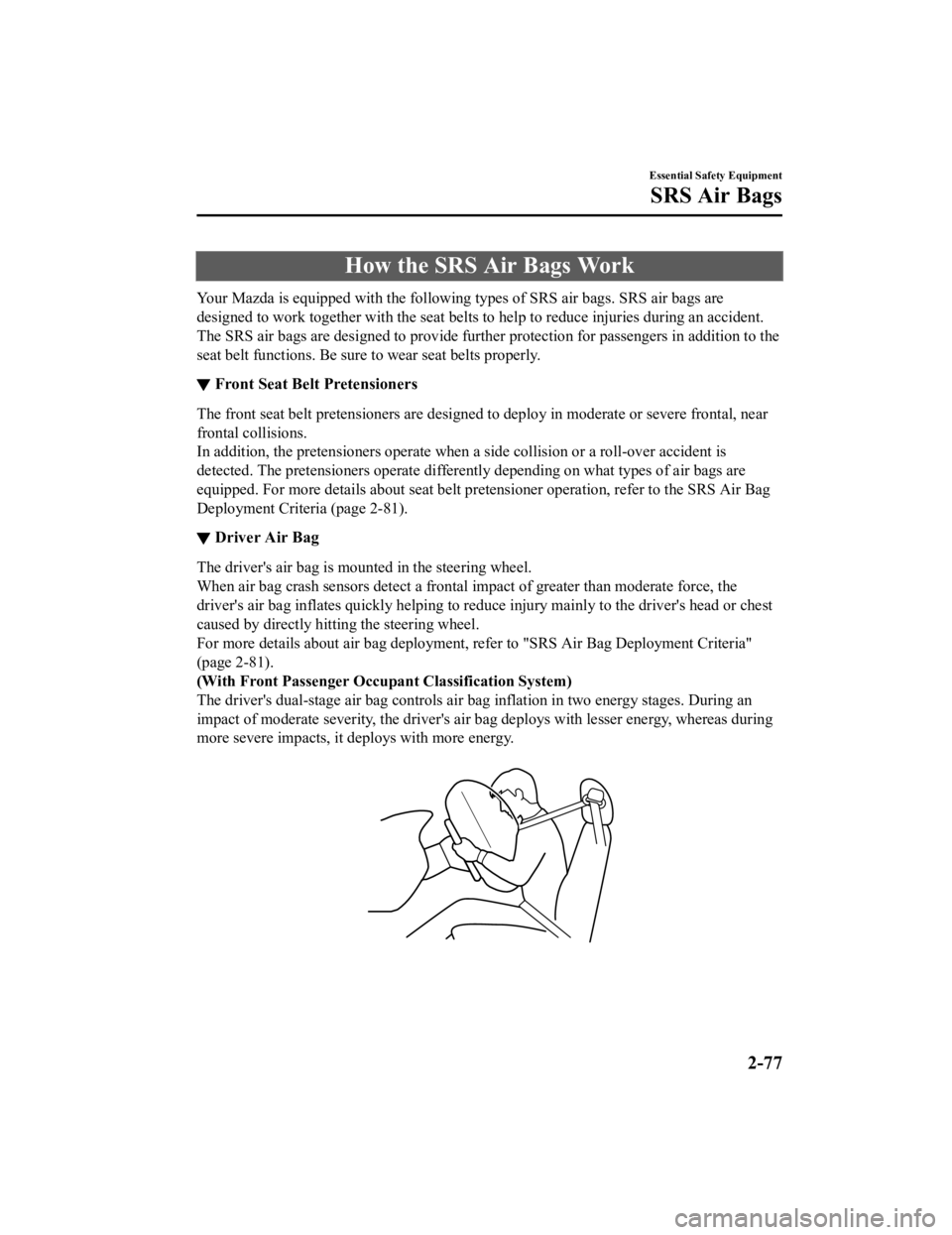
▼ Driver Air Bag
The driver's air bag is mounted in the steering wheel.
When air bag crash sensors detect a frontal impact of greater than moderate force, the
driver's air bag inflates quickly
helping to reduce injury mainly to the driver's head or chest
caused by directly hitting the steering wheel.
For more details about air bag deployment, refer to "SRS Air Ba g Deployment Criteria"
(page 2-81).
(With Front Passenger Occupa nt Classification System)
The driver's dual-stage air bag controls air bag inflation in two energy stages. During an
impact of moderate severity, the driver's air bag deploys with lesser energy, whereas during
more severe impacts, it deploys with more energy.
Essential Safety Equipment
SRS Air Bags
2-77
CX-9_8LJ2-EA-22H_Edition1_old 2022-6-9 13:33:08
Page 148 of 739
Break-In Period
No special break-in is necessary, but a few
precautions in the first 1,000 km (600
miles) may add to the performance,
economy, and life of the vehicle.
Do not race the engine.
Do not maintain one constant speed,
either slow or fast, for a long period of
time.
Do not drive constantly at full-throttle or
high engine rpm for extended periods of
time.
Avoid unnecessary hard stops.
Avoid full-throttle starts.
Do not tow a trailer.
Saving Fuel and Protection of the Environment
How you operate your Mazda determines
how far it will travel on a tank of fuel. Use
these suggestions to help save fuel and
reduce CO
2.
Avoid long warm-ups. Once the engine
runs smoothly, begin driving.
Avoid fast starts.
Drive at lower speeds.
Anticipate when to apply the brakes
(avoid sudden braking).
Follow the maintenance schedule (page
6-4) and have an Authorized Mazda
Dealer perform inspections and
servicing.
Use the air conditioner only when
necessary.
Slow down on rough roads.
Keep the tires properly inflated.
Do not carry unnecessary weight.
Do not rest your foot on the brake pedal
while driving.
Keep the wheels in correct alignment.
Keep windows closed at high speeds.
Slow down when driving in crosswinds
and headwinds.
WA R N I N G
Never stop the engine when going down a
hill:
Stopping the engine when going down a
hill is dangerous. This causes the loss of
power steering and power brake control,
and may cause damage to the drivetrain.
Any loss of steering or braking control
could cause an accident.
Before Driving
Driving Tips
3-47
CX-9_8LJ2-EA-22H_Edition1_old 2022-6-9 13:33:08
Page 161 of 739

Before driving
Have your cooling and braking system checked by an Authorized M azda Dealer.
Before starting out, inspect the operation of all vehicle and t railer lights and all
vehicle-to-trailer connections. Stop and re-inspect all lights and connections after driving
a short distance.
Driving
Your Mazda will handle differentl y with a trailer in tow, so practice turning, backing, and
stopping in a traffic-free area.
Take time to get accustomed to the extra weight and length.
Allow more room between your vehicle and the one in front becau se braking distance
increases with a trailer. For each 16 km/h (10 mph) of speed, a llow at least one vehicle
and trailer length between your M azda and the vehicle ahead.
Avoid jerky starts or sudden acceleration.
Avoid sudden braking. It may cause loss of control and result i n jackknifing, especially so
on wet or slippery roads.
Shift the selector lever to the D position when towing a trailer in hilly terrain or when
heavily loaded.
The D position will allow operating the vehicle without frequen t shifting.
Lane changes and turning
Avoid quick lane changes, sudden turns, and tight turns. Slow d own before turning to avoid
the need of sudden braking.
A turning trailer will make a tighter arc than the tow vehicle. Compensate with turns that are
larger than normal.
Passing
Plan well ahead to pass other v ehicles, and provide plenty of r oom before changing lanes.
Crosswinds from passing vehicles, especially larger ones, and t he effects of rough roads will
affect handling.
If swaying occurs, firmly grip the steering wheel and reduce sp eed immediately, but
gradually.
Steer straight ahead. If no extr eme correction of steering or b raking is made, the
combination of less speed and firm steering will result in stab ility.
Backing up
Backing a vehicle with a traile r requires practice and patience . Back slowly, and have a
helper outside at the rear of th e trailer to reduce the risk of an accident.
Before Driving
To w i n g
3-60
CX-9_8LJ2-EA-22H_Edition1_old 2022-6-9 13:33:08
Page 162 of 739
To turn the trailer, place your hand at the bottom of the steering wheel and turn it in the
direction you want the trailer to go. Make only slight movements to prevent sharp or
prolonged turning.
Ascending a hill
Shift into a lower gear to reduce the possibility of overloadin g or overheating the engine, or
both.
Descending a hill
Shift into a lower gear and use engine compression as a braking effect.
WA R N I N G
Always use lower gears to reduce speed:
Holding the brake pedal down too long or too frequently is dangerous as it could cause the
brakes to overheat and lose power, resulting in loss of control and a serious accident. Use
lower gears to help reduce speed . Pull off the road and allow brakes to cool down whenever
braking performance feels reduced.
Overheated engine
The extra weight of the trailer may strain the engine on hot da ys and on long or steep
upgrades.
If the temperature gauge indicates overheating, turn off the ai r conditioner, drive safely to
the side of the road, park off t he right-of-way and wait for en gine to cool. Refer to
Overheating on page 7-23.
Parking
Always make sure the tires of the trailer and the tow vehicle a re blocked while parked.
Apply the parking brake firmly and put the transaxle in P.
Avoid parking on an incline, but if you must, follow these instructions:
1. Depress and hold down the brake pedal.
2. Have a helper put wheel blocks against the downhill side of a ll vehicle and trailer tires.
3. Then release the brake pedal slowly until the blocks bear the load.
If the grade is downhill, turn the steering wheel so that the front of the front tires face
the curb.
If it is uphill, face the rear of the front tires against the curb.
4. Firmly apply th e parking brake.
5. Shift the transaxle into P, and stop the engine.
Before Driving
To w i n g
3-61
CX-9_8LJ2-EA-22H_Edition1_old 2022-6-9 13:33:08
Page 229 of 739

▼Manually Shifting Up
You can shift gears up by operating the
selector lever or
the steering shift
switches
*.
M1 → M2 → M3 → M4 → M5 → M6
Using selector lever
To shift up to a higher gear, tap the
selector lever back
once.
Using steering shift switch*
To shift up to a higher gear with the
steering shift switches, pull the UP switch
(
) toward you once with your
fingers.
UP switch (+/OFF)
WA R N I N G
Keep your hands on the steering wheel rim
when using fingers on the steering shift
switches:
Putting your hands inside the rim of the
steering wheel when using the steering
shift switches is dangerous. If the driver's
air bag were to deploy in a collision, your
hands could be impacted causing injury.
NOTE
When driving slowly, the gears may not
shift up.
Do not drive the vehicle with the
tachometer needle in the RED ZONE
while in manual shift mode. In addition,
manual shift mode switches to automatic
shift mode while the accelerator pedal is
completely depressed.
This function is canceled while the TCS
is turned off or th e Off-Road Traction
Assist is turned on. However, if the
vehicle is continuously driven at a high
rpm, the gears may automatically shift
up to protect the engine.
The steering shift switch can be used
temporarily even if the selector lever is
in the D position while driving. In
addition, it returns to automatic shift
mode when the UP switch (
) is
pulled rearward for a sufficient amount
of time.
When Driving
Automatic Transaxle
4-64*Some models.
CX-9_8LJ2-EA-22H_Edition1_old 2022-6-9 13:33:08
Page 230 of 739
▼Manually Shifting Down
You can shift gears down by operating the
selector lever or the steering shift
switches
*.
M6 → M5 → M4 → M3 → M2→ M1
Using selector lever
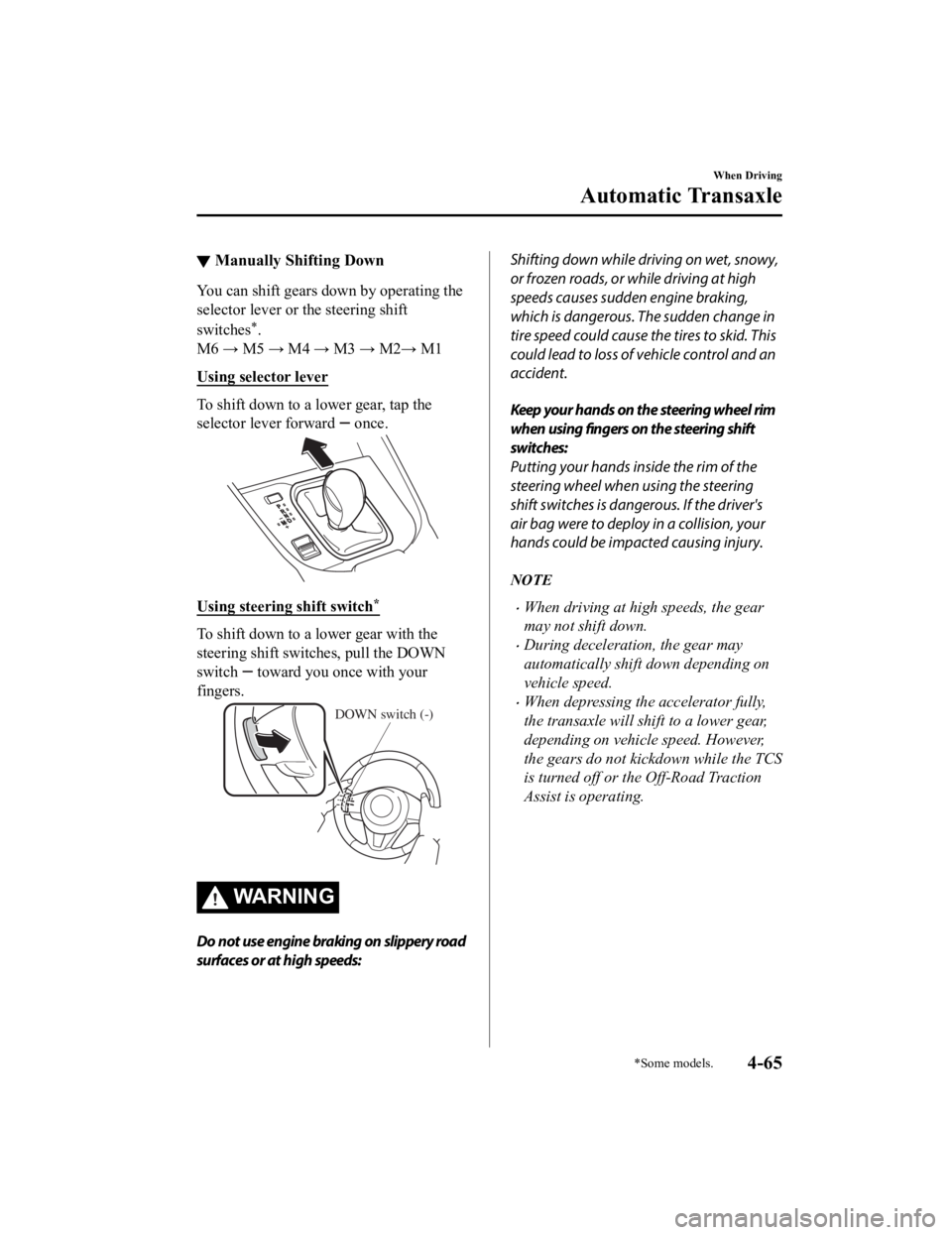
To shift down to a lower gear, tap the
selector lever forward
once.
Using steering shift switch*
To shift down to a lower gear with the
steering shift switches, pull the DOWN
switch
toward you once with your
fingers.
DOWN switch (-)
WA R N I N G
Do not use engine braking on slippery road
surfaces or at high speeds:
Shifting down while driving on wet, snowy,
or frozen roads, or while driving at high
speeds causes sudden engine braking,
which is dangerous. The sudden change in
tire speed could cause the tires to skid. This
could lead to loss of vehicle control and an
accident.
Keep your hands on the steering wheel rim
when using fingers on the steering shift
switches:
Putting your hands inside the rim of the
steering wheel when using the steering
shift switches is dangerous. If the driver's
air bag were to deploy in a collision, your
hands could be impacted causing injury.
NOTE
When driving at high speeds, the gear
may not shift down.
During deceleration, the gear may
automatically shift down depending on
vehicle speed.
When depressing th e accelerator fully,
the transaxle will shift to a lower gear,
depending on vehicle speed. However,
the gears do not kickdown while the TCS
is turned off or the Off-Road Traction
Assist is operating.
When Driving
Automatic Transaxle
*Some models.4-65
CX-9_8LJ2-EA-22H_Edition1_old 2022-6-9 13:33:08
Page 249 of 739

▼Windshield Wiper De-icer*
The thermal filaments at the following
positions heat up and facilitate the removal
of snow accumulated on the windshield.
The windshield wiper de-icer operates in
conjunction with the rear window
defogger.
To turn on the windshield wiper de-icer,
switch the ignition O
N and press the rear
window defogger switch (page 4-83).
Indicator light
Horn
To sound the horn, press the mark on
the steering wheel.
When Driving
Switches and Controls
4-84*Some models.
CX-9_8LJ2-EA-22H_Edition1_old 2022-6-9 13:33:08
Page 263 of 739

AUTOHOLD
The AUTOHOLD function automatically holds the vehicle stopped, even if you take your
foot off the brake pedal. This function can be best used while stopped in traffic or at a traffic
light. The brakes are released when you start driving the vehic le.
WA R N I N G
Do not rely completely on the AUTOHOLD function:
The AUTOHOLD function is only designed to assist the brake operation while the vehicle is
stopped. Neglecting to operate the brakes and relying only on the AUTOHOLD system is
dangerous and could result in an unexpected a ccident if the vehicle were to suddenly move.
Operate the brakes appropriatel y in accordance with the road and surrounding conditions.
Note that the vehicle may move suddenly depending on the vehicle's load or if it is towing
something.
Do not release your foot from the brake pedal while the vehicle is stopped on a steep grade:
Because there is a possibility of the vehicle not being held in the stopped position by the
AUTOHOLD function, the vehicle may move un expectedly and result in an accident.
Do not use the AUTOHOLD function on slippery roads such as icy or snow-covered roads, or
unpaved roads:
Even if the vehicle is held in the stopped posi tion by the AUTOHOLD function, the vehicle may
move unexpectedly and result in an accident . Operate the accelerator pedal, brakes, or
steering wheel approp riately as necessary.
Immediately depress the brake pedal in the following cases:
Because the AUTOHOLD function is canceled forcibly, the vehicle may move unexpectedly
and result in an accident.
The brake pedal operation demand warning light (red)
flashes and the warning sound is
activated at the same time.
(Red)
[Brake Hold Unavailable Depress Brake to Hold Position] is displayed in the
multi-information display and the warning sound is activated at the same time.
When Driving
Brake
4-98
CX-9_8LJ2-EA-22H_Edition1_old 2022-6-9 13:33:08