light MAZDA CX90 2024 Owners Manual
[x] Cancel search | Manufacturer: MAZDA, Model Year: 2024, Model line: CX90, Model: MAZDA CX90 2024Pages: 687, PDF Size: 15.46 MB
Page 436 of 687
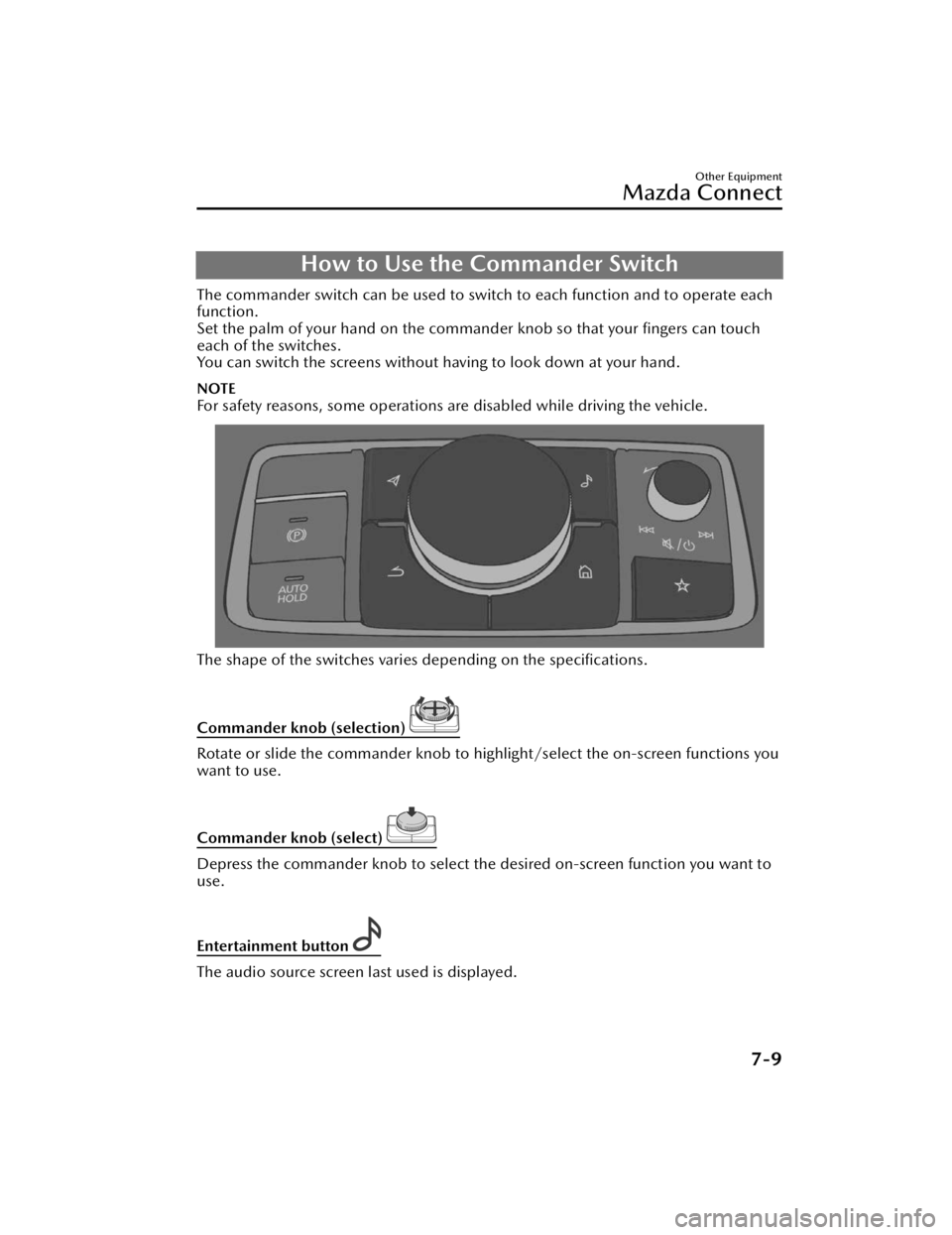
How to Use the Commander Switch
The commander switch can be used to switch to each function and to operate each
function.
Set the palm of your hand on the commander knob so that your fingers can touch
each of the switches.
You can switch the screens without ha ving to look down at your hand.
NOTE
For safety reasons, some operations are disabled while driving the vehicle.
The shape of the switches varies depending on the specifications.
Commander knob (selection)
Rotate or slide the commander knob to highlight/select the on-screen functions you
want to use.
Commander knob (select)
Depress the commander knob to select the desired on-screen function you want to
use.
Entertainment button
The audio source screen last used is displayed.
Other Equipment
Mazda Connect
7-9
CX-90_8KG7-EA-22L_Edition1_new 2022-11-17 16:05:04
Page 438 of 687

Slide the volume knob right to skip to the next track or slide it to the left to go back
to the previous track. You can also slide and hold the volume knob to fast forward or
rewind the track.
Favorites button
Displays the favorites screen.
Press and hold to register AM/FM/SiriusXM®* stations, contacts, navigation
destinations, or any highlighted menu item s to create easily accessible shortcuts.
Home button
Displays the home screen.
(While Apple CarPlay™ or Android Auto™ is displayed)
Displays the Apple CarPlay™ or Android Auto™ home screen.
(While Apple CarPlay™ or Android Auto™ is connected)
Press and hold while the Mazda Connect screen is displayed to switch the screen
from Mazda Connect to Apple CarPlay™ or Mazda Connect to Android Auto™. In
addition, press and hold while the Apple CarPlay™ or Android Auto™ screen is
displayed to switch to the Mazda Connect screen.
Back button
Returns to previous screen.
Map button
Displays the navigation screen (vehicles with navigation system).
In order for the navigation system to func tion, the SD card for the navigation system
is required.
If the SD card for the navigation system is not inserted, the compass indicating the
direction in which the vehicle is moving is displayed.
For the navigation system operation, refer to the navigation system manual.
(During Apple CarPlay™ or Android Auto™ route guidance)
Displays the Apple CarPlay™ or Android Auto™ map screen.
Other Equipment
Mazda Connect
*Some models.7-11
CX-90_8KG7-EA-22L_Edition1_new 2022-11-17 16:05:04
Page 443 of 687
Ending voice recognition
Do any one of the following operations:
Press the hang-up button.Press and hold the talk/Pick-up button.Say the word, “Cancel”.
Convenient operating tips for using the voice recognition function
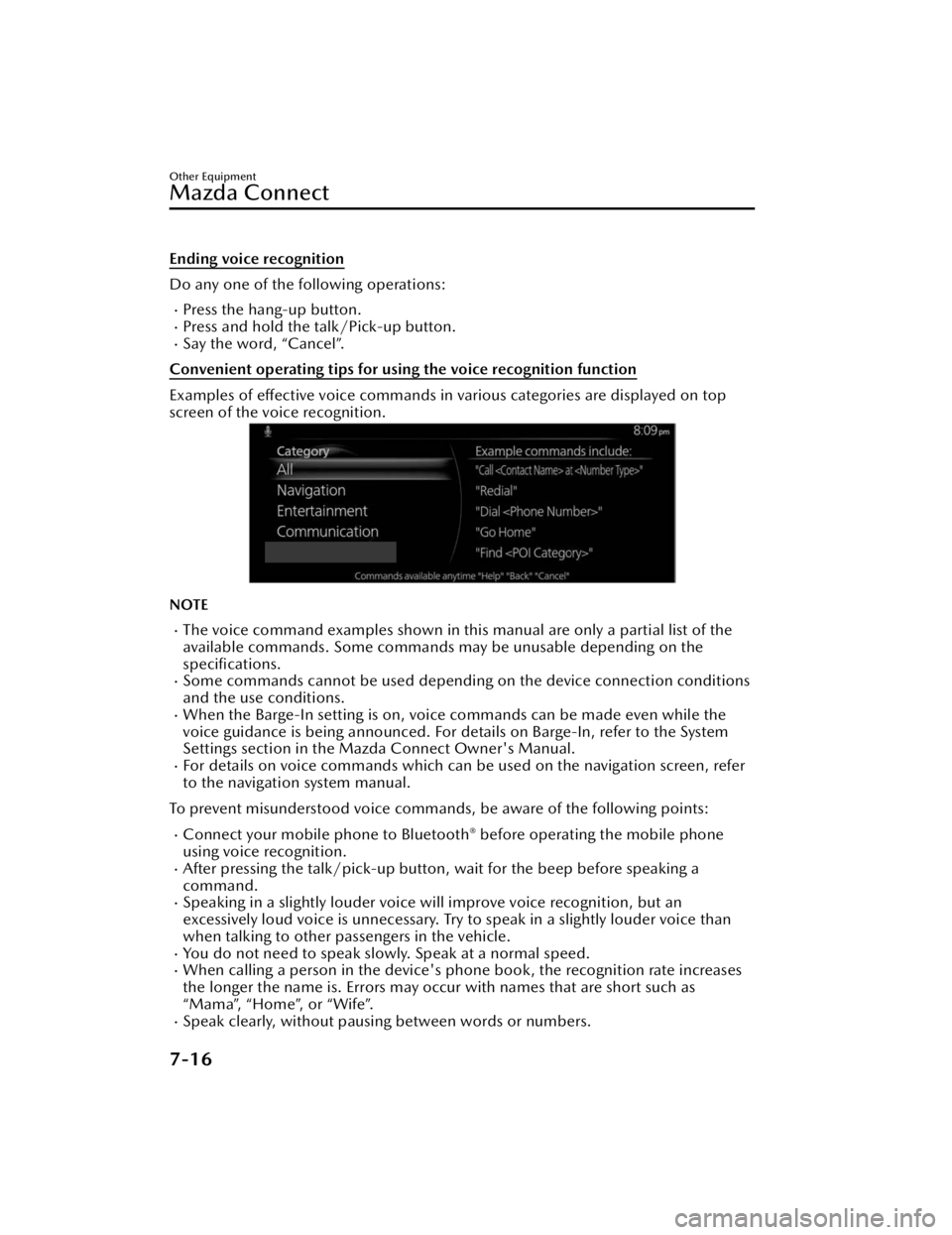
Examples of effective voice commands in various categories are displayed on top
screen of the voice recognition.
NOTE
The voice command examples shown in this manual are only a partial list of the
available commands. Some commands ma y be unusable depending on the
specifications.
Some commands cannot be used depending on the device connection conditions
and the use conditions.
When the Barge-In setting is on, voice commands can be made even while the
voice guidance is being announced. For details on Barge-In, refer to the System
Settings section in the Ma zda Connect Owner's Manual.
For details on voice commands which can be used on the navigation screen, refer
to the navigation system manual.
To prevent misunderstood voice commands, be aware of the following points:
Connect your mobile phone to Bluetooth® before operating the mobile phone
using voice recognition.
After pressing the talk/pick-up button, wait for the beep before speaking a
command.
Speaking in a slightly louder voice will improve voice recognition, but an
excessively loud voice is unnecessary. Try to speak in a slightly louder voice than
when talking to other passengers in the vehicle.
You do not need to speak slow ly. Speak at a normal speed.When calling a person in the device's phone book, the recognition rate increases
the longer the name is. Errors may occur with names that are short such as
“Mama”, “Home”, or “Wife”.
Speak clearly, without pausing between words or numbers.
Other Equipment
Mazda Connect
7-16
CX-90_8KG7-EA-22L_Edition1_new 2022-11-17 16:05:04
Page 453 of 687

registered trademarks or trademarks of iBiquity Digital Corporation in the United
States and/or other countries.
iPhone, iPod touch, iPod nano, Siri and Lightning are trademarks of Apple Inc.,
registered in the U.S. and other countries.
Apple CarPlay is a trademark of Apple Inc.Use of the Apple CarPlay logo means that a vehicle user interface meets Apple
performance standards. Apple is not responsible for the operation of this vehicle
or its compliance with safety and regulatory standards. Please note that the use of
this product with iPhone, iPod may affect wireless performance.
iOS is a trademark or registered trademark of Cisco in the U.S. and other countries
and is used under license.
“Made for iPhone” and “Made for iPod” mean that an accessory has been
designed to connect
specifically to iPhone or iPod, and has been
certified by the
developer to meet Apple performance standards. Apple is not responsible for the
operation of this device or its compliance with safety and regulatory standards.
Please note that the use of this accessory with iPhone or iPod may affect wireless
performance.
Made for
iPhone 11 Pro Max
iPhone 11 Pro
iPhone 11
iPhone XS Max
iPhone XS
iPhone XR
iPhone X
iPhone 8 Plus
iPhone 8
iPhone 7 Plus
iPhone 7
iPhone SE
iPhone 6s Plus
iPhone 6s
iPhone 6 Plus
iPhone 6
iPhone 5s
iPod touch (7th Generation)
Other Equipment
Mazda Connect
7-26
CX-90_8KG7-EA-22L_Edition1_new 2022-11-17 16:05:04
Page 456 of 687
Warning and Cautions forUsing the StorageCompartments
WARNING
When loading cargo, make sure that it
is completely secured.
If the cargo is not completely secured,
it may move or collapse while driving
or during sudden braking, resulting in
injury or an accident.
CAUTION
Always close the covers for storage
such as the glove compartment
when the vehicle is being driven.
Open storage boxes and their
contents may cause injury during
sudden braking or if the vehicle is
involved in a collision.
Be careful when storing items in
uncovered storage spaces. If an item
is ejected from the storage space
during sudden braking ,
maneuvering , or acceleration it
could lead to an accident.
Do not leave lighters or eyeglasses in
the storage boxes while parked
under the sun. A lighter could
explode or the plastic material in
eyeglasses could deform and crack
from high temperature.
Other Equipment
Storage Compartments
7-29
CX-90_8KG7-EA-22L_Edition1_new 2022-11-17 16:05:04
Page 466 of 687

How to Use the Sunvisor
When blocking light from the front
When blocking light from the side
Unhook the sunvisor and swing it to
the side.
The visor extender extends the
sunvisor's range of sun shading.
To u s e , p u l l i t o u t .
CAUTION
When moving the sunvisor, retract the
visor extender to its original position.
Otherwise, the visor extender could hit
the rearview mirror.
Other Equipment
Sunvisor
7-39
CX-90_8KG7-EA-22L_Edition1_new 2022-11-17 16:05:04
Page 467 of 687

How to Use the VanityMirrors
1. Vanity mirror light*
2. Lighting range
3. Off range
For vehicles with a light, it turns on
when the cover is opened.
The light turns on only when the
sunvisor angle is within the lighting
range.
NOTE
If a vanity mirror light is left on with
the vehicle power switched OFF, the
light is turned off automatically to
prevent the lead-acid battery from
being discharged.
The vanity mirror light can be turned
on again by doing any of the
following operations:
Opening/closing any door.Unlocking any door.Switching the vehicle power to
ACC or ON.
Switching an overhead light/front
map light on.
Other Equipment
Va n i t y M i r r o r
7-40*Some models.
CX-90_8KG7-EA-22L_Edition1_new 2022-11-17 16:05:04
Page 468 of 687

Illuminated Entry System
The interior lights turn on/off in
conjunction with the opening/closing
of the doors and the position of the
vehicle power (ON/OFF).
How to Use the
Illuminated Entry System
The overhead lights turn on when any
of the following operations is done
with the overhead light switch in the
DOOR-linked position.
The driver's door is unlocked with
the vehicle power switched OFF.
The vehicle power is switched OFF
with all doors closed.
The overhead lights turns off when any
of the following operations is done.
The driver's door is locked.The vehicle power is switched ON.
When the vehicle power is switched
OFF and the interior lights remain on,
they turn off after a certain period of
time has passed.
NOTE
The amount of time until the
illuminated entry system turns off can
be changed.
Refer to Mazda Connect Owner's
Manual or consult an Authorized
Mazda Dealer.
The illuminated entry system does
not operate when the overhead
lights are turned on by operating the
overhead light ON/OFF switch.
Other Equipment
Interior Lights
7-41
CX-90_8KG7-EA-22L_Edition1_new 2022-11-17 16:05:04
Page 469 of 687

How to Use the
Overhead Lights
Front
The overhead lights turn on.
Press the
switch again to turn off
the overhead lights.
When the door interlock is ON
The indicator light in the switch
turns off.
The lights turn on when any of the
doors is opened.
The light turns on/off depending on
the illumination entry system.
When the door interlock is OFF
The indicator light in the switch turns
on.
Center
The center overhead lights also turns
on/off in conjunction with the
operation of the front overhead lights.
Ty p e A
Ty p e B
Rear
The rear overhead lights also turns
on/off in conjunction with the
operation of the front overhead lights.
Other Equipment
Interior Lights
7-42
CX-90_8KG7-EA-22L_Edition1_new 2022-11-17 16:05:04
Page 470 of 687

How to Use the MapLights
Front
The map light turns on.
Press the switch again to turn off the
map lights.
Rear
Ty p e A
Ty p e B
The map light turns on.
Press the switch again to turn off the
map lights.
NOTE
Pressing the switch does not turn the
lights off in any of the following
cases.
When the light is turned on by
operating an overhead light
switch.When the illuminated entry system
is operating.
(Rear)
Once the rear map lights have been
turned off, they will turn
on/off in
conjunction with the operation of an
overhead light switch.
Other Equipment
Interior Lights
7-43
CX-90_8KG7-EA-22L_Edition1_new 2022-11-17 16:05:04