warning MAZDA CX90 2024 Owners Manual
[x] Cancel search | Manufacturer: MAZDA, Model Year: 2024, Model line: CX90, Model: MAZDA CX90 2024Pages: 687, PDF Size: 15.46 MB
Page 307 of 687

How to Use the DriverAttention Alert (DAA)
Operating the DAA
If all of the following conditions are
met, the screen display and warning
sound notify the driver that his/her
attention level has decreased.
The system has completed learning
of the driver’s driving data.
The system detects white (yellow)
lane lines.
One hour has passed since the driver
began driving.
The vehicle speed is about 65 km/h
to 140 km/h (41 mph to 86 mph).
The system detects driver fatigue or
decreased attentiveness
1. “Time for a Break”
NOTE
The DAA does not operate if any of
the following conditions is met.
The vehicle is making a sharp turn.The vehicle is changing lanes.The DAA may not operate normally if
any of the following conditions is
met.
The visibility of white (yellow) lane
lines is poor.
The vehicle is jolted or swayed
continuously by strong winds or
rough roads.
The DAA detects driver fatigue and
decreased attentiveness based on
the driving data when driving the
vehicle at a vehicle speed between
about 65 km/h and about 140
km/h (41 to 86 mph) for about 20
minutes. The learned driving data is
reset when any of the following
conditions is met.
The vehicle is stopped for 15
minutes or longer.
The vehicle is driven at less than
about 65 km/h (41 mph) for
about 30 minutes.
The vehicle power is switched OFF.After the DAA has displayed the first
message encouraging rest, it does
not display the next one until 60
minutes have passed.
Turning off the DAA
Tu r n off the DAA using Mazda
Connect.
Refer to the Settings section in the
Mazda Connect Owner's Manual.
Driving
Driver Attention Alert (DAA)
5-156
CX-90_8KG7-EA-22L_Edition1_new 2022-11-17 16:05:04
Page 308 of 687

Driver Monitoring (DM)*
The DM is a system that detects
dangerous conditions and behavior of
the driver and notifies the driver of
possible danger.
The DM has two detection functions.
Drowsiness detection function
The drowsiness detection function
detects the level of driver drowsiness.
When the driver drowsiness is
detected, the screen display and
warning sound encourage the driver to
take a rest.
There are 2 levels of screen display and
warning sound.
Warning pattern (caution)
When driver drowsiness is detected,
taking a rest is encouraged.
Warning pattern (warning)
If a higher level of driver drowsiness is
detected, taking a rest is encouraged.
Inattentive driving detection function
The inattentive driving detection
function detects that the driver is not
paying attention to the road. When the
system detects that the driver is not
paying attention to the road, it alerts
the driver with a screen display and a
warning sound.
Driving
Driver Monitoring (DM)
*Some models.5-157
CX-90_8KG7-EA-22L_Edition1_new 2022-11-17 16:05:04
Page 309 of 687

Warnings and Cautionsfor Using the DriverMonitoring (DM)
WARNING
Do not rely completely on the DM.
The DM does not prevent driver
drowsiness or inattentive driving and
over reliance on the system could lead
to an accident. Drive carefully and turn
the steering wheel appropriately.
In addition, the system may not be
able to correctly detect driver
drowsiness or inattentive driving
depending on the road and driving
conditions. The driver must take
sufficient rest in consideration of safe
driving.
How to Use the Driver
Monitoring (DM)
Operating the drowsiness detection
function
The drowsiness detection function
operates when all of the following
conditions are met.
The vehicle has been driven for
about 20 minutes or longer.
The vehicle speed is about 5 km/h
(3 mph) or faster.
The system detects driver
drowsiness.
When the drowsiness detection
function operates, the screen display
and warning sound encourage the
driver to take a rest.
Warning pattern (caution) (white)
1. “Time for a Break”
Warning pattern (warning) (amber)
1. “Time for a Break”
NOTE
After the drowsiness detection
function has displayed the first
message encouraging the driver to
take a rest, it does not display it
again during the following periods.
Driving
Driver Monitoring (DM)
5-158
CX-90_8KG7-EA-22L_Edition1_new 2022-11-17 16:05:04
Page 310 of 687

After displaying the warning
pattern (caution), the next warning
pattern (caution) is not displayed
until 45 minutes have passed.
After displaying the warning
pattern (warning), the next
warning pattern (warning) is not
displayed until 15 minutes have
passed.
After displaying the warning
pattern (warning), the next
warning pattern (caution) is not
displayed until 45 minutes have
passed.
If the driver monitoring camera does
not recognize the driver correctly, the
drowsiness detection function may
not operate normally.
Refer to Driver Monitoring Camera
on page 5-139.
The drowsiness detection function
may not operate normally if any of
the following conditions is met.
You are looking down.You are squinting or closing your
eyes.
One eye is closed.You are laughing.
Operating the inattentive driving
detection function
The inattentive driving detection
function operates when all of the
following conditions are met.
The vehicle speed is about 30 km/h
(19 mph) or faster.
The system detects inattentive
driving.
When the inattentive driving detection
function operates, the screen display
and warning sound alerts the driver.
1. “Distracted Driver Detected”
NOTE
If the driver monitoring camera does
not recognize the driver correctly, the
inattentive driving detection function
may not operate normally.
Refer to Driver Monitoring Camera
on page 5-139.
The inattentive driving detection
function may not operate normally if
any of the followi ng conditions is
met.
Your line of sight moves or directly
after it stops moving
There is a large difference between
your line of sight and the direction
your face is pointed.
Your face or your eyes frequently
turn in a direction other than
straight ahead.
You are driving the vehicle with
your head largely tilted to one side.
You are moving around extensively.
Turning off the DM
The DM can be turned off using the
Mazda Connect.
Refer to the Settings section in the
Mazda Connect Owner's Manual.
Driving
Driver Monitoring (DM)
5-159
CX-90_8KG7-EA-22L_Edition1_new 2022-11-17 16:05:04
Page 311 of 687

Front Cross Traffic Alert(FCTA)
*
The FCTA assists the driver in checking
both sides of the vehicle when the
vehicle starts to drive at an
intersection. When a vehicle
approaching from the blind spots on
the front left or right side is detected, a
screen display and warning sound
notify the driver of the danger.
Warnings and Cautions
for Using the Front Cross Tra ffi c Alert (FCTA)
WARNING
Always check the surrounding area
visually when the vehicle starts to
drive at an intersection.
Due to certain limitations with the
operation of the FCTA, the screen
display and warning sound might be
delayed even though there is a vehicle
approaching from a blind spot. Always
make it your responsibility as a driver
to check the left and right sides.
Driving
Front Cross
Tra ffi c Alert (FCTA)
5-160*Some models.
CX-90_8KG7-EA-22L_Edition1_new
2022-11-17 16:05:04
Page 312 of 687
How to Use the Front
Cross Traffic Alert (FCTA)
Operating the FCTA
The FCTA operates when all of the
following conditions are met.
The vehicle speed is less than about
10 km/h (6 mph).
The selector lever is in the D
position.
The system detects a vehicle
approaching at a speed of about 5
km/h (3 mph) or faster from the
front side of your vehicle.
When the FCTA is operating, the driver
is notified of the danger by the screen
display and the warning sound
according to the situation.
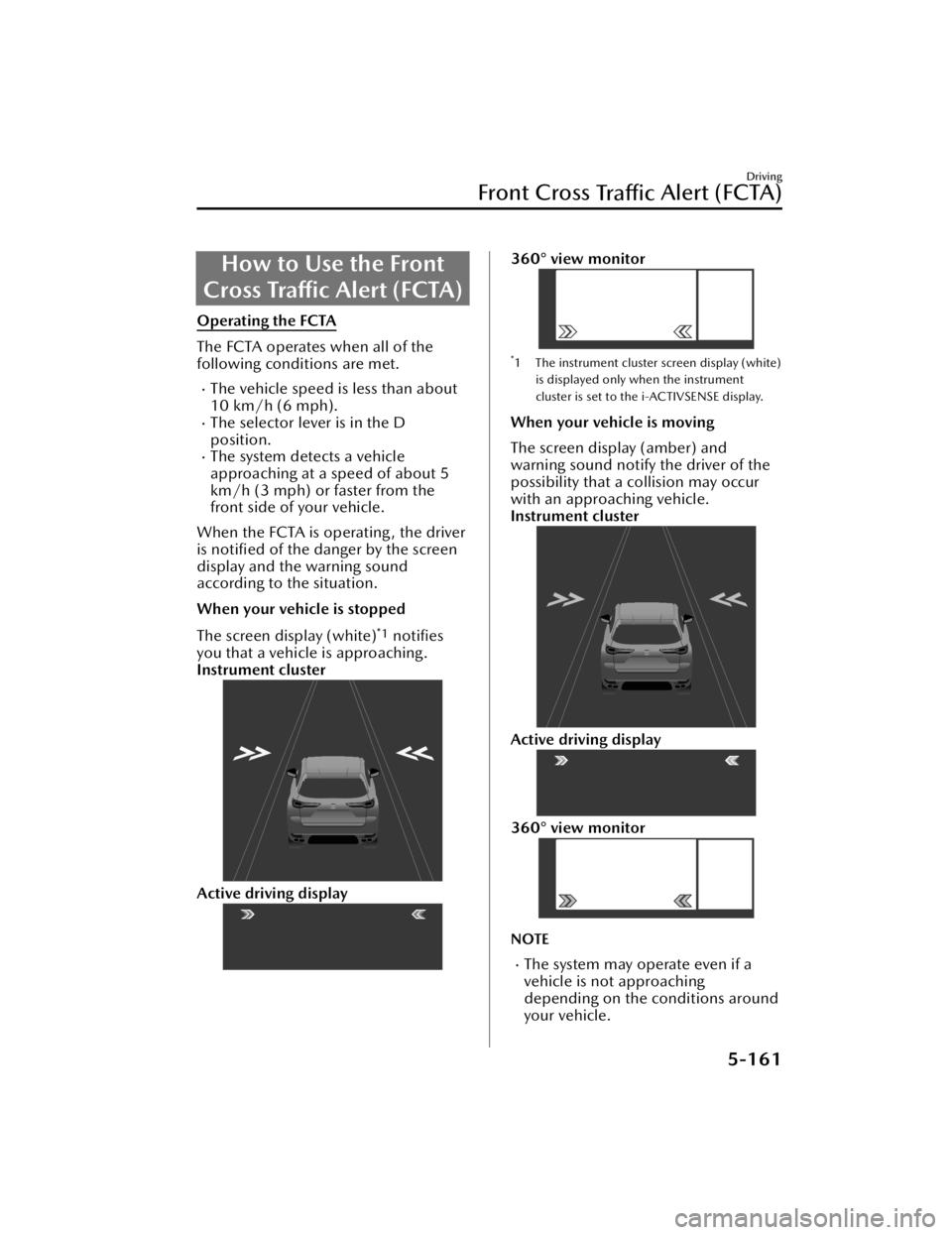
When your vehicle is stopped
The screen display (white)
*1 notifies
you that a vehicle is approaching.
Instrument cluster
Active driving display
360° view monitor
*1 The instrument cluster screen display (white)
is displayed only when the instrument
cluster is set to the i-ACTIVSENSE display.
When your vehicle is moving
The screen display (amber) and
warning sound notify the driver of the
possibility that a collision may occur
with an approaching vehicle.
Instrument cluster
Active driving display
360° view monitor
NOTE
The system may operate even if a
vehicle is not approaching
depending on the conditions around
your vehicle.
Driving
Front Cross Tra ffi c Alert (FCTA)
5-161
CX-90_8KG7-EA-22L_Edition1_new
2022-11-17 16:05:04
Page 314 of 687

Rear Cross Traffic Alert(RCTA)
*
The RCTA assists the driver in checking
the area to the rear of the vehicle, such
as while reversing out of a parking
space. When a vehicle approaching
from the rear on the left or right is
detected, various screen displays and
warning sounds notify the driver of the
danger.
Warnings and Cautions
for Using the Rear Cross Tra ffi c Alert (RCTA)
WARNING
Do not rely completely on the RCTA.
The RCTA is a system to assist the
driver in checking the area to the rear
of the vehicle while reversing. Due to
certain limitations with the operation
of the system, the BSM warning light
may not
flash or it might be delayed
even though a vehicle is at the rear of
your vehicle. Always make it your
responsibility as a driver to check the
rear.
Driving
Rear Cross Tra ffi c Alert (RCTA)
*Some models.5-163
CX-90_8KG7-EA-22L_Edition1_new
2022-11-17 16:05:04
Page 315 of 687

How to Use the Rear
Cross Traffic Alert (RCTA)
Operating the RCTA
The RCTA operates when all of the
following conditions are met.
The vehicle is about to be driven in
reverse.
The system detects an approaching
vehicle.
When the RCTA operates, the driver is
notified of the danger by flashing of
the BSM warning lights, a warning
indication, and a warning sound.
NOTE
The system may operate even if a
vehicle is not approaching
depending on the conditions around
your vehicle.
The RCTA may not operate normally
if any of the following conditions is
met.
The rear side radar sensors cannot
detect an object.
Refer to Radar Sensors on page
5-131.
The vehicle speed when reversing
is about 15 km/h (9 mph) or
faster.
A vehicle is approaching directly
from the rear of your vehicle.
A vehicle is approaching at an
angle from the rear of your vehicle.
If a Mazda genuine trailer hitch is
used, the RCTA is automatically
turned off when the trailer's
electrical connector is connected.
When pulling a trailer other than
with a Mazda genuine trailer hitch,
or while an accessory such as a
bicycle carrier is installed to the rear
of the vehicle, turn off the RCTA.
Otherwise, the radar’s radio waves
will be blocked causing the RCTA to
not operate normally.
The brightness of the BSM warning
lights is linked to the panel light
control.
Refer to Dashboard Illumination on
page 5-35.
Turning off the RCTA
There are 2 ways to turn off the RCTA.
Turn off the RCTA using Mazda
Connect.
Refer to the Settings section in the
Mazda Connect Owner's Manual.
Turn off the RCTA using the
i-ACTIVSENSE OFF switch.
Refer to How to Use the
i-ACTIVSENSE OFF switch on page
5-126.
Driving
Rear Cross Tra ffi c Alert (RCTA)
5-164
CX-90_8KG7-EA-22L_Edition1_new
2022-11-17 16:05:04
Page 316 of 687
Mazda Radar CruiseControl (MRCC)
*
MRCC is a system that reduces load on
the driver through constant speed and
headway control. The function
performs headway control to maintain
the distance with a vehicle ahead at a
constant preset speed without you
having to depress the accelerator or
brake pedal.
Warnings and Cautionsfor Using the Mazda
Radar Cruise Control
(MRCC)
WARNING
Do not rely completely on the MRCC.
The MRCC may not be able to detect a
vehicle ahead depending on the type
of vehicle ahead and its conditions, the
weather conditions, and the road
conditions. Additionally, the system
might be unable to decelerate
sufficiently if the vehicle ahead applies
the brakes suddenly or another vehicle
cuts into your lane, which could result
in an accident.
Always check the surrounding
conditions and depress the brake
pedal or accelerator pedal while
keeping a safe distance from a vehicle
ahead or a vehicle following behind
you.
Do not use the MRCC under the
following conditions. Otherwise, it
may result in an accident.
The vehicle is driven on roads other
than highways.
The vehicle is driven on roads with
sharp curves or with heavy traffic
where sufficient distances between
vehicles cannot be kept.
The vehicle is driven on roads where
acceleration and deceleration are
frequently repeated.
The vehicle is exiting the main lane
on an expressway to enter an
interchange, a rest area, or a parking
area.
Driving
Mazda Radar Cruise Control (MRCC)
*Some models.5-165
CX-90_8KG7-EA-22L_Edition1_new 2022-11-17 16:05:04
Page 324 of 687

NOTE
The distance-between-vehicles can be set to 4 levels: Long, medium, short, and
extremely short distance.
The distance-between-vehicles differs depending on the vehicle speed, and the
slower the vehicle speed, the shorter the distance.
Close proximity warning
If your vehicle approaches a vehicle ahead while in headway control, a warning
sound and a display cautions you.
1. “Depress Brake Pedal”
NOTE
The close proximity warning may not be activated in the following cases.
The vehicle is driven at the same speed as the vehicle ahead.Directly after the MRCC is set.Immediately after the accelerator pedal is released.Another vehicle cuts into the driving lane.Do not use the MRCC under conditions in which the close proximity warnings are
frequently activated.
The MRCC is canceled temporarily
If any of the following conditions is met, the MRCC is canceled temporarily.
The brake pedal is depressed.The CANCEL switch is pressed one time.The DSC has operated.The Smart Brake Support (SBS) has operated.The front radar sensors cannot detect target objects.The parking brake is applied.Any door is opened.The driver’s seat belt is unfastened.The frequency of the braking operation by the MRCC is high.
If the MRCC is temporarily canceled, it will resume operation at the previously set
speed by pressing the RES switch.
Driving
Mazda Radar Cruise Control (MRCC)
5-173
CX-90_8KG7-EA-22L_Edition1_new 2022-11-17 16:05:04