audio MAZDA CX90 2024 User Guide
[x] Cancel search | Manufacturer: MAZDA, Model Year: 2024, Model line: CX90, Model: MAZDA CX90 2024Pages: 687, PDF Size: 15.46 MB
Page 442 of 687
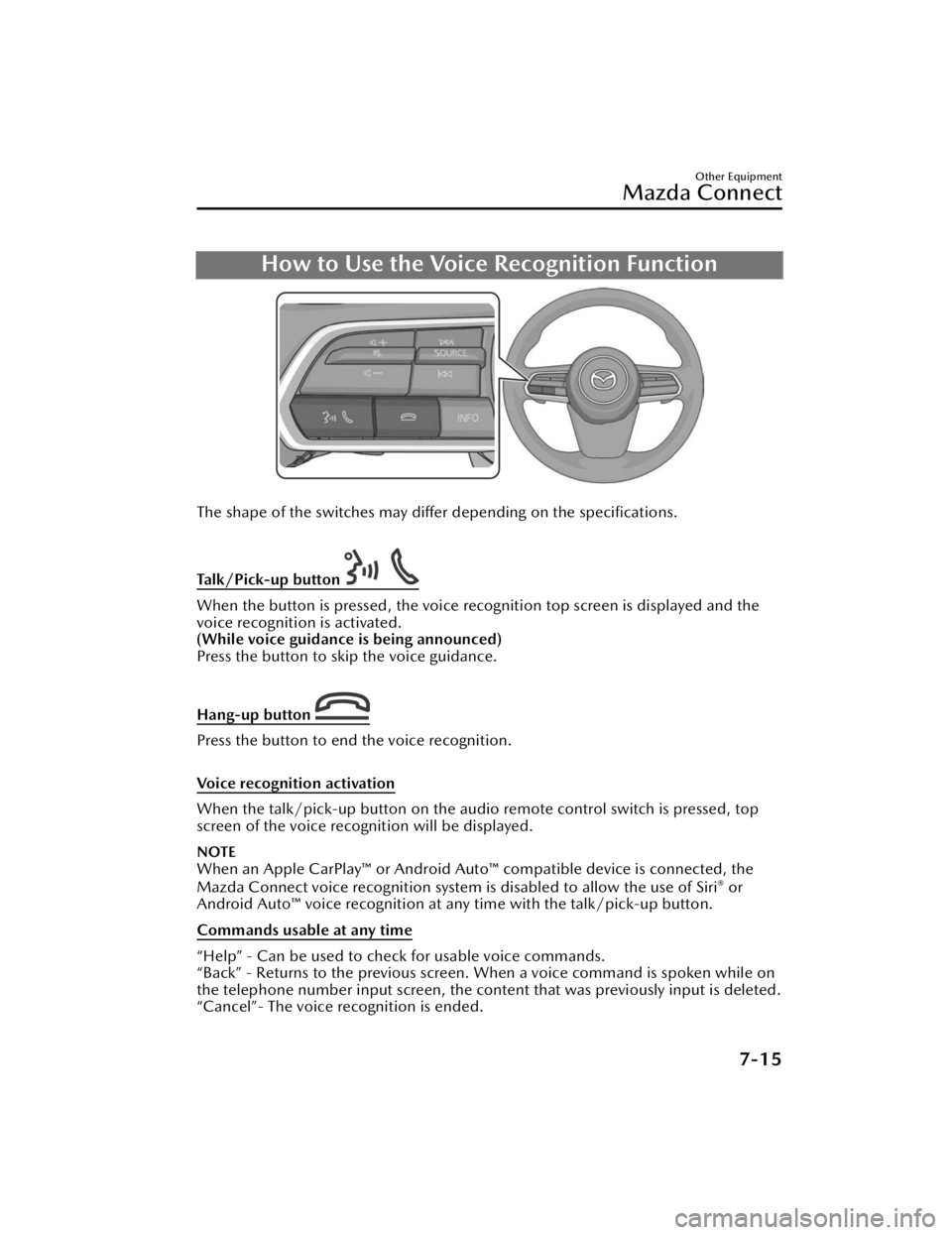
How to Use the Voice Recognition Function
The shape of the switches may differ depending on the specifications.
Talk/Pick-up button
When the button is pressed, the voice recognition top screen is displayed and the
voice recognition is activated.
(While voice guidance is being announced)
Press the button to skip the voice guidance.
Hang-up button
Press the button to end the voice recognition.
Voice recognition activation
When the talk/pick-up button on the audio remote control switch is pressed, top
screen of the voice recognition will be displayed.
NOTE
When an Apple CarPlay™ or Android Auto ™ compatible device is connected, the
Mazda Connect voice recognition system is disabled to allow the use of Siri® or
Android Auto™ voice recognition at an y time with the talk/pick-up button.
Commands usable at any time
“Help” - Can be used to check for usable voice commands.
“Back” - Returns to the previous screen. When a voice command is spoken while on
the telephone number input screen, the content that was previously input is deleted.
“Cancel”- The voice recognition is ended.
Other Equipment
Mazda Connect
7-15
CX-90_8KG7-EA-22L_Edition1_new 2022-11-17 16:05:04
Page 444 of 687

Voice commands other than those specified, cannot be recognized. Speak in the
wording specified by the voice commands.
It is not necessary to face the microphone or approach it. Speak the voice
commands while maintaining a safe driving position.
Close the windows and the moonroof*/panorama sunroof* to reduce loud noises
from outside the vehicle and to prevent th e airflow of the air-conditioning system
from being a disturbance when using Bluetooth
® Hands-Free.Make sure that the air flow from the air conditioner is not blowing on the
microphone.
If the voice recognition is poor with th e guidance volume set to high, set the
Barge-In to OFF.
Examples of available voice commands
The specified name and number are put into the {}.
Common
BackHelp (You can listen to help guidance at each screen.){Line Number} (You can select the line number on the screen.)Next PagePrevious PageCancel
Menu
AllNavigationEntertainmentCommunication
Setting
Voice Recognition SettingsDisplay Off
Music
Play Artist (You can also use “Play Artist {Artist name}”.)Play Album (You can also us e “Play Album {Album Name}”.)Play Playlist (You can also use “Play Playlist {Playlist Name}”.)Play Song (You can also use “Play Song {Song Name}”.)Play Audiobook (You can also use “Play Audiobook {Audiobook Name}”.)Play Podcast (You can also use “Play Podcast {Podcast Name}”.)
Radio
Tu n e t o { F re q u e n c y } A MTu n e t o { F re q u e n c y } F MTune to {Frequency} HD {Sub Channel}SiriusXM Channel {Channel Number}
Other Equipment
Mazda Connect
*Some models.7-17
CX-90_8KG7-EA-22L_Edition1_new 2022-11-17 16:05:04
Page 445 of 687

SiriusXM {Station Name}SiriusXM Genre (You can also use “SiriusXM {Genre Name}”.)
Source
Change Source (You can also use “Change Source to USB”*1 and “USB”*1.)Audio OFF (You can also use “Change Source to Audio OFF”.)
Phone
Dial Phone Number (You can al so use “Dial {Phone Number}”.)Call HistoryCall a Contact (You can also use “Call {Contact Name}” and “Call {Contact Name}
at {Number Type}”.)
Redial
*1 Audio source names ot her than “USB” can also be used as follows:
Bluetooth/AM/FM/SiriusXM/Pandora/USB1 Audio/USB2 Audio/USB1 Video/
USB2 Video
Other Equipment
Mazda Connect
7-18
CX-90_8KG7-EA-22L_Edition1_new 2022-11-17 16:05:04
Page 448 of 687

Appendix
Gracenote® Database
When connecting a USB audio device or Bluetooth® audio device to this unit and
playing audio, the unit searches the database stored in the vehicle for the album art.
If there is a match in the vehicle's database compilation to the music being played,
the album art is displayed. The database information stored in this device uses
database information in the Gracenote
® music recognitions service.
SiriusXM Travel Link
®*
CAUTION
ADVISORY ONLY
The weather information is subject to service interruptions and may contain errors or
inaccuracies and consequently should not be relied upon exclusively. You are urged
to check alternate weather information sources prior to making safety related
decisions. You acknowledge and agree that you shall be solely responsible for use of
the information and all decisions taken with respect thereto. By using this weather
service, you release and waive any claims against Sirius XM Radio Inc. and Mazda
Motor Corporation and all of their respective affiliates with regard to this service.
SiriusXM
® Satellite Radio*
Products/applications shall display “Call [Appropriate Phone Number] to Enable
Services” for any unsubscribed SiriusXM Data Service(s).
This shall be shown on the same screen as the Radio ID and the service subscription
status:
Contact your SiriusXM Representative for the appropriate call center phone number.
U.S.A.: 1-877-447-0011Canada: 1-877-438-9677
SiriusXM
® All Access Subscription
Hopefully, you're already loving SiriusXM in your new Mazda. But don't stop there
— you can also listen on the app and online. All Access is the very best subscription
package – with the most channels and the most flexibility. With All Access, you get
every channel available on your vehicle, plus you can listen on the app, online, and
in your home on a variety of connected devices. — so you can enjoy SiriusXM
wherever you are. Here's what's included:
Over 150 satellite channels to enjoy in your car, coast-to-coast, 24/7.All kinds of commercial-free music, plus every major sport, world-class news and
the biggest names in talk & entertainment.
Other Equipment
Mazda Connect
*Some models.7-21
CX-90_8KG7-EA-22L_Edition1_new 2022-11-17 16:05:04
Page 449 of 687

All of our premium programming, including Howard Stern, every NFL, MLB®, and
NBA game, NHL® games, every NASCAR® race, 24/7 talk channels dedicated to
the biggest leagues, and much more.
All SiriusXM services require a subscription, sold separately or as a package by
SiriusXM Radio Inc. (or, in Canada, SiriusXM Canada Inc.), after any trial
subscription which may be included with your vehicle purchase or lease. To
subscribe after your trial subscrip tion, call 1-877-447-0011 (U.S.A.) or
1-877-438-9677 (Canada).
CAUTION
It is prohibited to copy, decompile, disassemble, reverse engineer, hack,
manipulate, or otherwise make available any technology or software incorporated in
receivers compatible with the SiriusXM satellite radio service or that support the
SiriusXM website, the online service or any of its content. Furthermore, the AMBE
®
voice compression software included in this product is protected by intellectual
property rights including patent rights, co pyrights, and trade secrets of Digital Voice
Systems, Inc. The SiriusXM Service may include traffic, weather and other content
and emergency alert information and data. Such information and data is not for
“safety for life”, but is merely supplemental and advisory in nature and, therefore,
cannot be relied upon as safety critical. Neither SiriusXM nor Mazda is responsible
for any errors in accuracies in the SiriusXM data services or its use in applications.
The SiriusXM content is subject to change without notice.
NOTE
SiriusXM Satellite Radio Service is available in the 48 contiguous United States and
the District of Columbia. The service is not available in Alaska, Hawaii or Puerto
Rico.
HD Radio™
*
What is HD Radio™ Technology and how does it work?
HD Radio™ Technology is the digital evolution of analog AM/FM radio.
Your radio product has a special receiver which allows it to receive digital broadcasts
(where available) in addition to the analog broadcasts it already receives.
Digital broadcasts have better sound quality than analog broadcasts as digital
broadcasts provide free, crystal clear audio.
For more information, and a guide to available radio stations and programming,
please visit www.hdradio.com.
Benefits of HD Radio™ Technology
(Information)
The song title, artist name, album name will appear on the screen when available by
the radio station.
Other Equipment
Mazda Connect
7-22*Some models.
CX-90_8KG7-EA-22L_Edition1_new 2022-11-17 16:05:04
Page 454 of 687

iPod touch (6th Generation)
Google, Android, Android Auto and other related marks are trademarks of Google
LLC.
AudioPilot is a registered trademark of Bose Corporation.Centerpoint is a registered trademark of Bose Corporation.This product is protected by certain intellectual property rights of Microsoft.
Use or distribution of such technology outside of this product is prohibited
without a license from Microsoft.
This product is licensed under the MPEG-4 patent portfolio license, AVC patent
portfolio license and VC-1 patent portfolio license
for the personal use of a
consumer or other uses in which it does not receive remuneration to (i) encode
video in compliance with the MPEG-4 Visual Standard, AVC Standard and
VC-1
Standard (“MPEG-4/AVC/VC-1 Video”) and (ii) decode MPEG-4/AVC/VC-1
Video that was encoded by a consumer enga ged in a personal activity and/or was
obtained from a video provider licensed to provide MPEG-4/AVC/VC-1 Video.
No license is granted or shall be implied for any other use.
Additional information may be obtained from MPEG LA, L.L.C. See http://
www.mpegla.com.
The Bluetooth® word mark and logos are registered trademarks owned by
Bluetooth SIG, Inc. and any use of such marks by Panasonic Corporation is under
license. Other trademarks and trade names are those of their respective owners.
SDHC Logo is a trademark of SD-3C, LLC.
Other Equipment
Mazda Connect
7-27
CX-90_8KG7-EA-22L_Edition1_new 2022-11-17 16:05:04
Page 473 of 687

Accessory Sockets
The accessory socket is used as a
socket for accessories when the vehicle
power is switched to ACC or ON.
Only use accessories that have a
maximum power consumption of 120
W (DC12V-10A) or below.
Warnings and CautionsWhen Using the
Accessory Socket
CAUTION
Always close the cover when it is not
in use. If foreign matter or liquid
penetrates the socket, it may cause a
problem.
Insert the accessory plug into the
socket securely. If the plug is not
inserted securely, it may heat
excessively and blow the fuse.
Do not use accessories that have a
power consumption of over 120 W
(DC12V-10A). Otherwise, it could
cause a malfunction.
Noise may occur on the audio
playback depending on the device
connected to the accessory socket.
Do not insert the cigarette lighter
into the accessory socket.
Depending on the device connected
to the accessory socket, the vehicle's
electrical system might be affected,
which could cause the warning light
to turn on. Disconnect the
connected device and make sure
that the problem is resolved. If the
problem is resolved, switch the
vehicle power OFF after the device is
disconnected from the socket. If the
problem is not resolved, consult an
Authorized Mazda Dealer.
Other Equipment
Accessory Sockets
7-46
CX-90_8KG7-EA-22L_Edition1_new 2022-11-17 16:05:04
Page 476 of 687

How to Use the ACPower Outlet (120 V/150 W)
Open the lid and insert the plug to be
used.
NOTE
Use electrical appliances only in the
cabin. If they are used outside of the
vehicle cabin, they may not operate
correctly due to noise.
The following electrical appliances
may not operate even if their
electrical capacity is 150 W or lower.
Appliances requiring large
amounts of power for activation
(such as refrigerators with a
compressor, electrical pumps, and
electrical tools)
Appliances with a power supply
frequency switch function (such as
clocks and audio)
Appliances for precise data
processing (such as measurement
equipment)
Electrical appliances other than the
above may be used.
When using an electrical appliance
for data processing such as a
personal computer, back up the data
frequently.
The protection function operates and
the AC power outlet cannot be used
in the following cases:
Lead-acid battery power is weakAppliances with a capacity of 150
W or higher are used
Cabin temperature is extremely hotNoise may occur during radio
operation depending on the
electrical appliance being used.
To prevent the lead-acid battery from
depleting, do not use the socket for
long periods with the hybrid system
stopped.
Other Equipment
Accessory Sockets
7-49
CX-90_8KG7-EA-22L_Edition1_new 2022-11-17 16:05:04
Page 606 of 687

Interior Maintenance
WARNING
Do not spray water into the vehicle
cabin.
Spraying water into the vehicle cabin is
dangerous as electrical devices such as
the audio and switches could get wet
resulting in a malfunction or vehicle
fire.
CAUTION
Do not use polishing agents.
Depending on the product
ingredients, they could cause
discoloration, stains, cracks or
peeling of the coating.
Do not scrape or scratch the inside
of the window glass. It could
damage the thermal filaments and
the antenna lines.
When washing the inside of the
window glass, use a soft cloth
dampened in lukewarm water, gently
wiping the thermal filaments and the
antenna lines.
Use of glass cleaning products could
damage the thermal filaments and
the antenna lines.
If liquid such as fragrance is spilled
on the interior, wipe it off
immediately.
Do not use wax containing
compounds, organic solvents such as
gasoline or benzene, alcohols, acidic
or alkaline solvents, or bleach for
cleaning.
Do not try to rub
off the shiny surface
panels and the metallic parts with a
dry cloth. Otherwise, it may cause
scratches.
Instrument Panel Top
(Soft pad) Maintenance
Dashboard maintenance for areas
requiring further cleaning.
1. Wipe the soiled area with a soft cloth soaked in a mild detergent
diluted with water.
2. Wipe off any detergent and water remaining on the surface using a
cloth soaked in water and wrung
out well.
Inspection and Servicing/Cleaning
Interior Maintenance
9-37
CX-90_8KG7-EA-22L_Edition1_new 2022-11-17 16:05:04
Page 611 of 687

Cell Phones.......................... 10-26Cell Phones Warning.......... 10-26
Uniform Tire Quality Grading System
(UTQGS).............................. 10-27 Uniform Tire Quality Grading
System (UTQGS)................ 10-27
Tread Wear........................ 10-27
Traction-AA, A, B, C........... 10-28
Temperature-A, B, C.......... 10-28
UNIFORM TIRE QUALITY
GRADING......................... 10-29
Tire Information (U.S.A.)........ 10-30 Tire Labeling...................... 10-30
Information on Passenger Vehicle
Tires.................................. 10-30
Information on Temporary
Tires.................................. 10-33
Location of the Tire Label
(Placard)........................... 10-34
Recommended Tire Inflation
Pressure............................ 10-34
Checking Tire Pressure........10-35
Glossary of Terms............... 10-36
Tire Maintenance............... 10-37
Tire Inflation Pressure......... 10-37
Tire Rotation...................... 10-38
Replacing a Tire................. 10-38
Safety Practices.................. 10-39
Vehicle Loading................. 10-40
Steps for Determining the Correct
Load Limit......................... 10-45
Declaration of Conformity..... 10-46 Keyless Entry System/Immobilizer
System.............................. 10-46
HomeLink Wireless Control
System.............................. 10-47Charging........................... 10-48
Tire Pressure Monitoring
System.............................. 10-49
Front Radar Sensor System ...........
........................................ 10-50
Front Side Radar Sensor System/
Rear Side Radar Sensor
System.............................. 10-51
Audio System.................... 10-52
Radio System..................... 10-54
Data Communication
System.............................. 10-55
Wireless Charger (Qi)......... 10-58
Identification Numbers.......... 10-59 Ve h i c l e I d e n t i fi c a t i o n
Number............................ 10-59
Motor Vehicle Safety Standard
Label.................................10-59
Chassis Number................ 10-60
Vehicle Emission Control
Information Label.............. 10-60
Tire Pressure Label..............10-61
Engine Number..................10-61
Vehicle Specification............. 10-62 Engine...............................10-62
Charge System................... 10-63
High Voltage Battery...........10-64
Electrical System................ 10-65
Lubricant Quality............... 10-66
Capacities......................... 10-67
Dimensions....................... 10-68
Weights.............................10-69
Light Bulbs.........................10-70
Tires.................................. 10-71
10-2
CX-90_8KG7-EA-22L_Edition1_new 2022-11-17 16:05:04