change wheel MAZDA CX90 2024 User Guide
[x] Cancel search | Manufacturer: MAZDA, Model Year: 2024, Model line: CX90, Model: MAZDA CX90 2024Pages: 687, PDF Size: 15.46 MB
Page 342 of 687
Emergency Lane Keeping(ELK)
*
The ELK is a system designed to assist
the driver’s steering wheel operation to
avoid danger.
The ELK has the following 3 functions.
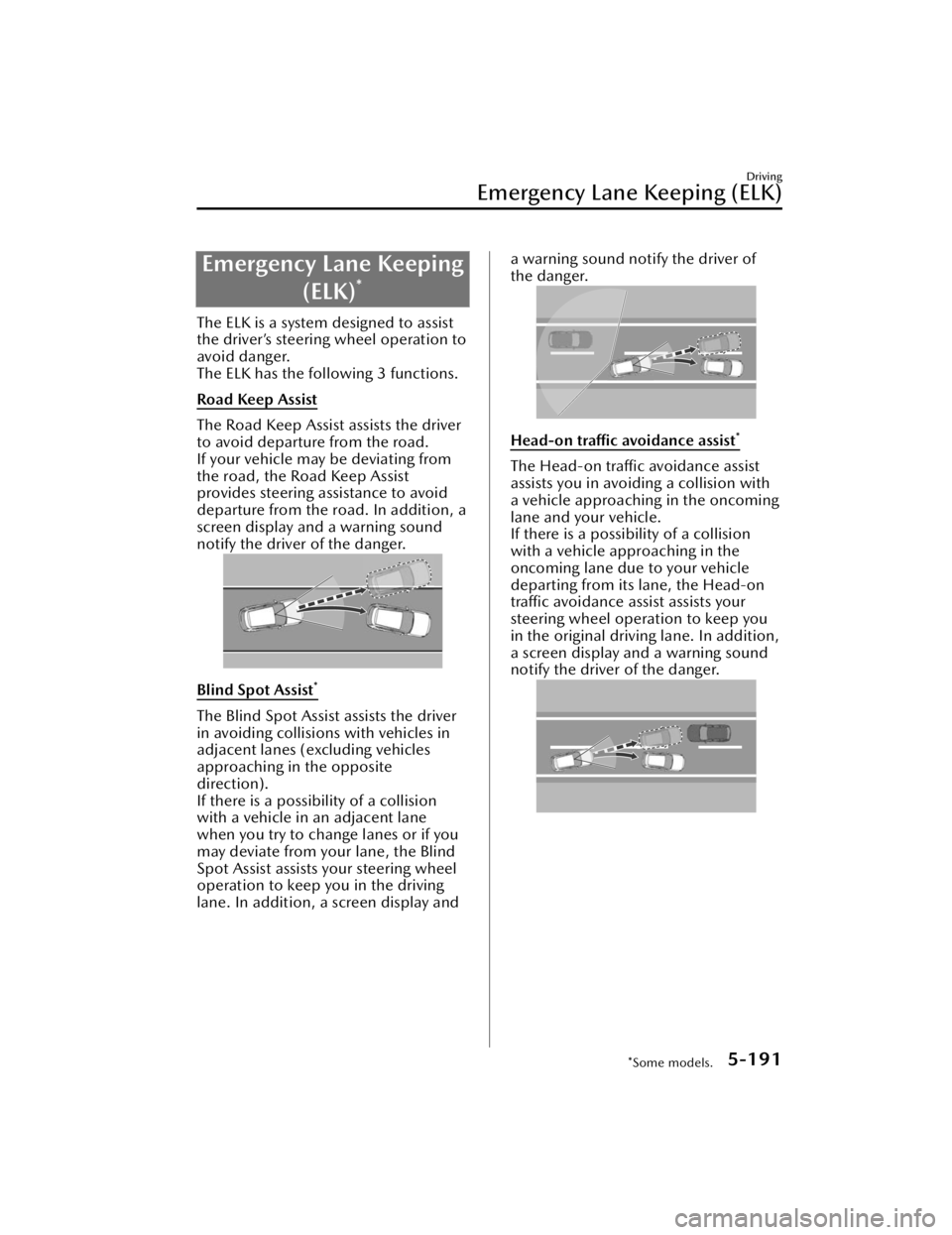
Road Keep Assist
The Road Keep Assist assists the driver
to avoid departure from the road.
If your vehicle may be deviating from
the road, the Road Keep Assist
provides steering assistance to avoid
departure from the road. In addition, a
screen display and a warning sound
notify the driver of the danger.
Blind Spot Assist*
The Blind Spot Assist assists the driver
in avoiding collisions with vehicles in
adjacent lanes (excluding vehicles
approaching in the opposite
direction).
If there is a possibility of a collision
with a vehicle in an adjacent lane
when you try to change lanes or if you
may deviate from your lane, the Blind
Spot Assist assists your steering wheel
operation to keep you in the driving
lane. In addition, a screen display and
a warning sound notify the driver of
the danger.
Head-on traffic avoidance assist*
The Head-on traffic avoidance assist
assists you in avoiding a collision with
a vehicle approaching in the oncoming
lane and your vehicle.
If there is a possibility of a collision
with a vehicle approaching in the
oncoming lane due to your vehicle
departing from its lane, the Head-on
traffic avoidance a
ssist assists your
steering wheel operation to keep you
in the original driving lane. In addition,
a screen display and a warning sound
notify the driver of the danger.
Driving
Emergency Lane Keeping (ELK)
*Some models.5-191
CX-90_8KG7-EA-22L_Edition1_new 2022-11-17 16:05:04
Page 352 of 687

1. “BRAKE!”
Active driving display
1. “BRAKE!”
NOTE
If any of the following conditions is
met, the forward detection function
may not operate normally.
The Forward Sensing Camera (FSC)
cannot detect target objects.
Refer to Forward Sensing Camera
(FSC) on page 5-127.
The front radar sensor cannot
detect target objects.
Refer to Radar Sensors on page
5-131.
When there is the possibility of a
partial contact with a target object.
The driver deliberately performs
driving operations (accelerator pedal
operation, steering wheel operation,
selector lever operation, and turn
signal lever operation).
If any of the follo wing conditions is
met, the forward detection function
may operate.
An animal or object on the road is
detected.
Passing an approaching vehicle
while rounding a curve.
Vehicle is passing through a narrow
gate or a gate with a low ceiling.
There is a metal object, bump, or a
protruding object on the road.
(Vehicles with Driver Monitoring
(DM))
If the system determines that the
driver is not paying attention to the
road, it activates the collision
warning earlier than normal.
If the forward detection function
performs brake control and the
vehicle is stopped, the system will
continue to hold the brakes for a
brief time unless there is an
operation performed by the driver.
The operation distance and volume
of the collision warning can be
changed.
Refer to the Settings section in the
Mazda Connect Owner's Manual.
The Turn-Across Tra ffi c operation
conditions*
The Turn-Across
Tra ffi c operates when
all of the following conditions are met.
The vehicle speed is about 4 km/h
to 20 km/h (3 mph to 12 mph).
The left turn signal light is turned on
and the vehicle is turning left.
A lane line between your vehicle and
the vehicle approaching in the
opposite direction is detected.
The system determines that there is a
possibility of collision with an object
ahead.
When the Turn-Across Tra ffi c operates,
the driver is notified of the danger by
the screen display and warning sound.
Furthermore, if the possibility of a
collision increases, brake control is
performed.
Instrument cluster
Driving
Smart Brake Support (SBS)
*Some models.5-201
CX-90_8KG7-EA-22L_Edition1_new 2022-11-17 16:05:04
Page 371 of 687

IndicationContent
8 Mode switching icon Indicates which mode is selected.
9 Parking sensor status icon Indicates that the parking sensor has a problem or it is
switched
off.
NOTE
The front See-Through View may be displayed as follows.
The ground and three-dimensional objects may appear curved.The representation of three-dimensional objects changes at the joints of images
and the same object may appear to be duplicated or not connected.
Top view, rear See-Through View
Indication Content
1 Tire icon Indicates the tire direction. Moves in conjunction with
the steering wheel operation.
2 Projected vehicle path lines (red/
yellow) Indicates the approximate projected path of the vehicle.
Moves in conjunction with the steering wheel operation.
a) Indicates the path where the rear end of the rear
bumper passes as a reference.
b) Indicates the path where the outer side of the vehicle
is expected to travel.
3 Parking sensor detection indication Indicates the obstruction detection status.
4 Tire graphic Indicates the approximate position of the tires.
5 Vehicle bottom graphic Indicates the estimated bottom of the vehicle.
Driving
360° View Monitor
5-220
CX-90_8KG7-EA-22L_Edition1_new 2022-11-17 16:05:04
Page 426 of 687

The amount of seat movement and
the seat and the steering wheel
movement on/off can be changed.
Refer to Settings section in the
Mazda Connect Owner's Manual or
consult an Authorized Mazda Dealer.
In the following cases, the Entry/Exit
Assist is canceled.
A switch is operated due to the
position adjustment of the driver's
seat, steering wheel, or outer
mirrors.
The key lock button or unlock
button is operated.
Editing and Deleting the
Programming Content
Switch the vehicle power ON.
Select “Settings” from the Mazda
Connect home screen.
Select “Driver Personalization System”.
Operate according to the Mazda
Connect screen.
Setting the System to Inoperable
This can be set by operating Mazda
Connect.
Refer to Mazda Connect Owner's
Manual or consult an Authorized
Mazda Dealer.
Equipment to Make Cabin More Comfortable
Driver Personalization System
6-33
CX-90_8KG7-EA-22L_Edition1_new 2022-11-17 16:05:04
Page 440 of 687

How to Use the Audio Remote Control Switch
The audio remote control switch is on the left side of the steering wheel. You can
operate basic audio functions, pick up/hang up the phone, or activate voice
control using the switch.
The shape of the switches may differ depending on the specifications.
Volume adjustment button
/
Press the (+) or (-) button to adjust the volume.
If you adjust the volume during voice guidance, the volume of the voice guidance
will change.
If you adjust the volume during a hands-free call, the conversation volume will
change.
Seek Switch
(SEEK UP)/(SEEK DOWN)
Selecting a radio station
Radio stations saved to your Favorites can be selected by pressing the seek
switch while listening to FM/AM radio. The station will change to the previous or
next favorite station each time you press the seek switch. If you want to manually
tune to the next available station before or after the currently selected station, press
and hold the seek switch until it beeps and the tuner will select the next available
station.
Playback Control
Music and video files can be cued when listening to stored content via USB,
Bluetooth
®, and SiriusXM®*, audio, or video.
Other Equipment
Mazda Connect
*Some models.7-13
CX-90_8KG7-EA-22L_Edition1_new 2022-11-17 16:05:04
Page 488 of 687

Do not connect a hydraulic
trailer-brake system to your vehicle's
brake system:
Connecting a hydraulic trailer-brake
system directly to the vehicle brake
system is dangerous and will result in
inadequate braking and possible injury.
Always use lower gears to reduce
speed:
Holding the brake pedal down too
long or too frequently is dangerous as
it could cause the brakes to overheat
and lose power, resulting in loss of
control and a serious accident. Use
lower gears to help reduce speed. Pull
off the road and allow brakes to cool
down whenever braking performance
feels reduced.
CAUTION
Do not tow a trailer during the first
1,000 km (600 miles) of your new
Mazda. If you do, you may damage
the engine, transmission, differential,
wheel bearings, and other
power-train components.
Be aware of the towing load weight
differences when towing at high
altitudes. For altitudes exceeding
1,000 meter (3,280 ft 10 in), always
reduce the towing load by 10 % for
every 1,000 meter (3,280 ft 10 in)
increase in altitude from the load
indicated under the maximum
GCWR heading in the trailer
towing-load table. If the determined
maximum total towing load weight is
exceeded, the engine and other
power-train parts may be damaged.
The total trailer weight and tongue
load can be determined by weighing
the trailer on platform scales at a
highway weight station or a trucking
company.
Make all hitch adjustments with
actual loads. Do not load and
unload vehicle while adjusting hitch.
This action will change the vehicle
height.
Do not use an axle-mounted hitch.
This may damage the axle and
related parts.
If the vehicle exceeds 100 km/h (62
mph) with a trailer in tow, the
vehicle could be damaged.
Do not connect a trailer lighting
system directly to the lighting system
of your Mazda. This may damage
your vehicle's electrical system and
lighting systems. Have a recreational
vehicle dealer or trailer rental agency
connect the system, and inspect the
brake lights and turn signals yourself
before each trip.
Other Equipment
Towing (U.S.A. and Canada)
7-61
CX-90_8KG7-EA-22L_Edition1_new 2022-11-17 16:05:04
Page 527 of 687

Changing a Flat Tire (WithSpare Tire)
NOTE
If the following occurs while driving , it
could indicate a flat tire.
Steering becomes difficult.The vehicle begins to vibrate
excessively.
The vehicle pulls in one direction.
If you have a flat tire, drive slowly to a
level spot that is well off the road and
out of the way of traffic to change the
tire.
Stopping in traffic or on the shoulder
of a busy road is dangerous.
WARNING
Do not install the temporary spare tire
on the rear wheels (driving wheels).
Driving with the temporary spare tire
on one of the rear driving wheels is
dangerous. Handling will be affected.
You could lose control of the vehicle,
especially on ice or snow bound roads,
and have an accident. Move a regular
tire to the rear wheel and install the
temporary spare tire to the front.
Be sure to follow the directions for
changing a tire.
Changing a tire is dangerous if not
done properly. The vehicle can slip off
the jack and seriou sly injure someone.
No person should place any portion of
their body under a vehicle that is
supported by a jack.
Never allow anyone inside a vehicle
supported by a jack.
Allowing someone to remain in a
vehicle supported by a jack is
dangerous. The occupant could cause
the vehicle to fall resulting in serious
injury.
NOTE
Make sure the jack is well lubricated
before using it.
1. Park on a hard, level surface off the
right-of-way and firmly set the
parking brake.
2. Shift into Park (P) and turn off the
engine.
3. Turn on the hazard warning flasher.
4. Have passengers get out of the
vehicle and away from the vehicle
and traffic.
5. Remove any luggage, the jack (page
7-76), spare tire (page 7-77), and
tools.
1. Lug wrench
2. Jack lever
6. Block the wheel diagonally opposite the flat tire. When
blocking a wheel, place a tire block
both in front and behind the tire.
What to Do in Case of Emergency
Tire is Punctured or Bursts
8-22
CX-90_8KG7-EA-22L_Edition1_new 2022-11-17 16:05:04
Page 528 of 687

NOTE
When blocking a tire, use rocks or
wood blocks of sufficient size if
possible to hold the tire in place.
Removing a Flat Tire
WARNING
When jacking-up a vehicle, always
shift the selector lever to P position,
apply the parking brake, and place
wheel blocks in the position
diagonally opposed to the jack.
Changing a flat tire without using
wheel blocks is dangerous because the
vehicle may move and fall off the jack
even with the selector lever is in P
position, which could result in an
accident.
1. Loosen the lug nuts by turning them counterclockwise one turn each,
but do not remove any lug nuts
until the tire has been raised off the
ground.
NOTE
If your Mazda is equipped with the
optional antitheft wheel lug nuts, a
special key must be used to unlock
the locking lug nut for each wheel.
For details, refer to “Locking Lug
Nuts” below.
2. Place the jack on the ground.
3. Turn the jack screw in the direction shown in the figure and adjust the
jack head so that it is close to the
jack-up position.
4. Place the jack under the jack-upposition closest to the tire being
changed with the jack head
squarely under the jack-up point.
5. Continue raising the jack headgradually by rotating the screw with
your hand until the jack head is
inserted into the jack-up position.
What to Do in Case of Emergency
Tire is Punctured or Bursts
8-23
CX-90_8KG7-EA-22L_Edition1_new 2022-11-17 16:05:04