charging MAZDA CX90 2024 User Guide
[x] Cancel search | Manufacturer: MAZDA, Model Year: 2024, Model line: CX90, Model: MAZDA CX90 2024Pages: 687, PDF Size: 15.46 MB
Page 174 of 687

How to Use the
e-SKYACTIV PHEV
Switching the Drive Mode
You can switch the drive mode of the
hybrid system by operating the switch.
TOWING mode/SPORT mode/
NORMAL mode/EV mode/
OFF-ROAD mode
Refer to How to Use the Mazda
intelligent Drive Select (Mi-Drive) on
page 5-96.
CHARGE Mode
The engine is used as a generator, and
the vehicle is driven while charging the
high voltage battery.
1. Start the hybrid system.
2.
When CHARGE mode is activated, the
CHARGE mode indicator light
in
the instrument cluster turns on.
Power is generated to the preset target
charge amount, and when the target
charge amount is reached, power is
generated to maintain it.
NOTE
Switching to CHARGE mode may not
be possible depending on the
conditions of the hybrid system.
When power consumption is high
due to the vehicle driving conditions,
outside air temperature, or when the
air conditioner is used, charging may
take longer than usual or may not
occur.
When the vehicle is driven while in
CHARGE mode, the engine operates
to generate electricity, therefore fuel
consumption may increase
compared to when driving the
vehicle in a mode other than
CHARGE mode.
If the vehicle power is switched OFF
while switching the mode to
CHARGE mode, the CHARGE mode
will be canceled the next time the
vehicle power is switched ON.
When pressing the charge mode
switch while the Mazda intelligent
Drive Select (Mi-Drive) is in EV
mode, the Mi-Drive switches to
NORMAL mode and the vehicle is
driven in CHARGE mode.
The mode may not be able to switch
to CHARGE mode when the fuel is
low.
The target charge amount can be
changed.
Refer to the Settings section in the
Mazda Connect Owner's Manual.
Po we r Me te r
Displays in the instrument cluster while
driving in NORMAL mode or EV mode.
Driving
e-SKYACTIV PHEV
5-23
CX-90_8KG7-EA-22L_Edition1_new 2022-11-17 16:05:04
Page 176 of 687

Convenient Ways to Usethe e-SKYACTIV PHEV
Switch to Start in EV Mode
The hybrid system can be changed to
start in EV mode.
Refer to the Settings section in the
Mazda Connect Owner's Manual.
Switching the Regenerative Braking
Strength
The regenerative braking strength can
be changed.
Refer to the Settings section in the
Mazda Connect Owner's Manual.
For Eco-Friendly and Economical
Driving
Using the Drive Mode
EV mode is mainly used in urban areas,
while NORMAL mode is used in
suburban areas and on expressways,
which leads to savings in electricity and
fuel consumption.
By actively using regenerative braking
to charge the high voltage battery, it is
possible to increase the EV travel
distance and to reduce fuel
consumption when driving the vehicle
in a mode other than EV mode.
To extend cruising distance
The electrical power consumption
while driving can be reduced and the
cruising distance can be extended by
doing the following operations.
With the charge connector
connected, turn on the climate
control system to provide a
comfortable temperature in the
cabin before driving.
When driving during cold
temperatures, use the seat warmer or
steering warmer instead of the
climate control system.
Adjust the climate control system to
a moderate airflow and temperature
setting.
Refrain from using the defogger
under conditions other than when a
window is fogged or frozen.
By maintaining a sufficient distance
between vehicles and using the
regenerative braking well, more
electrical power can be charged to
the high voltage battery.
To extend the life of the high voltage
battery
The high voltage battery life changes
depending on the vehicle storage
conditions or charging method.
To extend the life of the high voltage
battery, be careful of the following.
(Charging the battery)
Avoid unnecessary, frequent
charging.
Only charge the battery with as much
power as needed, and do not always
fully charge the battery. The
maximum charge limit can be set.
Refer to Convenient Ways to Use of
Charging on page 5-118.
(Parking the vehicle)
Do not park the vehicle in a place
where the ambient temperature is
extremely high or low.
Do not leave the vehicle while the
remaining high voltage battery power
is extremely low.
If the [Battery Cooling] operation notification is displayed on the
center display after driving the
vehicle, select [Activate].
Driving
e-SKYACTIV PHEV
5-25
CX-90_8KG7-EA-22L_Edition1_new 2022-11-17 16:05:04
Page 185 of 687

Engine Coolant
Temperature Gauge
Displays the engine coolant
temperature. The blue range of the
gauge indicates that the engine coolant
temperature is low, and the red range
of the gauge indicates that the engine
coolant temperature is high and
overheating.
CAUTION
If the engine coolant temperature
gauge needle is in the red range, there
is the possibility of overheating. Drive
slowly to reduce engine load.
Refer to Taking Action with
Overheating on page 8-20.
High Voltage Battery Powe r G au ge
The remaining power of the high
voltage battery is indicated when the
vehicle power is switched ON.
When the high voltage battery is fully
charged, F is indicated. As the level
lowers, the needle approaches E.
NOTE
After charging, it may require some
time for the needle to stabilize.
The arrow indicates that the
charging port is on the right side.
Driving
Instrument Cluster
5-34
CX-90_8KG7-EA-22L_Edition1_new 2022-11-17 16:05:04
Page 209 of 687

How to Use the ElectricParking Brake (EPB)
Applying the Parking Brake Manually
1. Depress the brake pedal.
2.
The parking brake is applied and
the EPB indicator light
in the
instrument cluster and the EPB
switch indicator light turn on.
Releasing the Parking Brake Manually
1. Depress the brake pedal with the vehicle power switched ON or the
hybrid system operating.
2.
When the parking brake is released,
the EPB indicator light
in the
instrument cluster and the EPB
switch indicator light turn off.
NOTE
To release the parking brake when
the vehicle power is switched OFF, it
is necessary to cancel the parking
brake auto operation. If the parking
brake is likely to freeze such as
during cold weather conditions,
cancel the parking brake auto
operation.
When the charging system warning
light in the instrument cluster turns
on, the parking brake cannot be
applied after the vehicle power is
switched OFF. Before switching the
vehicle power OFF, apply the parking
brake manually.
Applying the Parking Brake
Automatically
Switch the vehicle power from ON to
ACC or OFF.
The parking brake is applied and the
EPB indicator light
in the
instrument cluster and the EPB switch
indicator light turn on.
Releasing the Parking Brake
Automatically
Shift-linked release
Shift the selector lever from the P
position to a position other than P
when all of the following conditions
are met.
Hybrid system is operating.Driver’s door is closed.Brake pedal is firmly depressed.
When the parking brake is released,
the EPB indicator light
in the
instrument cluster and the EPB switch
indicator light turn off.
Driving
Electric Parking Brake (EPB)
5-58
CX-90_8KG7-EA-22L_Edition1_new 2022-11-17 16:05:04
Page 262 of 687
Warnings and CautionsFor Charging
WARNING
For occupants who use any medical
device such as an implanted-type
heart pacer or defibrillator, ask a
doctor or manufacturer of the device
about how the medical device may be
affected by the charging operation.
Otherwise, the operation of the
medical device could be affected
resulting in an accident.
For occupants who use any medical
device such as an implanted-type
heart pacer or defibrillator, do not
enter the cabin including the luggage
compartment while charging.
Otherwise, the operation of the
medical device could be affected
resulting in an accident.
Do not disassemble or modify the
charge port and the charge cable.
Otherwise, it could lead to an
electrical shock resulting in an
accident.
Always heed the following when
charging.
Otherwise, it could lead to an
electrical shock resulting in an
accident.
Never allow children to charge the
battery.
Do not charge the battery while the
vehicle is covered with a car cover.
Always heed the following when
charging in the rain or snow.
Otherwise, it could lead to an
electrical shock resulting in an
accident.
Do not charge the battery outside if
there is the possibility of heavy rain,
strong winds, or lightning.
Remove water with a clean cloth if
the charge connector or charge plug
is wet.
Do not touch the charge port or
charge cable with wet hands.
If the outlet is covered with snow
while charging, turn
off the power
such as turning off the breaker,
remove the snow, and then remove
the charge plug.
Refer to the instruction manual
accompanying the charge cable and
use the charge cable correctly.
If you handle the charge cable
mistakenly, it could result in an
unexpected accident.
Do not use the charge cable if it has
any of the following malfunctions.
Otherwise, it could lead to an
electrical shock resulting in an
accident.
The charge connector is rusted or
corroded.
The charge connector is damaged or
foreign matter penetrates the charge
connector.
Always heed the following when
using the charge cable.
Otherwise, the charge cable could be
damaged resulting in an accident.
Do not pull out or bend the charge
cable excessively.
Do not step on the charge cable or
drag it on the ground.
Driving
Charging
5-111
CX-90_8KG7-EA-22L_Edition1_new 2022-11-17 16:05:04
Page 263 of 687
When inserting/pulling out the
charge connector and the charge
plug, do not twist them excessively.
Do not apply excessive force to the
connected charge connector such as
by applying your weight.
Keep objects which generates
intense heat (such as a heater or
cigarette) away from the charge
cable.
Do not apply orga nic solvents, acid
or alkaline agents to the charge
cable.
CAUTION
Do not connect the booster cable to
the lead-acid battery or remove the
lead-acid battery while charging the
high voltage battery. Otherwise, the
vehicle or charging device could be
damaged.
If the charge connector is removed
after the charging is
finished, close
the charging port cap immediately. If
the charging port lid is closed with
the charging port cap open, water or
foreign matter may enter the
charging inlet causing a malfunction.
Always make sure that the charge
cable is not connected to the vehicle
before driving. If the charge
connector is connected correctly, the
vehicle cannot be driven. However, if
it is not connected completely, the
vehicle can be driven, which could
result in an accident.
If the charging port is frozen shut,
defrost the port using a hair dryer. If
the charge cable is inserted/pulled
out with the charging inlet frozen, it
could cause damage.
Driving
Charging
5-112
CX-90_8KG7-EA-22L_Edition1_new 2022-11-17 16:05:04
Page 264 of 687

Charging Related Part Overview
Charge cable
The charge cable is connected to the electrical outlet and the vehicle to send
electrical power to the vehicle. For details regarding the charge cable, refer to the
instruction manual accompanying the charge cable.
1. Charge connector
2. Control box
3. Charge plug
charge connector
The charge connector is the part used for connecting to the charging port on the
vehicle side.
When the charge connector is connected to the charging port, a vehicle system locks
the charge connector.
When the charge connector is locked by the vehicle system, it unlocks when the
driver’s door is unlocked.
If the charge connector locked by the vehicle system is not unlocked even though
the driver’s door is unlocked, consult an Authorized Mazda Dealer.
NOTE
The conditions for locking the vehicle system can be changed.
Refer to Convenient Ways to Use of Charging on page 5-118.
Control box
The control box indicates the charge status by turning on/flashing the indicator light.
For the indicator light illumination/flash pattern, refer to the instruction manual
accompanying the charge cable.
charge plug
The charge plug is the part for connecting to the electrical outlet.
In general, keep the charge cable at home. If the charge cable is kept in the vehicle,
firmly secure it using the following procedure.
1. Store the charge cable in its special storage bag.
Driving
Charging
5-113
CX-90_8KG7-EA-22L_Edition1_new 2022-11-17 16:05:04
Page 265 of 687
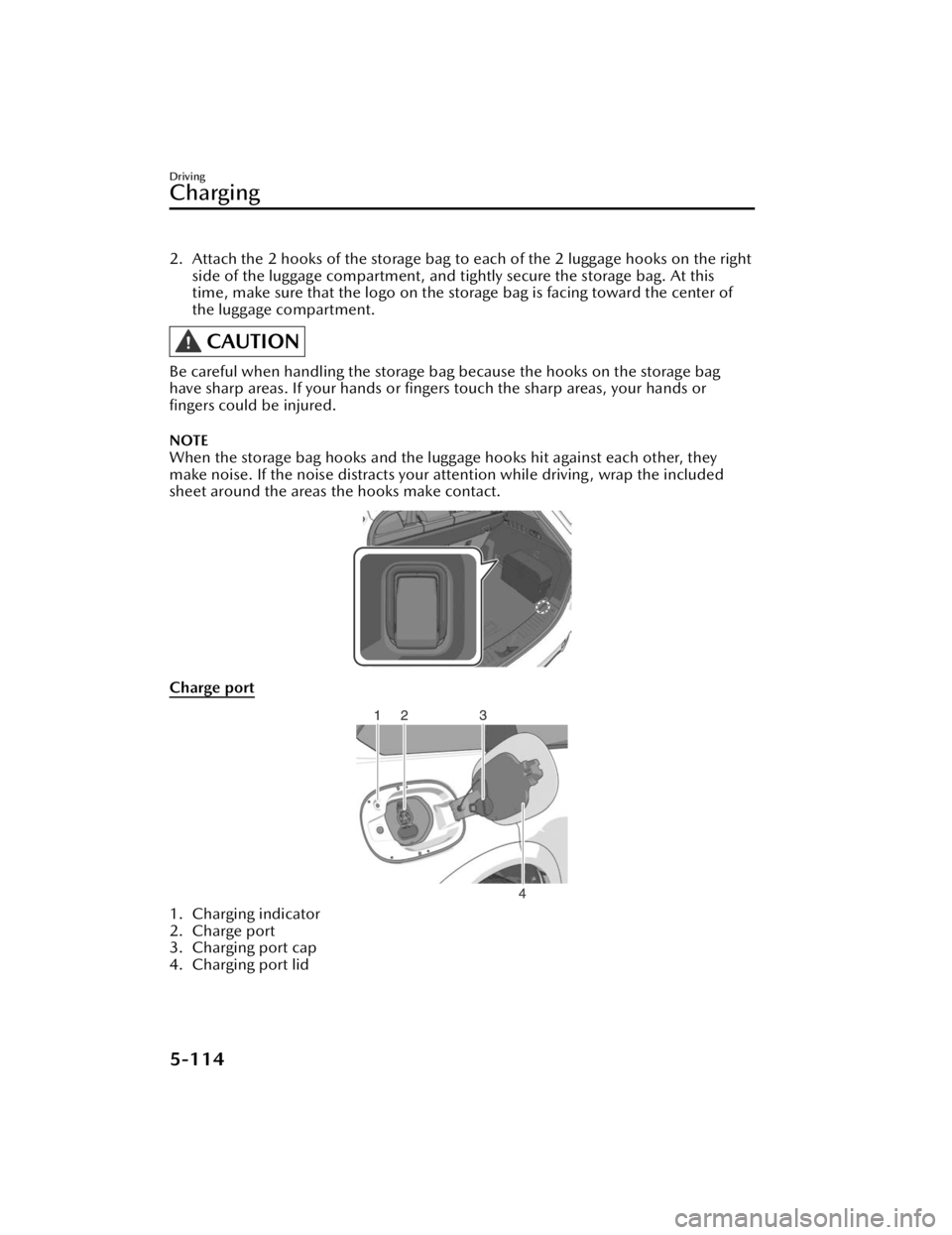
2. Attach the 2 hooks of the storage bag to each of the 2 luggage hooks on the right
side of the luggage compartment, and tightly secure the storage bag. At this
time, make sure that the logo on the storage bag is facing toward the center of
the luggage compartment.
CAUTION
Be careful when handling the storage bag because the hooks on the storage bag
have sharp areas. If your hands or fingers touch the sharp areas, your hands or
fingers could be injured.
NOTE
When the storage bag hooks and the luggage hooks hit against each other, they
make noise. If the noise distracts your attention while driving , wrap the included
sheet around the areas the hooks make contact.
Charge port
1. Charging indicator
2. Charge port
3. Charging port cap
4. Charging port lid
Driving
Charging
5-114
CX-90_8KG7-EA-22L_Edition1_new 2022-11-17 16:05:04
Page 266 of 687
![MAZDA CX90 2024 User Guide Charging indicator
The charging indicator indicates the charging status by turning
on/flashing the light.
For the charging indicator illumination/flash pattern, refer to [Charging].
Charging port l](/img/28/59014/w960_59014-265.png "MAZDA CX90 2024 User Guide Charging indicator
The charging indicator indicates the charging status by turning
on/flashing the light.
For the charging indicator illumination/flash pattern, refer to [Charging].
Charging port l")
Charging indicator
The charging indicator indicates the charging status by turning
on/flashing the light.
For the charging indicator illumination/flash pattern, refer to [Charging].
Charging port lid
The charging port lid is locked/unlocke d in conjunction with the door locking/
unlocking mechanism.
When unlocking the driver’s door, the charging port lid is unlocked. When locking
the driver’s door, the charging port lid is locked.
However, if the driver’s door is unlocked using the auxiliary key, the charging port lid
is not unlocked.
NOTE
When the driver's door is locked using an y of the following functions, the charging
port lid is also locked at the same time.
Vehicle speed sensing auto door lock functionAuto re-lock function
Charge port
The charge port is the part used for connecting to the charge connector of the
charge cable. It is used for charging.
Driving
Charging
5-115
CX-90_8KG7-EA-22L_Edition1_new 2022-11-17 16:05:04
Page 267 of 687
How to Perform Charging
It can be charged with a maximum of
7.2 kW of power.
When charging is started after the high
voltage battery warning indication/
warning light turns on, the time until
fully charged is as follows.
(7.2 kW normal charging)
About 2.5 hours
For charging, the charging timer
function can be used to charge
automatically from start to finish. For
details on use, refer to [Charging
Settings].
NOTE
Installation of charging equipment is
required for 7.2 kW normal charging.
Consult an Authorized Mazda Dealer
for details.
If a power outage occurs while
charging, remove the charge plug
and the charge connector and start
charging from the beginning again.
Make sure that no water has
accumulated in the charge connector
and the charging port before
charging. If any foreign matter enters
the charge connector or the charging
port, do not start charging and
consult an Authorized Mazda Dealer.
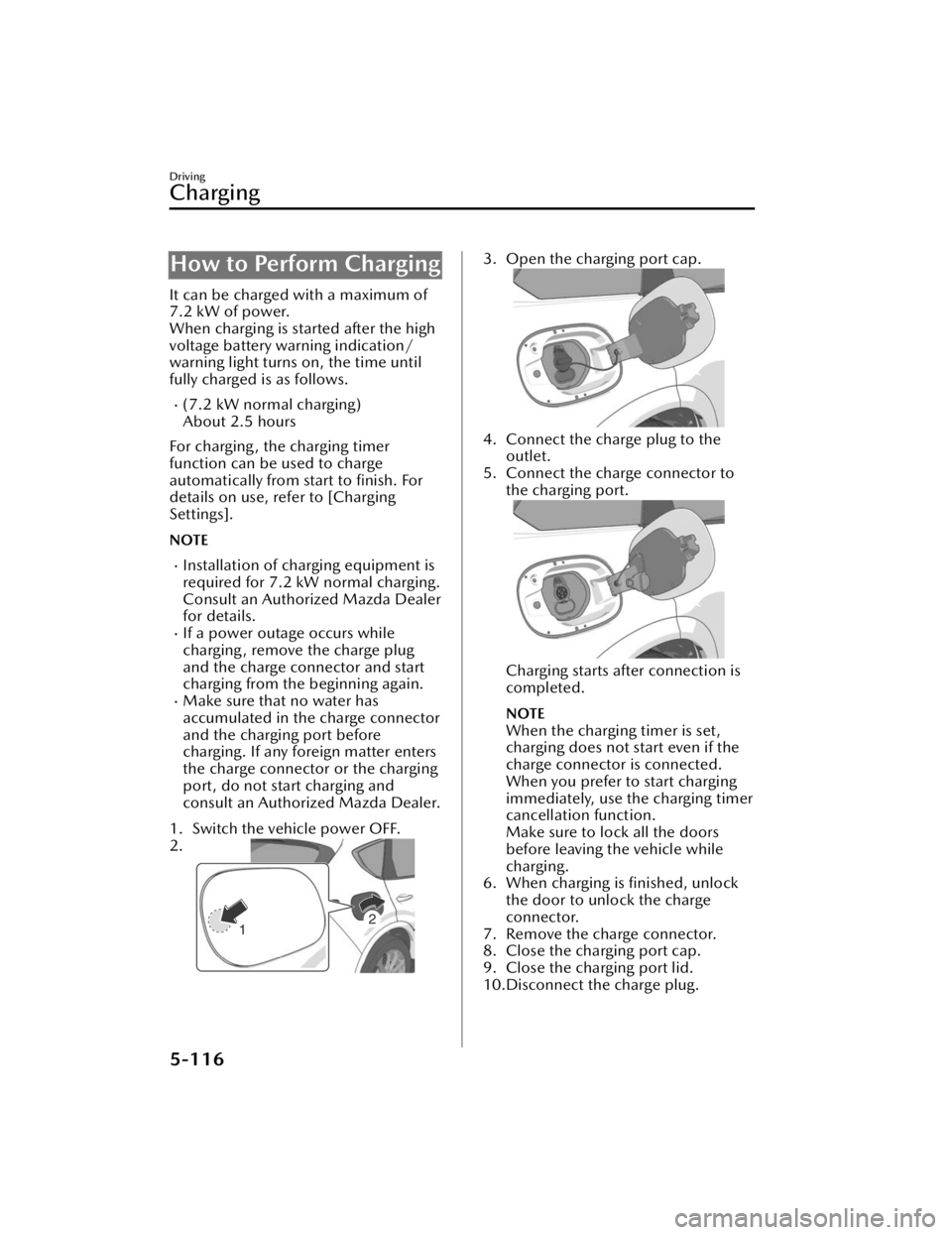
1. Switch the vehicle power OFF.
2.
3. Open the charging port cap.
4. Connect the charge plug to the outlet.
5. Connect the charge connector to the charging port.
Charging starts after connection is
completed.
NOTE
When the charging timer is set,
charging does not start even if the
charge connector is connected.
When you prefer to start charging
immediately, use the charging timer
cancellation function.
Make sure to lock all the doors
before leaving the vehicle while
charging.
6. When charging is finished, unlock the door to unlock the charge
connector.
7. Remove the charge connector.
8. Close the charging port cap.
9. Close the charging port lid.
10.Disconnect the charge plug.
Driving
Charging
5-116
CX-90_8KG7-EA-22L_Edition1_new 2022-11-17 16:05:04