dash MAZDA CX90 2024 User Guide
[x] Cancel search | Manufacturer: MAZDA, Model Year: 2024, Model line: CX90, Model: MAZDA CX90 2024Pages: 687, PDF Size: 15.46 MB
Page 187 of 687
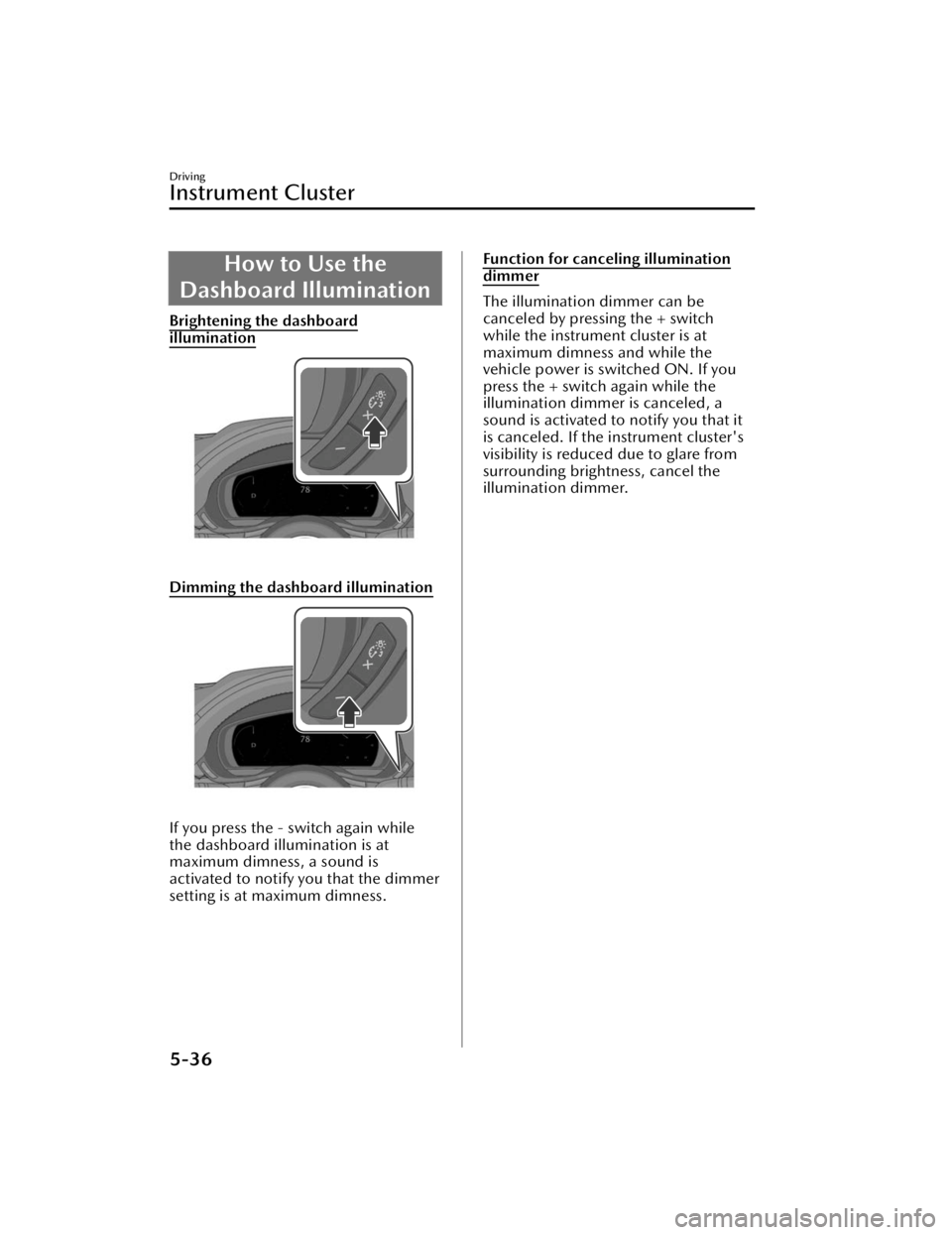
How to Use the
Dashboard Illumination
Brightening the dashboard
illumination
Dimming the dashboard illumination
If you press the - switch again while
the dashboard illumination is at
maximum dimness, a sound is
activated to notify you that the dimmer
setting is at maximum dimness.
Function for canceling illumination
dimmer
The illumination dimmer can be
canceled by pressing the + switch
while the instrument cluster is at
maximum dimness and while the
vehicle power is switched ON. If you
press the + switch again while the
illumination dimmer is canceled, a
sound is activated to notify you that it
is canceled. If the instrument cluster's
visibility is reduced due to glare from
surrounding brightness, cancel the
illumination dimmer.
Driving
Instrument Cluster
5-36
CX-90_8KG7-EA-22L_Edition1_new 2022-11-17 16:05:04
Page 278 of 687

Forward Sensing Camera(FSC)
*
The Forward Sensing Camera (FSC)
determines the conditions ahead of
the vehicle and detects the white
(yellow) lines on the traffic lane.
1. Forward Sensing Camera (FSC)
The following systems utilize the
Forward Sensing Camera (FSC).
High Beam Control System (HBC)Lane Departure Warning System
(LDWS)
Traffic Sign Recognition System (TSR)Distance & Speed Alert (DSA)Driver Attention Alert (DAA)Mazda Radar Cruise Control
(MRCC)
Cruising & Traffic Support (CTS)Lane-keep Assist System (LAS)Emergency Lane Keeping (ELK)Smart Brake Support (SBS) forward
drive detection
WARNING
Do not modify the suspension:
If the vehicle height or inclination is
changed, the system will not be able to
correctly detect vehicles ahead. This
will result in the system not operating
normally or mistakenly operating,
which could cause a serious accident.
CAUTION
Heed the following cautions to operate
the system correctly.
Do not hit or apply strong force to
the Forward Sensing Camera (FSC)
or the area around it. If the Forward
Sensing Camera (FSC) received a
strong impact, stop using the
following systems and consult an
Authorized Mazda Dealer.
High Beam Control System (HBC)
Lane Departure Warning System
(LDWS)
Traffic Sign Recognition System
(TSR)
Distance & Speed Alert (DSA)
Driver Attention Alert (DAA)
Mazda Radar Cruise Control
(MRCC)
Cruising & Traffic Support (CTS)
Lane-keep Assist System (LAS)
Emergency Lane Keeping (ELK)
Smart Brake Support (SBS) forward
drive detection
Do not remove the Forward Sensing
Camera (FSC) cover.
Be careful not to scratch the Forward
Sensing Camera (FSC) lens or allow
it to get dirty. Also, do not take the
camera apart. Otherwise, it may
cause a malfunction or
mis-operation.
The direction of the Forward Sensing
Camera (FSC) has been
finely
adjusted, therefore do not change
the installation position or remove
the Forward Sensing Camera (FSC).
Otherwise, it may cause a
malfunction or mis-operation.
Consult an Authorized Mazda Dealer
regarding cleaning of the camera
lens.
Do not place objects on the
dashboard which
reflect light.
Driving
Forward Sensing Camera (FSC)
*Some models.5-127
CX-90_8KG7-EA-22L_Edition1_new
2022-11-17 16:05:04
Page 299 of 687

Active driving display
NOTE
The BSM may not operate normally if
any of the following conditions is
met.
The rear side radar sensors cannot
detect an object.
Refer to Radar Sensors on page
5-131.
The road is on a steep slope.The road is extremely wide.You make a lane change 2 lanes or
more.
The BSM may operate when turning
at intersections in urban areas or
with stationary objects on the road
or the roadside (such as guardrails,
sidewalls, and parked vehicles).
If a Mazda genuine trailer hitch is
used, the BSM is automatically
turned off when the trailer's
electrical connector is connected.
When pulling a trailer other than
with a Mazda genuine trailer hitch,
or while an accessory such as a
bicycle carrier is installed to the rear
of the vehicle, turn off the BSM.
Otherwise, the radar’s radio waves
will be blocked causing the BSM to
not operate normally.
The brightness of the BSM warning
lights is linked to the panel light
control.
Refer to Dashboard Illumination on
page 5-35.
When the Vehicle Exit Warning
operates*
The Vehicle Exit Warning operates
when all of the following conditions
are met.
The vehicle is stopped.Within 3 minutes after the vehicle
power is switched OFF or the vehicle
power is switched ON.
The system detects an approaching
vehicle.
When the Vehicle Exit Warning
operates, the driver is notified of the
presence of an approaching vehicle
using the warning lights and the
instrument cluster screen display
(white)
*1.
BSM warning light
Instrument cluster
*1 The instrument cluster screen display (white)
is displayed only when the instrument
cluster is set to the i-ACTIVSENSE display.
However, when the vehicle power is OFF,
Driving
Blind Spot Monitoring (BSM)
5-148*Some models.
CX-90_8KG7-EA-22L_Edition1_new 2022-11-17 16:05:04
Page 300 of 687

the instrument cluster screen display (white)
is not displayed.
In addition, when the door in the
direction in which an approaching
vehicle is detected is opened, the
driver is notified of the danger by
flashing of the warning lights, the
warning sound, and the instrument
cluster warning indication (amber).
BSM warning light
Instrument cluster
NOTE
The Vehicle Exit Warning may not
operate normally if any of the
following conditions is met.
The rear side radar sensors cannot
detect an object.
Refer to Radar Sensors on page
5-131.
There is a parked vehicle near your
vehicle.
Moving objects are slow.The Vehicle Exit Warning is not
automatically turned off even if a
Mazda genuine trailer hitch is used.
If a trailer is towed or a bicycle
carrier is attached to the rear of the
vehicle, the radar signal may be
blocked and the Vehicle Exit Warning
may not operate correctly.
The Vehicle Exit Warning may
operate with stationary objects on
the road or the roadside (such as
guardrails, sidewalls, and parked
vehicles).
The brightness of the BSM warning
lights is linked to the panel light
control.
Refer to Dashboard Illumination on
page 5-35.
Tu r n i n g off the BSM and the Vehicle
Exit Warning
There are 2 ways to turn off the BSM
and the Vehicle Exit Warning.
Tu r n
off the BSM and the Vehicle Exit
Warning using Mazda Connect.
Refer to the Settings section in the
Mazda Connect Owner's Manual.
Tu r n off the BSM and the Vehicle Exit
Warning using the i-ACTIVSENSE
OFF switch.
Refer to How to Use the
i-ACTIVSENSE OFF switch on page
5-126.
Driving
Blind Spot Monitoring (BSM)
5-149
CX-90_8KG7-EA-22L_Edition1_new 2022-11-17 16:05:04
Page 315 of 687

How to Use the Rear
Cross Traffic Alert (RCTA)
Operating the RCTA
The RCTA operates when all of the
following conditions are met.
The vehicle is about to be driven in
reverse.
The system detects an approaching
vehicle.
When the RCTA operates, the driver is
notified of the danger by flashing of
the BSM warning lights, a warning
indication, and a warning sound.
NOTE
The system may operate even if a
vehicle is not approaching
depending on the conditions around
your vehicle.
The RCTA may not operate normally
if any of the following conditions is
met.
The rear side radar sensors cannot
detect an object.
Refer to Radar Sensors on page
5-131.
The vehicle speed when reversing
is about 15 km/h (9 mph) or
faster.
A vehicle is approaching directly
from the rear of your vehicle.
A vehicle is approaching at an
angle from the rear of your vehicle.
If a Mazda genuine trailer hitch is
used, the RCTA is automatically
turned off when the trailer's
electrical connector is connected.
When pulling a trailer other than
with a Mazda genuine trailer hitch,
or while an accessory such as a
bicycle carrier is installed to the rear
of the vehicle, turn off the RCTA.
Otherwise, the radar’s radio waves
will be blocked causing the RCTA to
not operate normally.
The brightness of the BSM warning
lights is linked to the panel light
control.
Refer to Dashboard Illumination on
page 5-35.
Turning off the RCTA
There are 2 ways to turn off the RCTA.
Turn off the RCTA using Mazda
Connect.
Refer to the Settings section in the
Mazda Connect Owner's Manual.
Turn off the RCTA using the
i-ACTIVSENSE OFF switch.
Refer to How to Use the
i-ACTIVSENSE OFF switch on page
5-126.
Driving
Rear Cross Tra ffi c Alert (RCTA)
5-164
CX-90_8KG7-EA-22L_Edition1_new
2022-11-17 16:05:04
Page 396 of 687

Airflow direction adjustment
Side Vents
Center Vents
Airflow selection
Dashboard Vents
Dashboard and Floor Vents
Floor Vents
Equipment to Make Cabin More Comfortable
Fully Automatic Climate Control (Front)
6-3
CX-90_8KG7-EA-22L_Edition1_new2022-11-17 16:05:04
Page 409 of 687

Airflow selection
Dashboard Vents
Dashboard and Floor Vents
Floor Vents
Fully Automatic ClimateControl System
The following functions are
automatically controlled according to
the set temperature.
Airflow temperature controlAirflow amount controlAirflow mode switching
NOTE
To p r e v e n t c o l d airflow immediately
after heating starts when the hybrid
system is cold, the airflow amount is
decreased.
Equipment to Make Cabin More Comfortable
Fully Automatic Climate Control (Rear)
6-16
CX-90_8KG7-EA-22L_Edition1_new 2022-11-17 16:05:04
Page 606 of 687

Interior Maintenance
WARNING
Do not spray water into the vehicle
cabin.
Spraying water into the vehicle cabin is
dangerous as electrical devices such as
the audio and switches could get wet
resulting in a malfunction or vehicle
fire.
CAUTION
Do not use polishing agents.
Depending on the product
ingredients, they could cause
discoloration, stains, cracks or
peeling of the coating.
Do not scrape or scratch the inside
of the window glass. It could
damage the thermal filaments and
the antenna lines.
When washing the inside of the
window glass, use a soft cloth
dampened in lukewarm water, gently
wiping the thermal filaments and the
antenna lines.
Use of glass cleaning products could
damage the thermal filaments and
the antenna lines.
If liquid such as fragrance is spilled
on the interior, wipe it off
immediately.
Do not use wax containing
compounds, organic solvents such as
gasoline or benzene, alcohols, acidic
or alkaline solvents, or bleach for
cleaning.
Do not try to rub
off the shiny surface
panels and the metallic parts with a
dry cloth. Otherwise, it may cause
scratches.
Instrument Panel Top
(Soft pad) Maintenance
Dashboard maintenance for areas
requiring further cleaning.
1. Wipe the soiled area with a soft cloth soaked in a mild detergent
diluted with water.
2. Wipe off any detergent and water remaining on the surface using a
cloth soaked in water and wrung
out well.
Inspection and Servicing/Cleaning
Interior Maintenance
9-37
CX-90_8KG7-EA-22L_Edition1_new 2022-11-17 16:05:04
Page 614 of 687

STEP 2: Contact MazdaNorth AmericanOperations
If for any reason you feel the need for
further assistance after contacting your
dealership management or it becomes
necessary to have the components or
wiring system for the supplementary
restraint system modified to
accommodate a person with certain
medical conditions in accordance with
a certified physician, you can reach
Mazda North American Operations by
one of the following ways.
Log on: at www.MazdaUSA.com
Answers to many questions, including
how to locate or contact a local Mazda
dealership in the U.S., can be found
here.
E-mail: click on “Contact Us” located
on the bottom of the page at
www.mazdausa.com under “Help”
By phone at: 1 (800) 222-5500
By letter at:
ATTN: Customer Experience Center
Mazda North American Operations
200 Spectrum Center Drive Suite 100
Irvine, California 92618
P.O. Box 19734
Irvine, CA 92623-9734
In order to serve you efficiently and
effectively, please help us by providing
the following information:
1. Your name, address, and telephone number
2. Year and model of vehicle
3. Vehicle Identification Number (17 digits, noted on your registration or
title or located on the upper
driver's side corner of the dash)
4. Purchase date and current mileage
5. Your dealer's name and location
6. Your question(s)
If you live outside the U.S.A., please
contact your nearest Mazda
Distributor.
Specifications/Customer Information and Reporting Safety Defects
Customer Assistance (U.S.A.)
10-5
CX-90_8KG7-EA-22L_Edition1_new 2022-11-17 16:05:04
Page 623 of 687

STEP 2
If, after following STEP 1, you feel the
need for further assistance, please
contact your area's Mazda
representative.
Refer to PUERTO RICO/U.S. Virgin
Island on page 10-18.
Please help us by providing the
following information:
1. Your name, address, and telephone
number
2. Year and model of vehicle
3. Vehicle Identification Number (17 digits, noted on your registration or
title or located on the upper
driver's side corner of the dash)
4. Purchase date and current mileage
5. Your dealer's name and location
6. Your question(s)
Specifications/Customer Information and Reporting Safety Defects
Customer Assistance (Puerto Rico)
10-14
CX-90_8KG7-EA-22L_Edition1_new 2022-11-17 16:05:04