mirror MAZDA CX90 2024 User Guide
[x] Cancel search | Manufacturer: MAZDA, Model Year: 2024, Model line: CX90, Model: MAZDA CX90 2024Pages: 687, PDF Size: 15.46 MB
Page 161 of 687

Convenient Ways to Usethe Outside Mirrors
Driving Position Memory*
The angle of the outside mirrors can be
programmed to the Driving Position
Memory.
Refer to Driving Position Memory on
page 3-33.
Auto fold function
*
When locking/unlocking the doors
while the vehicle power is switched
OFF, the outside mirrors automatically
fold in and out.
When the outside mirrors are folded in
and the vehicle power is switched ON,
or the hybrid system is started, the
outside mirrors fold out automatically.
Turn the auto fold function on using
the center display.
Refer to Settings section in the Mazda
Connect Owner's Manual or consult
an Authorized Mazda Dealer.
Operation function after hybrid
system is stopped
The angle of the outside mirrors can be
adjusted and they can be folded in and
out for about 40 seconds after the
vehicle power is switched from ON to
OFF.
Auto tilt-down outside mirror
function for reversing *
The outside mirrors can be set to tilt
downwards automatically when
reversing the vehicle. When the vehicle
is finished reversing , the outside
mirrors return to their original angle.
1. Press the select switch on the side of the door mirror to be tilted
down.
Turn on the indicator light of the
select switch.
2. Shift the selector lever to the Rposition.
The outside mirror on the side
where you pressed the select switch
will tilt downward.
NOTE
When any of the following condition is
met, the outer mirrors return to their
normal positions.
The vehicle power is switched to a
position other than ON.
The shift selector lever is shifted to a
position other than R.
The select switch is pressed again.
Automatic glare prevention function
*
In conjunction with the glare
prevention function of the auto-type
rearview mirror, only the driver's side
outside mirror reduces the light from
the headlights of on-coming vehicles.
Operation Function After Vehicle
power is Switched OFF
The outside mirrors can be operated
for about 40 seconds after the vehicle
power is switched from ON to off with
all doors closed. If any door is opened,
the outside mirrors will stop operating.
Driving
Mirrors
5-10*Some models.
CX-90_8KG7-EA-22L_Edition1_new 2022-11-17 16:05:04
Page 162 of 687

Warnings and Cautions
for the Rearview Mirror
WARNING
Do not stack luggage higher than the
seatback.
Loading luggage higher than the
seatback is dangerous. The rearview
mirror visibility may be obstructed,
which may result in a collision with
another vehicle when changing lanes.
How to Use the Rearview Mirror
Move and adjust the rearview mirror
body.
Driving
Mirrors
5-11
CX-90_8KG7-EA-22L_Edition1_new 2022-11-17 16:05:04
Page 163 of 687
Convenient Ways to Usethe Rearview Mirror
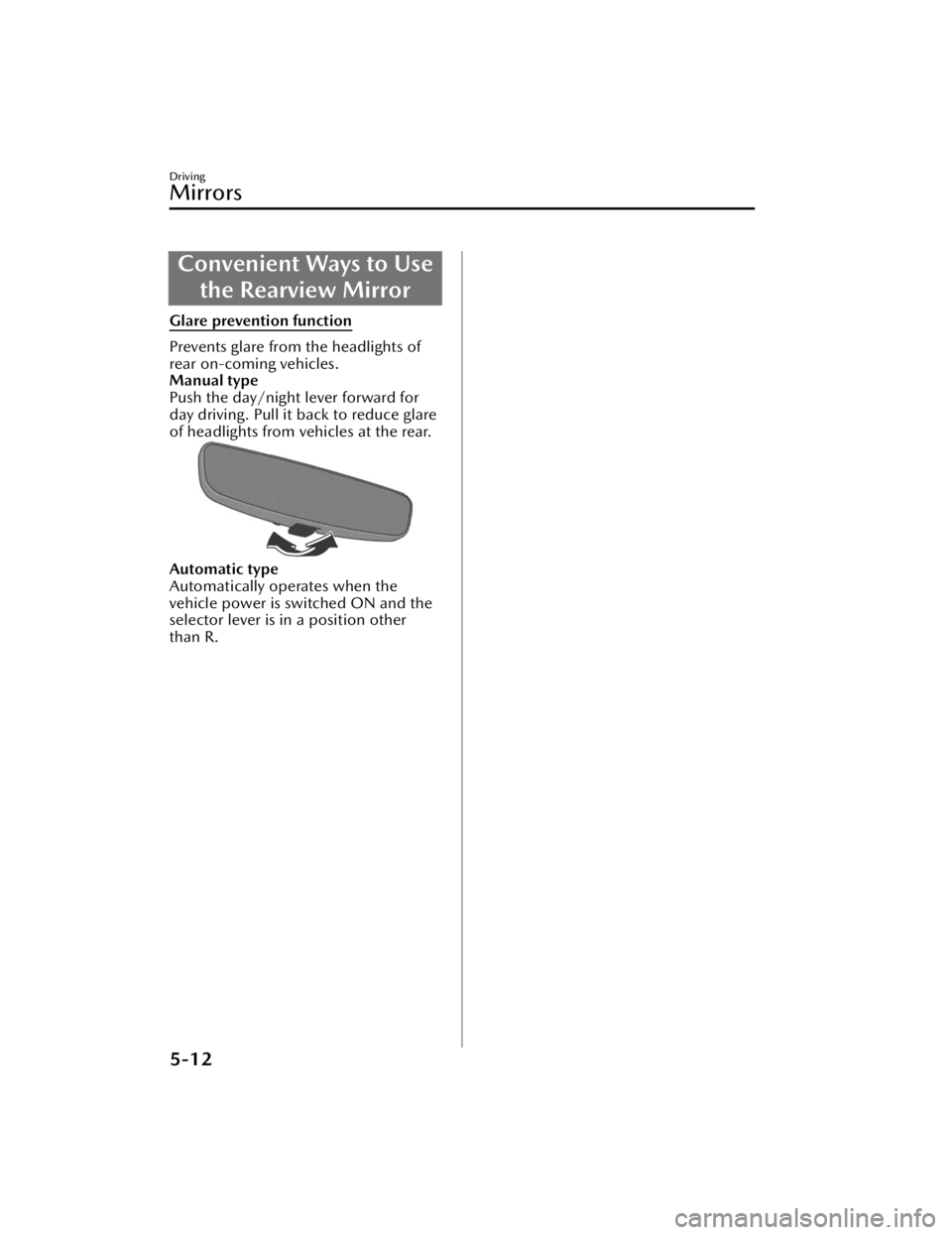
Glare prevention function
Prevents glare from the headlights of
rear on-coming vehicles.
Manual type
Push the day/night lever forward for
day driving. Pull it back to reduce glare
of headlights from vehicles at the rear.
Automatic type
Automatically operates when the
vehicle power is switched ON and the
selector lever is in a position other
than R.
Driving
Mirrors
5-12
CX-90_8KG7-EA-22L_Edition1_new 2022-11-17 16:05:04
Page 229 of 687

Rear Window DefoggerSwitch
The rear window defogger warms the
rear window and removes fog.
When the rear window defogger is
operated, the following equipment
operates in conjunction with it.
Mirror defogger*
Refer to How to Use the Mirror
Defogger on page 5-80.
Windshield wiper de-icer*
Refer to How to Use the Windshield
Wiper De-icer on page 5-81.
Warnings and Cautionsfor Using the Rear
Window Defogger Switch
CAUTION
Be careful not to scratch the
filaments when washing the rear
window. The filaments are installed
inside the rear window.
Use the rear window defogger while
the engine is running. In addition, do
not use the rear window defogger for
a long time. Otherwise, the
lead-acid battery power could be
depleted.
Driving
Rear Window Defogger Switch
5-78*Some models.
CX-90_8KG7-EA-22L_Edition1_new 2022-11-17 16:05:04
Page 230 of 687

How to Use the Rear
Window Defogger Switch
Using the Rear Window Defogger
Switch
1. Start the hybrid system.
2.
The rear window defogger operates
and the switch indicator light turns on.
The rear window defogger stops
automatically after it operates about
15 minutes.
NOTE
The rear window defogger operation
time can be changed.
Refer to the Settings section in the
Mazda Connect Owner's Manual.
Stopping the Rear Window Defogger
Press the rear window defogger switch
while the rear window defogger is
operating.
The rear window defogger stops and
the switch indicator light turns off.
Mirror Defogger*
The mirrors are heated using heat
filaments to remove fog.
Driving
Rear Window Defogger Switch
*Some models.5-79
CX-90_8KG7-EA-22L_Edition1_new
2022-11-17 16:05:04
Page 231 of 687

How to Use the MirrorDefogger
The mirror defoggers operate in
conjunction with the rear window
defogger.
For the operation method, refer to
How to Use the Rear Window
Defogger on page 5-79.
Windshield Wiper
De-icer
*
A part of the windshield is heated
using heat filaments to melt the ice on
the glass and wipers.
Driving
Rear Window Defogger Switch
5-80*Some models.
CX-90_8KG7-EA-22L_Edition1_new 2022-11-17 16:05:04
Page 279 of 687

Do not apply accessories, stickers, or
film to the windshield near the
Forward Sensing Camera (FSC). If the
area in front of the Forward Sensing
Camera (FSC) lens is obstructed, it
will cause the system to not operate
correctly even if it is transparent.
Always keep the windshield glass
around the Forward Sensing Camera
(FSC) clean by removing dirt or
fogging. If the windshield is fogged,
press the windshield defroster
switch.
The Forward Sensing Camera (FSC)
includes a function for detecting a
soiled windshield and informing the
driver, however, depending on the
conditions, it may not detect plastic
shopping bags, water or snow on the
windshield. In such cases, the system
cannot accurately determine a
vehicle or obstruction in front and
may not be able to operate normally.
Always drive carefully and pay
attention to the road ahead.
When cleaning the windshield, do
not allow glass cleaners or similar
cleaning fluids to get on the Forward
Sensing Camera (FSC) lens. In
addition, do not touch the Forward
Sensing Camera (FSC) lens.
Consult an Authorized Mazda Dealer
regarding cleaning the interior side of
the windshield around the Forward
Sensing Camera (FSC).
If there are cracks or damage caused
by flying gravel or debris on the
windshield, always have the
windshield replaced. Consult an
Authorized Mazda Dealer before
replacing the windshield.
Consult an Authorized Mazda Dealer
before doing repairs around the
Forward Sensing Camera (FSC).When doing repairs around the
rearview mirror, consult an
Authorized Mazda Dealer.
Always use tires of the specified size
and the same manufacturer, brand,
and tread pattern on all 4 wheels. In
addition, do not use tires with
significantly different wear patterns
or tire pressures on the same vehicle
(including temporary spare tire).
NOTE
If the Forward Sensing Camera (FSC)
does not function normally due to
fog or the vehicle being driven
towards the sun, the functions
related to the Forward Sensing
Camera (FSC) are temporarily
stopped. In this case, the following
warning indications turn on.
However, this does not indicate a
problem.
HBC warning indicationi-ACTIVSENSE warning indicationSBS OFF indicationIf the Forward Sensing Camera (FSC)
does not function normally due to
high temperatures, the functions
related to the Forward Sensing
Camera (FSC) are temporarily
stopped. In this case, the following
warning indications turn on.
However, this does not indicate a
problem. Cool down the area
around the Forward Sensing Camera
(FSC) such as by turning on the air
conditioner.
HBC warning indicationi-ACTIVSENSE warning indicationSBS OFF indication
Driving
Forward Sensing Camera (FSC)
5-128
CX-90_8KG7-EA-22L_Edition1_new 2022-11-17 16:05:04
Page 362 of 687

CAUTION
Handle the cameras appropriately. If the cameras are handled incorrectly, images
may not be displayed normally.
Refer to Cameras on page 5-137.
Do not use the 360° view monitor in th e following locations or conditions.
Bumpy roads
The vehicle is on a road incline.
Icy or snow-covered roads
Tire chains or a temporary spare tire is installed.
The doors are not fully closed.
The outside mirrors are retracted.
If the doors are not completely closed, images and guide lines may not be
displayed correctly.
Heed the following cautions to assure that the 360° view monitor operates
normally.
Do not modify the suspensions.
Always use wheels of the specified size for the front and rear wheels. Consult an
Authorized Mazda Dealer for tire replacement.
When the center display is cold, images may leave trails or the display might be
darker than usual, making it difficult to check the vehicle surroundings. Always
confirm the safety around the vehicle visually when driving.
Recognizing images at night may be
difficult because there are no lights in the
shooting range of the side camera. Always confirm the safety around the vehicle
visually when driving.
The method for parking/stopping the vehicle using the 360° View Monitor
differs
depending on the road conditions and ve hicle conditions. In addition, when and
how much you turn the steering wheel will differ depending on the situation,
therefore always check the vehicle surroundings directly with your eyes while using
the system.
Driving
360° View Monitor
5-211
CX-90_8KG7-EA-22L_Edition1_new 2022-11-17 16:05:04
Page 367 of 687
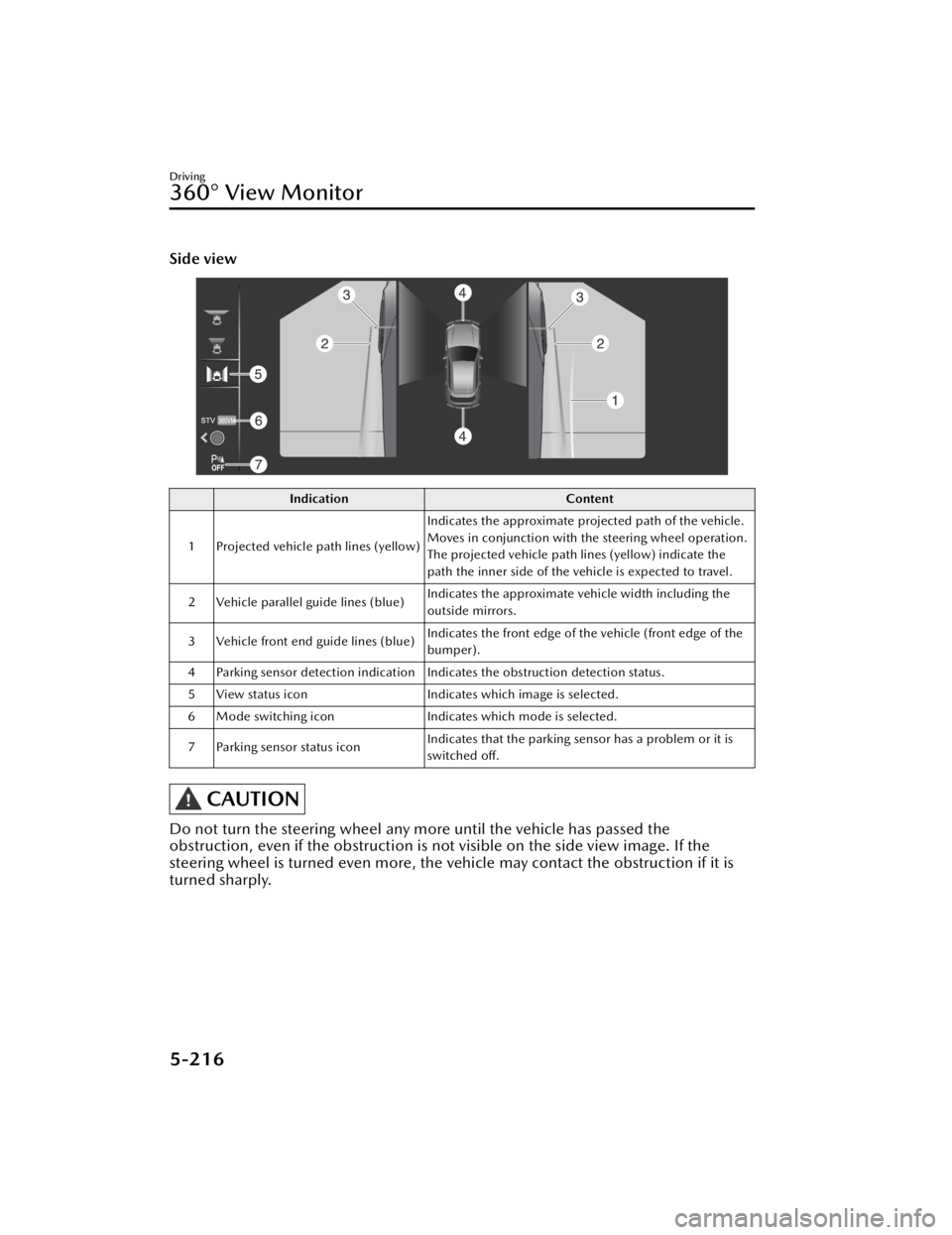
Side view
IndicationContent
1 Projected vehicle path lines (yellow) Indicates the approximate projected path of the vehicle.
Moves in conjunction with the steering wheel operation.
The projected vehicle path lines (yellow) indicate the
path the inner side of the vehicle is expected to travel.
2 Vehicle parallel guide lines (blue) Indicates the approximate vehicle width including the
outside mirrors.
3 Vehicle front end guide lines (blue) Indicates the front edge of the vehicle (front edge of the
bumper).
4 Parking sensor detection indication Indicates the obstruction detection status.
5 View status icon Indicates which image is selected.
6 Mode switching icon Indicates which mode is selected.
7 Parking sensor status icon Indicates that the parking sensor has a problem or it is
switched off.
CAUTION
Do not turn the steering wheel any more until the vehicle has passed the
obstruction, even if the obstruction is no
t visible on the side view image. If the
steering wheel is turned even more, the vehicle may contact the obstruction if it is
turned sharply.
Driving
360° View Monitor
5-216
CX-90_8KG7-EA-22L_Edition1_new 2022-11-17 16:05:04
Page 391 of 687

Winter Driving
Carry emergency gear, including tire
chains, window scraper, flares, a small
shovel, jumper cables, and a small bag
of sand or salt.
Ask an Authorized Mazda Dealer to
check the following:
Have the proper ratio of antifreeze in
the radiator.
Refer to Inspecting the Coolant on
page 9-14.
Inspect the battery and its cables.
Cold reduces battery capacity.
Use an engine oil appropriate for the
lowest ambient temperatures that
the vehicle will be driven in (page
9-18).
Inspect the ignition system for
damage and loose connections.
Use washer fluid made with
antifreeze―but do not use engine
coolant antifreeze for washer fluid
(page 9-17).
When driving on ice or in water, snow,
mud, sand, or similar hazards:
Be cautious and allow extra distance
for braking.
Avoid sudden braking and sudden
maneuvering.
Do not pump the brakes. Continue
to press down on the brake pedal.
Refer to Antilock Brake System (ABS)
on page 5-84.
If you get stuck, select a lower gear
and accelerate slowly. Do not spin
the rear wheels.
For more traction in starting on
slippery surfaces such as ice or
packed snow, use sand, rock salt,
chains, carpeting, or other nonslip
material under the rear wheels.
NOTE
Remove snow before driving. Snow
left on the windshield is dangerous
as it could obstruct vision.
Do not apply excessive force to a
window scraper when removing ice
or frozen snow on the mirror glass
and windshield.
Never use warm or hot water for
removing snow or ice from windows
and mirrors as it could result in the
glass cracking.
Drive slowly. Braking performance
can be adversely affected if snow or
ice adheres to the brake
components. If this situation occurs,
drive the vehicle slowly, releasing the
accelerator pedal and lightly applying
the brakes several times until the
brake performance returns to
normal.
Driving
Winter Driving
5-240
CX-90_8KG7-EA-22L_Edition1_new 2022-11-17 16:05:04