phone MAZDA CX90 2024 User Guide
[x] Cancel search | Manufacturer: MAZDA, Model Year: 2024, Model line: CX90, Model: MAZDA CX90 2024Pages: 687, PDF Size: 15.46 MB
Page 442 of 687
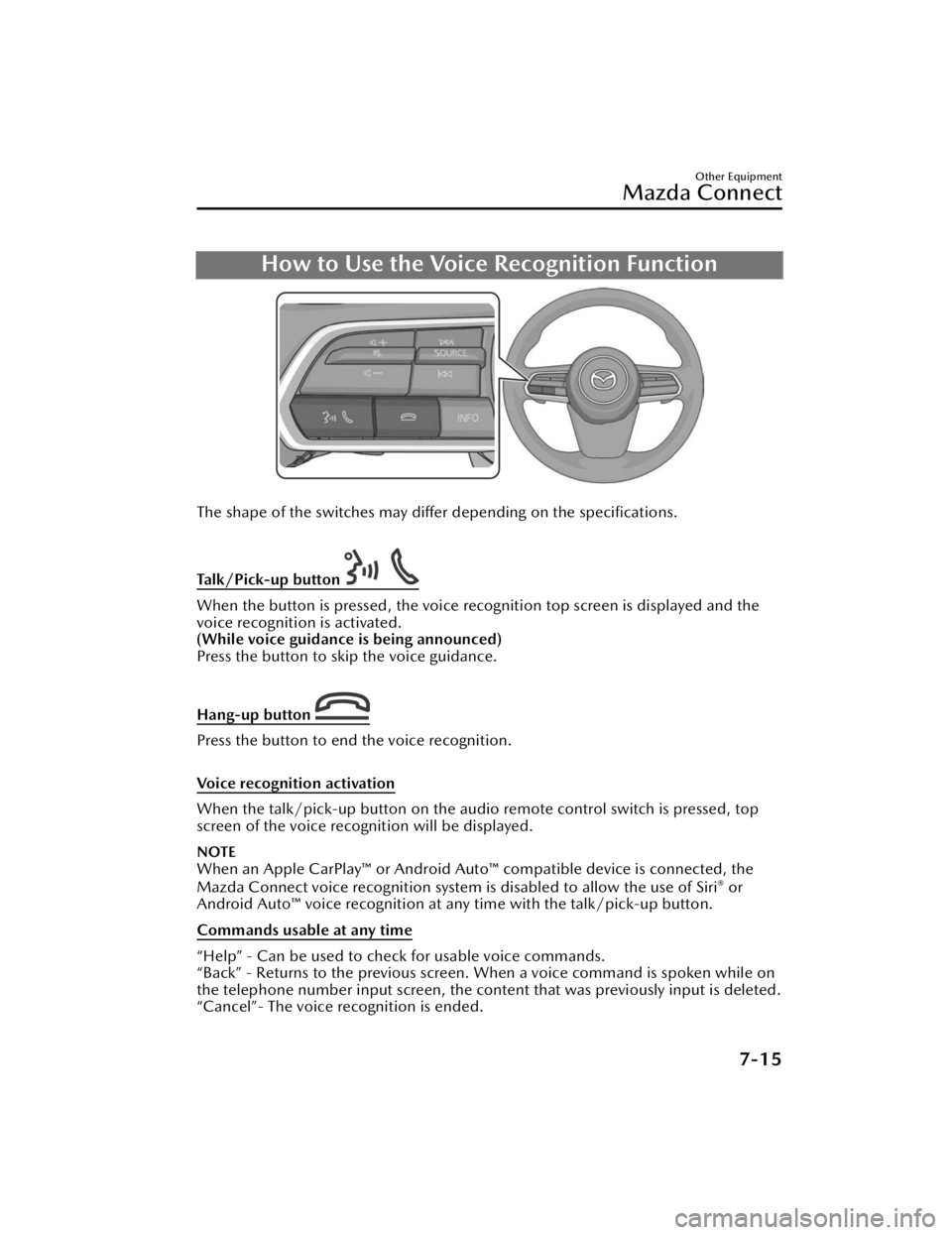
How to Use the Voice Recognition Function
The shape of the switches may differ depending on the specifications.
Talk/Pick-up button
When the button is pressed, the voice recognition top screen is displayed and the
voice recognition is activated.
(While voice guidance is being announced)
Press the button to skip the voice guidance.
Hang-up button
Press the button to end the voice recognition.
Voice recognition activation
When the talk/pick-up button on the audio remote control switch is pressed, top
screen of the voice recognition will be displayed.
NOTE
When an Apple CarPlay™ or Android Auto ™ compatible device is connected, the
Mazda Connect voice recognition system is disabled to allow the use of Siri® or
Android Auto™ voice recognition at an y time with the talk/pick-up button.
Commands usable at any time
“Help” - Can be used to check for usable voice commands.
“Back” - Returns to the previous screen. When a voice command is spoken while on
the telephone number input screen, the content that was previously input is deleted.
“Cancel”- The voice recognition is ended.
Other Equipment
Mazda Connect
7-15
CX-90_8KG7-EA-22L_Edition1_new 2022-11-17 16:05:04
Page 443 of 687
Ending voice recognition
Do any one of the following operations:
Press the hang-up button.Press and hold the talk/Pick-up button.Say the word, “Cancel”.
Convenient operating tips for using the voice recognition function
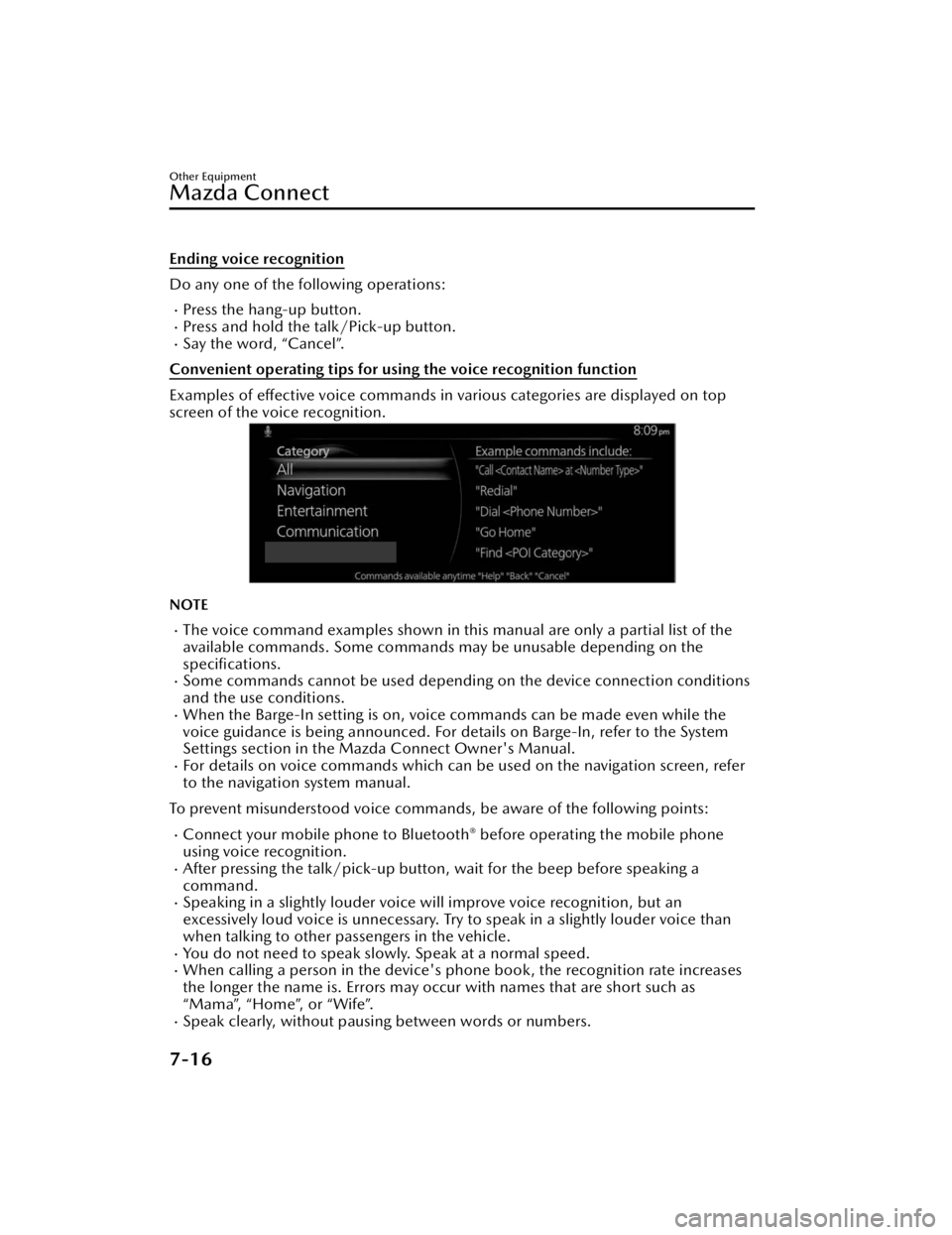
Examples of effective voice commands in various categories are displayed on top
screen of the voice recognition.
NOTE
The voice command examples shown in this manual are only a partial list of the
available commands. Some commands ma y be unusable depending on the
specifications.
Some commands cannot be used depending on the device connection conditions
and the use conditions.
When the Barge-In setting is on, voice commands can be made even while the
voice guidance is being announced. For details on Barge-In, refer to the System
Settings section in the Ma zda Connect Owner's Manual.
For details on voice commands which can be used on the navigation screen, refer
to the navigation system manual.
To prevent misunderstood voice commands, be aware of the following points:
Connect your mobile phone to Bluetooth® before operating the mobile phone
using voice recognition.
After pressing the talk/pick-up button, wait for the beep before speaking a
command.
Speaking in a slightly louder voice will improve voice recognition, but an
excessively loud voice is unnecessary. Try to speak in a slightly louder voice than
when talking to other passengers in the vehicle.
You do not need to speak slow ly. Speak at a normal speed.When calling a person in the device's phone book, the recognition rate increases
the longer the name is. Errors may occur with names that are short such as
“Mama”, “Home”, or “Wife”.
Speak clearly, without pausing between words or numbers.
Other Equipment
Mazda Connect
7-16
CX-90_8KG7-EA-22L_Edition1_new 2022-11-17 16:05:04
Page 444 of 687

Voice commands other than those specified, cannot be recognized. Speak in the
wording specified by the voice commands.
It is not necessary to face the microphone or approach it. Speak the voice
commands while maintaining a safe driving position.
Close the windows and the moonroof*/panorama sunroof* to reduce loud noises
from outside the vehicle and to prevent th e airflow of the air-conditioning system
from being a disturbance when using Bluetooth
® Hands-Free.Make sure that the air flow from the air conditioner is not blowing on the
microphone.
If the voice recognition is poor with th e guidance volume set to high, set the
Barge-In to OFF.
Examples of available voice commands
The specified name and number are put into the {}.
Common
BackHelp (You can listen to help guidance at each screen.){Line Number} (You can select the line number on the screen.)Next PagePrevious PageCancel
Menu
AllNavigationEntertainmentCommunication
Setting
Voice Recognition SettingsDisplay Off
Music
Play Artist (You can also use “Play Artist {Artist name}”.)Play Album (You can also us e “Play Album {Album Name}”.)Play Playlist (You can also use “Play Playlist {Playlist Name}”.)Play Song (You can also use “Play Song {Song Name}”.)Play Audiobook (You can also use “Play Audiobook {Audiobook Name}”.)Play Podcast (You can also use “Play Podcast {Podcast Name}”.)
Radio
Tu n e t o { F re q u e n c y } A MTu n e t o { F re q u e n c y } F MTune to {Frequency} HD {Sub Channel}SiriusXM Channel {Channel Number}
Other Equipment
Mazda Connect
*Some models.7-17
CX-90_8KG7-EA-22L_Edition1_new 2022-11-17 16:05:04
Page 445 of 687

SiriusXM {Station Name}SiriusXM Genre (You can also use “SiriusXM {Genre Name}”.)
Source
Change Source (You can also use “Change Source to USB”*1 and “USB”*1.)Audio OFF (You can also use “Change Source to Audio OFF”.)
Phone
Dial Phone Number (You can al so use “Dial {Phone Number}”.)Call HistoryCall a Contact (You can also use “Call {Contact Name}” and “Call {Contact Name}
at {Number Type}”.)
Redial
*1 Audio source names ot her than “USB” can also be used as follows:
Bluetooth/AM/FM/SiriusXM/Pandora/USB1 Audio/USB2 Audio/USB1 Video/
USB2 Video
Other Equipment
Mazda Connect
7-18
CX-90_8KG7-EA-22L_Edition1_new 2022-11-17 16:05:04
Page 446 of 687

Connected Service (If applicable)
Connected Service Overview (U.S.A.)
There are several types of connected services available via Mazda Connect. Some
services may require you to download the MyMazda app to your smartphone and
subscribe to the services, while others may require you to pair your smartphone to
the vehicle via Bluetooth
®. In addition, on a regular basis and unless you opt-out,
your vehicle will automatically transmit certain geo-location, driving behavior data,
and vehicle health information to Mazda for product quality, data analysis, research,
and product development. Using the QR codes or URLs below, refer to the
Connected Service Owner's Manual and Privacy Policy for more details and opt-out
options.
Connected Service Owner's Manual
https://www.mazdausa.com/static/manuals/mazda-connected-service/
index.html
Connected Service Overview (Canada)
If your vehicle is equipped for connected services, there may be several types of
connected services available to you. The availability, terms and capability of
connected services vary by vehicle and othe r factors. Some services may require you
to download the MyMazda app to your compatible smartphone, purchase a
subscription or be in a supported area with wireless coverage, while others may
require you to pair your smartphone to the vehicle via Bluetooth
®. If your vehicle is
equipped for connected services, certain data may be collected and transmitted
through the connected vehicle system, including, without limitation, geo-location,
driving behaviour data and vehicle health information. Please refer to connected
services terms and privacy policy available on the Mazda Canada website for more
details.
Connected Services owner’s manual:
http://www.mazda.ca/en/digital-owners-manual/2021/connectedservice/
Other Equipment
Mazda Connect
7-19
CX-90_8KG7-EA-22L_Edition1_new 2022-11-17 16:05:04
Page 448 of 687

Appendix
Gracenote® Database
When connecting a USB audio device or Bluetooth® audio device to this unit and
playing audio, the unit searches the database stored in the vehicle for the album art.
If there is a match in the vehicle's database compilation to the music being played,
the album art is displayed. The database information stored in this device uses
database information in the Gracenote
® music recognitions service.
SiriusXM Travel Link
®*
CAUTION
ADVISORY ONLY
The weather information is subject to service interruptions and may contain errors or
inaccuracies and consequently should not be relied upon exclusively. You are urged
to check alternate weather information sources prior to making safety related
decisions. You acknowledge and agree that you shall be solely responsible for use of
the information and all decisions taken with respect thereto. By using this weather
service, you release and waive any claims against Sirius XM Radio Inc. and Mazda
Motor Corporation and all of their respective affiliates with regard to this service.
SiriusXM
® Satellite Radio*
Products/applications shall display “Call [Appropriate Phone Number] to Enable
Services” for any unsubscribed SiriusXM Data Service(s).
This shall be shown on the same screen as the Radio ID and the service subscription
status:
Contact your SiriusXM Representative for the appropriate call center phone number.
U.S.A.: 1-877-447-0011Canada: 1-877-438-9677
SiriusXM
® All Access Subscription
Hopefully, you're already loving SiriusXM in your new Mazda. But don't stop there
— you can also listen on the app and online. All Access is the very best subscription
package – with the most channels and the most flexibility. With All Access, you get
every channel available on your vehicle, plus you can listen on the app, online, and
in your home on a variety of connected devices. — so you can enjoy SiriusXM
wherever you are. Here's what's included:
Over 150 satellite channels to enjoy in your car, coast-to-coast, 24/7.All kinds of commercial-free music, plus every major sport, world-class news and
the biggest names in talk & entertainment.
Other Equipment
Mazda Connect
*Some models.7-21
CX-90_8KG7-EA-22L_Edition1_new 2022-11-17 16:05:04
Page 451 of 687

IN ADDITION, YOU UNDERSTAND THAT CHANGES IN THIRD PARTY
TECHNOLOGY OR GOVERNMENT REGULATION MAY RENDER THE SERVICES
AND/OR APPLICATIONS OBSOLETE AND/OR UNUSABLE. TO THE EXTENT NOT
PROHIBITED BY LAW, IN NO EVENT SHALL MAZDA OR ITS AFFILIATES BE LIABLE
FOR PERSONAL INJURY, OR ANY INCIDENTAL, SPECIAL, INDIRECT OR
CONSEQUENTIAL DAMAGES WHATSOEVER, INCLUDING, WITHOUT
LIMITATION, DAMAGES FOR LOSS OF PROFITS, CORRUPTION OR LOSS OF
DATA, FAILURE TO TRANSMIT OR RECEIVE ANY DATA, BUSINESS INTERRUPTION
OR ANY OTHER COMMERCIAL DAMAGES OR LOSSES, ARISING OUT OF OR
RELATED TO THE APPLICATION OR YOUR USE OF OR INABILITY TO USE THE
APPLICATION OR INFORMATION ON THE APPLICATION.
When using Apple CarPlay™, please avoid distraction and use Apple CarPlay™
responsibly.
Stay fully aware of driving conditions and always obey applicable laws.
NOTE
Apple CarPlay™ is provided by Apple® and its use is subject to your agreement to
the Apple CarPlay™ terms of use, which are included as part of the Apple iOS
terms of use.
When using Apple CarPlay™, location, speed, and other vehicle data is transferred
to your iPhone®. For further details, refer to Apple®’s Privacy Policy.
Android Auto™
CAUTION
YOU EXPRESSLY ACKNOWLEDGE AND AG REE THAT USE OF ANDROID AUTO™
(“THE APPLICATION”) IS AT YOUR SOLE RISK AND THAT THE ENTIRE RISK AS TO
SATISFACTORY QUALITY, PERFORMANCE, ACCURACY AND EFFORT IS WITH
YOU TO THE MAXIMUM EXTENT PERMITTED BY APPLICABLE LAW, AND THAT
THE APPLICATION AND INFORMATION ON THE APPLICATION IS PROVIDED “AS
IS” AND “AS AVAILABLE,” WITH ALL FAULTS AND WITHOUT WARRANTY OF ANY
KIND, AND MAZDA HEREBY DISCLAIMS ALL WARRANTIES AND CONDITIONS
WITH RESPECT TO THE APPLICATION AND INFORMATION ON THE
APPLICATION, EITHER EXPRESS, IMPLIED OR STATUTORY, INCLUDING, BUT NOT
LIMITED TO, THE IMPLIED WARRANTIES AND/OR CONDITIONS OF
MERCHANTABILITY, SATISFACTORY QUALITY, FITNESS FOR A PARTICULAR
PURPOSE, ACCURACY, QUIET ENJOYMENT, AND NONINFRINGEMENT OF
THIRD PARTY RIGHTS.
Other Equipment
Mazda Connect
7-24
CX-90_8KG7-EA-22L_Edition1_new 2022-11-17 16:05:04
Page 452 of 687

AS EXAMPLES, AND WITHOUT LIMITATION, MAZDA DISCLAIMS ANY
WARRANTY REGARDING THE ACCURACY OF DATA PROVIDED BY THE
APPLICATION, SUCH AS THE ACCURACY OF DIRECTIONS, ESTIMATED TRAVEL
TIME, SPEED LIMITS, ROAD CONDITIONS, NEWS, WEATHER, TRAFFIC, OR
OTHER CONTENT PROVIDED BY GOOGLE, ITS AFFILIATES, OR THIRD PARTY
PROVIDERS; MAZDA DOES NOT GUARANTEE AGAINST LOSS OF APPLICATION
DATA, WHICH MAY BE LOST AT ANY TIME; MAZDA DOES NOT GUARANTEE
THAT THE APPLICATION OR ANY SERVICES PROVIDED THROUGH THEM WILL
BE PROVIDED AT ALL TIMES OR THAT ANY OR ALL SERVICES WILL BE AVAILABLE
AT ANY PARTICULAR TIME OR LOCATION. FOR EXAMPLE, SERVICES MAY BE
SUSPENDED OR INTERRUPTED WITHOUT NOTICE FOR REPAIR, MAINTENANCE,
SECURITY FIXES, UPDATES, ETC., SERVICES MAY BE UNAVAILABLE IN YOUR AREA
OR LOCATION, ETC.
IN ADDITION, YOU UNDERSTAND THAT CHANGES IN THIRD PARTY
TECHNOLOGY OR GOVERNMENT REGULATION MAY RENDER THE SERVICES
AND/OR APPLICATIONS OBSOLETE AND/OR UNUSABLE. TO THE EXTENT NOT
PROHIBITED BY LAW, IN NO EVENT SHALL MAZDA OR ITS AFFILIATES BE LIABLE
FOR PERSONAL INJURY, OR ANY INCIDENTAL, SPECIAL, INDIRECT OR
CONSEQUENTIAL DAMAGES WHATSOEVER, INCLUDING, WITHOUT
LIMITATION, DAMAGES FOR LOSS OF PROFITS, CORRUPTION OR LOSS OF
DATA, FAILURE TO TRANSMIT OR RECEIVE ANY DATA, BUSINESS INTERRUPTION
OR ANY OTHER COMMERCIAL DAMAGES OR LOSSES, ARISING OUT OF OR
RELATED TO THE APPLICATION OR YOUR USE OF OR INABILITY TO USE THE
APPLICATION OR INFORMATION ON THE APPLICATION.
When using Android Auto™, please avoid distraction and use Android Auto™
responsibly.
Stay fully aware of driving conditions and always obey applicable laws.
NOTE
Android Auto™ is provided by Google and its use is subject to your agreement to
the Android Auto™ terms of use.
When using Android Auto™, location, speed, and other vehicle data is transferred
to your smart phone. For further details, refer to Google Privacy Policy.
Trademark
Pa n d o ra®, the Pandora® logo, and the Pandora® trade dress are trademarks or
registered trademarks of Pandora Media, Inc., used with permission.
HD Radio Technology manufactured under license from iBiquity Digital
Corporation. U.S. and Foreign Patents. For patents see http://dts.com/patents.
HD Radio, Artist Experience, and the HD, HD Radio, and “ARC” logos are
Other Equipment
Mazda Connect
7-25
CX-90_8KG7-EA-22L_Edition1_new 2022-11-17 16:05:04
Page 453 of 687

registered trademarks or trademarks of iBiquity Digital Corporation in the United
States and/or other countries.
iPhone, iPod touch, iPod nano, Siri and Lightning are trademarks of Apple Inc.,
registered in the U.S. and other countries.
Apple CarPlay is a trademark of Apple Inc.Use of the Apple CarPlay logo means that a vehicle user interface meets Apple
performance standards. Apple is not responsible for the operation of this vehicle
or its compliance with safety and regulatory standards. Please note that the use of
this product with iPhone, iPod may affect wireless performance.
iOS is a trademark or registered trademark of Cisco in the U.S. and other countries
and is used under license.
“Made for iPhone” and “Made for iPod” mean that an accessory has been
designed to connect
specifically to iPhone or iPod, and has been
certified by the
developer to meet Apple performance standards. Apple is not responsible for the
operation of this device or its compliance with safety and regulatory standards.
Please note that the use of this accessory with iPhone or iPod may affect wireless
performance.
Made for
iPhone 11 Pro Max
iPhone 11 Pro
iPhone 11
iPhone XS Max
iPhone XS
iPhone XR
iPhone X
iPhone 8 Plus
iPhone 8
iPhone 7 Plus
iPhone 7
iPhone SE
iPhone 6s Plus
iPhone 6s
iPhone 6 Plus
iPhone 6
iPhone 5s
iPod touch (7th Generation)
Other Equipment
Mazda Connect
7-26
CX-90_8KG7-EA-22L_Edition1_new 2022-11-17 16:05:04
Page 481 of 687

Wireless Charger (Qi)
You can charge mobile devices such as
Smartphones which comply with the
Qi Wireless Charging standard.
Only use mobile devices that have a
maximum power consumption of 5 W,
or 15 W or below.
Trademarks
“Qi” and the Qi symbol are trademarks
or registered trademarks of the
Wireless Power Consortium (WPC).
Warnings and Cautions
When Using the Wireless Charger (Qi)
WARNING
Radio waves from the Wireless
Charger (Qi) may affect the operation
of medical devices such as
implanted-type cardiac pacemakers
or defibrillators.
Before using the Wireless Charger
(Qi) near people who use medical
devices, ask the medical device
manufacturer or your physician if
radio waves from the Wireless
Charger (Qi) will affect the device.
The Wireless Charger (Qi) can be
disabled to prevent it from affecting
medical devices. Consult an
Authorized Mazda Dealer for details.
Heed the following cautions.
Otherwise, the Wireless Charger (Qi)
may malfunction or be damaged,
which could cause a fire, burns due to
heat generation, or an accident such
as electrical shock.
Do not install, remove, disassemble,
or change the wiring of the Wireless
Charger (Qi). If the Wireless Charger
(Qi) needs to be installed or
removed, consult an Authorized
Mazda Dealer.
Do not use the Wireless Charger (Qi)
when it is malfunctioning. In
addition, if smoke, abnormal noise,
or abnormal smell is emitted from
the Wireless Charger (Qi), stop the
vehicle in a safe place, turn off the
Wireless Charger (Qi), and consult
an Authorized Mazda Dealer.
Other Equipment
Wireless Charger (Qi)
7-54
CX-90_8KG7-EA-22L_Edition1_new 2022-11-17 16:05:04