reset MAZDA CX90 2024 User Guide
[x] Cancel search | Manufacturer: MAZDA, Model Year: 2024, Model line: CX90, Model: MAZDA CX90 2024Pages: 687, PDF Size: 15.46 MB
Page 326 of 687

Cruising & Traffic Support(CTS)
*
The CTS is a system that reduces the
load on the driver while the vehicle is
driven on expressways or highways.
The CTS has the following 2 functions.
Constant speed/Headway control
function
The function performs headway
control to maintain the distance with a
vehicle ahead at a constant preset
speed without you having to depress
the accelerator or brake pedal.
Steering wheel assist function
When vehicle lane lines are detected,
the function assists your steering wheel
operation to follow the vehicle lane
lines.
When vehicle lane lines are not
detected, the function assists your
steering wheel operation to follow the
trajectory of the vehicle ahead.
Warnings and Cautionsfor Using Cruising &
Tra ffi c Support (CTS)
WARNING
Do not rely completely on the CTS.
The CTS is not an automated driving
system. Therefore, the function has
limitations. Do not rely completely
on the system and always stay on
course using the steering wheel.
Set a vehicle speed within the speed
limit according to the road
conditions and the weather
conditions.
The CTS may not be able to detect a
vehicle ahead depending on the type
of vehicle ahead and its conditions,
the weather conditions, and the road
conditions. Additionally, the system
might be unable to decelerate
sufficiently if the vehicle ahead
applies the brakes suddenly or
another vehicle cuts into your lane,
which could result in an accident.
Do not use the CTS under the
following conditions. Otherwise, it
may result in an accident.
The vehicle is driven on roads other
than expressways and highways.
The vehicle is driven on roads with
sharp curves or with heavy
traffic
where sufficient distances between
vehicles cannot be kept.
The vehicle is driven on roads where
acceleration and deceleration are
frequently repeated.
The vehicle is exiting the main lane
on an expressway to enter an
interchange, a rest area, or a parking
area.
Driving
Cruising &
Tra ffi c Support (CTS)
*Some models.5-175
CX-90_8KG7-EA-22L_Edition1_new
2022-11-17 16:05:04
Page 376 of 687

Cruise Control*
Cruise control reduces the load on the
driver by driving the vehicle at a
constant speed. The vehicle is driven at
the preset speed and maintaining a
constant vehicle speed without the
driver having to depress the accelerator
or brake pedal.
Warnings and Cautionsfor Using the Cruise Control
WARNING
Do not rely completely on the cruise
control.
The functions of the cruise control have
limitations. Always drive carefully by
checking the safety of your
surroundings and depressing the brake
or accelerator pedal.
Do not use the cruise control under
the following conditions. Otherwise,
it may result in an accident.
The vehicle is driven on roads other
than highways.
The vehicle is driven on roads with
sharp curves or with heavy
traffic
where sufficient distances between
vehicles cannot be kept.
The vehicle is driven on slippery
roads such as icy or snow-covered
roads, and unpaved roads.
The vehicle is driven on a long
downslope.
The vehicle is driven on a steep
slope.
Turn off the cruise control when not in
use.
Leaving the cruise control turned on
when it is not in use is dangerous as it
could operate unexpectedly, resulting
in an accident.
CAUTION
Turn off the cruise control when
being towed or when towing
another vehicle.
Driving
Cruise Control
*Some models.5-225
CX-90_8KG7-EA-22L_Edition1_new 2022-11-17 16:05:04
Page 378 of 687

While the cruise control is operating,
the driver is notified of the operation
condition by the screen display.
Instrument cluster
1. Set speed
Active driving display
1. Set speed
NOTE
The cruise control does not operate
when the Hill Descent Control is
operating.
While in EV mode, acceleration may
be restricted and the vehicle may not
be able to be driven at the set speed.
Refer to Mazda intelligent Drive
Select (Mi-Drive) on page 5-95.
The accelerator pedal operation
takes priority during constant speed
driving. When you release your foot
from the accelerator pedal, the
vehicle returns to constant speed
driving at the set speed.
(Vehicles with Mazda Radar Cruise
Control with Stop & Go function
(MRCC with Stop & Go function))
If the distance between vehicles
control is disabled using the Mazda
Connect, the system switches to the
cruise control. At this time, the
MRCC switch functions as the cruise
control switch.
Refer to the Settings section in the
Mazda Connect Owner's Manual.
If the vehicle power is switched OFF
while the distance between vehicles
control is disabled, the distance
between vehicles control is enabled
automatically the next time the
vehicle power is switched ON.
The system may not be able to
maintain the set speed depending
on the road conditions such as steep
up or down slopes.
When the vehicle speed is less than
20 km/h (12 mph), the cruise
control is canceled. If you want to
use the cruise control again, reset the
cruise control.
The brake lights turn on while the
brakes are operating by the cruise
control.
The cruise control cannot be
canceled while driving in manual
shift mode (selector lever shifted
from the D to M position).
Therefore, engine braking does not
work even if you shift down to a
lower gear. If deceleration is
required, lower the set vehicle speed
or depress the brake pedal.
Changing the set vehicle speed
Changing the set vehicle speed using
the RES switch
Press the RES switch up (SET+) or
down (SET-) to the desired speed.
Press and release immediately: 1
km/h (1 mph)
Press and hold: 10 km/h (5 mph)
Driving
Cruise Control
5-227
CX-90_8KG7-EA-22L_Edition1_new 2022-11-17 16:05:04
Page 405 of 687

Convenient Ways to Usethe Fully AutomaticClimate Control
Cabin Preconditioning
Cabin preconditioning is a collective
term regarding use of the climate
control timer and the remote climate
control.
While the climate control timer or the
remote climate control is operating ,
you can check the setting status on
your Smartphone.
Climate Control Timer
By setting the departure time using
Mazda Connect, the climate control
system operates and adjusts the cabin
temperature by the departure time.
The departure time, day, set
temperature, and defroster operation/
non-operation can be personalized,
and 7 types of patterns can be
programmed in advance.
Remote Climate Control
Using your Smartphone, you can turn
on the climate control system remotely
before departing.
WARNING
Do not operate the cabin
preconditioning with people or pets
in the vehicle.
The cabin preconditioning may stop
automatically due to the vehicle
conditions and the surrounding
environment. If the climate control
system stops and the temperature
inside the vehicle increases or
decreases, it could cause a serious
medical condition such as heat
exhaustion and dehydration.
CAUTION
If any of the following conditions is
met, the cabin preconditioning will
not operate. In addition, if the cabin
preconditioning is operating, it will
stop. However, if the liftgate is
opened while the cabin
preconditioning is operating, the
cabin preconditioning will not stop.
When the cabin preconditioning
does not operate or stops, the cabin
preconditioning cancel display is
indicated on the display.
The high voltage battery or the
lead-acid battery charge is low
The doors/liftgate are open
The vehicle power is switched to a
position other than OFF
There is a problem with the vehicle
If any of the following conditions is
met, the climate control system will
not operate effectively and the cabin
temperature may not reach the set
temperature.
Your power consumption is high
Extremely high or low
temperatures
The climate control system operates
so that it reaches the set temperature
at the departure time, and stops at
the departure time. The cabin
temperature may not reach the set
temperature if you get in the vehicle
earlier or later than the set departure
time.
If you operate the cabin
preconditioning while charging the
vehicle, it could take more time to
charge the battery. In addition, when
it is extremely hot or cold, the power
consumption of the climate control
system is high, therefore the charge
amount may be less than the preset
charge amount.
Equipment to Make Cabin More Comfortable
Fully Automatic Climate Control (Front)
6-12
CX-90_8KG7-EA-22L_Edition1_new 2022-11-17 16:05:04
Page 499 of 687

Erasing Programmed HomeLink
Buttons
Press the two outer HomeLink buttons
continuously at the same time until the
indicator light flashes.
1. HomeLink button 1
2. HomeLink button 3
NOTE
All of the programmed HomeLink
buttons are reset. If there is
programming you do not want to
delete, reprogram if necessary. Refer
to Programming the HomeLink
System.
Verify that the programming has
been erased if you resell the vehicle.
The programming will not be erased
even if the battery is disconnected.
Other Equipment
HomeLink Wireless Control System
7-72
CX-90_8KG7-EA-22L_Edition1_new 2022-11-17 16:05:04
Page 538 of 687

Initializing the Moonroof
If the moonroof does not operate
normally, do the following procedure:
1. Switch the vehicle power ON.
2. Press the tilt switch, to partially tiltopen the rear of the moonroof.
3. Repeat Step 2. The rear of the moonroof tilts open to the fully
open position, then closes a little.
If the reset procedure is performed
while the moonroof is in the slide
position (partially open) it will close
before the rear tilt opens.
What to Do in Case of Emergency
The Moonroof Cannot Be Operated
8-33
CX-90_8KG7-EA-22L_Edition1_new 2022-11-17 16:05:04
Page 560 of 687
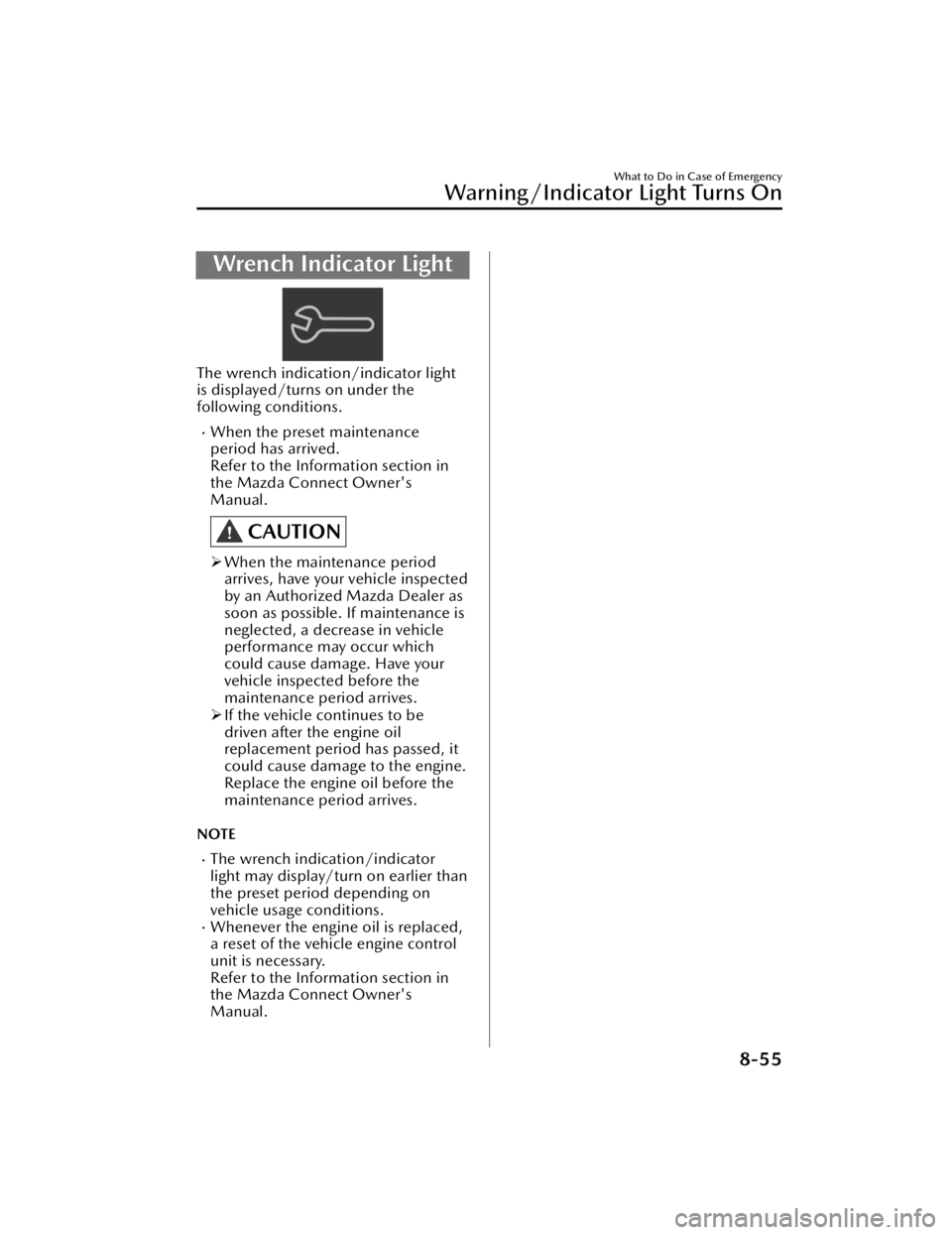
Wrench Indicator Light
The wrench indication/indicator light
is displayed/turns on under the
following conditions.
When the preset maintenance
period has arrived.
Refer to the Information section in
the Mazda Connect Owner's
Manual.
CAUTION
When the maintenance period
arrives, have your vehicle inspected
by an Authorized Mazda Dealer as
soon as possible. If maintenance is
neglected, a decrease in vehicle
performance may occur which
could cause damage. Have your
vehicle inspected before the
maintenance period arrives.
If the vehicle continues to be
driven after the engine oil
replacement period has passed, it
could cause damage to the engine.
Replace the engine oil before the
maintenance period arrives.
NOTE
The wrench indication/indicator
light may display/turn on earlier than
the preset period depending on
vehicle usage conditions.
Whenever the engine oil is replaced,
a reset of the vehicle engine control
unit is necessary.
Refer to the Information section in
the Mazda Connect Owner's
Manual.
What to Do in Case of Emergency
Warning/Indicator Light Turns On
8-55
CX-90_8KG7-EA-22L_Edition1_new 2022-11-17 16:05:04
Page 574 of 687
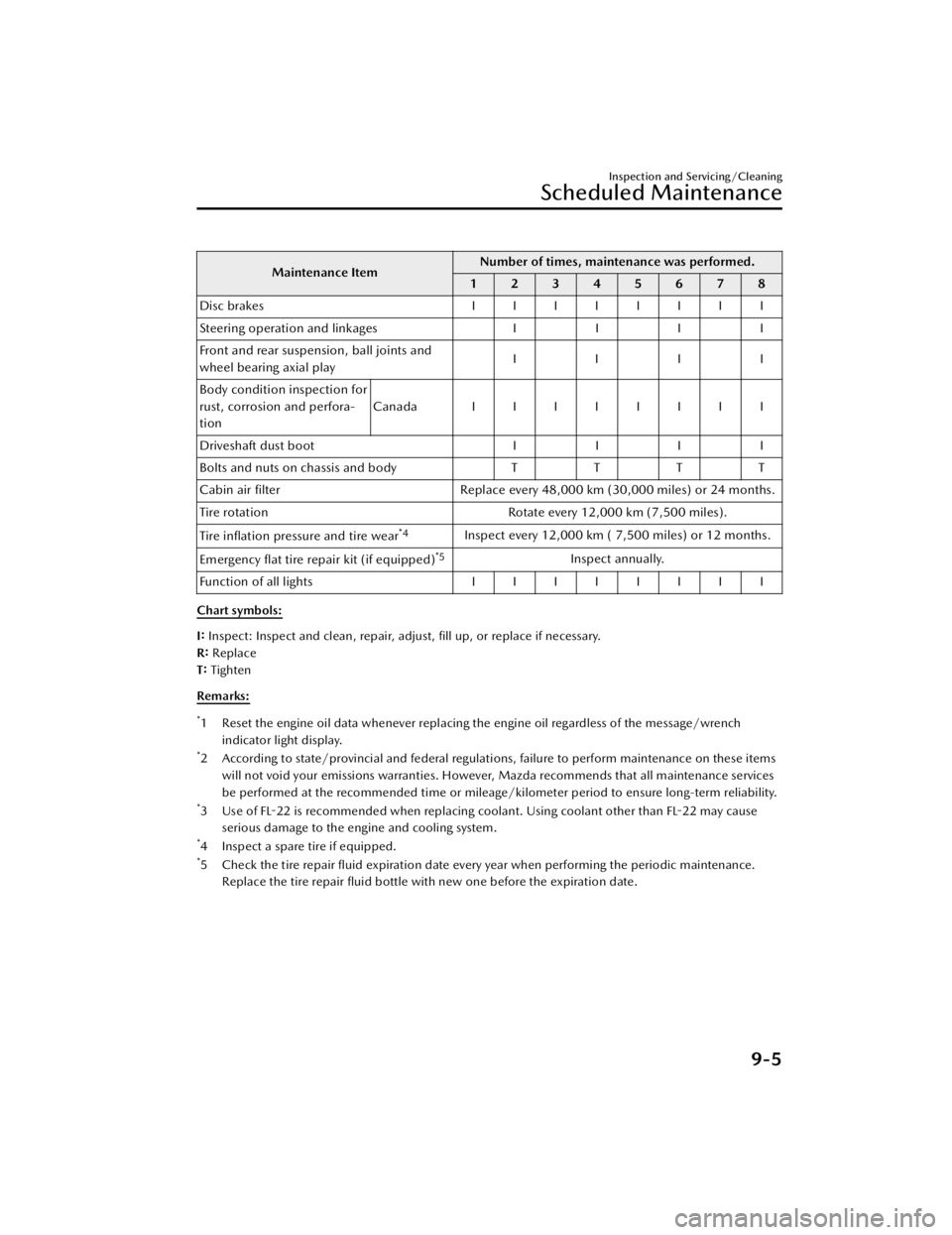
Maintenance ItemNumber of times, maintenance was performed.
12345678
Disc brakes IIIIIIII
Steering operation and linkages II II
Front and rear suspension, ball joints and
wheel bearing axial play IIII
Body condition inspection for
rust, corrosion and perfora-
tion Canada IIIIIIII
Driveshaft dust boot II II
Bolts and nuts on chassis and body TTT T
Cabin air filter Replace every 48,000 km (30,000 miles) or 24 months.
Tire rotation Rotate every 12,000 km (7,500 miles).
Tire inflation pressure and tire wear
*4Inspect every 12,000 km ( 7,500 miles) or 12 months.
Emergency flat tire repair kit (if equipped)
*5Inspect annually.
Function of all lights IIIIIIII
Chart symbols:
I: Inspect: Inspect and clean, repair, adjust, fill up, or replace if necessary.
R: Replace
T: Tighten
Remarks:
*1 Reset the engine oil data whenever replacing the engine oil regardless of the message/wrench indicator light display.
*2 According to state/provincial and federal regulations, failure to perform maintenance on these itemswill not void your emissions warranties. However, Mazda recommends that all maintenance services
be performed at the recommended time or mileage/kilometer period to ensure long-term reliability.
*3 Use of FL-22 is recommended when replacing coolant. Using coolant other than FL-22 may causeserious damage to the engine and cooling system.
*4 Inspect a spare tire if equipped.*5 Check the tire repair fluid expiration date every year when performing the periodic maintenance.Replace the tire repair fluid bottle with new one before the expiration date.
Inspection and Servicing/Cleaning
Scheduled Maintenance
9-5
CX-90_8KG7-EA-22L_Edition1_new
2022-11-17 16:05:04
Page 575 of 687
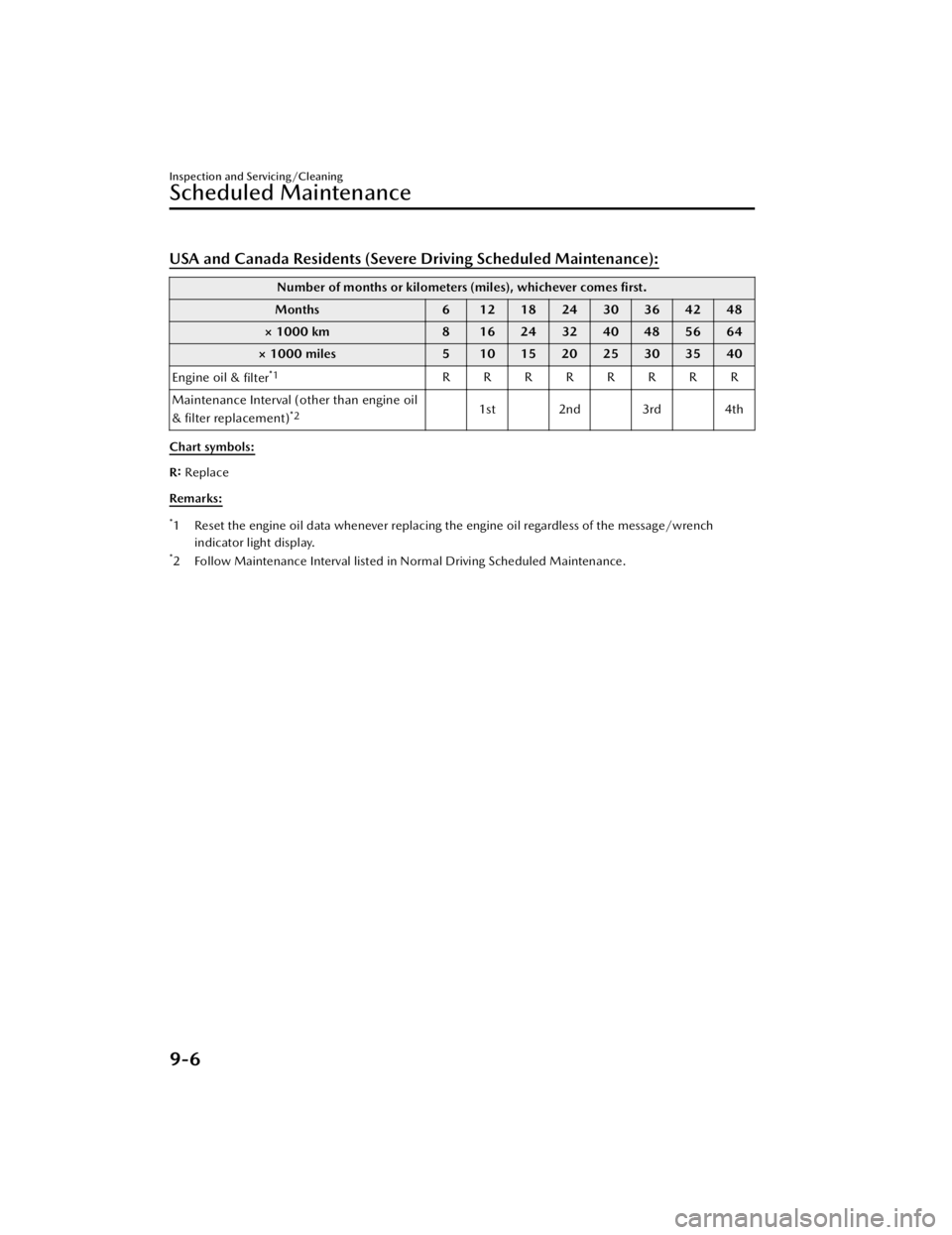
USA and Canada Residents (Severe Driving Scheduled Maintenance):
Number of months or kilometers (miles), whichever comes first.
Months 6 12182430364248
× 1000 km 8 16243240485664
× 1000 miles 5 10 15 20 25 30 35 40
Engine oil & filter
*1RRRRRRRR
Maintenance Interval (other than engine oil
& filter replacement)
*21st 2nd 3rd 4th
Chart symbols:
R: Replace
Remarks:
*1 Reset the engine oil data whenever replacing the engine oil regardless of the message/wrench indicator light display.
*2 Follow Maintenance Interval listed in Normal Driving Scheduled Maintenance.
Inspection and Servicing/Cleaning
Scheduled Maintenance
9-6
CX-90_8KG7-EA-22L_Edition1_new 2022-11-17 16:05:04