ECO mode MAZDA CX90 2024 Owner's Manual
[x] Cancel search | Manufacturer: MAZDA, Model Year: 2024, Model line: CX90, Model: MAZDA CX90 2024Pages: 687, PDF Size: 15.46 MB
Page 158 of 687

How to Use the Smart Brake
Support (SBS).................... 5-200
360° View Monitor............... 5-206 360° View Monitor
*........... 5-206
Warnings and Cautions for Using
the 360° View Monitor...... 5-210
How to Use the 360° View
Monitor............................ 5-212
Convenient Ways to Use the 360°
View Monitor.................... 5-222
Secondary Collision
Reduction............................ 5-223 Secondary Collision
Reduction
*........................ 5-223
Warnings and Cautions for Using
the Secondary Collision
Reduction......................... 5-223
How to Use the Secondary
Collision Reduction........... 5-224
Cruise Control......................5-225 Cruise Control
*.................. 5-225
Warnings and Cautions for Using
the Cruise Control............. 5-225
How to Use the Cruise
Control............................. 5-226
Rear View Monitor................5-229 Rear View Monitor
*........... 5-229
Warnings and Cautions for Using
the Rear View Monitor....... 5-230
How to Use the Rear View
Monitor............................ 5-231
Parking Sensor......................5-234 Pa r k i n g S e n s o r
*.................. 5-234
Warnings and Cautions for Using
the Parking Sensor............. 5-234
How to Use the Parking
Sensor...............................5-235
Winter Driving......................5-240 Winter Driving................... 5-240
Snow Tires........................ 5-241
Tire Chains........................ 5-241
*Some models.5-7
CX-90_8KG7-EA-22L_Edition1_new 2022-11-17 16:05:04
Page 161 of 687

Convenient Ways to Usethe Outside Mirrors
Driving Position Memory*
The angle of the outside mirrors can be
programmed to the Driving Position
Memory.
Refer to Driving Position Memory on
page 3-33.
Auto fold function
*
When locking/unlocking the doors
while the vehicle power is switched
OFF, the outside mirrors automatically
fold in and out.
When the outside mirrors are folded in
and the vehicle power is switched ON,
or the hybrid system is started, the
outside mirrors fold out automatically.
Turn the auto fold function on using
the center display.
Refer to Settings section in the Mazda
Connect Owner's Manual or consult
an Authorized Mazda Dealer.
Operation function after hybrid
system is stopped
The angle of the outside mirrors can be
adjusted and they can be folded in and
out for about 40 seconds after the
vehicle power is switched from ON to
OFF.
Auto tilt-down outside mirror
function for reversing *
The outside mirrors can be set to tilt
downwards automatically when
reversing the vehicle. When the vehicle
is finished reversing , the outside
mirrors return to their original angle.
1. Press the select switch on the side of the door mirror to be tilted
down.
Turn on the indicator light of the
select switch.
2. Shift the selector lever to the Rposition.
The outside mirror on the side
where you pressed the select switch
will tilt downward.
NOTE
When any of the following condition is
met, the outer mirrors return to their
normal positions.
The vehicle power is switched to a
position other than ON.
The shift selector lever is shifted to a
position other than R.
The select switch is pressed again.
Automatic glare prevention function
*
In conjunction with the glare
prevention function of the auto-type
rearview mirror, only the driver's side
outside mirror reduces the light from
the headlights of on-coming vehicles.
Operation Function After Vehicle
power is Switched OFF
The outside mirrors can be operated
for about 40 seconds after the vehicle
power is switched from ON to off with
all doors closed. If any door is opened,
the outside mirrors will stop operating.
Driving
Mirrors
5-10*Some models.
CX-90_8KG7-EA-22L_Edition1_new 2022-11-17 16:05:04
Page 176 of 687

Convenient Ways to Usethe e-SKYACTIV PHEV
Switch to Start in EV Mode
The hybrid system can be changed to
start in EV mode.
Refer to the Settings section in the
Mazda Connect Owner's Manual.
Switching the Regenerative Braking
Strength
The regenerative braking strength can
be changed.
Refer to the Settings section in the
Mazda Connect Owner's Manual.
For Eco-Friendly and Economical
Driving
Using the Drive Mode
EV mode is mainly used in urban areas,
while NORMAL mode is used in
suburban areas and on expressways,
which leads to savings in electricity and
fuel consumption.
By actively using regenerative braking
to charge the high voltage battery, it is
possible to increase the EV travel
distance and to reduce fuel
consumption when driving the vehicle
in a mode other than EV mode.
To extend cruising distance
The electrical power consumption
while driving can be reduced and the
cruising distance can be extended by
doing the following operations.
With the charge connector
connected, turn on the climate
control system to provide a
comfortable temperature in the
cabin before driving.
When driving during cold
temperatures, use the seat warmer or
steering warmer instead of the
climate control system.
Adjust the climate control system to
a moderate airflow and temperature
setting.
Refrain from using the defogger
under conditions other than when a
window is fogged or frozen.
By maintaining a sufficient distance
between vehicles and using the
regenerative braking well, more
electrical power can be charged to
the high voltage battery.
To extend the life of the high voltage
battery
The high voltage battery life changes
depending on the vehicle storage
conditions or charging method.
To extend the life of the high voltage
battery, be careful of the following.
(Charging the battery)
Avoid unnecessary, frequent
charging.
Only charge the battery with as much
power as needed, and do not always
fully charge the battery. The
maximum charge limit can be set.
Refer to Convenient Ways to Use of
Charging on page 5-118.
(Parking the vehicle)
Do not park the vehicle in a place
where the ambient temperature is
extremely high or low.
Do not leave the vehicle while the
remaining high voltage battery power
is extremely low.
If the [Battery Cooling] operation notification is displayed on the
center display after driving the
vehicle, select [Activate].
Driving
e-SKYACTIV PHEV
5-25
CX-90_8KG7-EA-22L_Edition1_new 2022-11-17 16:05:04
Page 183 of 687

Tachometer
The tachometer shows engine speed in
thousands of revolutions per minute
(rpm).
Displays while driving in SPORT
mode/OFF-ROAD mode/TOWING
mode.
Refer to How to Use the Mazda
intelligent Drive Select (Mi-Drive) on
page 5-96.
CAUTION
Do not run the engine with the
tachometer needle in the RED ZONE.
This may cause severe engine damage.
1. STRIPED ZONE
2. RED ZONE
NOTE
When the tachometer needle enters
the STRIPED ZONE, this indicates to
the driver that the gears should be
shifted before entering the RED ZONE.
Odometer/Trip Meter
Odometer
The odometer records the total
distance the vehicle has been driven.
Tr i p m e te r
The driving distance for a specified
interval is indicated. Two types (TRIP A,
TRIP B) of interval distance can be
measured.
Driving
Instrument Cluster
5-32
CX-90_8KG7-EA-22L_Edition1_new 2022-11-17 16:05:04
Page 190 of 687

Average Fuel EconomyDisplay
This mode displays the average fuel
economy by calculating the total
traveled distance and the total fuel
consumption since the vehicle was
purchased or the past data was reset.
The average fuel economy is calculated
and displayed every 30 seconds.
How to Use the AverageFuel Economy Display
To reset the displayed average fuel
economy data, press the INFO switch
for 2 seconds or longer.
After resetting the data, - - - L/100 km
(- - - mpg) is displayed until the
average fuel economy is recalculated
and displayed.
The average fuel economy is also reset
at the same time as the average
electrical power consumption rate.
Driving
Instrument Cluster
5-39
CX-90_8KG7-EA-22L_Edition1_new 2022-11-17 16:05:04
Page 203 of 687

NOTE
If the automatic transmission fluid (ATF) temperature becomes too high, the mode
will not switch to direct mode. In addition, if the ATF temperature becomes too
high while in direct mode, the mode may be canceled. If the mode is switched to
direct mode again, it is necessary to operate the steering shift switches.
While the vehicle is stopped, direct mode cannot be set even if the DOWN switch
(-) is pulled.
When fully depressing the accelerator pedal even while in direct mode, the
transmission kicks down, bu t it does not kick down while the Traction Control
System (TCS) is turned off. However, if th e vehicle is continuously driven at a high
rpm, the gears may automatically shift up to protect the engine.
When the vehicle is driven at low speed or decelerating quickly during EV driving,
the mode may not be able to be switched to direct mode using the UP switch (+/
OFF) of the steering shift switches.
If NORMAL mode is in use while the motor is running, operating the steering shift
switches will start the engine.
When operating a steering switch while the Mazda intelligent Drive Select
(Mi-Drive) is in EV mode, the engine st arts and the mode switches from EV mode
to NORMAL mode.
Canceling Direct Mode
Direct mode can be canceled by performing the following operations.
The UP switch (+/OFF) is pulled toward you for a certain period of time or longer.The vehicle is driven for a certain period of time or longer (time differs depending
on the driving conditions while operating).
The vehicle is stopped.The vehicle is driven at a low speed.
Using Manual Shift Mode
1. Select manual shift mode (M) from AT shift modes under Settings in Mazda
Connect.
2. Pull the up switch (+/OFF) or the down switch (-) of the steering shift switches toward you when the selector lever is in the D position.
1. Down switch (-)
2. Up switch (+/OFF)
The gear position can be switched manually in manual shift mode.
Driving
Steering Shift Switches
5-52
CX-90_8KG7-EA-22L_Edition1_new 2022-11-17 16:05:04
Page 204 of 687

Shifting up/down
Pull the up switch (+/OFF) or the down switch (-) of the steering shift switches
toward you.
1. Down switch (-)
2. Up switch (+/OFF)
Shifts up or down.
NOTE
If the automatic transmission fluid (ATF) temperature becomes too high, the mode
will not switch to manual shift mode. In addition, if the ATF temperature becomes
too high while in manual shift mode, the mode may be canceled. If the mode is
switched to manual shift mode again, it is necessary to operate the steering shift
switches.
When fully depressing the accelerator pedal even while in manual mode, the
transmission kicks down, but it does not kick down while the Traction Control
System (TCS) is turned off. However, if the vehicle is continuously driven at a high
rpm, the gears may automatically shift up to protect the engine.
When the vehicle is driven at low speed or decelerating quickly during EV driving,
the mode may not be able to be switched to manual shift mode using the UP
switch (+/OFF) of the steering shift switches.
If NORMAL mode is in use while the moto r is running, operating the steering shift
switches will start the engine.
When operating a steering switch while the Mazda intelligent Drive Select
(Mi-Drive) is in EV mode, the engine starts and the mode switches from EV mode
to NORMAL mode.
Canceling Manual Shift Mode
The UP switch (+/OFF) of the steering shift switches is pulled and held for a certain
period of time or longer.
Manual shift mode is canceled.
Driving
Steering Shift Switches
5-53
CX-90_8KG7-EA-22L_Edition1_new 2022-11-17 16:05:04
Page 205 of 687
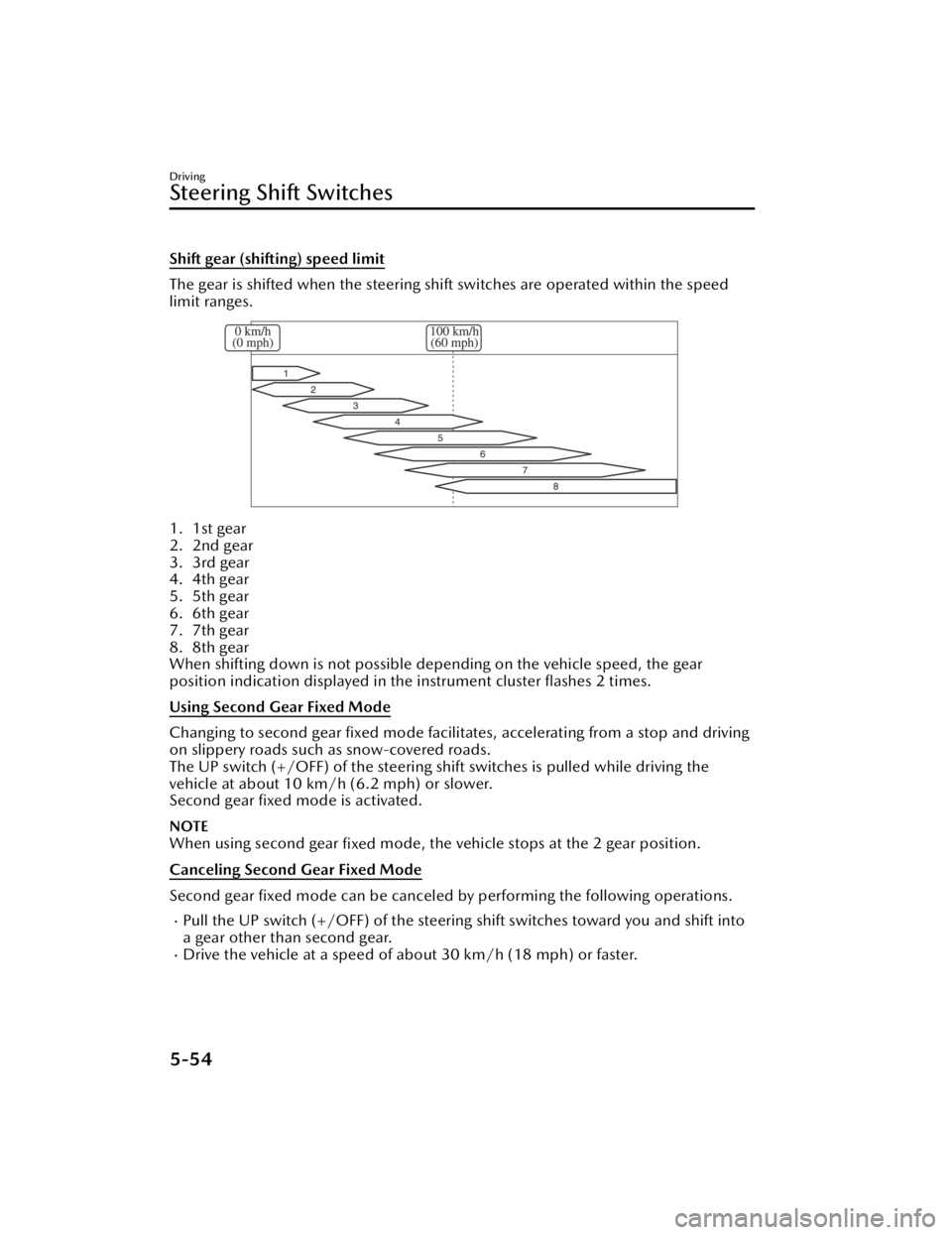
Shift gear (shifting) speed limit
The gear is shifted when the steering shift switches are operated within the speed
limit ranges.
1. 1st gear
2. 2nd gear
3. 3rd gear
4. 4th gear
5. 5th gear
6. 6th gear
7. 7th gear
8. 8th gear
When shifting down is not possible depending on the vehicle speed, the gear
position indication displayed in th e instrument cluster flashes 2 times.
Using Second Gear Fixed Mode
Changing to second gear fixed mode facili tates, accelerating from a stop and driving
on slippery roads such as snow-covered roads.
The UP switch (+/OFF) of the steering shif t switches is pulled while driving the
vehicle at about 10 km/h (6.2 mph) or slower.
Second gear fixed mode is activated.
NOTE
When using second gear fixed mode, the vehicle stops at the 2 gear position.
Canceling Second Gear Fixed Mode
Second gear fixed mode can be canceled by performing the following operations.
Pull the UP switch (+/OFF) of the steering shift switches toward you and shift into
a gear other than second gear.
Drive the vehicle at a speed of about 30 km/h (18 mph) or faster.
Driving
Steering Shift Switches
5-54
CX-90_8KG7-EA-22L_Edition1_new 2022-11-17 16:05:04
Page 219 of 687

How to Use the LightSwitch
NOTE
Headlights which do not blind drivers
approaching in the opposite direction
have been adopted. Therefore, it is not
necessary to adjust the optical axis of
the headlights even when traveling
temporarily in a country where vehicles
are driven on the right-hand side of the
road.
Using the Lights Automatically
Using the Auto Light*
Make sure that the light switch is in the
AUTO position.
The daytime running lights turn on
automatically when it is bright, and the
headlights, parking lights, taillights,
side-marker lights, and the license
plate lights turn on automatically when
it is dark.
When the parking lights, taillights,
side-marker lights, and the license
plate lights are turned on, the parking
lights indicator light
in the
instrument cluster turns on.
NOTE
If the surroundings remain dark for
several minutes even during daytime,
the light sensor determines that it is
nighttime, and the lights may not
turn off immediately even if the
surroundings become bright.
The illumination timing for the
headlights can be changed.
Refer to the Settings section in the
Mazda Connect Owner's Manual.
Using the Daytime Running Lights
The daytime running lights turn on
while driving in bright surroundings
such as during the day.
NOTE
(Only in regions where daytime
running lights are not mandatory)
The daytime running lights can be set
so that they do not to turn on.
Refer to the Settings section in the
Mazda Connect Owner's Manual.
Using the Lights Manually
Using the Parking lights, Taillights,
Side-Marker Lights, and License Plate
Lights
(The vehicle power is switched to ON)
The parking lights, taillights,
side-marker lights, and license plate
lights turn on, and the parking lights
indicator light
in the instrument
cluster turns on.
Driving
Light Switch
5-68*Some models.
CX-90_8KG7-EA-22L_Edition1_new 2022-11-17 16:05:04
Page 226 of 687

If dirt or ice is adheres to the top of
the rain sensor on the windshield
and the windshield wipers cannot
remove the dirt or ice even after the
wipers operate several times, the
auto wipers will stop operating. If
the auto wipers stopped, remove the
dirt and ice from the windshield.
The auto wipers could operate from
the effect of strong light sources,
electromagnetic waves, or infrared
light because the rain sensor uses an
optical sensor. It is recommended
that the auto-wiper lever be
switched to the OFF position other
than when driving the vehicle under
rainy conditions.
Changing sensitivity of auto wipers
The rain sensitivity level can be
adjusted by rotating the switch.
1. Higher sensitivity
2. Normal
3. Less sensitivity
Using the Intermittent Wiper
*
The wipers operate intermittently.
Changing the intermittent operation
time
The intermittent operation time can be
adjusted by turning the switch.
1. Fast
2. Normal
3. Slow
Using the Windshield Wipers
Using continuously
Set the lever to the LO or HI position.
In the LO position, the windshield
wipers operate at low speed. In the HI
position, the wipers operate at high
speed.
Driving
Windshield Wiper/Washer Switch
*Some models.5-75
CX-90_8KG7-EA-22L_Edition1_new 2022-11-17 16:05:04